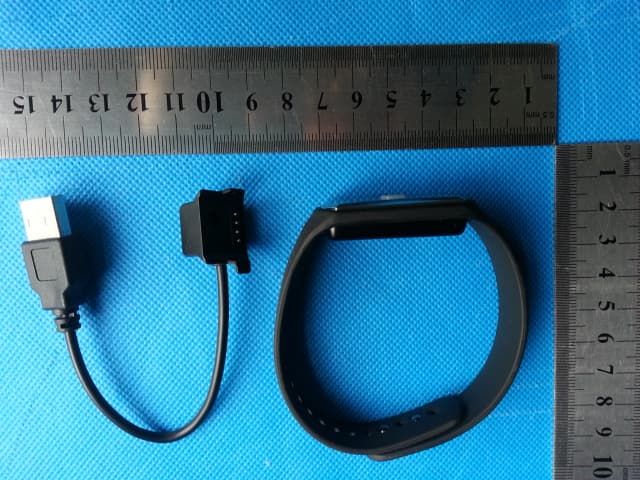
2AC2H-13V2SWireless activity tracker
Guangzhou Advansolution Corp.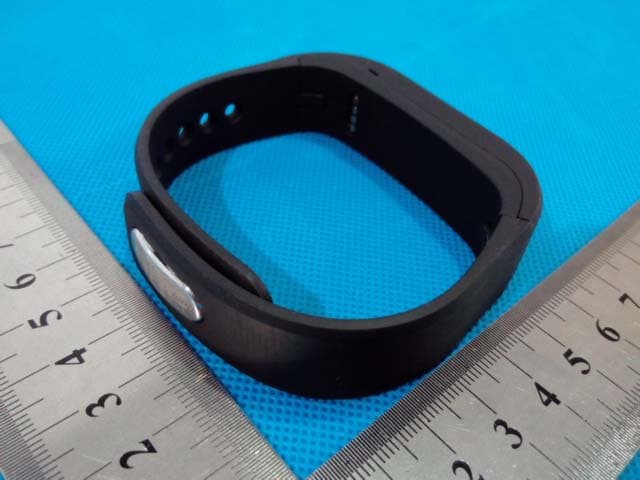
Click to zoom
Application Details
- Equipment Class
- DTS - Digital Transmission System
- Date of Grant
- Apr 09, 2015
- Application Purpose
- Original Equipment
- Date of Application
- Apr 09, 2015
- Equipment Note
- Wireless activity tracker
- Frequency Range
- 2402.00000000 - 2480.00000000
- Country
- China
Documents & Files
Document Text
Text extracted from the exhibit documents filed with the FCC. Open a document above to read the original.
Users Manual
protrackh2o wireless fitness band Instruction Manual Item #GP-5578 © 2015 Sakar International, Inc. All rights reserved. 1 Introduction The GNC protrackh2o wireless fitness band allows you to track your steps, distance, calories burned and quality of sleep. The tracker features three exercise modes: running, swimming and weight lifting. It is compatible with iOS and Android devices so that you can track your daily, weekly, monthly and yearly data via the GNC Pro Fitness app on your mobile device. Please read this manual before using this device in order to get the best results. Intended Use The protrackh2o wireless fitness band is a home fitness product only and is not intended to serve as a substitute for the advice of a physician or medical professional. Do not use this device for the diagnosis or treatment of any health problem or disease. This is not a medical device. Important Note Your protrackh2o wireless fitness band is a Bluetooth device that can be used to monitor your steps using iPhones and iPads which run iOS 7 and above, or Android devices running Android 4.3 or above. In addition, your smartphone or tablet needs to be Bluetooth compatible. To use your activity tracker with your smartphone or tablet, you must make sure the Bluetooth function is enabled. 2 Package Contents 1. Protrackh2o wireless fitness band 2. USB charging cable 3. User’s manual with warranty information Features Bluetooth connectivity Wirelessly syncs data to smartphones and portable devices Waterproof Swimming, running and weight lifting exercise modes Tracks steps, distance, calories burned and quality of sleep Dot matrix display Charging Your Device Your tracking band must be charged before using. In order to charge, follow the steps below: 1. Secure the included USB charging cable to the wireless fitness band. You should feel a click when it is securely in place. 2. Insert the USB cable into an available USB port on your computer or USB charging adapter. 3. Please allow up to 2.5 hours for an initial charge before the first use. 3 Using Your Activity Tracker To toggle between each of your wireless fitness band's activity modes, quickly press the Mode button twice. Step Activity Mode This is the default mode of your wireless fitness band. The Step Activity Mode records your steps, calories burned and distance traveled. Press the Mode button once on your tracker to toggle through the different statistics. The Step Activity Mode option includes: TIME: The current time. STEP: The number of steps taken. DIST: The distance traveled in miles/km. CALS: The amount of calories burned. GOAL: The percentage of your goal that has been met. The percentage of battery life remaining. Mode Button 4 Sleep Mode The Sleep Mode (ZZZZ) sets your activity tracker to record your sleep quality and time. The Sleep Mode option includes: TIME: The current time. Weightlifting Activity Mode The Weightlifting Activity Mode (LIFT) records the amount of reps you have performed during your exercise routine. Press the Mode button once on your tracker to toggle through the different statistics. The Weightlifting Activity Mode option includes: TIME: The current time is displayed. REPS: The amount of reps you have completed. The percentage of battery life remaining is displayed. 5 Swimming Activity Mode The Swimming Activity Mode records your strokes completed and swimming time. Press the Mode button once on your tracker to toggle through the different statistics. The Swimming Activity Mode option includes: TIME: The current time. STRK: The amount of strokes completed. SWTM: The amount time swimming. The percentage of battery life remaining. 6 Setting up the GNC Pro Fitness App Mobile Device Requirements Your protrackh2o wireless fitness band can be used as a Bluetooth device, compatible with most iPhone/iPad/Android phones and tablets that support Bluetooth. Device Requirements iPhone with iOS 7 and above Android phone with OS 4.3 and above NOTE: Your Android mobile device, tablet, iPhone, or iPad must be equipped with Bluetooth Installing the GNC Pro Fitness App Sync your protrackh2o wireless fitness band with your mobile device so you can view your latest stats, graphs and charts on your smartphone or tablet. The GNC Pro Fitness app can be found on the iOS App store or Google Play store by searching for ‘GNC Pro Fitness’. If you have already installed the GNC Pro Fitness application, check for available updates to make sure you have the latest version. 7 Initial Setup and Device Pairing Your GNC protrackh2o wireless fitness band must be paired directly through the GNC Pro Fitness App. 1. Enable Bluetooth on your smartphone or tablet. Check your mobile device settings if needed. 2. Open the GNC Pro Fitness App from your mobile device, and press the Start button to begin the setup wizard. 3. Select either metric or US to choose between the metric and imperial standards of measurement. 4. Select your gender. 5. Press "Select Language" to select your language. 6. Press "Time Display' to choose between a 12 and 24 hour clock. 7. Enter your name, height, weight, and age. 8. Press "Save" to save your personal settings. 9. Press the Mode button on the wireless fitness band to send out a Bluetooth signal. 10. Select your GNC device from the list of available devices, and press "next". 11. Set your daily goals by pressing "Select" and choosing a goal for that mode. When finished, press "next". 12. The initial setup is complete. Press "Sync" to connect and synchronize your wireless fitness band. The system will reset any previous recorded data to zero, and you will now be ready to enjoy your protrackh2o wireless fitness band. 8 Using the GNC Pro Fitness App The GNC Pro Fitness app is separated into three main sections. The Activity section shows you your statistics for each of the three exercise modes for the current day. The History section shows you previous workout and exercise data by day, week, mon…
Text truncated - open the document above for the full version.
Cover Letter(s)
Guangzhou Advansolution Corp. RM 2105, 2nd F,No.30, Wuxian Bridge St., Guangzhou Dadao BeiLu, Tianhe District, Guangzhou, China FCC Confidentiality Request Letter Number: CF303 Version: V05 Date: 21-05-2012 (Permanent or also called long term confidentiality is the normal method to keep certain docuements confidential, and may apply to schematics, block diagrams, operational description and bill of materials.) To: PHOENIX TESTLAB GmbH 7F., No. 12, Ln. 321, Yangguang St., Neihu Dist., Taipei City 114, Taiwan Pursuant to 47 CFR Section 0.459(a) & (b), we, (the applicant / grantee) Company name Guangzhou Advansolution Corp. Address RM 2105, 2nd F,No.30, Wuxian Bridge St., Guangzhou Dadao BeiLu, Tianhe District, City Guangzhou Country China request for this certification filing under: Grantee Code Product Number FCC ID: 2AC2H -13V2S to maintain permanent confidentiality for the following documents submitted within this application: (please cross what is applicable, or add other documents, provide the file name and description) Exhibit File Name Description Operational Description Operational Description explaining the functioning of the block diagram Block Diagrams 13V2S Block Diagram showing the systematic building blocks of the EUT Schematics Diagrams 13V2S Schematics showing components, their values and interconnection Above materials crossed contain secrets, proprietary and technical information, which would customarily be guarded from competitors under 47 CFR, section 0.457(d)(2). Disclosure or publication or any portion of this company confidential material to other parties could cause substantial competitive harm and provide unjustified benefits for competitors. We understand that pursuant to 47 CFR section 0.457(d)(1)(ii) disclosure of the applicant and all accompanying documentation will not be made before the date of the grant. The documents indicated as confidential above, are not publicly available elsewhere. Attestation: City and Country: Date: Name: (this must be a person) Function: Signature: (or official company stamp) Guangzhou China 03/27/2015 Rex Chen CEO
Cover Letter(s)
Guangzhou Advansolution Corp. RM 2105, 2nd F,No.30, Wuxian Bridge St., Guangzhou Dadao BeiLu, Tianhe District, Guangzhou, China Power of Attorney Number: CF101 Version: V03 Date: 01-08-2011 We, (the approval holder) Company name Guangzhou Advansolution Corp. Addresss RM 2105, 2nd F,No.30, Wuxian Bridge St., Guangzhou Dadao BeiLu, Tianhe District, City Guangzhou Country China declare that the following representative (agent): Name (person) Jackie.deng Function General Manager Company name Asia Institute Technology (DongGuan)limited Address No. 22, JinQianLing Street 3, JiTiGang Village HuangJiang Town, DongGuan, GuangDong, China. City DongGuan, GuangDong Country China is hereby authorized to apply and sign the following equipment for certification, registration or filing on our behalf: Product Description ACTIVITY TRACKER Type or Model(s) 13V2S Tradename or Brand(s) Keeproduct FCC ID 2AC2H-13V2S Attestation: City and Country: Date: Name: (this must be a person) Function: Signature: (or official company stamp) Guangzhou China 03/27/2015 Rex Chen CEO
External Photos
Report No.: E-F1503003 Page 1 of 2 Rev: one Asia Institute Technology (Dongguan) Limited No. 22, JinQianLing Street 3, JiTiGang Village HuangJiang Town, DongGuan, GuangDong, China. External View of EUT Model: 13V2S Photo 1 Model: 13V2S Photo 2 Report No.: E-F1503003 Page 2 of 2 Rev: one Asia Institute Technology (Dongguan) Limited No. 22, JinQianLing Street 3, JiTiGang Village HuangJiang Town, DongGuan, GuangDong, China. Model: 13V2S Photo 3
ID Label/Location Info
Suggested size : with white silkscreen marking on color surface Activity Tracker Input: DC 5V Rechargeable Li-Polymer battery 3.7V 60mAh FCCID: 2AC2H-13V2S Batch no: XXXXXX Made in China Suggested location : At the back of the unit as below
Internal Photos
Report No.: E-F1503003 Page 1 of 4 Rev: one Asia Institute Technology (Dongguan) Limited No. 22, JinQianLing Street 3, JiTiGang Village HuangJiang Town, DongGuan, GuangDong, China. Internal View of EUT Model: 13V2S Photo 1 Model: 13V2S Photo 2 Report No.: E-F1503003 Page 2 of 4 Rev: one Asia Institute Technology (Dongguan) Limited No. 22, JinQianLing Street 3, JiTiGang Village HuangJiang Town, DongGuan, GuangDong, China. Model: 13V2S Photo 3 Model: 13V2S Photo 4 Report No.: E-F1503003 Page 3 of 4 Rev: one Asia Institute Technology (Dongguan) Limited No. 22, JinQianLing Street 3, JiTiGang Village HuangJiang Town, DongGuan, GuangDong, China. Model: 13V2S Photo 5 Model: 13V2S Photo 6 Report No.: E-F1503003 Page 4 of 4 Rev: one Asia Institute Technology (Dongguan) Limited No. 22, JinQianLing Street 3, JiTiGang Village HuangJiang Town, DongGuan, GuangDong, China. Model: 13V2S Photo 6 Model: 13V2S Photo 6
Test Report
Report No.: E-F1503003 Page 1 of 43 Rev: one Asia Institute Technology (Dongguan) Limited No. 22, JinQianLing Street 3, JiTiGang Village, HuangJiang Town, DongGuan, GuangDong, China. FCC Test Report Part 15 subpart C Client Information: Applicant : Guangzhou Advansolution Corp. Applicant add.: RM 2105, 2nd F,No.30, Wuxian Bridge St., Guangzhou Dadao BeiLu, Tianhe District, Guangzhou, China EUT Information: EUT Name : ACTIVITY TRACKER Model No. : 13V2S Brand Name : Keeproduct FCC ID : 2AC2H-13V2S Prepared By: Asia Institute Technology (Dongguan) Limited Add. : No. 22, JinQianLing Street 3, JiTiGang Village HuangJiang Town, DongGuan, GuangDong, China. Date of Receipt: Mar. 20, 2015 Date of Test: Mar. 20~25, 2015 Date of Issue: Mar. 26, 2015 Te s t R e s u l t : Pass Test procedure used: ANSI C63.4-2009 This device described above has been tested by Asia Institute Technology (Dongguan) Limited, and the test results show that the equipment under test (EUT) is in compliance with the FCC requirements. And it is applicable only to the tested sample identified in the report. *This test report must not be used by the client to claim product endorsement by any agency of the U.S. government. Reviewed by: Approved by: Seal.Chen Jackie.Deng Report No.: E-F1503003 Page 2 of 43 Rev: one Asia Institute Technology (Dongguan) Limited No. 22, JinQianLing Street 3, JiTiGang Village, HuangJiang Town, DongGuan, GuangDong, China. 1 Contents Page COVER PAGE 1 CONTENTS............................................................................................................................................................. 2 2 TEST SUMMARY.................................................................................................................................................... 4 2.1 COMPLIANCE WITH FCC PART 15 SUBPART C ...................................................................................................... 4 2.2 MEASUREMENT UNCERTAINTY............................................................................................................................. 5 3 TEST FACILITY ...................................................................................................................................................... 6 3.1 DEVIATION FROM STANDARD................................................................................................................................6 3.2 ABNORMALITIES FROM STANDARD CONDITIONS..................................................................................................... 6 4 GENERAL INFORMATION .................................................................................................................................... 7 4.1 GENERAL DESCRIPTION OF EUT .......................................................................................................................... 7 4.2 DESCRIPTION OF TEST CONDITIONS..................................................................................................................... 9 4.3 EUT PERIPHERAL LIST...................................................................................................................................... 10 4.4 TEST PERIPHERAL LIST..................................................................................................................................... 10 5 EQUIPMENTS LIST FOR ALL TEST ITEMS ....................................................................................................... 11 6 TEST RESULT ...................................................................................................................................................... 12 6.1 ANTENNA REQUIREMENT................................................................................................................................... 12 6.1.1 Standard requirement.............................................................................................................................. 12 6.1.2 EUT Antenna ........................................................................................................................................... 12 6.2 CONDUCTION EMISSIONS MEASUREMENT........................................................................................................... 13 6.2.1 Applied procedures / Limit....................................................................................................................... 13 6.2.2 Test procedure ........................................................................................................................................ 13 6.2.3 Test results .............................................................................................................................................. 14 6.3 RADIATED EMISSIONS MEASUREMENT................................................................................................................ 16 6.3.1 Applied procedures / Limit....................................................................................................................... 16 6.3.2 Test procedure ........................................................................................................................................ 16 6.3.3 Test Result .............................................................................................................................................. 17 6.3.4 TEST RESULTS (Restricted Bands Requirements) ............................................................................... 22 6.4 BANDWIDTH TEST ........................................................................................................................................ 23 6.4.1 Applied procedures / Limit....................................................................................................................... 23 6.4.2 Test procedure ..................................................................................................................................…
Text truncated - open the document above for the full version.
Test Setup Photos
Report No.: E-F1503003 Page 1 of 2 Rev: one Asia Institute Technology (Dongguan) Limited No. 22, JinQianLing Street 3, JiTiGang Village HuangJiang Town, DongGuan, GuangDong, China. Test Setup Photograph Conducted Measurement Photos Radiated Measurement Photos 30MHz-1GHz Report No.: E-F1503003 Page 2 of 2 Rev: one Asia Institute Technology (Dongguan) Limited No. 22, JinQianLing Street 3, JiTiGang Village HuangJiang Town, DongGuan, GuangDong, China. 1GHz-18GHz
Contact Information
Applicant
Rex Chen(CEO)
Test Firm
Dongguan Yaxu (AiT) Technology LimitedJackie Deng
Technical Specifications
| # | Rule Parts | Frequency Range | Power Output |
|---|---|---|---|
| 1 | 15C | 2.40 GHz - 2.48 GHz | 200.00 µW |
Other Applications from Guangzhou Advansolution Corp.
2AC2H-IR132
Apr 13, 2015Wireless activity tracker
Equipment Class
DTS - Digital Transmission System
2AC2H-17V2S
Apr 09, 2015Wireless activity tracker
Equipment Class
DTS - Digital Transmission System