2AC7GEVT10QEviant 10 3G
UNION INFORMATION TECHNOLOGIES (USA) INC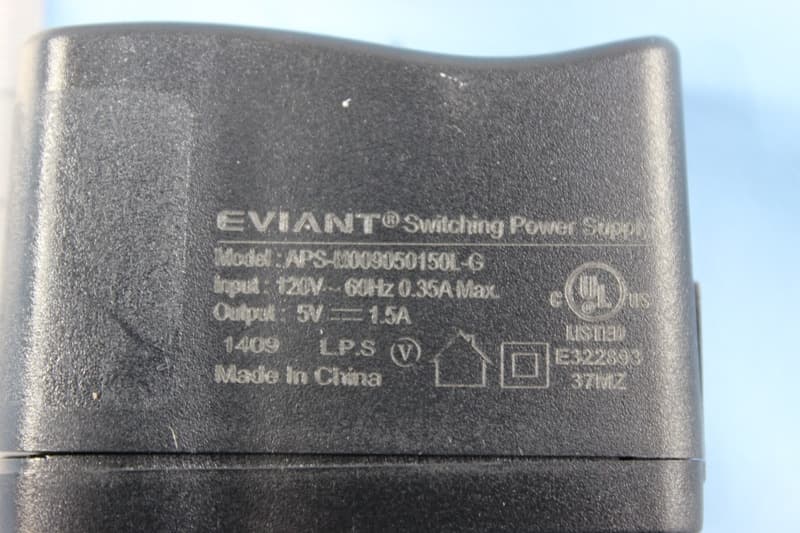
Click to zoom
Application Details
- Equipment Class
- DSS - Part 15 Spread Spectrum Transmitter
- Date of Grant
- Dec 08, 2014
- Application Purpose
- Original Equipment
- Date of Application
- Nov 20, 2014
- Equipment Note
- Eviant 10 3G
- Frequency Range
- 2402.00000000 - 2480.00000000
- Country
- United States
Documents & Files
Document Text
Text extracted from the exhibit documents filed with the FCC. Open a document above to read the original.
Users Manual
- 1 - Contents Chapter 1 Quick Start ....................................................................................... - 2 - 1.1 Appearance Introduction ...................................................................... - 2 - 1.2 Attachment ............................................................................................... - 3 - 1.3 SIM & SD card Installation .................................................................... - 4 - 1.4 Charging .................................................................................................... - 5 - 1.5 Turning On/Off ......................................................................................... - 6 - Chapter 2 Basic Operation ................................................................................. - 7 - 2.1 Home Screen ............................................................................................ - 7 - 2.2 Volumes ..................................................................................................... - 9 - Chapter 3 E-mail ................................................................................................... - 9 - 3.1 Google Account ...................................................................................... - 9 - 3.2 Gmail ........................................................................................................ - 10 - 3.3 E-mail ....................................................................................................... - 11 - Chapter 4 Network and Browser .................................................................... - 13 - 4.1 Mobile Networks ................................................................................... - 13 - 4.2 Browser ................................................................................................... - 13 - Chapter 5 BT ........................................................................................................ - 14 - 5.1 Using BT ................................................................................................. - 14 - Chapter 6 Multimedia ........................................................................................ - 14 - 6.1 Camera .................................................................................................... - 14 - 6.2 Photo Options ....................................................................................... - 15 - 6.3 Camcorder .............................................................................................. - 19 - 6.4 Sound Recorder .................................................................................... - 21 - Chapter 7 USB & Micro SD card ..................................................................... - 21 - 7.1 USB connection .................................................................................... - 21 - 7.2 Micro SD card ........................................................................................ - 22 - - 3 - 1.2 Attachment Your packing box comprises the following attachments • Tablet • USB cable • Charger - 4 - 1.3 SIM & SD card Installation SIM ·SIM card Installation Locate the SIM card slot,insert the SIM as picture below: ·SIM card Removal To remove the SIM card, please turn off the tablet first ,or else the SIM card can become damaged. Micro SD card Micro SD cards are used to store photos, music, video and other data. ·Micro SD card Installation Locate the Micro SD card slot, insert the Micro SD card as picture below: - 5 - ·Micro SD card Removal 1. Please make sure to disconnect the SD card from the tablet. Click>Settings>Storage>Unmount SD card 2. Open the Micro SD card protection cover. 3. Use your fingertips to push the Micro SD card, the Micro SD card will then eject from the slot. 1.4Charging Charging When the battery is charging, the icon appears in the status bar. When the battery is fully charged, the icon appears in the status bar. Connect the charger to the tablet using the USB/charger cable.Thecable plugs into the USB/charger port at the bottom: - 6 - 1.5Turning On/Off Turning On Press and hold power key to turn on the tablet,it will take about 30 seconds to completely boot-up. Turning Off Press and hold power key,and a menu will appear. Choose Power off and select OK when it appears. Standby 1. The tablet will automatically enter sleep mode after 10 seconds of inactivity by default. Screen timeout time can be changed. 2. Wake up the tablet from standby mode by pressing . - 7 - Chapter 2 Basic Operation 2.1 Home Screen You can switch between the various home screens by swiping left and right The main key ·Menu :Opens the application drawer. ·Google Search :Use this to quickly access the Google search services. ·The home key :Go to the home screen. ·Back key :Return to the previous screen. ·Task Switch key : Opens all recently used applications. Applications can also be closed by swiping to the right on the application you wantto close. Status Bar Status bar will display various important status information. Swipe up from the bottom of the status menu to close the status bar. IconExplainIconExplain SIM card not detected Signal strength On 3G NetworkOn GSM Network - 8 - OnEDGE Network Airplane mode ChargingLow power Full powerSilent mode Vibration modeAlarm set GPS on USB is connected Shortcuts To customize different home screen, you can add and reposition various app shortcuts. Click to open the application drawer.long press and drag the APP you wish to add to the home screen.You can always reposition the variousapp shortcuts home screen by long pressing and dragging. Widgets You can add a clock, music player and calendar widgets on the main screen. Click to open the application drawer,then choose long press any widget to drag it to the screen of your choosing. Wallpapers There are two methods for changing the wallpaper of your tablet 1.Touch and hold an empty area on the home screen. Choose “Gallery” to use your own pic…
Text truncated - open the document above for the full version.
Cover Letter(s)
Vicky Yuan
Cover Letter(s)
/Part List
External Photos
1 Photographs - EUT Constructional Details Test model No.: EVT10Q
ID Label/Location Info
警示贴纸 80 g铜版纸 空白贴纸 ACT打印 2.01.008.1781 45x15mm
Internal Photos
1 Photographs - EUT Constructional Details Test model No.: EVT10Q
Test Report
SGS-CSTC Standards Technical Services Ltd. No. 1 W orkshop, M-10, Middle section, Science & Technology Park, Nanshan District, Shenzhen, Guangdong, China 518057 Telephone: +86 (0) 755 2601 2053 Fax: +86 (0) 755 2671 0594 Email: [email protected] Report No.: SZEM140900494602 Page: 1 of 97 Authorized Signature: Jack Zhang EMC Laboratory Manager The manufacturer should ensure that all products in series production are in conformity with the product sample detailed in this report. If the product in this report is used in any configuration other than that detailed in the report, the manufacturer must ensure the new system complies with all relevant standards. Any mention of SGS International Electrical Approvals or testing done by SGS International Electrical Approvals in connection with, distribution or use of the product described in this report must be approved by SGS International Electrical Approvals in writing. The report must not be used by the client to claim product certification, approval, or endorsement by NVLAP, NIST, or any agency of the federal government. All test results in this report can be traceable to National or International Standards. “This document is issued by the Company subject to its General Conditions of Service printed overleaf, available on request or accessible at www.sgs.com/terms_and_conditions.htm and, for electronic format documents, subject to Terms and Conditions for Electronic Documents at www.sgs.com/terms_e-document.htm. Attention is drawn to the limitation of liability, indemnification and jurisdiction issues defined therein. Any holder of this document is advised that information contained hereon reflects the Company’s findings at the time of its intervention only and within the limits of Client’s instructions, if any. The Company’s sole responsibility is to its Client and this document does not exonerate parties to a transaction from exercising all their rights and obligations under the transaction documents. This document cannot be reproduced except in full, without prior written approval of the Company. Any unauthorized alteration, forgery or falsification of the content or appearance of this document is unlawful and offenders may be prosecuted to the fullest extent of the law. Unless otherwise stated the results shown in this test report refer only to the sample(s) tested and such sample(s) are retained for 90 days only.” 1 Cover page FCC REPORT Application No: SZEM1409004946RF Applicant: UNION INFORMATION TECHNOLOGIES (USA) INC Manufacturer/ Factory: Shenzhen ACT Industrial Co., Ltd. Product Name: Eviant 10 3G Model No.(EUT): EVT10Q Trade Mark: EVIANT FCC ID: 2AC7GEVT10Q Standards: 47 CFR Part 15, Subpart C (2013) Date of Receipt: 2014-09-10 Date of Test: 2014-09-16 to 2014-11-06 Date of Issue: 2014-11-10 Test Result: PASS * * In the configuration tested, the EUT complied with the standards specified above. SGS-CSTC Standards Technical Services Ltd. Report No.: SZEM140900494602 Page: 2 of 97 “This document is issued by the Company subject to its General Conditions of Service printed overleaf, available on request or accessible at www.sgs.com/terms_and_conditions.htm and, for electronic format documents, subject to Terms and Conditions for Electronic Documents at www.sgs.com/terms_e-document.htm. Attention is drawn to the limitation of liability, indemnification and jurisdiction issues defined therein. Any holder of this document is advised that information contained hereon reflects the Company’s findings at the time of its intervention only and within the limits of Client’s instructions, if any. The Company’s sole responsibility is to its Client and this document does not exonerate parties to a transaction from exercising all their rights and obligations under the transaction documents. This document cannot be reproduced except in full, without prior written approval of the Company. Any unauthorized alteration, forgery or falsification of the content or appearance of this document is unlawful and offenders may be prosecuted to the fullest extent of the law. Unless otherwise stated the results shown in this test report refer only to the sample(s) tested and such sample(s) are retained for 90 days only.” 2 Version Revision Record Version Chapter Date Modifier Remark 00 2014-11-10 Original Authorized for issue by: Tested By 2014-11-06 (Chris Zhong) /Project Engineer Date Prepared By 2014-11-10 (Hedy Wen) /Clerk Date Checked By 2014-11-13 (Emen Li) /Reviewer Date SGS-CSTC Standards Technical Services Ltd. Report No.: SZEM140900494602 Page: 3 of 97 “This document is issued by the Company subject to its General Conditions of Service printed overleaf, available on request or accessible at www.sgs.com/terms_and_conditions.htm and, for electronic format documents, subject to Terms and Conditions for Electronic Documents at www.sgs.com/terms_e-document.htm. Attention is drawn to the limitation of liability, indemnification and jurisdiction issues defined therein. Any holder of this document is advised that information contained hereon reflects the Company’s findings at the time of its intervention only and within the limits of Client’s instructions, if any. The Company’s sole responsibility is to its Client and this document does not exonerate parties to a transaction from exercising all their rights and obligations under the transaction documents. This document cannot be reproduced except in full, without prior written approval of the Company. Any unauthorized alteration, forgery or falsification of the content or appearance of this document is unlawful and offenders may be prosecuted to the fullest extent of the law. Unless otherwise stated the results shown in this test report refer only to the sample(s) tested and such sample(s) are retained for 90 days only.” 3 Test Summary Test Item Test Requirement Test method Result Antenna Requirement 47 CFR Part 15, Subpart C Section 15.203/15.247 (c) ANSI C63.10 (2009) PASS AC Power Line Conducted Emission 47…
Text truncated - open the document above for the full version.
Test Setup Photos
1 Photographs - EUT Test Setup Test model No.: EVT10Q 1.1 Conducted Emission 1.2 Radiated Emission 1.3 Radiated Spurious Emission
Contact Information
Applicant
Bo Qiu(general manager)
Technical Contact
SGS-CSTC Standards Technical Services LtdEmen Li
[email protected]0755-2654 4119
No.1 Workshop, M-10, Middle Section, · Shenzhen · China
Non-Technical Contact
SGS-CSTC Standards Technical Services LtdVicky Yuan
[email protected]0755-25328517
Test Firm
SGS-CSTC Standards Technical Services Co.,Ltd.June Zhang
Technical Specifications
| # | Rule Parts | Frequency Range | Power Output |
|---|---|---|---|
| 1 | 15C | 2.40 GHz - 2.48 GHz | 2.00 mW |
Other Applications from UNION INFORMATION TECHNOLOGIES (USA) INC
2AC7GEVC8Q
Dec 27, 2014Eviant 8 3G
Equipment Class
PCB - PCS Licensed Transmitter