2ADINNUUNU3SPhone
Sun Cupid Technology (HK) Ltd.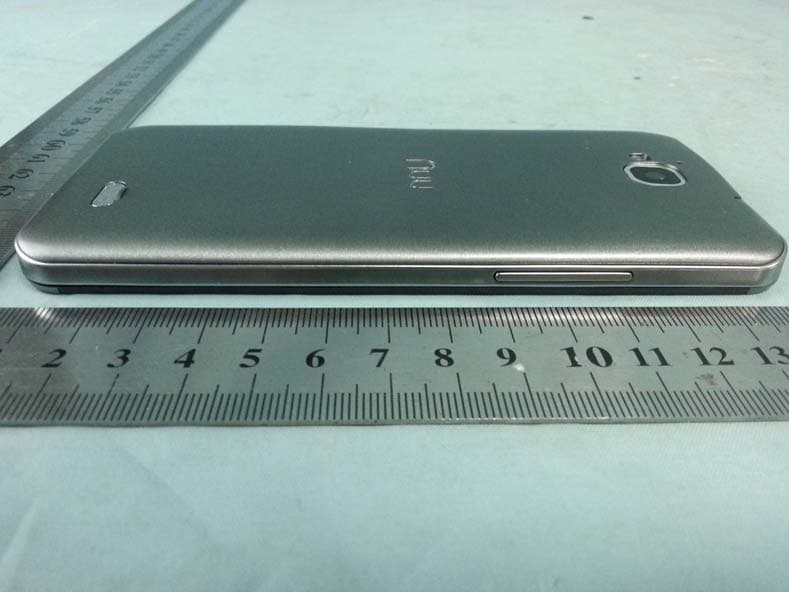
Click to zoom
Application Details
- Equipment Class
- DSS - Part 15 Spread Spectrum Transmitter
- Date of Grant
- Nov 26, 2014
- Application Purpose
- Original Equipment
- Date of Application
- Nov 26, 2014
- Equipment Note
- Phone
- Frequency Range
- 2402.00000000 - 2480.00000000
- Country
- Hong Kong
Documents & Files
Document Text
Text extracted from the exhibit documents filed with the FCC. Open a document above to read the original.
Users Manual
I Content Get Started .................................................. 1 Knowing Your Phone ................................... 1 Removing the back cover ............................ 3 Inserting the RUIM and SIM Card ............... 3 Inserting SD card ......................................... 4 Installing the battery ................................... 5 Removing the battery.................................. 6 Charging the battery ................................... 6 Battery Performance ................................... 7 Basic operations .......................................... 8 Turning on and off the phone ..................... 8 Main Screen ................................................ 8 Making a call ............................................. 13 Main Function ........................................... 14 Chrome ...................................................... 14 Play Store .................................................. 14 Optimized battery Life ............................... 15 Optimize Data Usage ................................. 16 Optimize Memory Usage ........................... 19 II Calculator .................................................. 20 Calendar .................................................... 20 Camera ...................................................... 20 Camcorder ................................................. 22 Clock .......................................................... 23 Email ......................................................... 24 FM Radio ................................................... 25 Gallery ....................................................... 25 Gmail ......................................................... 25 Google Applications .................................. 26 Google Settings ......................................... 26 Google + .................................................... 26 Hangouts .................................................... 27 Google Maps .............................................. 27 News & Weather ....................................... 28 Messaging ................................................. 28 Music ......................................................... 29 Contacts .................................................... 30 Search ........................................................ 30 Settings ...................................................... 31 III Videos ........................................................ 37 Voice Dialer ................................................ 37 Safety and Use ............................................ 37 Disclaimer.................................................. 43 FCC Statement ........................................... 44 SAR Statement .......................................... 45 1 Get Started Knowing Your Phone Name Function 1 Power Key Long press To turn on / off the phone from, and short press to turn on / off the screen backlight or screen lock the phone 2 Ear PieceReceive the voice 2 3 Sensors 1. Ambiance sensor, for detecting the light or surrounding brightness 2. Proximity sensor, used to measure distance between the phone and turn off the display during a call 4 Front Camera Capturing images using front camera 5 MicrophoneVoice receiver 6 Menu KeyTo enter the option menu 7 Home Key Short Press to return to home screen and long press to show the list off previous application opened 8 Return Key Return to the previous menu or screen 9 The volume keys Increase volume level or Decrease volumelevel 10 Headset Port To connect your 3.5”handsfree or audio port 11 Micro‐USB Port To connect the charger or data cable 12 Flash Light Brighten the environment when you capture images. 13 Rear Camera Capturing images using rear camera 14 Loud Speaker Produces the sound, phone ringtone, notification and loud the conversation sound 3 Removing the back cover You must remove the back cover to install RUIM card, SIM card and SD card. Hold the upper half of the phone with battery cover upwards, and lift the bottom of the battery cover, then the battery cover can be removed. Please turn the phone off before open the battery to prevent damage Please be careful when opening the back cover, follow it accordingly to prevent damage Inserting the RUIM and SIM Card You must insert Smartfren RUIM card is on the phone to enjoy and enable all the features. Your card contains all your subscription information. Insert RUIM and SIM card with the metal contacts facing down 4 and the cut corner is aligned with the cutting on the slot. If Smartfren RUIM card is not installed, or there are errors in the insertion, or the card is damaged , “No service”will appear on the screen after your phone is powered on If the PIN is enabled you need input the PIN number to unlock it before you can start using the phone The GSM function will not work if the Smartfren RUIM card is not present Inserting SD card Insert Micro SD card with the metal contacts facing down and the cut corner aligned with that of the slot 5 Please insert or remove the Micro SD card when the phone is powered off, or the Micro SD‐Card or the phone might get damaged and the data on the Micro SD‐Card could be lost. You might need to restart your phone after setting the storage to Micro SD‐Card or when inserting an Micro SD‐Card. Installing the battery You must install and charge the battery to use your phone. Insert the ridge at the top of the battery into the base of the phone, make sure to touch the metal contact on the phone, then push the battery down and snap it into place. Do not forces to turn the phone back on over and over if the battery is too low, it might cause damage to the phone and the battery. Please turn the phone off before open the battery to prevent damage. Note: Your phone is designed to be used only with the original 6 batteries and chargers. The use of other batteries or chargers is not recommended it may cause damage to your phone and the warranty will be voi…
Text truncated - open the document above for the full version.
Cover Letter(s)
Sun Cupid Technology (HK) Ltd. Date: Nov 01, 2014 Federal Communications Commission Authorization and Evaluation Division FCC ID: 2ADINNUUNU3S Confidentiality Request Pursuant to Sections 0.457 and 0.459 of the Commission’s Rules, we hereby request confidential treatment of information applied this application as outlined below: Schematic Theory of Operation Block Diagram Tune Up Part List The above materials contain trade secrets and proprietary information not customarily released to the public. The public disclosure of these matters might be harmful to the applicant and provide unjustified benefits to its competitors. The Applicant understands that pursuant to Rule 0.457, disclosure of this Application and all accompanying documentation will not be made before the date of the Grant for this application Sincerely Danny Sit General Manager Sun Cupid Technology (HK) Ltd. Phone: +852‐2725 0161 Fax: +852- 27250090 E-mail: [email protected]
Cover Letter(s)
Sun Cupid Technology (HK) Ltd. Date: Nov 01, 2014 Subject: Ad Hoc Mode Function Declaration FCC ID: 2ADINNUUNU3S To Whom it may concern, This device is acting as master and operating on 2.4GHz band. Ad Hoc function is available on client mode and not able to work on non-US frequencies. Please contact the one signed below or the authorized agent for this filing. Thank you. Regards, Sincerely Danny Sit General Manager Sun Cupid Technology (HK) Ltd. Phone: +852‐2725 0161 Fax: +852- 27250090 E-mail: [email protected]
Internal Photos
BT/Wifi Antenna FM/GPS Antenna GSM/WCDMA Antenna
Test Report
Shenzhen GTI Technology Co., Ltd. 1F,2 Block, Jiaquan Building, Guanlan High-tech Park Baoan District, Shenzhen, Guangdong, China. Tel: +86-755-27559792 Fax: +86-755-86116468 Report No.: GTI20140490F-3 Page 1 of 62 TEST REPORT Product Name ........................... : WCDMA Mobile Phone Trademark ................................. : NUU Model/Type reference ............... : NU-3S Listed Model(s) ......................... : NU-3S series Model difference ....................... : NU-3S other series model No. are all the same with main model NU-3S, except for body color, RAM and LOGO to meet different customer requirements FCC ID ........................................ : 2ADINNUUNU3S Test Standards .......................... : FCC Part 15.247: Operation within the bands 902-928 MHz, 2400-2483.5 MHz and 5725-5850 MHz Applicant ................................... : Sun Cupid Technology (HK) Ltd. Address of applicant ................ : 16/F, CEO Tower, 77 Wing Hong St, Cheung Sha Wan, Kowloon, Hong Kong Date of Receipt ......................... : Oct.20, 2014 Date of Test Date ....................... : Oct.20, 2014 - Nov.13, 2014 Data of issue. ............................ : Nov.14, 2014 Test result Pass * * In the configuration tested, the EUT complied with the standards specified above Page 2 of 62 Report No.: GTI20140490F-3 Shenzhen General Testing & Inspection Technology Co., Ltd. 1F, 2 Block, Jiaquan Building, Guanlan High-tech Park Baoan District, Shenzhen, Guangdong, China Tel.: (86)755-27588991 Fax: (86)755-86116468 Http://www.sz-ctc.com.cn GENERAL DESCRIPTION OF EUT Equipment: WCDMA Mobile Phone Model Name: NU-3S Manufacturer: Sun Cupid Technology (Shenzhen) Ltd. Manufacturer Address: 10A, No.3 Bldg, China Academy of Sci & Tech Development, No.1 High-Tech South St. Nanshan district, Shenzhen, China. Power Source: DC 3.7V from 2050mAh Li-ion battery Power Rating: Input: 100-240VAC, 50/60Hz 0.2A MAX Output: 5V 1.0A Compiled By: (Allen Wang) Reviewed By: (Tony Wang) Approved By: (Walter Chen) This test report consists of 62 pages in total. It may be duplicated completely for legal use with the approval of the applicant. It should not be reproduced except in full, without the written approval of our laboratory. The client should not use it to claim product endorsement by GTI. The test results in the report only apply to the tested sample. The test report shall be invalid without all the signatures of testing engineers, reviewer and approver. Any objections must be raised to GTI within 15 days since the date when the report is received. It will not be taken into consideration beyond this limit. Page 3 of 62 Report No.: GTI20140490F-3 Shenzhen General Testing & Inspection Technology Co., Ltd. 1F, 2 Block, Jiaquan Building, Guanlan High-tech Park Baoan District, Shenzhen, Guangdong, China Tel.: (86)755-27588991 Fax: (86)755-86116468 Http://www.sz-ctc.com.cn Table of Contents Page 1. SUMMARY ............................................................................................................................................................ 4 1.1. TEST STANDARDS .......................................................................................................................................................... 4 1.2. TEST DESCRIPTION ........................................................................................................................................................ 4 1.3. TEST FACILITY .............................................................................................................................................................. 5 1.4. MEASUREMENT UNCERTAINTY ........................................................................................................................................ 5 2. GENERAL INFORMATION ....................................................................................................................................... 6 2.1. ENVIRONMENTAL CONDITIONS ........................................................................................................................................ 6 2.2. GENERAL DESCRIPTION OF EUT ...................................................................................................................................... 6 2.3. DESCRIPTION OF TEST MODES ........................................................................................................................................ 7 2.4. MEASUREMENT INSTRUMENTS LIST ................................................................................................................................. 7 3. TEST CONDITIONS AND RESULTS ........................................................................................................................... 9 3.1. CONDUCTED EMISSION (AC MAIN) ................................................................................................................................. 9 3.2. RADIATED EMISSION ................................................................................................................................................... 12 3.3. MAXIMUM PEAK OUTPUT POWER ................................................................................................................................ 17 3.4. 20DB BANDWIDTH ..................................................................................................................................................... 21 3.5. BAND EDGE .............................................................................................................................................................. 25 3.6. FREQUENCY SEPARATION ............................................................................................................................................. 41 3.7. NUMBER OF HOPPING FREQUENCY ................................................................................................................................. 43 3.8. TIME OF OC…
Text truncated - open the document above for the full version.
Test Setup Photos
Radiated Emission (30MHz-1GHz) Radiated Emission (1GHz-25GHz) Conducted Emission
Contact Information
Applicant
Danny Sit
Test Firm
Shenzhen GTI Technology Co., Ltd.Walter Chen
Technical Specifications
| # | Rule Parts | Frequency Range | Power Output |
|---|---|---|---|
| 1 | 15C | 2.40 GHz - 2.48 GHz | 1.70 mW |
Other Applications from Sun Cupid Technology (HK) Ltd.
2ADINS6707X
Oct 07, 20245G Smartphone
Equipment Class
CBE - Citizens Band End User Devices2ADINS6603L
Sep 17, 2024LTE Smart Phone
Equipment Class
DSS - Part 15 Spread Spectrum Transmitter2ADINS6006L
Sep 15, 2024LTE Smart Phone
Equipment Class
DTS - Digital Transmission System2ADINS6601L
Aug 01, 2024LTE Smartphone
Equipment Class
NII - Unlicensed National Information Infrastructure TX
2ADINT0805L
May 17, 2023Tablet
Equipment Class
NII - Unlicensed National Information Infrastructure TX