2ADR9FT01BBLE Electronic Watch
Clarity Limited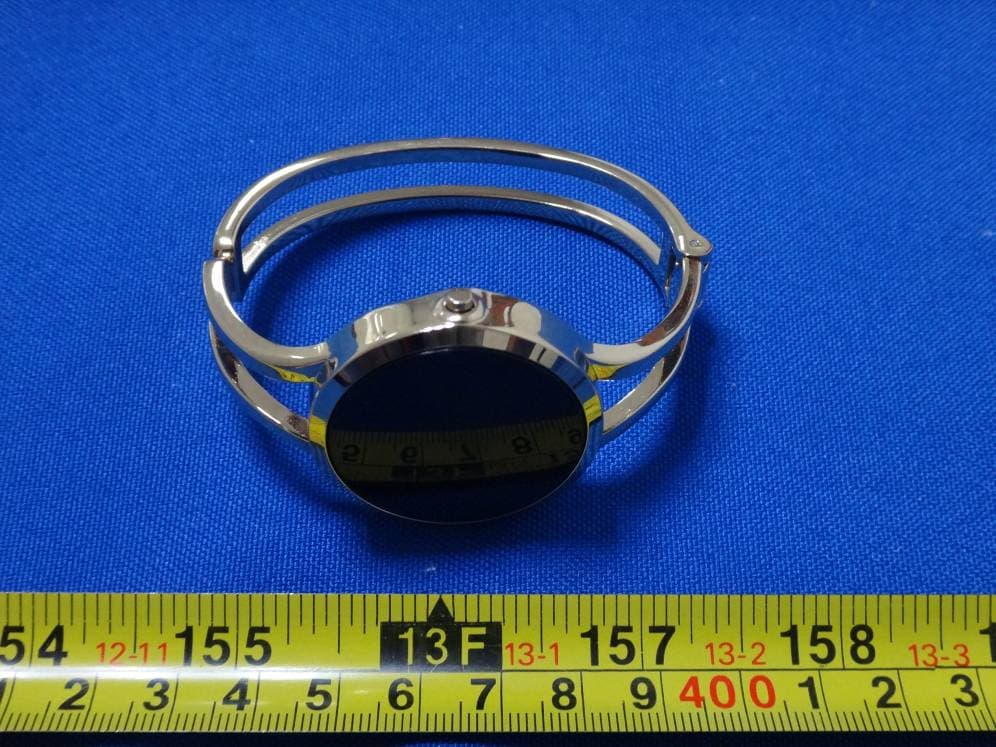
Click to zoom
Application Details
- Equipment Class
- DTS - Digital Transmission System
- Date of Grant
- Feb 11, 2015
- Application Purpose
- Original Equipment
- Date of Application
- Feb 08, 2015
- Equipment Note
- BLE Electronic Watch
- Frequency Range
- 2402.00000000 - 2480.00000000
- Company
- Clarity Limited
- Country
- Hong Kong
Documents & Files
Document Text
Text extracted from the exhibit documents filed with the FCC. Open a document above to read the original.
Users Manual
FashionFit WHAT’S INCLUDED Your FashionFit includes: • Watch module • Silicon case with band • Metal bangle • Charger WHAT FASHIONFIT TRACKS Your FashionFit tracks: • Steps taken • Calories burned • Distance traveled • Active time • Time slept / deep sleep CHARGING YOUR FASHIONFIT Your FashionFit must be charged before start using it. And you should charge your FashionFit when a flashing empty battery appear on the display. This flashing symbol is to let you know the battery power is down to 15% or below. To charge your FashionFit, please follow the steps below. 1. Remove your watch module from the metal bangle or silicon case. 2. Plug your charging cable into a USB port on your computer. 3. Insert your watch module into the charger as per the instruction attached to the charger. 4. You watch module will show a charging symbol which is a battery with lightning sign. This symbol will disappear in a few seconds. You can bring it back by pressing the buttons on the side watch module. 5. Charge until the battery sign is filled up. It usually takes 3 to 4 hours to fully charge the battery. Your FashionFit will run for 3 to 4 days before next charging. HOW TO PUT ON YOUR FASHIONFIT The watch module is interchangeable between the silicon case and the metal bangle. First, align the ridges on the side of the watch module with the notches on the back side of the silicon case or metal case. Then, plug the watch module into the silicon case or metal case. CARE AND WEARING TIPS The following are tips when caring for your FashionFit: • Clean and dry the FashionFit regularly, particularly under the band. • Wear your FashionFit band loosely enough to allow air circulation. • Use skin care products sparingly on the areas of the wrist covered by the FashionFit. SETTING THE TIME You do not need to set the time manually. When synchronizing the data on your watch to the apps on your phone, the time of your phone will be synchronized to the watch. TURNING YOUR FASHIONFIT ON Press and hold the button at 3:00 for 3 seconds. If the watch does not turn on after removal from the box, it will need to be charged before it is able to turn on. TURNING YOUR FASHIONFIT OFF Press and hold button at 3:00 for 5 seconds. WATCH MODULE BUTTON OPERATION • Press 3:00 button to display: o “ANNE KLEIN” logo o Time & date o Calorie burned FashionFit o Steps taken o Distance traveled o Time sleep / deep sleep • Press 9:00 button to show sleep mode: o If the sleep mode is off (it shows “Z OFF”), press 3:00 to start sleep monitoring. o If the sleep mode is on (it shows “Z ON”), press 3:00 to stop sleep monitoring. Then, it will show the monitoring result of the sleep. SETTING UP FASHIONFIT ON A MOBILE PHONE 1. Install the FashionFit app. (You can find the FashionFit app on the iOS App store or Google Play store by searching for “FashionFit”.) FashionFit runs on Android 4.3 and above, iOS 7 and above. 2. Turn on the Bluetooth on your mobile phone. 3. On the watch module, press 3:00 button until it shows “ANNE KLEIN” logo. 4. Press and hold the 9:00 button for a few seconds, it will show a validation code which is in 12 digits or letters. 5. Enter this validation code to the apps. (at setting section, in the tab “Device”) 6. Before you finish inputting the validation code, the display will blackout in 15 second. You can bring it back just by pressing the buttons. 7. After entering the validation code, tap “Pairing”. 8. Input the requred info in the tab “Info”. 9. Set your goal by entering no. of step in tab “Goal”. 10. Then go to “Home” page and tap “Sync” to sync the fitness data and time. 11. You can also tap “Start” to activate real time monitoring your fitness data like steps, distance, etc. To stop the real time monitoring, tap “Stop”. OTHER FEATURES OF THE APPS • When the daily goal is achieved, there will be a gold star tagged right at the date so you can see how much of your achievement. • The apps provides weekly, monthly and yearly report. You can review your fitness data history easily. MEMORY Your FashionFit holds the detailed data for the most recent 7 days. The recorded data consists of steps taken, calories burned, distance traveled, active time and sleep monitoring. Sync your FashionFit regularly to have the most detailed data available to view on your mobile phone installed with FashionFit apps. REGULATORY NOTICE NOTE: This product has been tested and found to comply with the limits for a Class B digital device, pursuant to Part 15 of the FCC Rules. These limits are designed to provide reasonable protection against harmful interference in a residential installation. This product generates, uses and can radiate radio frequency energy and, if not installed and used in accordance with the instructions, may cause harmful interference to radio communications. However, there is no guarantee that interference will not occur in a particular installation. If the product does cause harmful interference to radio or television reception, which can be determined by turning the equipment off and on, the user is encouraged to try to correct the interference by one or more of the following measures : • Reorient or relocate the receiving antenna. • Increase the separation between the product and receiver. • Connect the product into an outlet on a circuit different from that to which the receiver is connected. • Consult the dealer or an experienced radio/TV technician for help. FashionFit This device complies with Part 15 of the FCC Rules. Operation is subject to the following two conditions: (1) this device may not cause harmful interference, and (2) this device must accept any interference received, including interference that may cause undesired operation. IMPORTANT SAFETY INSTRUCTIONS While your FashionFit is designed to be worn 24/7, its components are electronic and susceptible to damage if used improperly. Please read the safety guidelines on the following to ensure proper use and care. • Read these instructions. • Keep these ins…
Text truncated - open the document above for the full version.
Users Manual
FashionFit WHAT’S INCLUDED Your FashionFit includes: • Watch module • Silicon case with band • Metal bangle • Charger WHAT FASHIONFIT TRACKS Your FashionFit tracks: • Steps taken • Calories burned • Distance traveled • Active time • Time slept / deep sleep CHARGING YOUR FASHIONFIT Your FashionFit must be charged before start using it. And you should charge your FashionFit when a flashing empty battery appear on the display. This flashing symbol is to let you know the battery power is down to 15% or below. To charge your FashionFit, please follow the steps below. 1. Remove your watch module from the metal bangle or silicon case. 2. Plug your charging cable into a USB port on your computer. 3. Insert your watch module into the charger as per the instruction attached to the charger. 4. You watch module will show a charging symbol which is a battery with lightning sign. This symbol will disappear in a few seconds. You can bring it back by pressing the buttons on the side watch module. 5. Charge until the battery sign is filled up. It usually takes 3 to 4 hours to fully charge the battery. Your FashionFit will run for 3 to 4 days before next charging. HOW TO PUT ON YOUR FASHIONFIT The watch module is interchangeable between the silicon case and the metal bangle. First, align the ridges on the side of the watch module with the notches on the back side of the silicon case or metal case. Then, plug the watch module into the silicon case or metal case. CARE AND WEARING TIPS The following are tips when caring for your FashionFit: • Clean and dry the FashionFit regularly, particularly under the band. • Wear your FashionFit band loosely enough to allow air circulation. • Use skin care products sparingly on the areas of the wrist covered by the FashionFit. SETTING THE TIME You do not need to set the time manually. When synchronizing the data on your watch to the apps on your phone, the time of your phone will be synchronized to the watch. TURNING YOUR FASHIONFIT ON Press and hold the button at 3:00 for 3 seconds. If the watch does not turn on after removal from the box, it will need to be charged before it is able to turn on. TURNING YOUR FASHIONFIT OFF Press and hold button at 3:00 for 5 seconds. WATCH MODULE BUTTON OPERATION • Press 3:00 button to display: o “ANNE KLEIN” logo o Time & date o Calorie burned FashionFit o Steps taken o Distance traveled o Time sleep / deep sleep • Press 9:00 button to show sleep mode: o If the sleep mode is off (it shows “Z OFF”), press 3:00 to start sleep monitoring. o If the sleep mode is on (it shows “Z ON”), press 3:00 to stop sleep monitoring. Then, it will show the monitoring result of the sleep. SETTING UP FASHIONFIT ON A MOBILE PHONE 1. Install the FashionFit app. (You can find the FashionFit app on the iOS App store or Google Play store by searching for “FashionFit”.) FashionFit runs on Android 4.3 and above, iOS 7 and above. 2. Turn on the Bluetooth on your mobile phone. 3. On the watch module, press 3:00 button until it shows “ANNE KLEIN” logo. 4. Press and hold the 9:00 button for a few seconds, it will show a validation code which is in 12 digits or letters. 5. Enter this validation code to the apps. (at setting section, in the tab “Device”) 6. Before you finish inputting the validation code, the display will blackout in 15 second. You can bring it back just by pressing the buttons. 7. After entering the validation code, tap “Pairing”. 8. Input the requred info in the tab “Info”. 9. Set your goal by entering no. of step in tab “Goal”. 10. Then go to “Home” page and tap “Sync” to sync the fitness data and time. 11. You can also tap “Start” to activate real time monitoring your fitness data like steps, distance, etc. To stop the real time monitoring, tap “Stop”. OTHER FEATURES OF THE APPS • When the daily goal is achieved, there will be a gold star tagged right at the date so you can see how much of your achievement. • The apps provides weekly, monthly and yearly report. You can review your fitness data history easily. MEMORY Your FashionFit holds the detailed data for the most recent 7 days. The recorded data consists of steps taken, calories burned, distance traveled, active time and sleep monitoring. Sync your FashionFit regularly to have the most detailed data available to view on your mobile phone installed with FashionFit apps. REGULATORY NOTICE NOTE: This product has been tested and found to comply with the limits for a Class B digital device, pursuant to Part 15 of the FCC Rules. These limits are designed to provide reasonable protection against harmful interference in a residential installation. This product generates, uses and can radiate radio frequency energy and, if not installed and used in accordance with the instructions, may cause harmful interference to radio communications. However, there is no guarantee that interference will not occur in a particular installation. If the product does cause harmful interference to radio or television reception, which can be determined by turning the equipment off and on, the user is encouraged to try to correct the interference by one or more of the following measures : • Reorient or relocate the receiving antenna. • Increase the separation between the product and receiver. • Connect the product into an outlet on a circuit different from that to which the receiver is connected. • Consult the dealer or an experienced radio/TV technician for help. FashionFit This device complies with Part 15 of the FCC Rules. Operation is subject to the following two conditions: (1) this device may not cause harmful interference, and (2) this device must accept any interference received, including interference that may cause undesired operation. Changes or modifications not expressly approved by the party responsible for compliance could void the user's authority to operate the equipment. IMPORTANT SAFETY INSTRUCTIONS While your FashionFit is designed to be worn 24/7, its components are electronic and susceptible to damage…
Text truncated - open the document above for the full version.
Cover Letter(s)
< CLARITY LTD > Office of Engineering Technology Federal Communications Commission 7435 Oakland Mills Road Columbia. MD 21046 Subj ect; Request for Confi denti ality FCC ID:2ADR9FT0IB Date:2015.01.22 To Whom It May Concern, Pursuant to the provisions of Sections 0.457 and 0.459 of Commission's rules (47CFR0.457, 0.459), we are requesting the Commission to withhold the following attachment(s) as confidential document from public disclosure indefinitely. r Schematic Diagram o Block Diagram o OperationalDescription Above mentioned document contains detailed system and equipment description are considered as proprietary information in operation of the equipment. The public disclosure of above documents might be harmful to our company and would give competitor an unfair advantage in the market. In additional to above mentioned documents, pursuant to Public Notice DA 04-1705 of the Commission' s policy, in order to comply with the marketing regulations in 47 CFT $2.803 and the importation rules in 47 CFR 52.1204, while ensuring that business sensitive information remains confidential until the actual marketing of newly authorized devices. We are requesting the commission to grant shot-term confidentiality request on the following attachment(s) for 180 days after the grant as outlined in Public Notice DA 04-1705. It is our understanding that all measurement test reports, FCC ID label format and correspondent during certification review process cannot be granted as confidential documents and those information will be available for public review once the grant of equipment authorization is issued. H-: lrt(Ut Name: Billy Leung Title: Engineering Manager Emai I : clarity @egc-c I arity. com
Cover Letter(s)
CLARITY LTD Letter of Authorization Company: CLARITY LTD Address: FLAT A-8,12/F, SING MEI INDUSTRIAL BUILDING,29-37 KWAI WING ROAD. KWAI CHUNG. N.T. HONG KONG Product Name: Electronic Watch Model Number: FTO1B We authorize MiCOM Labs Inc, 575 Boulder Court, Pleasanton, CA94566, USA, to act on our behalf on all matters concerning the above named equipment. Any individual within MiCOM Labs is authorized to act on our behalf and take action on the application. This shall include the followins: o Testing . Approval applications (includes complete product documentation package, including Confidential information) and procedures o Payment of approval fees We declare that MiCOM Labs Inc, 575 Boulder Court, Pleasanton, CA94566, USA, is allowed to forward all information related to the approval project to the applied notified body and to the notification entities and to discuss any issues concerning the approval application. Any and all acts carried out by MiCOM Labs on our behalf shall have the same effect as acts of our own. Name: Billy Leung Title: EngineeringManager Signature of applicant: Date:2015.AL22 A,(/,q
External Photos
External photos
ID Label/Location Info
LABEL ARTWORK AND LOCATION Label size: L*W=24*10mm Color: white FCC ID: 2ADR9FT01B FCC ID Location
Internal Photos
Internal photos
Test Report
Report No.: TCT150119E021 The results detailed in this test report relate only to the specific sample(s) tested. and the test results show that the equipment under test (EUT) is in compliance with the FCC requirements. This report is not to be reproduced except in full, without written approval from TCT Testing Technology. FCC REPORT Applicant: CLARITY LTD Address of Applicant: FLAT A-B, 12/F, SING MEI INDUSTRIAL BUILDING, 29-37 KWAI WING ROAD, KWAI CHUNG, N.T. HONG KONG Equipment Under Test (EUT) Product Name: Electronic WATCH Model No.: FT01B Additional Model No.: N/A Trade mark: ANNE KLEIN/ARMITRON FCC ID: 2ADR9FT01B Applicable standards: FCC CFR Title 47 Part 15 Subpart C Section 15.247 Date of sample receipt: Jan. 20, 2015 Date of Test: Jan. 20, 2015 - Jan. 23, 2015 Date of report issued: Jan. 29, 2015 Test Result : PASS * * In the configuration tested, the EUT complied with the standards specified above. Report No.: TCT150119E021 Hotline: 400-6611-140 Tel: 86-755-27673339 Fax: 86-755-27673332 http://www.tct-lab.com Page 2 of 26 2 Version Version No. Date Description 00 Jan. 20, 2015 Original Prepared by: Date: Jan. 20, 2015 Report Clerk Reviewed by: Date: Jan. 20, 2015 EMC Manager Report No.: TCT150119E021 Hotline: 400-6611-140 Tel: 86-755-27673339 Fax: 86-755-27673332 http://www.tct-lab.com Page 3 of 26 3. Contents Page 2 VERSION ....................................................................................................................................................................... 2 3. CONTENTS ................................................................................................................................................................... 3 4. TEST SUMMARY ......................................................................................................................................................... 4 5. GENERAL INFORMATION ........................................................................................................................................ 5 5.1 CLIENT INFORMATION ............................................................................................................................................ 5 5.2 GENERAL DESCRIPTION OF EUT .......................................................................................................................... 5 5.3 MEASUREMENT UNCERTAINTY ............................................................................................................................... 6 5.4 TEST ENVIRONMENT AND MODE ............................................................................................................................ 6 5.5 LABORATORY FACILITY .......................................................................................................................................... 7 5.6 LABORATORY LOCATION ........................................................................................................................................ 7 5.7 TEST INSTRUMENTS LIST ....................................................................................................................................... 8 6. TEST RESULTS AND MEASUREMENT DATA ..................................................................................................... 9 6.1 ANTENNA REQUIREMENT: ...................................................................................................................................... 9 6.2 CONDUCTED EMISSION ........................................................................................................................................ 10 6.3 CONDUCTED OUTPUT POWER ............................................................................................................................. 13 6.4 EMISSION BANDWIDTH ......................................................................................................................................... 14 6.5 POWER SPECTRAL DENSITY ............................................................................................................................... 16 6.6 CONDUCTED BAND EDGES AND SPURIOUS EMISSION MEASUREMENT ............................................................. 18 6.7 RADIATED BAND EDGES AND SPURIOUS EMISSION MEASUREMENT ................................................................. 22 Report No.: TCT150119E021 Hotline: 400-6611-140 Tel: 86-755-27673339 Fax: 86-755-27673332 http://www.tct-lab.com Page 4 of 26 4. Test Summary Test Item Section in CFR 47 Result Antenna requirement 15.203/15.247 (c) Pass AC Power Line Conducted Emission 15.207 Pass Conducted Peak Output Power 15.247 (b)(3) Pass 6dB Emission Bandwidth 15.247 (a)(2) Pass Power Spectral Density 15.247 (e) Pass Band Edge 15.247(d) Pass Spurious Emission 15.205/15.209 Pass Pass: The EUT complies with the essential requirements in the standard. Report No.: TCT150119E021 Hotline: 400-6611-140 Tel: 86-755-27673339 Fax: 86-755-27673332 http://www.tct-lab.com Page 5 of 26 5. General Information 5.1 Client Information Applicant: CLARITY LTD Address of Applicant: FLAT A-B, 12/F, SING MEI INDUSTRIAL BUILDING, 29-37 KWAI WING ROAD, KWAI CHUNG, N.T. HONG KONG Manufacturer: DATIMOS ELECTRONIC IND.(SHENZHEN)CO.,LTD Address of Manufacturer: 2/F NO.57 MEIBAO ROAD,DALANG STREET,BAOAN DISTRICT,SHENZHEN, CHINA 5.2 General Description of EUT Product Name: Electronic WATCH Model No.: FT01B Additional Model No.: N/A Trade mark: ANNE KLEIN/ARMITRON Operation Frequency: 2402MHz~2480MHz Channel numbers: 40 for BT LE mode Channel separation: 2 MHz Modulation technology: GFSK Data speed: 1Mbps Antenna Type: Internal Antenna Antenna gain: 0 dBi AC adapter: N/A Power supply: Rechargeable lithium Battery DC3.7V Operation Frequency each of channel For Bluetooth V4.0 Channel Frequency Channel Frequency Channel Frequency Channel Frequency 0 2402MHz -- -- 19 2440MHz -- -- 1 2404MHz -- -- -- -- 38 2478MHz -- -- 18 2438MHz -- -- 39 2480MHz Note: In section 15.31(m…
Text truncated - open the document above for the full version.
Test Setup Photos
Setup photos Radiated Emission Conducted Emission
Contact Information
Applicant
Billy Leung(Engineering Manager)
Technical Contact
Shenzhen Tongce Testing labJoe Zhou
[email protected](86)075536638142
1F, Leinuo Watch Building · Shenzhen · China
Test Firm
Shenzhen Tongce Testing LabJoe Zhou
[email protected]860755-36638142
Technical Specifications
| # | Rule Parts | Frequency Range | Power Output |
|---|---|---|---|
| 1 | 15C | 2.40 GHz - 2.48 GHz | 430.00 µW |
Other Applications from Clarity Limited
2ADR9FT01A
Feb 28, 2015SMART WATCH WITH BLUETOOTH MODULE
Equipment Class
DXX - Part 15 Low Power Communication Device Transmitter