2ADYY-S15AMLaptop
TECNO MOBILE LIMITED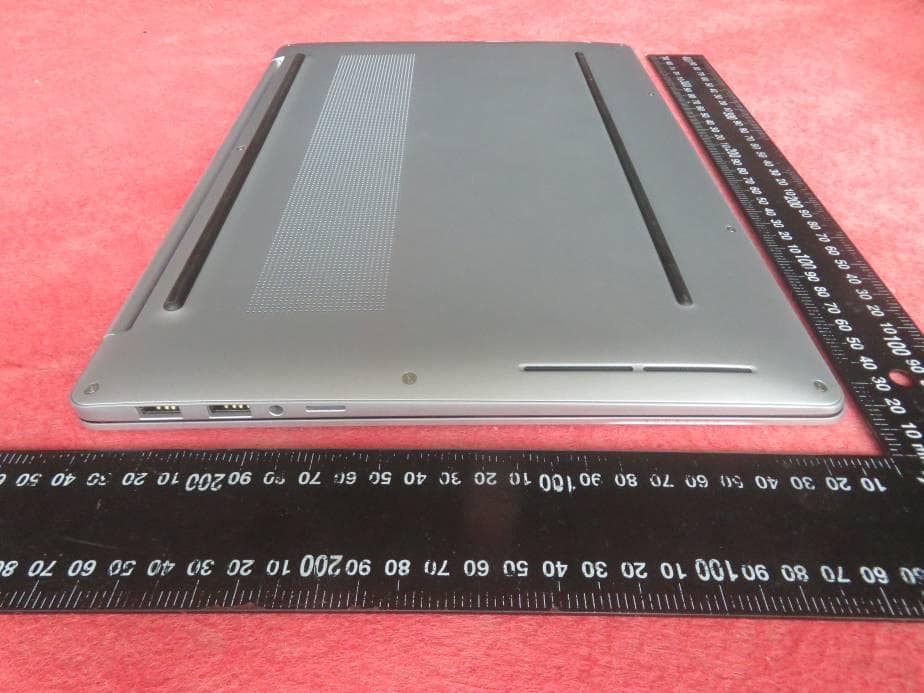
Click to zoom
Application Details
- Equipment Class
- JBC - Part 15 Class B Computing Device/Personal Computer
- Date of Grant
- Jun 29, 2023
- Application Purpose
- Original Equipment
- Date of Application
- Jun 29, 2023
- Equipment Note
- Laptop
- Company
- TECNO MOBILE LIMITED
- Country
- Hong Kong
Documents & Files
Document Text
Text extracted from the exhibit documents filed with the FCC. Open a document above to read the original.
Users Manual
1 Laptop User Manual MEGABOOK S1 Model: S15AM Before using and operating the device, please read and follow the precautions below to ensure optimum performance and to avoid dangerous or illegal situations. 2 Contents Appearance Introduction ................................................ 3 Power On ......................................................................... 6 Boot for the First Time ..................................................................... 6 Charge the Computer....................................................................... 7 Charging Precautions ....................................................................... 8 Learn about Battery Status .............................................................. 9 Features ........................................................................... 9 Specification ..................................................................................... 9 Camera Privacy Switch ..................................................................... 11 Function Key Introduction ............................................................... 12 Touchpad Introduction ..................................................................... 14 Fingerprint & Power One-key Start .................................................. 16 Reset ................................................................................................ 19 WIN11 Use Tips ................................................................................ 19 FAQ ................................................................................................... 23 Security Information ....................................................... 24 Certification Information ....................................................................... 26 Environmental Protection .............................................. 32 3 Appearance Introduction 4 A Fingerprint Power Button After the fingerprint is registered, you only need to press the power button with the registered finger and the device can be turned on and unlocked at the same time. No need to enter a password, fast and safe. When shutting down or sleeping, short press the power button to log in safely with one key. When the light screen is locked, tap the power button to unlock it securely with one key. B Full-function Type-C Interface Support 65W charging, charging, display, data three-in-one C HDMI 2.0 Interface Connect an optional video or audio device (such as a high-definition television), any compatible digital or audio component, or a High-Definition Multimedia Interface (HDMI) device. D USB4 Interface This interface supports charging, display and data three-in-one. Once connected to a USB4-capable device, data transfer can be established in USB4 mode. This connector can also be used to connect display devices and devices using USB data transfer technology. 5 E USB 3.2<Type-A> *2 Connect USB devices such as mobile phones, cameras, and U disks, and provide high-speed data transmission. F Headset 2-in-1 3.5mm Interface Connect headphones or headsets with a 3.5 mm plug. G Micro TF card Read an optional memory card that can store, manage, share or access information. H Camera Privacy Switch Slide the privacy switch to the right to cover the lens to protect the user's privacy from prying eyes, which is convenient and free. 6 Power on Boot for the First Time The power adapter must be connected to the first boot, then press the power button for 1~2 seconds, the keyboard backlight or the FN key will light up to boot. You need to complete the power-on settings according to the interface prompts. • Connect to wireless network • Sign in to Megabook S1 with a Microsoft account 7 Signing in with a Microsoft account will give you a more personalized experience, and you can use an existing Microsoft-related account such as Hotmail, Outlook.com and so on, or register a new account. • Set a PIN password to log in MEGABOOK S1 and other apps or services. • Set up Windows Hello, enter your fingerprint by using the fingerprint power button, you only need to press the power button shortly when starting up, then you can log in with one button, which is fast and safe. Charge the Computer The computer has a built-in (non-removable) rechargeable battery. Use the included power adapter and USB-C interface charging cable to connect to a power outlet, and the charging indicator will light to indicate that the battery is charging. The battery charges faster when the computer is powered off or in sleep state 8 Charging Precautions Use the power adapter and USB-C charging cable that came with your computer to charge. Using third-party accessories may result in slower computer performance and may pose a security risk. Charge your computer in a comfortable temperature range and in a cool, well-ventilated area. Charging in a high temperature (above 45°) environment may damage the computer. Computer charging time vary with temperature conditions and battery usage. 9 Features When the computer is working and charging for a long time, the surface may become warm, which is normal. When you feel hot, turn off some functions and stop charging. Learn about Battery Status You can judge the current battery status through the power icon on the screen. When the computer is plugged in, the battery icon shows a connected state. When the computer is in use, move the cursor to the battery icon to view the remaining power and remaining usage time of the battery. The remaining battery life displayed on the icon is the time estimated by the operating system, not the actual time. The battery is consumable. If you find that the standby time is greatly reduced, please do not replace it by yourself. Please go to the customer service center near Transsion to replace the original battery. Specification Market Name MEGABOOK S1 Feature Type Detailed Specification Remark CPU Intel Intel 12th ADL Different configuration, optional 10 Memory DDR LPDDR5 8G…
Text truncated - open the document above for the full version.
Attestation Statements
(APPLICANT’S COMPANY LETTERHEAD) (May 05,2023) Eurofins Electrical and Electronic Testing NA, Inc. 914 West Patapsco Avenue Baltimore, MD 21230 RE: Attestation Statements Part 2.911(d)(5)(i) request for (2ADYY-S15AM#) [TECNO MOBILE LIMITED] (“the applicant”) certifies that the equipment for which authorization is sought is not “covered” equipment prohibited from receiving an equipment authorization pursuant to section 2.903 of the FCC rules. Sincerely, Yiting,Luo / Certified Engineer (APPLICANT’S COMPANY LETTERHEAD) (May 05,2023) Eurofins Electrical and Electronic Testing NA, Inc. 914 West Patapsco Avenue Baltimore, MD 21230 RE: Attestation Statements Part 2.911(d)(5)(i) request for (2ADYY- S15AM#) [TECNO MOBILE LIMITED] (“the applicant”) certifies that the equipment for which authorization is sought is not identified on the Covered List as an entity producing “covered” equipment. Sincerely, Yiting,Luo / Certified Engineer
Attestation Statements
Attestation Statements (May 05,2023) TO: Federal Communications Commission Authorization and Evaluation Division 7435 Oakland Mills Road Columbia, MD 21046, USA RE: Attestation Statements Part 2.911(d)(7) request for (FCC ID: 2ADYY-S15AM) (TECNO MOBILE LIMITED ), the undersigned, hereby authorize (Lucky Cowboy Global Services, LLC) to act as our designated U.S. agent for service of process, (TECNO MOBILE LIMITED) accepts to maintain an agent for no less than one year after the grantee has terminated all marketing and importation or the conclusion of any Commission-related proceeding involving the equipment. Lucky Cowboy Global Services, LLC accepts the responsibility to act as designated U.S. agent for service of process. Applicant Information: Company name: TECNO MOBILE LIMITED Contact Name: Yiting Luo Address: FLAT N 16/F BLOCK B UNIVERSAL INDUSTRIAL CENTRE 19-25 SHAN MEI STREET FOTAN NT HONGKONG Telephone No: 86-755-61803856 Email: [email protected] Signature [Yiting Luo] U.S. Agent Information: Company Name: Lucky Cowboy Global Services, LLC Address: 2213 S. Braeswood Blvd. #12E Houston, TX 77030 USA FRN: 0033510934 Contact Name: Louie Liu Telephone No: +1 (713) 992-3369 Email: [email protected] Signature [Louie Liu]
Cover Letter(s)
TECNO MOBILE LIMITED Agent Authorization Letter (June 12, 2023) Eurofins MET Labs 914 West Patapsco Avenue Baltimore, MD 21230 RE: LETTER OF AGENT AUTHORIZATION To Whom It May Concern: We, the undersigned, hereby authorize (BTF Testing Lab (Shenzhen) Co., Ltd.) to act on our behalf in all matters relating to application for equipment authorization, including the signing of all documents relating to these matters. We also hereby certify that no party to the application authorized hereunder is subject to the denial of benefits, including FCC benefits, pursuant to Section 5301 of the Anti-Drug Abuse Act of 1988, 21 U.S.C.853(a). This agreement expires one year from the current date. Sincerely, Yiting,Luo / Certified Engineer
Cover Letter(s)
TECNO MOBILE LIMITED Long Term Confidentiality Request Letter (April 24, 2023) Eurofins MET Labs 914 West Patapsco Avenue Baltimore, MD 21230 RE: CONFIDENTIALITY REQUEST FOR (Laptop /S15AM # 2ADYY-S15AM#) To Whom It May Concern: This letter serves as an official request for confidentiality under sections 0.457 and 0.459 of CFR 47. We have requested that the - Block Diagram - Schematics - Operational Description - BOM - SOFTWARE SECURITY REQUIREMENTS required to be submitted with this application be permanently withheld from public review. The above-mentioned documents belong to internal documents, is our proprietary information, that could never get into the possession of our competition. Please contact me if there is any information you may need. Sincerely, Client’s name / title : Yiting,Luo / Certified Engineer Company Name: TECNO MOBILE LIMITED Contact information / address: [email protected] / FLAT N 16/F BLOCK B UNIVERSAL INDUSTRIAL CENTRE 19-25 SHAN MEI STREET FOTAN NT HONGKONG
Cover Letter(s)
TECNO MOBILE LIMITED Short Term Confidentiality Request Letter (April 24,2023) MET Laboratories, Inc. 914 West Patapsco Avenue Baltimore, MD 21230 RE: Short Term Confidentiality Request For (Laptop /S15AM # 2ADYY-S15AM#) To Whom It May Concern: In accordance with sections 0.457 and 0.459 of CFR 47, <TECNO MOBILE LIMITED. >. requests short-term Confidentiality of following sections of this application for a period of 180 days after grant is issued. Test setup photos External photos Internal photos User’s manual These documents contain detailed system and equipment descriptions and related information about the product, which < TECNO MOBILE LIMITED. > considers to be proprietary, confidential, and a custom design and otherwise, would not release to the general public. Since this design is a basis from which future technological products will evolve, <TECNO MOBILE LIMITED.> feels that this information would be of benefit to its competitors, and that the disclosure of the information in these documents would give our competitors an unfair advantage in the market. Please contact me if there is any information you may need. Sincerely, Name: Yiting,Luo Function: Certified Engineer Signature:
External Photos
Appearance photograph of EUT Appearance photograph of EUT Appearance photograph of EUT Appearance photograph of EUT Appearance photograph of EUT Appearance photograph of EUT Appearance photograph of EUT Appearance photograph of EUT Appearance photograph of EUT
ID Label/Location Info
Label Location:
Internal Photos
Internal photograph of EUT Internal photograph of EUT Internal photograph of EUT Internal photograph of EUT Internal photograph of EUT Internal photograph of EUT Internal photograph of EUT Internal photograph of EUT Internal photograph of EUT Internal photograph of EUT Internal photograph of EUT Internal photograph of EUT Internal photograph of EUT Internal photograph of EUT Internal photograph of EUT Internal photograph of EUT BT/Wi-Fi MAIN ANT Wi-Fi AUX ANT Internal photograph of EUT Internal photograph of EUT Internal photograph of EUT
Test Report
Total or partial reproduction of this document without permission of the Laboratory is not allowed. Page 1 of 18 BTF Testing Lab (Shenzhen) Co., Ltd. F101, 201 and 301, Building 1, Block 2, Tantou Industrial Park, Tantou Community, Songgang Street, Bao'an District, Shenzhen, China FCC Test Report For Applicant Name: TECNO MOBILE LIMITED Address: FLAT N 16/F BLOCK B UNIVERSAL INDUSTRIAL CENTRE 19-25 SHAN MEI STREET FOTAN NT HONGKONG EUT Name: Laptop Brand Name: TECNO Model Number: S15AM Series Model Number: Refer to section 2 Issued By Company Name: BTF Testing Lab (Shenzhen) Co., Ltd. Address: F101, 201 and 301, Building 1, Block 2, Tantou Industrial Park, Tantou Community, Songgang Street, Bao'an District, Shenzhen, China Report Number: BTF230612R00406 Test Standards: 47 CFR Part 15, Subpart B FCC ID: 2ADYY-S15AM Test Conclusion: Pass Test Date: 2023-03-06 to 2023-05-29 Date of Issue: 2023-06-15 Prepared By: Chris Liu / Project Engineer Date: 2023-06-15 Approved By: Ryan.CJ / EMC Manager Date: 2023-06-15 Note: All the test results in this report only related to the testing samples. Which can be duplicated completely for the legal use with approval of applicant; it shall not be reproduced except in full without the written approval of BTF Testing Lab (Shenzhen) Co., Ltd., All the objections should be raised within thirty days from the date of issue. To validate the report, you can contact us. Test Report Number: BTF230612R00406 Total or partial reproduction of this document without permission of the Laboratory is not allowed. Page 2 of 18 BTF Testing Lab (Shenzhen) Co., Ltd. F101, 201 and 301, Building 1, Block 2, Tantou Industrial Park, Tantou Community, Songgang Street, Bao'an District, Shenzhen, China Revision History Version Issue Date Revisions Content R_V0 2023-06-15 Original Note: Once the revision has been made, then previous versions reports are invalid. Test Report Number: BTF230612R00406 Total or partial reproduction of this document without permission of the Laboratory is not allowed. Page 3 of 18 BTF Testing Lab (Shenzhen) Co., Ltd. F101, 201 and 301, Building 1, Block 2, Tantou Industrial Park, Tantou Community, Songgang Street, Bao'an District, Shenzhen, China Table of Contents 1 INTRODUCTION ..........................................................................................................................................4 1.1 Identification of Testing Laboratory ...............................................................................................4 1.2 Identification of the Responsible Testing Location ......................................................................4 1.3 Announcement .................................................................................................................................4 2 PRODUCT INFORMATION..........................................................................................................................5 2.1 Application Information ...................................................................................................................5 2.2 Manufacturer Information ................................................................................................................5 2.3 Factory Information .........................................................................................................................5 2.4 General Description of Equipment under Test (EUT) ...................................................................5 2.5 Technical Information ......................................................................................................................5 3 SUMMARY OF TEST RESULTS .................................................................................................................6 3.1 Test Standards ..................................................................................................................................6 3.2 Uncertainty of Test ...........................................................................................................................6 3.3 Summary of Test Result ..................................................................................................................6 4 TEST CONFIGURATION .............................................................................................................................7 4.1 Test Equipment List .........................................................................................................................7 4.2 Test Auxiliary Equipment ................................................................................................................9 4.3 Test Modes ........................................................................................................................................9 5 EMISSION TEST RESULTS (EMI) ............................................................................................................10 5.1 Conducted emissions on AC mains .............................................................................................10 5.1.1 E.U.T. Operation: ..................................................................................................................10 5.1.2 Test Setup Diagram: .............................................................................................................10 5.1.3 Test Data: ............................................................................................................................. 11 5.2 Radiated emissions (Below 1GHz) ...............................................................................................13 5.2.1 E.U.T. Operation: ..................................................................................................................13 5.2.2 Test Setup Diagram: .............................................................................................................13 5.2.3 Test Data: ................................................…
Text truncated - open the document above for the full version.
Test Setup Photos
CONDUCTED EMISSION RADIATED EMISSION BELOW 1GHz RADIATED EMISSION ABOVE 1GHz
Contact Information
Applicant
Yiting Luo
Test Firm
BTF Testing Lab (Shenzhen) Co., Ltd.Ryan CJ
[email protected]8675523146130
Technical Specifications
| # | Rule Parts | Frequency Range | Power Output |
|---|---|---|---|
| 1 | 15B | - | - |
Other Applications from TECNO MOBILE LIMITED
2ADYY-KO2
Sep 16, 2026Mobile Phone
Equipment Class
DSS - Part 15 Spread Spectrum Transmitter2ADYY-T1002W
Jun 10, 2026Tablet
Equipment Class
DTS - Digital Transmission System2ADYY-KN4N
Jun 08, 2026Mobile Phone
Equipment Class
PCE - PCS Licensed Transmitter held to ear2ADYY-CN6
Jun 05, 2026Mobile Phone
Equipment Class
DTS - Digital Transmission System2ADYY-T1103
May 25, 2026Tablet
Equipment Class
NII - Unlicensed National Information Infrastructure TX