2ADYZAX-6209Car Audio
INNO AUDIO&VIDEO (HK) LIMITED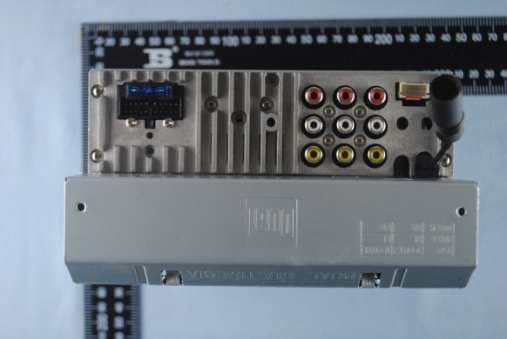
Click to zoom
Application Details
- Equipment Class
- DXX - Part 15 Low Power Communication Device Transmitter
- Date of Grant
- Jan 25, 2015
- Application Purpose
- Original Equipment
- Date of Application
- Jan 25, 2015
- Equipment Note
- Car Audio
- Frequency Range
- 2402.00000000 - 2480.00000000
- Country
- China
Documents & Files
Document Text
Text extracted from the exhibit documents filed with the FCC. Open a document above to read the original.
Users Manual
RADIO ANTENNA JACK V-IN AUX-LRL RRFR FL AUX-R V-OUT 2 V-OUT 1 SUBWOOFER GREY SUBWOOFER GREY REAR CAMERA INPUT YELLOW 1. Power & Mode 2. Talk 3. Angle adjust(optional) 4. Setup 5. Sub-title & LO/DX 6. Tune/Previous Track 7. Band 8. Title/PBC & AS/PS 9. Backward 10. Volume Up/Down 11. Menu & SUB 12. Angle & Zoom 13. Audio & MO/ST 14. EQ & Loud 15. Goto & * 16. Mute 17. END & Reject 18. CLK 19. SEL 20. Tune/Next Track 21. OK 22. Forward 23. Stop 24. Play/Pause 25.9/ TA 26. +10/# 27. 0/AF 28. CH+/CH-(TV Tuner models only) 1. Home 2. Information Display 3. Tune Up 4. Preset Station Display 5. Next Menu 6. BAND 7. AS/PS 8. Audio Setup 9. Mute 10. Previous Menu 11. Tune Down 12. LOCAL/DX 13. PTY 14. TA 15. AF 1. Mute 2. Previous Track 3. Play/Pause 4. Next Tack 5. Backward 6. Forward 7. Next Menu 8. Repeat Play 9. Random Play 10. Talk 11. TA 12. AF 13. Previous Menu 1. Previous Menu 2. Mute 3. Audio Setup 4. Backward 5. Forward 6. Next Menu 1. Power/Mode 2. Play/Pause/CH1-6 3. Select/Volume Up/Down 4. Mute 5. Mic 6. IR 7. USB 8. Reset 9. Aux In 10. Eject In the Menu mode, press the desired icon to enter the corresponding mode: Radio, Disc, USB, BT Phone, BT Music, Aux In, AV In, Setup, Rear Camera(optional) In the Menu, press the Setup icon to do setting. 1.General 2. Time 3. Video 4. Language 5. RGB Illumination 6. Calibration Select the Tuner icon from the Main Menu screen or press MODE unit Tuner is selectde. Audio EQ Presets USER JAZZ CLASSIC POP ROCK BEAT FLAT USER PRESET 6 EQ Band frequencies are adjustable from the ASP settings. ASP menu adjust the Bass/MID/Treb center frequencies. Each band adjusts the center frequency average(Low/Mid/High). Bass/MID/Treb Q Value adjust the frequency width, wide to narrow. Loudness center frequency(Flat, 400,800,2400) Subwoofer center frequency(Flat, 80,120,160) FADER/BALANCE FADER: F 0-10 to R 0-10 BALANCE: F0-10 to R 0-10 SUB/LOUD SUB: Volume level Off - 12 LOUDNESS: Select loudness level OFF LOW HIGH Bluetooth Microphone Bluetooth features of the unit function with the included external microphone. Which is designed for mounting to the visor or A-pillar inside the vehicle. Pairing and Connecting Before you can use a Bluetooth device, it must be paired and connected. The Multi Media broadcasts the pairing signal constantly when no devices are currently connected. Complete the pairing sequence from your Bluetooth device. The device name is “DUAL BT”. The Bluetooth passcode “1234”. Once paring is complete, most Bluetooth will connect automatically if the device is in rang when the unit is powered-on. Dialing a Number Press to display keypad and dial a number. Making and Ending a Call Press to connect a call, and press to end a call. Accessing Recent Call List Press to view the Dialed Press to view the Received Press to view the Missed Transfering Audio Press to transfer audio between the head unit and mobile phone. Streaming Audio Press to enter the music control menu. Press to play or pause the music. Press to skip to the previous track. Press to advance to the next track. FCC Information This device complies with Part 15 of the FCC rules. Operation is subject to the following two conditions: (1) this device may not cause harmful interference, and (2) this device must accept any interference received; including interference that may cause undesired operation. Federal Communications Commission (FCC) Statement This Equipment has been tested and found to comply with the limits for a Class B digital device, pursuant to Part 15 of the FCC rules. These limits are designed to provide reasonable protection against harmful interference in a residential installation. This equipment generates, uses and can radiate radio frequency energy and, if not installed and used in accordance with the instructions, may cause harmful interference to radio communications. However, there is no guarantee that interference will not occur in a particular installation. If this equipment does cause harmful interference to radio or television reception, which can be determined by turning the equipment off and on, the user is encouraged to try to correct the interference by one or more of the following measures: - Reorient or relocate the receiving antenna. - Increase the separation between the equipment and receiver. - Connect the equipment into an outlet on a circuit different from that to which the receiver is connected. - Consult the dealer or an experienced radio/TV technician for help. Warning: Changes or modifications to this unit not expressly approved by the party responsible for compliance could void the user authority to operate the equipment. Tested to comply with FCC standard. FOR HOME OR OFFICE USE. Warning : This equipment complies with FCC RF radiation exposure limits set forth for an uncontrolled environment. & This device and its antenna(s) must not be co-located or conjunction with any other antenna or transmitter.
Attestation Statements
INNO AUDIO&VIDEO(HK)LIMITED Room 1703, 17/F., Universal Trade Centre. No. 3-5A Arbuthnot Road, Hong Kong. Office of Engineering Technology Federal Communications Commission 7435 Oakland Mills Road Columbia, MD 21046 Date: February 5, 2015 To whom it may concern: The testing model of our INNO AUDIO&VIDEO(HK)LIMITED brand of FCC approval is AX-6209 and we have models or brands for listed. We hereby certify that the interior structure, electrical circuit and schematics of the listed models are the same as the testing model except the below list. And just for the marketing requirement. Our listed models is as follows: Product name: Car Audio Brand: N/A Model: AX-6205/AX-6207/AX-6208/AX-6210/DV605/DV615B/AV6115B/DV625BH/AV6225BH/BV8963/P9732/ AX-4331/AX-7703/AX-7502/AX-9006 FCC ID: 2ADYZAX-6209 Your assistance on this mater is highly appreciated. Company Officer: Yellow Wong
Cover Letter(s)
INNO AUDIO&VIDEO(HK)LIMITED Room 1703, 17/F., Universal Trade Centre. No. 3-5A Arbuthnot Road, Hong Kong. Letter of Authorization Company: INNO AUDIO&VIDEO(HK)LIMITED Address: Room 1703, 17/F., Universal Trade Centre. No. 3-5A Arbuthnot Road, Hong Kong. Product Name: Car Audio Model Number: AX-6209/AX-6205/AX-6207/AX-6208/AX-6210 We authorize MiCOM Labs Inc, 575 Boulder Court, Pleasanton, California 94566, USA, to act on our behalf on all matters concerning the above named equipment. Any individual within MiCOM Labs is authorized to act on our behalf and take action on the application. This shall include the following: Testing Approval applications (includes complete product documentation package, including Confidential information) and procedures Payment of approval fees We declare that MiCOM Labs Inc, 575 Boulder Court, Pleasanton, California 94566, USA, is allowed to forward all information related to the approval project to the applied notified body and to the notification entities and to discuss any issues concerning the approval application. Any and all acts carried out by MiCOM Labs on our behalf shall have the same effect as acts of our own. Name: Yellow Wong Date: January 23, 2015 Title: Marketing Assistant Signature of applicant:
Cover Letter(s)
INNO AUDIO&VIDEO(HK)LIMITED Room 1703, 17/F., Universal Trade Centre. No. 3-5A Arbuthnot Road, Hong Kong. Office of Engineering Technology Federal Communications Commission 7435 Oakland Mills Road Columbia, MD 21046 Date: January 23, 2015 Subject; Request for Confidentiality FCC ID: 2ADYZAX-6209 To Whom It May Concern, Pursuant to the provisions of Sections 0.457 and 0.459 of Commission's rules (47CFR0.457, 0.459), we are requesting the Commission to withhold the following attachment(s) as confidential document from public disclosure indefinitely. Schematic Diagram Block Diagram Operational Description Above mentioned document contains detailed system and equipment description are considered as proprietary information in operation of the equipment. The public disclosure of above documents might be harmful to our company and would give competitor an unfair advantage in the market. It is our understanding that all measurement test reports, FCC ID label format and correspondent during certification review process cannot be granted as confidential documents and those information will be available for public review once the grant of equipment authorization is issued. Sincerely, Signature: Name: Yellow Wong Title: Marketing Assistant
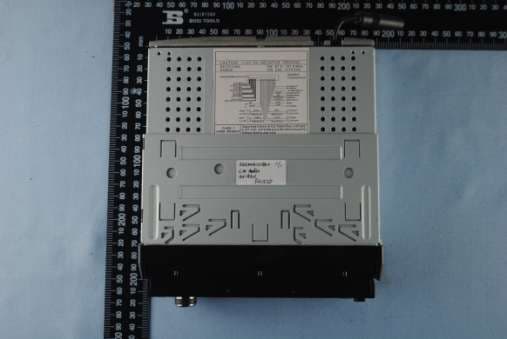
External Photos
EUT top view EUT bottom view
ID Label/Location Info
This device complies with Part 15 of the FCC Rules. Operation is subject to the following two conditions: (1) this device may not cause harmful interference, and (2) this device must accept any interference received, including interference that may cause undesired operation. The Label must not be a stick-on paper label. The Label on these products must be permanently affixed to the product and readily visible at the time of purchase and must last the expected lifetime of the equipment not be readily detachable. Proposed Label Location on EUT EUT Bottom View/Proposed Label Location FCC ID: 2ADYZAX-6209
Internal Photos
EUT inside whole view Main board component side Main board solder side
Test Setup Photos
Radiated Emission test view(Frequency from 30MHz to 1GHz) Radiated Emission test view(Frequency above 1GHz)
Contact Information
Applicant
Yellow Wong
Technical Contact
Ke Mei Ou Laboratory Co., LtdApallo Liu
[email protected](86)75583642690
E506, 5th Floor, No. 39 Keji Zhong Er Lu, · Shenzhen, Guangdong · China
Test Firm
Ke Mei Ou Laboratory Co., Ltd.Apollo Liu
Technical Specifications
| # | Rule Parts | Frequency Range | Power Output |
|---|---|---|---|
| 1 | 15C | 2.40 GHz - 2.48 GHz | - |
Other Applications from INNO AUDIO&VIDEO (HK) LIMITED
2ADYZAX-8321
Jan 25, 2015Car Audio
Equipment Class
DXX - Part 15 Low Power Communication Device Transmitter