Text extracted from the exhibit documents filed with the FCC. Open a document above to read the original.
820.009 Rev 01 Quick Start & Instructions For Use TEMP 1 Return to the page from Step 1, or click this link again: https://testflight.apple.com/join/htMatc38 Click "Start Testing" to complete Step 2. This should open the TestFlight app. You will be guided through the installation process. Once connected to the NIRA Temp App, assign the device to yourself or a loved one. Open this link from your phone or tablet: https://testflight.apple.com/join/htMatc38 Click "View in App Store" Download TestFlight & ensure the download has completed Peel the patch and place the device on clean, dry skin under the armpit. The sensor should touch the skin. Get a real-time look at your temperature and get notified at the first sign of an abnormal temperature. 1. Get TestFlight 3. Stick To Activate 5. Monitor In Real Time 2. Join the Beta 4. Connect & Assign User °F °F °F °F °F 2 NIRA Temp measures under-the-arm “axillary” temperature and display it in the NIRA Temp app. Welcome to NIRA Temp, a wearable smart thermometer. NIRA Temp is a Bluetooth® wearable smart thermometer with disposable patches. The device senses, records and transmits body temperature via Bluetooth®. Temperature information from the sensor is monitored using a smart device (Apple® or Android™ with Bluetooth® Version 4.1 or higher capability running the NIRA Temp app). This product is suitable for ages 3 and up. The wireless thermometer, Model 2, is a battery-operated electronic device with an intended use of measuring human body temperature. This device is reusable and intended for armpit temperature readings for people of ages 3 and up. Important: Read instructions carefully before use. High, prolonged fever requires medical attention. If symptoms persist, contact your healthcare provider. Important: Read the instructions for use before using NIRA Temp The battery is non-rechargeable and is intended to operate at least 12 months of normal use. During his time the battery voltage will be gradually reduced, which is normal and expected. The current battery level is displayed in the mobile app screen in remaining percentage units and the device will stop operation soon after the battery level will reach 0%. As battery discharges, the LED brightness will go down, but the strength of the BLE signal and thermometer accuracy will not be affected. The NIRA Temp accuracy is verified for the entire range of possible battery voltages and meets the specification as long as device is capable to measure and transmit the information to the mobile device. Introduction to NIRA Temp Intended Use Temperature Measurement Battery Life 3 The device uses color coding to aid the user: Warning – Prompt response by user is required. (Temperature exceeds user defined warning limit, the default value range is 97.8°F - 98.78°F (36.5°C - 37.1°C)). Alarm – Immediate response by user is required. (Temperature exceeds user defined limit, the default value is 98.78°F (37.1°C)). Normal - (temperature is less than user defined warning limit, the default value is 95.36°F - 97.8°F (35.2°C-36.56°C)). Alert Levels What's included (Normal Package) What's included (Refill Package) NameNumber NIRA Temp thermometer1 Adhesive patches30 Quick start guide for the device1 Getting Started Instruction1 NameNumber Adhesive patches90 °F °F °F °F °F °F °F °F °F °F °F °F °F °F °F °F °F °F 4 Wear NIRA Temp all day for the full benefits of 24/7 temperature tracking. Peel the adhesive patch and center the device onto the patch with the sensor (metal piece) side up. Apply the patch with the device onto clean, dry skin in the center of the armpit. For best results, use NIRA Temp on a shaven armpit. Ensure that the device is fully covered by the patch. The sensor should touch the skin. The device should be fully enclosed in the armpit when your arm is relaxed along your side. Temperature measurements can be affected by cold ambient temperatures. Dampen the patch with lukewarm water prior to slowly removing the patch from the skin. It may take up to 10 - 20 minutes after application for the device to warm up to display your real- time temperature in the NIRA Temp app. During warm up, your graph displayed in the app may be blue. If your phone has been off or in sleep mode, it may take a couple minutes for the app to sync and display your real-time temperature and history temperature in table and graphic forms. If you experience skin irritation from the adhesive patch, alternate armpits or contact a medical professional. Regular Operation StateBLE advertisementVisual indication StandbyNone Green and Yellow LED, reduced brightness, once in 6 second Standby (low battery at or below 25%)None Yellow and Red LED, reduced brightness, once in 6 seconds User Connection Once in 3 seconds, 0 dBmAll 3 LED, once in 3 seconds Monitoring, normal temperatureOnce in 9 seconds, +4 dBmGreen LED, once in 3 seconds Monitoring, low grade feverOnce in 9 seconds, +4 dBmYellow LED (full brightness), once in 3 seconds Monitoring, high grade feverOnce in 9 seconds, +4 dBmRed LED, once in 3 seconds Troubleshooting Things To Note For Best Results 5 When using this product always follow these basic safety precautions to ensure that the patch accurately reads temperature and to avoid skin irritation. Failure to follow these precautions could result in inaccurate temperature readings, or could result in skin irritation and mild discomfort. The NIRA Temp device is intended for use by a single individual. As such, it does not require disinfection after detachment from the body and attachment with a new adhesive patch. It can be cleaned for hygienic purposes such as removal of sweat and odor. To clean, use liquid soap, cool or warm tap water (temperature from 20°C - 30°C). For best results, dampen a cotton ball, pad, or paper towel in soapy water, clean the front and back of the device for 15- 30 seconds, rinse the device in running water for another 15-30 seconds, and dry using a clean paper towel or air dry for 10 minutes. In th…
Text truncated - open the document above for the full version.
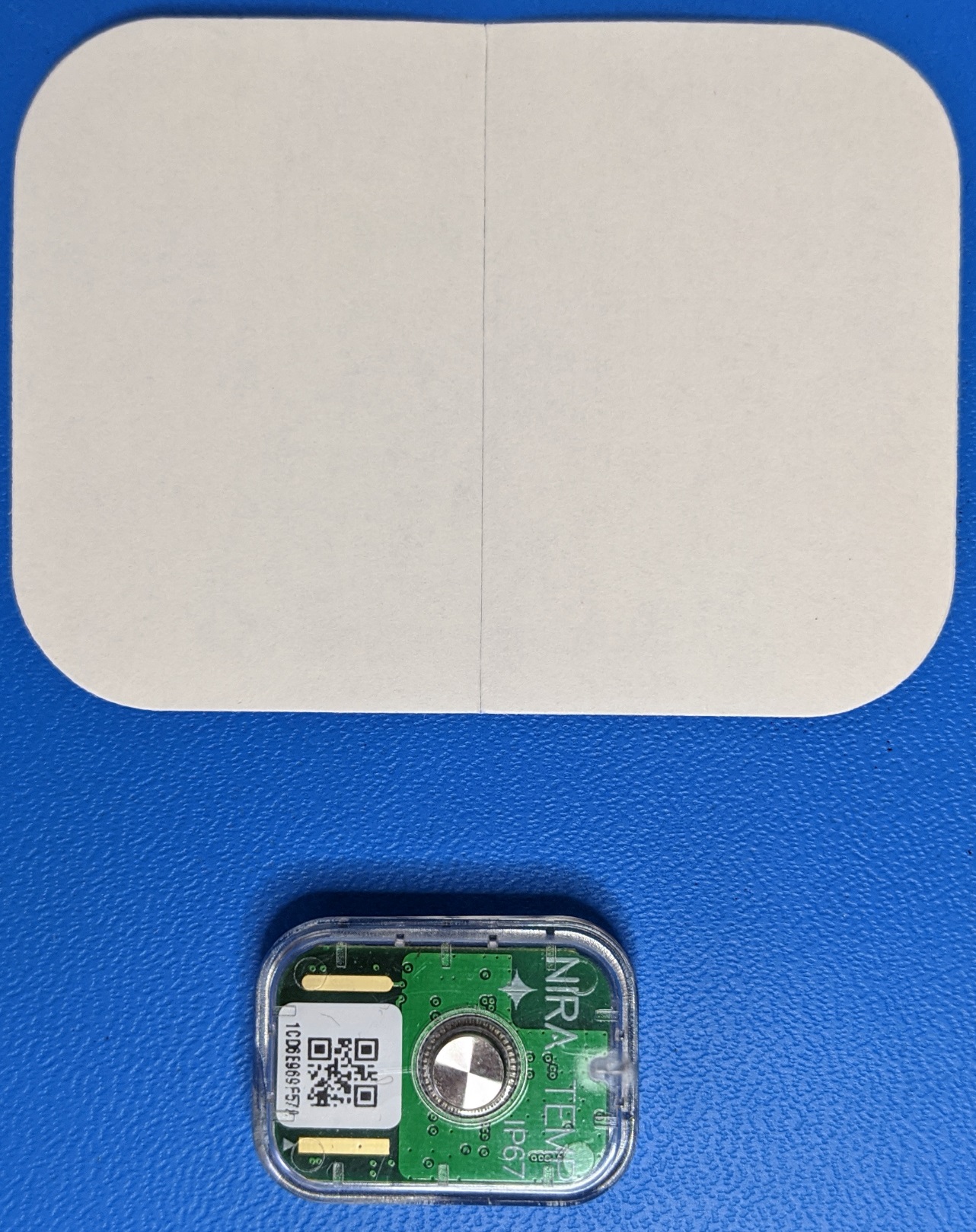
Device with Patch
E Label (screen shot)
E-label for FCC ID – NIRA Temp mobile app 1) From any screen a tab Settings is available in the bottom, see screen below: 2) In the Settings screen tap About 3) About screen shows FCC ID
Model 2 WEARABLE SMART THERMOMETER 35°C (95°F) 100% 10% % 106kPa 50kPa 50°C (122°F) -20°C (-4°F) Shipping Storage -20°C (-4°F) Complies with FDA recognized standards NIRA Temp, Manufactured By Dermal Photonics 200 Corporate Place, Suite 2B, Peabody, MA 01960 ©2020 Dermal Photonics Corp. NIRAtemp.com What’s Included Smartphone Integration NIRA Temp Thermometer 30 Adhesive Patches *Image of product is not to scale Designed in USA Made with Domestic & Foreign Parts 600-026 Rev.01 Real Time Tracking Monitor the health of your loved ones, and yourself, in real time. Fever Alert Get notified at the first sign of a health concern. ! Works 24/7 Track health all day, every day with a one year battery life. 24 Stick And Go Simple to use, comfortable, and effective. Peace Of Mind Early fever detection allows for socialization with peace of mind. FCC ID: 2ADZENIRE Stay Healthy WARNING: CHOKING HAZARD Small parts. Not for children under 3 yrs. ! 0-3 IP67 Rated Ages 3 & Up Thermometer Wireless
Internal Photo (Antenna location)
Page 1 of 87 Dermal Photonics Corporation TEST REPORT SCOPE OF WORK Emissions Testing on NIRA Temp EUA REPORT NUMBER 104370255BOX-009 ISSUE DATE [REVISED DATE] July 20, 2020 Original Issue DOCUMENT CONTROL NUMBER Non-Specific Radio Report Shell Rev. December 2017 © 2017 INTERTEK Non-Specific Radio Report Shell Rev. December 2017 Page 2 of 87 Client: Dermal Photonics Corporation / Model: NIRA TEMP EMISSIONS TEST REPORT (FULL COMPLIANCE) Report Number: 104370255BOX-009 Project Number: G104370255 Report Issue Date: 07/20/2020 Model(s) Tested: NIRA Temp Model(s) Partially Tested: None Model(s) Not Tested but declared equivalent by the client: None Standards: CFR47 FCC Part 15.247 Subpart C: 07/2020, CFR47 FCC Part 15 Subpart B: 07/2020, RSS-247 Issue 2 February 2017, ICES-003 Issue 6 Published: January 2016 Updated: April 2019, RSS-Gen Issue 5 April 2018 +Amendment 1 March 2019, RSS-102 Issue 5 March 2015 Tested by: Client: Intertek Testing Services NA, Inc. 70 Codman Hill Road Boxborough, MA 01719 USA Dermal Photonics Corporation 100 Corporate Plaza Ste 303 Peabody, MA 01960 USA Report prepared by Report reviewed by Vathana Ven / EMC Staff Engineer Michael Murphy / EMC Engineering Supervisor This report is for the exclusive use of Intertek's Client and is provided pursuant to the agreement between Intertek and its Client. Intertek's responsibility and liability are limited to the terms and conditions of the agreement. Intertek assumes no liability to any party, other than to the Client in accordance with the agreement, for any loss, expense or damage occasioned by the use of this report. Only the Client is authorized to permit copying or distribution of this report and then only in its entirety. Any use of the Intertek name or one of its marks for the sale or advertisement of the tested material, product or service must first be approved in writing by Intertek. The observations and test results in this report are relevant only to the sample tested. This report by itself does not imply that the material, product, or service is or has ever been under an Intertek certification program. Intertek Report Number: 104370255BOX-009 Issued: 07/20/2020 Non-Specific Radio Report Shell Rev. December 2017 Page 3 of 87 Client: Dermal Photonics Corporation / Model: NIRA TEMP Table of Contents 1 Introduction and Conclusion .............................................................................................................. 4 2 Test Summary ...................................................................................................................................... 4 3 Client Information ................................................................................................................................ 5 4 Description of Equipment Under Test and Variant Models ............................................................. 5 5 System Setup and Method .................................................................................................................. 7 6 Maximum Peak Output Power and Human RF exposure ................................................................. 8 7 6 dB Bandwidth and Occupied Bandwidth ..................................................................................... 15 8 Maximum Power Spectral Density ................................................................................................... 23 9 Band Edge Compliance ..................................................................................................................... 28 10 Transmitter spurious emissions ................................................................................................... 34 11 Digital Device and Receiver Radiated Spurious Emissions ...................................................... 79 12 Revision History ............................................................................................................................. 87 Intertek Report Number: 104370255BOX-009 Issued: 07/20/2020 Non-Specific Radio Report Shell Rev. December 2017 Page 4 of 87 Client: Dermal Photonics Corporation / Model: NIRA TEMP 1 Introduction and Conclusion The tests indicated in section 2.0 were performed on the product constructed as described in section 4.0. The remaining test sections are the verbatim text from the actual data sheets used during the investigation. These test sections include the test name, the specified test Method, a list of the actual Test Equipment Used, documentation Photos, Results and raw Data. No additions, deviations, or exclusions have been made from the standard(s) unless specifically noted. Based on the results of our investigation, we have concluded the product tested complies with the requirements of the standard(s) indicated. The results obtained in this test report pertain only to the item(s) tested. Intertek does not make any claims of compliance for samples or variants which were not tested. 2 Test Summary Section Test full name Result 3 Client Information -- 4 Description of Equipment Under Test and Variant Models -- 5 System Setup and Method -- 6 Maximum Peak Output Power and Human RF exposure CFR47 FCC Part 15 Subpart C:01/2020, Section 15.247 (b)(3) RSS-247 Issue 2 February 2017, RSS-102 Issue 5 March 2015 Pass 7 6 dB Bandwidth and Occupied Bandwidth CFR47 FCC Part 15 Subpart C: 01/2020, Section 15.247 (a)(2) RSS-247 Issue 2 February 2017 Pass 8 Maximum Power Spectral Density CFR47 FCC Part 15 Subpart C: 01/2020, Section 15.247 (e) RSS-247 Issue 2 February 2017 Pass 9 Band Edge Compliance CFR47 FCC Part 15 Subpart C: 01/2020, Section 15.247 (d) RSS-247 Issue 2: 02/2017) Pass 10 Transmitter spurious emissions CFR47 FCC Part 15 Subpart C: 12/2019, Section 15.247 (d) RSS-247 Issue 2 February 2017 Pass 11 Digital Device and Receiver Radiated Spurious Emissions (CFR47 FCC Part 15 Subpart B 15.109: 12/2019, ICES-003 Issue 6 Published: January 2016 Updated: April 2019 Pass 12 AC Mains Conducted Emissions FCC 47CFR Part 15…
Text truncated - open the document above for the full version.
200 Corporate Place Suite 2B · Peabody · United States
| # | Rule Parts | Frequency Range | Power Output |
|---|---|---|---|
| 1 | 15C | 2.40 GHz - 2.48 GHz | 2.50 mW |

Digital Transmission System
Equipment Class
DTS - Digital Transmission System