2AFCMMS625Bluetooth Speaker Set
August International Ltd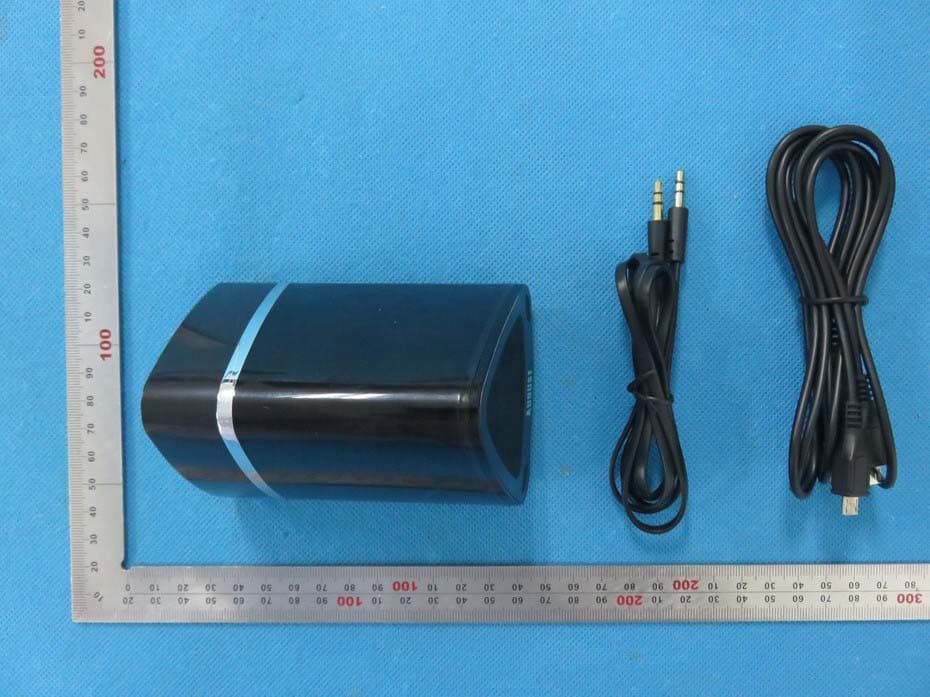
Click to zoom
Application Details
- Equipment Class
- DXX - Part 15 Low Power Communication Device Transmitter
- Date of Grant
- Jul 20, 2015
- Application Purpose
- Original Equipment
- Date of Application
- Jul 20, 2015
- Equipment Note
- Bluetooth Speaker Set
- Frequency Range
- 2402.00000000 - 2480.00000000
- Company
- August International Ltd
- Country
- United Kingdom
Documents & Files
Document Text
Text extracted from the exhibit documents filed with the FCC. Open a document above to read the original.
Users Manual
August International Ltd United Kingdom www.augustint.com M o d e l N o . : M S 6 2 5 Bluetooth Wireless Stereo Speakers Casque Stéréo Sans-fil Bluetooth Kabellose Bluetooth Stereo Kopfhörer Cuffie Stereo Senza Fili Bluetooth Auriculares de Diadema Abiertos Bluetooth FCC ID:2AFCMMS625 User Manual -2- -1- English Français Deutsch Español Quick Start Guide MS625 1.Before first use, please ensure that both speakers are fully charged. To charge, use the USB charging cable to connect both speakers to a powered USB port. Whilst charging, the LED lights red and turns off once fully charged. 2. Switch the parent speaker on, then press and hold the multi-function switch button until a two tone notification sounds to indicate pairing mode. In pairing mode, the LED will quickly flash blue. Note: Do not turn on the child speaker at this stage. This will prevent you pairing to your source device. 3. Pair your source device with “MS625” using its Bluetooth settings, if you are unfamiliar with the Bluetooth feature of your source device, refer to its user manual for detailed instructions. 4. Once paired to your source device, the LED on the parent will light constant blue. You can then turn on the child speaker which will automatically pair to the parent. Once paired, the LED on the child will light constant blue. Thank you for purchasing this August product. This user manual is designed to familiarize you with all the features of this device. Please take the time to read this user manual carefully, even if you are already familiar with a similar product. Safety To ensure the safety of you and others, please read the Safety Instructions before using this device. Please do not disassemble this product, it can be unsafe and will invalidate the manufacturer's warranty. Disposal Please ensure the product and accessories are disposed of in compliance with the WEEE (Waste Electrical and Electronic Equipment) Directive and any other regulations applicable to your country. Always check with the environment agency and any other relevant authorities for current disposal regulations. Customer Service You can contact us by phone on: +44 (0)845 250 0586 or by email at: [email protected] should you require further technical support or customer service. Contents Storage and Use Do not expose this device to dust, oil or smoke. When transporting this device store securely to avoid impact damage. Do not scratch this device with sharp objects. Do not store or use this device in extreme temperatures. Do not store or use this device in wet or damp environments. Do not drop or strike this device. Maintenance Please unplug all leads before cleaning this device. Wipe the device and buttons with a soft cloth. Never wipe this device with an abrasive cloth or apply detergent, alcohol or chemical based cleaning products. Alcohol 1. Safety Instructions -4- -3- English Français Deutsch Español 1. Safety Instructions.......................................................4 2. Main Features..............................................................5 3. Accessories.................................................................5 4. Part Names and Functions.............................................5 5. Operation....................................................................6 6. Charging.....................................................................9 7. Specification...............................................................9 8. Troubleshooting.........................................................10 9. Warranty....................................................................11 4. Part Names and Functions -6- -5- 3. Accessories 123 USB charging cable 3.5mm audio cableUser manual 2. Main Features 1. USB Charging Socket 2. 3.5mm Audio-in Socket 3. Multifunction Switch 4. Power Switch English Stereo Speaker System for Mobile Phones Wireless Audio from any Bluetooth Device Speakers for Stereo Sound on Your Home TV Audio-In Socket for Non Bluetooth Devices Long Life Built-in Rechargeable Batteries 5. Operations Parent(Left)Child(Right) 1 1 2 3 4 4 5.1 Switch Speakers On/Off The power switch for both the parent and child speakers is a slider switch located on the rear of each unit. 5.2 Bluetooth Connection 5.2.1 Connection to the Parent Speaker Switch the parent speaker on, then press and hold the multifunction switch button until a two tone notification sounds to indicate pairing mode. In pairing mode, the LED will quickly flash blue. Note: Do not turn on the child speaker at this stage. This will prevent you pairing to your source device. For mobile phones 1) Scan for available Bluetooth devices on your mobile phone (see your mobile phone user manual for instructions if needed). 2) Select “MS625” from the available devices. 3) Once successfully paired and connected, the status LED will light constant blue. Note: Accessing Bluetooth settings on mobile phones varies for each phone. To find the information for your phone, please refer to its user manual. For computers 1) Enable the Bluetooth function on your computer. 2) Select evices and Printersfrom the Control Panel and click dd a Device 3) Select S625from the available devices, the system will install the driver automatically. 4) Once sucessfully paired and connected, the status LED will light constant blue. M o d e l N o . : M S 6 2 5 Bluetooth Wireless Stereo Speakers Casque Stéréo Sans-fil Bluetooth Kabellose Bluetooth Stereo Kopfhörer Cuffie Stereo Senza Fili Bluetooth Auriculares de Diadema Abiertos Bluetooth English -8- -7- For a TV or Set-Top Box with Integrated Bluetooth Connection 1) Scan for available Bluetooth devices on your TV or Set-Top Box (see your TV or Set-Top Box user manual for instructions if needed). 2) Select “MS625” from available devices. 3) Once successfully paired and connected, the status LED will light constant blue. For TV with No Bluetooth Connection To connect to a TV or Set-Top box without a Bluetooth connection, you will requi…
Text truncated - open the document above for the full version.
Cover Letter(s)
Federal Communications Commission Authorization and Evaluation Division Equipment Authorization Branch 7435 Oakland Mills Road Columbia, MD 21046 7/14/2015 To whom it may concern: We, the undersigned, hereby authorize Eurofins Product Service GmbH to act on our behalf in all matters relating to applications for equipment authorization FCC ID: 2AFCMMS625 including the signing of all documents related to these matters. Any and all acts carried out by Eurofins Product Service GmbH on our behalf shall have the same effect as acts of our own. We also hereby certify that no party to this application is subject to a denial of benefits, including FCC benefits, pursuant to Section 5301 of the Anti-Drug Abuse Act of 1988, 21 U.S.C. 862. Sincerely, Signature August International Ltd Contact person: David Du Title: Manager
Cover Letter(s)
Federal Communications Commission Equipment Authorization Branch 7435 Oakland Mills Road Columbia, MD 21046 7/14/2015 Request for Confidentiality Company name: August International Ltd FCC ID: 2AFCMMS625 FCC Part 15 Certification Gentlemen, In accordance with CFR 47 § 0.459, Moment Inc hereby requests confidentiality of following attachments: (1) schematic diagrams, (2) detailed block diagrams, (3) detailed operational descriptions, (4) parts lists. These documents contain detailed system and equipment description and related information about the product which Moment Inc considers to be proprietary, confidential and a custom design and otherwise would not release to the general public. Since the design is a basis from which future technological products will evolve, Moment Inc considers that this information would be of benefit to its competitors and that the disclosure of the information in these documents would give competitors an unfair advantage in the market. Sincerely, Signature [David Du] [Manager] August International Ltd Swains Mill, Crane Mead, Ware, Herts,SG129PY,United Kingdom
External Photos
External Photos All VIEW OF EUT TOP VIEW OF EUT BOTTOM VIEW OF EUT FRONT VIEW OF EUT BACK VIEW OF EUT LEFT VIEW OF EUT RIGHT VIEW OF EUT VIEW OF EUT (Port)
ID Label/Location Info
FCC ID Label Location FCC ID: 2ACFMMS625
Internal Photos
Internal Photos OPEN VIEW OF EUT-1 OPEN VIEW OF EUT-2 INTERNAL VIEW OF EUT-1 INTERNAL VIEW OF EUT-2 INTERNAL VIEW OF EUT-3 INTERNAL VIEW OF EUT-4 INTERNAL VIEW OF EUT-5 INTERNAL VIEW OF EUT-6 Antenna INTERNAL VIEW OF EUT-7
RF Exposure Info
RF Exposure evaluation Product Description:Bluetooth Speaker Set Model Number: MS625 FCC ID: 2ACFMMS625 According to 447498 D01 General RF Exposure Guidance v05 The 1-g and 10-g SAR test exclusion thresholds for 100 MHz to 6 GHz at test separation distances ≤ 50 mm are determined by: [(max. power of channel, including tune-up tolerance, mW)/(min. test separation distance, mm)] ·[√f(GHz)] ≤ 3.0 for 1-g SAR and ≤ 7.5 for 10-g extremity SAR, where f(GHz) is the RF channel transmit frequency in GHz Power and distance are rounded to the nearest mW and mm before calculation According to the follow transmitter output power(P t )formula: P t =(E x d) 2 /(30 x g t ) P t =transmitter output power in watts g t =numeric gain of the transmitting antenna (unitess) E=electric field strength in V/m d=measurement distance in meters (m) According to the above test data, Emax=100.35dBuv/m=0.104V/m,d=3m,g t =1 P t =(E x d) 2 /(30 x g t )=(0.104x3) 2 /(30x1)=0.003245W=3.25mW The result is rounded to one decimal place for comparison Worse case is as below: [2480MHz -3.25mW output power] (3.25mW /5mm) .[√2.480(GHz)]= 1.024<3.0 for 1-g SAR Then SAR evaluation is not required NOTE: For the maximum power, you can refer FCC test report.
Test Report
Page 1 of 76 FCC Test Report Report No.: AGC04777150601FE03 FCC ID : 2AFCMMS625 APPLICATION PURPOSE : Original Equipment PRODUCT DESIGNATION : Bluetooth Speaker Set BRAND NAME : August MODEL NAME : MS625 CLIENT : August International Ltd DATE OF ISSUE : July 03,2015 STANDARD(S) TEST PROCEDURE(S) : FCC Part 15 Rules REPORT VERSION : V1.0 Attestation of Global Compliance (Shenzhen) Co., Ltd CAUTION: This report shall not be reproduced except in full without the written permission of the test laboratory and shall not be quoted out of context. Report No.: AGC04777150601FE03 Page 2 of 76 Report Revise Record Report Version Revise Time Issued Date Valid VersionNotes V1.0 / July 03,2015 Valid Original Report Report No.: AGC04777150601FE03 Page 3 of 76 TABLE OF CONTENTS 1. VERIFICATION OF CONFORMITY ...................................................................................... 4 2. GENERAL INFORMATION .................................................................................................. 5 2.1. PRODUCT DESCRIPTION ........................................................................................................... 5 2.2. TABLE OF CARRIER FREQUENCYS .......................................................................................... 5 3. MEASUREMENT UNCERTAINTY........................................................................................ 7 4. DESCRIPTION OF TEST MODES ........................................................................................ 7 5. SYSTEM TEST CONFIGURATION ...................................................................................... 8 5.1. CONFIGURATION OF EUT SYSTEM .......................................................................................... 8 5.2. EQUIPMENT USED IN EUT SYSTEM ......................................................................................... 8 5.3. SUMMARY OF TEST RESULTS .................................................................................................. 8 6. TEST FACILITY .................................................................................................................... 9 7 ALL TEST EQUIPMENT LIST ............................................................................................... 9 8. RADIATED EMISSION ....................................................................................................... 10 8.1TEST LIMIT ................................................................................................................................... 10 8.2. MEASUREMENT PROCEDURE ................................................................................................ 11 8.3. TEST SETUP .............................................................................................................................. 13 8.4. TEST RESULT(Worst modulation:GFSK) ................................................................................... 15 9. BAND EDGE EMISSION .................................................................................................... 41 9.1. MEASUREMENT PROCEDURE ................................................................................................ 41 9.2 TEST SETUP ............................................................................................................................... 41 9.3 RADIATED TEST RESULT(Worst modulation:GFSK) ................................................................. 42 10. 20DB BANDWIDTH .......................................................................................................... 50 10.1. MEASUREMENT PROCEDURE .............................................................................................. 50 10.2. TEST SET-UP (BLOCK DIAGRAM OF CONFIGURATION) ..................................................... 50 10.3. LIMITS AND MEASUREMENT RESULTS ................................................................................ 50 11. FCC LINE CONDUCTED EMISSION TEST ..................................................................... 60 11.1. LIMITS OF LINE CONDUCTED EMISSION TEST ................................................................... 60 11.2. BLOCK DIAGRAM OF LINE CONDUCTED EMISSION TEST ................................................. 60 11.3. PRELIMINARY PROCEDURE OF LINE CONDUCTED EMISSION TEST .............................. 61 11.4. FINAL PROCEDURE OF LINE CONDUCTED EMISSION TEST ............................................. 61 11.5. TEST RESULT OF LINE CONDUCTED EMISSION TEST ....................................................... 62 APPENDIX A: PHOTOGRAPHS OF TEST SETUP ............................................................... 66 APPENDIX B: PHOTOGRAPHS OF EUT .............................................................................. 68 Report No.: AGC04777150601FE03 Page 4 of 76 1. VERIFICATION OF CONFORMITY Applicant August International Ltd Address Swains Mill, Crane Mead, Ware, Herts, SG129PY, United Kingdom Manufacturer August International Ltd Address Guohong Mansion, Qinghu Road, Longhua District, Shenzhen, 518109,China Product Designation Bluetooth Speaker Set Brand Name August Test Model MS625 Date of test May 25,2015 to May 28,2015 Deviation None Condition of Test Sample Normal Report Template AGCRT-US-BR/RF We hereby certify that: The above equipment was tested by Compliance Certification Service(Shenzhen) Inc. The test data, data evaluation, test procedures, and equipment configurations shown in this report were made in accordance with the procedures given in ANSI C63.4 (2009) and the energy emitted by the sample EUT tested as described in this report is in compliance with radiated emission limits of FCC Rules Part 15.249. Prepared By Time Huang July 03,2015 Checked By Forrest Lei July 03,2015 Authorized By Solger Zhang July 03,2015 Report No.: AGC04777150601FE03 Page 5 of 76 2. GENERAL INFORMATION 2.1. PRODUCT DESCRIPTION A major technical description of EUT is described as following Operation F…
Text truncated - open the document above for the full version.
Test Setup Photos
APPENDIX IV PHOTOGRAPHS OF TEST SETUP FCC LINE CONDUCTED EMISSION TEST SETUP FCC RADIATED EMISSION TEST SETUP
Contact Information
Applicant
Alan Lai
Test Firm
Compliance Certification Services (Shenzhen) Inc.Harry Li
Technical Specifications
| # | Rule Parts | Frequency Range | Power Output |
|---|---|---|---|
| 1 | 15C | 2.40 GHz - 2.48 GHz | - |
Other Applications from August International Ltd

2AFCM-MS515
Dec 05, 2015Computer Speaker
Equipment Class
DXX - Part 15 Low Power Communication Device Transmitter