2AJEM-HY8066-CHANNEL WIRELESS INTERCOM
Shenzhen Macross Industrial Co., Ltd.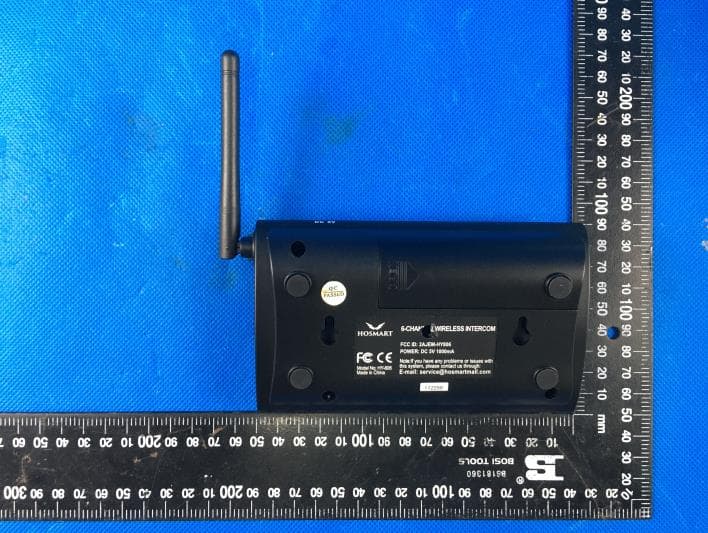
Click to zoom
Application Details
- Equipment Class
- FRB - Part 95 Family Radio Base Transmitter
- Date of Grant
- Mar 10, 2020
- Application Purpose
- Original Equipment
- Date of Application
- Mar 10, 2020
- Equipment Note
- 6-CHANNEL WIRELESS INTERCOM
- Frequency Range
- 467.63750000 - 467.63750000
- Country
- China
Documents & Files
Document Text
Text extracted from the exhibit documents filed with the FCC. Open a document above to read the original.
Users Manual
OVERVIEW The intercom has a range of 1/2 mile and can simultaneously handle multiple conversations using a 462Mhz secure digital radio link. The intercom is a half-duplex TDD FM transceiver that alternates between a transmitting or receiving state. Hosmart was founded in 2012 by a former group of Motorola engineers and designers. Now fast forward a few years and we are now the industries leader in home intercom and security products. Our vision is to become the world leader in home intercom products and solutions. We design as well as engineer intelligent home intercom systems. We want to be your homes solution. Our company philosophy is to focus our efforts and energy based on our client's wishes. We are confident that you will enjoy and be satisfied with our products. Any damage or malfunction of Hosmart product is 100% guaranteed to be replaced. If you have any questions with the unit, please contact us by navigating to www.myhosmart.com, then click Warranty, and fill out the form, we will assist you as quickly as possible. E-mail: [email protected] Phone: (502)-341-7705 Note: Your call is very important to us, if we can not answer your call on time ,we will reply your call in 24 hours. BATTERY The intercom can also run on an 18650 battery as backup, for up to one week, depending on use. The 18650 battery is not included in the package. We recommend installing a 3.7V/2800mAh for better battery life. The red light will illuminate while charging, The red light will turn off once the battery is fully charged. 6-CHANNEL WIRELESS INTERCOM MODEL:HY-806 Make a Call Select the desired channel by pressing and releasing a channel button, then press CALL. This will ring all devices set to that channel. Continue the conversation as described in “Receive a call”. Notes: • You will not be able to hear a transmission from another device while you are pressing the TALK button. • When talk ends, the channel of calling unit automatically change to the originally set channel after 1 minute. CAUTIONS The following will help you maintain your wireless intercom for years to come. * Keep stations from getting wet, as they are not waterproof. * Keep stations in a control environment. Avoid extreme temperatures. * Handle the stations with care. Do not drop, throw, or mishandle the stations. * Keep stations clean from dust and dirt as this can damage the sensitive electronics. * Do not use chemicals or cleaning solvent. Use a damp cloth to clean the station. * Modifying or tampering with the stations internal components can cause it to malfunction, and will also void your warranty. * If your product is not working as advertised then return FEATURES ANT(antenna) Sends and received FM wireless signal. MIC Speak towards MIC (30-40 cm away) with normal volume. CALL To make a call, select the channel you want to communicate with and press “CALL”. TALK (+ Low Battery Indicator) The red LED indicator will keep flash on Talk button if the battery is low. Press and hold "TALK" when speaking. Release "TALK" to listen for a response. The indicator turns off when transmission is complete. The TALK button red LED indicator will flash when the battery is low. ON/OFF (+ Monitor Mode) ON / OFF: Plug the intercom into an outlet with the AC adapter. The unit will turn on automatically. After installing the battery, press ON/OFF to turn on the intercom, press and hold “ON/OFF” for 3 seconds to turn OFF. Monitor Mode: Press “Monitor” to put the intercom in monitor mode. The unit will be monitored for 24 hours by other units that have been set to the same channel. Press any function button to exit Monitor mode. GROUP (Group-Call Function) Press and hold “GROUP” to talk to all intercoms simultaneously, even the device in different channel. 0-5 channel number Set the channel for each intercom. The default channel is #1. Volume Adjustment (VOL+/VOL-) Press "VOL -" or "VOL +" to decrease or increase the volume level. A tone will sound when you have reached the maximum or minimum limit. N ote: To choose different ring tones Step1. Press and hold the "VOL-" to enter the chimes select mode. Step2. Press "CALL" to choose the ring tone you like. Step3. There are 4 different chimes you may choose. Exit this mode by Pressing any function button. SETTING CHANNEL Please set different channel for different devices by following steps : 1). Use the AC adapter to plug the intercom into a power outlet. 2). Set the channel for each intercom. The default channel is #1. Set the channel by pressing and holding one of the channel buttons1 thru 5 or 0) for 3 seconds, until you hear the Beep and the channel button lights. Set channels on additional intercoms using the same steps. Intercoms may be set to the same or different channel numbers depending on intended use. 3). Make a note of all units that share the same channel number to enable rapid and accurate communication. For example: USING ADDITIONAL STATIONS You may add additional stations to the system as long as they transmit on the same frequency. OPERATION Receive a Call A device will emit a series of rings when receiving a call from another device. Press and hold the TALK button to answer the call, and speak 30-40 cm toward the MIC in a normal voice. The blue LED indicates that Talk mode is active. Release the TALK button to listen for a reply. All devices set to the same channel will receive the transmission. Channel Device Location 2 General Manager Room 3 Conference Room 4 Finance 5 HR 正面 背面 MONITOR TALK ON/OFF Volume Control Function button Speaker Channel select button MIC Antenna TALK ON/OFF RecommendedOptional Install 18650 battery (not provided) AC adapter DC 5V +- parts and products may be used in the performance of warranty service. Repaired or replaced parts and products are warranted for the remainder of the original warranty period. You will be charged for repairs on products no longer covered by warranty. For all returns, please write down the RBM# and return date on the outsid…
Text truncated - open the document above for the full version.
Cover Letter(s)
2020-03-09 Nemko Canada Inc 303 River Road Ottawa, Ontario, Canada K1V 1H2 Attn: Director of Certification Authority to Act as Agent On our behalf, I appoint Shenzhen Huatongwei International Inspection Co., Ltd./ 1/F, Bldg 3, Hongfa Hi-tech Industrial Park, Genyu Road, Tianliao, Gongming, Shenzhen, China / Hans Hu,. to act as our agent in the preparation of this application for equipment certification. I certify that submitted documents properly describe the device or system for which equipment certification is sought. I also certify that each unit manufactured, imported or marketed, as defined in the Federal Communications Commission’s regulations will have affixed to it a label identical to that submitted for approval with this application. For instances where our authorized agent signs the application for certification on our behalf, I acknowledge that all responsibility for complying with the terms and conditions for certification, as specified by Nemko Canada Inc, still resides with Shenzhen Macross Industrial Co., Ltd. / 3rd floor,#5 Building,Jianghao Technology Park #430 Jihua Rd.Bantian St.Longgang District Shenzhen, Guangdong,China. Dated this Mar.09, 2020 Agency agreement expiration date: Mar.09, 2021 By: William King Signature Printed Title: Manager On behalf of : Shenzhen Macross Industrial Co., Ltd. Telephone: +86-755-28915149
Cover Letter(s)
2020-03-09 Equipment Autorisation Division Federal Communications Commission 7435 Oakland Mills Road Columbia, MD 21046 FCC ID: 2AJEM-HY806 Product Name: 6-CHANNEL WIRELESS INTERCOM Request for Confidentiality Pursuant to Sections 0.457 and 0.459 of the commissions rules, we hereby request that the following documents be held confidential: (List here the documents for which you are seeking confidentiality – for example ...) Schematics Block diagram Operation description BOM PCB Layout PCB Placement Tune up These materials contain trade secrets and proprietary information and are not customarily released to the public. The public disclosure of this information might be harmful to the company and provide unjustified benefits to our competitors. Dated this Mar.09, 2020 By: William King Signature Printed Title: Manager On behalf of : Shenzhen Macross Industrial Co., Ltd. Telephone: +86-755-28915149
External Photos
External Photos
ID Label/Location Info
Label location
Internal Photos
Internal Photos
RF Exposure Info
FCC ID: 2AJEM-HY806 RF Exposure Evaluation LIMIT The criteria listed in the following table shall be used to evaluate the environment impact of human exposure to radio frequency (RF) radiation as specified in 1.1307(b) Limits for Maximum Permissible Exposure (MPE) Frequency range (MHz) Electric field strength (V/m) Magnetic field strength (A/m) Power density (mW/cm 2 ) Averaging time (minutes) (A) Limits for Occupational/Controlled Exposures 0.3–3.0 614 1.63 *(100) 6 3.0–30 1842/f 4.89/f *(900/f 2 ) 6 30–300 61.4 0.163 1.0 6 300–1500 - - f/300 6 1500–100,000 - - 5 6 (B) Limits for General Population/Uncontrolled Exposure 0.3–1.34 614 1.63 *(100) 30 1.34–30 824/f 2.19/f *(180/f 2 ) 30 30–300 27.5 0.073 0.2 30 300–1500 - - f/1500 30 1500–100,000 - - 1.0 30 Note: f = frequency in MHz EVALUATION METHOD Transmission formula: Pd = (Pout*G)/(4*pi*r 2 ) Where Pd = power density in mW/cm 2 , Pout = output power to antenna in mW, G = gain of antenna in linear scale; Pi = 3.1416, R = distance between observation point and center of the radiator in cm TEST RESULT Passed Not Applicable Channel ERP(dBm) Maximum Tune-up (dBm) Power Density (mW/cm2) Limit (mW/cm2) Result CH M1 24.98 25.50 0.071 0.308 Pass CH M2 25.12 25.50 0.071 0.312 Pass Note: 1) The maximum antenna gain is 2dBi 2) The exposure evaluation safety distance is 20mm.
Test Report
Page: 1 of 27 TEST REPORT Report No. ...................................... : CHTEW20030007 Report Verification: Project No.................................: SHT2001042501EW FCC ID ............................................. : 2AJEM-HY806 Applicant’s name ........................... : Shenzhen Macross Industrial Co., Ltd. Address ............................................. : 3rd floor,#5 Building,Jianghao Technology Park #430 Jihua Rd.Bantian St.Longgang District Shenzhen, Guangdong,China Manufacturer.....................................: Shenzhen Macross Industrial Co., Ltd. Address..............................................: 3rd floor,#5 Building,Jianghao Technology Park #430 Jihua Rd.Bantian St.Longgang District Shenzhen, Guangdong,China Test item description .................... : 6-CHANNEL WIRELESS INTERCOM Trade Mark ....................................... : HOSMART/eMACROS Model/Type reference ....................... : HY-806 Listed Model(s) ................................. : - Standard ......................................... : FCC CFR Title 47 Part 95 Subpart B Date of receipt of test sample..........: Jan.16, 2020 Date of testing.............................: Jan.16, 2020- Mar.03, 2020 Date of issue...............................: Mar.04, 2020 Result .................. ........................: PASS Compiled by ( Position+Printed name+Signature): File administrator Echo Wei Supervised by (Position+Printed name+Signature): Project Engineer Gaosheng Pan Approved by (Position+Printed name+Signature): RF Manager Hans Hu Testing Laboratory Name ............. : Shenzhen Huatongwei International Inspection Co., Ltd. Address ............................................. : 1/F, Bldg 3, Hongfa Hi-tech Industrial Park, Genyu Road, Tianliao, Gongming, Shenzhen, China Shenzhen Huatongwei International Inspection Co., Ltd. All rights reserved. This publication may be reproduced in whole or in part for non-commercial purposes as long as the Shenzhen Huatongwei International Inspection Co., Ltd. is acknowledged as copyright owner and source of the material. Shenzhen Huatongwei International Inspection Co., Ltd. takes no responsibility for and will not assume liability for damages resulting from the reader's interpretation of the reproduced material due to its placement and context. The test report merely correspond to the test sample. Report No.: CHTEW20030007 Page: 2 of 27 Issued: 2020-03-04 Shenzhen Huatongwei International Inspection Co., Ltd. Report Template Version: V02 (2019-10) Contents 1. TEST S T A N D A R D S AND R E P O R T V E R S I O N 3 1.1. Test Standards 3 1.2. Report version 3 2. TEST DESCRIPTION 4 3. SUMMARY 5 3.1. Client Information 5 3.2. Product Description 5 3.3. Radio Specification Description 5 3.4. Testing Laboratory Information 6 4. TEST CONFIGURATION 7 4.1. Test frequency list 7 4.2. Test mode 8 4.3. Support unit used in test configuration and system 8 4.4. Testing environmental condition 9 4.5. Measurement uncertainty 9 4.6. Equipment Used during the Test 10 5. TEST CONDITIONS AND RESULTS 11 5.1. Carrier Output Power (ERP) 11 5.2. 99% Occupied Bandwidth & 26dB Bandwidth 12 5.3. Emission Mask 13 5.4. Modulation Limit 14 5.5. Audio Frequency Response 15 5.6. Frequency stability VS Temperature 17 5.7. Frequency stability VS Voltage 18 5.8. Transmit Radiated Spurious Emission 19 6. TEST SETUP PHOTOS 23 7. EXTERANAL AND INTERNAL PHOTOS 24 8. APPENDIX 27 Report No.: CHTEW20030007 Page: 3 of 27 Issued: 2020-03-04 Shenzhen Huatongwei International Inspection Co., Ltd. Report Template Version: V02 (2019-10) 1. TEST STANDARDS AND REPORT VERSION 1.1. Test Standards The tests were performed according to following standards: ‒ FCC Rules Part 95: PERSONAL RADIO SERVICES ‒ FCC Rules Part 2: Frequency allocations and radio treaty matters; General rules and regulations ‒ ANSI C63.26-2013: American National Standard for Compliance Testing of Transmitters Used in Licensed Radio Services ‒ ANSI C63.4-2014: American National Standard for Methods of Measurement of Radio-Noise Emissions from Low-Voltage Electrical and Electronic Equipment in the Range of 9 kHz to 40 GHz 1.2. Report version Revision No. Date of issue Description N/A 2020-03-04 Original Report No.: CHTEW20030007 Page: 4 of 27 Issued: 2020-03-04 Shenzhen Huatongwei International Inspection Co., Ltd. Report Template Version: V02 (2019-10) 2. TEST DESCRIPTION Report clause Test Items Standard Requirement Result 5.1 Carrier Output Power(ERP) Part 95.567 Part 2.1046(a) PASS 5.2 99% Occupied Bandwidth & 26dB bandwidth Part 95.573 Part 2.1049 PASS 5.3 Emission Mask Part 95.579(a)(1)(2)(3) Part 2.1049 PASS 5.4 Modulation Limit Part 95.575 Part 2.1047(b) PASS 5.5 Audio Frequency Response Part 95.575 Part 2.1047(a) PASS 5.6 Frequency Stability V.S. Temperature Part 95.565 Part 2.1055 PASS 5.7 Frequency Stability V.S. Voltage Part 95.565 Part 2.1055 PASS 5.8 Transmit Radiated Spurious Emission Part 95.579(a)(3) Part 2.1053 PASS Note: ‒ The measurement uncertainty is not included in the test result. Report No.: CHTEW20030007 Page: 5 of 27 Issued: 2020-03-04 Shenzhen Huatongwei International Inspection Co., Ltd. Report Template Version: V02 (2019-10) 3. SUMMARY 3.1. Client Information Applicant: Shenzhen Macross Industrial Co., Ltd. Address: 3rd floor,#5 Building,Jianghao Technology Park #430 Jihua Rd.Bantian St.Longgang District Shenzhen, Guangdong,China Manufacturer: Shenzhen Macross Industrial Co., Ltd. Address: 3rd floor,#5 Building,Jianghao Technology Park #430 Jihua Rd.Bantian St.Longgang District Shenzhen, Guangdong,China 3.2. Product Description Name of EUT: 6-CHANNEL WIRELESS INTERCOM Trade Mark: HOSMART/eMACROS Model No.: HY-806 Listed Model(s): - Power supply: DC 5V Adapter information: Model: JHD-AP006U-050100BB-2 Input: 100-240Va.c.,50/60Hz 0.2A Output:5Vd.c.,1000mA Hardware version: Rev.D Software version: V201 3.3. Radio Specification Description Support Frequency Range: CH02~CH05: 462.5875MHz~ 462.6625MHz CH11: …
Text truncated - open the document above for the full version.
Test Setup Photos
TEST SETUP PHOTOS Carrier output power / transmit radiated spurious emission
Contact Information
Applicant
William King(Manager)
Test Firm
Shenzhen Huatongwei International Inspection Co.,Tony Jiang
[email protected]+86-755-26748078
Technical Specifications
| # | Rule Parts | Frequency Range | Power Output | Emission | Tolerance |
|---|---|---|---|---|---|
| 2 | 95B | 467.6375 MHz - 467.6375 MHz | 310.00 mW | 11K0F3E | 0.6 ppm |
Other Applications from Shenzhen Macross Industrial Co., Ltd.

2AJEM-BT274
Jul 29, 2020Wireless Solar Driveway Alarm
Equipment Class
DSC - Part 15 Security/Remote Control Transmitter
2AJEM-MC004
Mar 25, 2020Wireless Solar Driveway Alarm
Equipment Class
DSC - Part 15 Security/Remote Control Transmitter