2AJJCTNS-1176WIRELESS CONTROLLER
ShenZhen YuYuanXin Electronic Technology Co., LTD.
Click to zoom
Application Details
- Equipment Class
- DTS - Digital Transmission System
- Date of Grant
- Jun 21, 2022
- Application Purpose
- Original Equipment
- Date of Application
- Jun 21, 2022
- Equipment Note
- WIRELESS CONTROLLER
- Frequency Range
- 2402.00000000 - 2480.00000000
- Country
- China
Documents & Files
Document Text
Text extracted from the exhibit documents filed with the FCC. Open a document above to read the original.
Users Manual
Product Introduction: 1 名称: TNS-1176 说明书 材质: 100g书写纸 尺寸: 展开尺寸:300x150mm 成品尺寸:75x150mm 颜色: 单黑双面印刷,风琴折 设计师: 全飞鸿 2022.02.28 版本号: KC TNS-1176 2202 A1 This controller supports games on N-S/P-3/Android (supporting Android 6.0 and above) and computer (Win 7 and above)/direct mode/IOS 13/devices, with function button burst settings - Turbo function button, screenshot button, gyroscope gravity sensing, dual motor vibration, host awakening by controller and other functions. 1. Support wireless connection of Bluetooth to N-S/Android (supporting Android 6.0 and above)/computer (Win 7 and above)/IOS 13/direct connection mode/console platform. 2. Support wired connection of data cable to N-S console, P-3/smart TV/TV box. 3. Designed with Turbo setting, changeable Turbo rate, screenshot button, gyroscope gravity sensing and other functions. 4. With adjustable motor vibration speed. 5. Support the console wake-up function and code button connection. 6. Charging indicator. 1. Before using the wired connection, please confirm the system of the N-S console: 'Settings'->'Controller and Sensor'->'Wired connection of Pro controller' is turned on; 2. Connect the controller to the N-S base via the USB data cable to become a wired controller, and the corresponding indicator of the controller will be normally on; 3. Unplug the USB cable, and the controller will automatically reconnect to the console in the wireless mode. Wired connection mode of N-S: 5 1. Before wireless connection, please confirm to enter the system of N-S console: ‘Controller’->‘Change Grip/ Sequence’ is in the pairing state; 2. On the controller, press the "B" + "HOME" buttons for 2 seconds to turn on the controller and enter the pairing mode, and the LED1 to LED4 on the controller will start to flash quickly. When a single LED is normally on, it indicates that the controller is paired with the console successfully. Press HOME to reconnect. Among them, the LED1 to LED4 will flash slowly. After the reconnection is successful, the corresponding indicator will be normally on. N-S wireless connection mode: 6 Press the "X" + "HOME" combination button for 2 seconds to enter the Bluetooth search mode. At the same time, find the Bluetooth name "Gamepad" in the Bluetooth "Available Devices" list of the Android device for pairing. When pairing, LED2 and LED3 flash quickly. After the pairing is successful, LED2 and LED3 will be normally on, and the controller will enter the Android mode. You can play games under the Android standard protocol or enter the Putao Game to download games. Press the HOME button to reconnect, and LED2 and LED3 will flash slowly. After successful reconnection, LED2 and LED3 will be normally on. (Download the Papa game hall simulator on the Application Treasure and install it, open the game simulator, and download and install the game inside to experience the game. Since the Android system is an open platform, the design standards of various game manufacturers are not unified, which will cause that the controller cannot be applicable to all games. Your understanding will be appreciated.) Note: In Android mode, there is no vibration or no six-axis function. Connection of Android device (Android standard HID mode): 7 Connect the controller to the PC device/smart TV/TV box/P-3 console with a USB cable. Open the downloaded simulator. When connecting, the corresponding channel indicator of the controller will be on, and LED1 to LED4 will flash. LED1 will be normally on after the simulator is successfully connected. When connected, the X-INPUT mode will be entered by default. Press the "- and + buttons" for 5S to switch to the PC D-INPUT mode, and the LED2 and LED3 will be normally on. In the main interface of the P-3 console or entering the interface of the game, God of War, LED1 will be on for multiple controllers connected. In the game interface, press and hold the HOME button to view the light number, LED1-4 according to the actual order of connection. Remarks: In the wired connection mode, there is vibration function but not six-axis function. (The smart TV/box shall support the X-INPUT and D-INPUT mode before use). Wired connection PC device/ smart TV/TV box/P-3 host: 10 Product Diagram: 3 2 User Manual Product No.: 1176Version Number: A.1 + Number button Right JoystickLeft joystick Cross button HOME button R button/ R1 button Type-C port L button/ L1 button ZL button/ L2 button ZR button/ R2 button - Number button Screenshot button Channel indicator T buttonX button A button B button B button X button Attention: 8 Press the "Y" + "HOME" combination button for 2 seconds to enter the Bluetooth search mode. At the same time, find the Bluetooth name "DUALSHOCK 4 wireless Controller" in the Bluetooth "Available Devices" list of the Apple device for pairing. When pairing, LED1 and LED4 flash quickly. After the connection is successful, LED1 and LED4 will be normally on. Press the HOME button to reconnect, and LED1 and LED4 flash slowly. After successful reconnection, LED1 and LED4 will be normally on (Download the game from the Apple Store for experience. Such as: Modern Warfare 5 and other games.) Bluetooth connection (xinput) mode: 9 1. Press the "A" + "HOME" combination button for 2 seconds to enter the Bluetooth search mode. At the same time, find the Bluetooth name "Gamepad" in the Bluetooth "Available Devices" list of the WIN10 device for pairing. When pairing, LED2 and LED3 flash quickly. After the pairing is successful, LED2 and LED3 will be normally on. 2. Open the STEAM login account, click (STEAM-Settings-Control- ler-Common Controller Settings) to check the support option, and view (detected controller) the name (displayed as X-ONE controller in WIN10 system in wireless XINPUT mode). 3. Wired connection controller of the notebook, with the Bluetooth name of X-B 360 Controller for Windows. Automatic sleep: 13 1. Wired connection mode: (1) When the console screen is turned off or the console is shut down, the controller will…
Text truncated - open the document above for the full version.
Cover Letter(s)
ShenZhen YuYuanXin Electronic Technology Co., LTD Model Difference 2022/06/17 EUT NAME: ShenZhen YuYuanXin Electronic Technology Co., LTD FCC ID: 2AJJCTNS-1176 MODEL : TNS-1176, TNS-1176C, TNS-1176B All the model are the same circuit and RF module, except model names. Sincerely Client’s signature Client’s name / title : Guangrong Tu / General Manager Contact information / address: Building 11, Tianluohu Industry Park, Guihua Industry Area, Guanguang Road, Guanlan Town, Longhua District, Shenzhen, Guangdong, China
Cover Letter(s)
ShenZhen YuYuanXin Electronic Technology Co., LTD Agent Authorization Company: ShenZhen YuYuanXin Electronic Technology Co., LTD Address: Building 11, Tianluohu Industry Park, Guihua Industry Area, Guanguang Road, Guanlan Town, Longhua District, Shenzhen, Guangdong, China Product Name: WIRELESS CONTROLLER Model Number(s): TNS-1176, TNS-1176C, TNS-1176B Product Description: WIRELESS CONTROLLER We authorize MiCOM Labs Inc., 575 Boulder Court, Pleasanton, California 94566, USA, to act on our behalf on all matters concerning the certification of above named equipment. We declare that MiCOM Labs Inc. is allowed to forward all information related to the approval and certification of equipment to the regulatory agencies as required and to discuss any issues concerning the approval application. Any and all acts carried out by MiCOM Labs on our behalf shall have the same effect as acts of our own. Signature: Date: 2022/06/17 Name: Guangrong Tu Title: General Manager Company: ShenZhen YuYuanXin Electronic Technology Co., LTD
Cover Letter(s)
ShenZhen YuYuanXin Electronic Technology Co., LTD Office of Engineering Technology Federal Communications Commission 7435 Oakland Mills Road Columbia, MD 21046 USA Date: 2022/06/17 Subject; Request for Confidentiality FCC ID: 2AJJCTNS-1176 To Whom It May Concern, Pursuant to the provisions of the Commission’s rules Title 47 Sections §0.457 and §0.459, we are requesting the Commission to withhold the following attachment(s) as confidential documents from public disclosure indefinitely. These documents contain detailed system and equipment descriptions and are considered as proprietary information in operation of the equipment. The public disclosure of these documents might be harmful to our company and would give competitors an unfair advantage in the market. Schematic Diagram Block Diagram Operational Description In additional to above mentioned documents, in order to comply with the marketing regulations in Title 47 CFR §2.803 and the importation rules in Title 47 CFR §2.1204, while ensuring that business sensitive information remains confidential until the actual marketing of newly authorized devices, we request Short Term Confidentiality of the following attachment(s); User Manual For 45 days, pursuant to Public Notice DA 04-1705. OR For 180 days pursuantto KDB 726920 D01. It is our understanding that all measurement test reports, FCC ID label format and correspondence during the certification review process cannot be granted as confidential documents and this information will be available for public review once the grant of equipment authorization is issued. Sincerely, Signature: Name: Guangrong Tu Title: General Manager
External Photos
External Photos
ID Label/Location Info
Size:20*10mm FCC ID: 2AJJCTNS-1176 Label location
Internal Photos
Internal Photos Antenna
RF Exposure Info
FCC ID: 2AJJCTNS-1176 RF exposure evaluation §2.1093 Radiofrequency radiation exposure evaluation: Portable Devices. According to§15.247(i) and§1.1307b(1), systems operating under the provisions of this section shall be operated in a manner that ensures that the public is not exposed to radio frequency energy level in excess of the commission’s guidance. The 1-g SAR test exclusion thresholds for 100 MHz to 6 GHz at test separation distances ≤ 50 mm are determined by: [(max. power of channel, including tune-up tolerance, mW) / (min. test separation distance, mm)] · [√f(GHz)] ≤ 3.0 for 1-g SAR, where f(GHz) is the RF channel transmit frequency in GHz Power and distance are rounded to the nearest mW and mm before calculation When the minimum test separation distance is < 5 mm, a distance of 5 mm according is applied to determine SAR test exclusion. The result is rounded to one decimal place for comparison BLE Modulation Frequency (GHz) Max. Power (dBm) Tune up Power (dBm) Max. Tune up Power (dBm) Max. Tune up Power (mW) Test distance (mm) Result exclusion thresholds for 1-g SAR GFSK(1M) 2.480 3.58 3±1 4 2.51 5 0.79 3.0 Conclusion: For the max result : 0.79W/Kg ≤ FCC Limit 3.0 for 1g SAR. The Product unsupported at the same time to Transmitting.
Test Report
No.:BCTC/RF-EMC-005 Page: 1 of 59 Edition:A.4 TEST REPORT Shenzhen BCTC Testing Co., Ltd. Report No.: BCTC2206695833E Applicant: ShenZhen YuYuanXin Electronic Technology Co., LTD Product Name: WIRELESS CONTROLLER Model/Type Ref.: TNS-1176 Tested Date: 2022-06-06 to 2022-06-14 Issued Date: 2022-06-14 Report No.: BCTC2206695833E No.:BCTC/RF-EMC-005 Page: 2 of 59 Edition:A.4 FCC ID: 2AJJCTNS-1176 The test report is effective only with both signature and specialized stamp. This result(s) shown in this report refer only to the sample(s) tested. Without written approval of Shenzhen BCTC Testing Co., Ltd, this report can’t be reproduced except in full. The tested sample(s) and the sample information are provided by the client. Product Name: WIRELESS CONTROLLER Trademark: N/A Model/Type Ref.: TNS-1176 TNS-1176C Prepared For: ShenZhen YuYuanXin Electronic Technology Co., LTD Address: Building 11, Tianluohu Industry Park, Guihua Industry Area, Guanguang Road, Guanlan Town, Longhua District, Shenzhen, Guangdong, China Manufacturer: ShenZhen YuYuanXin Electronic Technology Co., LTD Address: Building 11, Tianluohu Industry Park, Guihua Industry Area, Guanguang Road, Guanlan Town, Longhua District, Shenzhen, Guangdong, China Prepared By: Shenzhen BCTC Testing Co., Ltd. Address: 1-2/F., Building B, Pengzhou Industrial Park, No.158, Fuyuan 1st Road, Tangwei, Fuhai Subdistrict, Bao'an District, Shenzhen, Guangdong, China Sample Received Date: 2022-06-06 Sample tested Date: 2022-06-06 to 2022-06-14 Issue Date: 2022-06-14 Report No.: BCTC2206695833E Test Standards: FCC Part15.247 ANSI C63.10-2013 Test Results: PASS Remark: This is Bluetooth BLE radio test report. Tested by: Approved by: Brave Zeng/ Project Handler Zero Zhou/Reviewer Report No.: BCTC2206695833E No.:BCTC/RF-EMC-005 Page: 3 of 59 Edition:A.4 Table Of Content Test Report Declaration Page 1. Version .................................................................................................................. 5 2. Test Summary ....................................................................................................... 6 3. Measurement Uncertainty ..................................................................................... 7 4. Product Information And Test Setup ..................................................................... 8 4.1 Product Information ............................................................................................... 8 4.2 Test Setup Configuration ...................................................................................... 8 4.4 Channel List .......................................................................................................... 9 4.5 Test Mode ............................................................................................................. 9 4.6 Table Of Parameters Of Text Software Setting ................................................... 10 5. Test Facility And Test Instrument Used ............................................................... 11 5.1 Test Facility ......................................................................................................... 11 5.2 Test Instrument Used .......................................................................................... 11 6. Conducted Emissions .......................................................................................... 13 6.1 Block Diagram Of Test Setup .............................................................................. 13 6.2 Limit .................................................................................................................... 13 6.3 Test Procedure ................................................................................................... 13 6.4 EUT Operating Conditions .................................................................................. 14 6.5 Test Result .......................................................................................................... 15 7. Radiated Emissions ............................................................................................. 17 7.1 Block Diagram Of Test Setup .............................................................................. 17 7.2 Limit .................................................................................................................... 18 7.3 Test Procedure ................................................................................................... 19 7.4 EUT Operating Conditions .................................................................................. 20 7.5 Test Result .......................................................................................................... 21 8. Radiated Band Emission Measurement And Restricted Bands Of Operation ..... 25 8.1 Block Diagram Of Test Setup .............................................................................. 25 8.2 Limit .................................................................................................................... 25 8.3 Test Procedure ................................................................................................... 26 8.4 EUT operating Conditions ................................................................................... 26 8.5 Test Result .......................................................................................................... 27 9. Power Spectral Density Test ............................................................................... 28 9.1 Block Diagram Of Test Setup .............................................................................. 28 9.2 Limit .................................................................................................................... 28 9.3 Test Procedure ................................................................................................... 28 9.4 EUT Operating Conditions ..............................................................…
Text truncated - open the document above for the full version.
Test Setup Photos
Report No.: BCTC2206695833E No.:BCTC/RF-EMC-005 Page: 57 of 59 Edition:A.4 16. EUT Test Setup Photographs Conducted emissions Photo Radiated Measurement Photos Report No.: BCTC2206695833E No.:BCTC/RF-EMC-005 Page: 58 of 59 Edition:A.4
Contact Information
Applicant
Guangrong Tu(General Manager)
Technical Contact
Test Firm
Shenzhen BCTC Testing Co., Ltd.Sally He
[email protected]15999690624
Technical Specifications
| # | Rule Parts | Frequency Range | Power Output |
|---|---|---|---|
| 1 | 15C | 2.40 GHz - 2.48 GHz | 2.30 mW |
Other Applications from ShenZhen YuYuanXin Electronic Technology Co., LTD.
2AJJC-TP5-35135
Feb 02, 2026WIRELESS KEYBOARD
Equipment Class
DSS - Part 15 Spread Spectrum Transmitter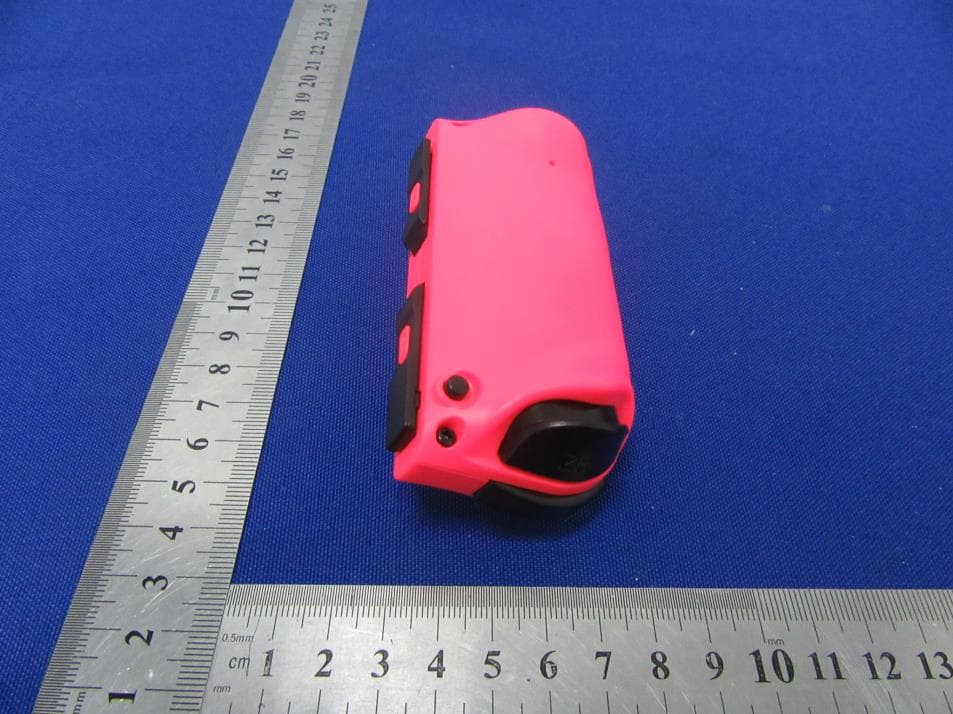
2AJJCTNS-0163R
Jun 07, 2021JOY-PAD (L) / (R)
Equipment Class
DXX - Part 15 Low Power Communication Device Transmitter
2AJJC-TP4022
Nov 29, 2020Wireless Keyboard
Equipment Class
DXX - Part 15 Low Power Communication Device Transmitter
2AJJC-TYX-586
Nov 23, 2020Wireless Keyboard
Equipment Class
DXX - Part 15 Low Power Communication Device Transmitter