2AJN7-TP00146ALQNotebook Computer
LC Future Center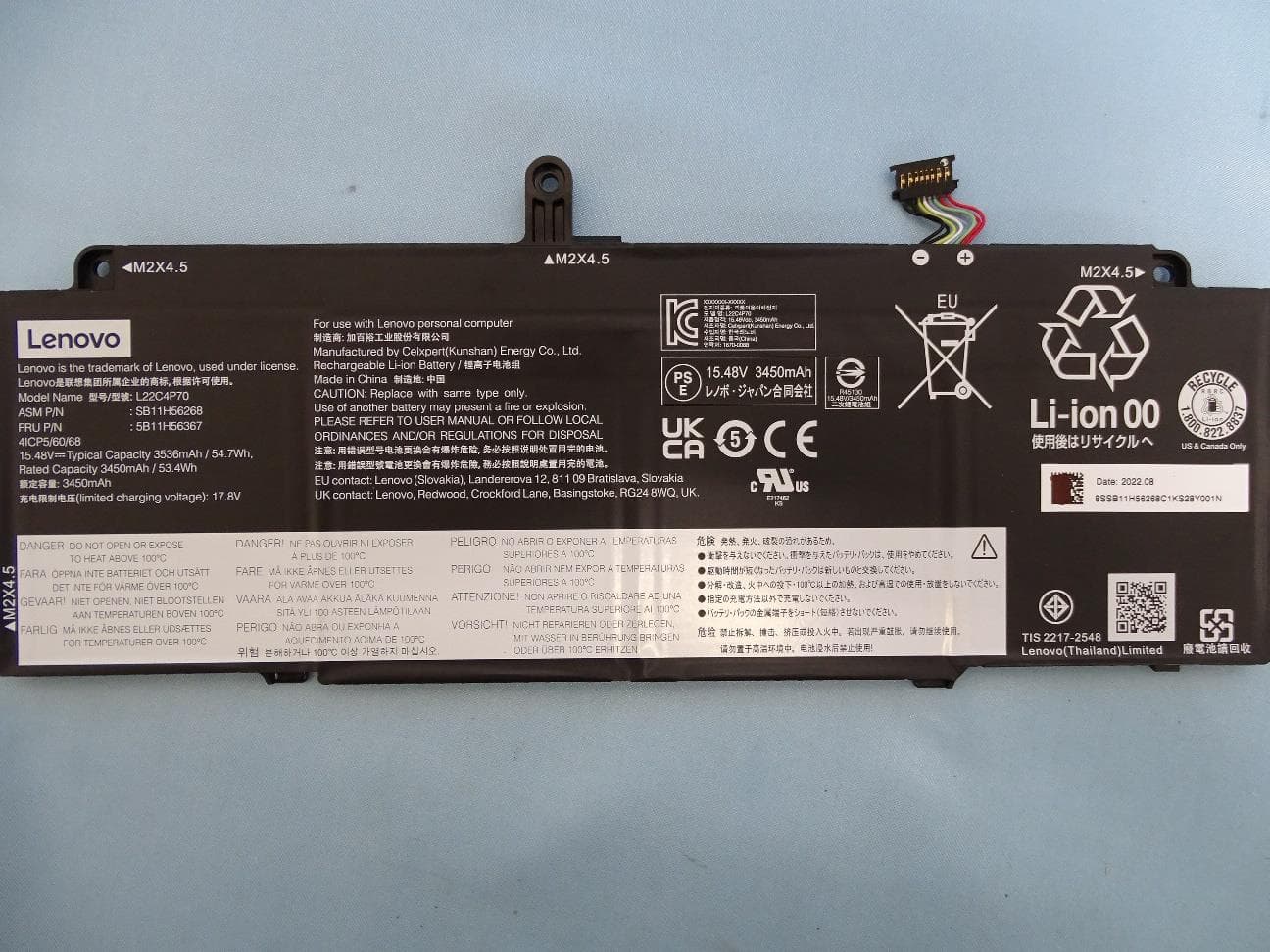
Click to zoom
Application Details
- Equipment Class
- PCB - PCS Licensed Transmitter
- Date of Grant
- Mar 27, 2023
- Application Purpose
- Original Equipment
- Date of Application
- Mar 09, 2023
- Equipment Note
- Notebook Computer
- Frequency Range
- 673.00000000 - 688.00000000
- Company
- LC Future Center
- Country
- Taiwan
Documents & Files
Document Text
Text extracted from the exhibit documents filed with the FCC. Open a document above to read the original.
Users Manual
X13 Gen 4 and X13 Yoga Gen 4 User Guide Read this first Before using this documentation and the product it supports, ensure that you read and understand the following: • Safety and Warranty Guide • Setup Guide • Generic Safety and Compliance Notices First Edition (April 2023) © Copyright Lenovo 2023. LIMITED AND RESTRICTED RIGHTS NOTICE: If data or software is delivered pursuant to a General Services Administration “GSA” contract, use, reproduction, or disclosure is subject to restrictions set forth in Contract No. GS- 35F-05925. Contents Discover your Lenovo notebook. . . . . iii Chapter 1. Meet your computer. . . . . 1 Front view. . . . . . . . . . . . . . . . . . 1 Side view. . . . . . . . . . . . . . . . . . 5 Bottom view. . . . . . . . . . . . . . . . . 7 Features and specifications. . . . . . . . . . . 9 USB specifications. . . . . . . . . . . . . 9 Chapter 2. Get started with your computer. . . . . . . . . . . . . . . . 11 Access networks. . . . . . . . . . . . . . 11 Connect to Wi-Fi networks. . . . . . . . . 11 Connect to the wired Ethernet. . . . . . . 11 Connect to a cellular network (for selected models). . . . . . . . . . . . . . . . 11 Turn on the Airplane mode. . . . . . . . . 12 Interact with your computer. . . . . . . . . . 12 Use the keyboard shortcuts. . . . . . . . 12 Use the TrackPoint pointing device. . . . . 14 Use the trackpad. . . . . . . . . . . . 15 Use the touch screen (for selected models). . 16 Connect to an external display. . . . . . . 18 Get to know YOGA modes ( for X13 Yoga Gen 3 only). . . . . . . . . . . . . . . . . . . 19 Use Lenovo Integrated Pen (for selected models). . . . . . . . . . . . . . . . . . 20 Chapter 3. Explore your computer. . 23 Lenovo apps. . . . . . . . . . . . . . . . 23 The Vantage app. . . . . . . . . . . . 23 AI Meeting Manager (for selected models). . . 23 Lenovo Smart Appearance (for selected models). . . . . . . . . . . . . . . . 24 Lenovo Quick Clean / Clean Your Device. . . 24 Smart features (for selected models). . . . . . . 25 Color calibration (for selected models). . . . . . 27 Intelligent cooling. . . . . . . . . . . . . . 28 Manage power. . . . . . . . . . . . . . . 30 Check the battery status. . . . . . . . . 30 Charge the computer. . . . . . . . . . . 30 Change the power settings. . . . . . . . 31 Transfer data. . . . . . . . . . . . . . . . 31 Set up a Bluetooth connection. . . . . . . 31 Set up an NFC connection. . . . . . . . . 32 Use an SD card or smart card. . . . . . . 32 Accessories. . . . . . . . . . . . . . . . 33 Purchase accessories. . . . . . . . . . 33 Chapter 4. Secure your computer and information. . . . . . . . . . . . . . . 35 Lock the computer. . . . . . . . . . . . . 35 Log in with your fingerprint. . . . . . . . . . 35 Log in with your face ID (for selected models). . . 36 Detect human presence (for selected models) . . . 36 Protect your privacy (for selected models). . . . 37 Protect data against power loss (for selected models). . . . . . . . . . . . . . . . . . 37 UEFI BIOS passwords. . . . . . . . . . . . 37 Password types. . . . . . . . . . . . . 37 Set, change, or remove a password. . . . . 39 Password types. . . . . . . . . . . . . 40 Set, change, and remove a password. . . . 41 Associate your fingerprints with passwords (for selected models). . . . . . . . . . . 42 FIDO (Fast Identity Online) authentication. . . . . 42 Certificate based BIOS management. . . . . . 43 Chapter 5. Configure advanced settings. . . . . . . . . . . . . . . . . 45 UEFI BIOS. . . . . . . . . . . . . . . . . 45 Enter the UEFI BIOS menu. . . . . . . . . 45 Navigate in the UEFI BIOS interface. . . . . 45 Set the system date and time. . . . . . . . 45 Change the startup sequence. . . . . . . 45 View UEFI BIOS Event logs. . . . . . . . 45 Detect memory retraining. . . . . . . . . 47 Reset system to factory defaults. . . . . . 47 Update UEFI BIOS. . . . . . . . . . . . 47 Install a Windows operating system and drivers. . 48 Chapter 6. CRU replacement. . . . . 51 CRU list. . . . . . . . . . . . . . . . . . 51 Disable Fast Startup and the built-in battery. . . . 51 Replace a CRU. . . . . . . . . . . . . . . 52 Base cover assembly. . . . . . . . . . . 52 Wireless WAN card (for selected models). . . 54 M.2 solid-state drive. . . . . . . . . . . 55 Chapter 7. Help and support. . . . . 57 Frequently asked questions. . . . . . . . . . 57 Error messages. . . . . . . . . . . . . . . 58 Beep errors. . . . . . . . . . . . . . . . 59 Self-help resources. . . . . . . . . . . . . 60 Windows label. . . . . . . . . . . . . . . 61 Call Lenovo. . . . . . . . . . . . . . . . 61 © Copyright Lenovo 2023i Before you contact Lenovo. . . . . . . . 61 Lenovo Customer Support Center. . . . . . 62 Purchase additional services. . . . . . . . . . 63 Appendix A. Compliance information. . . . . . . . . . . . . . . 65 Appendix B. Notices and trademarks. . . . . . . . . . . . . . . 69 iiX13 Gen 4 and X13 Yoga Gen 4 User Guide Discover your Lenovo notebook Thank you for choosing a Lenovo ® notebook! We are dedicated to delivering the best solution to you. Before starting your tour, please read the following information: • Illustrations in this documentation might look different from your product. • Depending on the model, some optional accessories, features, software programs, and user interface instructions might not be applicable to your computer. • Documentation content is subject to change without notice. To get the latest documentation, go to https:// pcsupport.lenovo.com . © Copyright Lenovo 2023iii ivX13 Gen 4 and X13 Yoga Gen 4 User Guide Chapter 1. Meet your computer Front view For ThinkPad X13 Gen 4 Item Description Item Description Microphone Infrared camera / Camera Webcam privacy shutter Touch screen Power button with fingerprint reader Speaker © Copyright Lenovo 20231 Item Description Item Description NFC (near field communication) mark Trackpad TrackPoint buttons TrackPoint ® pointing stick * for selected models Webcam privacy shutter Slid…
Text truncated - open the document above for the full version.
Users Manual
Generic Safety and Compliance Notices Read this first • These notices provide safety and compliance information about Lenovo notebook computers, tablets, desktop computers, and workstations. Depending on the model, some information might not be applicable to your product. For additional legal notices, refer to User Guide of your product at https:// support.lenovo.com . • Documentation content is subject to change without notice. To get the latest documentation, go to https://pcsupport.lenovo.com. Third Edition (March 2021) © Copyright Lenovo 2020, 2021. LIMITED AND RESTRICTED RIGHTS NOTICE: If data or software is delivered pursuant to a General Services Administration “GSA” contract, use, reproduction, or disclosure is subject to restrictions set forth in Contract No. GS- 35F-05925. Contents Chapter 1. Important safety information. . . . . . . . . . . . . . . . 1 Safety notices. . . . . . . . . . . . . . . . 1 Important information about using your computer (for notebook computers). . . . . . . . . . . . 1 Conditions that require immediate action. . . . . . 3 Service and upgrades. . . . . . . . . . . . . 4 Power cord notice (for desktop computers and workstations). . . . . . . . . . . . . . . . . 5 Power cords and power adapters. . . . . . . . . 6 Extension cords and related devices. . . . . . . . 6 Plugs and outlets. . . . . . . . . . . . . . . 7 Power supply statement. . . . . . . . . . . . 7 External devices. . . . . . . . . . . . . . . 7 General battery notice (for notebook computers and tablets) . . . . . . . . . . . . . . . . . 8 Notice for removable rechargeable battery (for selected notebook computers). . . . . . . . . . 8 Notice for built-in rechargeable battery (for selected notebook computers and tablets). . . . . 9 Lithium coin-cell battery notice (for selected models). . . . . . . . . . . . . . . . . . . 9 Heat and product ventilation (for desktop computers and workstations). . . . . . . . . 10 Heat and product ventilation (for notebook computers and tablets) . . . . . . . . . . . . 11 Electrical current safety information. . . . . . . 12 Laser safety information (for selected models). . . 13 Liquid crystal display (LCD) notice (for desktop computers and workstations). . . . . . . . . 13 Liquid crystal display (LCD) notice (for notebook computers and tablets). . . . . . . . . . . . 13 Use earphones, headphones, or a headset. . . . 14 Choking hazard notice. . . . . . . . . . . . 14 Plastic bag notice. . . . . . . . . . . . . . 15 Glass parts notice. . . . . . . . . . . . . . 15 Computer placement notices. . . . . . . . . 15 Hazardous energy statement (for desktop computers and workstations) . . . . . . . . . 15 Tip-over hazard prevention notice (for desktop computers and workstations). . . . . . . . . 16 Static electricity prevention. . . . . . . . . . 16 Cleaning and maintenance (for desktop computers and workstations). . . . . . . . . . . . . . 16 Cleaning and maintenance (for notebook computers and tablets). . . . . . . . . . . . 18 Chapter 2. Compliance information. . . . . . . . . . . . . . . 21 Radio frequency compliance statements. . . . . 21 Wireless-related information. . . . . . . . 21 European Union (EU) / United Kingdom (UK) — Radio Equipment Compliance. . . . . . 22 Brazil. . . . . . . . . . . . . . . . . 22 Mexico. . . . . . . . . . . . . . . . 22 Singapore. . . . . . . . . . . . . . . 22 Electromagnetic emission notices. . . . . . . . 23 Federal Communications Commission (FCC) Supplier’s Declaration of Conformity. . . . . 23 Industry Canada compliance statement. . . 23 European Union (EU) / United Kingdom (UK) — Electromagnetic Compatibility Compliance. . . . . . . . . . . . . . 23 German Class B compliance statement. . . . 24 Japan VCCI Class B compliance statement. . 24 Japan compliance statement for products which connect to the power mains with rated current less than or equal to 20 A per phase. . 24 Japan notice for ac power cord. . . . . . . 24 Environmental information. . . . . . . . . . . 24 Recycling and environmental information. . . 24 Important battery recycling and WEEE information. . . . . . . . . . . . . . . 25 EU ErP (EcoDesign) Directive (2009/125/EC) - external power adapters (Regulation (EU) 2019/1782), Ecodesign for Energy-Related Products Regulations 2010 - UK SI 2010 No. 2617 (Ext PSU), SI 2020 No. 485 (Ntwk Standby), SI 2014 No. 1290 as amended. . . 26 Japan recycling statements. . . . . . . . 26 Recycling information for Brazil. . . . . . . 27 Recycling information for mainland China. . . 27 Battery recycling information for Taiwan. . . 27 Battery recycling information for the United States and Canada (for selected models). . . 28 Restriction of Hazardous Substances (RoHS) Directive of countries and regions. . . . . . 28 ENERGY STAR model information. . . . . . 34 Other compliance information. . . . . . . . . 34 Eye comfort (for desktop computers and workstations). . . . . . . . . . . . . . 34 Remote control (for selected desktop computers and workstations). . . . . . . . 34 Export classification notice. . . . . . . . 34 Lenovo product service information for Taiwan. . . . . . . . . . . . . . . . 34 Taiwan precautionary vision statement. . . . 34 Keyboard and mouse compliance statement for Taiwan (for desktop computers and workstations). . . . . . . . . . . . . . 35 Supplemental information for the Eurasian Union (for selected models). . . . . . . . 35 Brazil audio notice. . . . . . . . . . . . 35 © Copyright Lenovo 2020, 2021i Korea radio frequency compliance statement. . . . . . . . . . . . . . . 35 Regulatory labels. . . . . . . . . . . . 36 Appendix A. TCO Certified. . . . . . 37 Appendix B. Accessibility and ergonomic information. . . . . . . . 39 Appendix C. Notices and trademarks. . . . . . . . . . . . . . . 41 iiGeneric Safety and Compliance Notices Chapter 1.Important safety information Safety notices This information can help you safely use your computer. Follow and retain all information included with your computer. The inform…
Text truncated - open the document above for the full version.
Users Manual
Regulatory Notice Read this first Read this document before using your computer. This computer complies with the radio frequency and safety standards of any country or region in which it has been approved for wireless use. Install and use your computer according to the following instructions. The latest Regulatory Notice manual is available on the Lenovo Web site. To download the manual, go to https://support.lenovo.comand then follow the on-screen instructions. Lisez ce document avant d'utiliser votre ordinateur. Cette ordinateur est conforme aux normes de fréquence radio et de sécurité du pays ou de la région où son utilisation sans fil est autorisée. Installez et utilisez votre ordinateur en vous conformant aux instructions ci-dessous. La dernière version du manuel Regulatory Notice est disponible sur le site Web de Lenovo. Pour télécharger le document, rendez-vous sur https://support.lenovo.comet suivez les instructions à l'écran. First Edition (February 2023) © Copyright Lenovo 2023. LIMITED AND RESTRICTED RIGHTS NOTICE: If data or software is delivered pursuant to a General Services Administration “GSA” contract, use, reproduction, or disclosure is subject to restrictions set forth in Contract No. GS- 35F-05925. Contents About this manual. . . . . . . . . . . . iii Chapter 1. Regulatory information for users in USA and Canada. . . . . . 1 USA - Federal Communications Commission (FCC). . . . . . . . . . . . . . . . . . . . 1 FCC RF exposure compliance. . . . . . . . 4 Emergency Calls. . . . . . . . . . . . . 4 Simultaneous use of RF transmitters. . . . . . 4 Radio Frequency interference requirements. . . 4 Canada — Innovation, Science and Economic Development (ISED). . . . . . . . . . . . . . 4 ISED certification number. . . . . . . . . . 4 Exposure of humans to RF fields (RSS-102) . . . 7 Canada - Innovation, Sciences et Développement économique (ISDE). . . . . . . . . . . . . . 8 Numéro de certification ISDE. . . . . . . . . 8 Conformité des appareils de radiocommunication aux limites d'exposition humaine aux radiofréquences (CNR-102). . . 11 Electromagnetic emission notices. . . . . . . . 11 Usage environment and your health. . . . . . . 11 Precautions against electrostatic discharges (ESD) in inserting or removing the nano-SIM card. . . . 11 Chapter 2. Notice for users in Japan. . . . . . . . . . . . . . . . . . 13 日本国内でご使用になる際の注意. . . . . . . . 13 無線 LAN 製品ご使用時におけるセキュリティに関 するご注意. . . . . . . . . . . . . . . . . 15 使用環境および快適に使用するために. . . . . . 15 日本国内で無線WAN 設備をご使用になる場合の注 意. . . . . . . . . . . . . . . . . . . . 16 無線通信機能(モジュールを含む)を持つパーソナル コンピュータの比吸収率(Body SAR)につい て. . . . . . . . . . . . . . . . . . . . 16 Chapter 3. European Union (EU) / United Kingdom (UK) Compliance. . . 19 UK declaration of conformity. . . . . . . . . . 19 EU declaration of conformity. . . . . . . . . . 19 Bulgarian. . . . . . . . . . . . . . . . . 19 Croatian. . . . . . . . . . . . . . . . . . 19 Czech. . . . . . . . . . . . . . . . . . 19 Danish. . . . . . . . . . . . . . . . . . 20 Dutch. . . . . . . . . . . . . . . . . . . 20 Estonian. . . . . . . . . . . . . . . . . . 20 Finnish. . . . . . . . . . . . . . . . . . 20 French. . . . . . . . . . . . . . . . . . 20 German. . . . . . . . . . . . . . . . . . 20 Greek. . . . . . . . . . . . . . . . . . . 21 Hungarian. . . . . . . . . . . . . . . . . 21 Italian. . . . . . . . . . . . . . . . . . . 21 Latvian. . . . . . . . . . . . . . . . . . 21 Lithuanian. . . . . . . . . . . . . . . . . 21 Norwegian. . . . . . . . . . . . . . . . . 21 Polish. . . . . . . . . . . . . . . . . . . 22 Portuguese. . . . . . . . . . . . . . . . 22 Romanian. . . . . . . . . . . . . . . . . 22 Slovakian. . . . . . . . . . . . . . . . . 22 Slovenian . . . . . . . . . . . . . . . . . 22 Spanish. . . . . . . . . . . . . . . . . . 22 Swedish. . . . . . . . . . . . . . . . . . 23 Turkish. . . . . . . . . . . . . . . . . . 23 Chapter 4. Notice for users in other countries/regions. . . . . . . . . . . 25 Notice for users in Argentina (Nota para uso en Argentina). . . . . . . . . . . . . . . . . 25 Notice for users in Brazil (Aviso para usuarios no Brasil) . . . . . . . . . . . . . . . . . . 26 Notice for Users in Chile (Nota para Uso en Chile). . . . . . . . . . . . . . . . . . . 28 Notice for users in Mexico (Nota para uso en Mexico). . . . . . . . . . . . . . . . . . 28 Notice for users in Morocco. . . . . . . . . . 28 Notice for users in Nigeria. . . . . . . . . . . 29 Notice for users in Pakistan. . . . . . . . . . 29 Notice for users in Saudi Arabia. . . . . . . . 31 Notice for users in Serbia. . . . . . . . . . . 47 Notice for users in South Africa. . . . . . . . . 47 Notice for users in Taiwan. . . . . . . . . . . 48 Chapter 5. Trademarks. . . . . . . . 49 © Copyright Lenovo 2023i iiRegulatory Notice About this manual This manual contains regulatory information for the following wireless modules and ThinkPad ® products. (1) WLAN/Bluetooth combo module RTL8822CE (2) WLAN/Bluetooth combo module RTL8852BE (3) WLAN/Bluetooth combo module RTL8852CE (4) WLAN/Bluetooth combo module QCNFA725 (5) WLAN/Bluetooth combo module MT7921 (6) WLAN/Bluetooth combo module MT7922A12L (7) WLAN/Bluetooth combo module MT7922A22M (8) WLAN/Bluetooth combo module AX201NGW (9) WLAN/Bluetooth combo module AX201D2W (10) WLAN/Bluetooth combo module AX211NGW (11) WLAN/Bluetooth combo module AX211D2W (12) WLAN/Bluetooth combo module BE200D2W (13) WWAN module L860-GL-16 (14) WWAN module FM101-GL (15) WWAN module EM05-CE (16) WWAN module EM05-G (17) WWAN module FM350-GL (18) WWAN module T99W175 (19) NFC module T77H747 (20) RFID module R8XXEA (R8XXEA-V3) (21) Human Presence Sensing ® module X4C007 (22) WWAN module EM05-CN (23) Earbuds L06D (24) Earbuds L06E Note:9560NGW R is a sub-model of 9560NGW, its certification is covered by 9560NGW. Product Compliance IDSupported wireless module ThinkPad X1 Yoga Gen 8TP00128C(11)(13)(17)(19) ThinkPad X1 Carbon Gen 11 TP00129C(11)(13)(15)(17)(19) ThinkPad T14 Gen 4 (Intel ® models…
Text truncated - open the document above for the full version.
Attestation Statements
LC Future Center 7F., No.780, Beian Rd., Zhongshan Dist. Taipei 104, Taiwan Tel: 886-2-2718-8555; Fax: 886-2-2532-3719 Federal Communications Commission 7435 Oakland Mills Road Columbia MD 21046 Date: March 2, 2023 Subject: Certifications concerning “covered” equipment pursuant to Part 2.911(d)(5)(i) and (ii) To whom it may concern, LC Future Center (“the applicant”) certifies that the equipment FCC ID: 2AJN7-TP00146ALQ for which authorization is sought is not “covered” equipment prohibited from receiving an equipment authorization pursuant to section 2.903 of the FCC rules. LC Future Center (“the applicant”) certifies that, as of the date of the filing of the application, the applicant is not identified on the Covered List as an entity producing “covered” equipment. Sincerely, ________________________ Allen Chen Design Leader [email protected]
Cover Letter(s)
LC Future Center 7F., No.780, Beian Rd., Zhongshan Dist. Taipei 104, Taiwan Tel: 886-2-2718-8555; Fax: 886-2-2532-3719 FCC Laboratory 7435 Oakland Mills Rd. Columbia, MD 21046 To whom it may concern: This device with FCC ID: 2AJN7-TP00146ALQ integrates a WWAN module: FCC ID Grant Date WWAN module XMR2021EM05G 07/28/2021 No hardware design changes are made on the modules, and the software has not been changed to increase the RF output power of the modules. Pursuant to KDB 996369 D02v01, the original modular reports as following table mentioned are submitted to represent the compliance of Part 22/24/27/90 conducted RF testing items of this device. Test Report Number SHR/2021/3000701 SZCR210602131701 The radiated RF testing items are tested on this host device, and the test report is submitted additionally. Should you have any question, please do not hesitate to contact me. Sincerely, Allen Chen Design Leader [email protected]
Cover Letter(s)
LC Future Center 7F., No.780, Beian Rd., Zhongshan Dist. Taipei 104, Taiwan Tel: 886-2-2718-8555; Fax: 886-2-2532-3719 Date: December 28, 2022 FCC Laboratory 7435 Oakland Mills Rd Columbia MD 21046 Subject: Request for Confidentiality FCC ID: 2AJN7-TP00146ALQ To Whom It May Concern, Pursuant to the provisions of Sections 0.457 and 0.459 of Commission’s rules (47CFR§§0.457, 0.459), we are requesting the Commission to withhold the following documents from public disclosure indefinitely. Schematic Diagram Block Diagram Part List Operational Description Tune-up Procedure Above mentioned documents which contain detailed system and equipment description are considered as proprietary information in operation of the equipment. The public disclosure of above documents might be harmful to our company and would give competitor an unfair advantage in the market. In additional to above mentioned documents, pursuant to Public Notice DA 04-1705 of the Commission’ s policy, in order to comply with the marketing regulations in 47 CFR §2.803 and the importation rules in 47 CFR §2.1204, while ensuring that business sensitive information remains confidential until the actual marketing of newly authorized devices, we are requesting the Commission to withhold the following documents for 180 days after the grant of equipment authorization is issued: External Photos Internal Photos Test Setup Photos User Manual It is our understanding that all measurement test reports, FCC ID label format cannot be granted as confidential documents and those information will be available for public review once the grant of equipment authorization is issued. Best Regards, _______________________ Allen Chen Design Leader [email protected]
Cover Letter(s)
LC Future Center 7F., No.780, Beian Rd., Zhongshan Dist. Taipei 104, Taiwan Tel: 886-2-2718-8555; Fax: 886-2-2532-3719 FCC Agent Authorization Date: December 28, 2022 To whom it may concern, LC Future Center hereby authorize Sporton International Inc. to act on our behalf in all matters relating to applications for FCC equipment authorization, including the signing of all documents relating to these matters. Any and all acts carried out by Sporton International Inc. on our behalf shall have the same effect as acts of our own. We also hereby certify that neither the applicant nor any party to the application is subject to a denial of Federal benefits that includes FCC benefits pursuant to section 5301 of the Anti-Drug Abuse Act of 1988. 21 U.S.C. 862. This authorization is limited to the product of as following: FCC ID: 2AJN7-TP00146ALQ This authorization is valid until further written notice from the LC Future Center Sincerely, ________________________ Allen Chen Design Leader [email protected]
External Photos
PHOTOGRAPHS OF EUT Report No.: EP2N1408-01 TEL : 0800-800005 Page Number : 1 of 30 FAX : 886-3-328-4978 Issue Date : Jan. 19, 2023 E-mail : [email protected] Report Version : 02 1. External Photograph of EUT Brand Name: Lenovo / Model Name: TP00146A Sample 1 and Sample 2 PHOTOGRAPHS OF EUT Report No.: EP2N1408-01 TEL : 0800-800005 Page Number : 2 of 30 FAX : 886-3-328-4978 Issue Date : Jan. 19, 2023 E-mail : [email protected] Report Version : 02 PHOTOGRAPHS OF EUT Report No.: EP2N1408-01 TEL : 0800-800005 Page Number : 3 of 30 FAX : 886-3-328-4978 Issue Date : Jan. 19, 2023 E-mail : [email protected] Report Version : 02 PHOTOGRAPHS OF EUT Report No.: EP2N1408-01 TEL : 0800-800005 Page Number : 4 of 30 FAX : 886-3-328-4978 Issue Date : Jan. 19, 2023 E-mail : [email protected] Report Version : 02 PHOTOGRAPHS OF EUT Report No.: EP2N1408-01 TEL : 0800-800005 Page Number : 5 of 30 FAX : 886-3-328-4978 Issue Date : Jan. 19, 2023 E-mail : [email protected] Report Version : 02 PHOTOGRAPHS OF EUT Report No.: EP2N1408-01 TEL : 0800-800005 Page Number : 6 of 30 FAX : 886-3-328-4978 Issue Date : Jan. 19, 2023 E-mail : [email protected] Report Version : 02 PHOTOGRAPHS OF EUT Report No.: EP2N1408-01 TEL : 0800-800005 Page Number : 7 of 30 FAX : 886-3-328-4978 Issue Date : Jan. 19, 2023 E-mail : [email protected] Report Version : 02 PHOTOGRAPHS OF EUT Report No.: EP2N1408-01 TEL : 0800-800005 Page Number : 8 of 30 FAX : 886-3-328-4978 Issue Date : Jan. 19, 2023 E-mail : [email protected] Report Version : 02 720510 PHOTOGRAPHS OF EUT Report No.: EP2N1408-01 TEL : 0800-800005 Page Number : 9 of 30 FAX : 886-3-328-4978 Issue Date : Jan. 19, 2023 E-mail : [email protected] Report Version : 02 2. Photograph of Accessory Brand Name: Lenovo / Model Name: TP00146A Specification of Accessory AC Adapter Brand Name Lenovo Model Name ADLX45YCC2G Battery Brand Name Lenovo Model Name L22C4P70 Remark: For accessories equipped with this EUT, please refer to the following photos. PHOTOGRAPHS OF EUT Report No.: EP2N1408-01 TEL : 0800-800005 Page Number : 10 of 30 FAX : 886-3-328-4978 Issue Date : Jan. 19, 2023 E-mail : [email protected] Report Version : 02 PHOTOGRAPHS OF EUT Report No.: EP2N1408-01 TEL : 0800-800005 Page Number : 11 of 30 FAX : 886-3-328-4978 Issue Date : Jan. 19, 2023 E-mail : [email protected] Report Version : 02 AC Adapter PHOTOGRAPHS OF EUT Report No.: EP2N1408-01 TEL : 0800-800005 Page Number : 12 of 30 FAX : 886-3-328-4978 Issue Date : Jan. 19, 2023 E-mail : [email protected] Report Version : 02 720510 Battery
ID Label/Location Info
1 FCC/ISED E-Label Information A. Information to be displayed 1. The information that will be displayed on the e-label and information that will remain in the user manual is shown below: Information on E-label In Manual FCC number/ISED number Yes Yes Model Yes Yes FCC logo Yes Yes 15.19 statement (“This device complies with part 15 of the FCC Rules. Operation is subject to the following two conditions: (1) This device may not cause harmful interference, and (2) this device must accept any interference received, including interference that may cause undesired operation.”) No Yes RSS GEN or other mandatory user information required to be on the surface of the device No Yes Images of the e-label screen are provided below: 2 B. Access to the required information on the e-label 1. Users must be able to access the regulatory information without requiring special access codes or permissions, and in all cases the information must be accessible in no more than three steps from a product’s main or home menu. The actual steps are: To access the e-label information, do one of the following: -Restart the computer. When the logo screen is displayed, press F9. -Restart the computer. When the logo screen is displayed, press Enter or tap the prompt to enter the Startup Interrupt menu. Then, press F9 or tap the Regulatory information option. No special access codes or permissions are required to go through the above steps beyond entering a user-defined password to protect against unauthorized access to the device. 2. Instructions must be provided with the product at the time of purchase, in the user manual, operating instructions, packaging material, quick guide pamphlet, etc. Alternatively, a product-related website is permitted, if a reference (URL) to obtain the website information is provided at the time of purchase in the user manual, operating instructions, packaging material, quick guide pamphlet, etc. The information to the user is provided in the user manual. 3. Products must not require special accessories or supplemental plug-ins (e.g., the installation of a SIM/USIM card) to access the information. Access to regulatory information must be provided without special codes, accessories, or permissions beyond the normal security protection to unlock the screen, sign-in page, or overall product access. The devices do not require special code, accessories or supplemental plug-ins to access the information. 4. The FCC ID/ISED ID, warning statements, or other information must be displayed electronically in a manner that is clearly legible without the aid of magnification. Yes, it is clearly legible without the aid of magnification. 5. Both regulatory information and dedicated exclusive application(s) or script(s) must be secured and implemented in a factory- set-unalterable format. The regulatory information must be capable of being retrieved and displayed locally, and under the control of the end user in possession of Yes, it is secured and the user cannot modify it. 3 the product. The method must be secure, such that the application or script ensures that the regulatory information correctly displayed. C. Labeling for Importation and Purchasing 1. When e-labeling is used, a physical temporary label is also required on the product, or a label on the packaging, at the time of importation, marketing, and sales.8 The physical label can be a summary version of the required regulatory information, such that the product can be identified as complying with the FCC’s and ISED’s equipment authorization requirements. The information may simply be the FCC ID and ISED ID for products subject to certification. Products imported that are already packaged for sale and have a physical temporary label will satisfy this requirement. However, for products imported in bulk and not packaged individually, it is acceptable to use a temporary removable adhesive label on the product, or temporary or permanent labels on the shipping packaging or protective bags. Any removable adhesive label shall be of a type intended to survive normal shipping and handling. The FCC logo, FCC ID, ISED ID and model number are present on the product packaging.
Internal Photos
PHOTOGRAPHS OF EUT Report No.: EP2N1408-01 TEL : 0800-800005 Page Number : 13 of 30 FAX : 886-3-328-4978 Issue Date : Jan. 19, 2023 E-mail : [email protected] Report Version : 02 3. Internal Photograph of EUT Brand Name: Lenovo / Model Name: TP00146A Sample 1 and Sample 2 PHOTOGRAPHS OF EUT Report No.: EP2N1408-01 TEL : 0800-800005 Page Number : 14 of 30 FAX : 886-3-328-4978 Issue Date : Jan. 19, 2023 E-mail : [email protected] Report Version : 02 PHOTOGRAPHS OF EUT Report No.: EP2N1408-01 TEL : 0800-800005 Page Number : 15 of 30 FAX : 886-3-328-4978 Issue Date : Jan. 19, 2023 E-mail : [email protected] Report Version : 02 PHOTOGRAPHS OF EUT Rep…
Text truncated - open the document above for the full version.
Contact Information
Applicant
Allen Chen(Design Leader)
Technical Contact
Sporton International Inc.Eric Huang
[email protected]886-3-327-3456
No.52, Huaya 1st Rd., Guishan Dist., · Taoyuan · Taiwan
Non-Technical Contact
Sporton International Inc.Ida Chen
[email protected]886-3-327-3456
Test Firm
SPORTON International Inc.Alex Chen
Technical Specifications
| # | Rule Parts | Frequency Range | Power Output | Emission | Tolerance |
|---|---|---|---|---|---|
| 45 | 27 | 673 MHz - 688 MHz | 88.10 mW | 17M8W7D | 2.5 ppm |
Other Applications from LC Future Center
2AJN7-TP00172C
Aug 24, 2026Notebook Computer
Equipment Class
CBE - Citizens Band End User Devices2AJN7-TP00173A
May 28, 2026Notebook Computer
Equipment Class
CBE - Citizens Band End User Devices2AJN7-TP00172A
May 28, 2026Notebook Computer
Equipment Class
PCB - PCS Licensed Transmitter2AJN7-TP00176AL
May 07, 2026Notebook Computer
Equipment Class
PCB - PCS Licensed Transmitter2AJN7-TP00173AL
May 06, 2026Notebook Computer
Equipment Class
CBE - Citizens Band End User Devices