2AKFED42BBluetooth Headset
The Art of Utility AB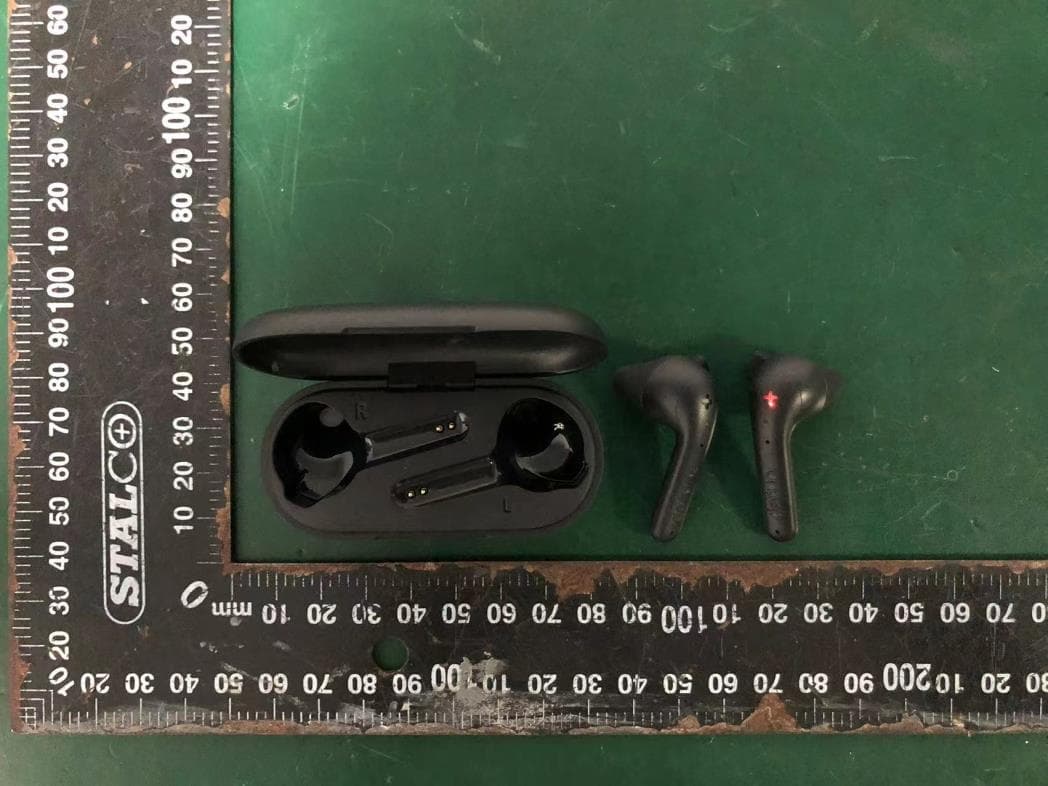
Click to zoom
Application Details
- Equipment Class
- DTS - Digital Transmission System
- Date of Grant
- Nov 20, 2023
- Application Purpose
- Original Equipment
- Date of Application
- Nov 20, 2023
- Equipment Note
- Bluetooth Headset
- Frequency Range
- 2402.00000000 - 2480.00000000
- Company
- The Art of Utility AB
- Country
- Sweden
Documents & Files
Document Text
Text extracted from the exhibit documents filed with the FCC. Open a document above to read the original.
Users Manual
QUICK START GUIDE TRUE BASIC I want to reset my earbuds. How do I do that? 1. Turn off the Bluetooth function on close-by devices to avoid accidental pairing. 2. Take out the earbuds from the charging case. Turn off the earbuds by pressing each earbud for 5 seconds. 3. Turn on the earbuds by pressing each earbud for 3 seconds. Hold the earbuds close to each other. 4. Pairing is successful when you hear ”earbuds paired”. 5. Turn on the Bluetooth function on the device you want to pair your earbuds with and choose Defunc TRUE BASIC in the list of available devices. Can the earbuds be connected to two devices at the same time? No. They can only be connected to one device at a time only. Can I use one earbud and charge the other one in the charging case? Yes you can! How do I unpair the earbuds and my device? Go to the Bluetooth settings on your device and look for a text or graphic that reads ”disconnect pairing” or similar. Tap on that text/graphic to unpair. Why won’t the earbuds sync with my device? This can be due to a few different reasons. Please make sure... • ...the earbuds are turned on. • ...Bluetooth is turned off on your device. • ...that the earbuds aren’t connected to another device. • ...the earbuds have low battery. What should I know about Bluetooth interference? Remember that when the 10-meter Bluetooth range is measured, it’s measured between two points without any objects in the way blocking the signal. This means that even though you have your device in your back pocket, the connection might not be 100 percent. If you experience a bad connection, please make sure that as little objects as possible are in the way between your earbuds and your device, for example clothes and accessories in your bag. I would like to claim my Defunc product. What shall I do? If you receive your goods and discover that it is damaged, or have other defects, please contact customer service. Defunc.com/support/ Scroll down and click on the <GET IN TOUCH> button. Provide us with your contact and purchase details. Scan the QR CODE for Defunc True BASIC full manual. QR-CODE TO MANUAL SECURE FIT MAINTIEN SECURISE FIJACIÓN SEGURA SICHERER HALT POWERFUL SOUND SON PUISSANT SONIDO POTENTE STARKES KLANGBILD PLAYTIME AUTONOMIE TIEMPO DE USO SPIELZEIT 22 h All ears around the world deserve good sound. 56 SIMPLIFYING YOUR CHOICE How do I charge the charging case? Plug the USB-C charging cable with the USB-C port on the charging case and plug the other end of the cable into a power source. Charging case and ear- buds can be charged simultaneously. Do note that the charging case cannot be charged if you replace it with a USB-C to USB-C cable. What do the lights on the charging case communicate? Charging case battery status: A flashing light means that the earbuds are being charged. Each light on the charging case equals 25% battery life of the charging case. When each 25% is reached, the corre- sponding light becomes stable, and the next starts flashing. When charged to 100%, all lights are lit. Earbuds battery status: How much battery life there is in the earbuds can be seen on devices like a smartphone. Check the top bar of your phone for a battery icon that appears when you connect your earbuds with it. I’m losing sound in one of the earbuds. What do I do? 1. Make sure the earbud has battery life. If not, place the earbud in the charging case to charge it. 2. Create a new Bluetooth connection between the earbuds and the earbuds and your device by placing the earbuds in the charging case and close the cap. Then, open the cap and pick out the earbuds again. How do I get started? 1. Make sure the earbuds are fully charged. Do this by charging the earbuds in the charging case until all 4 lights on the charging case are lit. How do I pair the earbuds? When you power them on for the first time they will auto-pair. You will hear ”earbuds paired” when this is done. This takes about one to two seconds after turning them on. How do I pair my device? 1. Take the earbuds out of the charging case or press the touch control area (below the “+” area) on both earbuds for about 3 seconds until you hear the starting sound. Either course of action turns the earbuds on. 2. Go to the Bluetooth settings on your device and make sure Bluetooth is turned on. 3. In the list of available devices, choose Defunc TRUE BASIC and accept to pair. What touch control commands are there? Power on: Open the cap of the charging case and take out the earbuds for auto-power on. If the earbuds are turned off and not in the charging case, press the touch control on both left and right earbuds for 3 seconds to power on. Power off: Put the earbuds back in the charging case and close the lid or touch either the right or left earbuds for 5 seconds. Auto-power off will be activated after 5 minutes in paired mode without connected device. Play/pause: While listening to music, double-click the touch area of any earbud to play and pause the music. Next: Press the right earbud for 2 seconds. Previous track: Press the left earbud for 2 seconds. Volume increase: Click once on the right earbud. Wait 1 second between each touch if you want to increase the volume. Volume decrease: Click once on the left earbud. Wait 1 second between each touch if you want to decrease the volume. Answer/end phone call: Double-click either the left or right earbud to answer or end the phone call. Reject call: Press either the left or right earbuds for 2 seconds to reject the call. Voice assistant: Triple-click on either earbud to activate the voice assistant on your device. How do I charge the earbuds? Put the earbuds in the charging case and close the cap. Make sure that the charging case has battery life. 23 4 BASIC
Attestation Statements
The Art of Utility AB Covered Equipment Certification Attestation Letter 10/8/2023 Federal Communications Commission Authorization and Evaluation Division 7435 Oakland Mills Road Columbia, MD 21046 USA ATTN.: Reviewing Engineer FCC ID: 2AKFED42B The Art of Utility AB (“the applicant”) certifies that the equipment for which authorization is sought is not “covered” equipment prohibited from receiving an equipment authorization pursuant to section 2.903 of the FCC rules. Note: If the equipment for which the applicant seeks authorization is produced by any of the entities identified on the current Covered List, the applicant should include an explanation on why the equipment is not “covered” equipment. Signed: Printed name: Johan Wahlback Title: CEO Company Name: The Art of Utility AB Date: 10/8/2023
Attestation Statements
The Art of Utility AB * the applicant must designate a contact located in the United States for purposes of acting as the applicant’s agent for service of process, regardless of whether the applicant is a domestic or foreign entity. An applicant located in the United States may designate itself as the agent for service of process. U.S. Agent Designation for Service of Process - Certification Attestation Letter 10/8/2023 TO: Federal Communications Commission 7435 Oakland Mills Road Columbia, MD 21046 ATTN.: Reviewing Engineer FCC ID: 2AKFED42B FRN of applicant: 0026055079 Per section 2.911(d)(7) of the FCC rules, The Art of Utility AB (“the applicant”) certifies that the equipment for which authorization is sought is designated to the following U.S. agent* for service of process: Company Name: DEFUNC USA FCC Registration Number (FRN): 0033751033 Physical U.S. Company Address: 315 N PUENTE ST. SUITE D, BREA, CA 92821 Contact Person: Eric Zi Agent Email Address: [email protected] The above contact person accepts the obligation for service of process. The applicant accepts to maintain an agent for no less than one year after the grantee has terminated all marketing and importation or the conclusion of any Commission-related proceeding involving the equipment. Applicant Signed: Agent Signed (if different from Applicant): Signed: Signed: Printed name: Johan Wahlback Printed name: Eric Zi Title: CEO Title: President Company Name: The Art of Utility AB Company Name: DEFUNC USA Date: 10/8/2023 Date: 10/8/2023
Attestation Statements
The Art of Utility AB Covered Equipment Certification Attestation Letter 10/8/2023 Federal Communications Commission Authorization and Evaluation Division 7435 Oakland Mills Road Columbia, MD 21046 USA ATTN.: Reviewing Engineer FCC ID: 2AKFED42B The Art of Utility AB (“the applicant”) certifies that, as of the date of the filing of the application, the applicant is not identified on the Covered List as an entity producing “covered” equipment. Signed: Printed name: Johan Wahlback Title: CEO Company Name: The Art of Utility AB Date: 10/8/2023
Cover Letter(s)
DATE : 11/16/2023 Federal Communications Commission Authorization & Evaluation Division 7345 Oakland Mills Road Columbia, Maryland 21046 Authority to Act as Agent On our behalf, I appoint EST Technology Co., Ltd. Address:Chilingxiang, Qishantou, Santun, Houjie, Dongguan, Guangdong, China to act as our agent in the preparation of this application for equipment certification. I certify that submitted documents properly describe the device or system for which equipment certification is sought. I also certify that each unit manufactured, imported or marketed, as defined in the Federal Communications Commission’s regulations will have affixed to it a label identical to that submitted for approval with this application. For instances where our authorized agent signs the application for certification on our behalf, I acknowledge that all responsibility for complying with the terms and conditions for certification, still resides with The Art of Utility AB Address: Hollandargatan 22, 113 59 Stockholm, Sweden <Signature> Name:Johan Wahlback Title:CEO Applicant Company:The Art of Utility AB
Cover Letter(s)
DATE : 11/16/2023 Equipment Autorisation Division Federal Communications Commission 7435 Oakland Mills Road Columbia, MD 21046 FCC ID: 2AKFED42B Product Name: Bluetooth Headset Request for Confidentiality Pursuant to Sections 0.457 and 0.459 of the commissions rules, we hereby request that the following documents be held confidential: Schematics Block diagram Operation description These materials contain trade secrets and proprietary information and are not customarily released to the public. The public disclosure of this information might be harmful to the company and provide unjustified benefits to our competitors. <Signature> Name:Johan Wahlback Title:CEO Company:The Art of Utility AB
Cover Letter(s)
The Art of Utility AB I, the undersigned, Johan Wahlback: The following models have the same technical construction including circuit diagram, PCB Layout, components and component layout, all electrical construction and mechanical construction, except the different model name and appearance of color. 1) Model No.: Defunc TRUE BASIC 2) Model No.: Defunc TRUE MUSIC 3) Model No.: Defunc TRUE AIR FCC ID: 2AKFED42B Sincerely, Client’s signature : Client’s name / title : Johan Wahlback / CEO Contact information / address : Hollandargatan 22, 113 59 Stockholm, Sweden Telephone: +46708886989 Fax No.: +46708886989
External Photos
External Photos M/N: Defunc TRUE BASIC External Photos M/N: Defunc TRUE BASIC External Photos M/N: Defunc TRUE BASIC External Photos M/N: Defunc TRUE BASIC
ID Label/Location Info
The product certification number will be listed in the user's manual.
Internal Photos
Internal Photos M/N: Defunc TRUE BASIC Bluetooth Antenna Internal Photos M/N: Defunc TRUE BASIC
RF Exposure Info
FCC ID: 2AKFED42B EST Technology Co., Ltd Report No. ESTE-R2309181 Page 1 of 3 FCC RF EXPOSURE REPORT The Art of Utility AB Bluetooth Headset Model Number: Defunc TRUE BASIC Additional Model: Defunc TRUE MUSIC, Defunc TRUE AIR FCC ID: 2AKFED42B Applicant: The Art of Utility AB Address: Hollandargatan 22, 113 59 Stockholm, Sweden Prepared By: EST Technology Co., Ltd. Chilingxiang, Qishantou, Santun, Houjie, Dongguan, Guangdong, China Tel: 86-769-83081888-808 Report Number: ESTE-R2309181 Date of Test: Sep. 07~26, 2023 Date of Report: Sep. 28, 2023 FCC ID: 2AKFED42B EST Technology Co., Ltd Report No. ESTE-R2309181 Page 2 of 3 1. Applicable Standards FCC Part 2(Section 2.1093) FCC KDB 447498 D04 Interim General RF Exposure Guidance v01 2. Exposure Evaluation of Portable or Mobile Devices Human exposure to RF emissions from portable devices (47 CFR §2.1093), as defined by the FCC, must be evaluated with respect to the FCC-adopted limits for SAR. Evaluation of mobile devices, as defined by the FCC, may also be performed with respect to SAR limits, but in such cases it is usually simpler and more cost-effective to evaluate compliance with respect to field strength or power density limits. For certain devices that are designed to be used in both mobile and portable configurations similar to those described in 47 CFR §2.1091(d)(4), such as certain desktop phones and wireless modem modules, compliance for mobile configurations is also satisfied when the same device is evaluated for SAR compliance in portable configurations. The test exclusions are applicable only when the minimum test separation distance is ≤ 50 mm and for transmission frequencies between 300 MHz and 6 GHz. When the minimum test separation distance is < 5 mm, a distance of 5 mm is applied to determine SAR test exclusion. FCC ID: 2AKFED42B EST Technology Co., Ltd Report No. ESTE-R2309181 Page 3 of 3 3. Evaluation Results Mode CH Peak output Power (dBm) Antenna Gain (dBi) effective radiated power (dBm) Target power (dBm) Max. Target power (mW) SAR Test Exemption Limit (mW) GFSK 2402 0.54 1.24 -0.37 0±1 1.259 2.72 2441 -0.71 1.24 -1.62 0±1 1.259 2.72 2480 -1.21 1.24 -2.12 -1±1 1.000 2.72 π/4- DQPSK 2402 2.73 1.24 1.82 2±1 1.995 2.72 2441 1.35 1.24 0.44 1±1 1.585 2.72 2480 0.61 1.24 -0.30 0±1 1.259 2.72 8-DPSK 2402 0.35 1.24 -0.56 0±1 1.259 2.72 2441 -1.08 1.24 -1.99 -1±1 1.000 2.72 2480 -1.63 1.24 -2.54 -1±1 1.000 2.72 BLE 1M 2402 2.92 1.24 2.01 2±1 1.995 2.72 2440 1.31 1.24 0.40 1±1 1.585 2.72 2480 0.35 1.24 -0.56 0±1 1.259 2.72 Note: 1. We choose f=2.48GHz (Highest frequency operate at bluetooth) to calculate MPE limit as higher frequency will have lower MPE limits. 2. SAR Test Exclusion Thresholds is 2.72mW for separation distance 5mm. Therefore, SAR test is not required. End of Test Report
Test Report
FCC ID: 2AKFED42B EST Technology Co., Ltd Report No.ESTE-R2309180 Page 1 of 59 FCC PART 15C TEST REPORT FOR CERTIFICATION On Behalf of The Art of Utility AB Bluetooth Headset Model Number: Defunc TRUE BASIC Additional Model: Defunc TRUE MUSIC, Defunc TRUE AIR FCC ID: 2AKFED42B Applicant : The Art of Utility AB Address: Hollandargatan 22, 113 59 Stockholm, Sweden Prepared By: EST Technology Co., Ltd. Chilingxiang, Qishantou, Santun, Houjie, Dongguan, Guangdong, China Tel: 86-769-83081888-808 Report Number: ESTE-R2309180 Date of Test: Sep. 07~26, 2023 Date of Report: Sep. 28, 2023 FCC ID: 2AKFED42B EST Technology Co., Ltd Report No.ESTE-R2309180 Page 2 of 59 TABLE OF CONTENTS Description Page TEST REPORT VERIFICATION......................................................................................................................... 3 1. GENERAL INFORMATION ................................................................................................................. 5 1.1. Description of Device (EUT) ........................................................................................................... 5 1.2. Antenna Information ........................................................................................................................ 5 1.3. Information of RF Cable .................................................................................................................. 5 2. SUMMARY OF TEST ......................................................................................................................... 6 2.1. Summary of test result ...................................................................................................................... 6 2.2. Test Facilities ................................................................................................................................... 7 2.3. Measurement uncertainty ................................................................................................................. 8 2.4. Assistant equipment used for test ..................................................................................................... 8 2.5. Block Diagram ................................................................................................................................. 8 2.6. Test Mode ......................................................................................................................................... 9 2.7. Power Setting of Test Software ........................................................................................................ 9 2.8. Duty Cycle ...................................................................................................................................... 10 2.9. Channel List ................................................................................................................................... 11 2.10. Test Equipment List ....................................................................................................................... 12 3. 6DB BANDWIDTH .......................................................................................................................... 14 3.1. Limit ............................................................................................................................................... 14 3.2. Test Setup ....................................................................................................................................... 14 3.3. Spectrum Analyzer Setting ............................................................................................................. 14 3.4. Test Procedure ................................................................................................................................ 14 3.5. Test Result ...................................................................................................................................... 14 4. MAXIMUM PEAK OUTPUT POWER ................................................................................................. 15 4.1. Limit ............................................................................................................................................... 15 4.2. Test Setup ....................................................................................................................................... 15 4.3. Spectrum Analyzer Setting ............................................................................................................. 15 4.4. Test Procedure ................................................................................................................................ 15 4.5. Test Result ...................................................................................................................................... 15 5. POWER SPECTRAL DENSITY .......................................................................................................... 16 5.1. Limit ............................................................................................................................................... 16 5.2. Test Setup ....................................................................................................................................... 16 5.3. Spectrum Analyzer Setting ............................................................................................................. 16 5.4. Test Procedure ................................................................................................................................ 16 5.5. Test Result ...................................................................................................................................... 16 6. CONDUCTED BAND EDGE ............................................................................................................. 17 6.1. Limit ........................................................................................…
Text truncated - open the document above for the full version.
Test Report
2.4GHz 3216 Chip Antenna: RANT3216F245X02 _ Application: WLAN,802.11b/g,Bluetooth,WLAN,etc... Features SMD,highreliability,ultraImpact,Omni-directional... PartnumberInformation RANT3216F245X02 (A)(B)(C)(D)(E)(F) ElectricalSpecification ThespecificationisdefinedonEVB. DimensionandTerminalConfiguration No.TerminalName 1Feeding/GNG 2GND/Feeding (A)ProductTypeChipAntenna (B)SizeCode 3.2x1.6mm( ± 0.2mm) (C)MaterialHighKmaterial (D)Frequency2.4~2.5GHz (E)FeedingmodePIFA&SingleFeeding (F)AntennatypeType=01 WorkingFrequencyRange2400~2500MHz Bandwidth120MHz(Min.) PeakGain1.15dBi(Typ.) Impedance50Ohm Returnloss10dB(Min) PolarizationLinear AzimuthBeamwidthOmni-directional OperationTemperature(°C)-40~85°C ResistancetoSolderingHeats 10sec.(@280°C) TerminationNi/Au(Leadless) Dimension(mm) L 3.20±0.20 W 1.60±0.20 T 0.45±0.20 咏成國際科技有限公司電話 :13530576606 RAINInternationalTechnologyCo.,Ltd. TEL:13530576606 2.4GHz 3216 Chip Antenna: RANT3216F245X02 _ 1 EvaluationBoardReference PCBDimensionAntennaLayoutReference Unit:mm ElectricalCharacteristics ReturnLoss&Radiation ReturnLoss Frequency(MHz) S11(dB) 2400-10.50 2450-30.62 2500-11.47 Radiation 2400MHz2450MHz2500MHz Efficiency82.52%85.26%83.01% PeakGain1.15dBi1.24dBi1.19dBi Directivity1.89dBi1.97dBi1.91dBi X Y Z 2400MHz 2450MHz 2500MHz 2.4GHz 3216 Chip Antenna: RANT3216F245X02 _ TapingSpecifications ReelandTapingSpecification ReelSpecification TYPESIZEABCD 32167”5K/Reel 9.0±0.5 60±213.5±0.5178±2 TappingSpecification PackagingTypeABWEFGHTψDP PaperType3216 1.90±0.203.50±0.208.0±0.201.75±0.103.5±0.054.0±0.102.0±0.050.75±0.10 1.50±0.10 4.0±0.1 2.4GHz 3216 Chip Antenna: RANT3216F245X02 Reliability Table _ TestItemProcedure Requirements CeramicType Remark (Reference) Electrical Characterization Fulfilltheelectrical specification UserSpec. Thermal Shock 1.Preconditioning: 50±10°C/1hr,thenkeepfor24±1hrsatroomtemp. 2.Initialmeasure:Spec:referInitialspec. 3.Rapidchangeoftemperaturetest: -30°Cto+85°C;100cycles; 15minutesatLowercategorytemperature; 15minutesatUppercategorytemperature. NoVisibleDamage. Fulfilltheelectrical specification. MIL-STD-202 107 Temperature Cycling 1.Initialmeasure:Spec:referInitialspec. 2.100Cycles(-30°Cto+85°C),SoakMode=1(2Cycle/hours). 3.Measurementat24±2Hoursaftertestcondition. NoVisibleDamage. Fulfilltheelectrical specification. JESD22 JA104 HighTemperature Exposure 1.Initialmeasure:Spec:referInitialspec. 2.Unpowered;500hours@T=+85°C. 3.Measurementat24±2hoursaftertest. NoVisibleDamage. Fulfilltheelectrical specification. MIL-STD-202 108 LowTemperature Storage 1.Initialmeasure:Spec:referInitialspec. 2.Unpowered:500hours@T=-30°C. 3.Measurementat24±2hoursaftertest. NoVisibleDamage. Fulfilltheelectrical specification. MIL-STD-202 108 Solderability (SMDBottomSide) Dippingmethod: a.Temperature:235±5°C b.Dippingtime:3±0.5s Thesoldershouldcover over95%ofthecritical areaofbottomside. IEC60384-21/22 4.10 SolderingHeat Resistance (RSH) Preheatingtemperature:150±10°C. Preheatingtime:1~2min. Soldertemperature:260±5°C. Dippingtime:5±0.5s NoVisibleDamage.IEC60384-21/22 4.10 Vibration5g'sfor20min.,12cycleseachof3orientations Note:Use8"X5"PCB.031"thick7securepointson,onelong sideand2securepointsatcornersofoppositesides.Parts mountedwithin2"fromanysecurepoint.Testfrom10-2000 Hz. NoVisibleDamage.MIL-STD-202 Method204 Mechanical Shock Threeshocksineachdirectionshallbeappliedalongthethree mutuallyperpendicularaxesofthetestspecimen(18shocks) Peakvalue:1,500g’s Duration:0.5ms Velocitychange:15.4ft/s Waveform:Half-sine NoVisibleDamage.MIL-STD-202 Method213 Humidity Bias 1.Humidity:85%R.H.,Temperature:85±2°C. 2.Time:500±24hours. 3.Measurementat24±2hrsaftertestcondition. NoVisibleDamage. Fulfilltheelectrical specification. MIL-STD-202 Method106 2.4GHz 3216 Chip Antenna: RANT3216F245X02 _ Board Flex (SMD) 1.Mountingmethod: IR-Reflow.PCBSize(L:100×W:40×T:1.6mm) 2.Applytheloadindirectionofthearrowuntilbendingreaches 2mm. NoVisibleDamage.AEC-Q200 005 AdhesionForceof1.8Kgfor60seconds.NoVisibleDamage Magnificationof20Xor greatermaybeemployed forinspectionofthe mechanicalintegrityofthe devicebodyterminalsand body/terminaljunction. AEC-Q200 006 Physical Dimension Anyapplicablemethodusingx10magnification,micrometers, calipers,gauges,contourprojectors,orothermeasuring equipment,capableofdeterminingtheactualspecimen dimensions. Inaccordancewith specification. JESD22 JB100 RevisionHistory RevisionDateContent 12019/03/01NewDatasheet 22021/02/22Add2Dradiationcharacteristic
Test Setup Photos
Conducted Test Radiated Test (30-1000 MHz) Radiated Test (Above 1GHz)
Contact Information
Applicant
Johan Wahlback(CEO)
Test Firm
EST Technology Co., Ltd.Iceman Hu
[email protected]+86 0769-83081888
Technical Specifications
| # | Rule Parts | Frequency Range | Power Output |
|---|---|---|---|
| 1 | 15C | 2.40 GHz - 2.48 GHz | 1.96 mW |
Other Applications from The Art of Utility AB

2AKFE-D4551
Dec 29, 2025Bluetooth Wireless Earphones(True Wireless Type)
Equipment Class
DSS - Part 15 Spread Spectrum Transmitter2AKFED200
Feb 04, 2024Bluetooth Speaker
Equipment Class
DTS - Digital Transmission System
2AKFED42N
Dec 21, 2023Bluetooth Headset
Equipment Class
DSS - Part 15 Spread Spectrum Transmitter
2AKFED435
Jul 16, 2023Bluetooth Headset
Equipment Class
DSS - Part 15 Spread Spectrum Transmitter
2AKFED426
Jul 16, 2023Bluetooth Headset
Equipment Class
DTS - Digital Transmission System