2AM5N-ML2M1Magic Leap 2 Compute Pack and Headset
Magic Leap Inc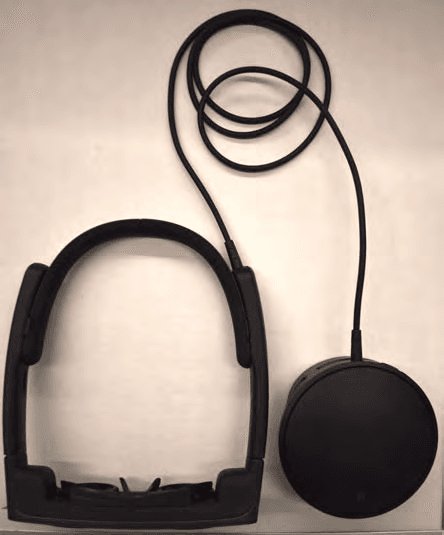
Click to zoom
Application Details
- Equipment Class
- DTS - Digital Transmission System
- Date of Grant
- Jun 12, 2022
- Application Purpose
- Original Equipment
- Date of Application
- Jun 09, 2022
- Equipment Note
- Magic Leap 2 Compute Pack and Headset
- Frequency Range
- 2412.00000000 - 2462.00000000
- Company
- Magic Leap Inc
- Country
- United States
Documents & Files
Document Text
Text extracted from the exhibit documents filed with the FCC. Open a document above to read the original.
Users Manual
DRAFT Magic Leap 2 Safety Guide & Regulatory Information Draft 1.0 Safety Guide Carefully read our Quick Start Guide at www.magicleap.com/quickstart and this Safety Guide at www.magicleap.com/safety before using Magic Leap 2. Failure to do so and follow the instructions in this Safety Guide may result in serious injury, property damage, or damage to the Magic Leap 2. This Magic Leap 2 Safety Guide (“Safety Guide”) is provided to reduce the risk of personal injury, physical discomfort, pain, health issues, and property damage relating to the Magic Leap 2 Headset, Compute Pack, or Controller (collectively “Magic Leap 2” or “Device”), as well as the Compute Pack charger, Controller charger, and other Magic Leap branded accessories sold by Magic Leap or its authorized resellers. Please ensure that all Magic Leap 2 users read and understand this Safety Guide before using the Device. For the full Device description, user agreements, Magic Leap policies, and our return and warranty policies, please visit www.magicleap.com. Changes Magic Leap may change or modify this Safety Guide from time to time to keep it accurate and complete. If we issue a new version of the Safety Guide, please discard your old copy and use the new one. We encourage you to review the Safety Guide and related information at www.magicleap.com/safety from time to time to ensure you are utilizing the latest version. Setting Up the Device Prior to Use.Prior to usingMagic Leap 2, you should read and follow all setup and operating instructions provided with the Device and on the Device. For example, be sure to go through the Fitting Guide and Visual Calibration, both of which you can access in Settings > Device > Calibration. Select “Run Fitting Guide” and “Run Visual Calibration” to begin. Fit.Make sure the Headset is level and fits comfortablyaround your head without pain or pressure. For more guidance, please use the Fitting Guide (in the Settings menu on the Device). Make sure you can see clearly through the Headset and the nose pad rests comfortably on the bridge of your nose. If the nose pad does not provide a good fit for the Headset, replace it with another size and go through the Fitting Guide again. If Visual Calibration fails, you may need to use the larger forehead pad. You can use the Fitting Guide to help you find the right nose and forehead pad sizes. Visit our Customer Care page at care.magicleap.com for steps on how to fit your Magic Leap 2. Visual Calibration.Adjust your Headset until youare able to see the full display, have successfully completed Visual Calibration, and are comfortable using the Device. If you do not pass the Visual Calibration, readjust your fit using the Fitting Guide and read the section below titled “Warning: Unsuccessful Visual Calibration.” For an optimal experience, we recommend that Magic Leap 2 is used by people with an interpupillary distance (the distance between your pupils, also known as “IPD”) between 54-76 millimeters. If you have an IPD outside that range, DRAFT 1 you may have a greater chance of experiencing visual pain or discomfort, and you may not have full visibility of the display. Volume.When you first use Magic Leap 2, start withthe volume at a low level and increase it until you can hear sounds clearly and comfortably. Avoid turning the volume up rapidly, especially if it becomes uncomfortable. Unsuccessful Visual Calibration.You may have an increasedchance of experiencing visual discomfort if you do not successfully complete the Visual Calibration. Magic Leap 2 relies on eye tracking to render content in a way that is designed to be comfortable for your eyes. Upon completing the Visual Calibration process, the Device will let you know if you were successful. Reasons to see a Physician Prior to Use.See yourphysician before using Magic Leap 2 if you: have any conditions that impair your vision (e.g., binocular vision disorder); mobility issues; are pregnant or elderly; or have a heart condition or other serious medical condition such as seizures or migraines. Intended Use.Magic Leap 2 is intended to providea safe spatial computing experience. This intended use requires you to have an unimpaired sense of balance and motion. Do not use Magic Leap 2 while you are fatigued, ill, experiencing symptoms of illness, are under emotional or physical stress, or are under the influence of alcohol or drugs. Unintended uses of the Device increase the likelihood of injury and property damage. Never use Magic Leap 2 while driving, cycling, operating heavy machinery, or operating any other moving vehicle. If any of the following occur while wearing the Device, the user should remove it immediately: ●The Device becomes too hot ●The Device causes discomfort ●If you think the Device may have been damaged ●Any dizziness or lightheadedness occurs DRAFT 2 WARNING: Use of this equipment adjacent to or stacked with other equipment should be avoided because it could result in improper operation. If such use is necessary, this equipment and the other equipment should be observed to verify that they are operating normally. The MANUFACTURER of the ME EQUIPMENT or ME SYSTEM may provide a description or list of equipment with which the ME EQUIPMENT or ME SYSTEM has been tested in a stacked or adjacent configuration and with which stacked or adjacent use resulted in normal operation. Virtual Objects.Remember that Device-generated objectsyou see in your spatial computing environment do not exist in the physical world. Do not attempt to sit or stand on such objects or use them for support. Environment.Use Magic Leap 2 only in a comfortable,safe environment. Magic Leap 2 is designed for indoor use only. To reduce the risk of fire or shock, do not use Magic Leap 2 near water or liquid. Magic Leap 2 should only be used in environments where the ambient temperature is between 10 °C and 25 °C (50 °F and 77 °F). Obstructions.Magic Leap 2 produces an immersive spatialcomputing experience that may distract you…
Text truncated - open the document above for the full version.
Users Manual
DRAFT QUICK START GUIDE ML2 Safety User Guide (Rev. 4.1.2022) DRAFT What’s in the Box Your Magic Leap 2 for Enterprise box contains: ●Headset ●Compute Pack ●Controller ●Enterprise Charger - 2 x 45W USB-C charger and cables for Compute Pack and Controller ●Fit Kit for Headset. A set of nose pads and forehead pads to customize the fit ●Optional Overhead Strap to support in-motion use and slippage ●Frame with eye cups ●Shoulder strap for crossbody wearing ●Controller lanyard to attach to users wrist ●Carry Case and Cleaning Cloth, robust case to carry Headset, Compute Pack and Controller Pictured: Magic Leap 2 Headset, Compute Pack and Controller. DRAFT Attach Your Compute Pack to a Pocket... Slide the Compute Pack onto a pocket until it moves past the clip. Please don’t put the Compute Pack in a pouch or pocket while in use or block the vents. The Compute Pack easily clips onto your pocket. DRAFT ... Or to the Shoulder Strap Clip the carabiners on the Shoulder Strap to the corresponding fasteners on the Compute Pack. Get comfortable by adjusting the length. Fasten the carabiners on the ends of the Shoulder Strap to the Compute Pack to hold it into place. DRAFT Put on your Headset Gently stretch the back of your Headset headband until it comfortably fits over your head. For the best comfort and visual experience, rest the Headset around the widest part of your head. If necessary, insert required pads and nosepiece from the included Fit Kit for an individualized comfortable fit for you. The Headset adjusts to the width of your head by gently stretching the temples of DRAFT the device. Prevent Tangling the Cords Be sure to prevent the cord from getting tangled or wrapped around the headband. The Headset cord should be clear of the headband accessory and torsion band. DRAFT Wear Glasses? Pull the magnetic frame away from the Headset and replace it with the Prescription Insert. Order yours at Rochester Optical’s FrameofChoice.com. A correctly seated Prescription Insert. DRAFT Turn On Your Magic Leap Press the button on the front of the Compute Pack and wait until the lights are fully illuminated. The five lights towards the top of the Compute Pack will be illuminated when fully powered. DRAFT Identifying Buttons and Controls Review the corresponding illustrations to become familiar with the buttons and controls of your new Magic Leap 2. Identify the buttons and controls on the Magic Leap 2 Controller and Compute Pack pictured. DRAFT Set Up Your Device Your device needs to be set up before you can use it. 1. Your Controller should be connected to your device from the factory. If it isn’t already connected, pair your Controller to the Compute Pack using the USB-C to USB-C cable. You can then follow the prompts in your device. 2. Connect to WiFi using the Settings app. a. Click on Network and internet. b. Click on Wi-Fi. c. Scroll through the list of WiFi using the touchpad and choose your preferred network. d. For secure networks, a virtual keyboard will popup: Enter your password using the Controller. e. Click “connect” on the WiFi screen. Connect to WiFi through the Home > Setting > Network & internet menu, pictured here. DRAFT Charge, Clean, and Store Safely Charge For the best experience, make sure the device is fully charged every time you use it. Clean Make sure the device is turned off while cleaning. Remove the Forehead Pad, Nose Pad, and Lens Insert. Use a damp, but not wet, isopropyl alcohol wipe or sterile, lint-free cloth to gently clean the Headset, Compute Pack, and Controller. Use a damp, sterile, lint-free cloth to rinse and a dry one to finish. Store Safely store the device in the Carry Case or box provided. Always keep it out of direct sunlight to avoid damage. For the full safety instructions, see the Safety Guide. DRAFT Keep up to date We may update this guide from time to time. For the latest version, please visit magicleap.com/start Copyright © 2018 - 2022 Magic Leap, Inc.
Cover Letter(s)
Magicr.ri'K Magic Leap 75OO West Sunrise Boulevard Plantation, FL 33313 USA Jonathan Reeves [email protected] May 09,2022 Attn: FCC Office of Engineering and Technology I UL Verification Services TCB The wLAN transmitter uses the Qualcomm geolocation mechanism approved by FCC oET via KDB inquiry' we do not modify this mechanism and it is implemented as described in the Qualcomm supporting documents for the KDB. we understand that it is the grantee,s responsibility to correctly implement the algorithm to ensure compliance with FCC,s rr.rles. Re: 8O2.11d Attestation FCC lD: 2AMSN-ML2Ml To Whom lt May Concern: Jonathan Reeves Sr. Director. Regulatory/Compliance/euality Systems. Best Regards
Cover Letter(s)
MagicleaP� Magic Leap 7500 West Sunrise Boulevard Plantation, FL 33313 USA Jonathan Reeves [email protected] May 09, 2022 UL LLC 47173 Benicia Street Fremont, CA 94538, USA Re: FCC Agent Authorization To whom it may concern: I, the undersigned, hereby authorize UL Verification Services Inc. to act on our behalf in all manners relating to application for authorization of the following equipment: 2AM5N-ML2M1 2AM5N-ML2M2 This includes signing of all documents relating to these matters. Any and all acts carried out by UL Verification Services Inc. on our behalf shall have the same effect as acts of our own. I, the undersigned, hereby certify that we are not subject to a denial of federal benefits, that includes FCC benefits, pursuant to Section 5301 of the Anti-Drug Abuse Act of 1988, 21 U.S.C. 853(a). In authorizing UL Verification Services Inc. as our representative, we still recognize that we are responsible to: a) fulfill the requirements for the scope of certification requested, including implementing any appropriate changes requested by UL Verification Services Telecommunications Certification Body (TCB) and / or the FCC; o) supply any and all information needed for the evaluation of the products for which certification is sought; :::) make claims regarding certification only in respect of the scope for which certification has been granted; :I ) not use our product certification in such a manner as to bring the TCB or FCC into disrepute and to not make any statement regarding product certification which the TCB or FCC may consider misleading or unauthorized; e) discontinue use of all advertising matter that contains any reference thereto and complies with any and all actions required by the FCC upon suspension or cancellation of certification; f) use certification only to indicate that products are certified in conformity with specified standards; Magicr.r}K Magic Leap 75OO West Sunrise Boulevard Plantation, FL 33313 USA Jonathan Reeves Jreeves@ magicleap.com g) endeavor to ensure that no certificate or report or any part thereof is used in a misleading manner, and any copies of the grants/certificates shall be reproduced in their entirety; 'r) comply with the requirements of the TCB and FCC, including the use of marks and label information prescribed for the scope of certification, when making reference to product certification in communication media such as documents, brochure or advertisements; ) comply with the requirements for certification, supply any information needed for evaluation of products to be certified and, where applicaule, make provision for the participation of observers; i) ensure that products marketed under the scope of the requested certification continue to comply with the certification requirements; k) provide a sample of a production unit for testing within 30 days of the request should this product be selected as part of either ilre ics's or the FCC,s market surveillance requirements; ) keep a record of all complaints relating to product's compliance with requirements of relevant standard; make records available to UL or FCC when requested; take appropriate action with respect to such complaints and any deficiencies found in the product that affect compliance with requirements for certification; document the actions taken with respect to complaints and/or deficiencies; 'n) inform the TCB immediately of any changes that may atiect its ability to comply with the certification requirements. This authorization is varid untir further written notice from the appricant. Jonathan Reeves Sr. Director, Regu latory/Compliance/eua lity Systems.
Cover Letter(s)
MagicleaP� Magic Leap 7500 West Sunrise Boulevard Plantation, FL 33313 USA Jonathan Reeves [email protected] May 09, 2022 Attn: FCC Office of Engineering and Technology / UL Verification Services TCB Re: Request for Confidentiality FCCID: 2AM5N-ML2Ml To Whom It May Concern: Pursuant to the provisions of Sections 0.457 and 0.459 of the Commission's rules (47 CFR §§ 0.457, 0.459), we are requesting the Commission to withhold the following attachments as confidential document from public disclosure indefinitely. Schematic Diagram Block Diagram Theory of Operation Above mentioned document contains detailed system and equipment description are considered as proprietary information in operation of the equipment. The public disclosure of abo ve documents might be harmful to our company and would give competitor an u nfair advantage in the market. In addition to above mentioned documents, pursuant to Public Notice DA 04-1705 of the Commission's policy, in order to comply with the marketing regulations in 47 CFR §2.803 and the importation rules in 47 CFR §2.1204, while ensuring that business sensitive i nformation remains confidential until the actual marketing of newly authorized devices. We are requesting the commission to grant short-term confidentiality request on the following attachments until 180 days after the grant date: Internal Photos Test Setup Photos User Manual It is our understanding that all measurement test reports, FCC ID label format and correspondent during certification review process cannot be granted as confidential documents and those information will be available for public review once the grant of equipment authorization is issued. Magicr.r}K Magic Leap 75OO West Sunrise Boulevard Plantation, FL 33313 USA Jonathan Reeves [email protected] Sr. Director, Regulatory/Compliance/euality Systems.
External Photos
FCC ID: 2AM5N-M L2M1 IC: 23045-M L2M1 Page 1 of 4 Magic Leap 2 - Compute Pack and Headset External Photos Figure 1: Compute Pack and Headset FCC ID: 2AM5N-M L2M1 IC: 23045-M L2M1 Page 2 of 4 Figure 6: Compute Pack – Bottom view Figure 3: Compute Pack – Side (bottom) view Figure 4: Compute Pack – Side (left) view Figure 2: Compute Pack – Side (top) view Figure 5: Compute Pack – Side (right) view FCC ID: 2AM5N-M L2M1 IC: 23045-M L2M1 Page 3 of 4 Figure 7: Headset – Top view Figure 8: Headset – Front view FCC ID: 2AM5N-M L2M1 IC: 23045-M L2M1 Page 4 of 4 Figure 10: Headset – Side (left) view Figure 11: Charger Figure 9: Headset – Side (right) view
ID Label/Location Info
FCC ID: 2AM5N-ML2M1 IC: 23045-ML2M1 Page 1 of 2 Magic Leap 2 – Compute Pack and Headset Label Drawings FCC ID: 2AM5N-ML2M1 IC: 23045-ML2M1 Page 2 of 2 Model Number label Location Model: M1003000 M1004000 M1005000 M1103000 M1104000 M1105000
Internal Photos
FCC ID: 2AM5N-M L2M1 IC: 23045-M L2M1 Page 1 of 5 Magic Leap 2 - Compute Pack and Headset Internal Photos Figure 1: Compute Pack – First layer below top cover FCC ID: 2AM5N-M L2M1 IC: 23045-M L2M1 Page 2 of 5 Figure 2: Compute Pack – Second layer below top cover FCC ID: 2AM5N-M L2M1 IC: 23045-M L2M1 Page 3 of 5 Figure 3: Compute Pack – Top PCB view w/ shield Figure 4: Compute Pack – Top PCB view w/o shield FCC ID: 2AM5N-M L2M1 IC: 23045-M L2M1 Page 4 of 5 Figure 5: Compute Pack – Bottom layer before the battery compartment FCC ID: 2AM5N-M L2M1 IC: 23045-M L2M1 Page 5 of 5 Figure 6: Compute Pack – Bottom PCB view w/o fan Figure 7: Compute Pack – Bottom PCB view w/o fan and shield
RF Exposure Info
Plot No. 1 Test Laboratory: UL Verification Services Inc. SAR Lab C Date/Time: 2/28/2022 10:51:31 AM 20220228_SystemPerformanceCheck-D5GHzV2 SN 1138 Frequency: 5250 MHz; Duty Cycle: 1:1; Room Ambient Temperature: 24.0°C; Liquid Temperature: 23.0°C Medium parameters used: f = 5250 MHz; σ = 4.862 S/m; ε r = 34.694; ρ = 1000 kg/m 3 DASY5 Configuration: - Area Scan Setting: Find Secondary Maximum Within: 2.0 dB and with a peak SAR value greater than 0.0012W/kg - Electronics: DAE4ip Sn1621; Calibrated: 4/20/2021 - Probe: EX3DV4 - SN3885; ConvF(4.85, 4.85, 4.85) @ 5250 MHz; Calibrated: 9/23/2021 - Sensor-Surface: 1.4mm (Mechanical Surface Detection) - Phantom: SAM v4.0(A); Type: QD000P40CD; Serial: 1632 Head/5.25 GHz, Pin=100mW/Area Scan (7x7x1): Measurement grid: dx=10mm, dy=10mm Maximum value of SAR (measured) = 19.8 W/kg Head/5.25 GHz, Pin=100mW/Zoom Scan (8x8x7)/Cube 0: Measurement grid: dx=4mm, dy=4mm, dz=1.4mm Reference Value = 58.28 V/m; Power Drift = -0.12 dB Peak SAR (extrapolated) = 33.0 W/kg SAR(1 g) = 7.71 W/kg; SAR(10 g) = 2.18 W/kg Smallest distance from peaks to all points 3 dB below = 7.4 mm Ratio of SAR at M2 to SAR at M1 = 63.3% Maximum value of SAR (measured) = 18.6 W/kg 0 dB = 18.6 W/kg = 12.70 dBW/kg Plot No. 2 Test Laboratory: UL Verification Services Inc. SAR Lab C Date/Time: 3/03/2022 11:05:16 AM 20220303_SystemPerformanceCheck-D5GHzV2 SN 1138 Frequency: 5250 MHz; Duty Cycle: 1:1; Room Ambient Temperature: 24.0°C; Liquid Temperature: 23.0°C Medium parameters used: f = 5250 MHz; σ = 4.625 S/m; ε r = 35.553; ρ = 1000 kg/m 3 DASY5 Configuration: - Area Scan Setting: Find Secondary Maximum Within: 2.0 dB and with a peak SAR value greater than 0.0012W/kg - Electronics: DAE4ip Sn1621; Calibrated: 4/20/2021 - Probe: EX3DV4 - SN3885; ConvF(4.85, 4.85, 4.85) @ 5250 MHz; Calibrated: 9/23/2021 - Sensor-Surface: 1.4mm (Mechanical Surface Detection) - Phantom: SAM v4.0(A); Type: QD000P40CD; Serial: 1632 Head/5.25 GHz, Pin=100mW/Area Scan (7x7x1): Measurement grid: dx=10mm, dy=10mm Maximum value of SAR (measured) = 19.3 W/kg Head/5.25 GHz, Pin=100mW/Zoom Scan (8x8x8)/Cube 0: Measurement grid: dx=4mm, dy=4mm, dz=1.4mm Reference Value = 57.47 V/m; Power Drift = -0.15 dB Peak SAR (extrapolated) = 30.9 W/kg SAR(1 g) = 7.48 W/kg; SAR(10 g) = 2.16 W/kg Smallest distance from peaks to all points 3 dB below = 7.4 mm Ratio of SAR at M2 to SAR at M1 = 64.2% Maximum value of SAR (measured) = 17.5 W/kg 0 dB = 17.5 W/kg = 12.43 dBW/kg Plot No. 3 Test Laboratory: UL Verification Services Inc. SAR Lab C Date/Time: 3/03/2022 2:31:44 PM 20220303_SystemPerformanceCheck-D2450V2 SN 706 Frequency: 2450 MHz; Duty Cycle: 1:1; Room Ambient Temperature: 24.0°C; Liquid Temperature: 23.0°C Medium parameters used: f = 2450 MHz; σ = 1.798 S/m; ε r = 39.815; ρ = 1000 kg/m 3 DASY5 Configuration: - Area Scan Setting: Find Secondary Maximum Within: 2.0 dB and with a peak SAR value greater than 0.0012W/kg - Electronics: DAE4ip Sn1621; Calibrated: 4/20/2021 - Probe: EX3DV4 - SN3885; ConvF(7.39, 7.39, 7.39) @ 2450 MHz; Calibrated: 9/23/2021 - Sensor-Surface: 2.5mm (Mechanical Surface Detection) - Phantom: SAM v4.0(A); Type: QD000P40CD; Serial: 1632 Head/Pin=100 mW/Area Scan (8x8x1): Measurement grid: dx=12mm, dy=12mm Maximum value of SAR (measured) = 5.56 W/kg Head/Pin=100 mW/Zoom Scan (7x7x7)/Cube 0: Measurement grid: dx=5mm, dy=5mm, dz=5mm Reference Value = 62.43 V/m; Power Drift = 0.11 dB Peak SAR (extrapolated) = 10.5 W/kg SAR(1 g) = 4.96 W/kg; SAR(10 g) = 2.29 W/kg Smallest distance from peaks to all points 3 dB below = 9.2 mm Ratio of SAR at M2 to SAR at M1 = 48.3% Maximum value of SAR (measured) = 7.09 W/kg 0 dB = 7.09 W/kg = 8.51 dBW/kg Plot No. 4 Test Laboratory: UL Verification Services Inc. SAR Lab C Date/Time: 3/07/2022 10:04:30 AM 20220307_SystemPerformanceCheck-D5GHzV2 SN 1138 Frequency: 5600 MHz; Duty Cycle: 1:1; Room Ambient Temperature: 24.0°C; Liquid Temperature: 23.0°C Medium parameters used: f = 5600 MHz; σ = 4.946 S/m; ε r = 34.625; ρ = 1000 kg/m 3 DASY5 Configuration: - Area Scan Setting: Find Secondary Maximum Within: 2.0 dB and with a peak SAR value greater than 0.0012W/kg - Electronics: DAE4ip Sn1621; Calibrated: 4/20/2021 - Probe: EX3DV4 - SN3686; ConvF(4.55, 4.55, 4.55) @ 5600 MHz; Calibrated: 1/18/2022 - Sensor-Surface: 1.4mm (Mechanical Surface Detection) - Phantom: SAM v4.0(A); Type: QD000P40CD; Serial: 1632 Head/5.6 GHz, Pin=100mW/Area Scan (7x7x1): Measurement grid: dx=10mm, dy=10mm Maximum value of SAR (measured) = 23.4 W/kg Head/5.6 GHz, Pin=100mW/Zoom Scan (8x8x8)/Cube 0: Measurement grid: dx=4mm, dy=4mm, dz=1.4mm Reference Value = 59.46 V/m; Power Drift = 0.04 dB Peak SAR (extrapolated) = 39.9 W/kg SAR(1 g) = 8.96 W/kg; SAR(10 g) = 2.55 W/kg Smallest distance from peaks to all points 3 dB below = 7.2 mm Ratio of SAR at M2 to SAR at M1 = 61.8% Maximum value of SAR (measured) = 21.9 W/kg 0 dB = 21.9 W/kg = 13.40 dBW/kg Plot No. 5 Test Laboratory: UL Verification Services Inc. SAR Lab C Date/Time: 3/07/ 2022 10:29:05 AM 20220307_SystemPerformanceCheck-D5GHzV2 SN 1138 Frequency: 5800 MHz; Duty Cycle: 1:1; Room Ambient Temperature: 24.0°C; Liquid Temperature: 23.0°C Medium parameters used: f = 5800 MHz; σ = 5.187 S/m; ε r = 34.233; ρ = 1000 kg/m 3 DASY5 Configuration: - Area Scan Setting: Find Secondary Maximum Within: 2.0 dB and with a peak SAR value greater than 0.0012W/kg - Electronics: DAE4ip Sn1621; Calibrated: 4/20/2021 - Probe: EX3DV4 - SN3686; ConvF(4.5, 4.5, 4.5) @ 5800 MHz; Calibrated: 1/18/2022 - Sensor-Surface: 1.4mm (Mechanical Surface Detection) - Phantom: SAM v4.0(A); Type: QD000P40CD; Serial: 1632 Head/5.8 GHz, Pin=100mW/Area Scan (7x7x1): Measurement grid: dx=10mm, dy=10mm Maximum value of SAR (measured) = 22.9 W/kg Head/5.8 GHz, Pin=100mW/Zoom Scan (8x8x8)/Cube 0: Measurement grid: dx=4mm, dy=4mm, dz=1.4mm Reference Value = 57.09 V/m; Power Drift = 0.11 dB Peak SAR (extrapolated) = 41.1 W/kg SAR(1 g) = 8.72 W/kg; SAR(10 g) = 2.47 W/kg Smallest distance from peaks to all …
Text truncated - open the document above for the full version.
RF Exposure Info
Plot No. 1 Test Laboratory: UL Verification Services Inc. SAR Lab C Date/Time: 3/03/2022 5:29:37 PM Wi-Fi 2.4GHz ANT1 Frequency: 2412 MHz; Duty Cycle: 1:1; Room Ambient Temperature: 24.0°C; Liquid Temperature: 23.0°C Medium parameters used (interpolated): f = 2412 MHz; σ = 1.766 S/m; ε r = 39.839; ρ = 1000 kg/m 3 DASY5 Configuration: - Area Scan Setting: Find Secondary Maximum Within: 2.0 dB and with a peak SAR value greater than 0.0012W/kg - Electronics: DAE4ip Sn1621; Calibrated: 4/20/2021 - Probe: EX3DV4 - SN3686; ConvF(7.09, 7.09, 7.09) @ 2412 MHz; Calibrated: 1/18/2022 - Sensor-Surface: 1.4mm (Mechanical Surface Detection (Locations From Previous Scan Used)), Sensor-Surface: 1.4mm (Mechanical Surface Detection) - Phantom: SAM v4.0(A); Type: QD000P40CD; Serial: 1632 Front/802.11b_CH 1_0mm/Area Scan (13x13x1): Measurement grid: dx=12mm, dy=12mm Info: Interpolated medium parameters used for SAR evaluation. Maximum value of SAR (measured) = 0.759 W/kg Front/802.11b_CH 1_0mm/Zoom Scan ANT 1 (7x8x7)/Cube 0: Measurement grid: dx=5mm, dy=5mm, dz=5mm Reference Value = 19.17 V/m; Power Drift = 0.01 dB Peak SAR (extrapolated) = 1.06 W/kg SAR(1 g) = 0.489 W/kg; SAR(10 g) = 0.241 W/kg Smallest distance from peaks to all points 3 dB below = 8.6 mm Ratio of SAR at M2 to SAR at M1 = 45.9% Info: Interpolated medium parameters used for SAR evaluation. Maximum value of SAR (measured) = 0.828 W/kg 0 dB = 0.828 W/kg = -0.82 dBW/kg Plot No. 2 Test Laboratory: UL Verification Services Inc. SAR Lab C Date/Time: 3/03/2022 5:56:42 PM Wi-Fi 2.4GHz ANT2 Frequency: 2462 MHz; Duty Cycle: 1:1; Room Ambient Temperature: 24.0°C; Liquid Temperature: 23.0°C Medium parameters used (interpolated): f = 2462 MHz; σ = 1.801 S/m; ε r = 39.831; ρ = 1000 kg/m 3 DASY5 Configuration: - Area Scan Setting: Find Secondary Maximum Within: 2.0 dB and with a peak SAR value greater than 0.0012W/kg - Electronics: DAE4ip Sn1621; Calibrated: 4/20/2021 - Probe: EX3DV4 - SN3686; ConvF(7.09, 7.09, 7.09) @ 2462 MHz; Calibrated: 1/18/2022 - Sensor-Surface: 1.4mm (Mechanical Surface Detection) - Phantom: SAM v4.0(A); Type: QD000P40CD; Serial: 1632 Front/802.11b_CH 11_0mm/Area Scan (12x12x1): Measurement grid: dx=12mm, dy=12mm Info: Interpolated medium parameters used for SAR evaluation. Maximum value of SAR (measured) = 0.402 W/kg Front/802.11b_CH 11_0mm/Zoom Scan ANT 2 (7x7x7)/Cube 0: Measurement grid: dx=5mm, dy=5mm, dz=5mm Reference Value = 13.58 V/m; Power Drift = -0.08 dB Peak SAR (extrapolated) = 0.568 W/kg SAR(1 g) = 0.250 W/kg; SAR(10 g) = 0.118 W/kg Smallest distance from peaks to all points 3 dB below = 9.5 mm Ratio of SAR at M2 to SAR at M1 = 44.1% Info: Interpolated medium parameters used for SAR evaluation. Maximum value of SAR (measured) = 0.426 W/kg 0 dB = 0.426 W/kg = -3.71 dBW/kg Plot No. 3 Test Laboratory: UL Verification Services Inc. SAR Lab C Date/Time: 3/10/2022 11:01:35 AM Wi-Fi 2.4GHz MIMO Frequency: 2462 MHz; Duty Cycle: 1:1; Room Ambient Temperature: 24.0°C; Liquid Temperature: 23.0°C Medium parameters used (interpolated): f = 2462 MHz; σ = 1.839 S/m; ε r = 38.343; ρ = 1000 kg/m 3 DASY5 Configuration: - Area Scan Setting: Find Secondary Maximum Within: 2.0 dB and with a peak SAR value greater than 0.0012W/kg - Electronics: DAE4ip Sn1621; Calibrated: 4/20/2021 - Probe: EX3DV4 - SN3686; ConvF(7.09, 7.09, 7.09) @ 2462 MHz; Calibrated: 1/18/2022 - Sensor-Surface: 1.4mm (Mechanical Surface Detection) - Phantom: SAM v4.0(A); Type: QD000P40CD; Serial: 1632 Front/802.11b_CH 11_0mm/Area Scan (12x12x1): Measurement grid: dx=12mm, dy=12mm Maximum value of SAR (measured) = 0.461 W/kg Front/802.11b_CH 11_0mm/Zoom Scan ANT 1 (7x9x7)/Cube 0: Measurement grid: dx=5mm, dy=5mm, dz=5mm Reference Value = 14.35 V/m; Power Drift = -0.05 dB Peak SAR (extrapolated) = 1.30 W/kg SAR(1 g) = 0.289 W/kg; SAR(10 g) = 0.156 W/kg Smallest distance from peaks to all points 3 dB below = 7.6 mm Ratio of SAR at M2 to SAR at M1 = 38.2% Maximum value of SAR (measured) = 0.467 W/kg Front/802.11b_CH 11_0mm/Zoom Scan ANT 2 (7x7x7)/Cube 0: Measurement grid: dx=5mm, dy=5mm, dz=5mm Reference Value = 14.35 V/m; Power Drift = -0.05 dB Peak SAR (extrapolated) = 0.355 W/kg SAR(1 g) = 0.157 W/kg; SAR(10 g) = 0.086 W/kg Smallest distance from peaks to all points 3 dB below = 9 mm Ratio of SAR at M2 to SAR at M1 = 47.5% Maximum value of SAR (measured) = 0.254 W/kg 0 dB = 0.254 W/kg = -5.95 dBW/kg Plot No. 4 Test Laboratory: UL Verification Services Inc. SAR Lab C Date/Time: 3/04/2022 10:10:54 AM Wi-Fi 5.2 GHz ANT1 Frequency: 5270 MHz; Duty Cycle: 1:1; Room Ambient Temperature: 24.0°C; Liquid Temperature: 23.0°C Medium parameters used: f = 5270 MHz; σ = 4.652 S/m; ε r = 35.499; ρ = 1000 kg/m 3 DASY5 Configuration: - Area Scan Setting: Find Secondary Maximum Within: 2.0 dB and with a peak SAR value greater than 0.0012W/kg - Electronics: DAE4ip Sn1621; Calibrated: 4/20/2021 - Probe: EX3DV4 - SN3686; ConvF(5.15, 5.15, 5.15) @ 5270 MHz; Calibrated: 1/18/2022 - Sensor-Surface: 1.4mm (Mechanical Surface Detection) - Phantom: SAM v4.0(A); Type: QD000P40CD; Serial: 1632 Front/802.11n_Ch 54_HT40_0mm/Area Scan (16x16x1): Measurement grid: dx=10mm, dy=10mm Maximum value of SAR (measured) = 1.16 W/kg Front/802.11n_Ch 54_HT40_0mm/Zoom Scan ANT 1 (9x9x12)/Cube 0: Measurement grid: dx=4mm, dy=4mm, dz=2mm Reference Value = 15.15 V/m; Power Drift = 0.03 dB Peak SAR (extrapolated) = 2.32 W/kg SAR(1 g) = 0.609 W/kg; SAR(10 g) = 0.243 W/kg Smallest distance from peaks to all points 3 dB below = 9.6 mm Ratio of SAR at M2 to SAR at M1 = 52.2% Maximum value of SAR (measured) = 1.39 W/kg 0 dB = 1.39 W/kg = 1.43 dBW/kg Plot No. 5 Test Laboratory: UL Verification Services Inc. SAR Lab C Date/Time: 3/04/2022 4:52:36 PM Wi-Fi 5.2 GHz ANT2 Frequency: 5260 MHz; Duty Cycle: 1:1; Room Ambient Temperature: 24.0°C; Liquid Temperature: 23.0°C Medium parameters used: f = 5260 MHz; σ = 4.637 S/m; ε r = 35.525; ρ = 1000 kg/m 3 DASY5 Configuration: - Area Scan Setting: Find Secondary Maximum Within: 2.0 dB…
Text truncated - open the document above for the full version.
RF Exposure Info
Head Tissue Simulating Liquids Application Specific absorption rate according to standards (e.g., IEC 62209-x, IEEE 1528) Packaging Plastic container of 10 liters with nozzle Life Time Life time and stability of the liquid depend on usage, storage, and handling of tissue simulating liqu…
Text truncated - open the document above for the full version.
Contact Information
Applicant
Jonathan Reeves(Manager)
Technical Contact
UL Verification Services Inc.Sol Kuwatani
[email protected]510-771-1000
47173 Benicia Street · Fremont · United States
Test Firm
UL Verification Services Inc.Jay Kogoma
[email protected]510 319 4135
Technical Specifications
| # | Rule Parts | Frequency Range | Power Output |
|---|---|---|---|
| 2 | 15C | 2.41 GHz - 2.46 GHz | 48.00 mW |
Other Applications from Magic Leap Inc
2AM5N-ML2M2
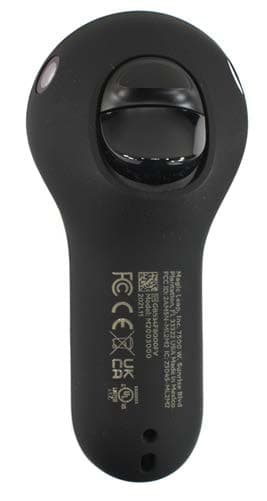
Jun 12, 2022Magic Leap 2 Controller with BLE transceiver
Equipment Class
JAB - Part 15 Class B Digital Device