2AMEAT78388Walkie Talkie
GLOBAL MEI CHUANG CO., LIMITED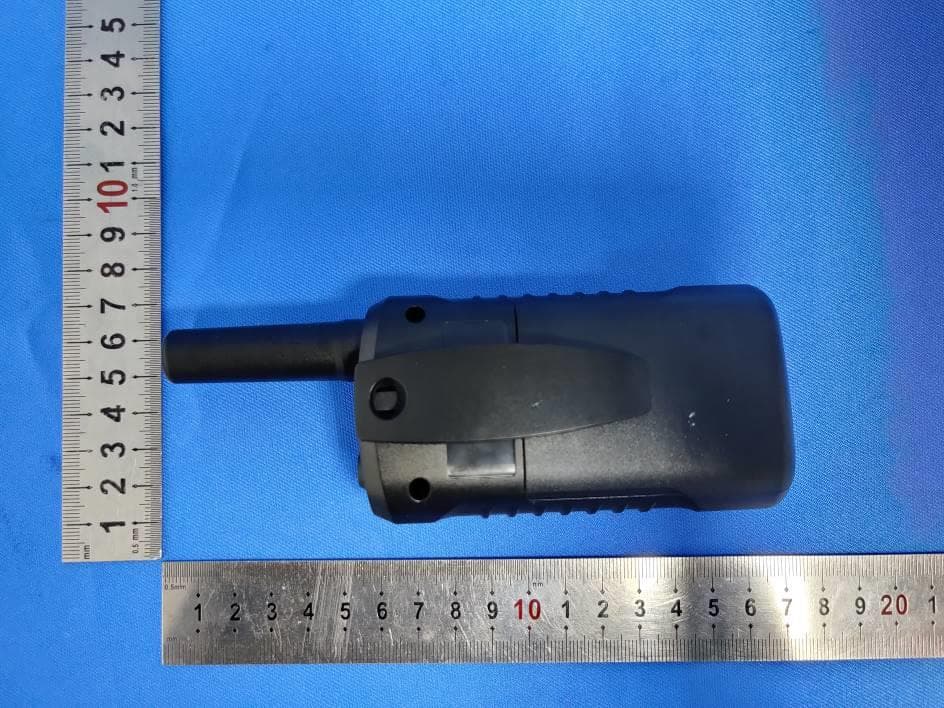
Click to zoom
Application Details
- Equipment Class
- JBP - Part 15 Class B Computing Device Peripheral
- Date of Grant
- Feb 04, 2021
- Application Purpose
- Original Equipment
- Date of Application
- Feb 04, 2021
- Equipment Note
- Walkie Talkie
- Country
- China
Documents & Files
Document Text
Text extracted from the exhibit documents filed with the FCC. Open a document above to read the original.
Users Manual
UserManual HandheldWalkieTalkiesmodelT78 ENGLISHINSTRUCTION 1InstructionForUse Thesewalkietalkiesarecommunicationdeviceswhich operateon462MHZ.Theycomewith22channelsaswell asback-litLCDscreen,enablingyoutocommunicate overseveralkilometersfree-of–charge(upto6Km) inopenfields. Note:Pleasereadtheusermanualcarefullybefore usingtheequipmentandretainforfutureconsultation! SpecificRecommendations Ifyoucarryanykindofpersonalmedicaldevice, pleaseconsultadoctorbeforeuse. Toavoidtheriskofburns,donotusethedevice iftheaerialisdamageinanyway. Donnotusethedeviceinapotentiallyexplosive setting(e.g.Aroundpumps,onthelowerdeckofaboat oraroundafuel-storageinstallationorchemicalproducts. Switchoffthedeviceifonanairplaneorinahospital. Removethebatteriesifthedeviceisnotuseforan extendedperiodoftime.Nevermixusedandnewbatteries. Positionthetransmitterandantennaatleast5cmfrom yourface.Directtheantennaupwardsandspeaknormally. Thisdevicesarenotwaterproof,pleasekeepthedevicesdry. Donotmodifythedeviceinanyway.Intheeventof damageoccurring,ensurethatthedeviceuscheckedby aqualifiedprofessional. Thedevicecannotbeusedtocontactinemergencyservices. 2KeyFunctions 3BeforeUsethedevice 3.1Removingthebeltclip Beforeinsertbatteriesintothedevice,firstremovethebelt cliplatchawayfromthedevice. 3.2InstallingtheBatteries 1,Sliddownthebatterycompartmentcover. 2,Insert4*AAAAlkalineeachwalkietalkie(Notincluded) 3,Positionthebatteriesaccordingtothepolaritymaking onthebatterycompartment. 4,Afterplacingbatteriesintocorrectpositions,replace thebatterycover. 4Usingthedevice 4.1Turningthedeviceon/off Switchonthedevice:Pressandholdonthe2seconds thenyouwillhearabeepsound. Switchoffthedevice:Pressandholdonthe3seconds thenyouwillhearabeepsound. 4.2Adjustingthevolume Toincreasethevolume,presstheUp▲button.Andpress theDown▼buttontodecreasethevolume. Note:Thevolumelevelisdisplayonthescreen. 4.3LowBatteryIndication Thedevicecandetectthelowbatterylevelwhenthebattery voltagegoeslow.Whenbatteryvoltageislow,thebattery iconwillflashandabeepwillbeheardtoindicatethatthe batteriesneedtobereplaced. 4.4Receiving/transmittingcommunications: Thedevicesarein“Reception”modewhenitisturnedON andnotransmitting.Whenasignalisreceivedonthecurrent channel,theLCDwilldisplayinreception. WhenyoupresstheTALK(pushtotalk)button,thedevices switchesto“Transmission”mode. Holdthedeviceinaverticalpositionwiththemicrophone 3-5cmawayfromyourmouth.WhileholdingtheTALK button,speakintothemicrophoneinanormaltoneofvoice. ReleasetheTALKbuttonwhenyouhavefinishedtransmitting. Forotherstoreceiveyourtransmission,theymustbeon thesamechannelwithyou. Note:1,Thetalkingrangewilldependonyoursurroundings andenvironment.Itwillbeaffectedbyobstructionssuch ashillsorbuildings. 2,Don’ttrytousetwodeviceswhicharelessthan1.5m (5feets)apart.Otherwise,youmayexperienceinterference. 4.5ChangingChannels PresstheMENUbuttononetime,thechannelnumberwill Flashonthedisplay. Presstheup▲/down▼buttontochangethechannel. PresstheTALKbuttontoconfirmandreturntostand-bymode. Note:ifnobuttonispressedwithin10secondsduring setting,thedevicewillreturntostand-bymode. 4.6CTCSSandDCSSubCodes PresstheMENUbuttontwice,thecurrentsubcodewillflash onthedisplay.Presstheup▲/down▼buttontochange the99availablecodes. PresstheTALKbuttontoconfirmandreturntostand-bymode. Licensefreeradio’soperatingonthe400-470MHZfrequency band,thedevicehas22radiochannels. Iftherearemanydeviceusersnearyou,thereisachancethat someoftheusersareoperatingonthesameradiochannel. Youarefreetochooseoneofthe99availablesub-channels. Duetofiltering,thesesub-channelswillgenerallynotbe audiblesotheywillnotedisturbthecommunication. 4.7VOX(Handsfreefunction) PresstheMENUbuttonthreetimes,thecurrentVOXsetting willflashonthedisplayandtheVOXiconwilldisplay, PressUP▲buttontosettheVOXsensitivitylevelbetween 1and3level(level3isthehighsensitivelevel). Pressdown▼buttonuntil“OF”appearsonthedisplayto turnVOXOFF. PresstheTALKbuttontoconfirmandreturntostand-bymode. InVOXmode,theradiowilltransmitasignalwhenitis activatedbyyourvoiceorothersoundaroundyou. VOXOperationisnotrecommendedifyouplantouseyour deviceinanoisyorwindyenvironment. Note:VOXmodewillbeoverridewhenyoupresstheTALK button. 4.8Scanningforanactiveradiochannel PresstheScanbutton:The“SCAN”functionindicator willappearonthedisplayandthechannelwillscan continuously.Onceanactivechannelisfound,the scanningwillstopandyoucanlistentothetransmission. Whenthetransmissionisonthefoundchannelstop,the scanningwillresumeautomatically. Note:IfyoupressTALKbuttonwhilelisteningtoafound channel,thedevicewillgobacktostand-bymode onthefoundchannel. 4.9Monitor PresstheMONbuttonabout3secondstoactivemonitor. ReleasetheMONbuttonreturntostandbymode. 4.10SettingtheCalltones Thedevicehas10calltones. PresstheMENUbutton4times,“CA”isdisplayedandon thecurrentcalltone. PresstheUP▲/Down▼buttontochangethese10call tonesonebyone. PresstheTALKbuttontoconfirmandreturntostand-bymode. 4.11Sendingacalltone PresstheCallbuttononetimequickly,thecalltonewillbe transmittedonthesettingchannel. 4.12KeyToneOn/Off Youcanon/offthekeytonewhenpressthebuttons. PresstheMENUbutton5times,“KO”willbedisplayed. PresstheUP▲/Down▼buttondisablethekeytoneON/OFF. PressTheTALKbuttontoconfirmyourselectionandreturn tothestand-bymode. 4.13RogerBeepOn/Off AftertheTALKbuttonreleased,thedevicewillsendout rogerbeeptoconfirmthathavestoppedtalking. PresstheMENUbutton6times,“RO”willbedisplayed. PresstheUP▲/Down▼buttondisabletherogerbeepON/OFF. PressTheTALKbuttontoconfirmyourselectionandreturn tothestand-bymode. 4.14Backlitdisplay Pressanybuttonexceptforthelightbuttontoactivatethe displaybacklight.Thebacklightwilllighton10seconds. 4.15Earpiececonnection Thedevicecanbeusedwithearpiece(Ifthereisearpiece packedtogetherwiththedevice). Theconnectorislocatedonthetopofthedevice. Inserttheearpieceplugintotheconnector(2.5mmjack). Thereisa“TALK”buttonontheearpiecethathasthesame functionastheTALKbuttononthedevice. WhenyouusetheTALKbuttonfromtheearpiece,youmust alsousethemicrophonefromtheearpiecetotalk. Note:Donot…
Text truncated - open the document above for the full version.
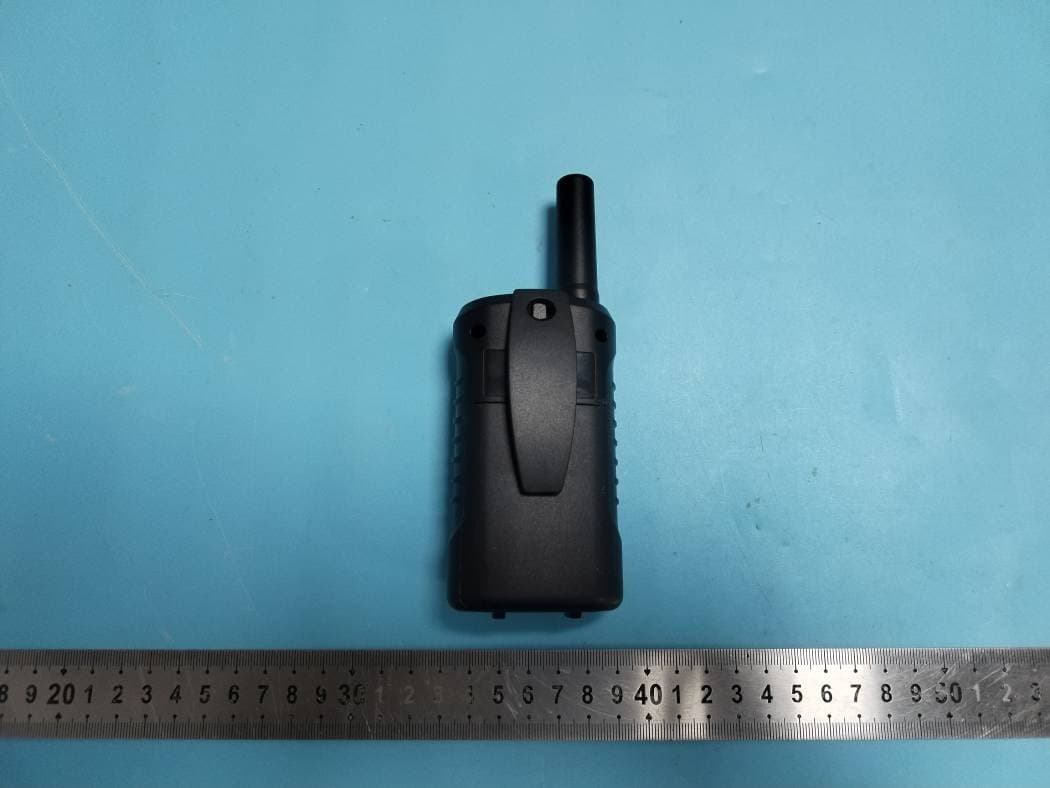
External Photos
SGS-CSTC Standards Technical Services Co., Ltd. Shenzhen Branch Page: 1 of 5 External Photos for SZEM2012012843CR FCC ID: 2AMEAT78388 SGS-CSTC Standards Technical Services Co., Ltd. Shenzhen Branch Page: 2 of 5 External Photos SGS-CSTC Standards Technical Services Co., Ltd. Shenzhen Branch Page: 3 of 5 SGS-CSTC Standards Technical Services Co., Ltd. Shenzhen Branch Page: 4 of 5 SGS-CSTC Standards Technical Services Co., Ltd. Shenzhen Branch Page: 5 of 5
ID Label/Location Info
FCC ID: 2AMEAT78388 This device complies with Part 15 of the FCC Rules. Operation is subject to the following two conditions: (1) this device may not cause harmful interference,and (2) this device must accept any interference received, including interference that may cause undesired operation.
Internal Photos
SGS-CSTC Standards Technical Services Co., Ltd. Shenzhen Branch Page: 1 of 4 Internal Photos for SZEM2012012843CR FCC ID: 2AMEAT78388 SGS-CSTC Standards Technical Services Co., Ltd. Shenzhen Branch Page: 2 of 4 Internal Photos SGS-CSTC Standards Technical Services Co., Ltd. Shenzhen Branch Page: 3 of 4 SGS-CSTC Standards Technical Services Co., Ltd. Shenzhen Branch Page: 4 of 4
Test Report
SGS-CSTC Standards Technical Services Co., Ltd. Shenzhen Branch Report No.: SZEM201201284301 Page: 1 of 15 Keny Xu EMC Laboratory Manager TEST REPORT Application No.: SZEM2012012843CR Applicant: Global Mei Chuang Co., Limited Address of Applicant: FLAT / RM A, 9 /F, SILVERCORP INTERNATIONAL TOWER, 707-713 NATHAN ROAD, MONGKOK, KL, HONGKONG, CHINA. Manufacturer: Huizhou LFY Technology Co., Ltd. Address of Manufacturer: Loujiao Xiaozu, Chayuan Village Committee, Qiuchang Street Office, Huiyang, Huizhou, Guangdong, China. Factory: Huizhou LFY Technology Co., Ltd. Address of Factory: Loujiao Xiaozu, Chayuan Village Committee, Qiuchang Street Office, Huiyang, Huizhou, Guangdong, China. Equipment Under Test (EUT): EUT Name: Walkie Talkie Model No.: T78, T388 ♣ ♣ Please refer to section 2 of this report which indicates which model was actually tested and which were electrically identical. FCC ID: 2AMEAT78388 Standard(s) : 47 CFR Part 15, Subpart B Date of Receipt: 2020-12-17 Date of Test: 2020-12-29 to 2021-01-05 Date of Issue: 2021-01-19 Test Result: Pass* * In the configuration tested, the EUT complied with the standards specified above. SGS-CSTC Standards Technical Services Co., Ltd. Shenzhen Branch Report No.: SZEM201201284301 Page: 2 of 15 Revision Record Version Chapter Date Modifier Remark 01 2021-01-19 Original Authorized for issue by: Damon Su/Project Engineer Eric Fu/Reviewer SGS-CSTC Standards Technical Services Co., Ltd. Shenzhen Branch Report No.: SZEM201201284301 Page: 3 of 15 2 Test Summary Emission Part Item Standard Method Requirement Result Radiated Emissions (30MHz-1GHz) 47 CFR Part 15, Subpart B ANSI C63.4:2014 Class B Pass Radiated Emissions (above 1GHz) 47 CFR Part 15, Subpart B ANSI C63.4:2014 Class B Pass Declaration of EUT Family Grouping: Model No.: T78, T388 Only the model T78 was tested, since according to the declaration from the applicant, the electrical circuit design, layout, components used, internal wiring and functions were identical for the above models, with only difference on model names and outlooks for the marketing requirement. SGS-CSTC Standards Technical Services Co., Ltd. Shenzhen Branch Report No.: SZEM201201284301 Page: 4 of 15 3 Contents Page 1 COVER PAGE ..................................................................................................................................... 1 2 TEST SUMMARY ................................................................................................................................. 3 3 CONTENTS ......................................................................................................................................... 4 4 GENERAL INFORMATION .................................................................................................................. 5 4.1 DETAILS OF E.U.T. ......................................................................................................................... 5 4.2 DESCRIPTION OF SUPPORT UNITS .................................................................................................... 5 4.3 MEASUREMENT UNCERTAINTY ......................................................................................................... 5 4.4 TEST LOCATION ............................................................................................................................. 6 4.5 TEST FACILITY ............................................................................................................................... 6 4.6 DEVIATION FROM STANDARDS ......................................................................................................... 6 4.7 ABNORMALITIES FROM STANDARD CONDITIONS ................................................................................. 6 5 EQUIPMENT LIST ............................................................................................................................... 7 6 EMISSION TEST RESULTS................................................................................................................. 8 6.1 RADIATED EMISSIONS (30MHZ-1GHZ) ............................................................................................. 8 6.1.1 E.U.T. Operation ...................................................................................................................... 8 6.1.2 Test Mode Description ............................................................................................................. 8 6.1.3 Test Setup Diagram ................................................................................................................. 9 6.1.4 Measurement Procedure and Data .......................................................................................... 9 6.2 RADIATED EMISSIONS (ABOVE 1GHZ) ..............................................................................................12 6.2.1 E.U.T. Operation .....................................................................................................................12 6.2.2 Test Mode Description ............................................................................................................12 6.2.3 Test Setup Diagram ................................................................................................................12 6.2.4 Measurement Procedure and Data .........................................................................................12 7 TEST SETUP PHOTO .........................................................................................................................15 8 EUT CONSTRUCTIONAL DETAILS (EUT PHOTOS) .........................................................................15 SGS-CSTC Standards Technical Services Co., Ltd. Shenzhen Branch Report No.: SZEM201201284301 Page: 5 of 15 4 General Information 4.1 Details of E.U.T. Power supply: DC 6V by AAA battery. Test voltage: DC 6V 4.2 Description of Support Units Description Manufacturer Model No. Serial No. -- -- -- -- T…
Text truncated - open the document above for the full version.
Test Setup Photos
SGS-CSTC Standards Technical Services Co., Ltd. Shenzhen Branch Page: 1 of 2 Setup Photos for SZEM2012012843CR FCC ID: 2AMEAT78388 SGS-CSTC Standards Technical Services Co., Ltd. Shenzhen Branch Page: 2 of 2 1 Photographs 1.1 Radiated Emissions Test Setup
Contact Information
Applicant
Jerry Huang
Technical Contact
SGS-CSTC Standards Technical Services Co., Ltd.Keny Xu
[email protected]86-755-25328629
No.1 Workshop, M-10, Middle Section, · Shenzhen · China
Test Firm
SGS-CSTC Standards Technical Services Co., LtdDerek Yang
[email protected]+86 0135 6484 8721
Technical Specifications
| # | Rule Parts | Frequency Range | Power Output |
|---|---|---|---|
| 1 | 15B | - | - |
Other Applications from GLOBAL MEI CHUANG CO., LIMITED
2AMEA-T783881
Jan 05, 2023Walkie Talkie
Equipment Class
FRF - Part 95 Family Radio Face Held Transmitter
2AMEAT38481866
Jan 25, 2021Walkie Talkie
Equipment Class
FRF - Part 95 Family Radio Face Held Transmitter