2AN2O-Q400RR02Robotic Vacuum Cleaner
Beijing Roborock Technology Co., Ltd.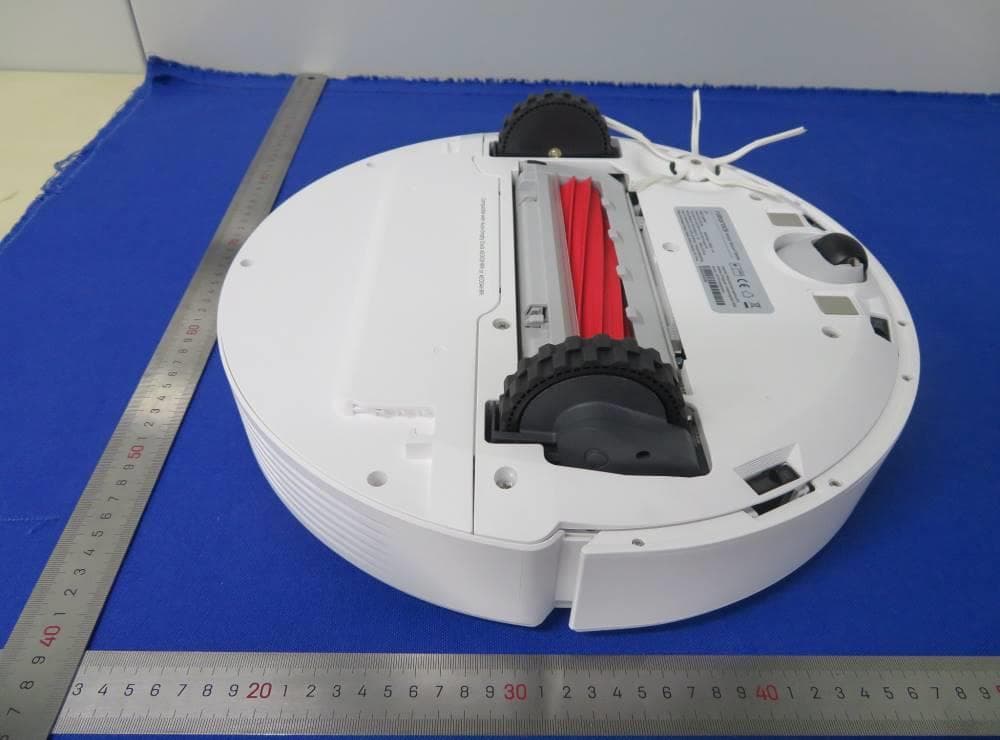
Click to zoom
Application Details
- Equipment Class
- DTS - Digital Transmission System
- Date of Grant
- Apr 28, 2022
- Application Purpose
- Original Equipment
- Date of Application
- Apr 27, 2022
- Equipment Note
- Robotic Vacuum Cleaner
- Frequency Range
- 2412.00000000 - 2462.00000000
- Country
- China
Documents & Files
Document Text
Text extracted from the exhibit documents filed with the FCC. Open a document above to read the original.
Users Manual
Roborock Q7+ Read this user manual with diagrams carefully before using this product and store it properly for future reference. Robotic Vacuum Cleaner User Manual 02 English 03 Français 16 Español 26 03 English Contents 04 WARNING 04 Battery and Charging 05 International Symbols Explanation 05 FCC/IC Statement 06 Product Overview 06 Installation 07 Connecting to the App 08 Instructions for Use 10 Routine Maintenance 11 Environment Protection Information 11 Basic Parameters 12 Errors 13 FAQs 04 • For use only with roborock CDZ11RR, CDZ12RR, AED03LRR or AED04LRR charger. • Place the cords from other appliances out of the area to be cleaned. • Do not operate the vacuum in a room where an infant or child is sleeping. • Do not operate the vacuum in an area where there are lit candles or fragile objects on the floor to be cleaned. • Do not operate the vacuum in a room that has lit candles on furniture that the vacuum may accidentally hit or bump into. • Do not allow children to sit on the vacuum. • Unplug the appliance before making any adjustments, changing accessories, or storing appliance. Such preventive safety measures reduce the risk of starting the appliance accidentally. • Do not carry the product using the dustbin cover or base. • Place the dock on a flat floor away from fire, heat, and water. Avoid narrow spaces or locations where the robot may be suspended in the air. • The product must be switched off and the plug must be removed from socket outlet before cleaning or maintaining the product. • This product can be used by children aged from 8 years and above and persons with reduced physical, sensory or mental capabilities or lack of experience and knowledge if they have been given supervision or instruction concerning use of the product in a safe way and understand the hazards involved. Children shall not play with the product. Cleaning and user maintenance shall not be made by children without supervision. • Do not use wet cloth or liquids for cleaning the charging contacts. • Do not dismantle, repair or modify the battery or charging dock. • If the dock is placed in an area susceptible to thunderstorms or with unstable voltage, take protection measures. • Keep the charging dock away from heat (such as radiators). Battery and Charging • To reduce the risk of electric shock, this appliance has a polarized plug (one blade is wider than the other). This plug will fit in a polarized outlet only one way. If the plug does not fit fully in the outlet, reverse the plug. If it still does not fit, contact a qualified electrician to install the proper outlet. Do not change the plug in any way. • Keep the charging dock away from heat (such as radiators). • Do not wipe the charging contacts with wet cloth or wet hands. • Turn the robot off and use original packaging for shipment. • If placing the robot into storage, charge it fully and turn it off before placing it in a cool dry place. Recharge it at least every three months to prevent the battery over discharging. WARNING 05 International Symbols Explanation ~ – ALTERNATING CURRENT symbol [symbol IEC 60417-5032 (2009-02)] – DIRECT CURRENT symbol [symbol IEC 60417-5031 (2009-02)] FCC/IC Statement Compliance Information Product NameRobotic Vacuum Cleaner with Charging Dock Robotic Vacuum Cleaner Model: Q400RR Dock Charger Model: CDZ11RR, CDZ12RR Auto-Empty Dock Model: AED03LRR, AED04LRR This device complies with Part 15 of the FCC Rules. Operation is subject to the following two conditions: (1) this device may not cause harmful interference, and (2) this device must accept any interference received, including interference that may cause undesired operation. This device contains licence-exempt transmitter(s)/receiver(s) that comply with Innovation, Science and Economic Development Canada’s licence-exempt RSS(s). Operation is subject to the following two conditions: (1) This device may not cause interference. (2) This device must accept any interference, including interference that may cause undesired operation of the device. Product Model Compliance Statement Correspondence of the responsible party in USA Roborock Technology Co. 108 West 13th Street, Wilmington, Delaware 19801. [email protected] Company Address Email 06 Product Overview A A1 Robot (Top View) A2 Robot (Bottom View) A3 Robot (Upper Cover Open) A3-1—WiFi Indicator Light A6-1—Water Tank Stopper A6-2—Filter Components A6-3—Water Tank A6-4—Water Tank Latch A6-5—Flow Control A5 Mop Cloth A5-1—Mop Cloth A5-2—Hook and Loop Pads A2-1—Wall Sensor A2-2—Cliff Sensors A2-3—Omni-Directional Wheel A2-4—Charging Contacts A2-5—Side Brush A2-6—Main Wheel A2-7—Main Brush A2-8—Main Brush Cover Latches Note:Press any button to stop the robot during cleaning or docking. A1-1—Bumper A1-2—LiDAR Sensor A1-3—Cover Opener A1-4—Dock Locator • Off: WiFi disabled • Flashing slowly: Waiting for connection • Flashing quickly: Connecting • Steady: Connected • Press to return to dock • Press and hold to start spot cleaning —Docking/Spot Cleaning • Press and hold to turn the robot on or off • Press to start cleaning —Power/Clean • White: Battery level ≥ 20% • Red: Battery level < 20% • Pulsing: Charging or starting up • Flashing red: Error —Power Indicator A4 Dustbin A4-1—Dustbin Latch A4-2—Washable Filter A3-2—Reset Button A3-3—Air Outlet A6 Adjustable Water Tank A7 Disposable Dust Bag A8 Base A8-1—Air Duct Cover Screws (10) A8-2—Air Duct Cover A8-3—Screwdriver A8-4—Base Fastening Screws (6) A11 Power Cable A9-8—Power Cable Storage Slot A9-9—Cable Outlet A9-10—Power Port A10 Auto-Empty Dock (Cover Removed) A10-1—Dust Bag Slot A10-2—Filter Note:Power cable can exit at either side. A9 Auto-Empty Dock A9-1—Dustbin Cover A9-2—Dustbin (Disposable Dust Bag Pre-Installed) A9-3—Status Indicator Light A9-4—Dock Location Beacon A9-5—Charging Contacts A9-6—Suction Inlet A9-7—Electrode Brushes • Steady white: Standby • Flashing white: Emptying • Steady red: Malfunction • Light off: Charging Robot/Not Powered On Installat…
Text truncated - open the document above for the full version.
Users Manual
Roborock Q7 Read this user manual with diagrams carefully before using this product and store it properly for future reference. Robotic Vacuum Cleaner User Manual 02 English 03 Français 15 Español 25 03 English Contents 04 Safety Information 04 Battery and Charging 04 International Symbols Explanation 05 FCC IC Statement 06 Product Overview 06 Installation 08 Connecting to the App 08 Instructions for Use 10 Routine Maintenance 11 Environment Protection Information 11 Basic Parameters 12 Errors 13 FAQs 04 English Safety Information • For use only with roborock CDZ11RR, CDZ12RR, AED03LRR or AED04LRR charger. • Place the cords from other appliances out of the area to be cleaned. • Do not operate the vacuum in a room where an infant or child is sleeping. • Do not operate the vacuum in an area where there are lit candles or fragile objects on the floor to be cleaned. • Do not operate the vacuum in a room that has lit candles on furniture that the vacuum may accidentally hit or bump into. • Do not allow children to sit on the vacuum. Battery and Charging • Keep the charging dock away from heat (such as radiators). • Do not wipe the charging contacts with wet cloth or wet hands. • Turn the robot off and use original packaging for shipment. • If placing the robot into storage, charge it fully and turn it off before placing it in a cool dry place. Recharge it at least every three months to prevent the battery over discharging. International Symbols Explanation ~ – ALTERNATING CURRENT symbol [symbol IEC 60417-5032 (2009-02)] – DIRECT CURRENT symbol [symbol IEC 60417-5031 (2009-02)] 05 English FCC/IC Statement Compliance Information Correspondence of the responsible party in USA Product NameRobotic Vacuum Cleaner with Charging Dock Robotic Vacuum Cleaner Model: Q400RR Dock Charger Model: CDZ11RR or CDZ12R Auto-Empty Dock Model: AED03LRR or AED04LRR This device complies with Part 15 of the FCC Rules. Operation is subject to the following two conditions: (1) this device may not cause harmful interference, and (2) this device must accept any interference received, including interference that may cause undesired operation. This device contains licence-exempt transmitter(s)/receiver(s) that comply with Innovation, Science and Economic Development Canada’s licence-exempt RSS(s). Operation is subject to the following two conditions: (1) This device may not cause interference. (2) This device must accept any interference, including interference that may cause undesired operation of the device. Roborock Technology Co. 108 West 13th Street, Wilmington, Delaware 19801. [email protected] Product Model Compliance Statement Company Address Email 06 Product Overview A A1 Robot (Top View) A2 Robot (Bottom View) A5 Charging Dock A5-1—Power Indicator A5-2—Location Beacon A5-3—Charging Contacts A5-4—Power Port A5-5—Electrode Brushes A3 Robot (Upper Cover Open) A3-1—WiFi Indicator Light A6 Power Cable A7 Adjustable Water Tank A7-1—Water Tank Stopper A7-2—Filter Components A7-3—Water Tank A7-4—Water Tank Latch A7-5—Flow Control A8 Mop Cloth A8-1—Mop Cloth A8-2—Hook and Loop Pads A9 Moisture-Proof Mat A2-1—Wall Sensor A2-2—Cliff Sensors A2-3—Omni-Directional Wheel A2-4—Charging Contacts A2-5—Side Brush A2-6—Main Wheel A2-7—Main Brush A2-8—Main Brush Cover Latches Note:Press any button to stop the robot during cleaning or docking. A1-1—Bumper A1-2—LiDAR Sensor A1-3—Cover Opener A1-4—Dock Locator • Off: WiFi disabled • Flashing slowly: Waiting for connection • Flashing quickly: Connecting • Steady: Connected • Press to return to dock • Press and hold to start spot cleaning —Docking/Spot Cleaning • Press and hold to turn the robot on or off • Press to start cleaning —Power/Clean • White: Battery level ≥ 20% • Red: Battery level < 20% • Pulsing: Charging or starting up • Flashing red: Error —Power Indicator A4 Dustbin A4-1—Dustbin Latch A4-2—Washable Filter A3-2—Reset Button A3-3—Air Outlet Installation B Important Information 07 1. Tidy cables and loose items from the ground and move any unstable, fragile, precious, or dangerous items to prevent personal injury or property damage due to items becoming tangled in, struck by, or knocked over by the robot. Select a flat floor surface to place the dock and wipe it with a dry cloth. Then, place the dock on the selected surface against the wall. Use the double-sided tape to secure the dock better. Notes: • Use of the double-sided tape to secure the charging dock is optional. • When necessary, remove the double-sided tape slowly to reduce residue glue. B2 Secure the dock The robot may not turn on when the battery is low. In this case, place the robot directly onto the dock to charge. Note: 2. When using the robot in a raised area, always use a secure physical barrier to prevent accidental falls that may result in personal injury or property damage. Note:When using the robot for the first time, follow it throughout its whole cleaning route and watch for potential problems. The robot will be able to clean by itself in future uses. Keep the dock on a level surface, flat against a wall. Connect it to a power supply. B1-1 More than 0.5m (1.6ft) B1-2 More than 1.5m (4.9ft) B1 Place the dock After the dock is secured, use a dry cloth to wipe the surface on which the moisture-proof mat is to be placed. Tear off the double-sided tape at the bottom of the moisture-proof mat, and stick the mat on the floor. Press and hold the button to power on the robot. Wait until the power light is steady, and then place the robot on the dock to charge. The robot is equipped with high-performance lithium-ion rechargeable battery pack. To maintain battery performance, keep the robot charged during normal use. Notes: • Alway place the moisture-proof mat on wooden floors. • The moisture-proof mat attaches better to smooth surfaces. B3 Secure the Moisture-Proof Mat Powering on & Charging B4 • Allow more than 0.5 m (1.6 ft) of clearance on each side, and 1.5 m (4.9 ft) in front of the dock. • If the power …
Text truncated - open the document above for the full version.
Users Manual
Read this safety guidelines and certification document carefully before using this product and store it properly for future reference. Safety Guidelines & Certification English 01 Français 05 Español (Latinoamérica) 09 English-01 IMPORTANT SAFETY INSTRUCTIONS When using an electrical appliance, basic precautions should always be followed, including the following: READ ALL INSTRUCTIONS BEFORE USING (THIS APPLIANCE). Failure to follow the warnings and instructions may result in electric shock, fire and/or serious injury. WARNING To reduce the risk of fire, electric shock, or injury: • Do not use outdoors or on wet surfaces. • User must read instruction manual. • Risk of Injury. Brush May Start Unexpectedly.Disconnect the main Brush Before Cleaning or Servicing. • Do not allow to be used as a toy. Close attention is necessary when used by or near children, pets or plants. • Use only as described in this manual. Use only manufacturer’s recommended attachments. • Do not use with damaged cord or plug. If appliance is not working as it should, has been dropped, damaged, left outdoors, or dropped into water, return it to a service center. • Do not pull or carry by cord, use cord as a handle, close a door on cord, or pull cord around sharp edges or corners. • Do not run appliance over cord. Keep cord away from heated surfaces. • Do not unplug by pulling on cord. To unplug, grasp the plug, not the cord. • Do not handle charger, including charger plug, and charger terminals with wet hands. • Do not put any object into openings. Do not use with any opening blocked; keep free of dust, lint, hair, and anything that may reduce air flow. • Keep hair, loose clothing, fingers, and all parts of body away from openings and moving parts. • Do not use to pick up flammable or combustible liquids, such as gasoline, or use in areas where they may be present. • Do not pick up anything that is burning or smoking, such as cigarettes, matches, or hot ashes. • Do not use without dust bag. • Prevent unintentional starting. Ensure the switch is in the off-position before connecting to battery pack, picking up or carrying the appliance. Carrying the appliance with your finger on the switch or energizing appliance that have the switch on invites accidents. • Recharge only with the charger specified by the manufacturer. A charger that is suitable for one type of battery pack may create a risk of fire when used with another battery pack. English English-02 • Use appliances only with specifically designated battery packs. Use of any other battery packs may create a risk of injury and fire. • Turn off the appliance before making any adjustments, changing accessories, or storing appliance. Such preventive safety measures reduce the risk of starting the appliance accidentally. • When battery pack is not in use, keep it away from other metal objects, like paper clips, coins, keys, nails, screws or other small metal objects, that can make a connection from one terminal to another. Shorting the battery terminals together may cause burns or a fire. • Under abusive conditions, liquid may be ejected from the battery; avoid contact. If contact accidentally occurs, flush with water. If liquid contacts eyes, additionally seek medical help. Liquid ejected from the battery may cause irritation or burns. • Do not use a battery pack or appliance that is damaged or modified. Damaged or modified batteries may exhibit unpredictable behavior resulting in fire, explosion or risk of injury. • Do not expose a battery pack or appliance to fire or excessive temperature. Exposure to fire or temperature above 130°C (266°F) may cause explosion. • Follow all charging instructions and do not charge the battery pack or appliance outside of the temperature range specified in the instructions. Charging improperly or at temperatures outside of the specified range may damage the battery and increase the risk of fire. • Have servicing performed by a qualified repair person using only identical replacement parts.This will ensure that the safety of the product is maintained. • Do not modify or attempt to repair the appliance or the battery pack except as indicated in the instructions for use and care. • Do not use the product when the temperature is higher than 40°C (104°F) or lower than 4°C (39°F), or there is any liquid or sticky substance on the floor. SAVE THESE INSTRUCTIONS Household use only. WARNING English-03 Laser Safety Class 1 laser product . Complies with 21 CFR 1040.10 and 1040.11 except for conformance with IEC 60825-1 Ed. 3., as described in Laser Notice 56, dated May 8, 2019. Warning Any changes or modifications to this unit not expressly approved by the party responsible for compliance could void the user's authority to operate the equipment. This equipment has been tested and found to comply with the limits for a Class B digital device, pursuant to part 15 of the FCC Rules. These limits are designed to provide reasonable protection against harmful interference in a residential installation. This equipment generates uses and can radiate radio frequency energy and, if not installed and used in accordance with the instructions, may cause harmful interference to radio communications. However, there is no guarantee that interference will not occur in a particular installation. If this equipment does cause harmful interference to radio or television reception, which can be determined by turning the equipment off and on, the user is encouraged to try to correct the interference by one or more of the following measures: —Reorient or relocate the receiving antenna. —Increase the separation between the equipment and receiver. —Connect the equipment into an outlet on a circuit different from that to which the receiver is connected. —Consult the dealer or an experienced radio/TV technician for help. FCC/IC Statement English-04 FCC/IC Statement When the robot is docked, press and hold “Dock” for 10 seconds or until you hear an alert sound. This will activa…
Text truncated - open the document above for the full version.
Cover Letter(s)
Page 1 of 1 Beijing Roborock Technology Co., Ltd. Authority to Act as Agent Date: 20220415 TUV Rheinland of North America, Inc. 1279 Quarry Lane., Suite. A Pleasanton, CA 94566 To Whom It May Concern: I appoint MS.Yanli Fan of TUV Rheinland (shanghai) Co., Ltd to act as our agent in the preparation of this application for equipment certification. I certify that submitted documents properly describe the device or system for which equipment certification is sought. I also certify that each unit manufactured, imported or marketed, as defined in the FCC or Industry Canada’s regulations will have affixed to it a label identical to that submitted for approval with this application. For instances where our authorized agent signs the application for certification on our behalf, I acknowledge that all responsibility for complying with the terms and conditions for Certification, as specified by TUV Rheinland Group, still resides with Beijing Roborock Technology Co., Ltd. / Floor 6, Suite 6016, 6017, 6018, Building C, Kangjian Baosheng Plaza, No. 8 Heiquan Road, Haidian District, 100192 Beijing, P. R. China For TCB applications, We certify that we are not subject to denial of federal benefits, that includes FCC benefits, pursuant to Section 5301 of the Anti-Drug Abuse Act of 1988, 21 U.S.C. 862. Further, no party, as defined in 47 CFR 1.2002 (b), to the application is subject to denial of federal benefits, that includes FCC benefits. Thank you, Agency Agreement Date: 20220415 Agreement is valid for 12 months from the above date. By: ____________________ Qianqian Hu (Signature) (Print name) Project certification manager +86 010 53241660 (Title) (Telephone) On behalf of: Beijing Roborock Technology Co., Ltd . (Company Name)
Cover Letter(s)
MS-0044715 Page 1 of 1 Revision 0 Beijing Roborock Technology Co., Ltd. Date: 20220415 Subject: Confidentiality Request for FCC ID: 2AN2O-Q400RR02 and IC: 23317-Q400RR02 Pursuant to FCC 47 CRF 0.457(d) and 0.459 and IC RSP-100, Section 10, the applicant requests that a part of the subject FCC/IC application be held confidential. Type of Confidentiality Requested Exhibit Short Term Permanent Block Diagrams Short Term Permanent Internal Photos *** Short Term Permanent Operation Description/Theory of Operation Short Term Permanent Tune-Up Procedure/Parts List Short Term Permanent Schematics Short Term Permanent User’s Manual*** Short Term n/a Test Setup Short Term n/a External Photos Beijing Roborock Technology Co., Ltd. has spent substantial effort in developing this product and it is one of the first of its kind in industry. Having the subject information easily available to "competition" would negate the advantage they have achieved by developing this product. Not protecting the details of the design will result in financial hardship. Permanent Confidentiality: The applicant requests the exhibits listed above as permanently confidential be permanently withheld from public review due to materials that contain trade secrets and proprietary information not customarily released to the public. (*** PAG only) Short-Term Confidentiality: The applicant requests the exhibits selected above as short term confidential be withheld from public view for a period of _180 _ days from the date of the Grant of Equipment Authorization and prior to marketing. This is to avoid premature release of sensitive information prior to marketing or release of the product to the public. Applicant is also aware that they are responsible to notify TUV Rheinland in the event information regarding the product or the product is made available to the public. TUV Rheinland will then release the documents listed above for public disclosure pursuant to FCC Public Notice DA 04-1705. Sincerely, By: ______________ Qianqian Hu (Signature/Title) (Print name)
Cover Letter(s)
Date: 15 April 2022 FCC ID: 2AN2O-Q400RR02 IC: 23317-Q400RR02 To whom it may concern: We Beijing Roborock Technology Co., Ltd. hereby declare that Robotic Vacuum Cleaner (Model Q400 RR) is capable of operating with channel 12 and 13 in regions other than the US and Canada. However, these two channels will be disabled via software, this device available for import and sale in the US and Canada will not operate on channels 12 and 13 and it will not be possible for users to configure these channels in the US and Canada. If you have any questions regarding this, please don’t hesitate to contact us. Sincerely, _________________________ (Qianqian Hu / Project certification Manager) Beijing Roborock Technology Co., Ltd.,
Cover Letter(s)
Difference declaration We, Beijing Roborock Technology Co., Ltd. believe that there are no RF-related differences between Q7 and Q7+. The differences are that Robotic Vacuum Cleaner Q400RR shipped with different charging dock and the packaging is different. For specific information, please refer to the manual. Beijing Roborock Technology Co., Ltd. 20220124
External Photos
External Photos of EUT Report No.: CN22WXJ7 002 Model No. : Q400RR Page: 1 of 3 External Photos of EUT Report No.: CN22WXJ7 002 Model No. : Q400RR Page: 2 of 3 External Photos of EUT Report No.: CN22WXJ7 002 Model No. : Q400RR Page: 3 of 3
ID Label/Location Info
Host Label: Stick it in the limit slot at the bottom of the host Warning label: It is attached to the bottom of the host, close to the side of the universal wheel, opposite to the side brush.
Internal Photos
Internal Photos of EUT Report No.: CN22WXJ7 002 Model No. : Q400RR Page: 1 of 5 Internal Photos of EUT Report No.: CN22WXJ7 002 Model No. : Q400RR Page: 2 of 5 Internal Photos of EUT Report No.: CN22WXJ7 002 Model No. : Q400RR Page: 3 of 5 Internal Photos of EUT Report No.: CN22WXJ7 002 Model No. : Q400RR Page: 4 of 5 Internal Photos of EUT Report No.: CN22WXJ7 002 Model No. : Q400RR Page: 5 of 5
RF Exposure Info
1 Safety Human Exposure 1.1 Radio Frequency Exposure Compliance 1.1.1 Electromagnetic Fields RESULT: Pass Test Specification Test standard : CFR47 FCC Part 2: Section 2.1091 CFR47 FCC Part 1: Section 1.1310 FCC KDB Publication 447498 v06 FCC KDB Publication 865664 D02 v01r02 OET Bulletin 65 (Edition 97-01) RSS-102 Issue 5 March 2015 FCC ID: 2AN2O-Q400RR02 IC: 23317-Q400RR02 FCC requirements FCC requirement: Systems operating under the provisions of this section shall be operated in a manner that ensures that the public is not exposed to radio frequency energy level in excess limit for maximum permissible exposure. In accordance with 47 CFR FCC Part 2 Subpart J, section 2.1091 this device has been defined as a mobile device whereby a distance of 20cm normally can be maintained between the user and the device. MPE Calculation Method according to OET Bulletin 65 Power Density: S (mW/cm 2 ) = PG/4πR 2 or EIRP/4πR 2 Where: S = power density (mW/cm 2 ) P = power input to the antenna (mW) G = power gain of the antenna in the direction of interest relative to an isotropic radiator R = distance to the center of radiation of the antenna (cm) The nominal maximum conducted output power specified: 2.4GHz DTS: 20.39 dBm From the peak RF output power, the minimum mobile separation distance, d=20 cm, as well as the antenna gain (Max. 3.87 dBi for DTS), the RF power density can be calculated as below: Fo 2.4GHz DTS: S (mW /cm 2 ) = PG/4πR 2 = 0.05308 mW/cm 2 IC requirements: The EUT shall comply with the requirement of RSS-102 section 2.5.2. Exemption from Routine Evaluation Limits – RF Exposure Evaluation RF exposure evaluation is required if the separation distance between the user and/or bystander and the device’s radiating element is greater than 20 cm, except when the device operates as follows: at or above 300 MHz and below 6 GHz and the source-based, time-averaged maximum e.i.r.p. of the device is equal to or less than 1.31 x 10 -2 ƒ 0.6834 W (adjusted for tune-up tolerance), where ƒ is in MHz; RF exposure evaluation exempted power for DTS: 2.676 W The nominal maximum conducted output power specified: 2.4GHz DTS: 20.39 dBm Antenna Gain: 3.87dBi for DTS The Max. e.i.r.p. for 2.4GHz DTS: 24.26 dBm =0.2667 W e.i.r.p. for the DTS is less than the RF exposure evaluation exempted power. So RF exposure evaluation is not required. “RF Radiation Exposure Statement Caution: This Transmitter must be installed to provide a separation distance of at least 20 cm from all persons.”
Schematics
5 5 4 4 3 3 2 2 1 1 DD CC BB AA Charging Path > 150mils Roborock Differential Trace Quiescent Current: ~35uA@12V Input(8V~17V)<-->Output(1.493V~3.173V) Battery Voltage Detect ADC Port Vout=(56/300)*(BATT_PACK+ - BATT_PACK-) VBATT Source Width > 200mils VSYS Path > 80mils > 15mils Differential Trace and Shieldded by Ground and trace width>10mils Shielding by GND Rdson=12mohm, Id=-21A S-D Diode: Id=3.5A (5.25V) Differential Trace and Shieldded by Ground and trace width>10mils CMP_REF:2.3V V(IADPT)=20or40 x Icharge x 0.01ohm V(IBAT)=8or16 x Icharge x 0.01ohm V(ILIM)=1V+40 x Icharge x 0.01ohm Limit:~2.75A Battery Temperature Detect PSU_Voltage=66.5*(VDC/(430+66.5)) Input(18V~24V)<-->Output(2.411V~3.215V) RP77 93K 1uH RP77 137K 2.2uH RP77 169K 3.3uH BATT_V_DETECT[2^,5] PSU_OK[2^,5] PROC_HOT[2^,5] CHARGER_CLK[2^,5] CHARGER_SDA[2^,5] BATT_ID[2^,5] Dock_V_EN[2^,5] ADA_I_DETECT [2^,5] BATT_I_DETECT [2^,5] COMPOUT[2^,5] BATT_NTC[2^,5] PSU_VOLTAGE[2^,5] DGNDDGND VSYS VBAT DGND DGND DGND 3V3P 3V3P DGND 3V3P DGND DGND DGND DGND VBATT DGND DGND DGNDDGND DGND DGND DGNDDGNDDGND DGND DGND VDD DGND VBUS VDC VDD DGND DGNDDGND DGND VDD REGN REGN DGND DGND DGND DGND AGND AGND AGND AGND AGND AGND AGND AGND DGND DGND AGND VDC DGND DGND DGND 3V3P DGND 3V3P DGND DGND DGND Title Size Document NumberRev Date:Sheetof <Doc> MK Tanos-S-C:Dock/DCIN and Battery charge A3 326Tuesday, January 18, 2022 Title Size Document NumberRev Date:Sheetof <Doc> MK Tanos-S-C:Dock/DCIN and Battery charge A3 326Tuesday, January 18, 2022 Title Size Document NumberRev Date:Sheetof <Doc> MK Tanos-S-C:Dock/DCIN and Battery charge A3 326Tuesday, January 18, 2022 MTPP3 RP17 RP64 RP62 RP2 BP6 RP40 CP103 RP71 CP100 CP101 TPP20 RP18 CP83 QP5 4 1 27 5 6 38 RP4 RP27 TPP17 CP86 FP1 CP85 RP125 RP26 RP68 RP33 CP95 RP36 RP12 CP91 DP3 1 2 CP99 DP15 1 2 ESDP1 CP97 RP7 RP83 CP84 CP3 CP89 TPP18 RP121 CP93 QP7 1 3 2 RP109 RP31 CP15 RP106 LP1 CP64 CP77 N.M CP94 RP51 RP63 RP59 CP2 RP50 - + UF1B 5 6 7 8 4 RP124 RP5 CP40 RP81 DP16 1 2 RP76 RP39 CP7 N.M QP2 1 3 2 RP30 N.M RP120 CP20 RP103 RP116 RP123 RP75 CP96 RP56 CP67 V+ V- NTC+ ID JP1 3 2 1 4 5 6 CP81 CP92 RP118 RP1 CP76 N.M QP3 1 3 2 CP4 RP67 QP6 1 3 2 CP90 RP78 CP43 TPP3 RP20 N.M QP9 4 1 27 5 6 38 CP87 TVSP1 1 2 RP11 RP41 RP70 CP57 CP8 N.M CP12 CP82 UP8 COMP1 16 /PROCHOT 11 SCL 13 CHRG_OK 4 SRP 20 EN_OTG 5 VBUS 1 VDD 7 SRN 19 IBAT 9 ILIM_HIZ 6 PAD 33 CMPOUT 15 CELL_PRES 18 HD2 24 PGND 27 REGN 28 PSYS 10 SDA 12 ACN 2 ACP 3 IADP 8 COMP2 17 LD1 29 LD2 26 VSYS 22 SW2 23 /BATDRV 21 BT2 25 BT1 30 SW1 32 HD1 31 CMPIN 14 RP77 RP57 CP88 CP98 RP55 RP80 CP104 TPP19 RP126 QP4 4 1 27 5 6 38 CP38 RP119 RP37 + CPP4 RP52 CP39 RP53 V- V+ JP7 2 1 3 4 CP1 QP1 1 3 2 RP84 CP66 RP117 BATT_PACK+ BATT_PACK- BATTID NTC+ BATT_PACK- BATTID BATT_PACK+ DOCK_V DOCK+ DOCK- HD1 LD1 SW1SW2 HD2 LD2 IADP IBAT COMPIN C0MPOUT COMP1 NTC+ DOCK_V SW1SW2 5 5 4 4 3 3 2 2 1 1 DD CC BB AA Roborock Shielded by GND Vout=0.5V(1+56K/10K)=3.3V Trace Width > 80mils Trace Width >40milsTrace Width >25mils S/W System Power OFF Control, "H" Active H/W Key ON/OFF Control, "L" Active S/W System Power OFF IRQ, "L" Active Power ON/OFF Control System 5V Power Source: 5V/3A Shielded by GND Vout=1V(1+100K/24.9K)=5.016V Ultrasonic/LDS/Bumper/Wallsensor IRM AP-R16 Motor Driver Power START_STOP[2^,23] ONOFF_IRQ[2^,5] 3V3P_CNTL[2^,5] SYS_POWER_OFF[2^,5] ANALOG_5V_CNTL[2^,5] AP_PWR_EN[2^,5] MOTOR_PWR_EN[2^,5] IRM_5V_CNTL[2^,5] 3V3_MCU DGND DGNDDGND DGNDDGND DGND DGND DGND 5V0 DGND VSYS DGNDDGND DGND DGNDDGND 3V3P DGND DGND DGND DGND 3V3_MCU 3V3P DGND VRTC DGND VBAT DGNDDGNDDGND VSYS DGND DGND DGND VDC DGNDDGND DGND DGND DGND DGND DGND 5V0 DGND 5V0A5V0 DGND 5V0_IRM DGND DGND 5V0 DGND 5V0 DGND DGND DGND DGNDDGND DGND DGND DGND AP_5V DGND DGND DGND DGND DGND DGND DGND 5V0 DGND DGND DGND 5V0_M DGNDDGND DGND Ti…
Text truncated - open the document above for the full version.
Contact Information
Applicant
Ruby Hu(Sr. Certification Manager)
Test Firm
TUV Rheinland (Shenzhen) Co., Ltd.Gina Yang
[email protected]86 755 8268 1497
Technical Specifications
| # | Rule Parts | Frequency Range | Power Output |
|---|---|---|---|
| 1 | 15C | 2.41 GHz - 2.46 GHz | 109.40 mW |
Other Applications from Beijing Roborock Technology Co., Ltd.
2AN2O-RRE0BES01
Jul 17, 2026Robotic Vacuum Cleaner
Equipment Class
DTS - Digital Transmission System2AN2O-RRE0BES02
Jul 17, 2026Robotic Vacuum Cleaner
Equipment Class
DTS - Digital Transmission System2AN2O-RRE0QUI02
Apr 13, 2026Robotic Vacuum Cleaner
Equipment Class
DTS - Digital Transmission System2AN2O-RRE0QUI01
Apr 13, 2026Robotic Vacuum Cleaner
Equipment Class
DTS - Digital Transmission System2AN2O-RRE0VES01
Dec 19, 2025Robotic Vacuum Cleaner
Equipment Class
DTS - Digital Transmission System