2AP3QFG1914BSmart Body Fat Scale
Guangdong Welland Technology Co., Ltd.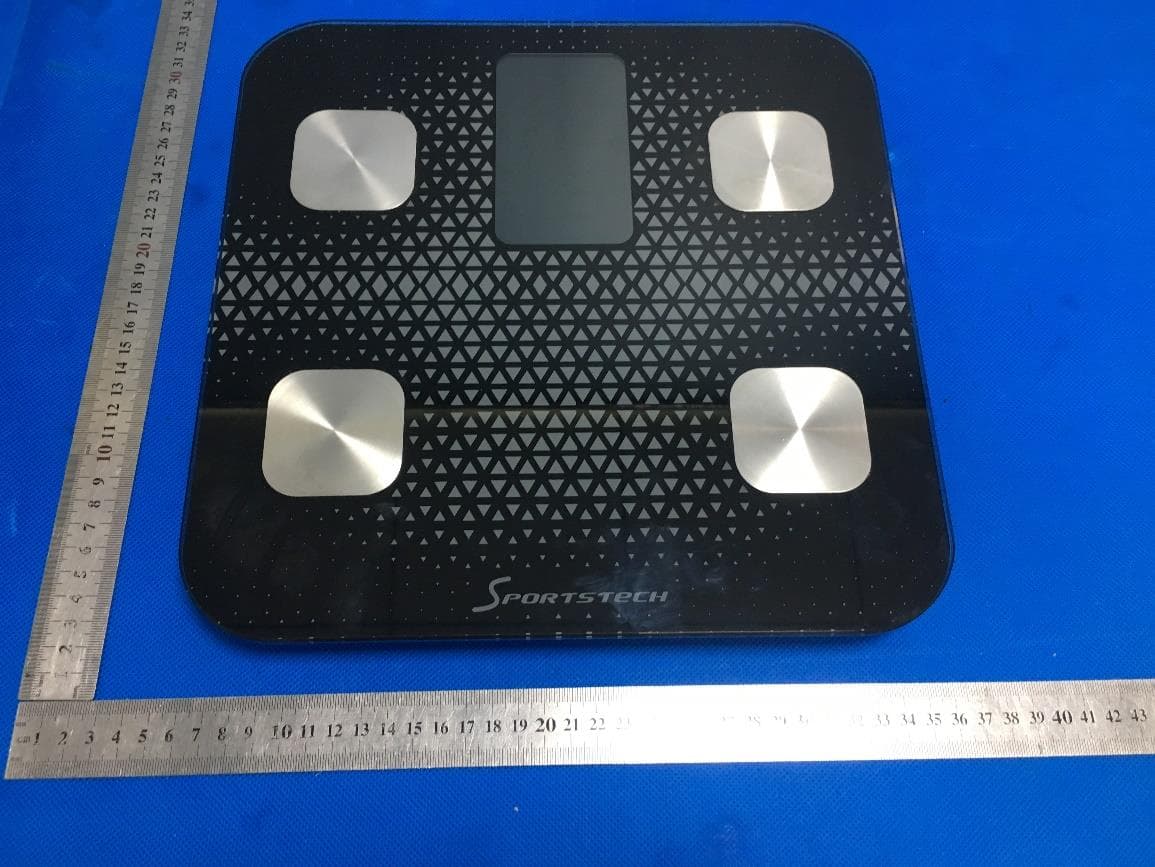
Click to zoom
Application Details
- Equipment Class
- DTS - Digital Transmission System
- Date of Grant
- Jun 20, 2020
- Application Purpose
- Original Equipment
- Date of Application
- Jun 20, 2020
- Equipment Note
- Smart Body Fat Scale
- Frequency Range
- 2402.00000000 - 2480.00000000
- Country
- China
Documents & Files
Document Text
Text extracted from the exhibit documents filed with the FCC. Open a document above to read the original.
Users Manual
Electronic Body Fat Scale Instruction Manual Scan the corresponding QR Code to download APP Thanks for choosing smart body scale. This fully body composition scale can help you conveniently measure body weight, hear rate, body balance, BMI, body fat rate, Fat-free body weight, subcutaneous fat, visceral fat,body water, skeletal muscle rate, muscle mass, bone mass, protein, BMR, body age and etc; IMPORTANT: Please read these instructions in this manual carefully before using the device. Failure to comply with the instructions given in the manual or using this scale in ways other than the ones mentioned in this manual may result in injury to yourself or damage to the scale. (Fitdays APP functions) Weight Heart rate Body balance BMI Body fat rate Fat-free body weight Subcutaneous fat Visceral fat Body water Skeletal muscle rate Muscle mass Bone mass Protein BMR Body age Height record (<16 years old) INDICATION SYMBOLS LO Low battery - please charge the batteries with USB plug Err Overload C An error has accorded during measurement. Step off the scales and step onto it again to repeat the measuring process. WHAT’S IN THE PACKAGE 1 X Smart body fat scale 1 X User manual WARNING DO NOT use with medical implants such as pacemakers. DO NOT stand on the edge of the scale or jump on it; DO NOT overload the scale(Max.180kg) DO NOT drop scale or droop an objects on it as this may damage the sensors. DO NOT immerse the scale in water or use chemical cleaning agents. Clean the scale with slightly damp cloth. Not recommended for pregnant women. Not recommended for infants, toddlers, and children under 10 years of age. Any obtained measurement results from this device are for reference only and should not be considered as a medical opinion. Consult your primary care doctor or physician before making changes to your diet, exercise plan or physical activities. Always place the scale on a hard, dry and flat surface before measurement. Make sure your feet are dry before stepping on the scale. Charge the battery with USB plug when low power or LO indication shows on scale. SPECIFICATION VA screen USB charge port Reset button Product size: 300x300x20.5mm VA display:62x109mm Weight unit:Kg/Lb/St Weight limit: 6kg-180kg Power Supply: Rechargeable lithium cell 600mAh Account number: No limitation (each account can add 24 persons) Baby mode: Allow you to scale the weight of baby Height record: Allow you to record the height info under 16 years old Operating temperature: 10-40 0 C Operation humidity: 20%-90% Support Devices: iOS 8.0 or higher Android 6.0 or higher Install Fitdays App 1. Search “Fitdays” in Apple Store or Google Play or scan the QR Code below: 2. Download and install the App on your device. 3. The App icon will appear on your phone or tablet after the installation is completed. HOW TO USE FITDAYS APP 1. Place the scale on a hard, flat ground. 2. Turn on Bluetooth on your smart phone or tablet. 3. Register your own ID by email or social media account. 4. Add personal data and click Confirm; Note: Enter the wrong info like gender, age, height, etc. may result in measurement inaccurate. X √ 5. Pair the scale via Bluetooth. Click Mine ----> Device---> + to find and pair the scale ID. Note: When successfully connection, a Bluetooth icon will show on scale and the word Connected will show on the circle of homepage. 6. Tap your foot on the scale to activate the display. Wait until the display shows “0.0”kg. 7. Stay Fitdays at the homepage and step on the scale with BARE feet to star measuring. Note: Leave at the homepage, the data cannot sync on phone; Step on the scale with socks, the scale only measures weight and BMI. 8. The number on display is flashing when the scale is weighing and analyzing. When it shows your left weight & Right weight, you will have about 5-10S to adjust your body. Please try to get equal left & right weight; 9. When heart rate measuring, a heart icon will shine on scale and flash on the app. Please keep silence and peace to get more accurate data. X √ X X 10. Stay on the scale until the circle shows ‘Finished’, all data sync on scale and phone. 11. Click More data to find details for Body Weight, BMI, BMR, Muscle, Bone Mass etc. And check data difference on Chart by week, moth and year in vertical or horizon version with icon up right. 12. Add or switch user: click photo profile on homepage, or Mine--> Add user. The Smart Scale can recognize the user by weight difference and remind to change the correct one. Each account can support 24 users; 13. Baby weight checking: click + --> Baby Mode. Adult steps on scale to weight first; after scale gets the weight, please step off the scale and hold the baby to weigh again; Fitdays will automatically calculate the baby’s weight. TROUBLE SHOOTING GUIDE 1. Device failure ⚫ Features: the scale failed to pressure switch on when full of power or display stop running when it’s light. ⚫ Press the button on the edge of scale to reset the scale. 2. Bluetooth failed to connection ⚫ Make sure the scale and the Bluetooth on your phone are on ⚫ Check the OS version of your smart phone, it must be iOS 8.0 or higher/Android 6.0 higher. ⚫ For successfully connection, there has a Bluetooth icon on the display and the word Connected will show on the circle of the homepage on phone ⚫ If fail to connect via Bluetooth, please click Mine--->Device to find the scale ID. 3. No body fat data after weighting ⚫ User must step onto the scale with bare feet. ⚫ Make sure your feet and the scale are both dry. ⚫ Step off the scale when measurement does not finish (Please keep standing on the scale around 10 second until the number on the display stops flashing). ⚫ Bluetooth is not turned on. ⚫ Bluetooth is paired with a difference scale. 4. Incorrect weight data occurs. ⚫ Check whether the scale is on a hard, flat surface. ⚫ Check each sensor foot on the back to make sure nothing is stuck to the bottom of it. ⚫ Press the button on the edge of scale; 5. Incorrect fat-mu…
Text truncated - open the document above for the full version.
Cover Letter(s)
Agent Authorization Company: Guangdong Welland Technology Co., Ltd Address: NO. 85 Minke East Road, Min Ying Science Technology Park, Shiqi District , Zhongshan, Guangdong, China Product Name: Smart Body Fat Scale Model Number(s): FG1914B, FI1914B, FI1901F, FI1913F, FI1902B, FG1904B, FI1904B, FI1905F, FG1905F, FI1910B, FG1910B, FI1910B-A, FG1910B-A, FG1919B, FI1919B, FG266RB-A, FI2001B, FG2001B, FG2008B, FG2008BP, FG1914B(USB), FI1914B(USB) Product Description: Smart Body Fat Scale We authorize MiCOM Labs Inc., 575 Boulder Court, Pleasanton, California 94566, USA, to act on our behalf on all matters concerning the certification of above named equipment. We declare that MiCOM Labs Inc. is allowed to forward all information related to the approval and certification of equipment to the regulatory agencies as required and to discuss any issues concerning the approval application. Any and all acts carried out by MiCOM Labs on our behalf shall have the same effect as acts of our own. Signature: Date: 2020-06-09 Name: Hillary Chan Company: Guangdong Welland Technology Co., Ltd
Cover Letter(s)
Office of Engineering Technology Federal Communications Commission 7435 Oakland Mills Road Columbia, MD 21046 USA Date: 2020-06-08 Subject; Request for Confidentiality FCC ID: 2AP3QFG1914B To Whom It May Concern, Pursuant to the provisions of the Commission’s rules Title 47 Sections §0.457 and §0.459, we are requesting the Commission to withhold the following attachment(s) as confidential documents from public disclosure indefinitely. These documents contain detailed system and equipment descriptions and are considered as proprietary information in operation of the equipment. The public disclosure of these documents might be harmful to our company and would give competitors an unfair advantage in the market. Schematic Diagram Block Diagram Parts List Operational Description Tune-up Procedure In additional to above mentioned documents, in order to comply with the marketing regulations in Title 47 CFR §2.803 and the importation rules in Title 47 CFR §2.1204, while ensuring that business sensitive information remains confidential until the actual marketing of newly authorized devices, we request Short Term Confidentiality of the following attachment(s); External Photos Test Setup Photos Internal Photos User Manual For 45 days, pursuant to Public Notice DA 04-1705. OR For 180 days pursuant to KDB 726920 D01. It is our understanding that all measurement test reports, FCC ID label format and correspondence during the certification review process cannot be granted as confidential documents and this information will be available for public review once the grant of equipment authorization is issued. Sincerely, Guangdong Welland Technology Co., Ltd Contact person: Hillary Chan
Cover Letter(s)
June 18, 2020 Office of Engineering Technology Federal Communications Commission 7435 Oakland Mills Road Columbia, MD 21046 USA Subject: Explanation of differences between product types FCC ID : 2AP3QFG1914B Model Number: FG1914B, FI1914B, FI1901F, FI1913F, FI1902B, FG1904B, FI1904B, FI1905F, FG1905F, FI1910B, FG1910B, FI1910B-A, FG1910B-A, FG1919B, FI1919B, FG266RB-A, FI2001B, FG2001B, FG2008B, FG2008BP, FG1914B(USB), FI1914B(USB) To Whom It May Concern: We, The Guangdong Welland Technology Co., Ltd hereby declare that the model : FI1914B, FI1901F, FI1913F, FI1902B, FG1904B, FI1904B, FI1905F, FG1905F, FI1910B, FG1910B, FI1910B-A, FG1910B-A, FG1919B, FI1919B, FG266RB-A, FI2001B, FG2001B, FG2008B, FG2008BP, FG1914B(USB), FI1914B(USB) is identical with the model : FG1914B, except the model name. Except for the different above, no other modification is performed. Sincerely, Signature: Guangdong Welland Technology Co., Ltd Contact person: Hillary Chan
External Photos
External Photos TOP VIEW OF EUT BOTTOM VIEW OF EUT FRONT VIEW OF EUT BACK VIEW OF EUT LEFT VIEW OF EUT RIGHT VIEW OF EUT
ID Label/Location Info
FCC ID Label Location FCC ID: 2AP3QFG1914B
Internal Photos
Internal Photos OPEN VIEW OF EUT INTERNAL VIEW-1 OF EUT Antenna INTERNAL VIEW-2 OF EUT INTERNAL VIEW-3 OF EUT INTERNAL VIEW-4 OF EUT VIEW OF BATTERY
RF Exposure Info
RF EXPOSURE EVALUATION 1. PRODUCT INFORMATION Product Description Smart Body Fat Scale Model Name FG1914B, FI1914B, FI1901F, FI1913F, FI1902B, FG1904B, FI1904B, FI1905F, FG1905F, FI1910B, FG1910B, FI1910B-A, FG1910B-A, FG1919B, FI1919B, FG266RB-A, FI2001B, FG2001B, FG2008B, FG2008BP, FG1914B(USB), FI1914B(USB) FCC ID 2AP3QFG1914B 2. EVALUATION METHOD According to 447498 D01 General RF Exposure Guidance v05 The 1-g and 10-g SAR test exclusion thresholds for 100 MHz to 6 GHz at test separation distances ≤ 50 mm are determined by: [(max. power of channel, including tune-up tolerance, mW)/(min. test separation distance, mm)] ·[√f(GHz)] ≤ 3.0 for 1-g SAR and ≤ 7.5 for 10-g extremity SAR. Where f(GHz) is the RF channel transmit frequency in GHz Power and distance are rounded to the nearest mW and mm before calculation 3. CALCULATION BLE: P t =-0.820dBm=0.83mW The value of the Maximum output power P t is referred to the test report of the CFR47 §15.247. The result for RF exposure evaluation SAR=(0.83mW /5mm) .[√2.402(GHz)]= 0.26<3.0 for 1-g SAR and ≤ 7.5 for 10-g extremity SAR. 4. CONCLUSION The SAR evaluation is not required.
Test Report
Page 1 of 47 FCC Test Report Report No.: AGC06164200505FE02 FCC ID : 2AP3QFG1914B APPLICATION PURPOSE : Original Equipment PRODUCT DESIGNATION : Smart Body Fat Scale BRAND NAME : N/A MODEL NAME : FG1914B, FI1914B, FI1901F, FI1913F, FI1902B, FG1904B, FI1904B, FI1905F, FG1905F, FI1910B, FG1910B, FI1910B-A, FG1910B-A, FG1919B, FI1919B, FG266RB-A, FI2001B, FG2001B, FG2008B, FG2008BP, FG1914B(USB), FI1914B(USB) APPLICANT : Guangdong Welland Technology Co, Ltd DATE OF ISSUE : Jun. 19, 2020 STANDARD(S) : FCC Part 15.247 REPORT VERSION : V1.0 Attestation of Global Compliance (Shenzhen) Co., Ltd CAUTION: This report shall not be reproduced except in full without the written permission of the test laboratory and shall not be quoted out of context. Report No.: AGC06164200505FE02 Page 2 of 47 REPORT REVISE RECORD Report Version Revise Time Issued Date Valid Version Notes V1.0 / Jun. 19, 2020 Valid Initial Release Report No.: AGC06164200505FE02 Page 3 of 47 TABLE OF CONTENTS 1. VERIFICATION OF COMPLIANCE ............................................................................................................... 5 2.GENERAL INFORMATION ............................................................................................................................. 6 2.1PRODUCT DESCRIPTION ........................................................................................................................ 6 2.2. TABLE OF CARRIER FREQUENCYS ..................................................................................................... 6 2.3 RELATED SUBMITTAL(S)/GRANT(S) ..................................................................................................... 7 2.4TEST METHODOLOGY ............................................................................................................................ 7 2.5 SPECIAL ACCESSORIES ........................................................................................................................ 7 2.6 EQUIPMENT MODIFICATIONS ............................................................................................................... 7 3. MEASUREMENT UNCERTAINTY ................................................................................................................. 8 4. DESCRIPTION OF TEST MODES ................................................................................................................. 9 5. SYSTEM TEST CONFIGURATION ............................................................................................................. 10 5.1 CONFIGURATION OF TESTED SYSTEM .............................................................................................. 10 5.2 EQUIPMENT USED IN TESTED SYSTEM ............................................................................................. 10 5.3. SUMMARY OF TEST RESULTS ............................................................................................................ 10 6. TEST FACILITY ........................................................................................................................................... 11 7. PEAK OUTPUT POWER ............................................................................................................................. 12 7.1. MEASUREMENT PROCEDURE ........................................................................................................... 12 7.2. TEST SET-UP (BLOCK DIAGRAM OF CONFIGURATION) .................................................................. 12 7.3. LIMITS AND MEASUREMENT RESULT ............................................................................................... 13 8. 6 DB BANDWIDTH ...................................................................................................................................... 15 8.1. MEASUREMENT PROCEDURE ........................................................................................................... 15 8.2. TEST SET-UP (BLOCK DIAGRAM OF CONFIGURATION) .................................................................. 15 8.3. LIMITS AND MEASUREMENT RESULTS ............................................................................................. 15 9. CONDUCTED SPURIOUS EMISSION ........................................................................................................ 17 9.1. MEASUREMENT PROCEDURE ........................................................................................................... 17 9.2. TEST SET-UP (BLOCK DIAGRAM OF CONFIGURATION) .................................................................. 17 9.3. MEASUREMENT EQUIPMENT USED .................................................................................................. 17 9.4. LIMITS AND MEASUREMENT RESULT ............................................................................................... 17 10. MAXIMUM CONDUCTED OUTPUT POWER SPECTRAL DENSITY ....................................................... 22 Report No.: AGC06164200505FE02 Page 4 of 47 10.1 MEASUREMENT PROCEDURE .......................................................................................................... 22 10.2 TEST SET-UP (BLOCK DIAGRAM OF CONFIGURATION) ................................................................. 22 10.3 MEASUREMENT EQUIPMENT USED ................................................................................................. 22 10.4 LIMITS AND MEASUREMENT RESULT .............................................................................................. 22 11. RADIATED EMISSION ............................................................................................................................... 24 11.1. MEASUREMENT PROCEDURE ......................................................................................................... 24 11.2. TEST SETUP ....................................................................................................................................... 2…
Text truncated - open the document above for the full version.
Test Setup Photos
Test Setup Photos RADIATED EMISSION TEST SETUP BELOW 1GHZ RADIATED EMISSION TEST SETUP ABOVE 1GHZ CONDUCTED EMISSION TEST SETUP CONDUCTED TEST SETUP
Contact Information
Applicant
Hillary Chan(Sales Manager)
Technical Contact
Test Firm
Attestation of Global Compliance (Shenzhen) Co., LDoris Li
[email protected]+86-755-25234088
Technical Specifications
| # | Rule Parts | Frequency Range | Power Output |
|---|---|---|---|
| 1 | 15C | 2.40 GHz - 2.48 GHz | 830.00 µW |
Other Applications from Guangdong Welland Technology Co., Ltd.
2AP3Q-FG2415WB
Jul 24, 2026Smart Scale
Equipment Class
DTS - Digital Transmission System
2AP3Q-FG2504WB-A
Apr 29, 2026Smart Body Fat Scale
Equipment Class
DTS - Digital Transmission System
2AP3Q-KG2458ULB
Apr 21, 2026Kitchen scale
Equipment Class
DTS - Digital Transmission System
2AP3Q-FG450WB-A
Apr 21, 2026Smart Body Fat Scale
Equipment Class
DTS - Digital Transmission System
2AP3Q-FI2502ULB
Mar 09, 2026Smart Body Fat Scale
Equipment Class
DTS - Digital Transmission System