2APXH82058280X-Men vs Street Fighter (Cokem Edition)
WF TASTEMAKERS TRADING LIMITED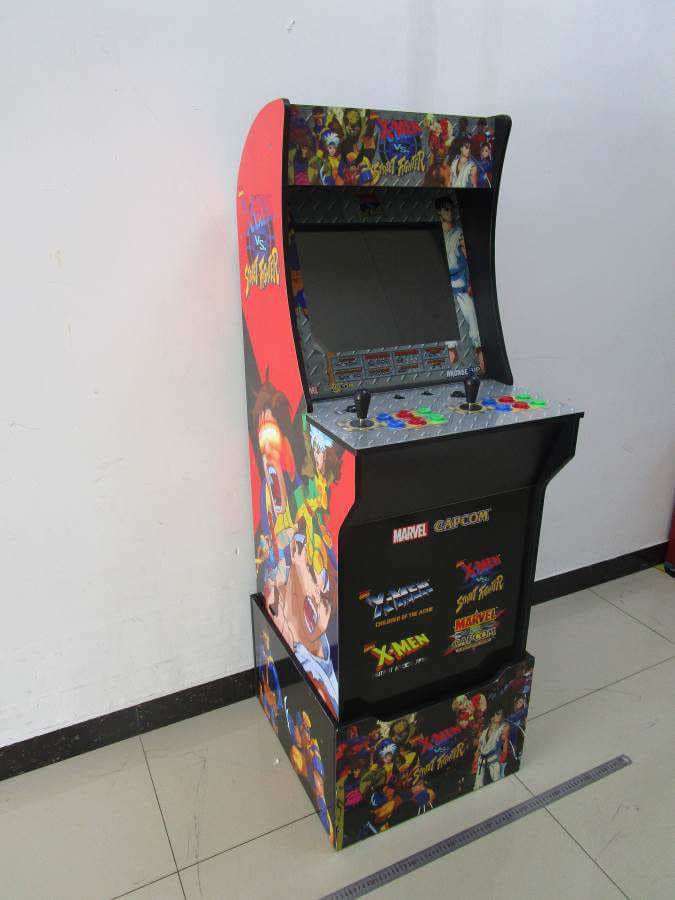
Click to zoom
Application Details
- Equipment Class
- DTS - Digital Transmission System
- Date of Grant
- Sep 15, 2020
- Application Purpose
- Original Equipment
- Date of Application
- Sep 15, 2020
- Equipment Note
- X-Men vs Street Fighter (Cokem Edition)
- Frequency Range
- 2412.00000000 - 2462.00000000
- Country
- Hong Kong
Documents & Files
Document Text
Text extracted from the exhibit documents filed with the FCC. Open a document above to read the original.
Users Manual
• Connect the equipment into an outlet on a circuit different from that to which the receiver is connected • Increase the separation between the equipment and receiver 5 32 1 4 REV 08.31.20 MADE IN CHINA VISIT US AT ARCADE1UP.COM © MARVEL © © 2020 MARVEL ©MOTO KIKAKU © CAPCOM CO., LTD 2020 © CAPCOM. LICENSED FOR USE BY TASTEMAKERS, LLC. MADE IN CHINA 4 PLAYER CABINET visit Arcade1up.comvisit Arcade1up.com TO SIGN UP FOR OUR MAILING LIST AND SEE A COMPLETE LIST OF GAMES TO SIGN UP FOR OUR MAILING LIST AND SEE A COMPLETE LIST OF GAMES GOLDEN TEE CLASSIC TM GOLDEN TEE 2K TM GOLDEN TEE ‘99 TM GOLDEN TEE ‘98 TM GOLDEN TEE CLASSIC TM GOLDEN TEE 2K TM GOLDEN TEE ‘99 TM GOLDEN TEE ‘98 TM MORTAL KOMBAT TM MORTAL KOMBAT 2 TM ULTIMATE MORTAL KOMBAT 3 TM MORTAL KOMBAT TM MORTAL KOMBAT 2 TM ULTIMATE MORTAL KOMBAT 3 TM FINAL FIGHT TM 1944 THE LOOP MASTER TM GHOSTS ‘N GOBLINS TM STRIDER TM FINAL FIGHT TM 1944 THE LOOP MASTER TM GHOSTS ‘N GOBLINS TM STRIDER TM FROGGER TIME PILOT TIME PILOT 84 FROGGER TIME PILOT TIME PILOT 84 ENGLISH TROUBLESHOOTINGTROUBLESHOOTINGCOLLECT THEM ALLCOLLECT THEM ALL Game will not turn on. PROBLEMPOSSIBLE CAUSESOLUTION Game will turn ON, but there is no sound. You hear sound but there is no picture. - Make sure power cord is plugged into the wall outlet and there is power to that outlet. (Plug other electrical equipment into the power outlet to make sure the outlet normally works.) -Make sure all Wires/Plugs are properly connected and all the way set in as directed in assembly instructions. -Slide ON/OFF Switch located on control deck to the ON position. -Slide upload switch on back of monitor to the ON position. - Make sure all Wires/Plugs are properly connected and all the way set in as directed in assembly instructions. -Slide Volume Switch located on control deck to the right. NOTE: Push volume slide switch right to increase volume, left to lower volume. - Make sure all Wires/Plugs are properly connected and all the way set in as directed in assembly instructions. -Turn the ON/OFF switch OFF and then back ON again. -You may need to RESET the game. Turn the ON/OFF switch to the OFF position. Unplug the game from the wall outlet and wait 60 seconds to RESET the game. Plug the game back in and turn the ON/OFF switch back to ON. - Make sure all Wires/Plugs are properly connected and all the way set in as directed in assembly instructions. -You may need to RESET the game. Turn the ON/OFF switch to the OFF position. Unplug the game from the wall outlet and wait 60 seconds to RESET the game. Plug the game back in and turn the ON/OFF switch back to ON. - Take something thin (like a business card) and place it between the button and the button housing and slide it back and forth to loosen the debris. - Look at the game control section in the instruction manual to make sure you are using the correct joystick or pressing the correct buttons to scroll through the game selection menu. - Look at the game control section in the instruction manual to make sure you are pressing the correct button to enter the game. - Look at the game control section in the instruction manual to make sure you are pressing the correct button to exit the game. -Make sure you are holding the exit button down for 5 seconds to exit the game. - Refer to the game control section in the instruction manual to see how many players are able to play that game. - Look at the game control section in the instruction manual to make sure you are pressing the correct game control buttons for that game. -Look at the game control loading screen on the monitor to make sure you are pressing the correct control buttons. (NOTE: The game controls that are printed on the control deck are only for the feature cabinet game. The other games in the cabinet will utilize the same buttons but react differently.) - Look at the game control section in the instruction manual to make sure you are pressing the correct button to start the game. The game screen looks pixelated or there are lines running through the image. The game screen is frozen. One of the buttons on the control deck is stuck in the down position. You are not able to scroll through the games on the game selection menu. You are able to scroll through the games on the game selection menu, but you can’t enter a game to begin playing. You have entered the game, but you can’t get the game to start. You have entered the game, but you can’t exit the game to get back to game selection menu. The control functions that are printed on the control deck do not match the gameplay on the screen for the game you are playing. The game will not let me select 2 or 3 players for a chosen game. -Wires/Plugs were hooked up incorrectly. -Debris may have gotten between the button and the button housing. -Power cord is not plugged into wall outlet. -Wires/Plugs are hooked up incorrectly. -ON/OFF Switch is in the OFF position. -Upload switch on back of monitor is in the OFF position. -Wires/Plugs were hooked up incorrectly. -Volume Switch is in the OFF position. -Wires/Plugs were hooked up incorrectly. -The game encountered a problem when processing the data. -You may be pressing the wrong button to enter the game. -You may be pressing the wrong button to exit the game. -You may not be holding down the exit button long enough. -You may be pressing the wrong game control buttons for the game you are playing. -The game may only be a 1 or 2 player game. -You may be pressing the wrong button to start the game. -You may be using the wrong joystick or pressing the incorrect buttons to scroll through the games. WARNING ENGLISH TO ENJOY A SAFE GAMING ENVIRONMENT Please use the wall anchor kit that is included with the product. Make sure to locate your Arcade1UP on a flat surface WARNING: Arcade1UP assumes no liability for improper installation or excessive loads placed on screws or bracket. This wall anchor is not a substitute for proper adult supervision. Serious or fatal crushing injuries can occur from fur…
Text truncated - open the document above for the full version.
Users Manual
5 32 1 4 REV 08.31.20 © MARVEL © © 2020 MARVEL ©MOTO KIKAKU © CAPCOM CO., LTD 2020 © CAPCOM. PERMIS POUR UTILISATION PAR / LICENCIADO PARA USO POR TASTEMAKERS, LLC. FABRIQUÉ EN CHINE / FABRICADO EN CHINA VISITEZ-NOUS À VISITANOS EN ARCADE1UP.COM Les couleurs, modèles et motifs peuvent varier./ Los colores, el estilo y la decoración pueden variar. AUTRES TITRES / OTROS TÍTULOSAUTRES TITRES / OTROS TÍTULOS POUR VOUS INSCRIRE À NOTRE LISTE DE DIFFUSION ET VOIR UNE LISTE COMPLÈTE DES JEUX / PARA INSCRIBIRSE EN NUESTRA LISTA DE CORREO Y VER UNA LISTA COMPLETA DE JUEGOS. POUR VOUS INSCRIRE À NOTRE LISTE DE DIFFUSION ET VOIR UNE LISTE COMPLÈTE DES JEUX / PARA INSCRIBIRSE EN NUESTRA LISTA DE CORREO Y VER UNA LISTA COMPLETA DE JUEGOS. Visitez / Vistar Arcade1up.com GOLDEN TEE CLASSIC TM GOLDEN TEE 2K TM GOLDEN TEE ‘99 TM GOLDEN TEE ‘98 TM GOLDEN TEE CLASSIC TM GOLDEN TEE 2K TM GOLDEN TEE ‘99 TM GOLDEN TEE ‘98 TM MORTAL KOMBAT TM MORTAL KOMBAT 2 TM ULTIMATE MORTAL KOMBAT 3 TM MORTAL KOMBAT TM MORTAL KOMBAT 2 TM ULTIMATE MORTAL KOMBAT 3 TM FINAL FIGHT TM 1944 THE LOOP MASTER TM GHOSTS ‘N GOBLINS TM STRIDER TM FINAL FIGHT TM 1944 THE LOOP MASTER TM GHOSTS ‘N GOBLINS TM STRIDER TM FROGGER TIME PILOT TIME PILOT 84 FROGGER TIME PILOT TIME PILOT 84 4 ARMOIRES DE JOUEUR / GABINETE DE 4 JUGADORES FRANÇAIS / ESPAÑOL RÉPARATION / RESOLUCIÓN DE PROBLEMASRÉPARATION / RESOLUCIÓN DE PROBLEMAS Les commandes de contrôle indiquées sur la plateforme ne correspondent pas au commandes indiquées sur l’écran pour le jeu. Las funciones de control que están impresas en los mandos de control no corresponden con la jugabilidad en pantalla para el juego al que está jugando. L’accès au jeu est possible mais il est impossible de quitter celui-ci pour revenir au menu de sélection. Ha entrado al juego, pero no puede salir del juego para volver al menú de selección de juegos. Le défilement des jeux dans le menu de sélection est possible, mais l’accès au jeu est impossible. Puede desplazarse por los juegos en el menú de selección de juego, pero no puede entrar en un juego para empezar a jugar. Défilement des jeux dans le menu de sélection impossible. No puede desplazarse por los juegos en el menú de selección de juego. Un des boutons de la plateforme de contrôle est bloqué en position basse. Uno de los botones de los mandos de control se ha quedado atascado. L’écran du jeu est pixellisé ou des lignes apparaissent sur l’image. La pantalla del juego está pixelada o tiene líneas sobre la imagen. L’écran du jeu est bloqué. La pantalla de juego se ha quedado congelada. Le jeu s’allume, mais il n’y a pas de son. El juego no se enciende, pero no hay sonido. Le son fonctionne, mais l’image est manquante. Oye sonido, pero no hay imagen. Le jeu ne s’allume pas. El juego no se enciende. - Le câble d’alimentation n’est pas branché à la prise murale. - Les fils/câbles n’ont pas été branchés correctement. - Le commutateur ON/OFF est en position OFF. - L’interrupteur de téléchargement à l’arrière du moniteur est en position OFF. - El cable de alimentaction no está enchufado. - Los cables/Los enchufes estaban mal conectados. - El botón de ON/OFF está en la posición de OFF. - El interruptor de carga en la parte posterior del monitor está en la posición OFF. - Les fils/câbles n’ont pas été branchés correctement. - Le commutateur de volume est en position OFF. - Los cables/Los enchufes estaban mal conectados. - El botón de ON/OFF está en la posición de OFF. - Les fils/câbles n’ont pas été branchés correctement. - Los cables/Los enchufes estaban mal conectados. - Les fils/câbles n’ont pas été branchés correctement. - Los cables/Los enchufes estaban mal conectados. - Des débris se sont insérés entre le bouton et son boîtier. - Puede que se haya metido suciedad entre el botón y el hueco del botón. - Vous appuyez peut-être sur le mauvais bouton pour accéder au jeu. - Puede que esté pulsando el botón incorrecto para entrar al juego. - Vous appuyez peut-être sur le mauvais bouton pour démarrer le jeu. - Puede que esté pulsando el botón incorrecto para iniciar el juego. - Vous appuyez peut-être sur les mauvais bouton de commande pour le jeu. - Puede que esté pulsando los botónes de control de juego incorrectos para el juego al que está jugando. - Le jeu est peut-être uniquement conçu pour 1 ou 2 joueurs. - Puede que el juego sea solo para 1 o 2 jugadores. - Consultez la section de commandes du jeu dans le manuel d’instructions pour découvrir jusqu’à combien de joueurs il est possible de jouer. - Lea la sección de control de juegos en el manual de instrucciones para ver cuántos jugadores pueden jugar. - Consultez la section de commande des jeux dans le manuel d’instructions afin de vérifier que vous appuyez sue le bon bouton pour quitter le jeu. - Mire en la sección de control de juegos en el manual de instrucciones para asegurarse de que está pulsando el botón correcto para salir del juego. - Consultez la section de commande des jeux dans le manuel d’instructions afin de vérifier que vous appuyez sur les bons boutons de commande pour le jeu. - Observez l’écran de chargement du jeu afin de vérifier que vous appuyez sur les bons boutons de commande. (REMARQUE : Les commandes de jeu indiquées sur la plateforme sont uniquement valables pour les jeux associés à la borne de jeu. Les autres jeux de la borne utiliseront les mêmes boutons mais réagiront différemment.) - Mire en la sección de control de juegos en el manual de instrucciones para asegurarse de que está pulsando los botones de control de juego correctos para ese juego. - Mire en la pantalla de carga de control del juego en el monitor para asegurarse de que está pulsando los botones de control correctos.(NOTA: Los controles de juego impresos en los mandos de control son solamente para el juego destacado de la vitrina. Los otros juegos de la vitrina utilizarán los mismos botones pero reaccionan de forma diferente.) - Consultez la section de commande des jeux dans le manuel d’instructions afin de vérifie…
Text truncated - open the document above for the full version.
Users Manual
• Increase the separation between the equipment and receiver 5 32 1 4 REV 08.31.20 MADE IN CHINA VISIT US AT ARCADE1UP.COM © MARVEL © © 2020 MARVEL ©MOTO KIKAKU © CAPCOM CO., LTD 2020 © CAPCOM. LICENSED FOR USE BY TASTEMAKERS, LLC. MADE IN CHINA ENGLISH - Make sure all Wires/Plugs are properly connected and all the way set in as directed in assembly instructions. -Marquee / Deck Protector / Light Up Front Panel power cord is not plugged in at the back of the monitor. -Marquee / Deck Protector / Light Up Front Panel power cord is plugged into the wrong input. Marquee / Light Up Deck Protector / Light Up Front Panel will not light up. Game will not turn on. PROBLEMPOSSIBLE CAUSESOLUTION Game will turn ON, but there is no sound. You hear sound but there is no picture. - Make sure power cord is plugged into the wall outlet and there is power to that outlet. (Plug other electrical equipment into the power outlet to make sure the outlet normally works.) -Make sure all Wires/Plugs are properly connected and all the way set in as directed in assembly instructions. -Slide ON/OFF Switch located on control deck to the ON position. -Slide upload switch on back of monitor to the ON position. - Make sure all Wires/Plugs are properly connected and all the way set in as directed in assembly instructions. -Slide Volume Switch located on control deck to the right. NOTE: Push volume slide switch right to increase volume, left to lower volume. - Make sure all Wires/Plugs are properly connected and all the way set in as directed in assembly instructions. -Turn the ON/OFF switch OFF and then back ON again. -You may need to RESET the game. Turn the ON/OFF switch to the OFF position. Unplug the game from the wall outlet and wait 60 seconds to RESET the game. Plug the game back in and turn the ON/OFF switch back to ON. - Make sure all Wires/Plugs are properly connected and all the way set in as directed in assembly instructions. -You may need to RESET the game. Turn the ON/OFF switch to the OFF position. Unplug the game from the wall outlet and wait 60 seconds to RESET the game. Plug the game back in and turn the ON/OFF switch back to ON. - Take something thin (like a business card) and place it between the button and the button housing and slide it back and forth to loosen the debris. - Look at the game control section in the instruction manual to make sure you are using the correct joystick or pressing the correct buttons to scroll through the game selection menu. - Look at the game control section in the instruction manual to make sure you are pressing the correct button to enter the game. - Look at the game control section in the instruction manual to make sure you are pressing the correct button to exit the game. -Make sure you are holding the exit button down for 5 seconds to exit the game. - Refer to the game control section in the instruction manual to see how many players are able to play that game. - Look at the game control section in the instruction manual to make sure you are pressing the correct game control buttons for that game. -Look at the game control loading screen on the monitor to make sure you are pressing the correct control buttons. (NOTE: The game controls that are printed on the control deck are only for the feature cabinet game. The other games in the cabinet will utilize the same buttons but react differently.) - Look at the game control section in the instruction manual to make sure you are pressing the correct button to start the game. The game screen looks pixelated or there are lines running through the image. The game screen is frozen. One of the buttons on the control deck is stuck in the down position. You are not able to scroll through the games on the game selection menu. You are able to scroll through the games on the game selection menu, but you can’t enter a game to begin playing. You have entered the game, but you can’t get the game to start. You have entered the game, but you can’t exit the game to get back to game selection menu. The control functions that are printed on the control deck do not match the gameplay on the screen for the game you are playing. The game will not let me select 2 or 3 players for a chosen game. -Wires/Plugs were hooked up incorrectly. -Debris may have gotten between the button and the button housing. -Power cord is not plugged into wall outlet. -Wires/Plugs are hooked up incorrectly. -ON/OFF Switch is in the OFF position. -Upload switch on back of monitor is in the OFF position. -Wires/Plugs were hooked up incorrectly. -Volume Switch is in the OFF position. -Wires/Plugs were hooked up incorrectly. -The game encountered a problem when processing the data. -You may be using the wrong joystick or pressing the incorrect buttons to scroll though the games. -You may be pressing the wrong button to enter the game. -You may be pressing the wrong button to exit the game. -You may not be holding down the exit button long enough. -You may be pressing the wrong game control buttons for the game you are playing. -The game may only be a 1 or 2 player game. -You may be pressing the wrong button to start the game. TROUBLESHOOTINGTROUBLESHOOTINGCOLLECT THEM ALLCOLLECT THEM ALL 4 PLAYER CABINET visit Arcade1up.comvisit Arcade1up.com TO SIGN UP FOR OUR MAILING LIST AND SEE A COMPLETE LIST OF GAMES TO SIGN UP FOR OUR MAILING LIST AND SEE A COMPLETE LIST OF GAMES GOLDEN TEE CLASSIC TM GOLDEN TEE 2K TM GOLDEN TEE ‘99 TM GOLDEN TEE ‘98 TM GOLDEN TEE CLASSIC TM GOLDEN TEE 2K TM GOLDEN TEE ‘99 TM GOLDEN TEE ‘98 TM MORTAL KOMBAT TM MORTAL KOMBAT 2 TM ULTIMATE MORTAL KOMBAT 3 TM MORTAL KOMBAT TM MORTAL KOMBAT 2 TM ULTIMATE MORTAL KOMBAT 3 TM FINAL FIGHT TM 1944 THE LOOP MASTER TM GHOSTS ‘N GOBLINS TM STRIDER TM FINAL FIGHT TM 1944 THE LOOP MASTER TM GHOSTS ‘N GOBLINS TM STRIDER TM FROGGER TIME PILOT TIME PILOT 84 FROGGER TIME PILOT TIME PILOT 84 WARNING ENGLISH TO ENJOY A SAFE GAMING ENVIRONMENT Please use the wall anchor kit that is included with the product. Make sur…
Text truncated - open the document above for the full version.
Users Manual
5 32 1 4 Les couleurs, modèles et motifs peuvent varier./ Los colores, el estilo y la decoración pueden variar. AUTRES TITRES / OTROS TÍTULOSAUTRES TITRES / OTROS TÍTULOS Les couleurs, modèles et motifs peuvent varier./ Los colores, el estilo y la decoración pueden variar. AUTRES TITRES / OTROS TÍTULOSAUTRES TITRES / OTROS TÍTULOS REV 08.31.20 © MARVEL © © 2020 MARVEL ©MOTO KIKAKU © CAPCOM CO., LTD 2020 © CAPCOM. PERMIS POUR UTILISATION PAR / LICENCIADO PARA USO POR TASTEMAKERS, LLC. FABRIQUÉ EN CHINE / FABRICADO EN CHINA VISITEZ-NOUS À VISITANOS EN ARCADE1UP.COM POUR VOUS INSCRIRE À NOTRE LISTE DE DIFFUSION ET VOIR UNE LISTE COMPLÈTE DES JEUX / PARA INSCRIBIRSE EN NUESTRA LISTA DE CORREO Y VER UNA LISTA COMPLETA DE JUEGOS. POUR VOUS INSCRIRE À NOTRE LISTE DE DIFFUSION ET VOIR UNE LISTE COMPLÈTE DES JEUX / PARA INSCRIBIRSE EN NUESTRA LISTA DE CORREO Y VER UNA LISTA COMPLETA DE JUEGOS. Visitez / Vistar Arcade1up.com GOLDEN TEE CLASSIC TM GOLDEN TEE 2K TM GOLDEN TEE ‘99 TM GOLDEN TEE ‘98 TM GOLDEN TEE CLASSIC TM GOLDEN TEE 2K TM GOLDEN TEE ‘99 TM GOLDEN TEE ‘98 TM MORTAL KOMBAT TM MORTAL KOMBAT 2 TM ULTIMATE MORTAL KOMBAT 3 TM MORTAL KOMBAT TM MORTAL KOMBAT 2 TM ULTIMATE MORTAL KOMBAT 3 TM FINAL FIGHT TM 1944 THE LOOP MASTER TM GHOSTS ‘N GOBLINS TM STRIDER TM FINAL FIGHT TM 1944 THE LOOP MASTER TM GHOSTS ‘N GOBLINS TM STRIDER TM FROGGER TIME PILOT TIME PILOT 84 FROGGER TIME PILOT TIME PILOT 84 4 ARMOIRES DE JOUEUR / GABINETE DE 4 JUGADORES FRANÇAIS / ESPAÑOL RÉPARATION / RESOLUCIÓN DE PROBLEMASRÉPARATION / RESOLUCIÓN DE PROBLEMAS Les commandes de contrôle indiquées sur la plateforme ne correspondent pas au commandes indiquées sur l’écran pour le jeu. Las funciones de control que están impresas en los mandos de control no corresponden con la jugabilidad en pantalla para el juego al que está jugando. L’accès au jeu est possible mais il est impossible de quitter celui-ci pour revenir au menu de sélection. Ha entrado al juego, pero no puede salir del juego para volver al menú de selección de juegos. Le défilement des jeux dans le menu de sélection est possible, mais l’accès au jeu est impossible. Puede desplazarse por los juegos en el menú de selección de juego, pero no puede entrar en un juego para empezar a jugar. Défilement des jeux dans le menu de sélection impossible. No puede desplazarse por los juegos en el menú de selección de juego. Un des boutons de la plateforme de contrôle est bloqué en position basse. Uno de los botones en la plataforma de control está atascado en la posición hacia abajo. L’écran du jeu est pixellisé ou des lignes apparaissent sur l’image. La pantalla del juego está pixelada o tiene líneas sobre la imagen. L’écran du jeu est bloqué. La pantalla de juego se ha quedado congelada. Le jeu s’allume, mais il n’y a pas de son. El juego no se enciende, pero no hay sonido. Le son fonctionne, mais l’image est manquante. Oye sonido, pero no hay imagen. Le jeu ne s’allume pas. El juego no se enciende. - Le câble d’alimentation n’est pas branché à la prise murale. - Les fils/câbles n’ont pas été branchés correctement. - Le commutateur ON/OFF est en position OFF. - L’interrupteur de téléchargement à l’arrière du moniteur est en position OFF. - El cable de alimentación no está enchufado a la toma de corriente. - Los cables/Los enchufes estaban mal conectados. - El botón de ON/OFF está en la posición de OFF. - El interruptor de carga en la parte posterior del monitor está en la posición OFF. - Les fils/câbles n’ont pas été branchés correctement. - Le commutateur de volume est en position OFF. - Los cables/Los enchufes estaban mal conectados. - El interruptor de volumen está en la posición OFF. - Les fils/câbles n’ont pas été branchés correctement. - Los cables/Los enchufes estaban mal conectados. - Les fils/câbles n’ont pas été branchés correctement. - Los cables/Los enchufes estaban mal conectados. - Des débris se sont insérés entre le bouton et son boîtier. - Puede que se haya metido suciedad entre el botón y el hueco del botón. - Vous utilisez peut-être le mauvais joystick ou appuyez sur le mauvais bouton pour faire défiler les jeux. - Puede que esté usando el joystick incorrecto o pulsando los botones incorrectos para deslizarse por los juegos. - Vous appuyez peut-être sur le mauvais bouton pour accéder au jeu. - Puede que esté pulsando el botón incorrecto para entrar al juego. - Vous appuyez peut-être sur le mauvais bouton pour démarrer le jeu. - Puede que esté pulsando el botón incorrecto para iniciar el juego. - Vous appuyez peut-être sur les mauvais bouton de commande pour le jeu. - Puede que esté pulsando los botónes de control de juego incorrectos para el juego al que está jugando. - Le jeu est peut-être uniquement conçu pour 1 ou 2 joueurs. - Puede que el juego sea solo para 1 o 2 jugadores. - Consultez la section de commandes du jeu dans le manuel d’instructions pour découvrir jusqu’à combien de joueurs il est possible de jouer. - Lea la sección de control de juegos en el manual de instrucciones para ver cuántos jugadores pueden jugar. - Consultez la section de commande des jeux dans le manuel d’instructions afin de vérifier que vous appuyez sue le bon bouton pour quitter le jeu. - Assurez-vous que vous maintenez le bouton de sortie enfoncé pendant 5 secondes quitter le jeu. - Mire en la sección de control de juegos en el manual de instrucciones para asegurarse de que está pulsando el botón correcto para salir del juego. - Asegúrese de mantener presionado el botón de salida durante 5 segundos para salir del juego. - Consultez la section de commande des jeux dans le manuel d’instructions afin de vérifier que vous appuyez sur les bons boutons de commande pour le jeu. - Observez l’écran de chargement du jeu afin de vérifier que vous appuyez sur les bons boutons de commande. (REMARQUE : Les commandes de jeu indiquées sur la plateforme sont uniquement valables pour les jeux associés à la borne de jeu. Les autres jeux de la borne utiliseront les mêmes boutons mais réagiront…
Text truncated - open the document above for the full version.
Users Manual
• Increase the separation between the equipment and receiver 5 32 1 4 REV 08.31.20 MADE IN CHINA VISIT US AT ARCADE1UP.COM © MARVEL © © 2020 MARVEL ©MOTO KIKAKU © CAPCOM CO., LTD 2020 © CAPCOM. LICENSED FOR USE BY TASTEMAKERS, LLC. MADE IN CHINA 4 PLAYER CABINET visit Arcade1up.comvisit Arcade1up.com TO SIGN UP FOR OUR MAILING LIST AND SEE A COMPLETE LIST OF GAMES TO SIGN UP FOR OUR MAILING LIST AND SEE A COMPLETE LIST OF GAMES GOLDEN TEE CLASSIC TM GOLDEN TEE 2K TM GOLDEN TEE ‘99 TM GOLDEN TEE ‘98 TM GOLDEN TEE CLASSIC TM GOLDEN TEE 2K TM GOLDEN TEE ‘99 TM GOLDEN TEE ‘98 TM MORTAL KOMBAT TM MORTAL KOMBAT 2 TM ULTIMATE MORTAL KOMBAT 3 TM MORTAL KOMBAT TM MORTAL KOMBAT 2 TM ULTIMATE MORTAL KOMBAT 3 TM FINAL FIGHT TM 1944 THE LOOP MASTER TM GHOSTS ‘N GOBLINS TM STRIDER TM FINAL FIGHT TM 1944 THE LOOP MASTER TM GHOSTS ‘N GOBLINS TM STRIDER TM FROGGER TIME PILOT TIME PILOT 84 FROGGER TIME PILOT TIME PILOT 84 ENGLISH TROUBLESHOOTINGTROUBLESHOOTINGCOLLECT THEM ALLCOLLECT THEM ALL - Make sure all Wires/Plugs are properly connected and all the way set in as directed in assembly instructions. -Marquee / Deck Protector / Light Up Front Panel power cord is not plugged in at the back of the monitor. -Marquee / Deck Protector / Light Up Front Panel power cord is plugged into the wrong input. Marquee / Light Up Deck Protector / Light Up Front Panel will not light up. Game will not turn on. PROBLEMPOSSIBLE CAUSESOLUTION Game will turn ON, but there is no sound. You hear sound but there is no picture. - Make sure power cord is plugged into the wall outlet and there is power to that outlet. (Plug other electrical equipment into the power outlet to make sure the outlet normally works.) -Make sure all Wires/Plugs are properly connected and all the way set in as directed in assembly instructions. -Slide ON/OFF Switch located on control deck to the ON position. -Slide upload switch on back of monitor to the ON position. - Make sure all Wires/Plugs are properly connected and all the way set in as directed in assembly instructions. -Slide Volume Switch located on control deck to the right. NOTE: Push volume slide switch right to increase volume, left to lower volume. - Make sure all Wires/Plugs are properly connected and all the way set in as directed in assembly instructions. -Turn the ON/OFF switch OFF and then back ON again. -You may need to RESET the game. Turn the ON/OFF switch to the OFF position. Unplug the game from the wall outlet and wait 60 seconds to RESET the game. Plug the game back in and turn the ON/OFF switch back to ON. - Make sure all Wires/Plugs are properly connected and all the way set in as directed in assembly instructions. -You may need to RESET the game. Turn the ON/OFF switch to the OFF position. Unplug the game from the wall outlet and wait 60 seconds to RESET the game. Plug the game back in and turn the ON/OFF switch back to ON. - Take something thin (like a business card) and place it between the button and the button housing and slide it back and forth to loosen the debris. - Look at the game control section in the instruction manual to make sure you are using the correct joystick or pressing the correct buttons to scroll through the game selection menu. - Look at the game control section in the instruction manual to make sure you are pressing the correct button to enter the game. - Look at the game control section in the instruction manual to make sure you are pressing the correct button to exit the game. -Make sure you are holding the exit button down for 5 seconds to exit the game. - Refer to the game control section in the instruction manual to see how many players are able to play that game. - Look at the game control section in the instruction manual to make sure you are pressing the correct game control buttons for that game. -Look at the game control loading screen on the monitor to make sure you are pressing the correct control buttons. (NOTE: The game controls that are printed on the control deck are only for the feature cabinet game. The other games in the cabinet will utilize the same buttons but react differently.) - Look at the game control section in the instruction manual to make sure you are pressing the correct button to start the game. The game screen looks pixelated or there are lines running through the image. The game screen is frozen. One of the buttons on the control deck is stuck in the down position. You are not able to scroll through the games on the game selection menu. You are able to scroll through the games on the game selection menu, but you can’t enter a game to begin playing. You have entered the game, but you can’t get the game to start. You have entered the game, but you can’t exit the game to get back to game selection menu. The control functions that are printed on the control deck do not match the gameplay on the screen for the game you are playing. The game will not let me select 2 or 3 players for a chosen game. -Wires/Plugs were hooked up incorrectly. -Debris may have gotten between the button and the button housing. -Power cord is not plugged into wall outlet. -Wires/Plugs are hooked up incorrectly. -ON/OFF Switch is in the OFF position. -Upload switch on back of monitor is in the OFF position. -Wires/Plugs were hooked up incorrectly. -Volume Switch is in the OFF position. -Wires/Plugs were hooked up incorrectly. -The game encountered a problem when processing the data. -You may be using the wrong joystick or pressing the incorrect buttons to scroll though the games. -You may be pressing the wrong button to enter the game. -You may be pressing the wrong button to exit the game. -You may not be holding down the exit button long enough. -You may be pressing the wrong game control buttons for the game you are playing. -The game may only be a 1 or 2 player game. -You may be pressing the wrong button to start the game. WARNING ENGLISH TO ENJOY A SAFE GAMING ENVIRONMENT Please use the wall anchor kit that is included with the product. Make sur…
Text truncated - open the document above for the full version.
Contact Information
Applicant
Chris Yip(Compliance Manager)
Technical Contact
Intertek Testing Services Shenzhen Ltd. Longhua brWilliam Chen
[email protected](86-755) 8614 0627
101, 201, Building B, No. 308 Wuhe Avenue, Zhangke · Shenzhen · China
Non-Technical Contact
Intertek Testing Services Shenzhen Ltd. Longhua brWilliam Chen
[email protected](86-755) 8614 0627
Test Firm
Intertek Testing Services Shenzhen Ltd. Longhua BrHolly Ou
[email protected]+86 755 86140691
Technical Specifications
| # | Rule Parts | Frequency Range | Power Output |
|---|---|---|---|
| 1 | 15C | 2.41 GHz - 2.46 GHz | 363.10 mW |
Other Applications from WF TASTEMAKERS TRADING LIMITED
2APXHGLDMID
Jul 30, 2024GOLDEN TEE 3D x MIDWAY XL
Equipment Class
DTS - Digital Transmission System2APXHIGB5G
Jul 29, 2024INFINITY GAME BOARD
Equipment Class
DTS - Digital Transmission System2APXHGLDBWDLX
Mar 27, 2024GOLDEN TEE DELUXE ARCADE MACHINE
Equipment Class
DTS - Digital Transmission System
2APXHTMC
Oct 15, 2023TIME CRISIS DELUXE EDITION
Equipment Class
NII - Unlicensed National Information Infrastructure TX
2APXHPABALE
Jun 08, 2022PAC-MANIATM LEGACY WITH RISER ARCADE1UP
Equipment Class
DTS - Digital Transmission System