2AQA6-H5102Smart Thermo-Hygrometer
Shenzhen Intellirocks Tech. Co., Ltd.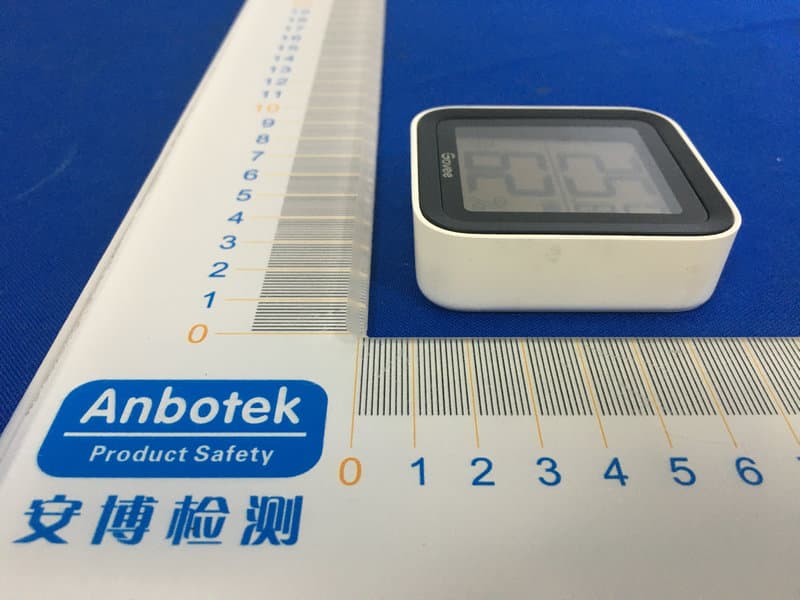
Click to zoom
Application Details
- Equipment Class
- DTS - Digital Transmission System
- Date of Grant
- Jul 13, 2020
- Application Purpose
- Original Equipment
- Date of Application
- Jul 13, 2020
- Equipment Note
- Smart Thermo-Hygrometer
- Frequency Range
- 2402.00000000 - 2480.00000000
- Country
- China
Documents & Files
Document Text
Text extracted from the exhibit documents filed with the FCC. Open a document above to read the original.
Users Manual
User Manual Smart Thermo-Hygrometer Model:H5102 English01 Deutsch09 Français17 Español 25 Italiano33 日本語 41 English At a Glance Temperature Comfort Level Stand Bluetooth- connected Humidity Battery Level °F /°C Switch 0101 Comfort Level Humidity is below 30%. Humidity is between 30% - 60% while temp is 20°C - 26°C. Humidity is above 60%. What You Get Bluetooth-connected Icon Display: Bluetooth is connected. Not shown: Bluetooth isn’t connected. °F /°C Switch Tap to switch temp unit to °F /°C on LCD screen. 1 1 1 1 1 1 Thermo-Hygrometer AAA Battery (Built-in) Stand (Built-in) 3M Adhesive User Manual Service Card 02 Specifications Temp: ±0.54°F/±0.3°C, Humidity: ±3% -20°C - 60°C (-4°F ~ 140°F) 0% ~ 99% 50m/164ft (No obstacles) Accuracy Operating Temp Operating Humidity Bluetooth-enabled Distance Installing Your Device ❶ ❷ Pull out the battery insulation sheet; Install the device. Stand on the table: Open the back cover and take out the stand; a. 03 Stick on the wall: Stick it on the wall with 3M adhesive. b. Insert the stand into the groove and stand the device on the desktop. 3M Adhesive 04 Download the Govee Home app from the App Store (iOS devices) or Google Play (Android devices). Downloading the Govee Home App Connecting to Bluetooth ❶ ❷ ❸ ❹ ❺ Turn on Bluetooth in your phone and get close to the thermo-hygrometer (Location Services/GPS should be turned on for Android users). Open Govee Home, tap “+” icon at the top right corner and select “H5102”. Follow instructions in app to complete connecting. It shows Bluetooth-connected icon on LCD screen after successful connection. Please check the above steps and try again if connection fails. Govee Home 05 Using the Thermo-Hygrometer with Govee Home Troubleshooting ❶ Cannot connect to Bluetooth. Make sure Bluetooth in your phone has been turned on.a. °F/°C Switch Switch the temperature unit between°F and °C. Data Export Export historical temp and humidity records to CSV format after filling in the mailbox. Push Notifications App pushes alert messages once temp/humidity is beyond preset range. Calibration Calibrate the temp and humidity readings. Data Clear Clear local and Cloud storing data. 06 Warning ❶ ❷ The device should work in an environment with a temperature ranging from -20°C to 60°C and humidity from 0% to 99%. Please take out batteries if you don’t use the device for an extended period of time. ❷ Data in the app is not updated. Connect to the thermo-hygrometer in the Govee Home app instead of Bluetooth list in your phone. Keep the distance between your phone and the device less than 50m/164ft. Keep your phone as close to the device as possible. Make sure that Android device users turn on Location and iOS users select “Setting - Govee Home - Location - Always” in the phone. b. c. d. e. Make sure the device has connected to the Govee Home app. Make sure that Android device users turn on Location and iOS users select “Setting - Govee Home - Location - Always” in the phone. a. b. ❸ Cannot export data in the app. Please sign up and log into your account before exporting data. 07 ❸ ❹ ❺ Prevent dropping the device from a high place. Do not disassemble the device aggressively. Do not immerse the device in water. Customer Service Warranty: 12-Month Limited Warranty Support: Lifetime Technical Support Email: [email protected] Official Website: www.govee.com @Govee @Govee @Goveeofficial @Govee 08 °F /°C Schalter Deutsch Überblick Temperatur Komfortstufe Ständer Bluetooth- verbunden Luftfeuchtigkeit Die Batterieleistung 09 Komfortstufe Luftfeuchtigkeit < 30% 20 °C ≤ Temperatur ≤ 26 °C, 30% ≤ Luftfeuchtigkeit ≤ 60% Luftfeuchtigkeit> 60% Was du bekommst Bluetooth verbunden Anzeige: Bluetooth ist verbunden Nicht gezeigt: Bluetooth ist nicht verbunden. °F /°C Schalter Drücken Sie, um die Temperatureinheit zwischen °F und °C umzuschalten. 1 1 1 1 1 1 Intelligentes Thermo-Hygrometer AAA-Batterie (Eingebaut) Ständer (Eingebaut) 3M Klebstoff Benutzerhandbuch Servicekarte 10 Die Spezifikation Temperatur: ±0.54°F/±0.3°C, Luftfeuchtigkeit: ±3% -20°C - 60°C (-4°F ~ 140°F) 0% ~ 99% 50m/164ft (Keine Hindernisse) Richtigkeit Betriebstemperatur Betriebsfeuchtigkeit Bluetooth-fähige Entfernung Installation des Geräts ❶ ❷ Ziehen Sie die Batterieisolationsfolie heraus. Installieren Sie das Gerät. Auf den Tisch stellen Öffnen Sie die hintere Abdeckung und nehmen Sie den Ständer heraus. a. 11 An der Wand kleben Kleben Sie es mit 3M Kleber an die Wand. b. Setzen Sie den Ständer in die Nut ein und stellen Sie das Gerät auf den Desktop. 3M Klebstoff 12 Laden Sie die GoveeHome-App aus dem App Store (iOS-Geräte) oder von Google Play (Android-Geräte) herunter. Herunterladen der Govee Home App Verbindung mit Bluetooth ❶ ❷ ❸ Schalten Sie Bluetooth in Ihrem Telefon ein und nähern Sie sich dem Thermo-Hygrometer (Hinweis: Benutzer von Android-Geräten sollten den Standort aktivieren, und iOS-Benutzer sollten in Ihrem Telefon auf "Einstellung - Govee Home - Standort - Immer" tippen.) Öffnen Sie Govee Home, tippen Sie oben rechts auf das Symbol "+" und wählen Sie "H5102". Befolgen Sie die Anweisungen in der App, um die Verbindung abzuschließen. Govee Home 13 Einheitschalten Einheiten in der app wechseln Daten ausgeben Senden Sie historische Daten im CSV-Format an Ihre Mailbox. Erinnern mich Sobald die Temperatur / Luftfeuchtigkeit den voreingestellten Bereich verlässt, werden Warnmeldungen ausgegeben. Kalibrierung Der Kalibrierungsbereich für die Temperatur und für die Luftfeuchtigkeit beträgt. Daten löschen Löschen Sie historische Daten, die auf Geräten und in der Cloud gespeichert sind. Verwenden Ihres Geräts mit der Govee Home App ❹ ❺ Sobald die Verbindung hergestellt ist, wird auf dem LCD-Bildschirm ein Bluetooth-Symbol angezeigt. Bitte überprüfen Sie die obigen Schritte und versuchen Sie noch einmal, wenn die Verbindung fehlgeschlagen ist. 14 ❷ Daten in der App werden nicht aktualisiert. Stellen Sie sicher, dass das Gerät mit der Govee Home-App verbunden ist. Stellen Sie s…
Text truncated - open the document above for the full version.
External Photos
FCC ID: 2AQA6-H5102
ID Label/Location Info
Label Location On EUT Label Product Name: Smart Thermo-Hygrometer Model No.: H5102 FCC ID: 2AQA6-H5102 This device complies with Part 15 of the FCC Rules. Operation is subject to the following two conditions: (1) This device may not cause harmful interference, and (2)This device must accept any interference received, including interference that may cause undesired operation.
Internal Photos
FCC ID: 2AQA6-H5102 ANT
Operational Description
version01 Shenzhen Intellirocks Tech. Co., Ltd. Declaration concerning Antenna Specification It is hereby declared that the product Model No.: H5102 FCC ID : 2AQA6-H5102 fulfills the requirement in FCC test relating to the antenna type. The device specified above confirms to the FCC recommendations for internal antenna type(s) described below: WIFI: Model No. of antenna: N/A Type of antenna: PCB Antenna Gain of the antenna: 2.1 dBi Frequency range:2402MHz~2480MHz The mounting of the antenna is fixed to the radio module and no other antenna should be used. Company name: Shenzhen Intellirocks Tech. Co., Ltd. Address: Room 502, Building 9, Yungu Phase 2, Pingshan 1st Road, Taoyuan Street, Nanshan, Shenzhen, Guangdong, China City:Nanshan ZIP / Postal code: N.A. Country:China Place:Shenzhen Date: 2020-07-14 Signature:
RF Exposure Info
RF EXPOSURE EVALUATION According to FCC 1.1310: The criteria listed in the following table shall be used to evaluate the environment impact of human exposure to radio frequency(RF) Radiation as specified in §1.1307(b) FCC ID: 2AQA6-H5102 EUT Specification EUTSmart Thermo-Hygrometer Frequency band (Operating) WLAN: 2.412GHz ~ 2.462GHz WLAN: 5.18GHz ~ 5.32GHz / 5.50GHz ~ 5.70GHz WLAN: 5.745GHz ~ 5825GHz Others: BLE: 2402-2480MHz Device category Portable (<20cm separation) Mobile (>20cm separation) Others ___ Exposure classificationOccupational/Controlled exposure (S = 5mW/cm2) General Population/Uncontrolled exposure (S=1mW/cm2) Antenna diversitySingle antenna Multiple antennas Tx diversity Rx diversity Tx/Rx diversity Max. output power4.823 dBm (0.00304W) Antenna gain (Max)2.1 dBi Evaluation applied MPE Evaluation SAR Evaluation Limits for Maximum Permissible Exposure(MPE) Frequency Range(MHz) Electric Field Strength(V/m) Magnetic Field Strength(A/m) Power Density(mW/cm 2 ) Average Time (A) Limits for Occupational/Control Exposures 300-1500----F/3006 1500-100000----56 (B) Limits for General Population/Uncontrol Exposures 300-1500----F/15006 1500-100000----130 Friis transmission formula: Pd=(Pout*G)\(4*pi*R2) Where Pd= Power density in mW/cm 2 Pout=output power to antenna in Mw G= gain of antenna in linear scale Pi=3.1416 R= distance between observation point and center of the radiator in cm Pd the limit of MPE, 1mW/cm2. If we know the maximum gain of the antenna and total power input to the antenna, through the calculation, we will know the distance where the MPE limit is reached. Measurement Result Operating Mode Channel Frequency (MHz) Measured Power (dBm) Tune up tolerance (dBm) Max. Tune up Power (dBm) Antenna Gain (dBi) Power density at 20cm (mW/ cm 2 ) Power density Limits (mW/cm 2 ) BLE 24023.6243.624±14.6242.10.00091 24404.5694.569±15.5692.10.00121 24804.8234.823±15.8232.10.00121
Test Report
Report No.: 18220WC00076001FCC ID: 2AQA6-H5102Page 1 of 42 Code:AB-RF-05-a FCC TEST REPORT Client Name: Shenzhen Intellirocks Tech. Co., Ltd. Address: Room 502, Building 9, Yungu Phase 2, Pingshan 1st Road, Taoyuan Street, Nanshan, Shenzhen, Guangdong, China Product Name: Smart Thermo-Hygrometer Date: Jul. 09, 2020 Shenzhen Anbotek Compliance Laboratory Limited Report No.: 18220WC00076001FCC ID: 2AQA6-H5102Page 2 of 42 Code:AB-RF-05-a Contents 1. General Information ............................................................................................................................................... 5 1.1. Client Information ....................................................................................................................................... 5 1.2. Description of Device (EUT) ..................................................................................................................... 5 1.3. Auxiliary Equipment Used During Test ................................................................................................... 6 1.4. Description of Test Modes ........................................................................................................................ 6 1.5. List of channels ........................................................................................................................................... 6 1.6. Description Of Test Setup ......................................................................................................................... 7 1.7. Test Equipment List .................................................................................................................................... 8 1.8. Measurement Uncertainty ......................................................................................................................... 9 1.9. Description of Test Facility ........................................................................................................................ 9 2. Summary of Test Results ................................................................................................................................... 10 3. Conducted Emission Test ................................................................................................................................... 11 3.1. Test Standard and Limit .......................................................................................................................... 11 3.2. Test Setup .................................................................................................................................................. 11 3.3. Test Procedure .......................................................................................................................................... 11 3.4. Test Data .................................................................................................................................................... 11 4. Radiation Spurious Emission and Band Edge ................................................................................................ 12 4.1. Test Standard and Limit .......................................................................................................................... 12 4.2. Test Setup .................................................................................................................................................. 12 4.3. Test Procedure .......................................................................................................................................... 13 4.4. Test Data .................................................................................................................................................... 14 5. Maximum Peak Output Power Test .................................................................................................................. 22 5.1. Test Standard and Limit .......................................................................................................................... 22 5.2. Test Setup .................................................................................................................................................. 22 5.3. Test Procedure .......................................................................................................................................... 22 5.4. Test Data .................................................................................................................................................... 22 6. 6DB Occupy Bandwidth Test ............................................................................................................................. 25 6.1. Test Standard and Limit .......................................................................................................................... 25 6.2. Test Setup ............................................................................................................................... ................... 25 6.3. Test Procedure .......................................................................................................................................... 25 6.4. Test Data .................................................................................................................................................... 25 7. Power Spectral Density Test .............................................................................................................................. 28 7.1. Test Standard and Limit .......................................................................................................................... 28 7.2. Test Setup .................................................................................................................................................. 28 7.3. Test Procedure ...................................................................................................…
Text truncated - open the document above for the full version.
Test Setup Photos
FCC ID: 2AQA6-H5102 Photo of Radiation Emission Test
Contact Information
Applicant
Eric Pan(Manager)
Test Firm
Shenzhen Anbotek Compliance Laboratory LimitedJeff Zhu
Technical Specifications
| # | Rule Parts | Frequency Range | Power Output |
|---|---|---|---|
| 1 | 15C | 2.40 GHz - 2.48 GHz | 3.04 mW |
Other Applications from Shenzhen Intellirocks Tech. Co., Ltd.
2AQA6-H6008C
May 08, 2026Govee RGBWW Smart LED Bulb
Equipment Class
DTS - Digital Transmission System2AQA6-H5179A
Sep 17, 2024Wi-Fi Thermo-Hygrometer
Equipment Class
DTS - Digital Transmission System
2AQA6-H6114A
Aug 28, 2024Govee RGB Car LED Strip Light
Equipment Class
DTS - Digital Transmission System2AQA6-H604D
Jun 29, 2024Govee DreamView G1S Gaming Light
Equipment Class
DTS - Digital Transmission System
2AQA6-H5085
Nov 13, 2023Smart Plug Pro
Equipment Class
DTS - Digital Transmission System