2AT86-SHTB01SECURAM Touch
SecuRam Systems, Inc.
Click to zoom
Application Details
- Equipment Class
- DTS - Digital Transmission System
- Date of Grant
- Jan 06, 2020
- Application Purpose
- Original Equipment
- Date of Application
- Jan 06, 2020
- Equipment Note
- SECURAM Touch
- Frequency Range
- 2402.00000000 - 2480.00000000
- Company
- SecuRam Systems, Inc.
- Country
- United States
Documents & Files
Document Text
Text extracted from the exhibit documents filed with the FCC. Open a document above to read the original.
Users Manual
SECURAMTouch Model:SH-TB01 Doc.No.:SH-TB01-191011 VersionNo.:V1.00 Date:2019-10-11 CongratulationsonyourpurchaseoftheSECURAMTouch,thesmartfingerprintdeadboltlock. 1.QuickTouroftheTouch TheTouchhas30usercapacity oEachusercanregister2fingerprints UserscanbesetasOwnersorVisitors o Ownerscanunlockusingfingerprintorcode oVisitorscanunlockusingfingerprintorcode,providedtheVisitorswitchissettogreen ThefirstuseraddedistheAdministrator/Owner oAdministrator/Ownercan: canunlockusingfingerprintorcode manageallusers accessallprogrammingmenus 2.Installation: DownloadtheappontheAppStoreorGooglePlayStoreandfollowtheinstructionstoinstallthe SECURAMTouch. 3.ToopenthelockwiththedefaultAdministratorcode: Forfirstuse,enter123456+button,toopenthelockusingthedefaultAdministratorscode 4.SetUp: TheeasiestwaytosetupyourSECURAMTouchistofollowthevoiceguidance. PresstheSettingsbuttontobegin: AddUserPress2-Toaddthefirstuser–Administrator/Owner o AddUser oEntercode–entertheadmincode–thedefaultis123456 oVerifiedSuccessfully oEnrolltheAdministratorfirst o Placefirstfinger–placefingeronfingerprintreaderonthetopofthetouchpad o PlacefingerandLiftfingerasinstructed NOTE:ifyoudonotwanttoaddafingerprintforauser,presstoskip oFingerprintenrolledsuccessfully oPlacesecondfinger–placeasecondfingeronthefingerprintreader oPlacefingerandLiftfingerasinstructed o Fingerprintenrolledsuccessfully oEnternewcodefollowedbycheckmark–enterauniquecodebetween4and8digitsin length,followedbybutton NOTE:ifyoudonotwanttoaddacodeforthisuser,presstoskip oRepeatnewcode–enterthesamecodeagainfollowedbythebutton o Operationsuccessful o OwneraddedsuccessfullyShouldsayAdministratoraddedsuccessfully IMPORTANT:thisnewcodeistheAdministrator/Owner,itreplacesthedefaultAdministrator code. oToaddotherusersfollowthesameprocessasabove. oYoucancategorizeusersaseitherowners(byselecting1)orvisitors(byselecting0) Visitorcodescanberevokedatanytimebytogglingthevisitoraccessbutton abovethethumbturn. MaskingCodes:Validcodescanbe4-8digitsinlength.Wehaveaddedtheabilitytomaskyour codebyaddingextradigitstoyourvalidcode.Maskingcanbeusedincasesomeoneis watchingasyouenteryourcodeandyoudon’twantthemtoknowyourcode.Tomaskyour codeenteramaximumof9digitswhereyourcodeisenteredasconsecutivedigits.Forexample, oValidcodeis9876 oTomaskyourcodeyoucouldenter789876824(9digits) oLikewiseyoucouldenter1987688plusthebutton(lessthan9digits) o Thelockwillopen Notetofirmware:Checkcodeissimilarfunction,3333isallowedasis333333,andif3333isavisitor, hecanmaskhiscodeas333333333andopenthedoorevenifvisitorsisoff. DeleteUserpress3 oDeleteUser oPleaseloginasAdministrator–entertheAdministrator/Ownercodeorfingerprint oVerifiedSuccessfully o Press1forOwners;0forVisitors 1=Wouldyouliketodeleteallowners? Press Owner(s)deletedsuccessfully–AllOwnerswillbedeletedexceptforthe Administrator/Owner 0=Wouldyouliketodeleteallvisitors? Press Visitor(s)deletedsuccessfully SetVolumepress6 oPress6toadjustvolume Press6-VolumeHigh Presstoconfirm Press6-VolumeOff Presstoconfirm Press6-VolumeLow Presstoconfirm OperationSuccessful Pairphonepress8 oPairingMode oPleaseloginasAdministrator oVerifiedsuccessfully o Nowpleasefollowtheinstructionsontheapptocompletethesetup 4.LockOperation Unlocking o Placefingerprintonsensor oOr oEntercodeandpress o Voice: Locking oPressanynumberonthetouchpad oVoice:Locked Autore-lock–thelockcanbesetuptoautomaticallyre-lockafteropening.Thisfeaturecanbe setupintheapp. oWhentheprescribedre-locktimeelapses,thesystemextendsthelockbolt 5.RestrictingVisitorAccess TheVisitorswitchcanbesettogreenorredbymanuallyslidingtheswitch. Green=allvisitoraccessallowed Red=visitoraccessrestricted,anduponentryofavisitorcodeorfingerprint, thelockwillremainlocked. Voice:Visitoraccessrestricted 6.Integrateddoorsensor TheSECURAMTouchisequippedwithanoptionalintegrateddoorsensortodetectdooropen/closed position.Tosetupthedoorsensorrotatethesensorarmfromthebackofinteriorassembly.Youmay needtoremovetheinteriorassemblyfromthedoortorotatethesensorarm. Thensecurethesensormagnettothedoorframewiththeincludedtwosidedtape.Thedistance betweenthesensormagnetandthesensorarmshouldbenomorethan½”. Thesensorwillthenreporttotheappthedoorposition. 7.Resettingtodefault Thelockcanberesettodefaultbyaccessingtheresetbuttononthebackoftheinteriorassembly. Openthebatterycompartment Raisethelockinglatchtoreleasetheinteriorassemblyfromthemountingplate Slideawayfromthespindle Rotatetheintegrateddoorsensortoaccesstheresethole Usingapaperclippressandholdtheresetbuttoninsidetheresetholefor5seconds,youwill hear“ResettoFactoryDefault” AllusercodesandfingerprintswillbedeletedandtheAdministratorcodewillberesetto 123456 8.Armingthesystem Afterpressinganybuttontolockthedoor,enter000000andbuttonwithin10seconds.Thisarms thesystembyturningonallnotificationsforallconnecteddevices. 9.Repeatedinvalidcodeentry–LockOutMode Afterenteringaninvalidcode3timesinsuccession,thetouchpadisdisabledfor4minutes–Lockout mode.Eventhoughthetouchpadisdisabled,theappcanstillopenthelock. 10.LowBattery Lowbatteryvoltage:4.6to5.0volts Underalowbatterycondition,theSECURAMTouchwillprovidealowbatterywarninguponcodeor fingerprintentry.Thelockwillunlockwiththevoicewarning“LowBattery”,andthelowbattery indicatorflashesred. NOTE:Lockprogrammingcannotbeperformedwithalowbattery. 11.Externalbatteryport Intheeventthatalowbatteryhasnotbeenreplacedandthebatteriesarecompletelydead,the externalbatteryportcanbeusedtopowerthelocktoopen.Contacttheexternalbatteryportswitha 9Vbatteryandentercodeorfingerprinttounlock. 12.HighSecurityKey TheSECURAMTouchisequippedwithamechanicaloverridetoopenthelock.Insertthekeyandturn tounlock. 13.Specifications RatedVoltage:DC6V WorkingTemperature:-25°C~60°C WorkingHumidity(max):<90% PasswordLength:4-8Digits 14.SafetyInformation Safetyinstructionsforbatterieswithbatteryproducts: UseTwoCR2typebatteries; Non-rechargeablebatteriescannotbecharged; Thebatteryshouldbeplacedwiththecorrectpolarity(+,-); Theusedbatteryshouldbetakenoutof…
Text truncated - open the document above for the full version.
Cover Letter(s)
QA-FR-170-B Company: SecuRam Systems, Inc. Add: 3325 Grande Vista Drive Newbury Park, CA 91320 United States Tel: 025-86553388-508 Fax: 025-52638736 FCC Authorization Date: 2019-12-04 FEDERAL COMMUNICATIONS COMMISSION Authorization and Evaluation Division 7435 Oakland Mills Road Columbia, MD 21046 Subject: Agent Authorization To whom it may concern: We, SecuRam Systems, Inc., the undersigned, Hereby authorizes Bay Area Compliance Laboratories Corporation to act on its behalf in all matters relating to application for Equipment authorization, including the signing of all documents relating to these matters. All acts carried out by Bay Area Compliance Laboratories Corp. on our behalf shall have the same effect as our own action. We, the undersigned, hereby certify that we are not subject to a denial of federal benefits, that includes FCC benefits, pursuant to Section 5301 of the Anti-Drug Abuse Act of 1988, 21 U.S.C. 862. This authorization is valid until further written notice from the applicant. Sincerely Yours, Signature: Typed or Printed Name: Shinee Zhang Title: IPR
Cover Letter(s)
Company Name: SecuRam Systems, Inc. Add: 3325 Grande Vista Drive Newbury Park, CA 91320 United States Tel: 025-86553388-508 Fax: 025-52638736 E-mail: [email protected] FCC Confidential Authorization Date:2019-12-04 FEDERAL COMMUNICATIONS COMMISSIONS Authorization and Evaluation Division 7435 Oakland Mills Road Columbia, MD 21046 Subject: Confidentiality Request regarding application for certification of FCC ID: 2 AT86-SHTB01 To: whom it may concern, In accordance with Sections 0.457 and 0.459 of the Commission’s Rules, SecuRam Systems, Inc. hereby requests long-term confidential treatment of information accompanying this application as outlined below: Block Diagram Schematics Operation Description The above materials contain proprietary and confidential information not customarily released to the public. The public disclosure of these materials provides unjustified benefits to its competitors in the market. Sincerely Yours, Signature: Typed or Printed Name: Shinee Zhang Title: IPR
External Photos
EXHIBIT A - EUT EXTERNAL PHOTOGRAPHS
Internal Photos
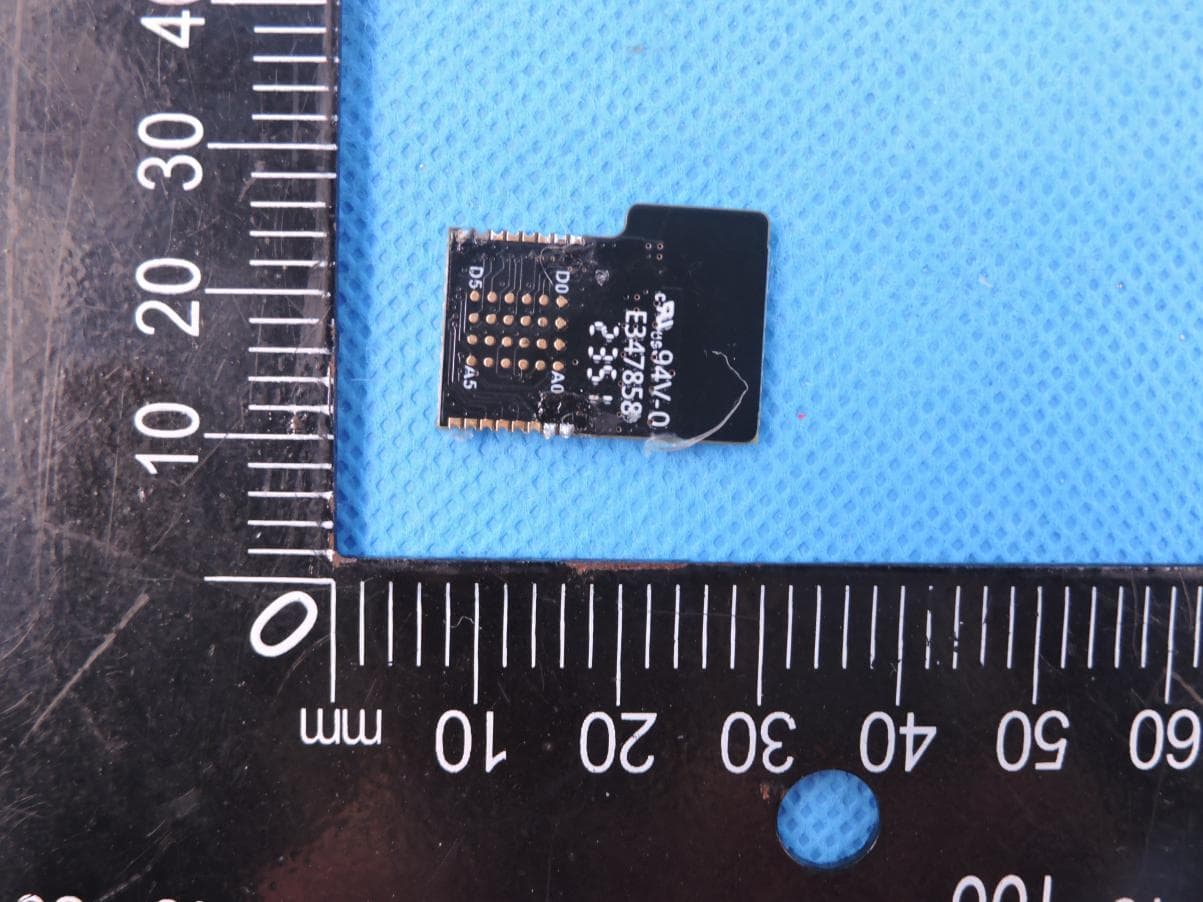
EXHIBIT B - EUT INTERNAL PHOTOGRAPHS BLE Antenna
RF Exposure Info
Bay Area Compliance Laboratories Corp. (Kunshan) Report No.: RKSA191204001-00B FCC Part 15.247 Page 10 of 32 FCC §1.1310& §2.1093 - RF EXPOSURE Applicable Standard According to§2.1093and §1.1307(b)(1), systems operating under the provisions of this section shall be operated in a manner that ensure that the public is not exposed to radio frequency energy level in excess of the Commission’s guideline. According to KDB 447498 D01 General RF Exposure Guidance The 1-g and 10-g SAR test exclusion thresholds for 100 MHz to 6 GHz at test separation distances ≤ 50 mm are determined by: [(max. power of channel, including tune-up tolerance, mW)/(min. test separation distance, mm)] ·[√f(GHz)] ≤ 3.0 for 1-g SAR and ≤ 7.5 for 10-g extremity SAR, where 1. f(GHz) is the RF channel transmit frequency in GHz. 2. Power and distance are rounded to the nearest mW and mm before calculation. 3. The result is rounded to one decimal place for comparison. 4. When the minimum test separation distance is < 5 mm, a distance of 5 mm is applied to determine SAR test Exclusion. Calculated Data: For worst case: Mode Frequency Range (MHz) Max Tune-up Conducted Power Calculated Distance (mm) Calculated Value Threshold (1-g SAR) SAR Test Exclusion (dBm) (mW) BLE 2402-2480 -0.15 0.97 5.0 0.31 3.0 Yes Note: For the above tune up power were declared by the manufacturer. Result: No SAR test is required.
Test Report
Note: This test report is prepared for the customer shown above and for the device described herein. It may not be duplicated or used in part without prior written consent from Bay Area Compliance Laboratories Corp. This report is valid only with a valid digital signature. The digital signature may be available only under the Adobe software above version 7.0. FCC PART 15.247 TEST REPORT For SecuRam Systems, Inc. 3325 Grande Vista Drive Newbury Park, CA 91320 United States FCC ID: 2AT86-SHTB01 Report Type: Original Report Product Type: SECURAM Touch Test Engineer: Lee Li Re port Number: RKSA191204001-00B Re port Date:2019-12-20 Reviewed B y: Oscar Ye EMC Manager Prepared By: Bay Area Compliance Laboratories Corp. (Kunshan) No.248 Chenghu Road,Kunshan,Jiangsu province,China Tel: +86-0512-86175000 Fax: +86-0512-88934268 www.baclcorp.com.cn Bay Area Compliance Laboratories Corp. (Kunshan) Report No.: RKSA191204001-00B FCC Part 15.247 Page 2 of 32 TABLE OF CONTENTS GENERAL INFORMATION ....................................................................................................................................... 3 PRODUCT DESCRIPTION FOR EQUIPMENT UNDER TEST (EUT) ..................................................................................... 3 OBJECTIVE ................................................................................................................................................................... 3 RELATED SUBMITTAL(S)/GRANT(S) ............................................................................................................................. 3 TEST METHODOLOGY .................................................................................................................................................. 3 MEASUREMENT UNCERTAINTY .................................................................................................................................... 4 TEST FACILITY ............................................................................................................................................................. 4 SYSTEM TEST CONFIGURATION .......................................................................................................................... 5 DESCRIPTION OF TEST CONFIGURATION ...................................................................................................................... 5 EQUIPMENT MODIFICATIONS ....................................................................................................................................... 5 EUT EXERCISE SOFTWARE .......................................................................................................................................... 5 SUPPORT EQUIPMENT LIST AND DETAILS .................................................................................................................... 6 EXTERNAL I/O CABLE .................................................................................................................................................. 6 BLOCK DIAGRAM OF TEST SETUP ................................................................................................................................ 6 SUMMARY OF TEST RESULTS ............................................................................................................................... 8 TEST EQUIPMENT LIST ........................................................................................................................................... 9 FCC §1.1310& §2.1093 - RF EXPOSURE .................................................................................................................. 10 APPLICABLE STANDARD ............................................................................................................................................ 10 CALCULATED DATA: .................................................................................................................................................. 10 FCC §15.203 - ANTENNA REQUIREMENT ........................................................................................................... 11 APPLICABLE STANDARD ............................................................................................................................................ 11 ANTENNA CONNECTOR CONSTRUCTION .................................................................................................................... 11 FCC §15.209, §15.205 & §15.247(d) - SPURIOUS EMISSIONS ............................................................................. 12 APPLICABLE STANDARD ............................................................................................................................................ 12 EUT SETUP ................................................................................................................................................................ 12 EMI TEST RECEIVER SETUP ....................................................................................................................................... 13 TEST PROCEDURE ...................................................................................................................................................... 13 CORRECTED AMPLITUDE & MARGIN CALCULATION ................................................................................................. 13 TEST RESULTS SUMMARY .......................................................................................................................................... 13 TEST DATA ................................................................................................................................................................ 14 FCC §15.247(a) (2) - 6 dB EMISSION BANDWIDTH ............................................................................................ 22 APPLICABLE STANDARD .............................................................................…
Text truncated - open the document above for the full version.
Test Setup Photos
EXHIBIT C - TEST SETUP PHOTOGRAPHS Radiated Emissions (Below 1GHz) Radiated Emissions (Above 1GHz)
Contact Information
Applicant
Shinee Zhang
Test Firm
Bay Area Compliance Laboratories Corp. (Kunshan)Mr. John Chan
[email protected]+86 0512 86175000
Technical Specifications
| # | Rule Parts | Frequency Range | Power Output |
|---|---|---|---|
| 1 | 15C | 2.40 GHz - 2.48 GHz | 1.00 mW |
Other Applications from SecuRam Systems, Inc.
2AT86BT832X
Sep 17, 2024Bluetooth Low Energy (BLE) Module
Equipment Class
DTS - Digital Transmission System