2AU3H-ESECUCARD-SeSecuCard-S Display Card
Excelsecu Data Technology Co., Ltd.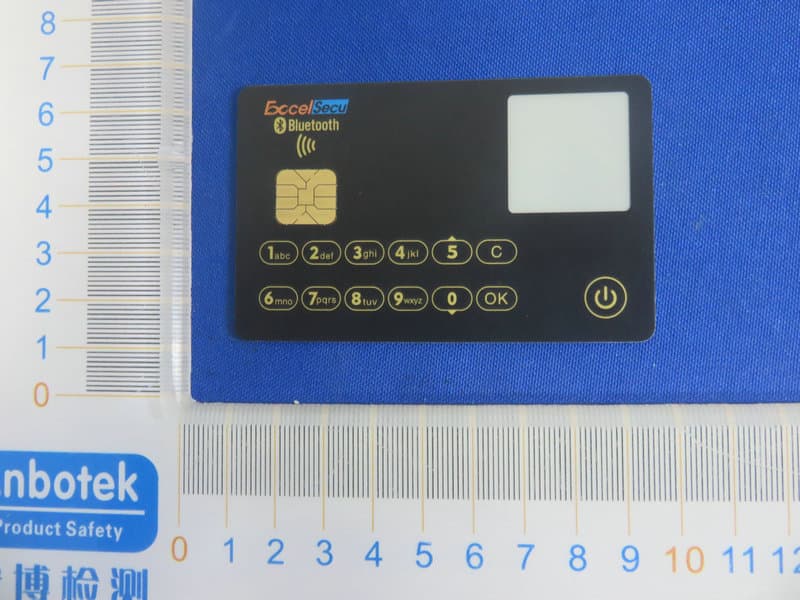
Click to zoom
Application Details
- Equipment Class
- DTS - Digital Transmission System
- Date of Grant
- Jul 21, 2020
- Application Purpose
- Original Equipment
- Date of Application
- Jul 21, 2020
- Equipment Note
- eSecuCard-S Display Card
- Frequency Range
- 2402.00000000 - 2480.00000000
- Country
- China
Documents & Files
Document Text
Text extracted from the exhibit documents filed with the FCC. Open a document above to read the original.
Users Manual
www.excelsecu.com eSecuCard-S User Manual (V1.1) Excelsecu Data Technology Co., Ltd. www.excelsecu.com CONFIDENTIAL information of Excelsecu Data Technology Co., Ltd. NO WARRANTIES OF ANY NATURE ARE EXTENDED BY THIS DOCUMENT. Any product and related material disclosed herein are only furnished pursuant and subject to the terms and conditions of a duly executed Program Product Licence or Agreement to purchase or lease equipment. The only warranties made by Excelsecu Technology, if any, with respect to the products described in this document are set forth in such Licence or Agreement. Excelsecu Technology cannot accept any financial or other responsibility that may be the result of your use of the information or software material, including direct, indirect, special or consequential damages. You should be careful to ensure that the use of this information and/or software material complies with the laws, rules, and regulations of the jurisdictions with respect to which it is used. All rights reserved. Copyright © 2020 Excelsecu Data Technology Co., Ltd. www.excelsecu.com Table of Contents 1. Getting Started with eSecuCard-S ............................................................................................. 4 2. Safety Caution ........................................................................................................................... 4 3. Product Picture.......................................................................................................................... 5 4. How to Use eSecuCard-S ........................................................................................................... 5 4.1. Turn ON/OFF eSecuCard-S ........................................................................................... 5 4.1.1. eSecuCard-S Function Menu ............................................................................ 5 4.2. Mobile Application ....................................................................................................... 6 4.2.1. Download Demo Application ........................................................................... 6 4.2.2. Bluetooth Mode ............................................................................................... 7 4.3. PC Application .............................................................................................................. 8 4.3.1. Contact Mode .................................................................................................. 8 4.3.2. Contactless Mode ............................................................................................ 9 5. How to Charge eSecuCard-S ...................................................................................................... 9 6. Product Specs .......................................................................................................................... 10 7. Appendix 1 .............................................................................................................................. 11 www.excelsecu.com Thank You for Using eSecuCard-S Product IMPORTANT INSTRUCTIONS Please read this manual before operating your eSecuCard-S and keep it for future reference. 1. Getting Started with eSecuCard-S ⚫ Please check eSecuCard-S’s battery level and make sure it’s not in low-power state before using it. ⚫ Please make sure eSecuCard-S to be charged when it’s in low-power condition, otherwise the RTC will be lost permanently. 2. Safety Caution ⚫ Do not put objects on the top of eSecuCard-S. ⚫ Do not deliberately bend the card. Parts inside could get damaged. ⚫ Keep eSecuCard-S away from flammable sources. ⚫ Keep eSecuCard-S away from water, alcohol and benzene etc. ⚫ Keep eSecuCard-S away from magnetic objects. ⚫ Do not disassemble or modify eSecuCard-S on your own. ⚫ To dispose of eSecuCard-S, cut along the dotted line on back side of product. ⚫ In low temperature conditions, after removing the displayed picture, there will be a shadow remaining. www.excelsecu.com 3. Product Picture ① EPD screen, 256*256 pixel. ② EMV chip, also battery recharging terminal. ③ Touch keypad: 0~9, a~z, OK and Cancel. ④ Power mechanical button. 4. How to Use eSecuCard-S 4.1. Turn ON/OFF eSecuCard-S 1. Long press the mechanical Power Button to power on/off. You need to set the PIN first after power on. It supports 6 to 16 digits. After set successfully, it shows the boot up logo and enters the BLE mode. If you have set the PIN before, you need to verify the PIN first after power on. After verify successfully, it shows the boot up logo and enters the BLE mode. (Note: Boot up logo can be changed by extended API, please refer to Java Card Extended APIs) 2. Standby time: 2 minutes. 4.1.1. eSecuCard-S Function Menu Touch the OK button to enter the function menu. Touch the Cancel button to quit the function menu. ⚫ Address www.excelsecu.com ⚫ Change PIN ⚫ About Of which: ➢ Address To display QR code and text. Automatically return to the function menu after 10 seconds. ➢ Change PIN To change the password of the eSecuCard-S. ➢ About To show the version information. 4.2. Mobile Application (Note: eSecuCard-S needs to be turned ON!) 4.2.1. Download Demo Application Download mobile application and open it: Android: Bigplatform.apk, iOS: Bigplatform.ipa. This is just a demo but not a perfect app because we need to show as more steps as we can to demonstrate the development for eSecuCard-S, so user experience is the second consideration. www.excelsecu.com 4.2.2. Bluetooth Mode It enters the Bluetooth mode automatically after power-on. 1. Connect and Disconnect. 1) Click Scan and Connect. 2) Select SN: 830X000000XX (Note: SN is on the back of each card. SN can be customized.) 3) eSecuCard-S will display “BLE Connected”, and shows an icon of bluetooth connected on the upper left of the screen. 2. Select Applet To select java applet. (Note: The first step after bluetooth connected.) 3. API Test (Note: Results will be displaying on m…
Text truncated - open the document above for the full version.
External Photos
FCC ID: 2AU3H-ESECUCARD-S
ID Label/Location Info
Label Location On EUT Label Product Name: eSecuCard-S Display Card Model No.: eSecuCard-S FCC ID: 2AU3H-ESECUCARD-S This device complies with Part 15 of the FCC Rules. Operation is subject to the following two conditions: (1) This device may not cause harmful interference, and (2) This device must accept any interference received, including interference that may cause undesired operation.
Internal Photos
FCC ID: 2AU3H-ESECUCARD-S ANT
Operational Description
version01 ExcelsecuDataTechnologyCo.,Ltd. Declaration concerning Antenna Specification It is hereby declared that the product Model No.: eSecuCard-S, eSecuCard-S300, eSecuCard-SK300 FCC ID : 2AU3H-ESECUCARD-S fulfills the requirement in FCC test relating to the antenna type. The device specified above confirms to the FCC recommendations for internal antenna type(s) described below: Model No. of antenna: N/A Type of antenna:PCB Antenna Gain of the antenna: 2.5 dBi Frequency range: 2402-2480MHz The mounting of the antenna is fixed to the radio module and no other antenna should be used. Company name: Excelsecu Data Technology Co., Ltd. Address: Unit 701-708, South 7/F, SDGI Building A, No.2 Kefeng Rd., Nanshan District, Shenzhen, Guangdong, China City: Shenzhen ZIP / Postal code: Country:China Place:ChinaDate:2020-07-22 Signature:
RF Exposure Info
RF EXPOSURE EVALUATION FCC ID: 2AU3H-ESECUCARD-S According to FCC 1.1310: The criteria listed in the following table shall be used to evaluate the environment impact of human exposure to radio frequency(RF) Radiation as specified in §1.1307(b): Routine SAR evaluation refers to that specifically required by §2.1093, using measurements or computer simulation. When routine SAR evaluation is not required, portable transmitters withoutput power greater than the applicable low threshold require SAR evaluation to qualify for TCB approval. Channel (MHz) Maximum output power (dBm) Tune up tolerance (dBm) Max Tune Up Power (dBm) Distance (mm) Calculation results Limit Operating Mode 2402-0.536 -0.536±1 0.46450.3453 BLE2440-0.375 -0.375±10.62550.3613 2480-0.470 -0.470±1 0.53050.3563 Test Results:PASS.
Test Report
Report No.: 18220WC00084901FCC ID: 2AU3H-ESECUCARD-SPage 1 of 48 Code:AB-RF-05-a FCC TEST REPORT Client Name: Excelsecu Data Technology Co., Ltd. Address: Unit 701-708, South 7/F, SDGI Building A, No.2 Kefeng Rd., Nanshan District, Shenzhen, Guangdong, China Product Name: eSecuCard-S Display Card Date: Jul. 17, 2020 Shenzhen Anbotek Compliance Laboratory Limited Report No.: 18220WC00084901FCC ID: 2AU3H-ESECUCARD-SPage 2 of 48 Code:AB-RF-05-a Contents 1. General Information ............................................................................................................................................... 5 1.1. Client Information ....................................................................................................................................... 5 1.2. Description of Device (EUT) ..................................................................................................................... 5 1.3. Auxiliary Equipment Used During Test ................................................................................................... 6 1.4. Description of Test Modes ........................................................................................................................ 6 1.5. List of channels ........................................................................................................................................... 6 1.6. Description Of Test Setup ......................................................................................................................... 8 1.7. Test Equipment List .................................................................................................................................... 9 1.8. Measurement Uncertainty ....................................................................................................................... 10 1.9. Description of Test Facility ...................................................................................................................... 10 2. Summary of Test Results ................................................................................................................................... 11 3. Conducted Emission Test ................................................................................................................................... 12 3.1. Test Standard and Limit .......................................................................................................................... 12 3.2. Test Setup .................................................................................................................................................. 12 3.3. Test Procedure .......................................................................................................................................... 12 3.4. Test Data .................................................................................................................................................... 12 4. Radiation Spurious Emission and Band Edge ................................................................................................ 17 4.1. Test Standard and Limit .......................................................................................................................... 17 4.2. Test Setup .................................................................................................................................................. 17 4.3. Test Procedure .......................................................................................................................................... 18 4.4. Test Data .................................................................................................................................................... 19 5. Maximum Peak Output Power Test .................................................................................................................. 27 5.1. Test Standard and Limit .......................................................................................................................... 27 5.2. Test Setup .................................................................................................................................................. 27 5.3. Test Procedure .......................................................................................................................................... 27 5.4. Test Data .................................................................................................................................................... 27 6. 6DB Occupy Bandwidth Test ............................................................................................................................. 30 6.1. Test Standard and Limit .......................................................................................................................... 30 6.2. Test Setup ............................................................................................................................... ................... 30 6.3. Test Procedure .......................................................................................................................................... 30 6.4. Test Data .................................................................................................................................................... 30 7. Power Spectral Density Test .............................................................................................................................. 33 7.1. Test Standard and Limit .......................................................................................................................... 33 7.2. Test Setup .................................................................................................................................................. 33 7.3. Test Procedure ..............................................................................................…
Text truncated - open the document above for the full version.
Contact Information
Applicant
Helen Dong(QA Supervisor)
Test Firm
Shenzhen Anbotek Compliance Laboratory LimitedJeff Zhu
Technical Specifications
| # | Rule Parts | Frequency Range | Power Output |
|---|---|---|---|
| 1 | 15C | 2.40 GHz - 2.48 GHz | 920.00 µW |
Other Applications from Excelsecu Data Technology Co., Ltd.
2AU3H-ESCS-W30
Feb 20, 20231D 2D Wireless Barcode Scanner
Equipment Class
DSS - Part 15 Spread Spectrum Transmitter2AU3H-ESECUFIDO2
Jan 02, 2020FIDO Authenticator
Equipment Class
DXX - Part 15 Low Power Communication Device Transmitter