FCCID.CO- FCC ID Database
HomeCompaniesEquipment ClassesSearch

© 2026 FCC ID Database. All rights reserved.

AboutContactData sourced from FCC public records
  1. Home/
  2. ESL Vision LLC/
  3. 2AUVL-RPP-001

2AUVL-RPP-001Power Pack

ESL Vision LLC
Power Pack - FCC ID 2AUVL-RPP-001 - ESL Vision LLC
Click to zoom

Application Details

Equipment Class
DTS - Digital Transmission System
Date of Grant
Jan 14, 2020
Application Purpose
Original Equipment
Date of Application
Jan 14, 2020
Equipment Note
Power Pack
Frequency Range
2402.00000000 - 2480.00000000
Company
ESL Vision LLC
Country
United States

Documents & Files

Select a file to view

Users Manual

↗

Cover Letter(s)

↗
↗
↗

External Photos

↗

ID Label/Location Info

↗

Internal Photos

↗

Test Report

↗

Test Setup Photos

↗

Document Text

Text extracted from the exhibit documents filed with the FCC. Open a document above to read the original.

Users Manual

User manual Model: ESL-KNX-RPP-001 1. This product (module) is used in ESL Visions ESL-DVAN-SLR/PNL product series. The module can be connected to a DVAN driver to achieve 0-10 dimming. It can also work with an ESL VISION App to perform other functionalism. 2. To download ESL Vision’s APP, you can visit www.eslvision.com or find it in the app store 3. Once the module is learned-in via the ESL Vision APP. The user will be able to set specified settings such as 0-10V Dimming, high and trim, LED driver ON / OFF, and real-time power monitoring, grouping and other such features. 4. Please make sure this product is set up with the corresponding DVAN driver model. 5. For how to use ESL Vision’s app to control the TAP Module, please refer to the ESL Vision app manual. 6. Bluetooth Version: V4.1 APP introduction: The Login page: 1: new account registration 2: account login, forgot password, you can retrieve Password. 3: For new account registration, you can choose Mobile number or Email address to register according to the country or region. Mobile number, Email address accept the verification code, and also serve as a login account. 4: When registering, set the account password at the same time. 5:PRESETS 6:DEVICES 7:GROUPS 8:SCENES 9:SCHEDULES 10:ALERTS 11:REPORTS 12:ACCOUNT 13:ABOUT 5:PRESETS: 5.1 Power of ESL DVAN drivers are : 25W, 45W, 75W, among which the maximum power is 75W. 5.2. Color temperature: adjustable arbitrarily between 2700K-6500K. 5.3. Delay for turning on the light and delay for turning off the light. 5.4. return to Home page 6:DEVICES: All devices that have been added will be on this list, including: Lamps, Power pack, Sensor, Wall Switch, Gateway. 6.1 Click "+" to learn devices 6.2 Show all Devices 6.3 Ungrouped: Show Devices that are not currently in a group 6.4 Device List : a)Tap the item to Enter the equipment adjustment page. b)Tap and hold: Enter the function to modify the device name and delete (the device cannot be deleted when it is not powered on. If you want to delete it forcibly, you can scan it with the app to see if the device that was forcibly deleted can be reset from the software. If not, You need to reset the Bluetooth module by turn the power on and of for 6 times each). 7:GROUPS 7.1 Create new Group 7.2 Turning the Group ALL ON or ALL OFF. 7.3 Tap to Enter the group function control center. Tap and hold to Enter the function for changing the device name or delete the device (Hint: there are devices in the group, you cannot delete them). OFF or ON control a single group (OFF or ON in the upper right corner of the software interface) 8:SCENES: Scene selection. 9:SCHEDULES: 9.1 Create a SCHEDULES for, GROUPS, LAMPS, Power Pack. 9.2 A List of the schedules that have been created. 10:ALERTS Shows the offline devices which cannot be operated. 11:REPORTS If you have any problem or questions regarding to the ESL App, you may use the "REPORTS" to send an email to ESL team for consultation. 12:ACCOUNT 12.1 Edit Name. 12.2 Edit password. 12.3 You can switch to different network within the same account. 13:ABOUT You can view the App version website: Click the URL to view more products on ESL website. FCC STATEMENT This device complies with Part 15 of the FCC rules. Operation is subject to the following two conditions: 1) this device may not cause harmful interference, and 2) this device must accept any interference received, including interference that may cause undesired operation. Changes or modifications not expressly approved by the party responsible for compliance could void your authority to operate the equipment. The device has been evaluated to meet general RF exposure requirement, the device can be used in portable exposure condition without restriction. NOTE: This equipment has been tested and found to comply with the limits for a Class B digital device, pursuant to Part 15 of the FCC Rules. These limits are designed to provide reasonable protection against harmful interference in a residential installation. This equipment generates uses and can radiate radio frequency energy and, if not installed and used in accordance with the instructions, may cause harmful interference to radio communications. However, there is no guarantee that interference will not occur in a particular installation. If this equipment does cause harmful interference to radio or television reception, which can be determined by turning the equipment off and on, the user is encouraged to try to correct the interference by one or more of the following measures: Reorient or relocate the receiving antenna. Increase the separation between the equipment and receiver Connect the equipment into an outlet on a circuit different from that to which the receiver is connected. Consult the dealer or an experienced radio/TV technician for help.

External Photos

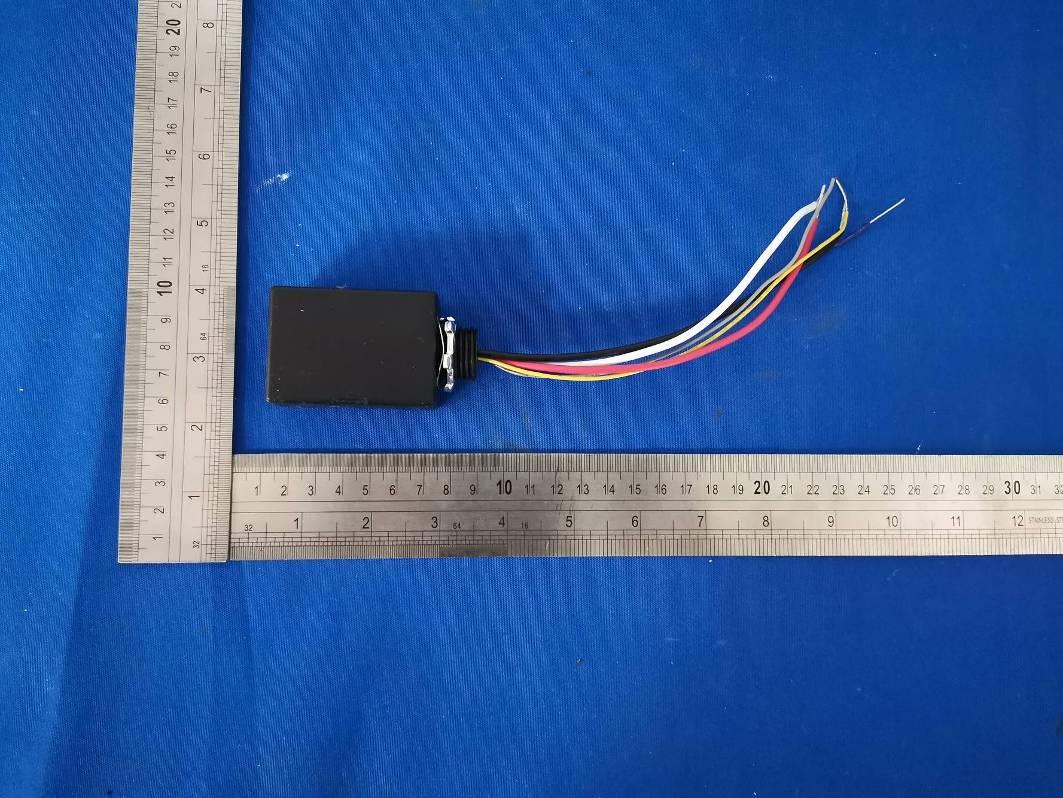
External photos Model: ESL-KNX-RPP-001

ID Label/Location Info

Label and label location

Internal Photos

Internal Photos Model: ESL-KNX-RPP-001 BT Antenna

Test Report

Report No.:NTCER1911011 Dongguan New Testing Centre Co., Ltd E-mail: [email protected] 3F, No. 1 the 1st North Industry Road, Songshan Lake Science & Technology Park, Dongguan, Guangdong, China, 523808 FCC PART 15 SUBPART C TEST REPORT Issued By: Dongguan New Testing Centre Co., Ltd Add: 3F, No. 1 the 1st North Industry Road, Songshan Lake Science & Technology Park, Dongguan, Guangdong, China, 523808. A2LA Number:5426.01 Tel: 86-769-22212079 http://www.ntc-cert.com Marking: 1. The test report is invalid without the official stamp of test center. 2. Nobody is allowed to photocopy or partly photocopy this test report without written permission of test center. 3. The test report is invalid without the signatures of approver, reviewer and testing engineer. 4. The test report is invalid if altered. 5. Objections to the test report must be submitted to NTC within 15 days. 6. The test report is valid for the tested samples only. 7. As for test verdict, “—”means is “no need for judgment” “N/A” means is “not applicable”, “P” means “pass”, “F” means “fail”. Dongguan New Testing Centre Co., Ltd E-mail: [email protected] 3F, No. 1 the 1st North Industry Road, Songshan Lake Science & Technology Park, Dongguan, Guangdong, China, 523808 Page 1 of 91 Report No.:NTCER1911011 TABLE OF CONTENTS Test Report Declare ...................................................................................................................... 3 1. Summary Of Test Results ....................................................................................................... 4 2. General Test Information ......................................................................................................... 4 2.1. Description of EUT ................................................................................................................... 4 2.2. Assistant equipment used for test .......................................................................................... 6 2.3. Block diagram EUT configuration for test ............................................................................. 6 2.4. Test environment conditions ................................................................................................... 7 2.5. Measurement uncertainty ........................................................................................................ 8 3. Power Line Conducted Emission Test .................................................................................. 9 3.1. Test equipment ......................................................................................................................... 9 3.2. Block diagram of test setup ..................................................................................................... 9 3.3. Power line conducted emission limits (class B) ................................................................... 9 3.4. Test procedure ........................................................................................................................ 10 3.5. Test result ................................................................................................................................ 10 4. Radiated Emission Test ......................................................................................................... 13 4.1. Test equipment ....................................................................................................................... 13 4.2. Block diagram of test setup ................................................................................................... 14 4.3. Limit .......................................................................................................................................... 16 4.4. Test procedure ........................................................................................................................ 17 4.5. Test result ................................................................................................................................ 17 5. Maximum Peak Output Power .............................................................................................. 23 5.1. Applied procedures / limit ...................................................................................................... 23 5.2. Test procedure ........................................................................................................................ 23 5.3. Deviation from standard ......................................................................................................... 23 5.4. Test setup ................................................................................................................................ 23 5.5. Test Results ............................................................................................................................. 23 6. -6dB Bandwidth Test .............................................................................................................. 26 6.1. Applied procedures / limit ...................................................................................................... 26 6.2. Test procedure ........................................................................................................................ 26 6.3. Deviation from standard ......................................................................................................... 26 6.4. Test setup ................................................................................................................................ 26 6.5. Test results .............................................................................................................................. 26 7. Power Spectral Density ......................................................................................................... 29 Dongguan New Testing Centre Co., Ltd E-mail: [email protected] 3F, No. 1 the 1st North Industry Road, Songshan Lake …

Text truncated - open the document above for the full version.

Test Setup Photos

Setup photos Model: ESL-KNX-RPP-001 Conducted emission test Radiated emission test 30MHz – 1GHz Above 1GHz

Contact Information

Applicant

Jennet Kao(Product Manager)
[email protected]888-493-5559Fax: 888-493-5559

Test Firm

Dongguan NTC CO., Ltd.Jees Hong
[email protected]+86-769-22022444

Technical Specifications

#Rule PartsFrequency RangePower Output
115C2.40 GHz - 2.48 GHz589.00 µW
Confidentiality
Long Term
Grant Notes
Output power listed is conducted.

Other Applications from ESL Vision LLC
TAP Module - FCC ID 2AUVL-SPETAP-V1 - ESL Vision LLC
2AUVL-SPETAP-V1

TAP Module

Jan 14, 2020

Equipment Class

DTS - Digital Transmission System