2AVYF-IPC-CX2E-CCONSUMER CAMERA
Hangzhou Huacheng Network Technology Co.,Ltd.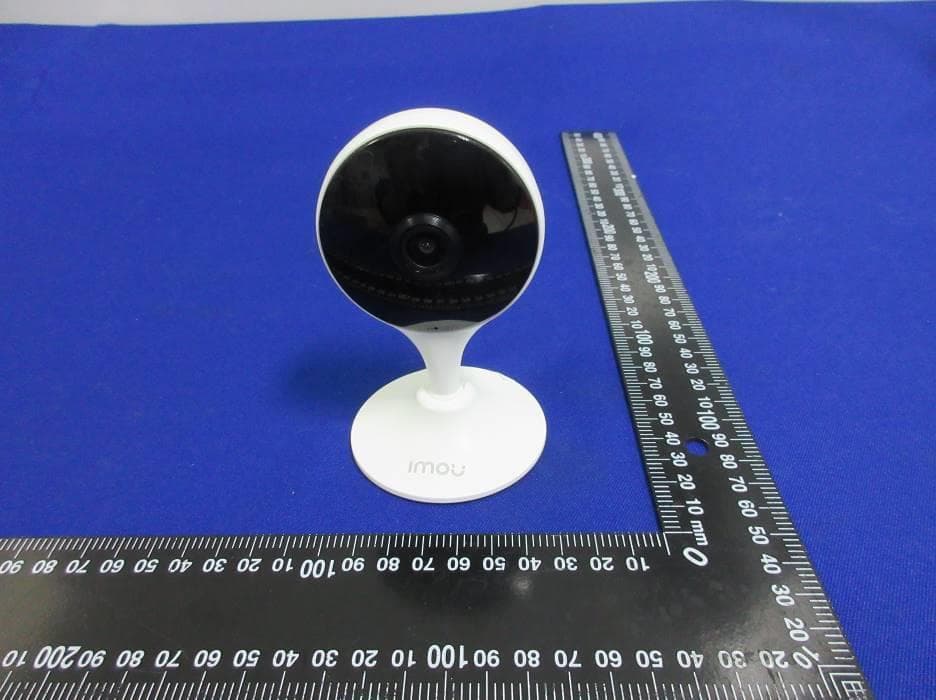
Click to zoom
Application Details
- Equipment Class
- DTS - Digital Transmission System
- Date of Grant
- Jun 27, 2021
- Application Purpose
- Original Equipment
- Date of Application
- Jun 25, 2021
- Equipment Note
- CONSUMER CAMERA
- Frequency Range
- 2412.00000000 - 2462.00000000
- Country
- China
Documents & Files
Document Text
Text extracted from the exhibit documents filed with the FCC. Open a document above to read the original.
Users Manual
Quick Start Guide Power Adapter ×1Power Cable ×1 Mounting Adhesive ×1 LED Indicator Lens Microphone Reset Button Micro SD Card Slot Power Port Version 1.0.0 T2.00212226 Package Content Camera ×1 QSG ×1 Camera Introduction Disconnect the camera from the power before installation or taking out its SD card. Press and hold the reset button for 10 s to reset the camera. LED Indicator Status Device Status Powered off/LED turned off Rebooting after reset Booting Device malfunction Off Solid red Flashing green and red alternately Network connection failed Ready for network configuration Operating properly Updating firmware Flashing red Solid green Flashing green See the table below for definitions of camera’s LED behaviors. Setting up Camera Follow the steps below to add the camera to your Imou account. Step 1 Scan the following QR code or search "Imou Life" in Google Play or App Store to download and install the app. Step 2 Launch the app. Then create an account if you are a new user. Step 3 Connect the camera to power source with the power adapter. Step 4 After the camera boots up, the LED indicator light flashes green (wire-free camera) or is on solid green (wired camera). If you already use the app, make sure that you are using the latest version. Mounting Plate ×1 Screw and Anchor Pack ×1 Mounting Template ×1 Select Wi-Fi Wi-Fi XXXXXX1 Wi-Fi XXXXXX2 Wi-Fi XXXXXX3 ... Wi-Fi Password If the LED indicator status goes wrong, reset the camera. Step 5 Follow the on-screen prompts to add the camera. Repeat the adding process if you have multiple cameras. Speaker About the Guide Mounting Surface Mounting Adhesive Camera Make sure that the mounting surface is strong enough to hold at least three times the weight of the camera. - This manual is for reference only. The operation of the actual product shall prevail if there is any inconsistency. - All the designs and software are subject to change without prior written notice. - All trademarks and registered trademarks mentioned are the properties of their respective owners. - Please visit our website or contact your local customer service if there is any problem when using the device. - If there is any uncertainty or controversy, we reserve the right of final explanation. Installaing Camera To paste the device firmly, clean and dry the mounting surface in advance. Use Mounting Adhesive Use Mounting Plate Step 1 Peel off the mounting adhesive and stick it to the bottom of the camera. Step 1 Peel off the mounting template and stick it to the desired installation area. Step 2 Drill holes into the mounting surface as the mounting template marks and then insert wall anchors as needed. Step 3 Secure the mounting plate to the mounting surface with included mounting screws. Step 4 Put the camera onto the mounting plate and ensure they attract to each other. Step 5 Power on the camera and then adjust its angle properly. Step 2 Press and hold the device against the installation area for 10 seconds and then release. Step 3 Power on the camera and then adjust its angle properly. Mounting Surface Mounting Template Wall Anchor Mounting Plate Mounting Screws Camera 1 2 3 4 5 FAQ For more questions, please scan the QR code below or visit: www.imoulife.com/web/support/help Q: The device cannot boot up or work as expected? Check the LED indicator status. If the light is not in green, press and hold the reset button for 10 s to reset the camera. Q: How to connect the camera to another Wi-Fi network? If the camera is online, select Device Details > Network Config to change the Wi-Fi connection on the app. If the camera is offline, reset the camera, and then configure the camera again. Q: Connection takes too long? Check if the distance between the camera and the router, and that between the camera and the smart phone is both within 5 m (16.4 ft) during the connection. Check the Wi-Fi configuration of the router: Select the channel to auto, and the mode to 11bgn mixed. Q: When the micro SD card is full, how is the recorded video saved? When the micro SD card is full, the system will overwrite the previous recorded videos. Save the important information in time. Q: Where are the recorded videos saved? If you have activated the cloud storage and installed a micro SD card, the recordings will be both saved to the card and cloud. If the cloud storage is deactivated, the recordings are saved to the SD card. Videos recorded during live view or playback is saved on your phone. Q: The device is offline? Check the indicator status: Solid green: Check whether the router can connect to the Internet. If the network is connected, restart the camera. Flashing red: Reset the camera, and then configure the camera again. Solid red: The camera is faulty.
Users Manual
C22E-A Network Camera Quick Start Guide Foreword Package Content1 Camera Introduction2 Important Safeguards and Warnings General Electrical Safety Operation and Daily Maintenance Environment Safety Instructions About the Manual ● ● ● ● ● ● V1.0.0 T2.0 0212227 This manual introduces the functions, installation and operations of the camera. The following categorized signal words with defined meaning might appear in the manual. Indicates a medium or low potential hazard which, if not avoided, could result in slight or moderate injury. Indicates a potential risk which, if not avoided, could result in property damage, data loss, lower performance, or unpredictable result. Provides additional information as the emphasis and supplement to the text. Signal WordsMeaning The manual is for reference only. If there is inconsistency between the manual and the actual product, the actual product shall prevail. We are not liable for any loss caused by the operations that do not comply with the manual. The manual would be updated according to the latest laws and regulations of related jurisdictions. For detailed information, refer to the paper manual, CD-ROM, QR code or our official website. If there is inconsistency between paper manual and the electronic version, the electronic version shall prevail. All the designs and software are subject to change without prior written notice. The product updates might cause some differences between the actual product and the manual. Please contact the customer service for the latest program and supplementary documentation. ● ● ● You can clean the device body with soft dry cloth, and for stubborn stains, use the cloth with mild detergent. To avoid possible damage on device body coating which could cause performance decrease, do not use volatile solvent such as alcohol, benzene, diluent and so on to clean the device body, nor can strong, abrasive detergent be used. Dome cover is an optical component. Do not touch or wipe the cover with your hands directly during installation or operation. For removing dust, grease or fingerprints, wipe gently with moistened oil-free cotton with diethyl or moisten soft cloth. You can also remove dust with an air blower. ● ● ● ● Strengthen the protection of network, device data and personal information by adopting measures which include but not limited to using strong password, changing password regularly, updating firmware to the latest version, and isolating computer network. For some device with old firmware versions, the ONVIF password will not be modified automatically along with the modification of the system password, and you need to upgrade the firmware or manually update the ONVIF password. Use standard components or accessories provided by manufacturer and make sure that the device is installed and maintained by professional engineers. The surface of the image sensor should not be exposed to laser beam radiation. Do not provide two or more power supply sources for the device unless otherwise specified. A failure to follow this instruction might cause damage to the device. 01 0504 02 06 03 07 ● ● ● ● ● ● ● ● ● ● ● There still might be deviation in technical data, functions and operations description, or errors in print. If there is any doubt or dispute, we reserve the right of final explanation. Upgrade the reader software or try other mainstream reader software if the manual (in PDF format) cannot be opened. All trademarks, registered trademarks and the company names in the manual are the properties of their respective owners. Please visit our website, contact the supplier or customer service if there is any problem occurring when using the device. If there is any uncertainty or controversy, we reserve the right of final explanation. ● ● ● ● ● ● ● ● ● ● ● ● ● Do not place the device in a wet, dusty, extremely hot or cold environment, and avoid places with strong electromagnetic radiation or unstable lighting. Keep the device away from any liquid to avoid damage to the internal components. Keep the indoor device away from rain or damp to avoid fire or lightning. Install the device in a well-ventilated place and do not block the ventilation of the device. Transport, use and store the device under the allowed humidity and temperature. Heavy stress, violent vibration or water splash are not allowed during transportation, storage and installation. Use the factory default package or material with equal quality to pack the device when transporting. Install the device in the location where only the professional staff with relevant knowledge of safety guards and warnings can access. Do not touch the heat dissipation component of the device to avoid scald. Do not open or dismantle the device; there are no components that a user can fix or replace. Opening the unit may cause water leakage or expose components to direct light. Contact the manufacturer or a qualified service representative to service the device or to replace a component, including the desiccant. (Not all models are provided with the desiccant). It is recommended to use the device together with lightning arrester to improve lightning protection effect. It is recommended to ground the device to enhance reliability. Do not touch the CCD or the CMOS optic sensor. Use a blower to clean dust or dirt on the lens surface. Use a dry cloth dampened with alcohol and gently wipe away any dust on the lens. All installation and operation must conform to your local electrical safety codes. Ensure power conforms to the Safety Extra Low Voltage (SELV), and that the rated voltage meets limited power source standards as specified in IEC60950-1. Note that the power supply requirement is subject to the device label. Make sure that the power supply is correct before operating the device. Please install easy-to-use device for power off before installing wiring, which is for emergent power off when necessary. Prevent the power cable from being trampled or pressed, especially the plug, power sock…
Text truncated - open the document above for the full version.
Cover Letter(s)
Hangzhou Huacheng Network Technology Co., Ltd. Date: 2021-06-11 Federal Communications Commission 7435 Oakland Mills Road Columbia MD 21046 To whom it may concern: I, the undersigned, hereby authorize UL-CCIC COMPANY LIMITED to act on our behalf in all manners relating to application for equipment authorization, including signing of all documents relating to these matters. Any and all acts carried out by UL-CCIC COMPANY LIMITED on our behalf shall have the same effect as acts of our own. I, the undersigned, hereby certify that we are not subject to a denial of federal benefits, that includes FCC benefits, pursuant to Section 5301 of the Anti-Drug Abuse Act of 1988, 21 U.S.C. 853(a). In authorizing UL-CCIC COMPANY LIMITED as our representative, we still recognize that we are responsible to: a) comply with the relevant provisions of the certification program; b) make all necessary arrangements for the conduct of the evaluation, including provision for examining documentation and access to all areas, records (including internal audit reports) and personnel for the purposes of evaluation (e.g. testing, inspection, assessment, surveillance, reassessment) and resolution of complaints; c) make claims regarding certification only in respect of the scope for which certification has been granted; d) do not use our product certification in such a manner as to bring the Certification Division into disrepute and not make any statement regarding our product certification which the Certification Division may consider misleading or unauthorized; e) upon suspension or cancellation of certification, discontinue use of all advertising matter that contains any reference thereto and return any certification documents as required by the Certification Division; f) use certification only to indicate the products are certified as being in conformity with specified standards; g) endeavor to ensure that no certificate or report nor any part thereof is used in a misleading manner; h) ensure that any reference to our product certification in communication media such as documents, brochures or advertising, complies with the requirements of the Certification Division; i) keep a record of all complaints made known to us relating to the product’s compliance with requirements of the relevant standard and to make these records available to the when requested; j) take appropriate action with respect to such complaints and any deficiencies found in products or services that affect compliance with the requirements for certification; k) document the actions taken. This authorization is valid until further written notice from the applicant. Sincerely Yours, Signed by: Company Name: Hangzhou Huacheng Network Technology Co., Ltd. Contact Name: Jian Li Title of Person: Certification Manager Address: No.2930, Nanhuan Road, Binjiang District, Hangzhou, China
Cover Letter(s)
Hangzhou Huacheng Network Technology Co., Ltd. Address: No.2930, Nanhuan Road, Binjiang District, Hangzhou, China Confirmation Letter We, Hangzhou Huacheng Network Technology Co., Ltd. The product: CONSUMER CAMERA FCC ID: 2AVYF-IPC-CX2E-C And model No.: IPC-C22EP-C-imou, IPC-C22EP-C, IPC-C22EN-C-imou, IPC-C22E-C-LC, TC2E-C have the same technical construction including circuit diagram, PCB Layout, components and component layout, all electrical construction and mechanical construction, with IPC-C22EN-C. The difference is only the name of the models. Best Regards Company Name: Hangzhou Huacheng Network Technology Co., Ltd. Contact Name: Jian Li Title of Person:Certification Manager Address: No.2930, Nanhuan Road, Binjiang District, Hangzhou, China Date:6/16/2021
Cover Letter(s)
Hangzhou Huacheng Network Technology Co., Ltd. Federal Communications Commission 7435 Oakland Mills Road Columbia MD 21046 Subject: Request for Confidentiality FCC ID: 2AVYF-IPC-CX2E-C To Whom It May Concern: Pursuant to the provisions of Sections 0.457 and 0.459 of the Commission’s rules (47 CFR §§ 0.457, 0.459), we are requesting the Commission to withhold the following attachments as confidential document from public disclosure indefinitely. Schematic Diagram Block Diagram Theory of Operation BOM List Tune-up procedure Above mentioned document contains detailed system and equipment description are considered as proprietary information in operation of the equipment. The public disclosure of above documents might be harmful to our company and would give competitor an unfair advantage in the market. It is our understanding that all measurement test reports, FCC ID label format and correspondent during certification review process cannot be granted as confidential documents and those information will be available for public review once the grant of equipment authorization is issued. Best Regards Company Name: Hangzhou Huacheng Network Technology Co., Ltd. Contact Name: Jian Li Title of Person:Certification Manager Address: No.2930, Nanhuan Road, Binjiang District, Hangzhou, China Date: June 8, 2021
External Photos
Appendix I External Photographs Page 2 of 6 UL-CCIC COMPANY LIMITED This report shall not be reproduced except in full, without the written approval of UL-CCIC COMPANY LIMITED. All View of EUT Page 3 of 6 UL-CCIC COMPANY LIMITED This report shall not be reproduced except in full, without the written approval of UL-CCIC COMPANY LIMITED. Top View of EUT Bottom View of EUT Page 4 of 6 UL-CCIC COMPANY LIMITED This report shall not be reproduced except in full, without the written approval of UL-CCIC COMPANY LIMITED. Front View of EUT Back View of EUT Page 5 of 6 UL-CCIC COMPANY LIMITED This report shall not be reproduced except in full, without the written approval of UL-CCIC COMPANY LIMITED. Left View of EUT Right View of EUT Page 6 of 6 UL-CCIC COMPANY LIMITED This report shall not be reproduced except in full, without the written approval of UL-CCIC COMPANY LIMITED. View of adapter
ID Label/Location Info
Remark: The product is too small to place the FCC statement on the product and it will be placed in the accessories while the device is marketed.
Internal Photos
Appendix II Internal Photographs Page 2 of 5 UL-CCIC COMPANY LIMITED This report shall not be reproduced except in full, without the written approval of UL-CCIC COMPANY LIMITED. Open View of EUT Internal View of EUT-1 Page 3 of 5 UL-CCIC COMPANY LIMITED This report shall not be reproduced except in full, without the written approval of UL-CCIC COMPANY LIMITED. Internal View of EUT-2 Internal View of EUT-3 Page 4 of 5 UL-CCIC COMPANY LIMITED This report shall not be reproduced except in full, without the written approval of UL-CCIC COMPANY LIMITED. Internal View of EUT-4 Page 5 of 5 UL-CCIC COMPANY LIMITED This report shall not be reproduced except in full, without the written approval of UL-CCIC COMPANY LIMITED. RF Model location ` Antenna location
RF Exposure Info
The results reported herein have been performed in accordance with the laboratory’s terms of accreditation. This report shall not be reproduced except in full without the written approval of the Laboratory. The results in this report apply to the test sample(s) mentioned above at the time of the testing period only and are not to be used to indicate applicability to other similar products. FCC RF EXPOSURE REPORT For CONSUMER CAMERA MODEL NUMBER: IPC-C22EN-C ADDITIONAL MODEL NUMBER: IPC-C22EP-C-imou, IPC-C22EP-C, IPC-C22EN-C-imou, IPC-C22E-C-LC, TC2E-C PROJECT NUMBER: 4789973747 REPORT NUMBER: 4789973747-56 FCC ID: 2AVYF-IPC-CX2E-C ISSUE DATE: Jun. 16, 2021 Prepared for Hangzhou Huacheng Network Technology Co., Ltd. Prepared by UL-CCIC COMPANY LIMITED No. 2, Chengwan Road, Suzhou Industrial Park, People’s Republic of China Tel: +86 512-6808 6400 Fax: +86 512-6808 4099 Website: www.ul.com REPORT No.: 4789973747-56 Page 2 of 7 UL-CCIC COMPANY LIMITED This report shall not be reproduced except in full, without the written approval of UL-CCIC COMPANY LIMITED.. Revision History Rev. Issue Date Revisions Revised By V0 06/16/2021 Initial Issue REPORT No.: 4789973747-56 Page 3 of 7 UL-CCIC COMPANY LIMITED This report shall not be reproduced except in full, without the written approval of UL-CCIC COMPANY LIMITED.. TABLE OF CONTENTS 1. ATTESTATION OF TEST RESULTS ................................................................................. 4 2. TEST METHODOLOGY ..................................................................................................... 5 3. FACILITIES AND ACCREDITATION ................................................................................. 5 4. REQUIREMENT ................................................................................................................. 6 REPORT No.: 4789973747-56 Page 4 of 7 UL-CCIC COMPANY LIMITED This report shall not be reproduced except in full, without the written approval of UL-CCIC COMPANY LIMITED.. 1. ATTESTATION OF TEST RESULTS Applicant Information Company Name: Hangzhou Huacheng Network Technology Co., Ltd. Address: No.2930, Nanhuan Road, Binjiang District, Hangzhou, China Manufacturer Information Company Name: Hangzhou Huacheng Network Technology Co., Ltd. Address: No.2930, Nanhuan Road, Binjiang District, Hangzhou, China EUT Description Product Name CONSUMER CAMERA Model Name IPC-C22EN-C Additional No. IPC-C22EP-C-imou, IPC-C22EP-C, IPC-C22EN-C-imou, IPC-C22E-C-LC, TC2E-C Sample Number 3967009 Data of Receipt Sample Jun. 05, 2021 Test Date Jun. 06, 2021 ~ Jun. 15, 2021 APPLICABLE STANDARDS STANDARD TEST RESULTS FCC Guidelines for Human Exposure IEEE C95.1 Complies Prepared By: Reviewed By: Jason Yang Tom Tang Engineer Project Engineer Authorized By: Chris Zhong Laboratory Leader REPORT No.: 4789973747-56 Page 5 of 7 UL-CCIC COMPANY LIMITED This report shall not be reproduced except in full, without the written approval of UL-CCIC COMPANY LIMITED.. 2. TEST METHODOLOGY The tests documented in this report were performed in accordance with KDB 447498 D01 General RF Exposure Guidance v06 and FCC Guidelines for Human Exposure IEEE C95.1. 3. FACILITIES AND ACCREDITATION Accreditation Certificate A2LA (Certificate No.: 4829.01) UL-CCIC COMPANY LIMITED has been assessed and proved to be in compliance with A2LA. FCC (FCC Designation No.: CN1247) UL-CCIC COMPANY LIMITED has been recognized to perform compliance testing on equipment subject to the Commission's Declaration of Conformity (DoC) and Certification rules. IC (IC Designation No.: 25056) UL-CCIC COMPANY LIMITED has been recognized to perform compliance testing on equipment subject to the Commission's Declaration of Conformity (DoC) and Certification rules. Note 1: All tests measurement facilities use to collect the measurement data are located at No. 2, Chengwan Road, Suzhou Industrial Park, Suzhou 215122, People’s Republic of China Note 2: For below 30MHz, lab had performed measurements at test anechoic chamber and comparing to measurements obtained on an open field site. These measurements below 30MHz had been correlated to measurements performed on an OFS. Note 3: The test anechoic chamber in UL-CCIC COMPANY LIMITED had been calibrated and compared to the open field sites and the test anechoic chamber is shown to be equivalent to or worst case from the open field site. REPORT No.: 4789973747-56 Page 6 of 7 UL-CCIC COMPANY LIMITED This report shall not be reproduced except in full, without the written approval of UL-CCIC COMPANY LIMITED.. 4. REQUIREMENT LIMIT Limits for General Population/Uncontrolled Exposure Limits for General Population/Uncontrolled Exposure Frequency Range (MHz) Electric Field Strength (E) (V/m) Magnetic Field Strength (H) (A/m) Power Density (S) (mW/cm 2 ) Averaging Time |E| 2 , |H| 2 or S (minutes) 0.3-1.34 614 1.63 (100)* 30 1.34-30 824/f 2.19/f (180/f2)* 30 30-300 27.5 0.073 0.2 30 300-1500 -- -- f/150 30 1500-100,000 -- -- 1.0 30 Note 1: f = frequency in MHz, * means Plane-wave equivalent power density Note 2: General population/uncontrolled exposures apply in situations in which the general public may be exposed, or in which persons that are exposed as a consequence of their employment may not be fully aware of the potential for exposure or cannot exercise control over their exposure. Note 3: The limit value 1.0mW/cm 2 is available for this EUT. MPE CALCULATION METHOD S =PG/(4πR 2 ) where: S = power density (in appropriate units, e.g. mW/ cm2) P = power input to the antenna (in appropriate units, e.g., mW) G = power gain of the antenna in the direction of interest relative to an isotropic radiator R = distance to the center of radiation of the antenna (appropriate units, e.g., cm) REPORT No.: 4789973747-56 Page 7 of 7 UL-CCIC COMPANY LIMITED This report shall not be reproduced except in full, without the written approval of UL-CCIC COMPANY LIMITED.. CALCULATED RESULTS Radio Frequency Radiation Exposure Evaluation WIFI (Worst case) Mode Ou…
Text truncated - open the document above for the full version.
Test Report
The results reported herein have been performed in accordance with the laboratory’s terms of accreditation. This report shall not be reproduced except in full without the written approval of the Laboratory. The results in this report apply to the test sample(s) mentioned above at the time of the testing period only and are not to be used to indicate applicability to other similar products. FCC 47 CFR PART 15 SUBPART C CERTIFICATION TEST REPORT For CONSUMER CAMERA MODEL NUMBER: IPC-C22EN-C ADDITIONAL MODEL NUMBER: IPC-C22EP-C-imou, IPC-C22EP-C, IPC-C22EN-C-imou, IPC-C22E-C-LC, TC2E-C PROJECT NUMBER: 4789973747 REPORT NUMBER: 4789973747-55 FCC ID: 2AVYF-IPC-CX2E-C ISSUE DATE: Jun. 16, 2021 Prepared for Hangzhou Huacheng Network Technology Co., Ltd. Prepared by UL-CCIC COMPANY LIMITED No. 2, Chengwan Road, Suzhou Industrial Park, People’s Republic of China Tel: +86 512-6808 6400 Fax: +86 512-6808 4099 Website: www.ul.com REPORT No.: 4789973747-55 Page 2 of 150 UL-CCIC COMPANY LIMITED This report shall not be reproduced except in full, without the written approval of UL-CCIC COMPANY LIMITED. Revision History Rev. Issue Date Revisions Revised By V0 06/16/2021 Initial Issue REPORT No.: 4789973747-55 Page 3 of 150 UL-CCIC COMPANY LIMITED This report shall not be reproduced except in full, without the written approval of UL-CCIC COMPANY LIMITED. TABLE OF CONTENTS 1. ATTESTATION OF TEST RESULTS ................................................................................. 4 2. TEST METHODOLOGY ..................................................................................................... 6 3. FACILITIES AND ACCREDITATION ................................................................................. 6 4. CALIBRATION AND UNCERTAINTY ................................................................................ 7 4.1. MEASURING INSTRUMENT CALIBRATION .............................................................. 7 4.2. MEASUREMENT UNCERTAINTY ............................................................................... 7 5. EQUIPMENT UNDER TEST ............................................................................................... 8 5.1. DESCRIPTION OF EUT .............................................................................................. 8 5.2. MAXIMUM OUTPUT POWER...................................................................................... 9 5.3. CHANNEL LIST ........................................................................................................... 9 5.4. TEST CHANNEL CONFIGURATION ..........................................................................10 5.5. THE WORSE CASE POWER SETTING PARAMETER ..............................................10 5.6. DESCRIPTION OF AVAILABLE ANTENNAS .............................................................11 5.7. THE WORSE CASE CONFIGURATIONS ..................................................................11 5.8. TEST ENVIRONMENT ...............................................................................................12 5.9. DESCRIPTION OF TEST SETUP ...............................................................................13 5.10. MEASURING INSTRUMENT AND SOFTWARE USED ..........................................15 6. MEASUREMENT METHODS ............................................................................................16 7. ANTENNA PORT TEST RESULTS ...................................................................................17 7.1. ON TIME AND DUTY CYCLE .....................................................................................17 7.2. 6 dB BANDWIDTH ......................................................................................................20 7.3. CONDUCTED OUTPUT POWER ...............................................................................28 7.4. POWER SPECTRAL DENSITY ..................................................................................30 7.5. CONDUCTED BANDEDGE AND SPURIOUS EMISSIONS ........................................38 7.6. RADIATED TEST RESULTS ......................................................................................68 7.6.1. LIMITS AND PROCEDURE .................................................................................68 7.6.2. TEST ENVIRONMENT ........................................................................................74 7.6.3. RESTRICTED BANDEDGE .................................................................................74 7.6.4. SPURIOUS EMISSIONS .....................................................................................91 8. AC POWER LINE CONDUCTED EMISSIONS ................................................................ 147 9. ANTENNA REQUIREMENTS .......................................................................................... 150 REPORT No.: 4789973747-55 Page 4 of 150 UL-CCIC COMPANY LIMITED This report shall not be reproduced except in full, without the written approval of UL-CCIC COMPANY LIMITED. 1. ATTESTATION OF TEST RESULTS Applicant Information Company Name: Hangzhou Huacheng Network Technology Co., Ltd. Address: No.2930, Nanhuan Road, Binjiang District, Hangzhou, China Manufacturer Information Company Name: Hangzhou Huacheng Network Technology Co., Ltd. Address: No.2930, Nanhuan Road, Binjiang District, Hangzhou, China EUT Description Product Name CONSUMER CAMERA Model Name IPC-C22EN-C Additional No. IPC-C22EP-C-imou, IPC-C22EP-C, IPC-C22EN-C-imou, IPC-C22E-C-LC, TC2E-C Sample Number 3967009 Data of Receipt Sample Jun. 05, 2021 Test Date Jun. 06, 2021 ~ Jun. 15, 2021 APPLICABLE STANDARDS STANDARD TEST RESULTS CFR 47 Part 15 Subpart C PASS REPORT No.: 4789973747-55 Page 5 of 150 UL-CCIC COMPANY LIMITED This report shall not be reproduced except in full, without the written approval of UL-CCIC COMPANY LIMITED. Summary of Test Results Clause Test Items FCC Rules Test Results 1 6db DTS Bandwidth FCC 15.247 (a) (2) PASS 2 Conducted Power FCC 15.24…
Text truncated - open the document above for the full version.
Test Report
REPORT No.: 4789973747-55 Page 49 of 150 UL-CCIC COMPANY LIMITED This report shall not be reproduced except in full, without the written approval of UL-CCIC COMPANY LIMITED. Puw test Plot HCH SPURIOUS EMISSION_30MHz~10GHz HCH SPURIOUS EMISSION_10GHz~26GHz REPORT No.: 4789973747-55 Page 50 of 150 UL-CCIC COMPANY LIMITED This report shall not be reproduced except in full, without the written approval of UL-CCIC COMPANY LIMITED. Test Mode Channel Verdict 11G LCH PASS Pref test Plot LCH SPURIOUS EMISSION REPO…
Text truncated - open the document above for the full version.
Contact Information
Applicant
chenhao Zhang(Certification Manager)
Technical Contact
UL Verification Services (Guangzhou) Co., Ltd., SoEcho Yin
[email protected]+8676933817169
Building 10, Innovation Technology Park · Dongguan · China
Test Firm
UL Verification Services (Guangzhou) Co., Ltd.Stephen Guo
[email protected]+86 0769 33817120
Technical Specifications
| # | Rule Parts | Frequency Range | Power Output |
|---|---|---|---|
| 1 | 15C | 2.41 GHz - 2.46 GHz | 45.00 mW |
Other Applications from Hangzhou Huacheng Network Technology Co.,Ltd.
2AVYF-IPC-F5XMI
Dec 08, 2022CONSUMER CAMERA
Equipment Class
DTS - Digital Transmission System
2AVYF-IPC-D5XMI
Nov 22, 2022CONSUMER CAMERA
Equipment Class
DTS - Digital Transmission System
2AVYF-IPC-D3XMI
Nov 08, 2022CONSUMER CAMERA
Equipment Class
DTS - Digital Transmission System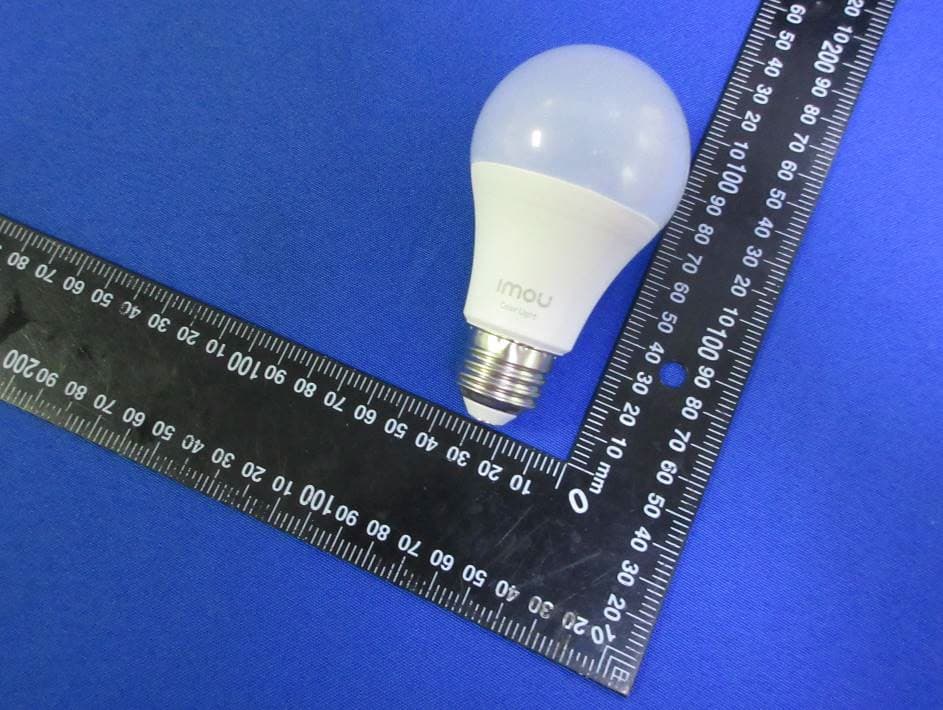
2AVYF-B5-E26-1
Nov 06, 2022Smart WiFi Multicolor Light Bulb
Equipment Class
DTS - Digital Transmission System
2AVYF-DB61
Mar 11, 2022Video Doorbell
Equipment Class
NII - Unlicensed National Information Infrastructure TX