2AWUS-MD002Robot vacuum cleaner
Jiangsu Midea Cleaning Appliances Co., Ltd.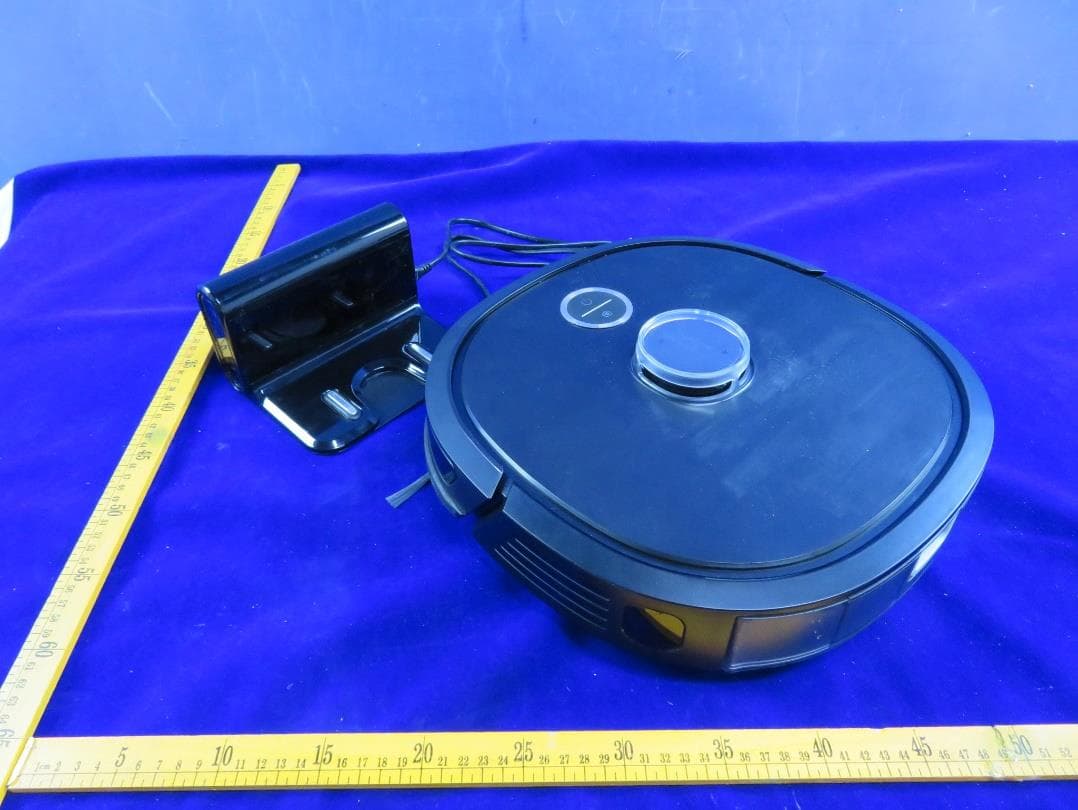
Click to zoom
Application Details
- Equipment Class
- DTS - Digital Transmission System
- Date of Grant
- May 14, 2021
- Application Purpose
- Original Equipment
- Date of Application
- May 13, 2021
- Equipment Note
- Robot vacuum cleaner
- Frequency Range
- 2402.00000000 - 2480.00000000
- Country
- China
Documents & Files
Document Text
Text extracted from the exhibit documents filed with the FCC. Open a document above to read the original.
Users Manual
ROBOT VACUUM CLEANER ROBOT VACUUM CLEANER Please read the manual before use NER600
Users Manual
OPERATING GUIDELINES CONTENTS PRODUCT INTRODUCTION13 22 13 14 SAFETY INSTRUCTIONS Open-box accessories layout Introduction of main-unit components TECHNICAL DATA12 22 23 24 24 25 25 25 01 01 05 06 Warning for the machine Warning for docking station Warning for batery 15 15 Installation of charging dock 16 17 Installation of mop assembly Installation of side brush INSTALLATION 18 DAILY MAINTENANCE AND SERVICING 26 FAQS 20 USING APP 21 EUREKA ROBOT APP QUICK GUIDE Dustbin maintenance Water tank maintenance Cleaning tools Rolling brush maintenance Drive wheel cleaning Sensor and chip cleaning Side brush cleaning 0102 SAFETY INSTRUCTIONS Warning Do not use outdoors or on wet surfaces. Do not allow to be used as a toy. Close attention is nec- essary when used by or near children, pets or plants. Use only as described in this manual. Use only manufacturer’s recommended attachments Do not use with damaged cord or plug. If appliance or Docking Station is not working as it should, has been dropped, damaged, left outdoors, or dropped into water, return it to a service center. Do not pull or carry by cord, use cord as a handle, close a door on cord, or pull cord around sharp edges or corners. Do not run appliance over cord. Keep cord away from heated surfaces. Do not unplug by pulling on cord. To unplug, grasp the plug, not the cord. Do not handle charger, including charger plug, and charger terminals with wet hands. Do not put any object into openings. Do not use with any opening blocked; keep free of dust, lint, hair, and anything that may reduce air flow. 1. 2. 3. 4. 5. 6. 7. 8. Keep hair, loose clothing, fingers, and all parts of body away from openings and moving parts. Do not use to pick up flammable or combustible liquids, such as gasoline, or use in areas where they may be present. Do not pick up anything that is burning or smoking, such as cigarettes, matches, or hot ashes. Do not use without dust bin and/or filters in place. Prevent unintentional starting. Ensure the switch is in the o -position before connecting to battery pack, picking up or carrying the appliance. Carrying the appliance with your finger on the switch or energiz- ing appliance that have the switch on invites accidents. Disconnect the battery pack from the appliance before making any adjustments, changing accessories, or storing appliance. Such preventive safety measures reduce the risk of starting the appli- ance accidentally. Recharge only with the charger specified by the manufacturer. A charger that is suitable for one type of battery pack may create a risk of fire when used with another battery pack. Use appliances only with specifically designated battery packs. Use of any other battery packs may create a risk of injury and fire. 9. 10. 11. 12. 13. 14. 15. 16. When using an electrical appliance, basic precautions should always be followed, including the following: READ ALL INSTRUCTIONS BEFORE USING (THIS- APPLIANCE), Failure to follow the warnings and instructions may result in electric shock, fire and/or serious injury. To reduce the risk of fire, electric shock, or injury: 0304 When battery pack is not in use, keep it away from other metal objects, like paper clips,coins, keys, nails, screws or other small metal objects, that can make a connection from one terminal to another. Shorting the battery terminals together may cause burns or a fire. Under abusive conditions, liquid may be ejected from the battery; avoid contact. If contact accidentally occurs, flush with water. If liquid contacts eyes, additionally seek medical help. Liquid ejected from the battery may cause irritation or burns. Do not use a battery pack or appliance that is dam- aged or modified. Damaged or modified batteries may exhibit unpredictable behavior resulting in fire, explosion or risk of injury. Do not expose a battery pack or appliance to fire or excessive temperature. Exposure to fire or temperature above 130°C may cause explosion. Do not use and store in extremely hot or cold envi- ronments (below -5°C or above 40°C). Please charge the robot in temperature above 4°C and below 40°C. Follow all charging instructions and do not charge the battery pack or appliance outside of the temperature range specified in the instructions. Charging improperly or at temperatures outside of the specified range may damage the battery and increase the risk of fire. 17. 18. 19. 20. 21. 22. Have servicing performed by a qualified repair person using only identical replacement parts.This will ensure that the safety of the product is maintained. Do not modify or attempt to repair the appliance or the battery pack except as indicated in the instructions for use and care. Place the cords from other appliances out of the area to be cleaned. Do not operate the vacuum in a room where an infant or child is sleeping. Do not operate the vacuum in an area where there are lit candles or fragile objects on the floor to be cleaned. Do not operate the vacuum in a room that has lit can- dles on furniture that the vacuum may accidentally hit or bump into. Do not allow children to sit on the vacuum. Do not use the vacuum on a wet surface. Do not use the Docking Station if it is damaged. Turn o the power switch before cleaning or maintaining the appliance. The plug must be removed from the receptacle before cleaning or maintain the Docking Station. Remove the appliance from the docking station and turn o the power switch to the appliance before removing the battery for disposal of the appliance. 23. 24. 25. 26. 27. 28. 29. 30. 31. 32. 33. 34. 0506 Caution: This device complies with Part 15 of the FCC Rules. Operation is subject to the following two conditions: -this device may not cause harmful interference. -this device must accept any interference received, including interference that may cause undesired operation. -Changes or modifications not expressly approved by the party responsible for compliance could void the user's authority to operate the equipment.This equip- men…
Text truncated - open the document above for the full version.
Users Manual
0910 12. 13. 14. 15. 16. 17. 18. 19. 20. Always purchase the correct cell or battery for the equipment. Keep cells and batteries clean and dry. Wipe the cell or battery terminals with a clean dry cloth if they become dirty. Secondary cells and batteries need to be charged before use. Always use the correct charger and refer to the manufacturer’s instructions or equip- ment manual for proper charging instructions. Do not leave a battery on prolonged charge when not in use. After extended periods of storage, it may be necessary to charge and discharge the cells or batteries several times to obtain maximum performance. Secondary cells and batteries give their best per- formance when they are operated at normal room temperature (20 °C ± 5 °C). Retain the original product literature for future reference. Use only the cell or battery in the application for which it was intended. When possible, remove the battery from the equipment when not in use. Dispose of properly. 10. 11. Keep cells and batteries out of the reach of chil- dren. Seek medical advice immediately if a cell or a battery has been swallowed. SAVE THESE INSTRUCTIONS Household use only 1112 TECHNICAL DATA Note: you can also view the instructions on the app. CLASS 1 LASER PRODUCT INVISIBLE LASER RADIATI ON 1. 2. 3. 4. 5. DOE+CEC+NRCAN: Pick up the whole unit and suspend the left wheel for 2s (in the meanwhile the right wheel remains lifted) Suspend the right wheel for 2s (in the meanwhile the left wheel remains lifted) Press both left and right bumper plates for 2s The return-to-charge indicator lights red briefly, and after the indicator is o , the whole unit enters its low-power consumption mode. Restart the whole unit in the low power mode to exit the low power mode. Note: the time interval between two steps in Steps 1-4 should not exceed 1s. Product Model: NER600 Host Charging Voltage: 17.2 V Host Rated Voltage:14.4 V Host Rated Power:40 W Docking Station Model:i5-DS Docking Station Input:100-240V~,50/60Hz,24W Docking Station Output:17.2V ,1A Battery Model:BP14435B Battery Rated Voltage:14.4V Battery Capacity:3400mAh 48.96Wh Charging Limit Voltage:16.8V 1. 2. 3. 4. 5. 6. 7. 8. 9. 10. 11. 1314 Startup&shutdown/ ster&pause key Navigation module Charging chips for main unit Rolling brush Dustbin/water tank release key Side brush Reset key Dustbin/water tank PRODUCT INTRODUCTION Introduction of main-unit components Top view Buttom view One charing dock One main unit PRODUCT INTRODUCTION Open-box accessories layout Layout Accessories box Accessories box (power cord HEPA (Mop holder Mop Side brush Waring This appliance can be used by children aged from 8 years and above and persons with reduced physical, sensory or mental capabilities or lack of experience and knowledge if they have been given supervision or instruction concerning use of the appliance in a safe way and understand the hazards involved. Children shall not play with the appliance. Cleaning and user maintenance shall not be made by children without supervision. Children should be supervised to ensure that they do not play with the appliance. If the supply cord is damaged, it must be replaced by a special cord or assembly available from the manufacturer or its service agent. Technical data Docking Station Model:i5-DS Docking Station Input:100-240V-,50-60Hz,24W Docking Station Output:17.2V,1A Battery Model:BP14435B 4INR 19/66 Battery Rated Voltage:14.4V Battery Capacity:3400mAh 48.96Wh 1. 2. 3. 4. 5. 0.5m 0.5m 1.5m Do not place the charging dock in direct sunlight; Do not cover the signal emission area of the charging dock with stickers or other objects; Do not place the charging dock on soft floors such as the ones installed with carpet; Ensure a clearance of 0.5m exists on two sides of the charging dock, and in front there is an open area of 1.5m away from the charging dock; After connection to power source, tie up the excessive power cord to prevent the robot from dragging the charging dock during its operations, resulting in displacement of the charging dock or inability to return to charge after power cutof; Keep the charging area dry, and remove the mopping plate after the robot is charged; Keep the charging chips dry and tidy, clean and wipe them regularly. 1. 2. 3. 4. 5. 6. 7. Installation of charging dock INSTALLATION The End A of the power cord is connected to the charging dock, while the End B is plugged in a power outlet. Place the charging dock on hard ground against wall. In order to ensure stable networking of the main unit and App functional. Please place the charging dock within the area covered by WiFi signal. 1. 2. 3. End A End B 1516 Notes Installation of mop assembly (this step can be skipped, please install when needing to mop the floor) INSTALLATION Installation of side brush Machine charging INSTALLATION To improve the mopping, recommend cleaning three times before using the mopping function; The mop has been stuck to the mop holder, and it can be removed for cleaning and replacement; No installation of the water tank in place may result in dropped tank; Please remove the mopping plate support when the main unit is charged in the charging dock; Do not fill in boiling water to prevent tank deformation at high temperature; If carpets exist in the mopping environment, place roll them at the edge or set a virtual wall in the App; In case of poor mopping efect or occurrence of slipping, choose a proper water volume in the App; When the mopping function is not in use, keep the water tank in place and remove the mop holder. 1. 2. 3. 4. 5. 6. 7. 8. When the main unit gets contact with the charging block, the power indicator flashes to indicate the main unit is charging; If the main unit fails to charge, check whether the charging chips of the machine at the bottom are blocked by 1. 2. Remove the strip seal according to prompt texts on the machine; By aligning the machine to the charging block in the indicated direction, push the machine into the charging blo…
Text truncated - open the document above for the full version.
Users Manual
When the machine reports a fault, the return-to-charge indicator turns red, please briefly press " " for 1 second to eliminate the fault; After the fault is eliminated, briefly press " " for 1 second to enter the cleaning status; After completion of the cleaning, the machine will automatically return to charge. It is recommended that the machine should be kept in the charging dock. (Remove the mopping plate after completion of the charging) OPERATING GUIDELINES Startup methods WHEN PLACING THE MACHINE INTO THE CHARGING DOCK FOR CHARGING, THEN THE MACHINE WILL START AUTOMATICALLY (RE-COMMENDED METHOD); LONG PRESS " " FOR 3 SECONDS, THEN THE POWER INDICATOR FLASHES, AND THE MACHINE MAKES A CHORD SOUND. WHEN THE POWER INDICATOR IS ALWAYS ON, THE MACHINE STARTS SUCCESSFULLY. 1. 2. The machine will not start to clean when the battery energy is too low, please charge it before starting to clean; During the cleaning, the machine will automatically return to charge when the battery energy is too low, and then go back to its interruption point to resume after the machine is fully charged; The machine will enter its sleep mode when it has been in standby for more than 10 minutes, and in the sleep mode, pressing any key will wake up the machine; During the charging, the power indicator flashes, and then it is always on after completion of the charging. 1. 2. 3. 4. Start the cleaning When the machine is in standby, briefly press " " for 1 second, and it will start to clean the whole room; If mopping is required, confirm the mopping assembly has been installed properly. 1. 2. Pause the cleaning During the cleaning, briefly press " " for 1 second, and the machine will pause the cleaning and enter its standby status. 1. After completion of the cleaning, the machine will enter its return-to-charge status; If return-to-charge is required during the cleaning, proceed as follows: When the machine is in standby, briefly press " " for 1 second, and the machine will start to return to charge; During the cleaning, briefly press " " for 1 second, and the machine will pause the cleaning; press " " for another 1 second, and the machine will start to return to charge; The main unit may be unable to return to charge automatically in some special conditions (e.g. energy depletion, machine getting stuck etc.), manually put the main unit back to the charging dock. Return to charge 1. 2. 3. Troubleshooting 1. 2. 3. If the machine will not be used for a long time period and needs to be shut down, long press " " for 3 seconds, and the power indicator begins to flash; The cleaner makes a chord sound, and when the power indicator turns of, the machine shuts down successfully; The cleaner cannot shut down when put in the charging block, and if shutdown is required,please remove the machine from the charging dock. Shutdown 1. 2. 3. 1. 2. 3. 4. 5. 6. 7. 8. 9. 10. Ensure mobile phone is connected to your home WiFi.1. Add your robot vacuum to your app Press the " + " button on the main screen of the app and select NER600 from the available list of products. Connect your robot to your WiFi After assembling and powering on the robot, press and hold down the " " button for 3 seconds until a beep is heard. The WiFi indicator light should start to flicker.Follow instructions on app for next steps. 3. 4. Download the eureka app and register your vacuum:2. USING APP If your home WiFi name or password is changed, you will need to reestablish connection with your robot vacuum. App supports iOS 9.0 and above, Android 4.4 and above phone system versions, but Pad device is not accepted; generally the phone system version may be checked by clicking “Settings-About Mobile Phone” in the mobile phone; This model does not support WEP encrypted router; The network accessing configuration of the cleaner requires WiFi network of 2.4GHz frequency range,5GHz frequency range is not currently compatible; Do not configure network accessing under the charging state; WiFi is mandatory for network accessing configuration of the cleaner; once the network accessing is configured successfully, App may be operated in WiFi/2G/3G/4G network environment and the cleaner may be controlled remotely; If your home WiFi password is changed or the router is replaced, the cleaner will be display ithout any changes of App account number, one just needs to configure network accessing for the cleaner once again; If others want to use App to operate same cleaner, they need be invited on App by the family creator to join in (on the condition that the invitee has downloaded App and registered an account); When App changes, the old users may be invited to remove device on mobile App and the new users just need to configure directly network accessing in accordance with network accessing instructions (if the old users don’t remove the device on mobile App,it will be removed automatically after the new users configure successfully network accessing); Once the cleaner is configured successfully network accessing, the following operations will result in clearance of WiFi settings and secondary network accessing configuration is required; Long press the network accessing configuration key on the device over 3 seconds and after a tick sound is heard, all Wi-Fi information will be cleared; WiFi Register and login personal account Add Equipment 1920 Notes Notes a. b. Scan the QR code or search for the eureka app in the Apple or Google Play store. Download the app. Open the app and create your personal account.Follow instructions on the screen. Dustbin maintenance (weekly cleaning recommended) DAILY MAINTENANCE AND SERVICING Press the box release key to pull out the box backwards; 1.Open the top cover of the Dustbin to pour out dust from the box; 2. Remove the filter assembly according to prompt texts on the assembly; 3.Clean components: clean the Dustbin and filter assembly; replace them after cleaning and drying completely,and check whether they are installed in place after the rear c…
Text truncated - open the document above for the full version.
Users Manual
FAQs Machine goes in circles Fault descriptionTreatment methods - Turn over the main unit, check whether its wheels rotate freely, and in case of any foreign matters, clean them up immediately Slow app reactions - Recommend authenticating with your mobile's hotspot Delayed device reactions - If the radar is blocked, clean up foreign matters immediately Device ID not found - Long press the return-to-charge key to enter the network pairing mode (Observe whether the WiFi indicator begins to flash) Failed software updating by clicking in the App - Place the main unit in the charging dock to ensure whether the unit is charging - Recommend updating the software when your home network is stable Map cannot be deleted - Recommend deleting the map when your home network is stable Map unavailable - Choose the map when your home network is stable No breakpoint resume is performed after the machine is fully charged - The breakpoint resume is a type of actions done by the main unit itself, which cannot be intervened by human beings Unable to upgrade - Verify whether the main unit resides in the charging block - Observe whether the WiFi indicator is always on, and verify whether the main unit is connect- ed to Internet Loud noise - Wash HEPA and dry it before use, avoid operating the machine in areas with water accumulation - Recommend cleaning the dust box and HEPA regularly - Choose a quiet suction force in the App 2930 DeclarationofConformity(DoC) Unique identificationof thisDoCM3LDS-001 WeJi angsuMideaCleaning Appliances Co., Ltd. No.39 CaohuAvenue,XiangchengEconomic Deve lopmentZone,Suzhou,Ji angsu, China responsibilityth atth e product: productnameRobotVacuumCleaner tradenameMidea/eureka/comfee typeormodelM3LDS/VCR21/Tornado/CFR08 to whichthis decl aration relates is in conformity with the essential requirements and otherrelevantrequirements of the Direct ive : 2014/53/EU2011/65/EU(EC)No 1907/2006 The product is in conformity with the follo wing st andards and/or othernormative documents: 2014/53/EU : EN 60335-2-2:2010+A11:2012+ A1:2013 EN 60335-1:2012+A11:2014+AC:2014+A13:2017+A1:2019+A14:2019+A2:2019 EN 62311: 2008EN 62233:2008 EN301489-1 V2.2.3EN301489-17 V3.2.4EN55014-1:2017EN55014-2: 2015 EN IEC 61000-3-2: 2019EN 61000-3-3:2013+A1: 2019EN 300328V2.2.2 2011/65/EU : EN 62321-1:2013EN 62321-2:2014EN 62321-3-1:2014 EN 62321-4:2014EN 62321-5:2014EN 62321-6:2015EN 62321-7-1:2015 EN 62321-7-2:2017EN 62321-8:2017 Supplementary information: Technical file held by:Jiangsu Midea Cleaning Appliances Co., Ltd. Place and date of issue (of this DoC): CHINA 2021-4-10 Signed by or for the manufacturer (Signature of authopised person) Name (in print): Shawn.yan Title: Quality Manager Jiangsu Midea Cleaning Appliances Co.,Ltd.
Cover Letter(s)
Declaration Letter We Jiangsu Midea Cleaning Appliances Co., Ltd.. hereby declare that the product Robot vacuum cleaner: M3LDS, VCR21, Tornado, CFR08, NER600, M6 is not capable of operating with channel 12 and 13 in regions of US and Canada. Versions of the product available for import and sale in the US and Canada will not operate on channels 12 and 13. It will not be possible for users and configure these channels in the US and Canada version. By: _______ Xiaofeng Yan _____ Title: Certification Engineer On behalf of: Jiangsu Midea Cleaning Appliances Co., Ltd. Telephone: 15996578260
Cover Letter(s)
Declaration We, Name: Jiangsu Midea Cleaning Appliances Co., Ltd. Address: No.39 Caohu Avenue, Xiangcheng Economic Development Zone, Suzhou, Jiangsu, China declare that M3LDS, VCR21, Tornado, NER600, M6 and CFR08 have the same RF modular, the main PCB. M3LDS, VCR21, NER600, M6 and CFR08 are same appliance except for the model name and brand name. Tornado is same as M3LDS except for different appearance and model name and brand name. Declared by: Jiangsu Midea Cleaning Appliances Co., Ltd. Name: Xiaofeng Yan Signature: Date:2021-05-06
Cover Letter(s)
Declaration We, Name: Jiangsu Midea Cleaning Appliances Co., Ltd. Address: No.39 Caohu Avenue, Xiangcheng Economic Development Zone, Suzhou, Jiangsu, China declare that The WIFI modular contains two types of antenna: PCB antenna and PIFA antenna. In fact, only PIFA antenna is used, PCB antenna is cut off. Declared by: Jiangsu Midea Cleaning Appliances Co., Ltd. Name: Xiaofeng Yan Signature: Date:2020-07-10
Cover Letter(s)
Jiangsu Midea Cleaning Appliances Co., Ltd. Authority to Act as Agent Date: Nov 17, 2020 American Certification Body, Inc. 6731 Whittier Avenue Suite C110 McLean, VA 22101 To Whom It May Concern: _____Intertek Testing Service Shanghai______ is authorized to act on our behalf, until otherwise notified, for applications to American Certification Body, Inc. (ACB). We certify that we are not subject to denial of federal benefits, that includes FCC benefits, pursuant to Section 5301 of the Anti-Drug Abuse Act of 1988, 21 U.S.C. 862. Further, no party, as defined in 47 CFR 1.2002 (b), to the application is subject to denial of federal benefits, that includes FCC benefits. We also declare that the information provided to the FCC is true and correct to the best of our knowledge (47 CFR 2.911(d)) and we have been informed of the grantee responsibilities (47 CFR 2.909) with regard to certified equipment. Thank you, Agency Agreement Expiration Date: _____Dec 31, 2021 By: _______________ ____ _Xiaofeng Yan____________ (Signature 1 ) (Print name) Title: ______ Certification Engineer ____________________ On behalf of: __ Jiangsu Midea Cleaning Appliances Co., Ltd.________________ (Company Name) Telephone: _____ 15996578260___________________ 1 - Must be signed by applicant contact given for applicant on the FCC site, or by the authorized agent if an appropriate authorized agent letter has been provided. Letters should be placed on appropriate letterhead.
Cover Letter(s)
Jiangsu Midea Cleaning Appliances Co., Ltd. Request for Confidentiality Date: Nov 17, 2020 Subject: Confidentiality Request for: __FCC ID: 2AWUS-MD002 Pursuant to FCC 47 CFR 0.457(d) and 0.459, the applicant requests that a part of the subject FCC application be held confidential. Type of Confidentiality Requested Exhibit ☐ Short Term ☒ Permanent Block Diagrams ☐ Short Term External Photos ☐ Short Term ☐ Permanent * 1 Internal Photos ☐ Short Term ☒ Permanent Operation Description/Theory of Operation ☐ Short Term ☐ Permanent Parts List & Placement/BOM ☐ Short Term ☐ Permanent Tune-Up Procedure ☐ Short Term ☒ Permanent Schematics ☐ Short Term Test Setup Photos ☐ Short Term ☐ Permanent * 3 User’s Manual ______ Jiangsu Midea Cleaning Appliances Co., Ltd. has spent substantial effort in developing this product and it is one of the first of its kind in industry. Having the subject information easily available to "competition" would negate the advantage they have achieved by developing this product. Not protecting the details of the design will result in financial hardship. Permanent Confidentiality: The applicant requests the exhibits listed above as permanently confidential be permanently withheld from public review due to materials that contain trade secrets and proprietary information not customarily released to the public. Short-Term Confidentiality: The applicant requests the exhibits selected above as short term confidential be withheld from public view for a period of ___(specify number of days not to exceed 180) 2 ___ days from the date of the Grant of Equipment Authorization and prior to marketing. This is to avoid premature release of sensitive information prior to marketing or release of the product to the public. Applicant is also aware that they are responsible to notify ACB in the event information regarding the product or the product is made available to the public before the requested period has expired. ACB will then release the documents listed above for public disclosure pursuant to FCC Public Notice DA 04-1705. NOTE for Industry Canada Applications: IC currently only distinguishes Permanent Confidentiality exhibits as shown above. Short Term confidentiality is not considered applicable to IC applications. Sincerely, By: Xiaofeng Yan (Signature/Title 3 ) (Print name) 1 - The asterisked items (*) require further information to be provided to ACB before permanent confidentiality will be extended to these exhibits. Please refer to FCC KDB 726920 and the specific Document link for D01 found at: https://apps.fcc.gov/oetcf/kdb/forms/FTSSearchResultPage.cfm?switch=P&id=41731 and review section II, 3) regarding specific information that must accompany these requests. 2 - Please refer to http://acbcert.com/documents/misc-docs/Memo-Short-Term-Vs-Standard-Confidentiality.pdf for complete details. 3 - Must be signed by applicant contact given for applicant on the FCC site, or by the authorized agent if an appropriate authorized agent letter has been provided. Letters should be placed on appropriate letterhead.
External Photos
FCC ID: 2AWUS-MD002 Page 1 of 4 External Picture M3LDS, VCR21, CFR08, NER600, M6 M3LDS, VCR21, CFR08, NER600, M6 FCC ID: 2AWUS-MD002 Page 2 of 4 M3LDS, VCR21, CFR08, NER600, M6 M3LDS, VCR21, CFR08, NER600, M6 FCC ID: 2AWUS-MD002 Page 3 of 4 M3LDS, VCR21, CFR08, NER600, M6 M3LDS, VCR21, CFR08, NER600, M6 FCC ID: 2AWUS-MD002 Page 4 of 4 M3LDS, VCR21, CFR08, NER600, M6 Tornado
ID Label/Location Info
Page 1 of 1 Label location
ID Label/Location Info
Robot Vacuum Cleaner PARSIPPANY, NJ 07054 MADE IN CHINA MODEL: CFR08 14.4V Li-ion HOUSEHOLD TYPE FOR PARTS / SERVICE INFO (T OLL FREE) 1-800-282-2886 For use only with Midea I5-DS Docking Sta tion U C 70 18 04 000001 Brand CodeCategory CodeManufacturing siteYear of Production WeekSerial Code Code 128 110*35mm R=2mm 5001465 Conforms to UL Std.1017 F CC ID: 2AWUS-MD002 UC70184000001 S/N: UC70184000001 CAUTION -Risk Of Injury. Brush May Start Unexpectedly. -Remove Main Brush Before Cleaning or Servicing -This device complies with DHHS Radiation Rules, 21CFR Chapter 1,Subchapter J. LASER 1
ID Label/Location Info
Robot Vacuum Cleaner PARSIPPANY, NJ 07054 MADE IN CHINA MODEL: M3LDS 14.4V Li-ion HOUSEHOLD TYPE FOR PARTS / SERVICE INFO (T OLL FREE) 1-800-282-2886 For use only with Midea I5-DS Docking Sta tion U C 70 18 04 000001 Brand CodeCategory CodeManufacturing siteYear of Production WeekSerial Code Code 128 110*35mm R=2mm 5001465 Conforms to UL Std.1017 F CC ID: 2AWUS-MD002 UC70184000001 S/N: UC70184000001 CAUTION -Risk Of Injury. Brush May Start Unexpectedly. -Remove Main Brush Before Cleaning or Servicing -This device complies with DHHS Radiation Rules, 21CFR Chapter 1,Subchapter J. LASER 1
ID Label/Location Info
Robot Vacuum Cleaner PARSIPPANY, NJ 07054 MADE IN CHINA MODEL: M6 14.4V Li-ion HOUSEHOLD TYPE FOR PARTS / SERVICE INFO (T OLL FREE) 1-800-282-2886 For use only with Midea I5-DS Docking Sta tion U C 70 18 04 000001 Brand CodeCategory CodeManufacturing siteYear of Production WeekSerial Code Code 128 110*35mm R=2mm 5001465 Conforms to UL Std.1017 F CC ID: 2AWUS-MD002 UC70184000001 S/N: UC70184000001 CAUTION -Risk Of Injury. Brush May Start Unexpectedly. -Remove Main Brush Before Cleaning or Servicing -This device complies with DHHS Radiation Rules, 21CFR Chapter 1,Subchapter J. LASER 1
ID Label/Location Info
Robot Vacuum Cleaner PARSIPPANY, NJ 07054 MADE IN CHINA MODEL: NER600 14.4V Li-ion HOUSEHOLD TYPE FOR PARTS / SERVICE INFO (T OLL FREE) 1-800-282-2886 For use only with Midea I5-DS Docking Sta tion U C 70 18 04 000001 Brand CodeCategory CodeManufacturing siteYear of Production WeekSerial Code Code 128 110*35mm R=2mm 5001465 Conforms to UL Std.1017 F CC ID: 2AWUS-MD002 UC70184000001 S/N: UC70184000001 CAUTION -Risk Of Injury. Brush May Start Unexpectedly. -Remove Main Brush Before Cleaning or Servicing -This device complies with DHHS Radiation Rules, 21CFR Chapter 1,Subchapter J. LASER 1
ID Label/Location Info
Robot Vacuum Cleaner PARSIPPANY, NJ 07054 MADE IN CHINA MODEL: Tornado 14.4V Li-ion HOUSEHOLD TYPE FOR PARTS / SERVICE INFO (T OLL FREE) 1-800-282-2886 For use only with Midea I5-DS Docking Sta tion U C 70 18 04 000001 Brand CodeCategory CodeManufacturing siteYear of Production WeekSerial Code Code 128 110*35mm R=2mm 5001465 C…
Text truncated - open the document above for the full version.
Contact Information
Applicant
xiaofeng Yan(Certification Engineer)
Technical Contact
Intertek Testing Services ShanghaiTeddy Yin
[email protected]86 21 61278471
Building No.86, 1198 Qinzhou Road(North) · Shanghai · China
Test Firm
Intertek Testing Services ShanghaiLeah Xu
[email protected]+86 21 61278200
Technical Specifications
| # | Rule Parts | Frequency Range | Power Output |
|---|---|---|---|
| 2 | 15C | 2.40 GHz - 2.48 GHz | 3.00 mW |
Other Applications from Jiangsu Midea Cleaning Appliances Co., Ltd.
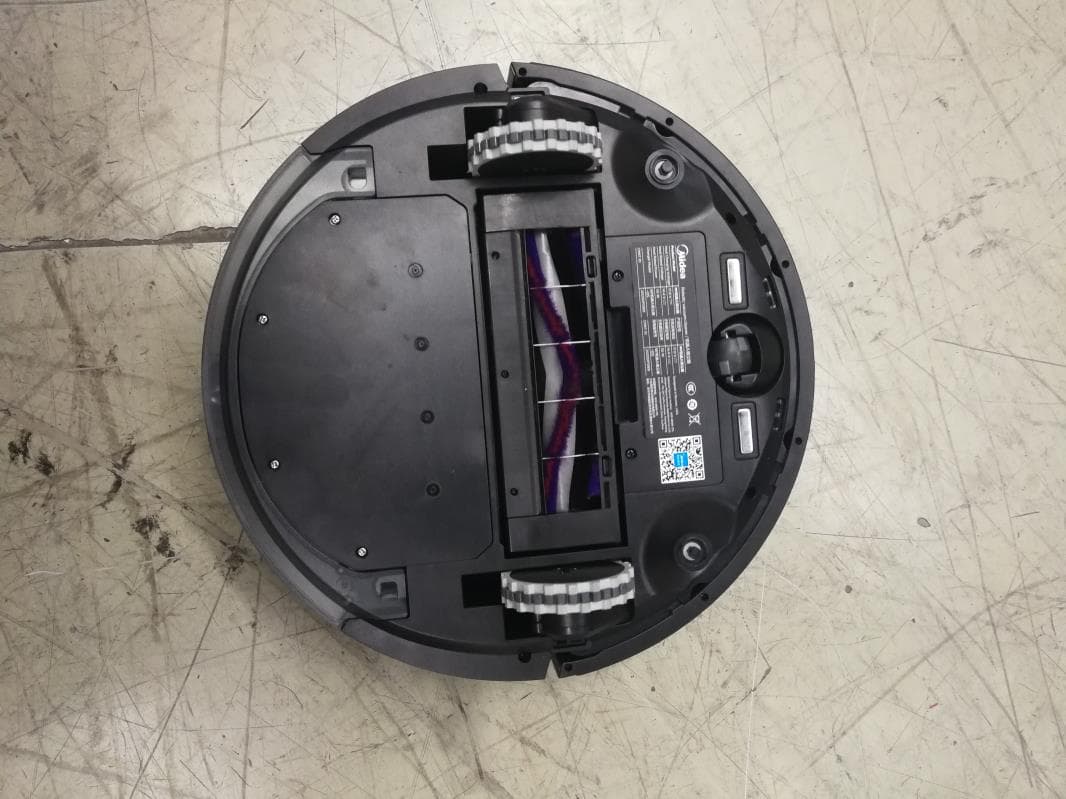
2AWUS-MD001
Oct 13, 2020Robot vacuum cleaner
Equipment Class
DTS - Digital Transmission System