Text extracted from the exhibit documents filed with the FCC. Open a document above to read the original.
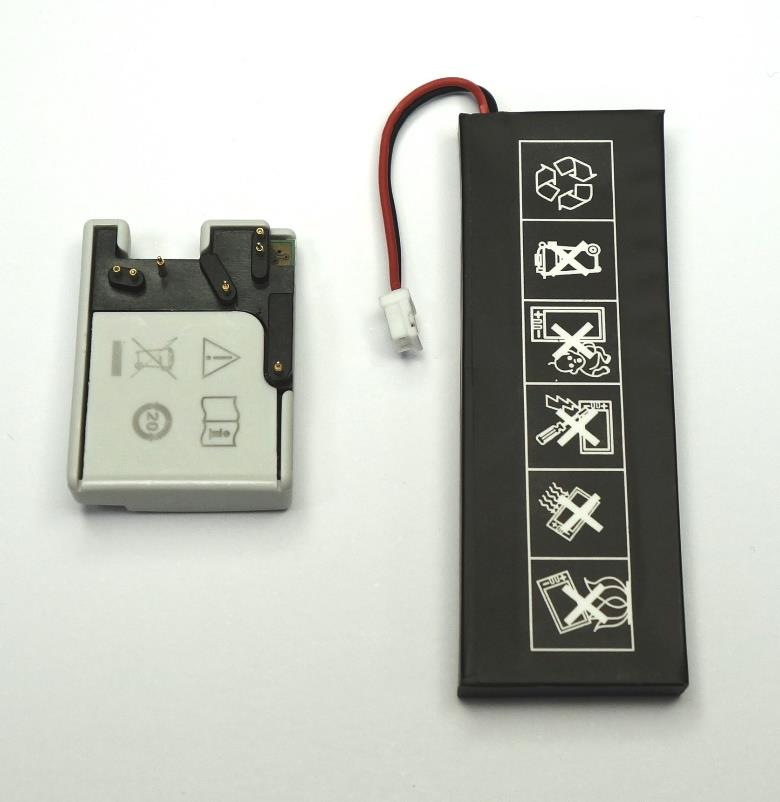
Quick Setup Guide - VisioNize pipette manager 1. Replace the long battery (already in pipette) with the radio module and the new shorter battery 2. Turn the selection dial to “Opt“ 3. Open the cover of the USB connector by using the pin Long battery (in pipette) 4. Connect and update the pipette with the VisioNize pipette manager 5. Create pipette sets6. Start pipetting OldNew Components Short battery Radio Module 1. 2. Remove the long battery. Exchange Place the short battery and the radio module in the pipette. Wi-Fi is only active when the pipette selection dial is set to “Opt“. 1. 3. 2. Remove the “safety padding“ from the pin. The pin is ready to use. 4. The cover of the USB connector is located at the top of the pipette. By using the pointy end of the pin, carefully open the cover - the USB connector is now available. Plug in the USB cable into both the VisioNize pipette manager and the pipette (one by one). Update the pipette according to the instructions on the VisioNize pipette manager. Once the update is finished, you can unplug the pipette. All updated pipettes will be shown in the “Pipette manager“. If you want to add more pipettes, select “Pair New Pipette” button. You can create pipette sets by touching the button “New Set“. Start working! Copyright © 2020 by Eppendorf AG. Eppendorf ® and the Eppendorf logo are registered trademarks of Eppendorf AG, Germany. 1004 900.037-01/102020 You can now start working with your pipette sets for pipetting, multi-dispensing and more! Questions? Refer to the appropriate user manual(s). Qualified nualipette manager EN)g manual Register your instrument! www.eppendorf.com/myeppendorf VisioNize ® pipette manager Operating manual 1004 900 002-01/102020 Qualified Copyright© 2020 Eppendorf AG, Germany. All rights reserved, including graphics and images. No part of this publication may be reproduced without the prior permission of the copyright owner. VisioNize ® , Eppendorf Xplorer ® and epT.I.P.S. ® are registered trademarks of Eppendorf AG, Germany. Eppendorf ® and the Eppendorf Brand Design are registered trademarks of Eppendorf AG, Germany. Registered trademarks and protected trademarks are not marked in all cases with ® or ™ in this manual. Table of contents VisioNize ® pipette manager English (EN) Qualified 3 Table of contents 1Operating instructions. . . . . . . . . . . . . . . . . . . . . . . . . . . . . . . . . . . . . . . . . . . . . . . . 7 1.1Using this manual . . . . . . . . . . . . . . . . . . . . . . . . . . . . . . . . . . . . . . . . . . . . . . 7 1.2Danger symbols and danger levels . . . . . . . . . . . . . . . . . . . . . . . . . . . . . . . . . 7 1.2.1Danger symbols . . . . . . . . . . . . . . . . . . . . . . . . . . . . . . . . . . . . . . . . 7 1.2.2Danger levels . . . . . . . . . . . . . . . . . . . . . . . . . . . . . . . . . . . . . . . . . . 7 1.3Symbols used . . . . . . . . . . . . . . . . . . . . . . . . . . . . . . . . . . . . . . . . . . . . . . . . . 7 1.4Other applicable documents . . . . . . . . . . . . . . . . . . . . . . . . . . . . . . . . . . . . . . 8 2Safety . . . . . . . . . . . . . . . . . . . . . . . . . . . . . . . . . . . . . . . . . . . . . . . . . . . . . . . . . . . . . 9 2.1Intended use . . . . . . . . . . . . . . . . . . . . . . . . . . . . . . . . . . . . . . . . . . . . . . . . . . 9 2.2Warnings for intended use . . . . . . . . . . . . . . . . . . . . . . . . . . . . . . . . . . . . . . . 9 2.3Warning symbols on the device . . . . . . . . . . . . . . . . . . . . . . . . . . . . . . . . . . 10 3Product description . . . . . . . . . . . . . . . . . . . . . . . . . . . . . . . . . . . . . . . . . . . . . . . . . 11 3.1Product overview. . . . . . . . . . . . . . . . . . . . . . . . . . . . . . . . . . . . . . . . . . . . . . 11 3.2Features. . . . . . . . . . . . . . . . . . . . . . . . . . . . . . . . . . . . . . . . . . . . . . . . . . . . . 11 3.2.1Supported dispensers . . . . . . . . . . . . . . . . . . . . . . . . . . . . . . . . . . 12 3.3The "VisioNize pipette manager" software . . . . . . . . . . . . . . . . . . . . . . . . . . 13 3.3.1Status bar. . . . . . . . . . . . . . . . . . . . . . . . . . . . . . . . . . . . . . . . . . . . 13 3.3.2Pipette tips. . . . . . . . . . . . . . . . . . . . . . . . . . . . . . . . . . . . . . . . . . . 13 3.3.3Display area . . . . . . . . . . . . . . . . . . . . . . . . . . . . . . . . . . . . . . . . . . 14 3.3.4Toolbar. . . . . . . . . . . . . . . . . . . . . . . . . . . . . . . . . . . . . . . . . . . . . . 14 3.3.5Operating controls . . . . . . . . . . . . . . . . . . . . . . . . . . . . . . . . . . . . . 14 3.3.6Structure of the software menu . . . . . . . . . . . . . . . . . . . . . . . . . . . 15 3.4Software symbols . . . . . . . . . . . . . . . . . . . . . . . . . . . . . . . . . . . . . . . . . . . . . 16 3.4.1Symbols used in the "VisioNize pipette manager" software . . . . . 16 3.4.2Pipette labeling . . . . . . . . . . . . . . . . . . . . . . . . . . . . . . . . . . . . . . . 17 3.4.3Symbols for alarms, warnings and information . . . . . . . . . . . . . . 18 3.5Liquid types. . . . . . . . . . . . . . . . . . . . . . . . . . . . . . . . . . . . . . . . . . . . . . . . . . 18 3.5.1Volatile liquids . . . . . . . . . . . . . . . . . . . . . . . . . . . . . . . . . . . . . . . . 18 3.5.2Foaming liquids . . . . . . . . . . . . . . . . . . . . . . . . . . . . . . . . . . . . . . . 18 3.5.3Viscous liquids. . . . . . . . . . . . . . . . . . . . . . . . . . . . . . . . . . . . . . . . 19 3.6Materials . . . . . . . . . . . . . . . . . . . . . . . . . . . . . . . . . . . . . . . . . . . . . . . . . . . . 19 3.7Warranty . . . . . . . . . . . . . . . . . . . . . . . . . . . . . . . . . . . . . . . . . . . . . . . . . . . . 19 4Installation . . . . . . . . . . . . . . . . . . . . . . . . . . . . . . . . . . . . . . . . . . . . . . . . . . . . . . . . 20 4.1Registering the pipette on the control panel . . . . . . . . . . . . . . . . . . . . . . . . 20 5Operation .…
Text truncated - open the document above for the full version.
CONFIDENTIALITY REQUEST for Certification Service in USA Federal Communication Commission Equipment Authorization Division, Application Processing Branch 7435 Oakland Mills Road Columbia, MD 21048 02 February 2021 TO WHOM IT MAY CONCERN Pursuant to Paragraphs §0.457 and 0.459 of the Commission’s Rules (47 C.F.R.) and Section §552(b) (4) of the Freedom of Information Act, we request confidentiality for the following products: FCC ID Model name 2AXZD1004000001 VisioNize® pipette manager 2AXZD4861490500 Eppendorf Xplorer® connect For the product stated above, we request that the following information be held confidential; Exhibits Long-Term Confidentiality Short-Term Confidentiality External Photos Internal Photos Block Diagram Schematics Test Setup Photos User’s Manual Parts List Tune Up Operational Description The long-term confidentiality exhibits contain our trade secrets and proprietary information that could be of benefit to our competitors. The short-term confidentiality on the basis of ensuring that business sensitive information remains confidential until the actual marketing of our new device, which is planned for 01. Feb. 2021 If you have any questions, please feel free to contact me at the address shown below. Sincerely, Lutz Metterhausen Head of Regulatory Affairs Eppendorf AG Barkhausenweg 1 22339 Hamburg Germany Phone: +49 40 538 01 88949 Email: [email protected]
Eppendorf AG Barkhausenweg 1, 22339 Hamburg Postanschrift: 22331 Hamburg Amtsgericht: Hamburg HRB 76249 Tel.: +49 (0)40.538 01 0 Fax: +49 (0)40.538 01 556 E-M ail: [email protected] Vorstand: Dr. Peter Fruhstorfer (Co-Vorsitzender) Eva van Pelt (Co-Vorsitzende) Axel Jaeger Dr. Wilhelm Plüster Vorsitzender des Aufsichtsrats: Philipp von Loeper Lutz Metterhausen Eppendorf AG Quality Management & Regulatory Affairs Barkhausenweg 1 22339 Hamburg Germany Hamburg, 04 February 2021 Declaration concering Frequeny Bandwidth Allocation (VisioNize® pipette manager) To Whom It May Concern, We, Eppendorf AG, Barkhausenweg 11, 22339 Hamburg, Germany, hereby declare that the Eppendorf product “VisioNize® pipette manager” only uses the 2.4 GHz WLAN with a bandwidth setting of 20 MHz. The pertaining module is RS9116N-DB00-CC1-B00. All other transmitters ( BT, BLE, Zigbee, 5G WLAN) are disabled via software. Sincerely yours, Lutz Metterhausen Head of Global Regulatory Affairs
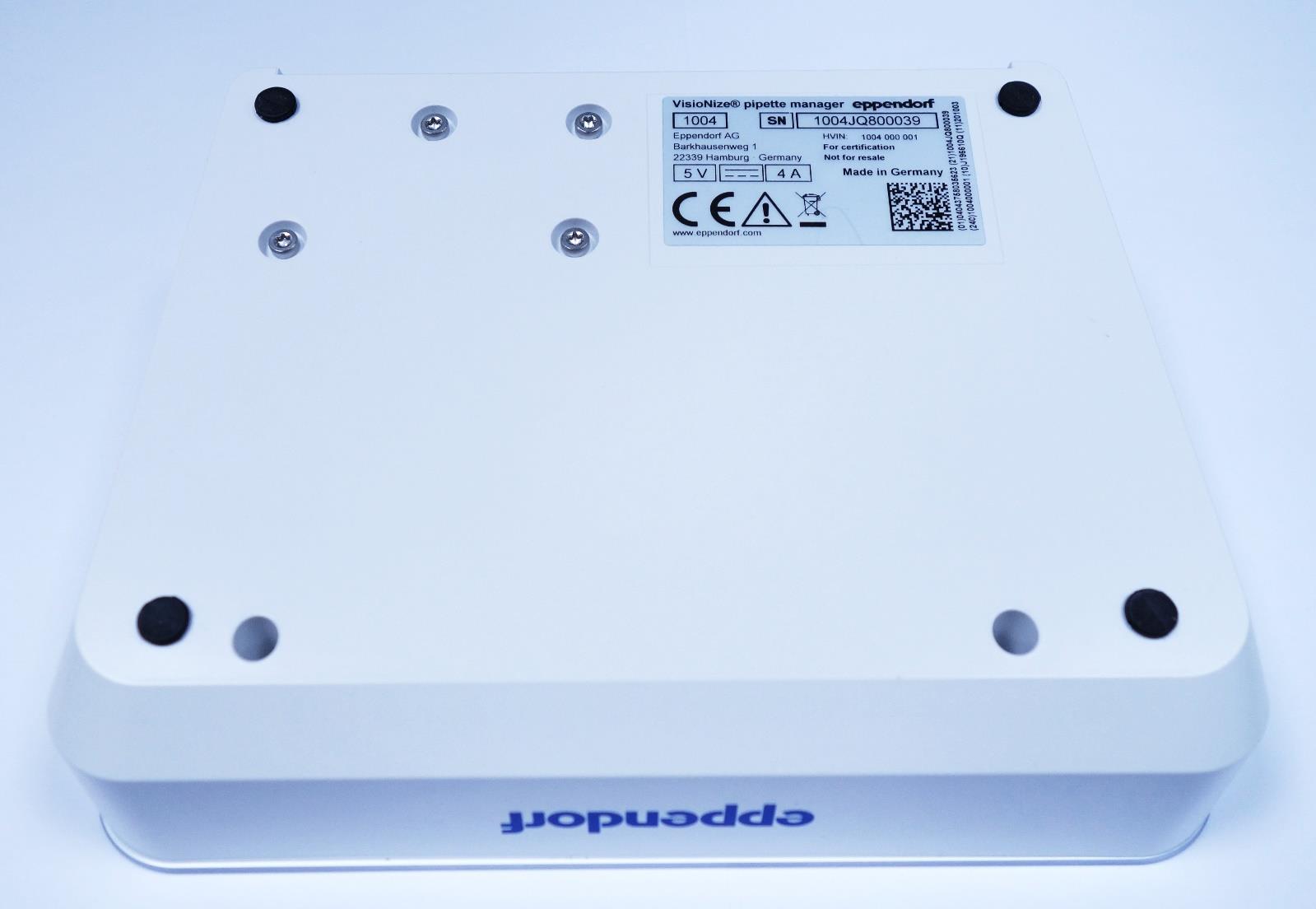
Front view Bottom View View form the back View from the right View form the left
Label of the VisioNize® pipette manager located on the underside of the device label location (underside of the device)
Internal view 1 Internal view2 Bottom view AI Modul UL (without EMV Shield) Top view AI Modul UL (with SOM) Top view AI Modul UL (without SOM) Top View SOM Bottom view SOM Back of AI Modul UL Display (with head spreader) Back of AI Modul UL Display (without head spreader) Top view PCBA Redpine WLAN Module Bottom view PCBA Redpine WLAN Module Detail of PCBA Redpine WLAN Module zoomed on RS9116N-DB00- CC1-B00 Antenna
The test results relate only to the individual items which have been tested. This report shall not be reproduced in parts without the written approval of the testing laboratory © Copyright: All rights reserved by CETECOM T E S T R E P O R T No.: 19-1-0200604T01a Touch server to handle electronic pipettes of Eppendorf Xplorer® family via WiFi VisioNize® pipette manager FCC ID: 2AXZD1004000001 IC: 26635-1004000001 Laboratory Accreditation and Listings accredited according to DIN EN ISO/IEC 17025:2018 CETECOM GmbH Laboratory Radio Communications & Electromagnetic Compatibility Im Teelbruch 116 • 45219 Essen • Germany Registered in Essen, Germany, Reg. No.: HRB Essen 8984 Tel.: + 49 (0) 20 54 / 95 19-0 • Fax: + 49 (0) 20 54 / 95 19-150 E-Mail: [email protected] • Internet: www.cetecom.com According to: FCC Regulations Part 1.1310 Part 2.1091 ISED-Regulations RSS-102, Issue 5 for Eppendorf AG Test Report 19-1-0200604T01a, Page 2 of 14 CETECOM_TR19_1_0200604T01a Table of contents 1. SUMMARY OF TEST RESULTS...................................................................................................................... 3 1.1. Summary of tests results .................................................................................................................................. 3 1.2. Attestation:....................................................................................................................................................... 3 2. ADMINISTRATIVE DATA ............................................................................................................................... 4 2.1. Identification of the testing laboratory ............................................................................................................. 4 2.2. Test location .................................................................................................................................................... 4 2.3. Organizational items ........................................................................................................................................ 4 2.4. Applicant’s details ........................................................................................................................................... 4 2.5. Manufacturer’s details ..................................................................................................................................... 4 3. EQUIPMENT UNDER TEST (EUT) ................................................................................................................. 5 3.1. Technical data of MAIN EUT (WLAN-technology) declared by applicant .................................................... 5 3.2. Technical data of main EUT (Non Cellular Technology) declared by applicant ............................................. 5 3.3. EUT: Type, S/N etc. and short descriptions used in this test report ................................................................ 5 3.4. Auxiliary Equipment (AE): Type, S/N etc. and short descriptions .................................................................. 6 3.5. EUT set-ups ..................................................................................................................................................... 6 3.6. EUT operating modes ...................................................................................................................................... 6 4. MEASUREMENTS ............................................................................................................................................. 7 4.1. Radio Frequency Exposure Evaluation §2.1091 .............................................................................................. 7 4.2. Requirements and limits for RSS Standard ..................................................................................................... 9 4.3. MPE Calculation method ................................................................................................................................. 10 4.4. Evaluation Method........................................................................................................................................... 10 4.5. Results for fixed and mobile operations .......................................................................................................... 11 4.6. Measurement uncertainties .............................................................................................................................. 12 5. ABBREVIATIONS USED IN THIS REPORT ................................................................................................. 13 6. ACCREDITATION DETAILS OF CETECOM’S LABORATORIES AND TEST SITES ......................... 13 7. PHOTOGRAPHS OF THE EUT’S .................................................................................................................... 14 8. VERSIONS OF TEST REPORTS (CHANGE HISTORY) ............................................................................. 14 Table of annexTotal pages Annex 1: Separate document applicant’s document “Redpine_RS9116-xB-CA1-CC1_Datasheet.pdf” 84 The listed attachments are an integral part of this report. Test Report 19-1-0200604T01a, Page 3 of 14 CETECOM_TR19_1_0200604T01a 1. Summary of test results The test results apply exclusively to the test samples as presented in this Report. The CETECOM GmbH does not assume responsibility for any conclusions and generalizations taken in conjunction specimens or samples with other of the type of the item presented to tests. The presented Equipment Under Test (in this report, hereinafter referred as EUT) integrates a WLAN 2.4 GHz RF Transceiver. Other implemented wireless technologies were not considered within this test report. Following tests have been performed to show compliance with applicable FCC Part 2.1091 and FCC Part 1.1310 of the FCC CFR 47 and ISED RSS-102, Issue 5 Rules. 1.1. Summary of tests res…
Text truncated - open the document above for the full version.
The test results relate only to the individual items which have been tested. This report shall not be reproduced in parts without the written approval of the testing laboratory © Copyright: All rights reserved by CETECOM Annex 3: External photographs to Test Report 19-1-0200601T10a-C1-A3 Number of pages: 7 Date of Report: 2021-Jan-27 Testing company: CETECOM GmbH Im Teelbruch 116 45219 Essen Germany Tel. + 49 (0) 20 54 / 95 19-0 Fax: + 49 (0) 20 54 / 95 19-150 Applicant: Eppendorf AG Product: Touch server to handle electronic pipettes of Eppendorf Xplorer® family via WiFi, Model: VisioNize® pipette manager FCC ID: 2AXZD1004000001 IC: 26635-1004000001 Testing has been carried out in accordance with: Title 47 CFR, Chapter I FCC Regulations, Subchapter A §15.247 (DTS) ISED-Regulations RSS-Gen, Issue 5 RSS 247, Issue 2 Deviations, modifications or clarifications (if any) to above mentioned documents are written in each section under "Test method and limit". 19-1-0200601T10a-C1-A3 CETECOM_TR19-1-0200601T10a_C1_A3 2 / 7 Table of Contents 1 External photographs of Main device under test (EUT/DUT) ..................................................................................................3 2 External photographs of Accessories .......................................................................................................................................6 19-1-0200601T10a-C1-A3 CETECOM_TR19-1-0200601T10a_C1_A3 3 / 7 1 External photographs of Main device under test (EUT/DUT) Photograph 1: EUT 1_Top view Photograph 2: EUT 1_Rear side view 19-1-0200601T10a-C1-A3 CETECOM_TR19-1-0200601T10a_C1_A3 4 / 7 Photograph 3: EUT 1_Left side view Photograph 1: EUT 2_Top side view 19-1-0200601T10a-C1-A3 CETECOM_TR19-1-0200601T10a_C1_A3 5 / 7 Photograph 2: EUT 2_Rear side view 19-1-0200601T10a-C1-A3 CETECOM_TR19-1-0200601T10a_C1_A3 6 / 7 2 External photographs of Accessories Photograph 1: AE 1 Photograph 1: AE 2 19-1-0200601T10a-C1-A3 CETECOM_TR19-1-0200601T10a_C1_A3 7 / 7 Photograph 2: CAB 1 End Of Annex 3