2AYPE-GWTC71427Laptop
E&S International Enterprises, Inc.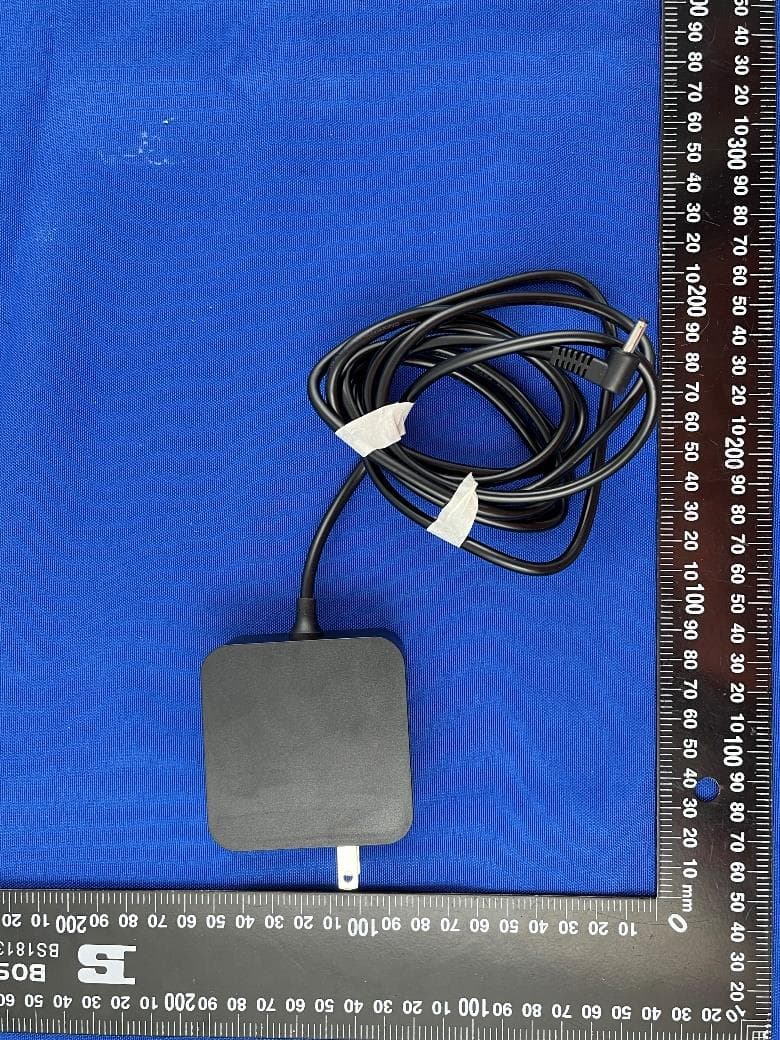
Click to zoom
Application Details
- Equipment Class
- DSS - Part 15 Spread Spectrum Transmitter
- Date of Grant
- Apr 17, 2022
- Application Purpose
- Original Equipment
- Date of Application
- Apr 14, 2022
- Equipment Note
- Laptop
- Frequency Range
- 2402.00000000 - 2480.00000000
- Country
- United States
Documents & Files
Document Text
Text extracted from the exhibit documents filed with the FCC. Open a document above to read the original.
Users Manual
Quickguide ChargingtheNotebook PleasechargeyourNotebookfullybeforeusingitforthefirsttime. ConnecttheDCplugonthesuppliedpoweradaptertothechargingsocket(DCIN) ontheNotebook. Thenplugthepoweradapterintoasocket. ThechargingLEDlightsupwhilethedeviceischarging. Onlyleavethepoweradapterconnectedtothesocketuntilthebatteryofthe batteryoftheNotebookisfullycharged.Inaddition,alwaysdisconnectthepower adapterfromtheNotebookwhenyouarenotchargingtheNotebook. TurningontheNotebookforthefirsttime Bringthescreenupwardsuntilitisstandingataminimumangleof90°tothe keyboard. Presstheon/offswitchforabout5secondstoswitchontheNotebook.Thesetup assistantwillthenappearonthescreen. FollowthesetupassistantinstructionstosetupyourNotebook. Duringthestart-up,thewizardpromptsyoutoregisterforyourMicrosoftaccount.If youdonotyethaveaMicrosoftaccount,pleasesetoneuphere Aftercompletionofthestart-up,yourNotebookisconfiguredThismaytakeseveral minutestocomplete.DonotturntheNotebookoffduringthistime! Unlockingthedisplay Assoonasthedevicehasbeensetup(andeverytimeitissubsequentlyswitchedon andbootedup),thelockscreenappears,Pressanykeyonthekeyboardtounlockthe screen. IfyourNotebookispassword-protected,youmustthenenterthepassword. Alternatively,youcanalsologintoyourNotebookviaWindowsHello.Toactivateand setupthisfeature,select“Settings”→“Accounts”→“Sign-inoptions”→“Windows Hello”. Startmenu Todisplaythestartmenu,clicktheWindowsiconinthebottomleftofthedisplayor pressthetheWindowsbuttononthekeyboard.Presstheiconasecondtimetohide theStartmenu. TheStartmenuconsistsoftheclassicnavigationlist(A)andausefulapparea(B)to therightofthenavigationlist. Amongotherthings,thenavigationlistincludesalinktoopenSettings(cogwheel icon).Intheapparea,youcanpinappsandfavouritesintheformoflivetilesand organizethem. Inthenavigationlist(A)youfindalistofallinstalledappsinalphabeticalorder.An alphabeticquickaccesstothenavigationlistappearswhenyouclickonarespective firstletter. TheActionCenter TheInfoCenterisabarwithquicklinkstosomeimportantNotebookfunctions, whichyoucaneitherdisplayorhide. ToaccesstheInfoCenterclickthememosymbolinthebottomfight-handcorner. ActivatingWIFIandopeningthebrowser a.CallupSettings(see“Startmenu”). bInthesettings,click“Network&Internet”. cClick“Wi-Fi”ontheleftinthenextscreen. dClickthesliderortheword“Off”.Theword“On”nowappearsnexttotheslider. TheNotebooksearchesforallavailableforallavailablewirelessnetworksnearbyand thendisplaysthemasalist(“Showavailablenetworks”). eClickthenetworkthatyouwishtoconnectto. fEnterthenetworkkey(password)ifnecessary. g.Click“Connect”.TheNotebookconnectstotheselectednetwork. ThebuttonforlaunchingtheInternetbrowsercanbefoundonthetaskbaratthe bottomofthedisplay.Clickthelittleblue“e”tolaunchthebrowser.Toenteran Internetaddress(URL),clickthesearchbardisplayedcentrallyatthetopofthe window. Reset IftheNotebook“freezes”andnolongerresponds,youcanresetit.Pleaseandhold downthenon/offswitchesoff.Waitforabout20secondsandthenturnthe Notebookonnormally. AnyfilesthathavenotbeensavedwillbelostwhentheNotebookisreset. SwitchingofftheNotebook Standby Brieflypresstheon/offswitchonthedevicetoactivatethestandbymode.Pressit againquicklytotaketheNotebookoutofstandbymode. Shuttingdown OpentheStartmenu.Click“Ф”inthebottomareaoftheStartmenuandthentap “Shutdown”.TheNotebookshutsdown. Savingenergy DeactivatetheWIFIfunctionwhenitisnotinuse. OnlyleavethepoweradapterconnectedtothesocketuntiltheNotebook’sbatteryis fullycharged.Inaddition,alwaysdisconnectthepoweradapterformtheNotebook whenyouarenotchargingtheNotebook. Reducethedisplaybrightnessunder“System”→“Display”inthesettings. ActivatestandbymodeorturnofftheNotebookcompletelyifyouarenotusingthe Notebook. Generalsafetyinformation WARNING Riskofmultipleinjuriesduetonreducedphsysical,sensoryormentalcapabilities and/orlackofknowledgeorpracticalexperience Childrenandvulnerableindividualsmayonlyusethedeviceunderdirectsupervision. Riskofelectricshockorelectrocutionfromlivecomponents Donotinsertobjectsintothedevice’sventilationslots. Donotopenthepoweradapter. Donottouchthepoweradapterifyouhandsarewet. Donotshortoutthedeviceand/orcharger. Firehazardandorriskofburnsfromdamagedorleakingbatteries Donotuseorchargethedeviceifthebatteryifdamagedorleaking. Donotuseorchargethedeviceifthebatteryisdamagedorleaking. Avoidskincontactwiththedeviceand/orbatteryifthebatteryisleaking.Wear protectiveglovesifitisnotpossibletoavoidtouchingthedevice/batteryinsuch cases. Immediatelywashyourhandsthoroughlyintheeventofskincontactwiththe batterysubstrate. Ifthebatterysubstratecomesintocontactwithyoureyes,rinsethemoutwith plentyofwaterandconsultaphysicianimmediately. Riskoffireorexplosionwhenusingnon-approvedchargersandpoweradapters Onlyusetheincludedpoweradapteroronanequivalentpoweradaptertocharge thebattery. Ifthepoweradapterisdefective,onlyexchangeitforanequivalentpoweradapter. Pleasenotetheinformationinthetechnicalspecificationsofthepoweradapterin theonlineuser’smanualorcontactcustomerservice. Riskofmultipleinjuriesfromslipping,trippingorfalling Donotexposethedeviceand/orpoweradaptertovibrationsand/oranyformof impact. Donotdropthedeviceand/orpoweradapter.Donotusethedevice/poweradapter ifithasbeendroppedand/orisdamaged.Haveaqualifiedservicetechniciancheck thedevice/poweradapterbeforerestartingit. Alwaysensurethatthepowercordisinstalledsecurely. Donotallowthepowercordtoknotorkink. Notesandpracticaltipsonmaintenanceandrepairs WARNING Riskofelectricshockandelectrocutionfromlivecomponents Never open the casing of the device and/or the power adapter. No parts inside the device require maintenance or cleaning. The battery in the device should not be removed by the user. Do not disassemble the battery, place objects into it or handle liquids near it. The battery could catch fire or explode. It is prohibited to repair or modify the device and/or power adapter. Failure to comply with these instructions may void the warranty. The device should only be serviced and repaired by a qualified service technician. Contact customer servic…
Text truncated - open the document above for the full version.
Cover Letter(s)
Date: 12 April 2022 E&S International Enterprises, Inc. To: Federal Communications Commission, Authorization & Evaluation Division, 7435 Oakland Mills Road, Columbia, MD 21046 To Whom It May Concern: The E&S International Enterprises, Inc., the undersigned, hereby authorizes Mr. Wu Xuewen from Shenzhen BALUN Technology Co., Ltd., to act on the behalf of the E&S International Enterprises, Inc. solely in matters relating to the application for an FCC equipment authorization for FCC ID: 2AYPE-GWTC71427 including the signing of documents in connection with this Application. Necessary acts carried out by Shenzhen BALUN Technology Co., Ltd. in connection with the Application shall have the same effect as acts of the E&S International Enterprises, Inc. The E&S International Enterprises, Inc. also hereby certify that no party to this application is subject to a denial of benefits, including FCC benefits, pursuant to Section 5301 of the Anti-Drug Abuse Act of 1988, 21 U.S.C. Section 862. Yours Sincerely, ------------------------------- Ting Liu
Cover Letter(s)
Date: 12 April 2022 E&S International Enterprises, Inc. To: Federal Communications Commission, Authorization & Evaluation Division, 7435 Oakland Mills Road, Columbia, MD 21046 Re: E&S International Enterprises, Inc. FCC ID: 2AYPE-GWTC71427 FCC Certification Confidentiality Request Gentlemen: This letter is to comply with 47 CFR 0.457 and 0.459 pertaining to confidentiality material. E&S International Enterprises, Inc. requests that the following documents regarding this submission for FCC ID: 2AYPE-GWTC71427 be kept confidential: Exhibit Type File Name Block Diagram Block Diagram.pdf Schematics Schematics.pdf Operational Description Operational Description.pdf Part list BOM.pdf General Description for UNII Devices General Description for UNII Devices And below exhibit kept short-term confidential (180 days): External photos External photos.pdf Test setup photos test photo.pdf Internal photos Internal photos.pdf User manual User manual.pdf Those documents contain detailed system and equipment description and related information about the product which E&S International Enterprises, Inc. considers to be confidential proprietary, a custom design and, otherwise, not releasable to the general public. Since this design is a basis form which future technological products will evolve, E&S International Enterprises, Inc. considers this information would be of benefit to its competitors, and that the disclosure of the information in these documents would give competitors an unfair advantage in the market. Yours Sincerely, ------------------------------- Ting Liu
Cover Letter(s)
Date: 12 April 2022 Declaration Of Identity To Whom It May Concern: With regards to the application for Model: GWTC71427, According to the designer, E&S International Enterprises, Inc. we hereby declare the difference between Model: GWTC71427, and Model: GWTC71427-BK, GWTC71427-BL, GWTC71427-RG, GWTC71427-SL as; Basic Model Number: GWTC71427 Basic Brand Name: Gateway Basic Product Name: LAPTOP Basic Certificate Number: ☐New/☒Additional Model Number(s): GWTC71427-BK, GWTC71427-BL, GWTC71427-RG, GWTC71427-SL Declare the Circuit, PCB Layout, Electrical Parts, and appearance of the following product(s) are identical to the basic model: Except the following(s): Only the shell color and model name are different. Yours Sincerely, ------------------------------- E&S International Enterprises, Inc. Charge Person Printed Name: Ting Liu
External Photos
Report No.: BL-SZ2220640-AW 1 / 6 EUT EXTERNAL PHOTOS FRONT VIEW OF EUT REAR VIEW OF EUT Report No.: BL-SZ2220640-AW 2 / 6 LEFT VIEW OF EUT CLOSE-UP Report No.: BL-SZ2220640-AW 3 / 6 RIGHT VIEW OF EUT CLOSE-UP Report No.: BL-SZ2220640-AW 4 / 6 TOP VIEW OF EUT BOTTOM VIEW OF EUT Report No.: BL-SZ2220640-AW 5 / 6 OPEN Report No.: BL-SZ2220640-AW 6 / 6 Accessory- Adapter CLOSE-UP
ID Label/Location Info
Label: Location:
Internal Photos
Report No.: BL-SZ2220640-AI 1 / 7 EUT INTERNAL PHOTOS EUT UNCOVER VIEW 1 EUT UNCOVER VIEW 2 FPC Antenna Report No.: BL-SZ2220640-AI 2 / 7 MAIN BOARD TOP VIEW (WITH SHIELDING) MAIN BOARD TOP VIEW (WITHOUT SHIELDING) RF Chip Report No.: BL-SZ2220640-AI 3 / 7 MAIN BOARD REAR VIEW Report No.: BL-SZ2220640-AI 4 / 7 MAIN BOARD TOP VIEW MAIN BOARD REAR VIEW Report No.: BL-SZ2220640-AI 5 / 7 MAIN BOARD TOP VIEW MAIN BOARD REAR VIEW Report No.: BL-SZ2220640-AI 6 / 7 Battery 1 BATTERY (FRONT) BATTERY (REAR) Report No.: BL-SZ2220640-AI 7 / 7 Battery 2 BATTERY (FRONT) BATTERY (REAR)
RF Exposure Info
Report No.: BL-SZ2220640-701 Tel: +86-755-66850100 E-mail: [email protected] Page No. 1 / 51 Web: www.titcgroup.com Template No.: TRP-FCC DASY-WIFI (2022-01-12) Add: Block B, 1/F, Baisha Science & Technology Park, Shahe West Road, Nanshan District, Shenzhen, Guangdong Province, China TEST REPORT Applicant: E&S International Enterprises, Inc. Address: 7801 Hayvenhurst Avenue, Van Nuys, CA 91406, USA Equipment Type: Laptop Model Name: GWTC71427 (refer section 2.4) Brand Name: Gateway FCC ID: 2AYPE-GWTC71427 Test Standard: FCC 47 CFR Part 2.1093 (refer section 3.1) Maximum SAR: Body 2.4GHz(1 g): 0.33 W/kg Body 5GHz(1 g): 0.36 W/kg Test Date Mar. 3, 2022 - Mar. 4, 2022 Date of Issue: Apr. 11, 2022 ISSUED BY: Shenzhen BALUN Technology Co., Ltd. Tested by: Miao Yan Checked by: Liyao Zong Approved by: Wei Yanquan (Chief Engineer) _______________ _______________ _______________ Report No.: BL-SZ2220640-701 Tel: +86-755-66850100 E-mail: [email protected] Page No. 2 / 51 Web: www.titcgroup.com Template No.: TRP-FCC DASY-WIFI (2022-01-12) Add: Block B, 1/F, Baisha Science & Technology Park, Shahe West Road, Nanshan District, Shenzhen, Guangdong Province, China Revision History Version Issue Date Revisions Content Rev. 01 Apr. 11, 2022 Initial Issue TABLE OF CONTENTS 1 GENERAL INFORMATION ......................................................................................................... 4 1.1 Identification of the Testing Laboratory .......................................................................... 4 1.2 Identification of the Responsible Testing Location ......................................................... 4 2 PRODUCT INFORMATION ......................................................................................................... 5 2.1 Applicant Information ...................................................................................................... 5 2.2 Manufacturer Information ............................................................................................... 5 2.3 Factory Information ........................................................................................................ 5 2.4 General Description for Equipment under Test (EUT) ................................................... 5 2.5 Ancillary Equipment ........................................................................................................ 6 2.6 Technical Information ..................................................................................................... 7 3 SUMMARY OF TEST RESULT ................................................................................................... 8 3.1 Test Standards ............................................................................................................... 8 3.2 Device Category and SAR Limit ..................................................................................... 9 3.3 Test Result Summary ................................................................................................... 10 3.4 Test Uncertainty ........................................................................................................... 11 4 MEASUREMENT SYSTEM ....................................................................................................... 12 4.1 Specific Absorption Rate (SAR) Definition ................................................................... 12 4.2 DASY SAR System ...................................................................................................... 13 5 SYSTEM VERIFICATION .......................................................................................................... 22 5.1 Purpose of System Check ............................................................................................ 22 5.2 System Check Setup .................................................................................................... 22 6 TEST POSITION CONFIGURATIONS ...................................................................................... 23 6.1 Laptop Exposure Condition .......................................................................................... 23 7 MEASUREMENT PROCEDURE ............................................................................................... 24 Report No.: BL-SZ2220640-701 Tel: +86-755-66850100 E-mail: [email protected] Page No. 3 / 51 Web: www.titcgroup.com Template No.: TRP-FCC DASY-WIFI (2022-01-12) Add: Block B, 1/F, Baisha Science & Technology Park, Shahe West Road, Nanshan District, Shenzhen, Guangdong Province, China 7.1 Measurement Process Diagram ................................................................................... 24 7.2 SAR Scan General Requirement ................................................................................. 25 7.3 Measurement Procedure .............................................................................................. 26 7.4 Area & Zoom Scan Procedure ..................................................................................... 26 8 CONDUCTED RF OUPUT POWER .......................................................................................... 27 8.1 WIFI .............................................................................................................................. 27 8.2 Bluetooth ...................................................................................................................... 30 9 TEST EXCLUSION CONSIDERATION ..................................................................................... 31 9.1 Laptop Mode antenna location sketch .......................................................................... 31 9.2 SAR Test Consideration Table ..................................................................................... 32 10 TEST RESULT .......................................................................................................................... 35 10.1 Bluetooth .................................…
Text truncated - open the document above for the full version.
RF Exposure Info
Report No.: BL-SZ2220640-701 1 / 34 CALIBRATION REPORT F.1 E-Field Probe(EX3DV4 - SN:3717) Report No.: BL-SZ2220640-701 2 / 34 Report No.: BL-SZ2220640-701 3 / 34 Report No.: BL-SZ2220640-701 4 / 34 Report No.: BL-SZ2220640-701 5 / 34 Report No.: BL-SZ2220640-701 6 / 34 Report No.: BL-SZ2220640-701 7 / 34 Report No.: BL-SZ2220640-701 8 / 34 Report No.: BL-SZ2220640-701 9 / 34 Report No.: BL-SZ2220640-701 10 / 34 F.2 Data Acquisition Electronics (DAE4 - SN:1226) Report No.: BL-SZ2220640-701 11 / 34 Report No.: BL-SZ2220640-701 12 / 34 Report No.: BL-SZ2220640-701 13 / 34 F.3 2450 MHz Dipole Report No.: BL-SZ2220640-701 14 / 34 Report No.: BL-SZ2220640-701 15 / 34 Report No.: BL-SZ2220640-701 16 / 34 Report No.: BL-SZ2220640-701 17 / 34 Report No.: BL-SZ2220640-701 18 / 34 Report No.: BL-SZ2220640-701 19 / 34 Report No.: BL-SZ2220640-701 20 / 34 Report No.: BL-SZ2220640-701 21 / 34 F.4 5GHz Dipole Report No.: BL-SZ2220640-701 22 / 34 Report No.: BL-SZ2220640-701 23 / 34 Report No.: BL-SZ2220640-701 24 / 34 Report No.: BL-SZ2220640-701 25 / 34 Report No.: BL-SZ2220640-701 26 / 34 Report No.: BL-SZ2220640-701 27 / 34 Report No.: BL-SZ2220640-701 28 / 34 Report No.: BL-SZ2220640-701 29 / 34 Report No.: BL-SZ2220640-701 30 / 34 Report No.: BL-SZ2220640-701 31 / 34 Report No.: BL-SZ2220640-701 32 / 34 Report No.: BL-SZ2220640-701 33 / 34 Report No.: BL-SZ2220640-701 34 / 34 --END OF REPORT--
Test Report
Report No.: BL-SZ2220640-601 Tel: +86-755-66850100 E-mail: [email protected] Page No. 1 / 70 Web: www.titcgroup.com Template No.: TRP-FCC Part 15.247 (2022-01-12) Add: Block B, 1/F, Baisha Science & Technology Park, Shahe West Road, Nanshan District, Shenzhen, Guangdong Province, China TEST REPORT Applicant: E&S International Enterprises, Inc. Address: 7801 Hayvenhurst Avenue, Van Nuys, California 91406 USA Equipment Type: Laptop Model Name: GWTC71427 (refer section 2.4) Brand Name: Gateway FCC ID: 2AYPE-GWTC71427 Test Standard: 47 CFR Part 15 Subpart C (refer section 3.1) Test Date Feb. 28, 2022 - Mar. 28, 2022 Date of Issue: Apr. 11, 2022 ISSUED BY: Shenzhen BALUN Technology Co., Ltd. Tested by: Julie Zhu Checked by: Ye Hongji Approved by: Liao Jianming (Technical Director) _______________ _______________ _______________ Report No.: BL-SZ2220640-601 Tel: +86-755-66850100 E-mail: [email protected] Page No. 2 / 70 Web: www.titcgroup.com Template No.: TRP-FCC Part 15.247 (2022-01-12) Add: Block B, 1/F, Baisha Science & Technology Park, Shahe West Road, Nanshan District, Shenzhen, Guangdong Province, China Revision History Version Issue Date Revisions Rev. 01 Apr. 11, 2022 Initial Issue TABLE OF CONTENTS 1 GENERAL INFORMATION ......................................................................................................... 4 1.1 Identification of the Testing Laboratory .......................................................................... 4 1.2 Identification of the Responsible Testing Location ......................................................... 4 2 PRODUCT INFORMATION ......................................................................................................... 5 2.1 Applicant Information ...................................................................................................... 5 2.2 Manufacturer Information ............................................................................................... 5 2.3 Factory Information ........................................................................................................ 5 2.4 General Description for Equipment under Test (EUT) ................................................... 5 2.5 Technical Information ..................................................................................................... 6 2.6 Additional Instructions .................................................................................................... 8 3 SUMMARY OF TEST RESULTS ................................................................................................. 9 3.1 Test Standards ............................................................................................................... 9 3.2 Test Verdict .................................................................................................................... 9 4 GENERAL TEST CONFIGURATIONS ...................................................................................... 10 4.1 Test Environments ....................................................................................................... 10 4.2 Test Equipment List ...................................................................................................... 10 4.3 Test Software List ......................................................................................................... 10 4.4 Measurement Uncertainty ............................................................................................ 11 4.5 Description of Test Setup ............................................................................................. 11 4.6 Measurement Results Explanation Example ................................................................ 14 5 TEST ITEMS .............................................................................................................................. 15 5.1 Antenna Requirements ................................................................................................. 15 5.2 Frequency Hopping Systems ....................................................................................... 16 5.3 Number of Hopping Frequencies ................................................................................. 18 Report No.: BL-SZ2220640-601 Tel: +86-755-66850100 E-mail: [email protected] Page No. 3 / 70 Web: www.titcgroup.com Template No.: TRP-FCC Part 15.247 (2022-01-12) Add: Block B, 1/F, Baisha Science & Technology Park, Shahe West Road, Nanshan District, Shenzhen, Guangdong Province, China 5.4 Peak Output Power ...................................................................................................... 19 5.5 Occupied Bandwidth .................................................................................................... 20 5.6 Carrier Frequency Separation ...................................................................................... 21 5.7 Time of Occupancy (Dwell time) .................................................................................. 22 5.8 Conducted Spurious Emission & Authorized-band band-edge .................................... 24 5.9 Conducted Emission .................................................................................................... 25 5.10 Radiated Spurious Emission ........................................................................................ 26 5.11 Band Edge (Restricted-band band-edge) ..................................................................... 28 ANNEX A TEST RESULT ............................................................................................................. 29 A.1 Number of Hopping Frequency .................................................................................... 29 A.2 Peak Output Power ...................................................................................................... 30 A.3 20 dB and 99% bandwidth .......................................................................................…
Text truncated - open the document above for the full version.
Test Setup Photos
Report No.: BL-SZ2220640-AR 1 / 6 TEST SETUP PHOTOS 1 Radiated Test Photo Below 30MHz 30MHz-1GHz Report No.: BL-SZ2220640-AR 2 / 6 Close-up Above 1GHz Report No.: BL-SZ2220640-AR 3 / 6 Close-up 2 Conducted Test Photo Conducted Test-BT Report No.: BL-SZ2220640-AR 4 / 6 Conducted Test-BLE Conducted Test-WIFI Report No.: BL-SZ2220640-AR 5 / 6 DFS Test 3 Conducted Emissions Test Photo 1 Report No.: BL-SZ2220640-AR 6 / 6 Test Photo 2
Test Setup Photos
Report No.: BL-SZ2220640-AS 1 / 1 TEST SETUP PHOTOS Bottom Side (0mm)
Contact Information
Applicant
Ting Liu
Technical Contact
Shenzhen BALUN Technology Co., Ltd.xuewen wu
[email protected]+8675566833404
Block B, FL 1, Baisha Science and Technology Park, · China
Non-Technical Contact
Shenzhen BALUN Technology Co., Ltd.Tiffany Zhang
[email protected]86-755-66850100
Test Firm
Shenzhen BALUN Technology Co., Ltd.Hanson Lin
[email protected]86-755-66833830
Technical Specifications
| # | Rule Parts | Frequency Range | Power Output |
|---|---|---|---|
| 1 | 15C | 2.40 GHz - 2.48 GHz | 3.90 mW |
Other Applications from E&S International Enterprises, Inc.

2AYPE-RWBN12444
Aug 20, 2024All-in-one PC
Equipment Class
DTS - Digital Transmission System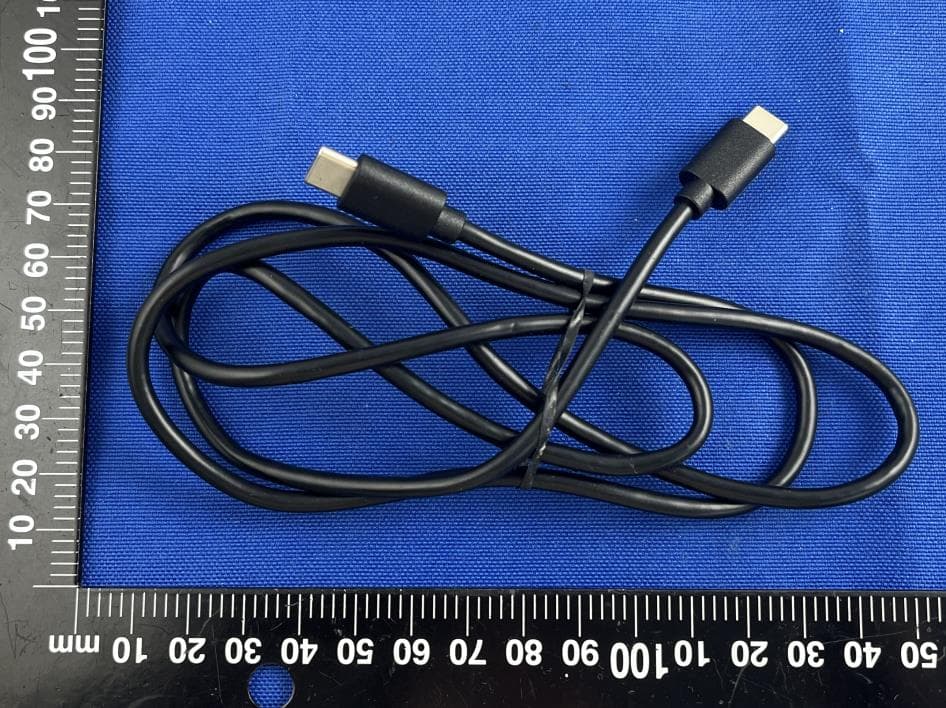
2AYPE-RATM3144B
Aug 01, 202414 inch Tablet
Equipment Class
DTS - Digital Transmission System
2AYPE-RWBN22744
Jul 28, 2024All-in-one PC
Equipment Class
NII - Unlicensed National Information Infrastructure TX2AYPE-RATM31046
Jul 14, 202410.1 inch Tablet
Equipment Class
DTS - Digital Transmission System2AYPE-RATM30846
Jul 09, 20248.68 inch Tablet
Equipment Class
DTS - Digital Transmission System