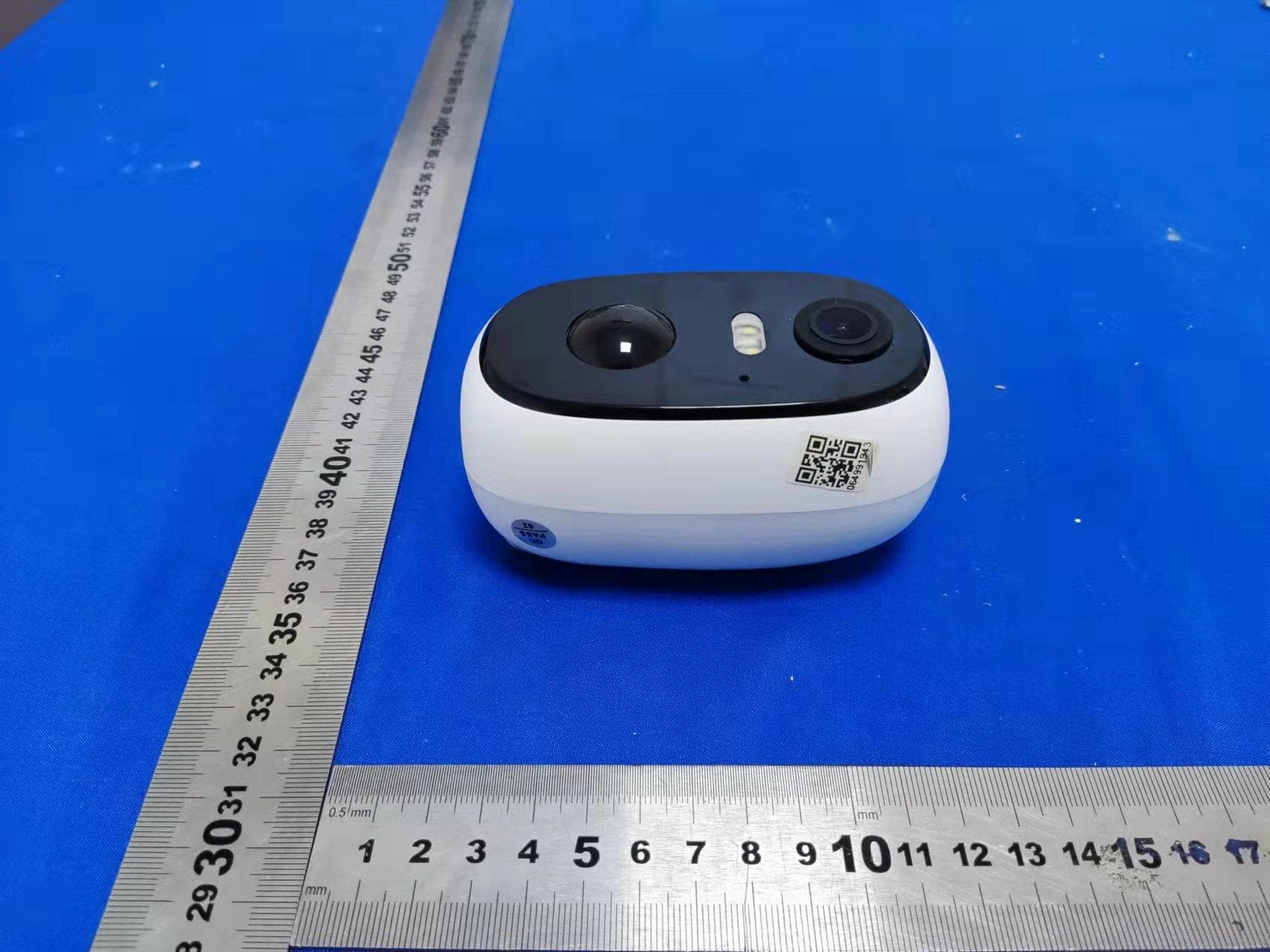
2AZL7-ZS-GX1SSecurity Camera
Shenzhen CTV Int Cloud Technology Co., Ltd
Click to zoom
Application Details
- Equipment Class
- DTS - Digital Transmission System
- Date of Grant
- May 05, 2021
- Application Purpose
- Original Equipment
- Date of Application
- Apr 29, 2021
- Equipment Note
- Security Camera
- Frequency Range
- 2412.00000000 - 2462.00000000
- Country
- China
Documents & Files
Document Text
Text extracted from the exhibit documents filed with the FCC. Open a document above to read the original.
Users Manual
User Manual PTZ Battery-Powered Security Camera Catalog I. Product description ........................................................................................................... 3 II. Add camera to APP ............................................................................................................. 4 1.Download "Cloud Edge" APP ......................................................................................... 4 2.Register Account ........................................................................................................... 5 3.Camera power on ............................................................................................................. 5 4.Connect WI-FI Steps ..................................................................................................... 6 III. Mounting the camera to the wall ............................................................................... 8 IV. Function introduction ................................................................................................... 10 1.Main Page ....................................................................................................................... 10 2.Preview page ................................................................................................................. 10 3.Video replay page ....................................................................................................... 11 4.Setup page ..................................................................................................................... 12 5.Equipment Sharing ....................................................................................................... 12 6.SD card recording ....................................................................................................... 12 7.PIR motion detection settings ............................................................................... 13 8.Battery Management ..................................................................................................... 14 V. FAQs ....................................................................................................................................... 15 Statement 1)Although every effort is made to make the manuals complete and accurate, there may be some discrepancies due to product updates. 2)Products and manuals are subject to change without notice. 3)The contents of this manual are for reference only and we do not guarantee that the accessories or app will be exactly the same as the one you receive. 4)If you have any problems with your camera, please feel free to contact us for assistance. We are always available to answer any questions you may have. Contact Us 7/24 Service Email:[email protected] I. Product introduction II. Add camera to APP 1.Download "CloudEdge" APP Search " CloudEdge" in App Store or Google Play, or scan the QR code below to download and install it on your smartphone. Power Key Press and hold the power button for 5 seconds to turn on the camera Reset Key Press and hold RESET for 5 seconds to reset the device (if you have modified the settings, they will revert to the factory default settings) SD Card Slot Support local SD card storage (up to 128G) Lens Support FHD 1080P resolution Power Light Red means charging is in progress Blue means charging is complete Microphone Capture sound for your videos PIR Sensor Can detect moving objects up to 12 meters away Working Status Light Red light continuously on: camera network abnormal Red light flashing slowly: waiting for Wi-Fi connection Red light flashing fast: Wi-Fi connection in progress Blue light continuously on: camera is running normally Speaker Two-way voice call sound output USB Charge Port Use 5V/2A power supply to charge the camera Thumb Screw For fixing the camera and the bottom bracket Wi-Fi Antenna Using 3DB signal antenna Note: When using the application for the first time, please turn on the following 2 permissions. Allow "CloudEdge" to access mobile cellular data and WLAN, otherwise you will not be able to add devices. Allow "CloudEdge" to receive messages, otherwise the phone will not receive alert push notifications when motion detection or audible alerts are triggered. The following is a screenshot of IOS cell phone operation, Android cell phone permissions open method is basically the same as this method. 2.Register Account New users must register by email. 1. Click on "Register"; 2. Follow the steps to complete your account registration; 3. Login. Tip: ①Please use the correct e-mail. ②Please select the correct country code. ③When registering for a new account, please select the region where you are actually located. (Cameras cannot be shared between different registration regions.) 3.Camera power on Find the camera's power-on button and press and hold it for five seconds,and you can hear the power-on tone, then the working indicator light up, red light slow flashing with 2 times per second rhythm. (If the working status light is not red slow flashing, please Reset the device) What if the camera cannot be turned on? 1.Try to charge the device and then turn it on again. 2.Please try several times to hold down the power key Continuously. 3.Contact Customer Service 4.Connect WI-FI Steps Step 1: Place the camera and smartphone within 1 to 3 feet (30 to 100 cm) of the router to ensure strong Wi-Fi signal. Note: The camera only works with 2.4G Wi-Fi and does not support 5G Wi-Fi. Step 2: Run the "CloudEdge" application, click and select "Battery Camera". Step 3: Follow the prompts to ensure that the camera is turned on. (The indicator turns red and blinks slowly) Step 4: Select the 2.4Ghz Wi-Fi SSID and enter the password, click "Next" Step 5: Align the QR code with the camera lens at a distance of 10-15cm (3.9-5.9inch) until the QR code is recognized. After you hear the "Bugu" sound, click "Notification tone heard". Step 6: After you click "Notificatio…
Text truncated - open the document above for the full version.
Cover Letter(s)
Shenzhen CTV Int Cloud Technology Co., Ltd. Add: 601, B Building, No.10, East District, Shangxue Industrial City, Xinxue Community, Bantian Street, Shenzhen, China Date: 2021-4-14 FCC ID: 2AZL7-ZS-GX1S Dear Sir/Madam, We, Shenzhen CTV Int Cloud Technology Co., Ltd. Hereby declares the following statement for Federal Communications Commission, PCB board, circuit, structure and internal of these model(s) are the same, Only model number is different for these model: Product name: Security Camera Model no.: ZS-GX1S, ZS-GX2S, ZS-GX3S, ZS-GX4S, ZS-GX5S, ZS-GX6S, ZS-GX7S, ZS-GX8S, ZS-GQ1, ZS-GQ2, ZS-GQ3, ZS-GQ4, ZS-GQ5 Sincerely, Name/Title: Liu guangqing/CEO Company: Shenzhen CTV Int Cloud Technology Co., Ltd. Address: 601, B Building, No.10, East District, Shangxue Industrial City, Xinxue Community, Bantian Street, Shenzhen, China Phone: +86 15814636688 Fax: +86 0755-89373554 E-Mail: [email protected]
Cover Letter(s)
CONFIDENTIALITY REQUEST for Certification Service in USA Federal Communication Commission Equipment Authorization Division, Application Processing Branch 7435 Oakland Mills Road Columbia, MD 21046 Date:<2021-4-14> Pursuant to Paragraphs §0.457 and 0.459 of the Commission’s Rules (47 C.F.R.) and Section §552(b)(4) of the Freedom of Information Act, we requests confidentiality for the following products: FCC ID Model name 2AZL7-ZS-GX1S ZS-GX1S For the product stated above, we request that the following information be held confidential; Exhibits Long-Term Confidentiality Short-Term Confidentiality Short-Term Confidentiality Days External Photos Internal Photos Block Diagram Schematics Test Setup Photos User’s Manual Parts List Tune Up Operational Descriptions The long-term confidentiality exhibits contain our trade secrets and proprietary information that could be of benefit to our competitors. The short-term confidentiality on the basis of ensuring that business sensitive information remains confidential until the actual marketing of our new device. If you have any questions, please feel free to contact me at the address shown below. Sincerely, Name/Title: Liu guangqing/CEO Company: Shenzhen CTV Int Cloud Technology Co., Ltd. Address: 601, B Building, No.10, East District, Shangxue Industrial City, Xinxue Community, Bantian Street, Shenzhen, China Phone: +86 15814636688 Fax: +86 0755-89373554 E-Mail: [email protected]
Cover Letter(s)
Shenzhen CTV Int Cloud Technology Co., Ltd. 601, B Building, No.10, East District, Shangxue Industrial City, Xinxue Community, Bantian Street, Shenzhen, China Date: 2021-4-14 FCC ID: 2AZL7-ZS-GX1S Model Number: ZS-GX1S To: Federal Communications Commission Authorization and Evaluation Division 7435 Oakland Mills Road Columbia, MD To Whom It May Concern, We, Shenzhen CTV Int Cloud Technology Co., Ltd., declare that this EUT (FCC ID: 2AZL7-ZS-GX1S) doesn’t have Ad Hoc mode function on “non-US/Canada frequencies”. In addition. The frequency selection feature is disabled by firmware for devices marked to the US/Canada. For DTS part of this device, only channels 1-11 will be used in North America, Country code selection is disabled. Should you have any questions or comments regarding this matter, please have my best attention. Sincerely, Name/Title: Liu guangqing/CEO Company: Shenzhen CTV Int Cloud Technology Co., Ltd. Address: 601, B Building, No.10, East District, Shangxue Industrial City, Xinxue Community, Bantian Street, Shenzhen, China Phone: +86 15814636688 Fax: +86 0755-89373554 E-Mail: [email protected]
Cover Letter(s)
Shenzhen CTV Int Cloud Technology Co., Ltd. 601, B Building, No.10, East District, Shangxue Industrial City, Xinxue Community, Bantian Street, Shenzhen, China Federal Communications Commission Authorization and Evaluation Division Equipment Authorization Branch 7435 Oakland Mills Road Columbia, MD 21046 2021-4-14 To whom it may concern: We, Shenzhen CTV Int Cloud Technology Co., Ltd. the undersigned, hereby authorize Eurofins Product Service GmbH to act on our behalf in all matters relating to applications for equipment authorization FCC ID: 2AZL7-ZS-GX1S including the signing of all documents related to these matters. Any and all acts carried out by Eurofins Product Service GmbH on our behalf shall have the same effect as acts of our own. We also hereby certify that no party to this application is subject to a denial of benefits, including FCC benefits, pursuant to Section 5301 of the Anti-Drug Abuse Act of 1988, 21 U.S.C. 862. Sincerely, Name/Title: Liu guangqing/CEO Company: Shenzhen CTV Int Cloud Technology Co., Ltd. Address: 601, B Building, No.10, East District, Shangxue Industrial City, Xinxue Community, Bantian Street, Shenzhen, China Phone: +86 15814636688 Fax: +86 0755-89373554 E-Mail: [email protected]
External Photos
FCC ID: 2ALZ7-ZS-GX1S TB-RF-074-1.0 Appendix III EUT External Photographs Photo 1 Appearance of EUT Photo 2 Appearance of EUT FCC ID: 2ALZ7-ZS-GX1S TB-RF-074-1.0 Photo 3 Appearance of EUT Photo 4 Appearance of EUT Antenna FCC ID: 2ALZ7-ZS-GX1S TB-RF-074-1.0 Photo 5 Appearance of EUT Photo 6 Appearance of EUT
ID Label/Location Info
FCC ID: 2ALZ7-ZS-GX1S TB-RF-074-1.0 Appendix IFCC ID Label Size for the label: 20mm X30mm Model: ZS-GX1S FCC ID: 2AZL7-ZS-GX1S FCC ID: 2ALZ7-ZS-GX1S TB-RF-074-1.0 Appendix II ID Label Location ID LOCATION
Internal Photos
FCC ID: 2ALZ7-ZS-GX1S TB-RF-074-1.0 Appendix IV EUT Internal Photographs Photo 7 Internal of EUT Photo 8 Internal of EUT 9 FCC ID: 2ALZ7-ZS-GX1S TB-RF-074-1.0 Photo 9 Internal of PCB Photo 10 Appearance of PCB FCC ID: 2ALZ7-ZS-GX1S TB-RF-074-1.0 Photo 11 Appearance of PCB Photo 12 Appearance of PCB FCC ID: 2ALZ7-ZS-GX1S TB-RF-074-1.0 Photo 13 Appearance of PCB Photo 14 Appearance of PCB FCC ID: 2ALZ7-ZS-GX1S TB-RF-074-1.0 Photo 15 Appearance of Battery
RF Exposure Info
Report No.: TB-MPE179193 Page: 1 of 3 TB-RF-075-1.0 Maximum Permissible Exposure Evaluation FCC ID: 2AZL7-ZS-GX1S 1. Client Information Applicant : Shenzhen CTV Int Cloud Technology Co., Ltd. Address : 601, B Building, No.10, East District, Shangxue Industrial City, Xinxue Community, Bantian Street, Shenzhen, China Manufacturer : Shenzhen CTV Int Cloud Technology Co., Ltd. Address : 601, B Building, No.10, East District, Shangxue Industrial City, Xinxue Community, Bantian Street, Shenzhen, China 2. General Description of EUT EUT Name : Security Camera Models No. : ZS-GX1S, ZS-GX2S, ZS-GX3S, ZS-GX4S, ZS-GX5S, ZS-GX6S, ZS-GX7S, ZS-GX8S, ZS-GQ1, ZS-GQ2, ZS-GQ3, ZS-GQ4, ZS-GQ5 Model Different : All these models are the same in the same PCB, layout and circuit, the only difference is the appearance and model. Brand Name : N/A Product Description : Operation Frequency: 802.11b/g/n(HT20): 2412MHz~2462MHz Number of Channel: 802.11b/g/n(HT20):11 channels see note(3) RF Output Power: 802.11b:17.674dBm 802.11g: 15.951dBm 802.11n (HT20): 12.588dBm Antenna Gain: 3 dBi Dipole Antenna Power Rating : USB Input: DC 5V2A DC 3.7V by 14400mAh Li-ion battery Software Version : ppstrong-b6-neutral_std-1.2.1.20210121-upgrade Hardware Version : SNAP B24S-H1MB-GQ1-REV1.0 Connecting I/O Port(S) : : Please refer to the User's Manual Remark : the MPE report used the EUT(TBBJ-20210226-02-02#). Report No.: TB-MPE179193 Page: 2 of 3 TB-RF-075-1.0 MPE Calculations for WIFI 1. Antenna Gain: Dipole Antenna:3dBi. 2. EUT Operation Condition: Software provided by client enabled the EUT to transmit and receive data at lowest, middle and highest channel individually. 3. Exposure Evaluation: Equation from page 18 of OET Bulletin 65, Edition 97-01 S=(PG)/4πR 2 Where S: power density P: power input to the antenna G: power gain of the antenna in the direction of interest relative to an isotropic radiator. R: distance to the center of radiation of the antenna 4. Test Result: 2.4G WiFi Mode Conducted Power(max) (dBm) Turn-up Power (dB) Max tune up power (dBm) [P] ANT Gain (dBi) [G] Distance (cm) [R] Power Density (mW/ cm 2 ) [S] Limit of Power Density (mW/ cm 2 ) (S) 802.11B 17.674 17±1 18 3 20 0.02505 1 802.11G 15.951 15±1 16 3 20 0.01580 1 802.11N(HT20) 12.588 12±1 13 3 20 0.00792 1 Report No.: TB-MPE179193 Page: 3 of 3 TB-RF-075-1.0 5. Conclusion: As specified in Table 1B of 47 CFR 1.1310- Limits for Maximum Permissible Exposure (MPE), Limits for General Population/ Uncontrolled Exposure Frequency Range (MHz) Power density (mW/ cm 2 ) 300-1,500 F/1500 1,500-100,000 1.0 For 2.4WIFI:2412~2462 MHz MPE limit S: 1mW/ cm 2 The MPE is calculated as 0.02505mW / cm 2 < limit 1mW / cm 2 . So, RF exposure limit warning or SAR test are not required. The EUT will only be used with a separation of 20cm or greater between the antenna and nearby persons and can therefore be considered a mobile transmitter per 47 CFR2.1091 (b). The RF Exposure Information page from the manual is included here for reference. Note For a more detailed features description, please refer to the RF Test Report. 6. Conclusion: The measurement results comply with the FCC Limit per 47 CFR 2.1091 for the uncontrolled RF Exposure of mobile device. -----END OF REPORT-----
Test Report
Shenzhen Toby Technology Co., Ltd. Report No.: TB-FCC179192 Page: 1 of 66 TB-RF-074-1.0 1 A/F., Building.6, Rundongsheng Industrial Zone, Longzhu, Xixiang, Bao’an, Shenzhen, Guangdong, China Tel: +86 75526509301 Fax: +86 75526509195 FCC Radio Test Report FCC ID: 2AZL7-ZS-GX1S Original Grant Report No. : TB-FCC179192 Applicant : Shenzhen CTV Int Cloud Technology Co., Ltd. Equipment Under Test (EUT) EUT Name : Security Camera Model No. : ZS-GX1S Series Model No. : ZS-GX2S, ZS-GX3S, ZS-GX4S, ZS-GX5S, ZS-GX6S, ZS-GX7S, ZS-GX8S, ZS-GQ1, ZS-GQ2, ZS-GQ3, ZS-GQ4, ZS-GQ5 Brand Name : N/A Sample ID : TBBJ-20210226-02-1#& TBBJ-20210226-02-2# Receipt Date : 2021-03-15 Test Date : 2021-03-15 to 2021-04-13 Issue Date : 2021-04-13 Standards : FCC Part 15, Subpart C 15.247 Test Method : ANSI C63.10: 2013 Conclusions : PASS In the configuration tested, the EUT complied with the standards specified above, The EUT technically complies with the FCC and IC requirements Test/Witness Engineer : Seven Wu Engineer Supervisor : Ivan Su Engineer Manager : Ray Lai This report details the results of the testing carried out on one sample. The results contained in this test report do not relate to other samples of the same product. The manufacturer should ensure that all products in series production are in conformity with the product sample detailed in the report. Report No.: TB-FCC179192 Page: 2 of 66 TB-RF-074-1.0 Contents CONTENTS ............................................................................................................................................. 2 1. GENERAL INFORMATION ABOUT EUT ............................................................................. 5 1.1 Client Information ................................................................................................................. 5 1.2 General Description of EUT (Equipment Under Test) ................................................... 5 1.3 Block Diagram Showing the Configuration of System Tested ...................................... 6 1.4 Description of Support Units .............................................................................................. 6 1.5 Description of Test Mode .................................................................................................... 7 1.6 Description of Test Software Setting ................................................................................ 8 1.7 Measurement Uncertainty .................................................................................................. 9 1.8 Test Facility ........................................................................................................................... 9 2. TEST SUMMARY ..................................................................................................................... 10 3. TEST SOFTWARE ................................................................................................................... 10 4. TEST EQUIPMENT .................................................................................................................. 11 5. CONDUCTED EMISSION TEST ........................................................................................... 12 5.1 Test Standard and Limit .................................................................................................... 12 5.2 Test Setup ........................................................................................................................... 12 5.3 Test Procedure ................................................................................................................... 13 5.4 Deviation From Test Standard ......................................................................................... 13 5.5 EUT Operating Mode ........................................................................................................ 13 5.6 Test Data ............................................................................................................................. 13 6. RADIATED EMISSION TEST ................................................................................................ 14 6.1 Test Standard and Limit .................................................................................................... 14 6.2 Test Setup ........................................................................................................................... 15 6.3 Test Procedure ................................................................................................................... 17 6.4 Deviation From Test Standard ......................................................................................... 17 6.5 EUT Operating Condition ................................................................................................. 17 6.6 Test Data ............................................................................................................................. 17 7. RESTRICTED BANDS REQUIREMENT ............................................................................. 18 7.1 Test Standard and Limit .................................................................................................... 18 7.2 Test Setup ........................................................................................................................... 18 7.3 Test Procedure ................................................................................................................... 19 7.4 Deviation From Test Standard ......................................................................................... 19 7.5 EUT Operating Condition ................................................................................................. 19 7.6 Test Data ............................................................................................................................. 19 8. BANDWIDTH TEST .......................................................................................…
Text truncated - open the document above for the full version.
Test Setup Photos
FCC ID: 2ALZ7-ZS-GX1S TB-RF-074-1.0 Appendix V EUT Test Photographs 15C Test Setup Photo of Setup for Radiated Emission (Above 1 GHz) Photo of Setup for Radiated Emission (Below 1 GHz) FCC ID: 2ALZ7-ZS-GX1S TB-RF-074-1.0 Photo of Setup for Conducted Emission -----END OF REPORT-----
Contact Information
Applicant
Liu guangqing
Test Firm
Shenzhen Toby Technology Co., Ltd.Ray Lai
Technical Specifications
| # | Rule Parts | Frequency Range | Power Output |
|---|---|---|---|
| 1 | 15C | 2.41 GHz - 2.46 GHz | 58.50 mW |
Other Applications from Shenzhen CTV Int Cloud Technology Co., Ltd
2AZL7-ZS-GX5S
Apr 14, 2022Security Camera
Equipment Class
DTS - Digital Transmission System