2AZON-Y1IP Camera
Shenzhen Ka Wah Hengtai Technology Co.,Ltd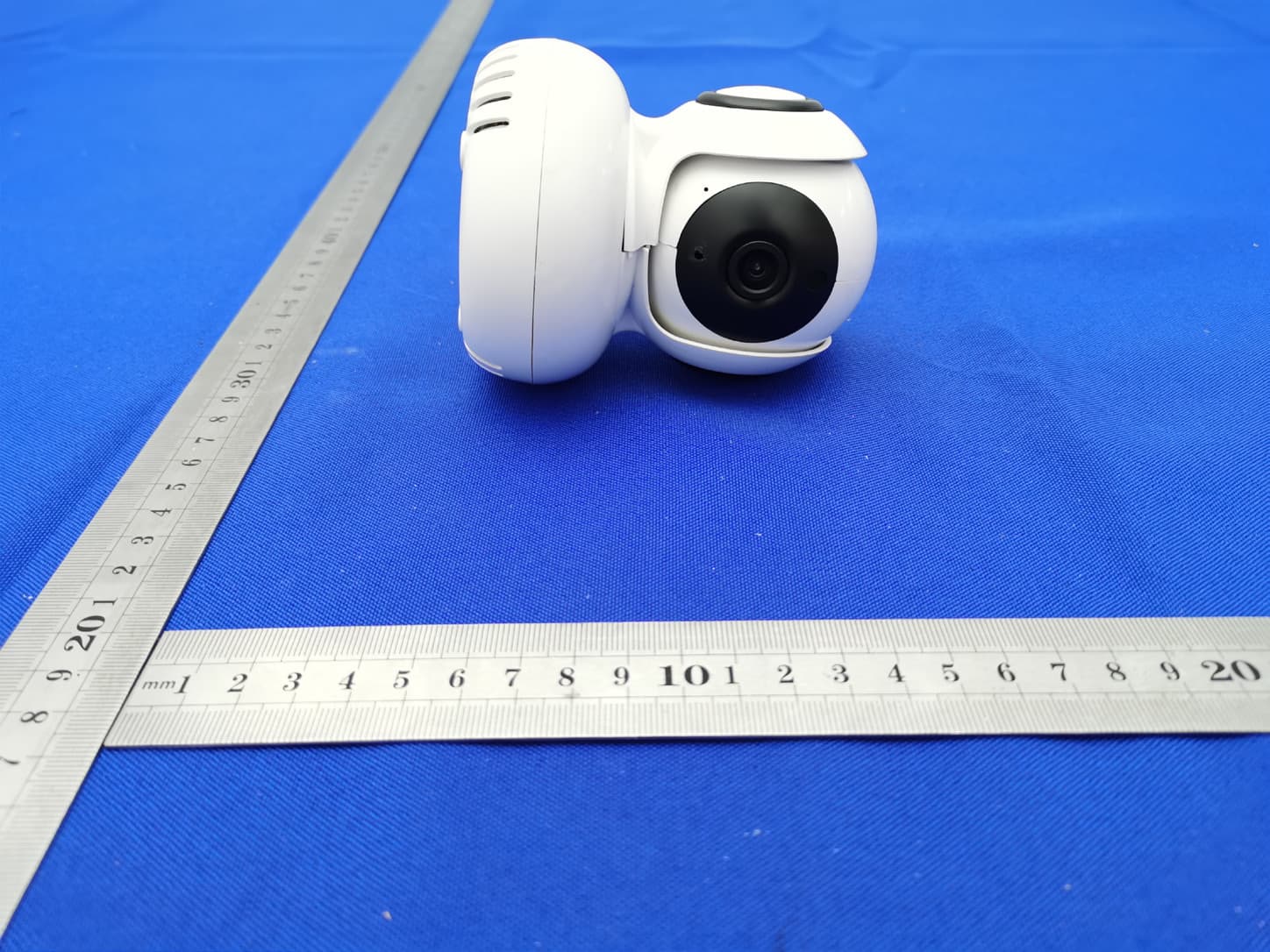
Click to zoom
Application Details
- Equipment Class
- DTS - Digital Transmission System
- Date of Grant
- Apr 23, 2021
- Application Purpose
- Original Equipment
- Date of Application
- Apr 23, 2021
- Equipment Note
- IP Camera
- Frequency Range
- 2412.00000000 - 2462.00000000
- Country
- China
Documents & Files
Document Text
Text extracted from the exhibit documents filed with the FCC. Open a document above to read the original.
Users Manual
Can’t connect? Need help? WE CAN HELP DO NOT RETURN THIS PRODUCT TO THE STORE support.mygeeni.com (888)232-3143 Toll-free or tap ‘support‘ for help in the Geeni app. SMART WI-FI CAMERA START GUIDE Thank you for purchasing your GEENI smart home product. Get started using your new devices by downloading Geeni, one convenient app that manages everything straight from your phone or tablet. Easily connect to your home Wi-Fi, and control multiple devices from the touch of your fingertips. 01 02 03 05 06 09 12 Download & Register Plug In Mounting The Camera Connect (QR Mode) Connect (Easy Mode) Settings Questions, Troubleshooting, Notices Contents Start Guide 15 17 Google Assistant Amazon Alexa Voice Control Guide FCC Notice: This equipment has been tested and found to comply with the limits for a Class B digital device, pursuant to part 15 of the FCC Rules. These limits are designed to provide reasonable protection against harmful interference in a residential installation. This equipment generates, uses and can radiate radio frequency energy and, if not installed and used in accordance with the instructions, may cause harmful interference to radio communications. However, there is no guarantee that interference will not occur in a particular installation. If this equipment does cause harmful interference to radio or television reception, which can be determined by turning the equipment off and on, the user is encouraged to try to correct the interference by one or more of the following measures: • Reorient or relocate the receiving antenna. • Increase the separation between the equipment and receiver. • Connect the equipment into an outlet on a circuit different from that to which the receiver is connected. • Consult the dealer or an experienced radio/TV technician for help. Caution: Any changes or modifications to this device not explicitly approved by manufacturer could void your authority to operate this equipment. This device complies with part 15 of the FCC Rules. Operation is subject to the following two conditions: (1) This device may not cause harmful interference, and (2) this device must accept any interference received, including interference that may cause undesired operation. The device has been evaluated to meet general RF exposure requirement. The device can be used in portable exposure condition without restriction. 18 You can rename your devices in the Geeni app, and Alexa will refer to them by the same name. So if you rename a smart bulb to “Living Room“ or a nickname like a smart camera to “Living Room Camera” or “Baby’s Room,” Alternatively, you can create an Alexa group, like “Bedroom“ or “Downstairs,“ and add the device to the group. Alexa will recognize the group name in the Alexa app, or the device name in the Geeni app. More information is available at: http://tinyurl.com/alexa-smart-home-groups Amazon Alexa 04 Choose “Discover Devices.“ After a few seconds your GEENI devices will be displayed under Smart Home in the Alexa app. 03 Authorize your account with Smart Home Skills using the username and password from your Geeni app. Support: If you encounter any issues, please contact us at support.mygeeni.com for help. (888) 232-3143 Toll-free To explore our full selection of products, visit us at: www.mygeeni.com © 2021 Merkury Innovations • 45 Broadway 3rd FL, New York NY 10006. The illustrated product and specifications may differ slightly from those supplied. Geeni is a trademark of Merkury Innovations LLC. iPhone, Apple and the Apple logo are trademarks of Apple Inc., registered in the U.S. and other countries. App Store is a service mark of Apple Inc. Google, Google Play, and related marks and logos are trademarks of Google LLC. iOS is a registered trademark of Cisco in the U.S. and other countries and is used under license. Amazon, Alexa and all related logos are trademarks of Amazon.com, Inc. or its affiliates. All other trademarks and trade names are those of their respective owners. Made in China START GUIDE Smart Wi-Fi Camera Power Adapter Mounting Kit (Screw + Wall Anchor) USB Cable User Manual What’s in the Box Get Ready Know your Wi-Fi network and password Make sure you’re connecting to a 2.4GHz Wi-Fi network. (Geeni can’t connect to 5GHz networks) Make sure your mobile device is running iOS ® 9 or higher or Android™ 5.0 or higher a microSD card can be used to save recorded footage but is not required 2.4GHz iOS 9 Android 5.0 1717 To control your GEENI smart home products, just ask Alexa. Make sure your devices are already set up using the Geeni app. 01 02 Open the Alexa app and go to Skills in the menu. Search for Geeni then tap Enable. “Alexa, show Living Room Camera.“ “Alexa, show me the kids room Camera.“ Things you can say*: Amazon Echo Show, Amazon Fire TV, and any Alexa- enabled TV or screen. Stream to: *Some commands require compatible devices. 16 04 Authorize your account with Google Assistant using the username and password from your Geeni app. 03 Choose “Geeni“ from the list of Home Control partners. Now your Google Home app and GEENI devices are linked! You’re now able to say “Hey Google“ and control your GEENI devices. At any time, go into the “Home Control“ section of the Google Home app to set nicknames and rooms for your devices. You can rename your devices in the Geeni app, and Google Assistant will refer to them by the same name. So if you rename a camera to ‘Living Room Camera’ or ‘Baby’s Room,“ then Google Assistant will use that same name later on. You can always give it a nickname using the Google Home app as well. Google Assistant will be able to control devices by room. Google Assistant 1 STEP 1 Download the Geeni App from App Store or Google Play. Register an account on your Geeni App. 01. Enter your mobile phone number or email address 03. Log in to the App. 02. Enter the verification code and create a password. Download & Register 2 Plug In SD Card Installation STEP 2 STEP 3 Plug In Plug camera into power source using the included …
Text truncated - open the document above for the full version.
Attestation Statements
Shenzhen Ka Wah Hengtai Technology Co.,Ltd M odel Difference Product description: IP Camera Model name: Y1, Y13, Y14, Y15, L1. Trade Name: N/A FCC ID: 2AZON -Y1 All the model are the same circuit and RF module, only different for model name. Regards Sincerely C lient’s signature: Cl ient’s name / title : Yan Ru Nie (Factor director) Contact information / address: 2F, Building B6, The Third Industrial Zone, Feng Huang Gang, Xixiang,Bao'an,Shenzhen,518101,China
Cover Letter(s)
C5266091_X8_Ed.1 Letter of Authorization Shenzhen Ka Wah Hengtai Technology Co.,Ltd Company: Shenzhen Ka Wah Hengtai Technology Co.,Ltd. Address: 2F, Building B6, The Third Industrial Zone, Feng Huang Gang, Xixiang,Bao'an,Shenzhen,518101,China Product Name: IP Camera Model Number: Y1 FCC Identifier: 2AZON -Y1 We authorize LGAI Technological Center S.A., Ronda de la Font del Carme, s/n, 08193 Bellaterra, Spain, to act on our behalf on all matters concerning the above named equipment. Any individual within LGAI Technological Center S.A. is authorized to act on our behalf and take action on the application. We declare that authorize LGAI Technological Center S.A., Ronda de la Font del Carme, s/n, 08193 Bellaterra, Spain, is allowed to forward all information related to the approval project to the Federal Communication Commission and to discuss any issues concerning the approval application. Any and all acts carried out by LGAI Technological Center S.A. on our behalf shall have the same effect as acts of our own. Name: Yan Ru Nie Date: Apr.19.2021 Title: Factor director Signature of applicant: 1/1
Cover Letter(s)
C5266091_X10_Ed.2 Shenzhen Ka Wah Hengtai Technology Co.,Ltd Office of Engineering Technology Federal Communications Commission 7435 Oakland Mills Road Columbia, MD 21046 Date: Apr.19.2021 Subject: Request for Confidentiality FCC ID: 2AZON -Y1 To Whom It May Concern, Pursuant to the provisions of Sections 0.457 and 0.459 of Commission's rules (47CFR0.457, 0.459), we are requesting the Commission to withhold the following attachment(s) as confidential document from public disclosure. Exhibits Long-Term Confidentiality Short-Term Confidentiality NOTE 2 ID Label/Location No No Attestation Statement No No External Photos No ☐ Block Diagram ☒ ☐ Schematics ☒ ☐ Test Report No No Test Setup Photos No ☐ User’s Manual ☐ NOTE 1 ☐ Internal Photos ☐ NOTE 1 ☐ Parts List / Tune Up ☐ ☐ RF Exposure Info No No Operational Description ☒ ☐ Cover Letter(s) No No SDR Software / Security Info ☐ No NOTE 1: Long-Term Confidentiality may be permitted under special conditions (See II. LONG-TERM CONFIDENTIALITY, Section 3 of KDB 726920, use last in force) NOTE 2: Short-Term Confidentiality can be requested for a maximum of 180 days from the date of the grant. Above mentioned document contains detailed system and equipment description are considered as proprietary information in operation of the equipment. The public disclosure of above documents might be harmful to our company and would give competitor an unfair advantage in the market. In case of short-term Confidentiality, the applicant requests the exhibits selected above are withheld from public view for a period of ______ days from the date of the Grant of Equipment Authorization and prior to marketing. It is our understanding that all measurement test reports, FCC ID label format and correspondent during certification review process cannot be granted as confidential documents and those information will be available for public review once the grant of equipment authorization is issued. 1/1 C5266091_X10_Ed.2 Sincerely, Signature: Name: Yan Ru Nie Title: Factor director 1/1
External Photos
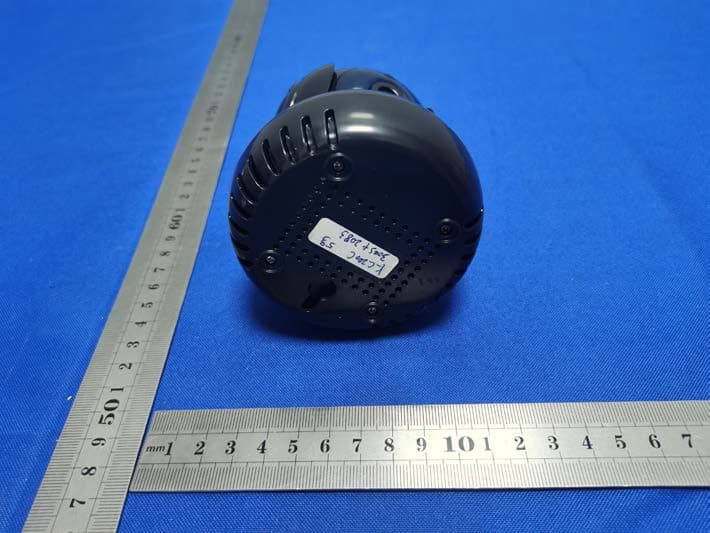
External Photos FCC ID: 2AZON -Y1 ANT
ID Label/Location Info
Model: Y1 FCC ID: 2AZON -Y1 Label Location
Internal Photos
Internal Photos FCC ID: 2AZON -Y1
RF Exposure Info
FCC §15.247 (i), §2.1091 – RF Exposure FCC ID: 2AZON -Y1 Applied procedures / limit According to FCC §15.247(i) and §1.1307(b)(1), systems operating under the provisions of this section shall be operated in a manner that ensures that the public is not exposed to radio frequency energy level in excess of the Commission’s guidelines. Limits for Occupational / Controlled Exposure Frequency Range (MHz) Electric Field Strength (E) (V/m) Magnetic Field Strength (H) (A/m) Power Density (S) (mW/ cm 2 ) Averaging Time |E| 2 ,|H| 2 or S (minutes) 0.3-3.0 614 1.63 (100)* 6 3.0-30 1842 / f 4.89 / f (900 / f)* 6 30-300 61.4 0.163 1.0 6 300-1500 F/300 6 1500-100,000 5 6 Note: ƒ is frequency in MHz * = Power density limit is applicable at frequencies greater than 100 MHz Limits for General Population / Uncontrolled Exposure Frequency Range (MHz) Electric Field Strength (E) (V/m) Magnetic Field Strength (H) (A/m) Power Density (S) (mW/ cm 2 ) Averaging Time |E| 2 ,|H| 2 or S (minutes) 0.3-1.34 614 1.63 (100)* 30 1.34-30 824/f 2.19/f (180/f)* 30 30-300 27.5 0.073 0.2 30 300-1500 F/1500 30 1500-100,000 1.0 30 Note: f = frequency in MHz * = Plane-wave equivalent power density MPE PREDICTION Predication of MPE limit at a given distance, Equation from OET Bulletin 65, Edition 97-01 Where: S = power density P = power input to antenna G = power gain of the antenna in the direction of interest relative to an isotropic radiator R = distance to the center of radiation of the antenna,R=20cm Test Result of RF Exposure Evaluation Tune up Produce power Maximu m peak output power (dBm) Output power to antenn a (mW) Antenna Gain (numeric) Power Density (S) (mW/ cm2) Limit (mW / cm2 ) Result W IFI 8±1 9 7.94 1.259 (1.00dBi) 0.00199 1 Pass
Test Report
Shenzhen CTB Testing Technology Co., Ltd. Report No.: CTB210412024RFX Report Tel: 4008-707-283 Web: http://www.ctb-lab.netPage 1 of 60 TEST REPORT Compiled by: Reviewed by: Approved by: Arron Liu Bin Mei Rita Xiao / Director The test report is effective only with both signature and specialized stamp. This result(s) shown in this report refer only to the sample(s) tested. Without written approval of Shenzhen CTB Testing Technology Co., Ltd. this report can’t be reproduced except in full. The tested sample(s) and the sample information are provided by the client. Product Name: IP Camera FCC ID: 2AZON -Y1 Trademark: N/A Model Number: Y1, Y13, Y14, Y15, L1 Prepared For: Shenzhen Ka Wah Hengtai Technology Co.,Ltd Address: 2F, Building B6, The Third Industrial Zone, Feng Huang Gang, Xixiang, Bao'an, Shenzhen, 518101, China Manufacturer: Shenzhen Ka Wah Hengtai Technology Co.,Ltd Address: 2F, Building B6, The Third Industrial Zone, Feng Huang Gang, Xixiang, Bao'an, Shenzhen, 518101, China Prepared By: Shenzhen CTB Testing Technology Co., Ltd. Address: Floor 1&2, Building A, No. 26 of Xinhe Road, Xinqiao Street, Baoan District, Shenzhen China Sample Received Date: Apr. 9, 2021 Sample tested Date: Apr. 10, 2021 to Apr. 15, 2021 Issue Date: Apr. 15, 2021 Report No.: CTB210412024RFX Test Standards FCC Part15.247 ANSI C63.10:2013 Test Results PASS Remark: This is WIFI-2.4GHz band radio test report. Shenzhen CTB Testing Technology Co., Ltd. Report No.: CTB210412024RFX Report Tel: 4008-707-283 Web: http://www.ctb-lab.net Page 2 of 60 TABLE OF CONTENT Test Report Declaration Page 1. VERSION............................................................ 4 2. TEST SUMMARY ..................................................... 5 3. MEASUREMENT UNCERTAINTY ....................................... 6 4. PRODUCT INFORMATION AND TEST SETUP ........................... 7 4.1 Product Information ..................................................... 7 4.2 Test Setup Configuration ................................................ 7 4.3 Support Equipment ..................................................... 8 4.4 Channel List ........................................................... 9 4.5 Test Mode ............................................................. 9 4.6 Test Environment ....................................................... 9 5. TEST FACILITY AND TEST INSTRUMENT USED ........................ 10 5.1 Test Facility ........................................................... 10 5.2 Test Instrument Used .................................................. 10 6. AC POWER LINE CONDUCTED EMISSION .............................. 12 6.1 Block Diagram Of Test Setup............................................ 12 6.2 Limit ................................................................. 12 6.3 Test procedure ........................................................ 12 6.4 Test Result ........................................................... 14 7. RADIATED SPURIOUS EMISSION ..................................... 16 7.1 Block Diagram Of Test Setup............................................ 16 7.2 Limit ................................................................. 16 7.3 Test procedure ........................................................ 17 7.4 Test Result ........................................................... 18 8. BAND EDGE AND RF COUNDUCTED SPURIOUS EMISSIONS ............ 35 8.1 Block Diagram Of Test Setup............................................ 35 8.2 Limit ................................................................. 35 8.3 Test procedure ........................................................ 35 8.4 Test Result ........................................................... 36 9. COUDUCTED OUTPUT POWER....................................... 42 9.1 Block Diagram Of Test Setup............................................ 42 9.2 Limit ................................................................. 42 9.3 Test procedure ........................................................ 42 9.4 Test Result ........................................................... 43 10. 6DB OCCUPIED BANDWIDTH ........................................ 47 10.1 Block Diagram Of Test Setup .......................................... 47 10.2 Limit ................................................................ 47 10.3 Test procedure ....................................................... 47 10.4 Test Result .......................................................... 47 11. POWER SPECTRAL DENSITY ........................................ 52 11.1 Block Diagram Of Test Setup .......................................... 52 11.2 Limit ................................................................ 52 11.3 Test procedure ....................................................... 52 Shenzhen CTB Testing Technology Co., Ltd. Report No.: CTB210412024RFX Report Tel: 4008-707-283 Web: http://www.ctb-lab.net Page 3 of 60 11.4 Test Result .......................................................... 53 12. ANTENNA REQUIREMENT ........................................... 57 13. EUT PHOTOGRAPHS ................................................ 58 14. EUT TEST SETUP PHOTOGRAPHS ................................... 59 (Note: N/A means not applicable) Shenzhen CTB Testing Technology Co., Ltd. Report No.: CTB210412024RFX Report Tel: 4008-707-283 Web: http://www.ctb-lab.net Page 4 of 60 1. VERSION Report N o. Issue Date Description Approved CTB210412024RFX Apr. 15, 2021 Original Valid Shenzhen CTB Testing Technology Co., Ltd. Report No.: CTB210412024RFX Report Tel: 4008-707-283 Web: http://www.ctb-lab.net Page 5 of 60 2. TEST SUMMARY The Product has been tested according to the following specifications: Test Item Test Requirement Test method Result AC Power Line Conducted Emission 47 CFR Part 15 Subpart C Section 15.207 ANSI C63.10-2013 PASS Radiated Spurious emissions 47 CFR Part 15 Subpart C Section 15.205/15.209 ANSI C63.10-2013 PASS Band edge and RF Conducted Spu…
Text truncated - open the document above for the full version.
Test Setup Photos
Radiated Emission Below 1G Above 1G FCC ID: 2AZON -Y1 Conducted Emission
Contact Information
Applicant
youyun Lian
Technical Contact
Non-Technical Contact
Shenzhen CTB Testing Technology Co., Ltd.Simon Lee
[email protected](86) 13662574496
Test Firm
Shenzhen CTB Testing Technology Co., Ltd.Rita Xiao
[email protected]86-13538218145
Technical Specifications
| # | Rule Parts | Frequency Range | Power Output |
|---|---|---|---|
| 1 | 15C | 2.41 GHz - 2.46 GHz | 5.62 mW |
Other Applications from Shenzhen Ka Wah Hengtai Technology Co.,Ltd
2AZONY1
Sep 18, 2022IP Camera
Equipment Class
DTS - Digital Transmission System