2AZP4-C9Smart Watch
Shenzhen Wellstec Communications Co., Ltd
Click to zoom
Application Details
- Equipment Class
- DTS - Digital Transmission System
- Date of Grant
- May 26, 2021
- Application Purpose
- Original Equipment
- Date of Application
- May 25, 2021
- Equipment Note
- Smart Watch
- Frequency Range
- 2402.00000000 - 2480.00000000
- Country
- China
Documents & Files
Document Text
Text extracted from the exhibit documents filed with the FCC. Open a document above to read the original.
Users Manual
Smart Watch User Manual Thank you for choosing our C9 smartwatch. You can have a comprehensive understanding of the use of the equipment by reading this manual,This device is mainly connected to mobile phone through Bluetooth for use,Provide a variety of practical functions and services,To facilitate your mobile phone operation,And developed many functions for human movement and health,This device is not a medical device,Measurement data and results are for reference only,Not as a basis for diagnosis and treatment。The Company reserves the right to make changes to the contents of this manual without prior notice. This product supports IP68 waterproof level,Support in the rain、Wash your hands、Swimming wear. Hot showers or saunas are not allowed,can't keep out steam. The company does not provide free warranty for water inflow caused by non-use as instructed. ※Watch Operation Instruction Side key on the key: Long press for switching machine, Press to return to the standby interface, When the watch freezes, A long press for 10 seconds will restart the watch。 Key the key: Short press to enter various motion modes。 TP gestures: left、Right swipe to enter the main menu, After entering each function, The right dash is return, Slide up and down to select menus,Click the menu to enter the next level menu. Dial switch: Long press the screen, A dial selection appears, Choose the dial you want Watch status bar: The standby interface is entered by swiping down, Bluetooth status will be displayed, electricity, Time and other data。 Charging instructions: This product is charged with a magnetic cable, which can be connected to a mobile phone charger within 5V or a computer USB interface. The watch and the magnetic cable will automatically absorb, and it will take about 3 hours for a full charge.The theoretical standby can reach 5 days, normal use can reach 2 days. The connection between the watch and the mobile phone: first, the mobile phone should download the APP to the mobile phone and install it. There are two ways: 一 Enter the main menu - Settings - select the QR code, use WeChat scan, when the interface is opened, then click the option on the upper right, and choose to open the download with the mobile browser. 二 Search for "GloryFit" on your Android phone.Search for "GloryFit" in the App Store on your iPhone. After downloading, various permissions will be reminded during the installation process. Press "Yes" to all of them, and all functions can only be realized if the watch is connected to the phone via Bluetooth. Bluetooth connection method:Go to Settings - Bluetooth - search for available Bluetooth name C9, and click Connection and Pair. Some Android phones need to open the GPS to search for the name of Bluetooth of the watch. How to verify a successful Bluetooth connection: Open the Settings menu of the phone to check the device with Bluetooth pairing. If it shows that C9 is connected, the connection is successful. How to open app notifications::Open Settings Apply Notifications will prompt you to enable Notifications and select Open.Go back, select the APP that needs synchronous information notification, such as QQ WeChat, and select Open.Note, if WeChat PC version online at the same time, mobile phone terminal will not receive mail notification. What if I don't get the notice? 1.First of all, the notice function of the watch is just to synchronize the mobile phone notification function, such as incoming mail, QQ WeChat letter reminder, if your mobile phone did not receive the notice, the watch end is not received, to set the notification function in the mobile phone, find the corresponding APP, open the allowed notice. 2.Because the bluetooth protocol of each mobile phone brand is not uniform, sometimes there will be unstable connection between the mobile phone and the bluetooth of the watch, you can turn off the bluetooth of the mobile phone and reconnect it again, or restore the factory setting of the watch. 3 Delete "Gloryfit" and download it again. Note that all permissions must be turned on during the installation process, and then reconnect the watch. Introduction to main functions: ●phone Incoming Reminder: When the phone calls, the watch will synchronize with the call reminder; Information: Synchronize 10 SMS messages on the mobile phone (not supported for iOS phones). ● notice:Can query QQ/ WeChat and other timely news, this function needs to connect to the mobile phone "Gloryfit" application to use. ● Bluetooth: Search for connected devices or disconnected devices. ● Pedometer: It can check the number of steps walked, calories burned and distance walked that day.Data of the day will be saved and reset to 0 at 12:00 every night. ● Sleep monitoring: it will record the length and quality of your sleep from 10pm to 8am every night to help you better adjust your work and rest time and improve the quality of sleep. ● Heart rate monitoring: put the watch on the wrist, the best position to wear the wrist bone on the upper arm, you can measure the real-time heart rate value, the normal value of the average person is 60-90 times/min.Click the start sign at the bottom to indicate that the measurement is in progress. The value will be measured in about 20 seconds. ● Sedentary reminder: Set the reminder time of sedentary, and the bell will automatically ring when the time is up. ●Anti-theft function: click search, the phone will issue an alarm;You can also check the device's functions in your phone APP, and the watch will sound an alert. ● Alarm clock: five alarm clocks can be customized;Long press to enter to delete the alarm clock. ● Bluetooth music: can use bluetooth to synchronize the music in the phone. ● Bluetooth photo taking: When the phone is on any interface, the watch enters the Bluetooth photo taking, click the watch to take photos, and the photos are stored on the phone end. ● Stopwatch: Open this function for single and multiple timing. ● Calculator: easy calculation can be done aft…
Text truncated - open the document above for the full version.
External Photos
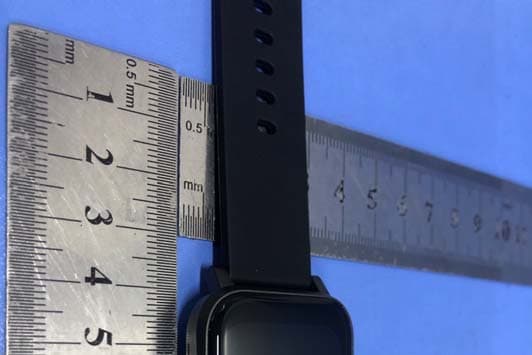
Page: 3 of 8 FCC ID: 2AZP4-C9 TB-RF-074-1.0 Appendix III EUT External Photographs Photo 1 Appearance of EUT Photo 2 Appearance of EUT Page: 4 of 8 FCC ID: 2AZP4-C9 TB-RF-074-1.0 Photo 3 Appearance of EUT Photo 4 Appearance of EUT
ID Label/Location Info
Page: 1 of 8 FCC ID:2AZP4-C9 TB-RF-074-1.0 Appendix IFCC ID Label Size for the label: 10mm X 10mm FCCID:2AZP4-C9 Model:C9 Page: 2 of 8 FCC ID: 2AZP4-C9 TB-RF-074-1.0 Appendix II ID Label Location ID LOCATION
Internal Photos
Page: 5 of 8 FCC ID: 2AZP4-C9 TB-RF-074-1.0 Appendix IV EUT Internal Photographs Photo 5 Appearance of Internal Photo 6 Appearance of PCB Page: 6 of 8 FCC ID: 2AZP4-C9 TB-RF-074-1.0 Photo 7 Appearance of PCB Photo 8 Appearance of Battery Antenna
RF Exposure Info
Shenzhen Toby Technology Co., Ltd. Report No.: TB-MPE179936 Page: 1 of 3 TB-RF-074-1.0 1/F.,Building 6, Rundongsheng Industrial Zone, Longzhu, Xixiang, Bao'an District, Shenzhen, Guangdong, China Tel: +86 75526509301 Fax: +86 75526509195 RF Exposure Evaluation FCC ID: 2AZP4-C9 1. Client Information Applicant : Shenzhen Wellstec Communications Co., Ltd Address : 608,6/F, Building A, UNIS Cyber Port, Hi-Tech park, Nanshan District, Shenzhen, China Manufacturer : Shenzhen Wellstec Communications Co., Ltd Address : 608,6/F, Building A, UNIS Cyber Port, Hi-Tech park, Nanshan District, Shenzhen, China 2. General Description of EUT EUT Name : Smart Watch Model(s) No. : C9, C9 Pro Model Different : All modles are based on the same circuit and structure, the differen ces are size. Sample ID : TBBJ-20210401-02-1# & TBBJ-20210401-02-2# Product Description : Operation Frequency: Bluetooth 5.0(BLE): 2402MHz~2480MHz Number of Channel: Bluetooth 5.0(BLE): 40 channels RF Output Power: 0.963dBm (Max) Antenna Gain: 1.0 dBi Wire Antenna Modulation Type: GFSK Bit Rate of Transmitter: 1Mbps Power Rating : Input: DC 5V DC 3.7V by 250mAh Li-ion battery Software Version : N/A Hardware Version : N/A Connecting I/O Port(S) : : Please refer to the User's Manual Remark: The antenna gain provided by the applicant, the adapter and verified for the RF conduction test and adapter provided by TOBY test lab. Note: More test information about the EUT please refer the RF Test Report. Report No.: TB-MPE179936 Page: 2 of 3 TB-RF-074-1.0 SAR Test Exclusion Calculations 1. FCC: According to KDB 447498 D01 Mobile and Portable Devices RF Exposure Procedures and Equipment Authorization Policies v06. (1) Clause 4.3: General SAR test reduction and exclusion guidance Sub clause 4.31: Standalone SAR test exclusion considerations 1) The 1-g and 10-g SAR test exclusion thresholds for 100 MHz to 6GHz at test separation distance≤5 mm are determined by: [(max. power of channel, including tune-up tolerance, mW)/(min. test separation, mm)]*[√f (GHz) ] ≤3.0 for 1-g SAR [(max. power of channel, including tune-up tolerance, mW)/(min. test separation, mm)]*[√f (GHz) ] ≤7.5.0 for 10-g SAR Report No.: TB-MPE179936 Page: 3 of 3 TB-RF-074-1.0 2. Calculation: Test separation: 5mm BLE Mode (1Mbps) Frequency (GHz) Conducted Power (dBm) Turn-up Power Tolerance (dB) Max power of tune up tolerance (dBm) Max power of tune up tolerance (mw) Calculation Value Threshold Value 2.402 -0.244 0±1 1 1.26 0.39 3.0 2.442 0.766 0±1 1 1.26 0.39 3.0 2.480 0.963 0±1 1 1.26 0.39 3.0 Conclusion: The measurement results comply with the FCC Limit per 47 CFR 2.1093 for the uncontrolled RF Exposure and SAR Exclusion Threshold per KDB 447498 v06. -----END OF REPORT-----
Test Report
Shenzhen Toby Technology Co., Ltd. Report No.: TB-FCC179935 Page: 1 of 42 TB-RF-074-1.0 1/F.,Building 6, Rundongsheng Industrial Zone, Longzhu, Xixiang, Bao'an District, Shenzhen, Guangdong, China Tel: +86 75526509301 Fax: +86 75526509195 FCC Radio Test Report FCC ID: 2AZP4-C9 Original Grant Report No. : TB-FCC179935 Applicant : Shenzhen Wellstec Communications Co., Ltd Equipment Under Test (EUT) EUT Name : Smart Watch Model No. : C9 Series Model No. : C9 Pro Brand Name : APOLLOFIT Sample ID : TBBJ-20210401-02-1# & TBBJ-20210401-02-2# Receipt Date : 2021-04-20 Test Date : 2021-04-20 to 2021-05-13 Issue Date : 2021-05-14 Standards : FCC Part 15, Subpart C 15.247 Test Method : ANSI C63.10: 2013 Conclusions : PASS In the configuration tested, the EUT complied with the standards specified above, Test/Witness Engineer : Camille Li Engineer Supervisor : Ivan Su Engineer Manager : Ray Lai This report details the results of the testing carried out on one sample. The results contained in this test report do not relate to other samples of the same product. The manufacturer should ensure that all products in series production are in conformity with the product sample detailed in the report. Report No.: TB-FCC179935 Page: 2 of 42 TB-RF-074-1.0 Contents CONTENTS ............................................................................................................................................. 2 1. GENERAL INFORMATION ABOUT EUT.............................................................................. 5 1.1 Client Information ................................................................................................................. 5 1.2 General Description of EUT (Equipment Under Test) ................................................... 5 1.3 Block Diagram Showing the Configuration of System Tested ...................................... 6 1.4 Description of Support Units .............................................................................................. 7 1.6 Description of Test Software Setting ................................................................................ 8 1.7 Measurement Uncertainty .................................................................................................. 8 1.8 Test Facility ........................................................................................................................... 9 2. TEST SUMMARY ..................................................................................................................... 10 3. TEST SOFTWARE ................................................................................................................... 10 4. TEST EQUIPMENT .................................................................................................................. 11 5. CONDUCTED EMISSION TEST ........................................................................................... 12 5.1 Test Standard and Limit .................................................................................................... 12 5.2 Test Setup ........................................................................................................................... 12 5.3 Test Procedure ................................................................................................................... 13 5.4 Deviation From Test Standard ......................................................................................... 13 5.5 EUT Operating Mode ........................................................................................................ 13 5.6 Test Data ............................................................................................................................. 13 6. RADIATED EMISSION TEST ................................................................................................ 14 6.1 Test Standard and Limit .................................................................................................... 14 6.2 Test Setup ........................................................................................................................... 15 6.3 Test Procedure ................................................................................................................... 16 6.4 Deviation From Test Standard ......................................................................................... 17 6.5 EUT Operating Condition ................................................................................................. 17 6.6 Test Data ............................................................................................................................. 17 7. RESTRICTED BANDS REQUIREMENT ............................................................................. 18 7.1 Test Standard and Limit .................................................................................................... 18 7.2 Test Setup ........................................................................................................................... 18 7.3 Test Procedure ................................................................................................................... 18 7.4 Deviation From Test Standard ......................................................................................... 19 7.5 EUT Operating Condition ................................................................................................. 19 7.6 Test Data ............................................................................................................................. 19 8. BANDWIDTH TEST ................................................................................................................. 20 8.1 Test Standard and Limit .................................................................................................... 20 8.2 Test Setup .................................................................................................................…
Text truncated - open the document above for the full version.
Test Setup Photos
Page: 7 of 8 FCC ID: 2AZP4-C9 TB-RF-074-1.0 Appendix V EUT Test Photographs 15C Test Setup Photo of Setup for Radiated Emission (Above 1 GHz) Photo of Setup for Radiated Emission (Below 1 GHz) Page: 8 of 8 FCC ID: 2AZP4-C9 TB-RF-074-1.0 Photo of Setup for Conducted Emission -----END OF REPORT-----
Contact Information
Applicant
Eli fan(Manager)
Test Firm
Shenzhen Toby Technology Co., Ltd.Ray Lai
Technical Specifications
| # | Rule Parts | Frequency Range | Power Output |
|---|---|---|---|
| 1 | 15C | 2.40 GHz - 2.48 GHz | 1.20 mW |
Other Applications from Shenzhen Wellstec Communications Co., Ltd
2AZP4-S9
May 30, 2021Smart Watch
Equipment Class
DTS - Digital Transmission System