2BE7Z-T10Intelligent desktop dual-screen translation machine
Shenzhen Cylan Technology Co., Ltd.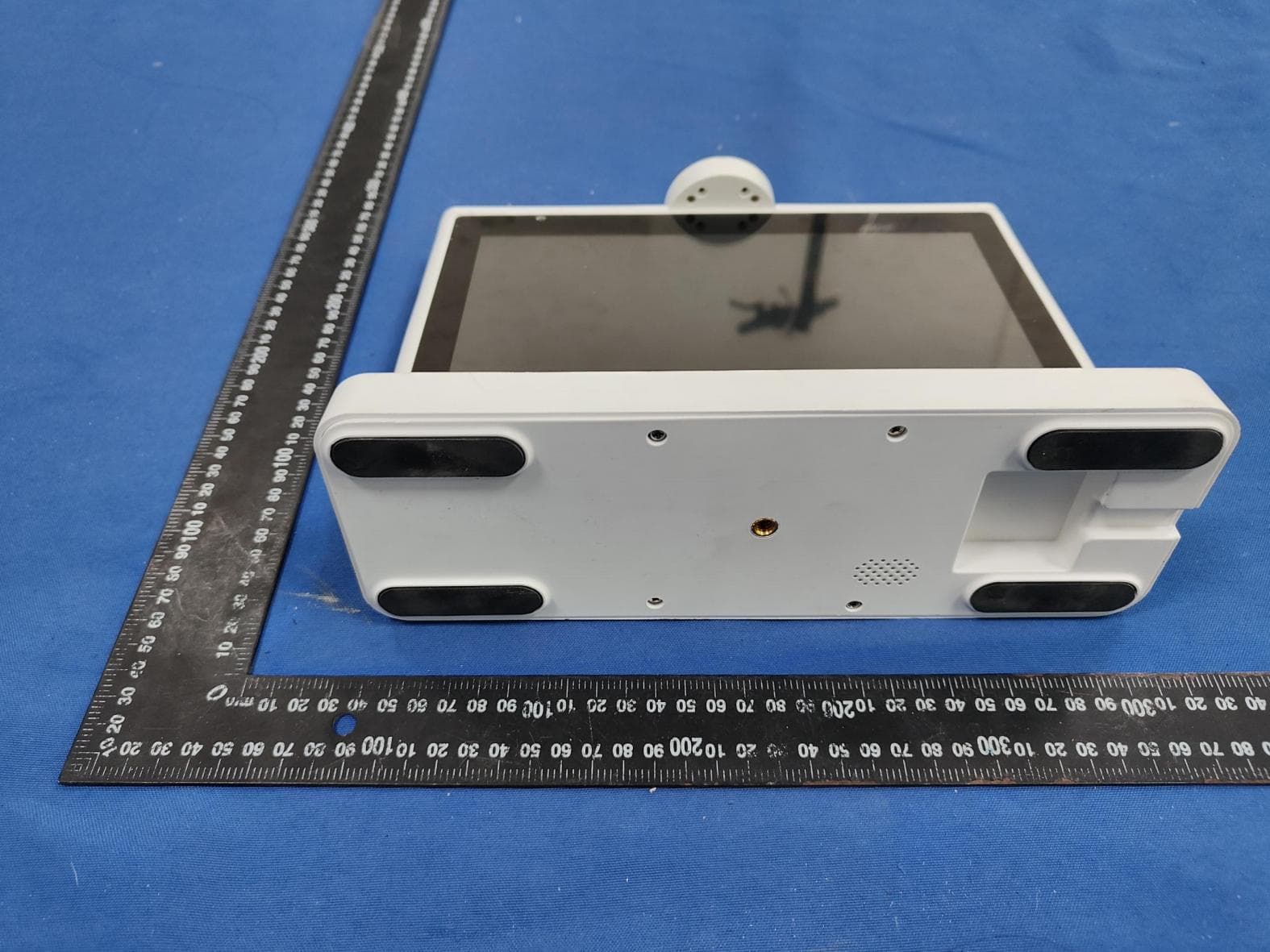
Click to zoom
Application Details
- Equipment Class
- NII - Unlicensed National Information Infrastructure TX
- Date of Grant
- Jan 23, 2026
- Application Purpose
- Original Equipment
- Equipment Note
- Intelligent desktop dual-screen translation machine
- Frequency Range
- 5745.00000000 - 5825.00000000
- Country
- China
Documents & Files
Document Text
Text extracted from the exhibit documents filed with the FCC. Open a document above to read the original.
Users Manual
Intelligent desktop dual-screen translation machine User Guide 273.58mm 96.50mm 213.48mm Equipment base Acrylic Frame 10-inch IPS Display Camera MIC Array (Microphone Array) Main face: Microphone switch - green Guest face: Microphone switch - yellow Device Exterior a)Please scan the QR code below, or go to the app store or App Treasure on your mobile phone and search for "Im Mata" to download and install it Power on the device. Upon hearing "Please connect to the network", wait for it to boot up. The powered-on device is shown below. 2.Install the "Im Mate APP" 1.Power on the device. User Manual b)When entering the Im Mate APP for the first time, you need to register an acc- ount. Click on [Log In] - [Log In/Register] - [Agree to the User Agreement and Privacy Policy]. 3. Register and log in to your account a)On home screen, tap [+] or [Add Device] b)Select Wi-Fi device as prompted c)Ensure device is in pairing mode, choose 2.4G Wi-Fi and enter password d)After successful connection, name your device to complete binding 4.Add Device a)After starting, both screens enter the translation page. The host screen defaults to the phone's system language, and the guest screen defaults to English. b)After the system prompt, both parties can begin the translation session. After successful binding, you can start translating on the device 5. Translation Option 1: Tap the "Real-time Translation" button on the home screen. Main face Guest face Guest face a)After a language is selected on the guest side, both screens enter the translation interface. The host defaults to the phone's system language, while the guest uses the selected language. b)Begin translation after the system prompt. Method Two: The customer selects the language in translation mode Main face c)On the guest screen, tap the ["Switch Language"] icon to change the translation language. After confirmation, a new session will begin: the previous guest screen con- tent will be cleared, while the host screen retains the old session with a prompt indica- ting a new session has started. Guest face Main face a)In the Admin Console, select Knowledge Base Management > click Create Knowledge Base. After creation, click Add Data on its card to add data under it. 一、Set up and associate the knowledge base 6.Robot b)After creating a knowledge base and its data, go to Device Management, select a device from the list, and click Link Knowledge Base to assign an existing knowledge base to the device. a)After setup, tap the [Robot] button on the host screen to enter the chat interface. The guest screen will also switch to robot mode. Select a language to start Q&A. Se- ssions on host and guest screens operate independently. 二、Robot Q&A Main face Guest face b)Tap the language icon to switch languages. The robot will then respond in the selected language. (Note: Available languages are limited to those supported by the knowledge base.) Q&A 1.How to identify the current mode on the host/guest screen. Main face:The host screen displays the current mode (e.g., "Robot Mode" or "Tr- anslation Mode") in the lower-right corner. Guest face:The guest screen displays "Translation Mode" or "Robot Mode" to ind- icate its current status. Model CPU Display Camera Microphone Speaker Network Power Reset Button Power Button Certifications Dimensions Operating conditions Dual-core ×2 T10 10" IPS HD touchscreen ×2 1080P HD ×2 (1920×1080) Dual-array MIC 2W output WI-FI 2.4&5.8G Dual-band Wi-Fi (2.4/5.8GHz) DC 12V/2A ×1 ×1 273.58mm*96.5mm*213.48mm -10°C~50°C,30%~80%RH Product Specifications 2.How to view translation history and robot chat records. On the Yueban APP home screen, tap "Translation History" or "Q&A History" to view the device's translation and robot chat records. 3.How to distinguish between host and guest screens. Main face: Microphone switch - green,Guest face: Microphone switch - yellow 4. "Link a knowledge base first" prompt when tapping robot. If no knowledge base is linked in the admin console, tapping the robot icon will prompt: "Please link a knowledge base first." The screen showing translation/robot icons is the host screen. The screen displaying the language list is the guest screen. After-Sales Service Warranty Services 1.Return Policy To protect your rights, please read the following carefully: Within 7 days of purchase, if the product fails due to manufacturing defects (confirmed by our technicians), you may request a full refund. 2.Replacement Policy Within 30 days of purchase, if the product fails due to manufacturing defects (confirmed by our technicians), you may request a free replacement or repair. 3.Repair Services 1-year free repair for covered malfunctions. After 1 year, repairs for manufacturing defects will incur fees (if repair or Support & Service Warranty Coverage Important Notes 4.Service Commitment We will repair or replace your product within 5 business days of receipt (excluding shipping time). Covers the product only (excludes packaging and accessories) The following situations are not covered by the free repair service. Please note Damage caused by improper use, installation, or maintenance Tampered or removed barcode Shipping costs are the sender's responsibility。 We are not responsible for dealer promises beyond this policy Required for service: Original invoice and Service Card (without proof, warranty starts from production date) 30-day extended warranty after repair (3 months for paid repairs on the same issue) Within 30 days of purchase: We will replace defective products with the same model or refurbished equivalent (defective parts retained by us) 1.Contact our support team to confirm the issue before sending your product. 2.Complete and keep the Service Card copy before shipping. replacement of parts is required after inspection, the user shall bear the relevant costs themselves). Return & Repair Process Beyond warranty/replacement period Product serial/model mismatch on Service Card Unauthorized modifications or repairs Acc…
Text truncated - open the document above for the full version.
External Photos
FCC:2BE7Z-T10 ExternalPhotosoftheEUT Fig.1 Fig.2 FCC:2BE7Z-T10 Fig.3 Fig.4 FCC:2BE7Z-T10 Fig.5 Fig.6 FCC:2BE7Z-T10 Fig.7
ID Label/Location Info
FCC:2BE7Z-T10 labelandlocation Fig.1 FCCID:2BE7Z-T10 Intelligentdesktopdual-screentranslationmachine Model:T10 Input:12V2A JiangxiSmallWalrusIntelligentTechnologyCo.,LTD
Internal Photos
FCCID:2BE7Z-T10 InternalPhotosoftheEUT Fig.1 Fig.2 WIFIAntenna FCCID:2BE7Z-T10 Fig.3 Fig.4 FCCID:2BE7Z-T10 Fig.5 Fig.6
RF Exposure Info
ShenzhenGUORENCertificationTechnologyServiceCo.,Ltd. 101#,BuildingK&BuildingT,TheSecondIndustrialZone,JiazitangCommunity, FenghuangStreet,GuangmingDistrict,Shenzhen,China RFExposureevaluation ReportReferenceNo........................: FCCID.................................................: GRCTR251002013-03 2BE7Z-T10 Compiledby (position+printedname+signature) .. : TestingEngineerJimmyWang Supervisedby (position+printedname+signature)..: ProjectEngineerKelleyZhang Approvedby (position+printedname+signature)..: ManagerSamWang Dateofissue.........................................:Jan.12,2026 TestingLaboratoryName................:ShenzhenGUORENCertificationTechnologyServiceCo.,Ltd. Address ................................................. : 101#,BuildingK&BuildingT,TheSecondIndustrialZone, JiazitangCommunity,FenghuangStreet,GuangmingDistrict, Shenzhen,China Applicant’sname ............................... :ShenzhenCylanTechnologyCo.,Ltd. Address.................................................: 211-212,ShenzhenFolkCultureIndustrialPark,No.1,Qunli2nd Road,XingdongCommunity,Xin'anSub-district,Bao'anDistrict, ShenzhenCity,GuangdongProvince,China Testspecification..............................: Standard................................................: 47CFR§2.1091 KDB447498D01v06 ShenzhenGUORENCertificationTechnologyServiceCo.,Ltd.Allrightsreserved. Thispublicationmaybereproducedinwholeorinpartfornon-commercialpurposesaslongasthe ShenzhenGUORENCertificationTechnologyServiceCo.,Ltd.isacknowledgedascopyrightownerand sourceofthematerial.ShenzhenGUORENCertificationTechnologyServiceCo.,Ltd.takesno responsibilityforandwillnotassumeliabilityfordamagesresultingfromthereader'sinterpretationofthe reproducedmaterialduetoitsplacementandcontext. Testitemdescription........................:Intelligentdesktopdual-screentranslationmachine TradeMark............................................: / Manufacturer.........................................:JiangxiSmallWalrusIntelligentTechnologyCo.,LTD Model/Typereference.........................: T10 ListedModels ...................................... : T10MAX,T10PRO,XHX-F80-N,XHX-F81-N HardwareVersion ............................... :V1.0 SoftwareVersion..................................:V1.0 Ratings...................................................:DC12VPoweredbyadapter Result.....................................................:PASS ReportNo.:GRCTR251002013-03Page2of10 TESTREPORT EquipmentunderTest:Intelligentdesktopdual-screentranslationmachine Model/Type:T10 ListedModels:T10MAX,T10PRO,XHX-F80-N,XHX-F81-N-5DX Applicant : ShenzhenCylanTechnologyCo.,Ltd. Address: 211-212,ShenzhenFolkCultureIndustrialPark,No.1,Qunli2nd Road,XingdongCommunity,Xin'anSub-district,Bao'anDistrict, ShenzhenCity,GuangdongProvince,China Manufacturer : JiangxiSmallWalrusIntelligentTechnologyCo.,LTD Address: No.1workshop,SmallandMicroEnterprisePioneerPark,Hengsi Road,QianpingIndustrialZone,Le'anCountyFuzhou,Jiangxi Province,China TestResult : PASS Thetestreportmerelycorrespondstothetestsample. Itisnotpermittedtocopyextractsofthesetestresultwithoutthewrittenpermissionofthetest laboratory. ReportNo.:GRCTR251002013-03Page3of10 Contents 1.SUMMARY...............................................................................................................................................4 1.1.GeneralRemarks.........................................................................................................................................4 1.2.ProductDescription....................................................................................................................................4 1.3.EquipmentUnderTest................................................................................................................................5 1.4.ShortdescriptionoftheEquipmentunderTest(EUT)............................................................................5 1.5.EUTconfiguration........................................................................................................................................5 1.6.Modifications................................................................................................................................................5 2.TESTENVIRONMENT.......................................................................................................................6 2.1.Addressofthetestlaboratory...................................................................................................................6 2.2.TestFacility..................................................................................................................................................6 2.3.Environmentalconditions...........................................................................................................................6 2.4.Statementofthemeasurementuncertainty.............................................................................................6 3.METHODOFMEASUREMENT.....................................................................................................8 3.1.ApplicableStandard....................................................................................................................................8 3.2.Limit...............................................................................................................................................................8 3.3.MPECalculationMethod.............................................................................................................................8 3.4.AntennaInformation....................................................................................................................................9 3.5.ManufacturingTolerance............................................................................................................................9 4.EVALUATIONRESULT.......................................................................................…
Text truncated - open the document above for the full version.
Test Report
Antennaspec FCCID:2BE7Z-T10 1.AntennaDescription: AntennatypeFPCAntenna Model Frequencyrang AN2450-FPC1132 e2400MHz~2500MHz,5150-5850MHz ManufacturerDonggUnTengxiangTechnology.Inc AddressNo.53,ShaoshuiRoad,Shatou,Chang'anTown, DongguanCity,GuangdongProvince 2.AntennaPhoto: Unit:mm 3.AntennaEfficiencyandGain: AN2450-FPC1132 4.RadiationPattern
Test Report
ShenzhenGUORENCertificationTechnologyServiceCo.,Ltd. 101#,BuildingK&BuildingT,TheSecondIndustrialZone,JiazitangCommunity, FenghuangStreet,GuangmingDistrict,Shenzhen,China FCCPART15SUBPARTCTESTREPORT FCCPART15SUBPARTE15.407 ReportReferenceNo........................: FCCID.................................................: GRCTR251002013-02 2BE7Z-T10 Compiledby (position+printedname+signature) .. : TestingEngineerJimmyWang Supervisedby (position+printedname+signature)..: ProjectEngineerKelleyZhang Approvedby (position+printedname+signature)..: ManagerSamWang Dateofissue.........................................:Jan.12,2026 TestingLaboratoryName................:ShenzhenGUORENCertificationTechnologyServiceCo.,Ltd. Address ................................................. : 101#,BuildingK&BuildingT,TheSecondIndustrialZone, JiazitangCommunity,FenghuangStreet,GuangmingDistrict, Shenzhen,China Applicant’sname...............................:ShenzhenCylanTechnologyCo.,Ltd. Address.................................................: 211-212,ShenzhenFolkCultureIndustrialPark,No.1,Qunli2nd Road,XingdongCommunity,Xin'anSub-district,Bao'anDistrict, ShenzhenCity,GuangdongProvince,China Testspecification .............................. : Standard................................................:FCCPart15SubpartE15.407 ShenzhenGUORENCertificationTechnologyServiceCo.,Ltd.Allrightsreserved. Thispublicationmaybereproducedinwholeorinpartfornon-commercialpurposesaslongasthe ShenzhenGUORENCertificationTechnologyServiceCo.,Ltd.isacknowledgedascopyrightownerand sourceofthematerial.ShenzhenGUORENCertificationTechnologyServiceCo.,Ltd.takesno responsibilityforandwillnotassumeliabilityfordamagesresultingfromthereader'sinterpretationofthe reproducedmaterialduetoitsplacementandcontext. Testitemdescription ........................ :Intelligentdesktopdual-screentranslationmachine TradeMark ............................................ : / Manufacturer.........................................:JiangxiSmallWalrusIntelligentTechnologyCo.,LTD Model/Typereference.........................: T10 ListedModels......................................: T10MAX,T10PRO,XHX-F80-N,XHX-F81-N FirmwareVersion ................................. :V1.0 HardwareVersion ................................ :V1.0 Modulation ........................................... :OFDM Frequency..............................................From5745MHz-5825MHz Ratings...................................................:DC12VPoweredbyadapter Result.....................................................:PASS ReportNo.:GRCTR251002013-02Page 2 of 43 TESTREPORT EquipmentunderTest:Intelligentdesktopdual-screentranslationmachine Model/Type:T10 ListedModels:T10MAX,T10PRO,XHX-F80-N,XHX-F81-N Applicant:ShenzhenCylanTechnologyCo.,Ltd. Address: 211-212,ShenzhenFolkCultureIndustrialPark,No.1,Qunli2nd Road,XingdongCommunity,Xin'anSub-district,Bao'anDistrict, ShenzhenCity,GuangdongProvince,China Manufacturer:JiangxiSmallWalrusIntelligentTechnologyCo.,LTD Address : No.1workshop,SmallandMicroEnterprisePioneerPark,Hengsi Road,QianpingIndustrialZone,Le'anCountyFuzhou,Jiangxi Province,China TestResult:PASS Thetestreportmerelycorrespondstothetestsample. Itisnotpermittedtocopyextractsofthesetestresultwithoutthewrittenpermissionofthetest laboratory. ReportNo.:GRCTR251002013-02Page 3 of 43 Contents 1TESTSTANDARDS..............................................................................................................................4 2SUMMARY.................................................................................................................................................5 2.1GeneralRemarks..........................................................................................................................................5 2.2ProductDescription.....................................................................................................................................5 2.3EquipmentUnderTest.................................................................................................................................5 2.4ShortdescriptionoftheEquipmentunderTest(EUT).............................................................................5 2.5EUTconfiguration.........................................................................................................................................6 2.6EUToperationmode.....................................................................................................................................6 2.7BlockDiagramofTestSetup.......................................................................................................................6 2.8RelatedSubmittal(s)/Grant(s)...................................................................................................................6 2.9Modifications.................................................................................................................................................7 3TESTENVIRONMENT........................................................................................................................7 3.1Addressofthetestlaboratory....................................................................................................................7 3.2TestFacility...................................................................................................................................................7 3.3Environmentalconditions............................................................................................................................7 3.4TestDescription............................................................................................................................................7 3.5Statementofthemeasurementuncertainty..............................................................................................8 3.6EquipmentsUsedduringtheTest......................................................................…
Text truncated - open the document above for the full version.
Test Setup Photos
FCC:2BE7Z-T10 TestSetupPhotosoftheEUT TestSetupPhoto(s)ofRadiatedEmissionsMeasurement Fig.1 Fig.2 FCC:2BE7Z-T10 TestSetupPhotoofLineConductedEmissionsMeasurement Fig.3 TestSetupPhoto(s)ofRFMeasurement Fig.4
Contact Information
Applicant
jack bu
[email protected]Fax: 18906679427
Technical Contact
Test Firm
Shenzhen GUOREN Certification Technology Service CSam Wang
Technical Specifications
| # | Rule Parts | Frequency Range | Power Output |
|---|---|---|---|
| 1 | 15E | 5.75 GHz - 5.83 GHz | 30.80 mW |
Other Applications from Shenzhen Cylan Technology Co., Ltd.

2BE7Z-SC398-WBC2
Jan 05, 2025Two-Way Video Camera
Equipment Class
DTS - Digital Transmission System
2BE7Z-C41P
Sep 01, 2024Video Call Camera
Equipment Class
DTS - Digital Transmission System