A3LGTN5100Portable Tablet PC with Cellular/ PCS GSM/ EDGE/ WCDMA, WLAN and Bluetooth
Samsung Electronics Co Ltd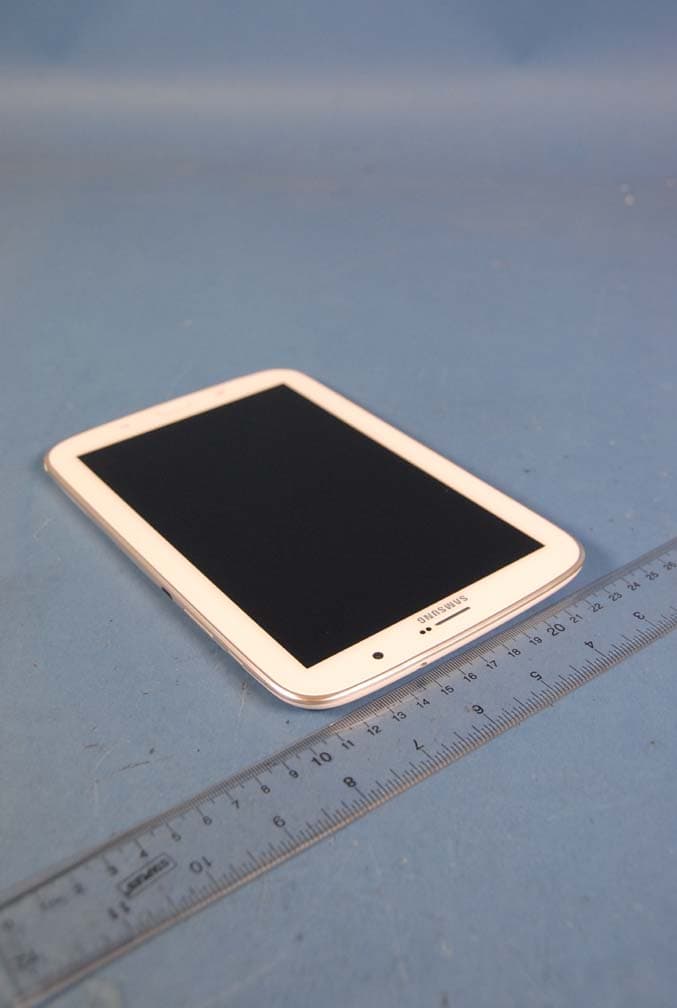
Click to zoom
Application Details
- Equipment Class
- JBC - Part 15 Class B Computing Device/Personal Computer
- Date of Grant
- Mar 11, 2013
- Application Purpose
- Original Equipment
- Date of Application
- Mar 07, 2013
- Equipment Note
- Portable Tablet PC with Cellular/ PCS GSM/ EDGE/ WCDMA, WLAN and Bluetooth
- Company
- Samsung Electronics Co Ltd
- Country
- United States
Documents & Files
Document Text
Text extracted from the exhibit documents filed with the FCC. Open a document above to read the original.
Users Manual
www.samsung.com User Manual GT-N5100 2 About this manual This device provides high quality mobile communication and entertainment using Samsung’s high standards and technological expertise. This user manual is specially designed to detail the device’s functions and features. • Please read this manual before using the device to ensure safe and proper use. • Descriptions are based on the device’s default settings. • Images and screenshots may differ in appearance from the actual product. • Content may differ from the final product, or from software provided by service providers or carriers, and is subject to change without prior notice. For the latest version of the manual, refer to the Samsung website, www.samsung.com. • Available features and additional services may vary by device, software, or service provider. • Applications and their functions may vary by country, region, or hardware specifications. Samsung is not liable for performance issues caused by applications from any provider other than Samsung. • Samsung is not liable for performance issues or incompatibilities caused by edited registry settings or modified operating system software. Attempting to customise the operating system may cause the device or applications to work improperly. • Software, sound sources, wallpapers, images, and other media provided with this device are licensed for limited use. Extracting and using these materials for commercial or other purposes is an infringement of copyright laws. Users are entirely responsible for illegal use of media. • You may incur additional charges for data services, such as messaging, uploading and downloading, auto-syncing, or using location services. To avoid additional charges, select an appropriate data tariff plan. For details, contact your service provider. About this manual 3 • Default applications that come with the device are subject to updates and may no longer be supported without prior notice. If you have questions about an application provided with the device, contact a Samsung Service Centre. For user-installed applications, contact service providers. • Modifying the device’s operating system or installing softwares from unofficial sources may result in device malfunctions and data corruption or loss. These actions are violations of your Samsung licence agreement and will void your warranty. Instructional icons Warning: situations that could cause injury to yourself or others Caution: situations that could cause damage to your device or other equipment Note: notes, usage tips, or additional information Copyright Copyright © 2013 Samsung Electronics This guide is protected under international copyright laws. No part of this guide may be reproduced, distributed, translated, or transmitted in any form or by any means, electronic or mechanical, including photocopying, recording, or storing in any information storage and retrieval system, without the prior written permission of Samsung Electronics. About this manual 4 Trademarks • SAMSUNG and the SAMSUNG logo are registered trademarks of Samsung Electronics. • The Android logo, Google ™ , Google Maps ™ , Google Mail ™ , YouTube ™ , Google Play ™ Store, and Google Talk ™ are trademarks of Google, Inc. • Bluetooth ® is a registered trademark of Bluetooth SIG, Inc. worldwide. • Wi-Fi ® , Wi-Fi Protected Setup ™ , Wi-Fi Direct ™ , Wi-Fi CERTIFIED ™ , and the Wi-Fi logo are registered trademarks of the Wi-Fi Alliance. • All other trademarks and copyrights are the property of their respective owners. DivX ® , DivX Certified ® , and associated logos are trademarks of Rovi Corporation or its subsidiaries and are used under licence. ABOUT DIVX VIDEO DivX ® is a digital video format created by DivX, LLC, a subsidiary of Rovi Corporation. This is an official DivX Certified ® device that plays DivX video. Visit www.divx.com for more information and software tools to convert your files into DivX videos. ABOUT DIVX VIDEO-ON-DEMAND This DivX Certified ® device must be registered in order to play purchased DivX Video-on- Demand (VOD) movies. To obtain your registration code, locate the DivX VOD section in your device setup menu. Go to vod.divx.com for more information on how to complete your registration. DivX Certified ® to play DivX ® video up to HD 720p, including premium content. 5 Table of Contents Getting started 8 Device layout 9 Butt ons 10 S Pen 10 Package contents 11 Installing the SIM or USIM car d 12 Charg ing the battery 15 Inserting a memory card 17 Turning the device on and off 17 Holding the device 18 Locking and unlocking the device 18 Adjusting the v olume 18 Switching to silent mode Basics 19 Indicator icons 20 Using the touch screen 23 Con trol motions 25 Page Buddy 25 Ac tivating Multi Window 26 Using the S P en 31 S Pen Air View 31 Quick Command 32 Notifica tions 33 Home screen 35 Using widgets 35 Using applications 36 Applications screen 37 Help 37 Entering text 39 Connecting to a Wi-Fi network 40 Setting up ac counts 41 Transferring files 42 Securing the device 44 Upgrading the device Communication 45 Phone 51 Contacts 54 M essaging 56 Email 57 Google Mail 59 T alk 60 Google+ 60 Messenger 61 Cha tON Web & network 62 Internet 63 Chrome 64 Bluetooth 65 AllShar e Cast Table of Contents 6 98 Polaris Office 101 Dropbox 101 A larm 102 World Clock 103 Calculator 103 S Voic e 104 Google 105 Voic e Search 105 My F iles 106 Downloads Travel & local 107 Maps 108 L ocal 109 Navigation Settings 110 About Settings 110 Wi-Fi 111 Bluetooth 111 Data usage 112 Mor e settings 113 Home screen mode 113 Blocking mode 114 Sound 114 Displa y 115 Storage 116 Po wer saving mode 116 Battery 116 Applica tion manager 116 Loca tion services 117 Lock scr een 66 AllShare Play 67 Group Play 67 Smart Remote Media 69 Music Player 70 Camera 77 Gallery 80 Paper Artist 81 PS Touch 82 Video Player 83 YouTube 85 Flipboard Application & media stores 86 Play Store 87 Samsung A pps 87 S Suggest 88 Game Hub 88 Music Hub 89 Play Books 89 Play Movies 90 R…
Text truncated - open the document above for the full version.
Users Manual
69 Media Music Player Use this application to listen to music. Tap Music Player on the Applications screen. • Some file formats are not supported depending on the device’s software version. • Some files may not play properly depending on the encoding used. Playing music Select a music category, and then select a song to play. Skip to the next song. Tap and hold to move forwards quickly. Pause and resume playback. Switch to Multi Window mode. Select a sound effect. Open the playlist. View file details. Change the repeat mode. Restart the currently-playing song or skip to the previous song. Tap and hold to move backwards quickly. Turn on shu e. Set the le as your favourite track. Mute the sound. Adjust the volume. Media 70 Setting a song as ringtone To use the currently-playing song as ringtone, tap → Set as → Call ringtone. Creating playlists Make an own selection of songs. Tap → New playlist. Enter a title and tap OK. Select songs to include, and then tap Done. To add the currently-playing song to a playlist, tap → Add to playlist. Playing music by mood Play music grouped by mood. The playlist is automatically created by the device. When a new song is added, tap Music square → . Tap Music square and select a cell of mood. Or select multiple cells by dragging your finger. Camera Use this application to take photos or videos. Use Gallery to view photos and videos taken with the device’s camera. (p. 77) Tap Camera on the Applications screen. The camera automatically shuts off when unused. Camera etiquette • Do not take photos or videos of other people without their permission. • Do not take photos or videos where legally prohibited. • Do not take photos or videos in places where you may violate other people’s privacy. Media 71 Taking photos Taking a photo Tap the image on the preview screen where the camera should focus. When the subject is in focus, the focus frame turns green. Tap to take the photo. Indicates which storage is in use. Switch between still and video mode. Open the image viewer to display photos. Switch between the front and rear camera. Change the shooting mode. Use this for delayed-time shots. Determine how much light the camera’s sensor receives. Change the camera settings. Select among various e ects that are available. Scene mode Predefined settings make point-and-shoot photos easier to take. Tap → Scene mode. • Portrait: Use this setting for a human subject. • Landscape: Use this setting to take photos of blue skies and landscapes with richer colours. • Sports: Use this setting for fast-moving subjects. • Party/Indoor: Use this setting for well-lit indoor scenes. • Beach/Snow: Use this setting for well-lit or sunny outdoor scenes. Media 72 • Sunset: Use this setting for richer colours and sharper contrasts. • Dawn: Use this setting for very subtle colours. • Autumn colour: Use this setting for red-shifted background scenery. • Te x t: Use this setting for books or posters. • Candlelight: Use this setting for images of bright light against a dark background. • Backlight: Use this setting for subjects with bright lights behind them. • Night: Use this setting for images taken in darker conditions. Shooting mode Several photo effects are available. Tap → Shooting mode. • Single shot: Take a single photo. • Panorama: Take a photo composed of many photos strung together. • Share shot: Send a photo directly to another device via Wi-Fi Direct. • Buddy photo share: Set the device to recognise a person’s face that you have tagged in a photo and send it to that person. Face recognition may fail depending on the face angle, face size, skin colour, facial expression, light conditions, or accessories the subject is wearing. • Smile shot: Take a photo when a subject smiles. • Cartoon: Take a photo that looks like a drawing. Panoramic photos A panoramic photo is a wide landscape image consisting of multiple shots. Tap → Shooting mode → Panorama. Tap and move the camera in any direction. When the blue frame aligns with the viewfinder, the camera automatically takes another shot in a panoramic sequence. To stop shooting, tap again. Media 73 Taking videos Taking a video Slide the still-video switch to the video icon, and then tap to take a video. To stop recording, tap . The zoom function may not be available when recording at the highest resolution. Recording mode Switch between the front and rear camera. Change recording mode. Use this for delayed-time shots. Select among various e ects that are available. Determine how much light the camera’s sensor receives. Change the camera settings. Indicates which storage is in use. Switch between still and video mode. Open the video player to play videos. Media 74 Tap to change recording mode. • Normal: Use this mode for normal quality. • Limit for MMS: Use this mode to lower quality for sending via messaging. • Limit for Email: Use this mode to lower quality for sending via email. Zooming in and out Use one of the following methods: • Use the Volume button to zoom in or out. • Spread two fingers apart on the screen to zoom in, and pinch to zoom out. • The zoom function may not be available when shooting at the highest resolution. • The zoom in/out effect is available when using the zoom feature while shooting video. Media 75 Configuring settings for Camera Tap to configure settings for Camera. Not all of the following options are available in both still camera and video camera modes. The available options vary depending on the mode used. • Edit shortcuts: Reorganise shortcuts to frequently-used options. • Use the volume key as: Set to use the Volume button to control the shutter or zoom function. • Self portrait: Take a photo of yourself. • Self recording: Take a video of yourself. • Shooting mode: Change the shooting mode. • Recording mode: Change recording mode. • Effects: Select among various photo effects that are available. • Scene mode: Change the scene mode. • Exposure value: Change the exposure value. This determines how much light the…
Text truncated - open the document above for the full version.
Cover Letter(s)
SAMSUNG ELECTRONICS AMERICA, INC. American QA Lab 19 Chapin Rd, Building D. Pine Brook, NJ 07058 Date: January 17, 2013 Federal Communications Commission Authorization and Evaluation Division 7435 Oakland Mills Road, Columbia, MD 21046 RE: Request of Confidentiality for FCC ID: A3LGTN5100 To Whom It May Concern: Pursuant to Sections 0.457 and 0.459 of the Commission’s Rules (CFR 47), and Section 552 (b) (4) of the Freedom of Information Act, SAMSUNG ELECTRONICS CO.,LTD. hereby requests confidentiality and treatment of certain information accompanying this application. The materials contain trade secrets and proprietary information not customarily released to the public. The public disclosure of these matters might be harmful to the Applicant and provide unjustified benefits to its competitors. We are also hereby request Short-Term Confidentiality for 180 days after the grant as outlined in Public Notice DA 04-1705. This provision will give SAMSUNG ELECTRONICS CO.,LTD. temporary confidentiality of commercially sensitive information prior to product release. The requested Permanent and Short-Term Confidential exhibits are listed as follows: PERMANENT AND SHORT-TERM CONFIDENTIAL LIST Exhibit Description 1 Block Diagram PERMANENT 2 Operational Description 3 External Photos 4 Internal Photos 5 Test-Setup Photos SHORT-TERM 6 Users Manual The Applicant understands that pursuant to Rule 0.457, disclosure of this application and all accompanying documentations, where applicable, will not be made public before the date of the Grant for this application. Sincerely, Peter Ra General Manager American QA Lab SAMSUNG Electronics America INC.
External Photos
Samsung Electronics Co. , Ltd. FCC ID: A3LGTN5100 Model: GT-N5100 External Photos EUT Type: Portable Tablet Page 1 of 4 © 2013 PCTEST Engineering Laboratory Inc. EXTERNAL PHOTOGRAPHS Samsung Electronics Co. , Ltd. FCC ID: A3LGTN5100 Model: GT-N5100 External Photos EUT Type: Portable Tablet Page 2 of 4 © 2013 PCTEST Engineering Laboratory Inc. Samsung Electronics Co. , Ltd. FCC ID: A3LGTN5100 Model: GT-N5100 External Photos EUT Type: Portable Tablet Page 3 of 4 © 2013 PCTEST Engineering Laboratory Inc. Samsung Electronics Co. , Ltd. FCC ID: A3LGTN5100 Model: GT-N5100 External Photos EUT Type: Portable Tablet Page 4 of 4 © 2013 PCTEST Engineering Laboratory Inc.
ID Label/Location Info
Label and Location Samsung Phone Model: GT-N5100 FCC ID: A3LGTN5100 Label: Location: Top Back of device Bottom FCC ID is printed on bottom of the device
Internal Photos
Samsung Electronics Co. , Ltd. FCC ID: A3LGTN5100 Model: GT-N5100 Internal Photos EUT Type: Portable Tablet Page 1 of 8 © 2013 PCTEST Engineering Laboratory Inc. INTERNAL PHOTOGRAPHS Samsung Electronics Co. , Ltd. FCC ID: A3LGTN5100 Model: GT-N5100 Internal Photos EUT Type: Portable Tablet Page 2 of 8 © 2013 PCTEST Engineering Laboratory Inc. Samsung Electronics Co. , Ltd. FCC ID: A3LGTN5100 Model: GT-N5100 Internal Photos EUT Type: Portable Tablet Page 3 of 8 © 2013 PCTEST Engineering Laboratory Inc. Samsung Electronics Co. , Ltd. FCC ID: A3LGTN5100 Model: GT-N5100 Internal Photos EUT Type: Portable Tablet Page 4 of 8 © 2013 PCTEST Engineering Laboratory Inc. Samsung Electronics Co. , Ltd. FCC ID: A3LGTN5100 Model: GT-N5100 Internal Photos EUT Type: Portable Tablet Page 5 of 8 © 2013 PCTEST Engineering Laboratory Inc. Samsung Electronics Co. , Ltd. FCC ID: A3LGTN5100 Model: GT-N5100 Internal Photos EUT Type: Portable Tablet Page 6 of 8 © 2013 PCTEST Engineering Laboratory Inc. Samsung Electronics Co. , Ltd. FCC ID: A3LGTN5100 Model: GT-N5100 Internal Photos EUT Type: Portable Tablet Page 7 of 8 © 2013 PCTEST Engineering Laboratory Inc. Samsung Electronics Co. , Ltd. FCC ID: A3LGTN5100 Model: GT-N5100 Internal Photos EUT Type: Portable Tablet Page 8 of 8 © 2013 PCTEST Engineering Laboratory Inc.
Test Report
-1/13- E E E M M M C C C T T T E E E S S S T T T R R R E E E P P P O O O R R R T T T Project No. LBE20131161 Issue No. 1 Applicant Name of organization Samsung Electronics Co., Ltd. Address (Maetan-dong) 129, Samsung-ro, Yeongtong-gu, Suwon-si, Gyeonggi-do, 443-742, Republic of Korea Date of application February 19, 2013 EUT Type of device Class B personal computers and peripherals All other devices Equipment authorization Declaration of Conformity Certification Verification FCC ID A3LGTN5100 Kind of product GSM WCDMA BT/Wi-Fi Portable Device Model No. GT-N5100 Variant Model No. Refer to clause 4.6 Manufacturer SAMSUNG ELECTRONICS CO., LTD. 94-1, Imsu-dong, Gumi-si, Gyengsangbuk-do, 730-722, Republic of Korea Applied Standards FCC Part 15, Subpart B, Class B / ANSI C63.4-2003 Test Period February 20, 2013 ~ February 21, 2013 Issue date February 25, 2013 Test result : Complied The equipment under test has found to be compliant with the applied standards. (Refer to the attached test result for more detail.) Tested by : Jong-Sup Jeong Reviewed by : Tae-Young Jang The test results in this report only apply to the tested sample. This report must not be reproduced, except in full, without written permission from CS & Environment center. (Maetan-dong) 129, Samsung-ro, Yeongtong-gu, Suwon-si, Gyeonggi-so, 443-742, Republic of Korea Tel: 82 31 279 1750, Fax: 82 31 279 1745 Project No. : LBE20131161 GSM WCDMA BT/Wi-Fi Portable Device : GT-N5100 -2/13- This report must not be reproduced, except in full, without written permission from CS & Environment center. Form No.: SRA-TRF-46/0 Table of contents 1. Report Information 1.1 Revision history ------------------------------------------------------------------------------------------------------------------ 3 2. Summary of test results 2.1 Emission ------------------------------------------------------------------------------------------------------------------------------- 3 3. General Information 3.1 Test facility ---------------------------------------------------------------------------------------------------------------------------- 3 4. Test Configuration 4.1 Test Peripherals ----------------------------------------------------------------------------------------------------------------- 4 4.2 EUT operating mode -------------------------------------------------------------------------------------------------------- 4 4.3 Details of Sampling ----------------------------------------------------------------------------------------------------------- 4 4.4 Used cable description ---------------------------------------------------------------------------------------------------- 5 4.5 Test arrangement -------------------------------------------------------------------------------------------------------------- 5 4.6 EUT Description ----------------------------------------------------------------------------------------------------------------- 6 4.7 Clock Frequencies ------------------------------------------------------------------------------------------------------------ 6 4.8 Test configuration and condition ---------------------------------------------------------------------------------- 6 4.9 Measurement uncertainty ---------------------------------------------------------------------------------------------- 7 5. Result of individual tests 5.1 Conducted disturbance --------------------------------------------------------------------------------------------------- 8 5.2 Radiated disturbance ------------------------------------------------------------------------------------------------------- 10 Project No. : LBE20131161 GSM WCDMA BT/Wi-Fi Portable Device : GT-N5100 -3/13- This report must not be reproduced, except in full, without written permission from CS & Environment center. Form No.: SRA-TRF-46/0 1. Report Information 1.1 Revision history No. Revised detailed information Issue 0 - LBE20126282 (SAMSUNG) Issue 1 - LBE20131161 (SAMSUNG), Changed the interface connector type and external design. 2. Summary of test results 1.1 Emission The EUT has been tested according to the following specifications: Applied Test type Applied standard Result Conducted Disturbance (Mains port) FCC Part 15 Subpart B / ANSI C63.4-2003 (Class B) Complied Radiated Disturbance Complied 3. General Information 3.1 Test facility The CS & Environment center is located on Samsung Electronics Co., Ltd. at (Maetan-dong) 129, Samsung-ro, Yeongtong-gu, Suwon-si, Gyeonggi-do, Republic of Korea. All testing are performed in Semi-anechoic chambers conforming to the site attenuation characteristics defined by ANSI C63.4, CISPR 22, 16-1 and 16-2. and Shielded rooms. The CS & Environment center is operated as testing laboratory in accordance with the requirements of ISO/IEC 17025:2005. Project No. : LBE20131161 GSM WCDMA BT/Wi-Fi Portable Device : GT-N5100 -4/13- This report must not be reproduced, except in full, without written permission from CS & Environment center. Form No.: SRA-TRF-46/0 4. Test Setup configuration 4.1 Test Peripherals The cables used for these peripherals are either permanently attached by the peripheral manufacturer or coupled with an assigned cable as defined below. The following is a listing of the EUT and peripherals utilized during the performance of EMC test: Mark Description Model No. Serial No. Manufacturer / Trademark FCC ID / DoC A GSM WCDMA BT/Wi-Fi Portable Device GT-N5100 R31CC0VKFXT SAMSUNG A3LGTN5100 B Headset EHS64AVFWE - SAMSUNG - C Data Cable ECB-DU4AWE - SAMSUNG - D HDMI Adapter EPL-3FHUBE RT1CC14AS E SAMSUNG - E microSD Card 16GB - SANDISK - F Travel Adapter ETA-U90EWE RT1CA31LS/B-E SAMSUNG - G Desk-Top Computer HP Compaq dx2200 Microtower CNG7060LW0 HP DoC H LCD TV Monitor CF19MS CF19H1LS700048Y SAMSUNG DoC I Mouse N3+Optical K034729902 HP DoC J Keyboard SDM8500P 8M000131 SAMSUNG DoC K Gigabit Switch 8 3CGSU08 AB/9XRQAC0024825 3COM DoC L Power Supply PW150 KA1203N03 AULT DoC This tablet device does not contain the minimum number of po…
Text truncated - open the document above for the full version.
Test Setup Photos
Project No. : LBE20131161 GSM WCDMA BT/Wi-Fi Portable Device : GT-N5100 -1/4- This report must not be reproduced, except in full, without written permission from CS & Environment center. Form No.: SRA-TRF-46/0 APPENDIX – Test Setup and EUT photography – Project No. : LBE20131161 GSM WCDMA BT/Wi-Fi Portable Device : GT-N5100 -2/4- This report must not be reproduced, except in full, without written permission from CS & Environment center. Form No.: SRA-TRF-46/0 1. Photograph of Test Setup [ Conducted Disturbance – Front ] [ Conducted Disturbance – Rear ] Project No. : LBE20131161 GSM WCDMA BT/Wi-Fi Portable Device : GT-N5100 -3/4- This report must not be reproduced, except in full, without written permission from CS & Environment center. Form No.: SRA-TRF-46/0 [ Radiated Disturbance for Below 1 GHz – Front ] [ Radiated Disturbance for Below 1 GHz – Rear ] Project No. : LBE20131161 GSM WCDMA BT/Wi-Fi Portable Device : GT-N5100 -4/4- This report must not be reproduced, except in full, without written permission from CS & Environment center. Form No.: SRA-TRF-46/0 [ Radiated Disturbance for Above 1 GHz – Front ] [ Radiated Disturbance for Above 1 GHz – Rear ]
Contact Information
Applicant
Jenni Chun(General Manager)
Technical Contact
PCTEST Engineering Lab., Inc.Randy Ortanez
[email protected]410-290-6652
6660-B Dobbin Road · Columbia, Maryland · United States
Test Firm
Samsung Electronics Co., Ltd. Global CS CenterPark No cheon
Technical Specifications
| # | Rule Parts | Frequency Range | Power Output |
|---|---|---|---|
| 1 | 15B | - | - |
Other Applications from Samsung Electronics Co Ltd
A3LSMS741B
Aug 05, 2026Portable Handset
Equipment Class
6VL - 15E 6 GHZ Very Low Power DeviceA3LSMX940
Jul 31, 2026BT,BLE Tablet DTS,UNII a,b,g,n,ac,ax,be and digitizer
Equipment Class
DTS - Digital Transmission SystemA3LSMS741U
Jul 30, 2026Portable Handset
Equipment Class
6CD - 15E 6 GHz Low Power Dual ClientA3LSMX840
Jul 27, 2026BT,BLE Tablet DTS,UNII a,b,g,n,ac,ax and Digitizer
Equipment Class
DSS - Part 15 Spread Spectrum TransmitterA3LSMX848U
Jul 27, 2026WCDMA, LTE, 5G NR Tablet BT,BLE, DTS,UNII a b g n ac ax and Digitizer
Equipment Class
JBP - Part 15 Class B Computing Device Peripheral