A3LML1670Laser Printer
Samsung Electronics Co Ltd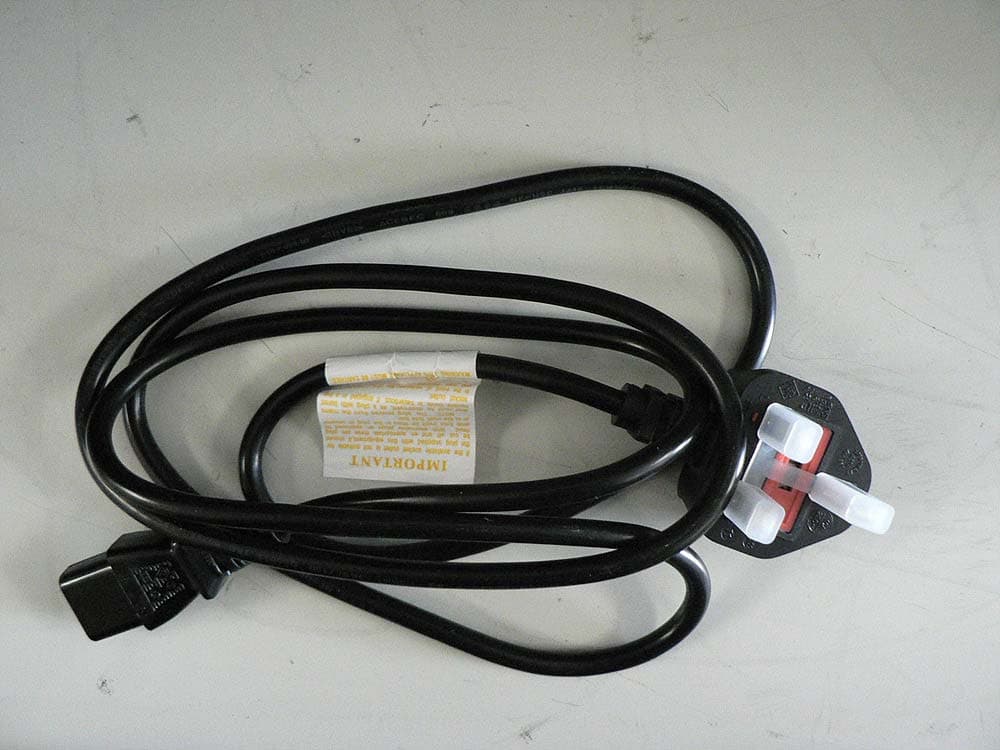
Click to zoom
Application Details
- Equipment Class
- JBP - Part 15 Class B Computing Device Peripheral
- Date of Grant
- Mar 13, 2011
- Application Purpose
- Original Equipment
- Date of Application
- Mar 13, 2011
- Equipment Note
- Laser Printer
- Company
- Samsung Electronics Co Ltd
- Country
- United States
Documents & Files
Document Text
Text extracted from the exhibit documents filed with the FCC. Open a document above to read the original.
Users Manual
Media and tray_ 27 4.media and tray This chapter provides information on how to load print media into your machine. This chapter includes: •Selecting print media •Changing the tray size •Loading paper in the tray •Printing on special media •Changing the tray size Selecting print media You can print on a variety of print media, such as plain paper, envelopes, labels, and transparencies. Always use print media that meets the guidelines for use with your machine and from the appropriate tray. Guidelines for selecting the print media Print media that does not meet the guidelines outlined in this user’s guide may cause the following problems: •Poor print quality •In creased paper jams •Pre mature wear on the machine. •Permanen t fuser damage, not covered under warranty. Properties, such as weight, composition , grain, and moisture content, are important factors that affect the machine’s performance and the output quality. When you choose print materials, consider the following: •The type, size and weight of the print media for your machine are described in print media specifications. (See "Print media specifications" on page 61.) •Desired outcome: The print media you choose should be appropriate for your project. •Bri ghtness: Some print media are whiter than others and produce sharper, more vibrant images. •Surface smoothness: The smoothness of the print media affects how crisp the printing looks on the paper. •Some print media may meet all of the guidelines in this section and still not produce satisfactory results. This may be the result of the sheets characteristics, improper handling, unacceptable temperature and humidity levels, or other variables over which cannot be controlled. •Befo re purchasing large quantities of print media, ensure that it meets the specifications in this user’s guide and that it meets your output requirements. •Using print media that does not meet these specifications may cause problems, requiring repairs. Such repairs are not covered by the warranty or service agreements. The amount of paper put into the tray may differ according to me dia type used. (See "Print media specifications" on page 61.) •Using inflammable print media can cause a fire. •Use desig nated print media (See "Print media specifications" on page 61). The use of inflammable media or foreign materials left in the printer may lead to overheating of the unit and, in rare cases may cause a fire. Media sizes supported in each mode ModeSizeTypeSource Simplex printing For details about paper size, see "Print media specifications" on page 61. For details about pa per type, see "Print media specifications" on page 61. Tray Duplex printing (Manual) a a. 75 to 90 g/m 2 (20~24 lbs bond) only (See "Print media specifications" on page 61). Letter, A4, Lega l, US Folio, Oficio Plain, Color, Preprinted, Recycled, Bond, Archive Manual feeding in the tray Changing the tray size The tray is preset to Letter or A4 size, depending on your country. To change the size, you need to adjust the paper guides. 1Paper width guide 2Tray 3Paper length guide Media and tray_ 28 1.Open front cover and pinch the paper length guide and pull it out to extend the tray. Because the machine is very light, it can move when you open and close the tray or install and remove the toner cartridge. Be careful not to move the machine when performing these tasks. 2.Fle x or fan the edge of the paper stack to separate the pages before loading the paper. Insert the paper into the tray. 3.Load paper with the print side facing up. Make sure that all four corners are flat in the tray. Do not overload the tray with paper. Otherwise, it may cause paper jams. 4.Pinch the paper length guide to adjust the guide so that it is flush up against the rear edge of the paper; then pinch the paper width guides so they are flush against the sides of the paper. •Do not push the paper width guide too far causing the media to warp. •Do no t use a paper with more than 6 mm (0.24 inch.) curl. •If you do no t adjust the paper width guide, it may cause paper jams. Loading paper in the tray Tray 1.Open the front cover, pinch the paper length guide and pull it out to extend the tray. Then, adjust the tray size to the media size you are loading. (See "Changing the tray size" on page 27.) 2.F lex or fan the edge of the paper stack to separate the pages before loading papers. 3.Place the paper with the side you want to print facing up. When you print a document, set the paper type and size for the tray. For information about setting the paper type and size on the control p anel (See "Setting the default tray and paper" on page 26). •If you experience problems with paper feeding, check whether the paper meets the media specifications. Then, try placing one sheet at a time in tray (See "Print media specifications" on page 61, "Printing on special media" on page 29). •The settings made from the machine driver override the settings on the control panel. Manual feeding in the tray The tray can hold special sizes and types of print material, such as postcards, note cards, and envelopes. It is useful for single page printing on letterhead or colored paper. Tips on using the manual feeding method •If you select Paper > Source > Manual Feeder from your printer driver, you need to press each time you print a page. Load only one type, size and weight of p rint media at a time in the tray. •To pre vent paper jams, do not add media while printing. •Pri nt media should be loaded face up with the top edge going into the tray first and be placed in the center of the tray. Media and tray_ 29 •Always load the use recommended print media to avoid paper jams and print quality problems. (See "Print media specifications" on page 61.) •Fl atten any curl on postcards, envelopes, and labels before loading them into the tray. 1.Loa d the paper in the tray. •When printing on special media, you must follow the loading guideline. (See "Printing on special media" on page 29.) •W hen paper does not fee…
Text truncated - open the document above for the full version.
Block Diagram
V0.0 Temujin Core : 300MHz ARM926EJS TOP Cover Micro Switch 24VS DEVELOPER Unit OPC MHV DEV Supply THV T D S DRUM M MT STEP SPI Flash (embbed) (4Mbit) MAIN Controller EMPTY Sensor USB Device PickUp Clutch SOL CLK Clock Generator 12MHz Stepper Motor Controller IC CANCEL Tact Switch Ready Error FEED Sensor RESET IC SDRAM(embbed) (8MByte) Soft POWER Tact Switch JAM +3.3V /+24V AC INLET 24V 4P FUSER Unit Thermostat Thermistor FUSERCONTROL THERMISTOR 2P 2P 16P LSU CONTROL Main Motor 4P 2P 5P
External Photos
ML-1670_Printer External ML-1670_Printer External ML-1670_Printer_TOP Side ML-1670_Printer_Front Side ML-1670_Printer_Rear Side ML-1670_Printer_Left Side ML-1670_Printer_Right Side ML-1670_Model Name Power Cord connected to ML-1670 Printer Power Cord of ML-1670 Printer
ID Label/Location Info
Project No. : LBE20110869 Mono Laser Printer : ML-1670 -26/26- This report must not be reproduced, except in full, without written permission from CS & Environment center. Label location Label
Internal Photos
ML-1670_Printer Internal ML-1670_Internal_Top Side ML-1670_Internal_Front Side ML-1670_Internal_Rear Side ML-1670_Internal_Left Side ML-1670_Internal_Right Side ML-1670_Main PBA_Top side ML-1670_Main PBA_Bottom side SUNGHO, Bluebird_V2 ( ML-1670_SMPS PBA_Top Side) SUNGHO, Bluebird_V2 ( ML-1670_SMPS PBA_Bottom Side) SCTH, Bluebird_V2 ( ML-1670_SMPS PBA_Top Side) SCTH, Bluebird_V2 ( ML-1670_SMPS PBA_Bottom Side) 신강위 ( SHANDONG COWI), Bluebird_V2 ( ML-1670_SMPS PBA_TOP Side) 신강위 ( SHANDONG COWI), Bluebird_V2 ( ML-1670_SMPS PBA_TOP Side)
Operational Description
Project No. : LBE20110869 Mono Laser Printer : ML-1670 -6/26- This report must not be reproduced, except in full, without written permission from CS & Environment center. 3.5 EUT Description The following features describe EUT represented by this report: Item Specification and Description Processor TEMUJIN(300Mhz) Standard System memory Embedded SDRAM core of ESMTwith 8MB size Resolution True 1200x1200dpi Copy Quality mode N.A Paper Handling Paper Tray(BIN Type) 150 Sheets Power Rating 110~127 VAC, 8A, 50/60 Hz Power Consumption Power save mode : 0.45 Watts Printing mode: MAX. 270 Watts Printer Language GDI PC Interfaces USB2.0 OS compatibility Windows 2000, XP, Vista, Windows7, 2003 Server, 2008 Sever, Various Linux OS, and Mac OS X 10.3~10.6 Modes of Operation USB Printing, Intended Class for Emissions Class B
Test Report
-1/26- E E E M M M C C C T T T E E E S S S T T T R R R E E E P P P O O O R R R T T T Project No. LBE20110869 Issue No. 1 Applicant Name of organization Samsung Electronics Co., Ltd. Address 416 Maetan 3-Dong, Yeongtong-Gu, Suwon-Si, Gyeonggi-Do 443-742 Korea Date of application 17 Dec, 2010 EUT Type of device Class B digital devices, peripherals Equipment authorization Declaration of Conformity Certification Verification FCC ID A3LML1670 Kind of product Mono Laser Printer Model No. ML-1670 Variant Model No. ML- 1671, ML-1675, ML-1677 Manufacturer 1) Samsung Electronics Co., Ltd. 259, Gongdan-Dong, Gumi-City, Gyeongsangbuk-Do, Korea 730-030 2) Samsung Electronics (Shandong) Digital Printing Co., Ltd. 264209, Samsung Road, Weihai Hi-Tech. IDZ, Shandong Province, P.R.China 3) Weihai Shin Heung Digital Electronics Co., Ltd. 98, Samsung Road, Weihai Hi-Tech. IDZ, Shandong Province, P.R.China 4) Intops : Intops (Weihai) Electronics Co., Ltd. Keji Road-268-1, Weihai Hi-Tech,Industries Development Zone , Shandong Province , CHINA Applied Standards FCC Part 15, Subpart B / ANSI C63.4-2009 Test Period 22 Dec, 2010 ~ 28 Dec, 2010 Issue date 12 Feb, 2011 Test result : Complied The equipment under test has found to be compliant with the applied standards. (Refer to the attached test result for more detail.) Tested by : Ho Jin Choi Reviewed by : No Cheon Park The test results in this report only apply to the tested sample. This report must not be reproduced, except in full, without written permission from CS & Environment Centre. 416 Maetan 3-Dong, Yeongtong-Gu, Suwon-Si, Gyeonggi-Do, 443-742 Korea Tel: 82 31 277 7752, Fax: 82 31 277 7753 Project No. : LBE20110869 Mono Laser Printer : ML-1670 -2/26- This report must not be reproduced, except in full, without written permission from CS & Environment center. Table of contents 1. Summary of test results 1.1 Emission 2. General Information 2.1 Test facility 3. Test configuration 3.1 Test Peripherals 3.2 EUT operating mode 3.3 Details of Sampling 3.4 Used cable description 3.5 EUT Description 3.6 Clock Frequencies 3.7 Test configuration and condition 3.8 Measurement uncertainty 4. Result of individual tests 4.1 Conducted disturbance 4.2 Radiated disturbance Appendix – EUT photography Project No. : LBE20110869 Mono Laser Printer : ML-1670 -3/26- This report must not be reproduced, except in full, without written permission from CS & Environment center. 1. Summary of test results 1.1 Emission The EUT has been tested according to the following specifications: Applied Test type Applied standard Result Remarks Conducted Disturbance (Mains Port) FCC Part 15 Subpart B Complied Meets Class B Limit Radiated Disturbance Complied Meets Class B Limit Project No. : LBE20110869 Mono Laser Printer : ML-1670 -4/26- This report must not be reproduced, except in full, without written permission from CS & Environment center. 2. General Information 2.1 Test facility The CS & Environment center is located on Samsung Electronics Co., Ltd. at 416 Maetan 3-Dong, Yeongtong-Gu, Suwon-Si, Gyeonggi-Do, South Korea. All testing are performed in Semi-anechoic chambers conforming to the site attenuation Characteristics defined by ANSI C63.4, CISPR 22, 16-1 and 16-2. and Shielded rooms. The CS & Environment center is operated as testing laboratory in accordance with the requirements of ISO/IEC 17025:2005. 3. Test Setup configuration 3.1 Test Peripherals The cables used for these peripherals are either permanently attached by the peripheral manufacturer or coupled with an assigned cable as defined below. The following is a listing of the EUT and peripherals utilized during the performance of EMC test: Description Model No. Serial No. Manufacturer Fcc ID / DoC Mono Laser Printer ML-1670 - Samsung A3L ML1670 Notebook PC PP18L 27182225373 Dell DoC AC Adapter HP-OQ065B83 CN-0N2765-47890-44I-0240 Dell DoC USB Mouse MOARUO 093308552 Primax Electronics DoC Headphone - - Micro soft DoC Project No. : LBE20110869 Mono Laser Printer : ML-1670 -5/26- This report must not be reproduced, except in full, without written permission from CS & Environment center. 3.2 EUT operating mode To achieve compliance applied standard specification, the following mode(s) were made during compliance testing: Operating Mode 1 Standby Operating Mode 2 USB Print 3.3 Details of Sampling Customer selected, single unit. 3.4 Used cable description The EUT is configured, installed, arranged and operated in a manner consistent with typical applications. Interface cables/loads/devices are connected to at least one of each type of interface port of the EUT, and where practical, each cable shall be terminated in a device typical of actual usage. The type(s) of interconnecting cables to be used and the interface port (of the EUT) to which these were connected; Connected cable Length [m] Shielded [Y/N] Note Power 1.8 No For EUT USB 1.8 Yes From Notebook PC to Mouse Headphone 1.8 No From Notebook PC to Headphone Project No. : LBE20110869 Mono Laser Printer : ML-1670 -6/26- This report must not be reproduced, except in full, without written permission from CS & Environment center. 3.5 EUT Description The following features describe EUT represented by this report: Item Specification and Description Processor TEMUJIN(300Mhz) Standard System memory Embedded SDRAM core of ESMTwith 8MB size Resolution True 1200x1200dpi Copy Quality mode N.A Paper Handling Paper Tray(BIN Type) 150 Sheets Power Rating 110~127 VAC, 8A, 50/60 Hz Power Consumption Power save mode : 0.45 Watts Printing mode: MAX. 270 Watts Printer Language GDI PC Interfaces USB2.0 OS compatibility Windows 2000, XP, Vista, Windows7, 2003 Server, 2008 Sever, Various Linux OS, and Mac OS X 10.3~10.6 Modes of Operation USB Printing, Intended Class for Emissions Class B Project No. : LBE20110869 Mono Laser Printer : ML-1670 -7/26- This report must not be reproduced, except in full, without written permission from CS & Environment center. 3.6 Clock Frequencies 3.7 Test configuration …
Text truncated - open the document above for the full version.
Test Setup Photos
Project No. : LBE20110869 Mono Laser Printer : ML-1670 -11/26- This report must not be reproduced, except in full, without written permission from CS & Environment center. 4.1.3 Photograph of Test Setup Front Rear Project No. : LBE20110869 Mono Laser Printer : ML-1670 -19/26- This report must not be reproduced, except in full, without written permission from CS & Environment center. 4.2.3 Photograph of Test Setup Front Rear Project No. : LBE20110869 Mono Laser Printer : ML-1670 -20/26- This report must not be reproduced, except in full, without written permission from CS & Environment center. Front (Above 1GHz)
Contact Information
Applicant
Jenni Chun(General Manager)
Technical Contact
PCTEST Engineering Laboratory, Inc.Randy Ortanez
[email protected]410-290-6652
6660-B Dobbin Road · Columbia, Maryland · United States
Test Firm
Samsung Electronics Co., Ltd. Global CS CenterPark No cheon
Technical Specifications
| # | Rule Parts | Frequency Range | Power Output |
|---|---|---|---|
| 1 | 15B | - | - |
Other Applications from Samsung Electronics Co Ltd
A3LSMU600
Sep 15, 2026Bluetooth Headset
Equipment Class
DTS - Digital Transmission SystemA3LSMA185G
Sep 08, 2026Portable Handset
Equipment Class
CXX - Communications Rcvr for use w/ licensed Tx and CBsA3LSMS741B
Aug 05, 2026Portable Handset
Equipment Class
6VL - 15E 6 GHZ Very Low Power DeviceA3LSMX940
Jul 31, 2026BT,BLE Tablet DTS,UNII a,b,g,n,ac,ax,be and digitizer
Equipment Class
DTS - Digital Transmission SystemA3LSMS741U
Jul 30, 2026Portable Handset
Equipment Class
6CD - 15E 6 GHz Low Power Dual Client