A3LS200Web Pad
Samsung Electronics Co Ltd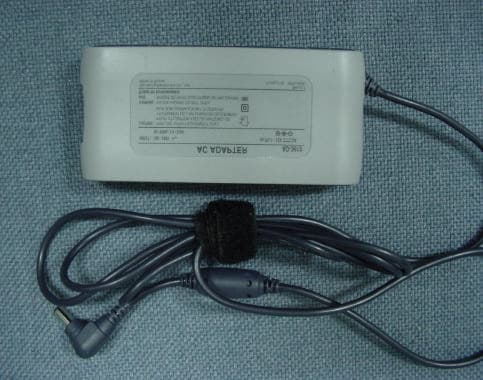
Click to zoom
Application Details
- Equipment Class
- JBC - Part 15 Class B Computing Device/Personal Computer
- Date of Grant
- Jan 22, 2001
- Application Purpose
- Original Equipment
- Date of Application
- Jan 22, 2001
- Equipment Note
- Web Pad
- Company
- Samsung Electronics Co Ltd
- Country
- United States
Documents & Files
Document Text
Text extracted from the exhibit documents filed with the FCC. Open a document above to read the original.
Users Manual
1 Part I. System User’s Guide Ver 4 - iZZi+CE.fm Page 1 Monday, November 13, 2000 11:58 AM 2 User’s Guide Using Your Documentation Congratulations on your purchase of the IZZI web with Microsoft Windows CE operating system. Documentation Conventions Information Icons Three icons and their associated messages appear in this manual: A note informs you of special circumstances. A caution warns you of possibledamage to equipment or data. A warning indicates the possibility of personal injury. Keyboard Conventions Keys that you need to press to perform certain functions are shown in the manual enclosed in angle brackets. For example, <Ctrl> indicates the control key (Ctrl on the keyboard). If you need to press two keys at the same time, the key names are shown joined by a plus sign. For example, <Alt+Pg Up> means that you should press the Alt key and hold it and then press the Pg Up key. Ver 4 - iZZi+CE.fm Page 2 Monday, November 13, 2000 11:58 AM Introducing theIZZI web3 Introducing the IZZI web The IZZI web is a lightweight handheld appliance that includes features to meet your computing needs at home, business or on the road. Item check list: –IZZIweb – AC adapter (IZZI web & AccessPoint) – Power cord – Docking Station – Access Point – User’s Guide Figures 1 and 2 show you the features of the IZZI web. Figure 1.Front ViewofIZZIweb Power button LCD Display Stylus Indicator lights and internal microphone Scroll button Speaker Infrared Port (Wireless Keyboard) Docking Window on Bottom Ver 4 - iZZi+CE.fm Page 3 Monday, November 13, 2000 11:58 AM 4User’s Guide Figure 2. Bottom View of IZZI web Data Loss may be caused by: Disassembling the battery compartment. Touching any key or button while you are pushing the reset button. Figure3. Back ViewofIZZIweb Docking Window Smart Media card slot Battery compartment Microphone jack Headphone jack Stand latch Reset button Smart Media Card Back Front AC Adapter jack Infrared port (SIR) Ver 4 - iZZi+CE.fm Page 4 Monday, November 13, 2000 11:58 AM SettingUptheIZZI web5 Setting Up the IZZI web This section gives you detailed information on using the IZZI web for the first time. IZZI web Setup The methods used for turning on the IZZI web for the first time are explained here. 1.Placing the IZZI web on its stand. a. Unlock the Stand Latch. b. Release the Stand leg. c. Support the system with the prop. Figure4. Standing theIZZI web 2.Installing the power cord. a. Connect the power cord to the AC adapter. b. Plug in the IZZI web into the AC adapter. c. Connect the power cord to the electrical outlet. a b c Stand Latch Stand leg Prop Ver 4 - iZZi+CE.fm Page 5 Monday, November 13, 2000 11:58 AM 6User’s Guide 3.When the power cord is installed properly, the left indicator light turns amber. This means that the battery is charging. Leave the IZZI web plugged in forseveral hours until the indicator light turns green, meaning that thebattery is fully charged. The battery will fully recharge in about three hours with the system is turned off and three and half hours with the system on. All batteries eventually wear out and lose the ability to hold a charge. If you notice your normal operating time on the battery significantly decrease you should replace the battery. 4.Installing the Access Point’s power is completed using the instructions provided in the Access Point manual provided with your IZZI web. For Installation of Access Point, Please see the enclosed manual. 5.Press the IZZI web power button. In approximately 1-3 seconds Microsoft Windows CE starts. 6.Next the [Ethernet Driver Settings] window appears. There are two options described below. a.YoumayallowtheIZZIwebtofinditsownIPaddressby selecting the “Obtain an IP address via DHCP” radio button. b. Or you may assign your own network IP address by clicking on the “Specify an IP address” radio button. To get the correct IP address for your area, askyour network administrator. Now your IZZI web setup is complete. If you want to make changes, click Start > Setting > Control Panel and use the Network icon . Ver 4 - iZZi+CE.fm Page 6 Monday, November 13, 2000 11:58 AM SettingUptheIZZI web7 Adjusting the LCD Display You may wish to adjust the LCD display when you start usingyour system. To adjust the LCD you may do one of the following: • Using the Keyboard. – Press <Fn + F3> to decrease the brightness. – Press <Fn + F4> to increase the brightness. • TapStart>Settings>Control Panel – Double tapIZZI web. –Tapthe brightness tabto see the brightness slider bar. Slide the bar to suit your requirements. Turning Off the System To turn off the system you may do one of the following: • Press the power button. • Complete the following steps, a.TapStarton the task bar b.TapSuspend . • Press <Fn + F8> rest. Ver 4 - iZZi+CE.fm Page 7 Monday, November 13, 2000 11:58 AM 8User’s Guide Tips for Using the IZZI web The following information helps you avoid potential problems as you use the IZZI web: Do not try to disassemble the IZZI web.Opening the system chassis voids your warranty.Only an authorized manufacturer’s service center can replace or add any parts inside the chassis. • Follow all the instructions and cautions in the user documentation. • The LCD has a polarized surface and can be damaged easily. Use only the Stylus for tapping the screen. • Because this system is small and has restricted air flow around its components, it is more likely to overheat than a desktop computer. Keep the system in an area that has good air circulation. Do not coverequipment with clothing or other items that may restrict air circulation. • Avoid using or storing the IZZI web in extremely hot or cold areas, such as a car on a hot day. Keep the IZZI web away from heaters and out of direct sunlight. Exposure to excessive heat or cold may damage your IZZI webcomponents. If you have left your IZZI web in a hot or cold place, let it cool down or warm up slowly to room temperature before using it. • Do not remove the battery compartment door, or try t…
Text truncated - open the document above for the full version.
Block Diagram
S200 Block Diagram CX5530A CODEC LM4546 GX1 DS90CF363MTD PCMCIA RB5C478II SMC-1205DL H8 MICOM RTC BQ3285 SUPERIO PC97338 CLOCK CHIP MK1491 X-TAL, 14.318MHZ CLK_PCI5530 33MHZ TS87C52X2 CLK_48M CLK_14M5530 CLK_PCICPU, 33MHZSDRAMCLK, 70MHz CLK_PCLK 40MHz CLK_DCLK 80MHz X-TAL, 16MHZ X-TAL 24.576MHZ X-TAL 11.0592MHZ X_TAL 32.768KHZ CLK_SUPIO 14.318MHZ CLK_AUD 24.576MHZ CLK_CB 33MHZ H8_PWRDWNCLK CLK_COGFP 40MHZ SDRAM K4S641632D-TL1L
External Photos
Front view of EUT Rear view of EUT Front view - Docking station Rear view - Docking station Bottom view - Docking station External adaptor Front view - Wireless keyboard Bottom view - Wireless keyboard
ID Label/Location Info
Label configulation Location of Label
Internal Photos
LCD panel Inside View of Docking station Front view - Main board of Docking station Rear view - Main board of Docking station Front view of Internal adaptor PCB Rear view of internal adaptor PCB Front view of external adaptor PCB Rear view of external adaptor PCB Front view of wireless LAN
Internal Photos
EUT - Inside 1 EUT - Inside 2 EUT - Inside 3 Front view of Main PCB Rear view of Main PCB
Test Report
Page 1 of 17 JOB NO. : SEMC914B Product :Web PAD Model No. :S200 FCC ID : A3LS200 1. This test reports shall not be reproduced except in full, without the written approval of SEC EMC Testing laboratory. 2. This test reports does not constitute an endorsement by NIST/NVLAP or U.S Government. 3. This test report is to certify that the tested device properly complies with the requirements of FCC Rules and Regulations Part 15 Subpart B Unintentional Radiators. All tests necessary to show compliance to the requirements were and these results met the specifications requirement. Date of test :December 5, 2000 Issued Date :December 8, 2000 Tested by: Chun Kyu, PARK / Test Engineer Reviewed by: Seung Kyu, CHA / Manager of EMC Lab Authorised by: Taek Jeong, Shin / Chief of EMC Lab This laboratory is registered by the NIST/NVLAP, U.S.A. The test reported herein have been performed in accordance with its terms of registration. EMI TEST REPORT According to FCC Part 15 Subpart B/Class B NVLAP Code: Page 2 of 17 JOB NO. : SEMC914B Table of Contents 1. General Information 1.1 Product Description 1.2 Tested System Details 1.3 Configuration of EUT and peripherals 1.4 Used Cable Description 1.5 System Block Diagram of Test Configuration 1.6 System Block Diagram of Test Configuration 2. System Test Configuration 2.1 Configuration of Radiated and Conducted Interference Measurement 2.2 Operation Enviroment 2.3 Test Procedure 3. Measurement Uncertainty 4. Conducted Emission Test Data 5. Radiated Emission Test Data 6. Label Configuration and Location 7. Test Equipment Used Distribution This test report has been made available as follows: CS Management Center, EMC Laboratory1 original Computer Division1 copy This report shall not be reproduced except in full, without the written approval of SEC EMC Testing laboratory. Page 3 of 17 JOB NO. : SEMC914B 1. General Information Applicant :Samsung Electronics Co., Ltd. CS Management Center EMC Test Laboratory Tel.: +81-(0)31-200-2135 Fax.: +81-(0)31-200-2189 Full Address :416 Maetan 3 Dong, Paldal-Ku, Suwon City, Kyungki Do, Korea, 442-742 Kind of Product :Web PAD CONTACT PERSON :Chun Kyu, PARK TEL. +82-31-200-2135 REGULATION(S) :FCC Part 15 Subpart B, Class B Model Name :S200(Brand Name: SAMSUNG) IZZI Web(Brand Name: SAMSUNG) Customer Ref. :Computer Div. (Contact Person : Byung Hwan, Kim Tel.: +82-(0)31-200-7241) TEST SITE :Open Field Test Site & Shield Room TEST SITE ADDRESS :781-14, Chung-Ri, Dongtan-Myun, Hwasung-Kun, Kyungki-Do, Korea 416, Maetan-3 Dong, Paldal-Gu Suwon City, Kyungki-Do, Korea, 442-742 This report shall not be reproduced except in full, without the written approval of SEC EMC Testing laboratory. Page 4 of 17 JOB NO. : SEMC914B 1.1 Product Description 1) Operating Frequency : 200MHz(CPU Speed), 80MHz(DCLK), 40MHz(PCLK) 33.3MHz(PCI Clock), 14.318MHz(SUPERIO_CLK), 14.318MHz(5530CLK) 48MHz(USB CLK), X-TAL(14.318MHz) X-TAL(24.576MHz), X-TAL(16MHz), X-TAL(11.0592MHz), X-TAL(32.768MHz) 2) Justification The system was configured for testing in typical fashion use. Cable were attached to each of the available I/O Ports. Where applicable, peripherals were attached to the I/O cables. The mode of operation utilized for testing was selected to best simulate typical EUT use. 3) Description of Testing operating mode LCD Screen RAM Windows Ping Test To Access point Device Audio out to Speaker 4) Tested Resolution : 800 X 60060Hz16bits This report shall not be reproduced except in full, without the written approval of SEC EMC Testing laboratory. Network Audio Output Operating Mode Operating section of EUT "H" Pattern display & Read / Write Refresh ratesColors LCD(10.4") Tested Video modeResolutions Page 5 of 17 JOB NO. : SEMC914B 5) Assemble Parts ItemSpecificationRemark CPUNational Semiconductor GeodeGX1-200B 200MHz Main MemorySAMSUNG, 32MB SDRAMK4S641632D-TL1L (RAM)K4S641632D-TL1L Base StationSEM,Built in AC-Adaptor (AD-3612)SBS-200E PS/2 Port, USB Port IR KeyboardSEM, IR 86Keys Qwerty TypeCIR9000 Smart MediaSEC, 16MBSMFV016S Smart Media CardMLL097GAS LCD10.4" TFT 800 * 600LTM10C348S 9YCOG000110 ROM16MB Disck-On ChipMD-2810-D08-PB M-Systems RF-LANSEM, Type II PCMCIA Wireless LAN CardSWL-2000N Based On 2.4GHz. DSSS(11Mbps) LNKRDAA07C97B0 802.11 SupportFCC ID : E2XSWL-2000N BATTERYSEM, 7.4V / 2P-2S LI-ion BatterySSB-400EL AC AdapterSEC, 36-Watts, AC 100~240V FREE-VOLTAGEAD-3612 This report shall not be reproduced except in full, without the written approval of SEC EMC Testing laboratory. Page 6 of 17 JOB NO. : SEMC914B 1.2 Tested System Details ModelDescriptionCable descriptionRemarks (1)SAMSUNG ElectronicsWeb PAD-EUT M/N : S200S/N : - (2)SAMSUNG Base station - M/N : SBS-200ES/N : - (3)LOGITECH USB Mause Shielded Mouse Cable M/N : M-M35S/N : LZE94654007 (4)SAMSUNGMIKEShielded Mike Cable M/N : YMC-2511S/N : - (5)SAMSUNGKeyboardShielded Mike Cable M/N : SEM-A17KKBAR04MT4197 (6)SAMSUNGWireless IR KeyboardShielded Mike Cable M/N : CIR9000KBAR04MT4197 (7)SAMSUNG Access Point - M/N:SWL-3000APA0A0000582 (8)Union Electronics Luad Speaker Unshielded Cable M/N : F2500S/N :LTC93500036 This report shall not be reproduced except in full, without the written approval of SEC EMC Testing laboratory. Page 7 of 17 JOB NO. : SEMC914B 1.3 Configuration of EUT and peripherals MarkItemModel No.Serial No.ManufacturerRemark AWeb PADS200-SAMSUNGEUT BBase StationSBS-200EN/ASAMSUNG*1 CLoud SpeakerF2500N/AUnion Electronics DMicrophoneYMC-2511NoneSAMSUNG EUSB MouseM-U48ALZE94654007Logitech FKeyboardSEM-A17K KBAR04MT4197 SAMSUNG G Wireless IR KeyboadCIR9000N/ASAMSUNG HAC AdapterAD-3612 N/ASAMSUNG IAccess PointSWL-3000APA0A0000582SAMSUNG*2 Remark * 1 : Docking Station (SBS-200E) = Base station Comparing the test results with Docking(SBS-200E) and without Docking(Used Ext. AC adaptor), the test result with Docking was found the worst case emissions. And so the final testing was performed with Docking. Samsung does intend to market this Docking as a separate unit. Therefore this Docking will not …
Text truncated - open the document above for the full version.
Test Setup Photos
Page 9 of 17 JOB NO. : SEMC914B 2. System Test Configuration 2.1 Configuration of Radiated and Conducted Interference Measurement * Cabling was taken into consideration and test data was taken under worse case conditions. 1)Conduction(Front View) 2)Conduction(Rear View) This report shall not be reproduced except in full, without the written approval of SEC EMC Testing laboratory. Page 10 of 17 JOB NO. : SEMC914B 3) Radiation(Front View) 4) Radiation(Rear View) This report shall not be reproduced except in full, without the written approval of SEC EMC Testing laboratory.
Contact Information
Applicant
Jenni Chun(General Manager)
Test Firm
Samsung Electronics Co., Ltd.K. Lyoum
Technical Specifications
| # | Rule Parts | Frequency Range | Power Output |
|---|---|---|---|
| 1 | 15B | - | - |
Other Applications from Samsung Electronics Co Ltd
A3LSMS741B
Aug 05, 2026Portable Handset
Equipment Class
6VL - 15E 6 GHZ Very Low Power DeviceA3LSMX940
Jul 31, 2026BT,BLE Tablet DTS,UNII a,b,g,n,ac,ax,be and digitizer
Equipment Class
DTS - Digital Transmission SystemA3LSMS741U
Jul 30, 2026Portable Handset
Equipment Class
6CD - 15E 6 GHz Low Power Dual ClientA3LSMX840
Jul 27, 2026BT,BLE Tablet DTS,UNII a,b,g,n,ac,ax and Digitizer
Equipment Class
DSS - Part 15 Spread Spectrum TransmitterA3LSMX848U
Jul 27, 2026WCDMA, LTE, 5G NR Tablet BT,BLE, DTS,UNII a b g n ac ax and Digitizer
Equipment Class
JBP - Part 15 Class B Computing Device Peripheral