A3LS950Notebook Computer
Samsung Electronics Co Ltd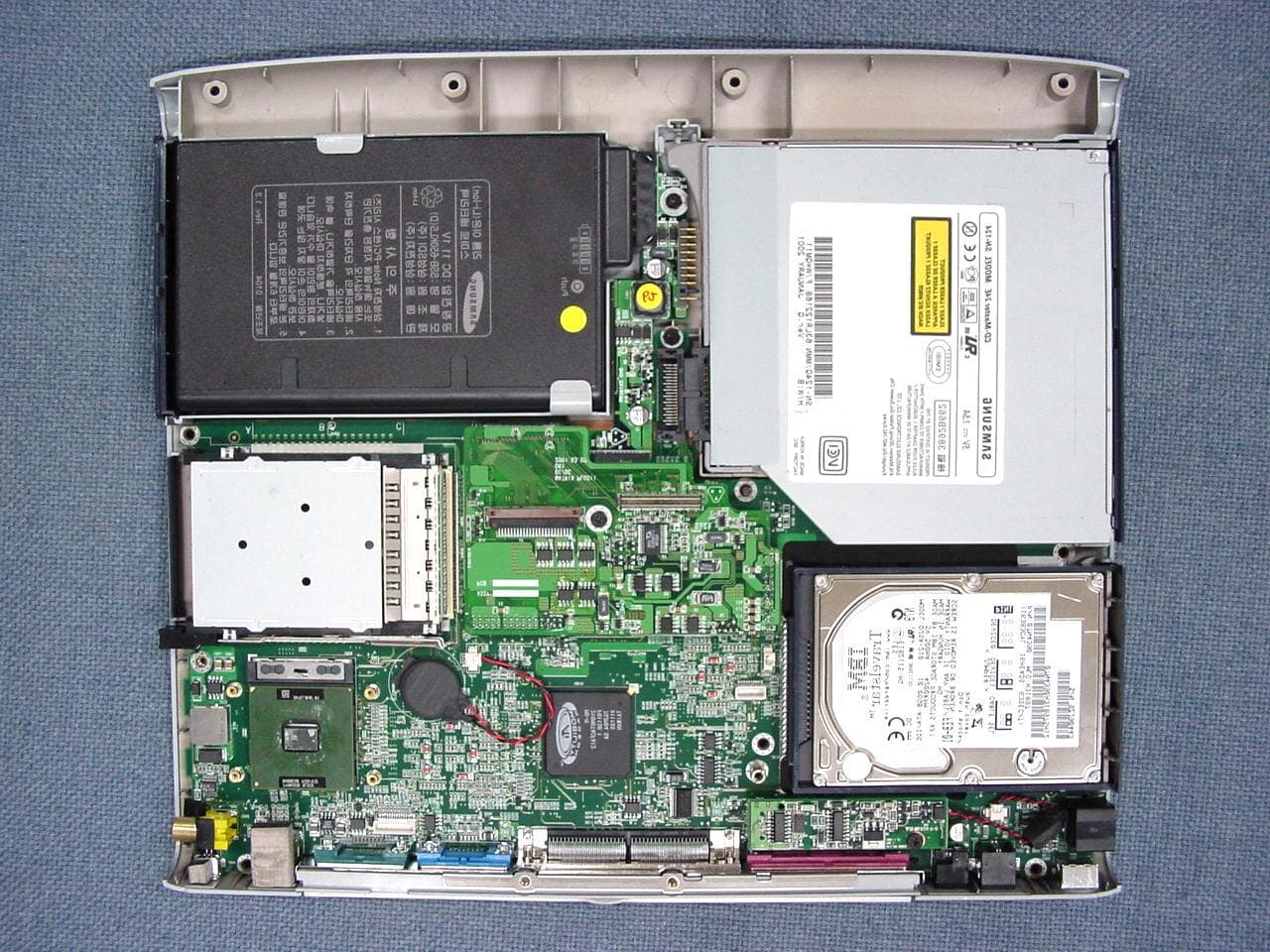
Click to zoom
Application Details
- Equipment Class
- JBC - Part 15 Class B Computing Device/Personal Computer
- Date of Grant
- Aug 05, 2001
- Application Purpose
- Original Equipment
- Date of Application
- Aug 05, 2001
- Equipment Note
- Notebook Computer
- Company
- Samsung Electronics Co Ltd
- Country
- United States
Documents & Files
Document Text
Text extracted from the exhibit documents filed with the FCC. Open a document above to read the original.
Users Manual
Notices i Notices No part of this publication may be reproduced, stored in a retrieval system, or transmitted, in any form or by any means, mechanical photocopying, recording or otherwise, without the prior written permission of the manufacturer. The information within this manual is subject to change without notice. The manufacturer shall not be held liable for technical or editorial errors or omissions contained in herein; nor for incidental or consequential damages resulting from the furnishing, performance or use of this material. Microsoft Windows is a registered trademark of the Microsoft Corporation. Product names mentioned herein are for identification purposes only, and may be trademarks and/or registered trademarks of their respective companies. Copyright2001 All rights are reserved ii Users Manual Important Safety Information Safety Instructions Your system is designed and tested to meet the latest standards for safety of information technology equipment. However, to ensure safe use of this product, it is important that the safety instructions marked on the product and in the documentation are followed. Always follow these instructions to help guard against personal injury and damage to your system. i Setting Up your System • Read and follow all instructions marked on the product and in the documentation before you operateyour system. Retain all safety and operating instructions for future use. • Do not use this product nearwater or a heat sourcesuch as a radiator. • Set up the system on a stable work surface. • The product should be operated only with the type of power source indicated on the rating label. • Ensure that the electrical outlet you are using to power your equipment is easily accessible in case of fire or short circuit. • If your computer has a voltage selector switch, make sure that the switch is in the proper position for your area. • Openings in the computer case are provided for ventilation. Do not block or cover these openings. Make sure you provide adequate space, at least 6 inches (15 cm), around the system for ventilation when you set up your work area. Never insert objects of any kind into the computer ventilation openings. • Ensure that the fan vents on the bottom of the casing are clear at all times. Do not place the computer on a soft surface, doing so will block the bottom vents. • The computer product is equipped with a three-wire power cord to make sure that the product is properly grounded when in use. The plug on this cord will fit only into a grounding-type outlet. This is a safety feature. If you are unable to insert the plug into an outlet, contact an electrician to install the appropriate outlet. Important Safety Information iii • If you use an extension cord with this system, make sure that the total ampere rating on the productsplugged into the extension cord does not exceed the extension cord ampere rating. Care During Use • Do not walk on the power cord or allow anything to rest on it. • Do not spill anything on the system. The best way to avoid spills is to not eat or drink near your system. • Some products have a replaceable CMOS battery on the system board. There is a danger of explosion if the CMOS battery is replaced incorrectly. Replace the battery with the same or equivalent type recommended by the manufacturer. Dispose of batteries according to the manufacturer’s instructions. If the CMOS battery requires replacement insure that a qualified technician performs the task • When the computer is turned off, a small amount of electrical current still flows through the computer. To avoid electrical shock, always unplug all power cables, remove the battery and modem cables from the wall outlets before cleaning the system. • Unplug the system from the wall outlet and refer servicing to qualified personnel if: – The power cord or plug is damaged. – Liquid has been spilled into the system. – The system does not operate properly when the operating instructions are followed. – The system was dropped or the casing is damaged. – The system performance changes. Replacement Parts and Accessories Use only replacement parts and accessories recommended by manufacturer. To reduce the risk of fire, use only No. 26 AWG or larger telecommunications line cord. Do not use this product in areas classified as hazardous. Such areas include patient care areas of medical and dental facilities, oxygen rich environments, or industrial areas. iv Users Manual Battery Disposal Do not put rechargeable batteries or products powered by non-removable rechargeable batteries in the garbage. Contact the Samsung Helpline for information on how to dispose of batteries that you cannot use or recharge any longer. Follow all local regulations when disposing of old batteries. Federal Communications Commission (FCC) v Federal Communications Commission (FCC) This device complies with Part 15 of the FCC Rules. Operation is subject to the following two conditions:(1) this device may not cause harmful interference, and (2) this device must accept any interference received, including interference that may cause undesired operation. This equipment has been tested and found to comply with the limits for a Class B digital device pursuant to Part 15 of the FCC Rules. These limits are designed to provide reasonable protection against harmful interference in a residential installation. This equipment generate uses and can radiate radio frequency energy and if not installed and used in accordance with the instructions may cause harmful interference will not occur in a particular installation. If this equipment does cause harmful interference to radio or television reception, which can be determined by turning the equipment off and on, the user is encouraged to try to correct the interference by one or more of the following measures: • Reorient or relocate the receiving antenna. • Increase the separation between the equipment and receiver. • Connect the equipment into an outlet on a circuit…
Text truncated - open the document above for the full version.
Block Diagram
BlockDiagram CPU-PentiumIV (uFCPGA/SocketI/F) Coppermine-T& Tualatin Almador-M GMCH-M 82830M 625-pinmBGA Almador-M ICH3-M 82801CAM 421-pinmBGA MICOM HD64F2169 SwappableBay (CD,DVD,Zip, 2ndHDD& FDD) Power& ChargingCircuits 1.2V, 133MHz Comp.Video Conn. 15-pinVGAConn. Internal Battery Kinnereth 82561ET 133MHz 3.3V SDRAM DVOB/C 4XAGP Docking Connector RJ-45 4/8MbitFlash FWH-Intel 32-pinPLCC SUBB'D MAINCHIP SUBCHIP UNIT CPUPower Supply(IMVP) GraphicsCont. ATI-M6 (16MEmbeded DDRDRAM) .18u,1.8V CPUPower DC/DCBoard SystemMemory SODIMM(2EA) AudioCont. ES1980 CardBusCont. PCI1450 AC97 S/WModem MiniPCIConn. TypeIIIA LCDPanel 15"TFT(SEC) SXGA+ SerialConn. ParallelConn. SuperIOCont. NS PC87393 100-pinTQFP HDD DCIn External PS/2Conn. Bluetooth (Ambler) Audio Codec ES1921 & Audio Amplifiers Microphone Headphone Line-in S/PDIFOut Docking Conn. 2ndCodec ES1921 PCIBUS CK-Titan Clocking FingerPrint PCIBUS RJ-11 HOSTBUS LVDS USB 2,3 USB 0,1 USB4 FDDBus IDEBus(UDMA 66/100) Ext.USB Conn. USB5 LPCBus InternalKeyb'd &TouchPad PS/2MS&KBD ToDocking Conn. PORT(User accessibleitems) HubInterface 1.8V,66MHz Internal Speakers Internal Microphone Primary Secondary ZVPort
Cover Letter(s)
From: [email protected] Sent: Sunday, August 05, 2001 11:14 PM To: [email protected]; [email protected] Subject: SAMSUNG ELECTRONICS CO., LTD., FCC ID:A3LS950, AN01T1370 -----Original Message----- From: Sang-Cheong Lee [mailto:[email protected]] Sent: Friday, July 27, 2001 7:53 PM To: CERTADM; '[email protected]' Cc: Mike Kuo; '[email protected]'; [email protected] Subject: RE: SAMSUNG ELECTRONICS CO., LTD., FCC ID:A3LS950, AN01T1370 Dear Mr. Mike and Certadm. Thank you for your good advices. Firstly, I'm sorry for the mistake on the test report . - Answer #1 : I attached new Manual with FCC Rules. - Answer #2,3 : We tested it exactly. But the form of test report which I sent is the old form. So, the test report was re-written out to be corrected exactly. Check the test report please. Best regards SC Lee -----Original Message----- From: CERTADM [mailto:[email protected]] Sent: Friday, July 27, 2001 5:31 AM To: '[email protected]' Cc: Mike Kuo; '[email protected]' Subject: SAMSUNG ELECTRONICS CO., LTD., FCC ID:A3LS950, AN01T1370 Notice_content ------------- Question #1:User Manual does not contain the information required under 15.21 and 15.105(b) of FCC rules. Please provide revised user manual to comply such requirements. Question #2: The highest Frequency used or generated in this device is 1133MHz. In accordance to 15.33 (b)(1) of FCC rules, the upper frequency range to be investigated is 5th harmonics of highest frequency or 40GHz whichever is lower. In this case, the upper frequency range to be investigated will be 5,665GHz. Page 14 of test report indicated the upper frequency was investigated is 8000MHz. However, the test equipment list in the page 16 of test report does not have such equipment can support 5.665GHz or 8GHz measurement. Please explain. Question #3: Please provide the measurement detector functions and bandwidths information for Radiated and Conducted Emission tests. Best Regards ------------------------------------------- Mike Kuo / TCB Certifier The items indicated above must be submitted before processing can continue on the above referenced ap plication. Failure to provide the requested information within 60 days of the original e-mail date may result in application dismissal and for feiture of the filing fee. Also, please note that partial responses inc rease processing time and should not be submitted. Any questions about the content of this correspondence should be directed to the e-mail add ress listed below the name of the sender.
External Photos
EUT-Front EUT-Rear Inside
ID Label/Location Info
Page 15 of 16 Pro NO. : SE-01-0133 5. FCC Label Configuration and Location 5.1 Label Configulation 5.2 Location of Label This report shall not be reproduced except in full, without the written approval of SEC EMC Testing laboratory.
Internal Photos
MainBoard-Front MainBoard-Rear LCD-Front LCD-Rear
Internal Photos
AudioBoard-Front AudioBoard-Rear ModemBoard-Front ModemBoard-Rear
Internal Photos
WirelessLAN-Front WirelessLAN-Rear FingerPrint-Front FingerPrint-Rear
Internal Photos
DC/DCBoard-Front DC/DCBoard-Rear ACAdapter-Front ACAdapter-Rear
Test Report
Page 1 of 16 Project No. : SE-01-0133 Product :Notebook PC Model No. :SENS Pro 950 FCC ID : A3LS950 1. This test reports shall not be reproduced except in full, without the written approval of SEC EMC Testing laboratory. 2. This test reports does not constitute an endorsement by NIST/NVLAP or U.S Government. 3. This test report is to certify that the tested device properly complies with the requirements of FCC Rules and Regulations Part 15 Subpart B Unintentional Radiators. All tests necessary to show compliance to the requirements were and these results met the specifications requirement. Date of test :June 12, 2001 Issued Date :June 25, 2001 Tested by: No Cheon, PARK / Test Engineer Reviewed by: Seung Kyu, CHA / Manager of EMC Lab Authorised by: Taek Jeong, Shin / Chief of EMC Lab This laboratory is registered by the NIST/NVLAP, U.S.A. The test reported herein have been performed in accordance with its terms of registration. EMI TEST REPORT According to FCC Part 15 Subpart B/Class B NVLAP Code: 200447 Page 2 of 16 Project No. : SE-01-0133 Table of Contents 1. General Information 1.1 Product Description 1.2 Configuration of EUT and peripherals 1.3 Used Cable Description 1.4 System Block Diagram of Test Configuration 1.5 Test Facility 2. System Test Configuration 2.1 Configuration of Radiated and Conducted Interference Measurement 2.2 Operation Enviroment 2.3 Test Procedure 3. Conducted Emission Test Data 4. Radiated Emission Test Data 5. Label Configuration and Location 6. Test Equipment Used Distribution This test report has been made available as follows: CS Management Center, EMC Laboratory1 original Computer Division1 copy This report shall not be reproduced except in full, without the written approval of SEC EMC Testing laboratory. Page 3 of 16 Project No. : SE-01-0133 1. General Information Applicant :Samsung Electronics Co., Ltd. CS Management Center EMC Test Laboratory Tel.: +81-(0)31-200-2135 Fax.: +81-(0)31-200-2189 Full Address :416 Maetan 3 Dong, Paldal-Ku, Suwon City, Kyungki Do, Korea, 442-742 Kind of Product :Notebook PC FCC ID:A3LS950 Project Name :Matrix II Plus Model & Variant Names :SENS Pro 950(Brand Name: SAMSUNG) Test Report Produced by :No Cheon, PARK / Test Eng. 1.1 Product Description 1) Justification The system was configured for testing in typical fashion use. Cable were attached to each of the available I/O Ports. Where applicable, peripherals were attached to the I/O cables. The mode of operation utilized for testing was selected to best simulate typical EUT use. Comparing the test results with Docking Station & without Docking Station, the test results without Docking Station was found the worst case emissions. And so the final testing was performed without Docking Station. Further details of cabling and configuration are shown in the test system configuration. This report shall not be reproduced except in full, without the written approval of SEC EMC Testing laboratory. Page 4 of 16 Project No. : SE-01-0133 2) Operating Frequency : 1133MHz(CPU Speed), 133MHz(Host Clock), 133MHz(SDRAM Clock), 8M(Finger print) 33.3MHz(PCI Clock), 14.318MHz(Ref. OSC), 49.512MHz(Audio Clock), 25M(Network) 165MHz(Video Memory Clock), 12.288MHz(Audio Bit Clock), 24.576MHz(Audio C24) 10MHz(Micom Clock), 48MHz(USB Clock), 54MHz(LCD Clock), 66.6(Hub) 3) Description of Testing operating mode LCD Screen CRT Monitor, TV Monitor FDD, Hard disk drive & CD-ROM drive LPT1 to Printer Media Player Playing through Video CD in Network Server Audio out to Speaker 4) Tested Resolution : 1400 X 105060Hz32bits 1400 X 105085Hz32bits 640 X 48060Hz32bits This report shall not be reproduced except in full, without the written approval of SEC EMC Testing laboratory. Network Audio Output Operating Mode Operating section of EUT "H" Pattern display & Read / Write Colors LCD(15.0") Ext. Monitor Tested Video modeResolutions TV Monitor Refresh rates Page 5 of 16 Project No. : SE-01-0133 5) Assemble Parts ItemSpecificationRemark CPUIntel Tualatin 1133MHzPSB 133 / 30W Solution uFCPGA2 Cashe 512KB, Core Logic 830M Bus Speed 133MHz Main MemorySEC, PC133-333-542-A1M464S0924CT2-L75 (RAM)128MB, Max 1GB Video ControllerExternal & Highest 3D Acceleration16MB, Max:32MB 4x AGP with sidebandsSupports simultaneously LCD/External monitor Video DisplaySEC, LCD 15" TFT, LTN150P1-L03TFT SXGA+(15.0"), 2NB1561102 Upto 1600x1200 Pixels; 16-bit 64k colors FDDTeac, FS05FG-5750A, FQA002100923.5", 1.44MB Fixed, 3Mode support HDDFujitsu, MHK2060AT, 01000324User-removable ; 2.5", 12.7mmH CD-RWMatsushita, UJDA330, 0LCHA000016 AC AdapterSEC, 60-Watts, AC 100~240V FREE-VOLTAGEAD-6019 MODEMSEC, SFM-3100LW, 56KBPSAC-97 Compliant MODEM Controller LAN10/100 Base-T Ethernet support Wireless LANAgere, MPCI3A-20, 01UT15473456, 016681/AIEEE 802.11b(11MBPS), Mini PCI Input DevicesKeyboard, 19mm pitch, 2.5mmH travel lengthKorean, US, UK, Japan German, French Pointing Device, PS/2 Touchpad w/ 2 button Finger Print, ST Microelectronics, TCS1A AC AdapterSEC, 60-Watts, AC 100~240V FREE-VOLTAGEAD-6019 BatterySony, Removable 9-cell Li-Ion Smart, 4HRsSSB-950KLS, NO0000013 Ports 2 USB, SIO, PIO, PS/2, RJ-11, RJ-45, DC IN, EXT. MONITOR, Mini-Dock Connector, TV-out, MIC-IN, LINE-IN,HEADPHONE-OUT, SPDIF, Card bus slot. Etc This report shall not be reproduced except in full, without the written approval of SEC EMC Testing laboratory. Page 6 of 16 Project No. : SE-01-0133 1.2 Configuration of EUT and peripherals MarkItemModel No.Serial No.ManufacturerFCC ID ANotebook PCSENS Pro 950-SamsungA3LS950 BExternal MonitorD828C(T) R0688EN476020CIAKE DellDoc CTVSMC-10056KBS0948ESamsung- DSerial Mouse X05-516927610043-00000Microsoft Doc EPrinter BJC-50CLG000800377Cannon Doc FAudio DeviceMY-250160KB00620Samsung- GSpeakerSBS36 SW00361292000005 CambridgeS.W.- HDigital SpeakerBA7350758108BOSTON- IMicrophoneYMC-2511NoneSamsung- JNetwork HubFS-108FS18A9A013479BAY NETWORKDoc KTelephoneSSP-2300902164618Samsung- LPS/2 KeyboardSEM-DC8H85000144SamsungDoc MUSB MouseM-U48ALZE946500…
Text truncated - open the document above for the full version.
Test Setup Photos
Page 9 of 16 Pro NO. : SE-01-0133 2. System Test Configuration 2.1 Configuration of Radiated and Conducted Interference Measurement * Cabling was taken into consideration and test data was taken under worse case conditions. 1)Conduction(Front View) 2)Conduction(Rear View) This report shall not be reproduced except in full, without the written approval of SEC EMC Testing laboratory. Page 10 of 16 Pro NO. : SE-01-0133 3) Radiation(Front View) 4) Radiation(Rear View) This report shall not be reproduced except in full, without the written approval of SEC EMC Testing laboratory.
Contact Information
Applicant
Jenni Chun(General Manager)
Test Firm
Samsung Electronics Co., Ltd.Jeong Kwan Choi
82-331-280-9951Fax: 82-331-280-9969
Technical Specifications
| # | Rule Parts | Frequency Range | Power Output |
|---|---|---|---|
| 1 | 15B | - | - |
Other Applications from Samsung Electronics Co Ltd
A3LSMS741B
Aug 05, 2026Portable Handset
Equipment Class
6VL - 15E 6 GHZ Very Low Power DeviceA3LSMX940
Jul 31, 2026BT,BLE Tablet DTS,UNII a,b,g,n,ac,ax,be and digitizer
Equipment Class
DTS - Digital Transmission SystemA3LSMS741U
Jul 30, 2026Portable Handset
Equipment Class
6CD - 15E 6 GHz Low Power Dual ClientA3LSMX840
Jul 27, 2026BT,BLE Tablet DTS,UNII a,b,g,n,ac,ax and Digitizer
Equipment Class
DSS - Part 15 Spread Spectrum TransmitterA3LSMX848U
Jul 27, 2026WCDMA, LTE, 5G NR Tablet BT,BLE, DTS,UNII a b g n ac ax and Digitizer
Equipment Class
JBP - Part 15 Class B Computing Device Peripheral