A3LSCHA690Dual-Band CDMA Phone
Samsung Electronics Co Ltd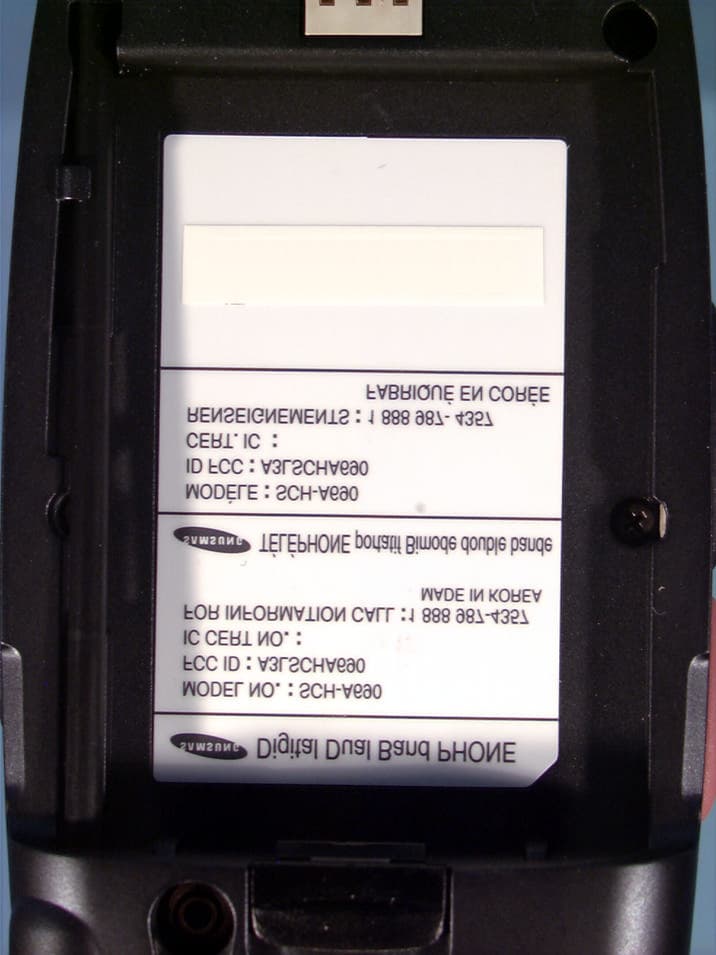
Click to zoom
Application Details
- Equipment Class
- PCE - PCS Licensed Transmitter held to ear
- Date of Grant
- Jun 05, 2003
- Application Purpose
- Original Equipment
- Date of Application
- Jun 05, 2003
- Equipment Note
- Dual-Band CDMA Phone
- Frequency Range
- 1851.25000000 - 1908.75000000
- Company
- Samsung Electronics Co Ltd
- Country
- United States
Documents & Files
Document Text
Text extracted from the exhibit documents filed with the FCC. Open a document above to read the original.
Users Manual
For more information about RF exposure, please visit the FCC website at www.fcc.gov FCC RF EXPOSURE INFORMATION In August 1996 the Federal Communications Commission (FCC) of the United States with its action in Report and Order FCC 96-326 adopted an updated safety standard for human exposure to radio frequency electromagnetic energy emitted by FCC regulated transmitters. Those guidelines are consistent with the safety standard previously set by both U.S. and international standards bodies. The design of this phone complies with the FCC guidelines and these international standards. Use only the supplied or an approved antenna. Unauthorized antennas, modifications, or attachments could impair call quality, damage the phone, or result in violation of FCC regulations. Do not use the phone with a damaged antenna. If a damaged antenna comes into contact with the skin, a minor burn may result. Please contact your local dealer for replacement antenna. Body-worn Operation This device was tested for typical body-worn operations using the belt-clip, which provides 2.2cm. spacing from the body. The use of other belt-clip/holsters and other non- tested accessories may not comply with FCC RF Exposure requirements and should be avoided. WARNING! Read this information before using your phone 22-Apr-03 1.Calls 1. Outgoing 2. Incoming3. Missed 4. Erase Logs > 1.Outgoing 2.Incoming 3.Missed 4.All calls 5. Call Timer > 1.Last Call 2.Total 3.Lifetime 4.Erase total 6. PTT Contact List 2. Phone Book 1. Find > By Name, By Entry, By Group 2. Add3. Rename Group > 1.Friend 2.Family 3.Colleague 4.VIP 5.No name 4. My Phone #5. Memory 3. Messa g e 1. Send New Msg2. Voice3. Inbox4. Outbox5. Draft Msg6. Saved Msg7. Web Alert8. Msg Setting > 1.New Message > 1.Save In Outbox > Not Save, Prompt, Auto Save 2.Callback# 3.Entry Mode > T9 Word, Alphabet SCH-a690 Menu Tree 4.Delivery Ack > Off, On 5.My Signature > Edit Signature, Setting> 2.Msg. Alert > 1.Volume/Viabrate > Silent, 1 Beep, Vibrate, Vib + Ring, Level 1 ~ 5 2.Type > 1. Voice Mail > Bell 1 ~ 5, Melody 1 ~ 10, Downed Melody 1 ~ 20 2. Page > Bell 1 ~ 5, Melody 1 ~ 10 , Downed Melody 1 ~ 20 3. Text > Bell 1 ~ 5, Melody 1 ~ 10 , Downed Melody 1 ~ 20 4. Web Alert > Bell 1 ~ 5, Melody 1 ~ 10 , Downed Melody 1 ~ 20 3.Reminder > Off, Once, Every 2 min> 3.Scroll Timer > Off, 1 ~ 5 Seconds> 4.Auto Delete > Warning Msg, Auto Delete> 5.Canned Msg. > 1.Yes 2.No 3.Call me 4.Need directions 5.Where are you? 6.Will call later 7.Busy 8.On my way 9.Will arrive 15 m 10.Thank you 11.Love you 12.~ 20 Blank> 6.Voice Mail # 9. Erase Msg > 1.Voice 2.OldInbox 3.NewInbox 4.Oldbox 5.Draft Msg 6.Saved Msg 7.All Messages 4. Mobile Web 1. Get In Web2. Prompt > None, To Start, To End, Both 5. Planner 1. Today2. Scheduler3. Jump To Date4. To Do List5. Memo Pad6. Count Down7. Alarm Clock > Once, Daily, Off 8. World Time9. Calculator 6. Display 1. Animation > 1. Opening > Auroa, Sailing, Fall 2. Closing > Auroa, Sailing, Fall 3. Wall Paper > Landscape, Water Drop, Clock1, Dual Clock, Digital Clock, Aquarium 2. Banner3. Backlight > 5, 10, 15 Seconds, Folder Open, Power Save 4. Contrast > 1. Main Display 2. Front Display 5. Auto Hyphen > No, Yes 6. Service LED > No, Yes 7. Sound 1. Volume/Vibrate > 1. Calls > Silent, 1 Beep, Vibrate, Vib + Ring, Level 1 ~ 5 2. Alarm > Silent, 1 Beep, Vibrate, Vib + Ring, Level 1 ~ 5 2. Ringer Type > 1. Calls > Bell 1 ~ 5, Melody 1 ~ 10 , DownedMelody 1 ~ 20 2. Alarm > Bell 1 ~ 5, Melody 1 ~ 10 , DownedMelody 1 ~ 20 3. Data/Fax In > Bell 1 ~ 5, Melody 1 ~ 10 , DownedMelody 1 ~ 20 4. Planner > Bell 1 ~ 5, Melody 1 ~ 10 , DownedMelody 1 ~ 20 3. Key Beep > 1. Volume > Silent, 1 Beep, Vibrate, Vib + Ring, Level 1 ~ 5 2. Tone Length > Long, Normal 4. Alerts > 1. Minute Beep > On, Off 2. Service > On, Off 3. Connect > On, Off 4. Disconnect > On, Off 5. Fade > On, Off 6. Roam > On, Off 7. Privacy > On, Off 5. Power On/Off > On, Off 6. Roam Ringer > On, Off 7. Whisper Mode > On, Off 8. Voice Kit 1. Voice Dial > 1. Record 2. Review 3. Erase All > Yes, No 4. Set Active > [*] Only, [*]/Folder, [*]/EarMic 2. Voice Memo > 1. Record 2. Review 3. Erase All > Yes, No 3. Call Screen > 1. On/Off > Enable, Disable 2. Inbox 3. Greeting > 1.Record 2.Play 3.Select > Recorded, Default 4. Call Sound > Enable, Disable 5. Wait Time > Off, After 3 sec, After 5 sec, After 10 sec 9. Setup 1. Location > Location On, 911 Only 2. Network > 1.Set NAM > NAM 1, NAM 2 2.Roam Option > Home Only, Automatic 3. Data/Fax > 1. Auto Detect > data off, data until powered off 2. Baud Rate > Auto, 19200, 38400, 57600, 115200, 230400 4. Security > 1.Lock Phone 2.Change Lock 3.Emergency # 4.Voice Privacy 5.Restriction > 1.Outgoing 2.Incoming 3.Phonebook 6.Erase Memory ( Pop Up Msg: "Erase Memory PHBK&VDial" ) 7.Reset Phone ( Pop UP Msg: "Restore Default Setting except PHBK & VDial" ) 5. Call Answer > Send Key, Folder Open, Any Key 6. Aut Answer > Off, After 5 sec, After 3 sec, After 1 sec 7. Auto Retry > Off, Every 10 sec, Every 30 sec, Every 60 sec. 8. Language > English, Spanish 9. Clock Set > 1.Main Clock 2.Dual Clock 10. Version
Users Manual
For more information about RF exposure, please visit the FCC website at www.fcc.gov FCC RF EXPOSURE INFORMATION In August 1996 the Federal Communications Commission (FCC) of the United States with its action in Report and Order FCC 96-326 adopted an updated safety standard for human exposure to radio frequency electromagnetic energy emitted by FCC regulated transmitters. Those guidelines are consistent with the safety standard previously set by both U.S. and international standards bodies. The design of this phone complies with the FCC guidelines and these international standards. Use only the supplied or an approved antenna. Unauthorized antennas, modifications, or attachments could impair call quality, damage the phone, or result in violation of FCC regulations. Do not use the phone with a damaged antenna. If a damaged antenna comes into contact with the skin, a minor burn may result. Please contact your local dealer for replacement antenna. Body-worn Operation This device was tested for typical body-worn operations using the optional belt-clip/ holster placed 0.86 inches (2.2 cm) from the body. To comply with FCC RF exposure requirements, a minimum separation distance of 0.86 inches (2.2 cm) must be maintained between the user’s body and the phone, including the antenna whether extended or retracted. The use of third party belt-clip/holsters that provide the minimum separation distance of 0.86 inches (2.2 cm) can be used to satisfy FCC RF exposure requirements. The use of non-tested accessories may not comply with FCC RF Exposure requirements and should be avoided. WARNING! Read this information before using your phone 22-Apr-03 1.Calls 1. Outgoing 2. Incoming3. Missed 4. Erase Logs > 1.Outgoing 2.Incoming 3.Missed 4.All calls 5. Call Timer > 1.Last Call 2.Total 3.Lifetime 4.Erase total 6. PTT Contact List 2. Phone Book 1. Find > By Name, By Entry, By Group 2. Add3. Rename Group > 1.Friend 2.Family 3.Colleague 4.VIP 5.No name 4. My Phone #5. Memory 3. Messa g e 1. Send New Msg2. Voice3. Inbox4. Outbox5. Draft Msg6. Saved Msg7. Web Alert8. Msg Setting > 1.New Message > 1.Save In Outbox > Not Save, Prompt, Auto Save 2.Callback# 3.Entry Mode > T9 Word, Alphabet SCH-a690 Menu Tree 4.Delivery Ack > Off, On 5.My Signature > Edit Signature, Setting> 2.Msg. Alert > 1.Volume/Viabrate > Silent, 1 Beep, Vibrate, Vib + Ring, Level 1 ~ 5 2.Type > 1. Voice Mail > Bell 1 ~ 5, Melody 1 ~ 10, Downed Melody 1 ~ 20 2. Page > Bell 1 ~ 5, Melody 1 ~ 10 , Downed Melody 1 ~ 20 3. Text > Bell 1 ~ 5, Melody 1 ~ 10 , Downed Melody 1 ~ 20 4. Web Alert > Bell 1 ~ 5, Melody 1 ~ 10 , Downed Melody 1 ~ 20 3.Reminder > Off, Once, Every 2 min> 3.Scroll Timer > Off, 1 ~ 5 Seconds> 4.Auto Delete > Warning Msg, Auto Delete> 5.Canned Msg. > 1.Yes 2.No 3.Call me 4.Need directions 5.Where are you? 6.Will call later 7.Busy 8.On my way 9.Will arrive 15 m 10.Thank you 11.Love you 12.~ 20 Blank> 6.Voice Mail # 9. Erase Msg > 1.Voice 2.OldInbox 3.NewInbox 4.Oldbox 5.Draft Msg 6.Saved Msg 7.All Messages 4. Mobile Web 1. Get In Web2. Prompt > None, To Start, To End, Both 5. Planner 1. Today2. Scheduler3. Jump To Date4. To Do List5. Memo Pad6. Count Down7. Alarm Clock > Once, Daily, Off 8. World Time9. Calculator 6. Display 1. Animation > 1. Opening > Auroa, Sailing, Fall 2. Closing > Auroa, Sailing, Fall 3. Wall Paper > Landscape, Water Drop, Clock1, Dual Clock, Digital Clock, Aquarium 2. Banner3. Backlight > 5, 10, 15 Seconds, Folder Open, Power Save 4. Contrast > 1. Main Display 2. Front Display 5. Auto Hyphen > No, Yes 6. Service LED > No, Yes 7. Sound 1. Volume/Vibrate > 1. Calls > Silent, 1 Beep, Vibrate, Vib + Ring, Level 1 ~ 5 2. Alarm > Silent, 1 Beep, Vibrate, Vib + Ring, Level 1 ~ 5 2. Ringer Type > 1. Calls > Bell 1 ~ 5, Melody 1 ~ 10 , DownedMelody 1 ~ 20 2. Alarm > Bell 1 ~ 5, Melody 1 ~ 10 , DownedMelody 1 ~ 20 3. Data/Fax In > Bell 1 ~ 5, Melody 1 ~ 10 , DownedMelody 1 ~ 20 4. Planner > Bell 1 ~ 5, Melody 1 ~ 10 , DownedMelody 1 ~ 20 3. Key Beep > 1. Volume > Silent, 1 Beep, Vibrate, Vib + Ring, Level 1 ~ 5 2. Tone Length > Long, Normal 4. Alerts > 1. Minute Beep > On, Off 2. Service > On, Off 3. Connect > On, Off 4. Disconnect > On, Off 5. Fade > On, Off 6. Roam > On, Off 7. Privacy > On, Off 5. Power On/Off > On, Off 6. Roam Ringer > On, Off 7. Whisper Mode > On, Off 8. Voice Kit 1. Voice Dial > 1. Record 2. Review 3. Erase All > Yes, No 4. Set Active > [*] Only, [*]/Folder, [*]/EarMic 2. Voice Memo > 1. Record 2. Review 3. Erase All > Yes, No 3. Call Screen > 1. On/Off > Enable, Disable 2. Inbox 3. Greeting > 1.Record 2.Play 3.Select > Recorded, Default 4. Call Sound > Enable, Disable 5. Wait Time > Off, After 3 sec, After 5 sec, After 10 sec 9. Setup 1. Location > Location On, 911 Only 2. Network > 1.Set NAM > NAM 1, NAM 2 2.Roam Option > Home Only, Automatic 3. Data/Fax > 1. Auto Detect > data off, data until powered off 2. Baud Rate > Auto, 19200, 38400, 57600, 115200, 230400 4. Security > 1.Lock Phone 2.Change Lock 3.Emergency # 4.Voice Privacy 5.Restriction > 1.Outgoing 2.Incoming 3.Phonebook 6.Erase Memory ( Pop Up Msg: "Erase Memory PHBK&VDial" ) 7.Reset Phone ( Pop UP Msg: "Restore Default Setting except PHBK & VDial" ) 5. Call Answer > Send Key, Folder Open, Any Key 6. Aut Answer > Off, After 5 sec, After 3 sec, After 1 sec 7. Auto Retry > Off, Every 10 sec, Every 30 sec, Every 60 sec. 8. Language > English, Spanish 9. Clock Set > 1.Main Clock 2.Dual Clock 10. Version
Users Manual
For more information about RF exposure, please visit the FCC website at www.fcc.gov FCC RF EXPOSURE INFORMATION In August 1996 the Federal Communications Commission (FCC) of the United States with its action in Report and Order FCC 96-326 adopted an updated safety standard for human exposure to radio frequency electromagnetic energy emitted by FCC regulated transmitters. Those guidelines are consistent with the safety standard previously set by both U.S. and international standards bodies. The design of this phone complies with the FCC guidelines and these international standards. Use only the supplied or an approved antenna. Unauthorized antennas, modifications, or attachments could impair call quality, damage the phone, or result in violation of FCC regulations. Do not use the phone with a damaged antenna. If a damaged antenna comes into contact with the skin, a minor burn may result. Please contact your local dealer for replacement antenna. Body-worn Operation This device was tested for typical body-worn operations using the optional belt-clip/ holster placed 0.86 inches (2.2 cm) from the body. To comply with FCC RF exposure requirements, a minimum separation distance of 0.86 inches (2.2 cm) must be maintained between the user’s body and the phone, including the antenna whether extended or retracted. The use of non-tested accessories may not comply with FCC RF Exposure requirements and should be avoided. WARNING! Read this information before using your phone 22-Apr-03 1.Calls 1. Outgoing 2. Incoming3. Missed 4. Erase Logs > 1.Outgoing 2.Incoming 3.Missed 4.All calls 5. Call Timer > 1.Last Call 2.Total 3.Lifetime 4.Erase total 6. PTT Contact List 2. Phone Book 1. Find > By Name, By Entry, By Group 2. Add3. Rename Group > 1.Friend 2.Family 3.Colleague 4.VIP 5.No name 4. My Phone #5. Memory 3. Messa g e 1. Send New Msg2. Voice3. Inbox4. Outbox5. Draft Msg6. Saved Msg7. Web Alert8. Msg Setting > 1.New Message > 1.Save In Outbox > Not Save, Prompt, Auto Save 2.Callback# 3.Entry Mode > T9 Word, Alphabet SCH-a690 Menu Tree 4.Delivery Ack > Off, On 5.My Signature > Edit Signature, Setting> 2.Msg. Alert > 1.Volume/Viabrate > Silent, 1 Beep, Vibrate, Vib + Ring, Level 1 ~ 5 2.Type > 1. Voice Mail > Bell 1 ~ 5, Melody 1 ~ 10, Downed Melody 1 ~ 20 2. Page > Bell 1 ~ 5, Melody 1 ~ 10 , Downed Melody 1 ~ 20 3. Text > Bell 1 ~ 5, Melody 1 ~ 10 , Downed Melody 1 ~ 20 4. Web Alert > Bell 1 ~ 5, Melody 1 ~ 10 , Downed Melody 1 ~ 20 3.Reminder > Off, Once, Every 2 min> 3.Scroll Timer > Off, 1 ~ 5 Seconds> 4.Auto Delete > Warning Msg, Auto Delete> 5.Canned Msg. > 1.Yes 2.No 3.Call me 4.Need directions 5.Where are you? 6.Will call later 7.Busy 8.On my way 9.Will arrive 15 m 10.Thank you 11.Love you 12.~ 20 Blank> 6.Voice Mail # 9. Erase Msg > 1.Voice 2.OldInbox 3.NewInbox 4.Oldbox 5.Draft Msg 6.Saved Msg 7.All Messages 4. Mobile Web 1. Get In Web2. Prompt > None, To Start, To End, Both 5. Planner 1. Today2. Scheduler3. Jump To Date4. To Do List5. Memo Pad6. Count Down7. Alarm Clock > Once, Daily, Off 8. World Time9. Calculator 6. Display 1. Animation > 1. Opening > Auroa, Sailing, Fall 2. Closing > Auroa, Sailing, Fall 3. Wall Paper > Landscape, Water Drop, Clock1, Dual Clock, Digital Clock, Aquarium 2. Banner3. Backlight > 5, 10, 15 Seconds, Folder Open, Power Save 4. Contrast > 1. Main Display 2. Front Display 5. Auto Hyphen > No, Yes 6. Service LED > No, Yes 7. Sound 1. Volume/Vibrate > 1. Calls > Silent, 1 Beep, Vibrate, Vib + Ring, Level 1 ~ 5 2. Alarm > Silent, 1 Beep, Vibrate, Vib + Ring, Level 1 ~ 5 2. Ringer Type > 1. Calls > Bell 1 ~ 5, Melody 1 ~ 10 , DownedMelody 1 ~ 20 2. Alarm > Bell 1 ~ 5, Melody 1 ~ 10 , DownedMelody 1 ~ 20 3. Data/Fax In > Bell 1 ~ 5, Melody 1 ~ 10 , DownedMelody 1 ~ 20 4. Planner > Bell 1 ~ 5, Melody 1 ~ 10 , DownedMelody 1 ~ 20 3. Key Beep > 1. Volume > Silent, 1 Beep, Vibrate, Vib + Ring, Level 1 ~ 5 2. Tone Length > Long, Normal 4. Alerts > 1. Minute Beep > On, Off 2. Service > On, Off 3. Connect > On, Off 4. Disconnect > On, Off 5. Fade > On, Off 6. Roam > On, Off 7. Privacy > On, Off 5. Power On/Off > On, Off 6. Roam Ringer > On, Off 7. Whisper Mode > On, Off 8. Voice Kit 1. Voice Dial > 1. Record 2. Review 3. Erase All > Yes, No 4. Set Active > [*] Only, [*]/Folder, [*]/EarMic 2. Voice Memo > 1. Record 2. Review 3. Erase All > Yes, No 3. Call Screen > 1. On/Off > Enable, Disable 2. Inbox 3. Greeting > 1.Record 2.Play 3.Select > Recorded, Default 4. Call Sound > Enable, Disable 5. Wait Time > Off, After 3 sec, After 5 sec, After 10 sec 9. Setup 1. Location > Location On, 911 Only 2. Network > 1.Set NAM > NAM 1, NAM 2 2.Roam Option > Home Only, Automatic 3. Data/Fax > 1. Auto Detect > data off, data until powered off 2. Baud Rate > Auto, 19200, 38400, 57600, 115200, 230400 4. Security > 1.Lock Phone 2.Change Lock 3.Emergency # 4.Voice Privacy 5.Restriction > 1.Outgoing 2.Incoming 3.Phonebook 6.Erase Memory ( Pop Up Msg: "Erase Memory PHBK&VDial" ) 7.Reset Phone ( Pop UP Msg: "Restore Default Setting except PHBK & VDial" ) 5. Call Answer > Send Key, Folder Open, Any Key 6. Aut Answer > Off, After 5 sec, After 3 sec, After 1 sec 7. Auto Retry > Off, Every 10 sec, Every 30 sec, Every 60 sec. 8. Language > English, Spanish 9. Clock Set > 1.Main Clock 2.Dual Clock 10. Version
Attestation Statements
May 12, 2003 Federal Communications Commission Authorization and Evaluation Div. Equipment Authorization Branch 7435 Oakland Mills Road Columbia, MD 21046 To whom it may concern: We, the undersigned, hereby authorize PCTEST Engineering Laboratory Inc., to act as agent on behalf of all matters relating to applications for equipment authorization, including the signing of all documents relating to these matters. Any and all acts carried out by PCTEST Engineering Laboratory, Inc. on our behalf shall have the same effect as acts of our own. We also hereby certify that no party to this application is subject to a denial of benefits, including FCC benefits, pursuant to Section 5301 of the Anti-Drug Abuse Act of 1988,21 U.S.C.862. Sincerely, Wallace Oh Engineering Manager Samsun Electronics America AFFIDAVIT FOR ESN PROTECTION OF CELLULAR MOBILE TELEPHONES We hereby certify that the Portable Cellular Telephone (FCC ID: A3LSCHA690) is so designed that it complies with all the requirements for ESN protection specified in Sec.22.919 of the FCC Rules. a) The transmitter in service has a unique ESN. b) The ESN host component is permanently attached to a main circuit board of the mobile transmitter and the integrity of the unit operating software cannot be altered. The ESN is plated from fraudulent contact and tampering. The ESN is encoded using multiplication by a polynomial and the ESN data programmed in the memory with other information. c) The ESN is factory set and cannot be altered, transferred, removed or otherwise able to be manipulated. Cellular mobile equipment is specifically designed such that any attempt to remove, tamper with, or change the ESN chip, its logic system, or firmware originally programmed by the manufacturer will render the mobile transmitter inoperative.
Attestation Statements
May 12, 2003 Federal Communications Commission Authorization and Evaluation Div. Equipment Authorization Branch 7435 Oakland Mills Road Columbia, MD 21046 In re: Samsung Electronics Co., Ltd. FCC ID.: A3LSCHA690 Request for Confidentiality To Whom It May Concern: In accordance with 0.459 of CFR 47, Samsung Electronics Co., Ltd. requests confidentiality for the Block Diagram, Schematics, Parts list, Tune-up Procedure, Operational and Circuit Description of the attached test report. These documents contain detailed system and equipment descriptions and related information about the product, which Samsung Electronics Co., Ltd. considers to be proprietary, confidential, and a custom design and otherwise, would not release to the general public. Since this design is a basis from which future technological products will evolve, Samsung feels that this information would be of benefit to its competitors, and that the disclosure of the information in these documents would give our competitors an unfair advantage in the market. Sincerely, Wallace Oh Engineering Manager Samsun Samsung Electronics America
Cover Letter(s)
May 20, 2003 Federal Communications Commission Equipment Approval Services 7435 Oakland Mills Road Columbia, MD 21046 SUBJECT: SAMSUNG Electronics Co., Ltd. FCC ID: A3LSCHA690 Part 22/24 Certification Gentlemen: Submitted herewith, on behalf of SAMSUNG Electronics Co., Ltd., is an application for Part 22/24 Certification of the Dual-Band CDMA Phone. Attached is the applicant’s Letter of Authorization, Confidentiality Request, measurement report test data and plots, RF Exposure measurement report and data, FCC ID label and location, test setup photographs, internal and external photographs, block diagram (confidential), circuit diagrams & description (confidential), operational description (confidential), parts list & tune-up procedure (confidential), and the user's manual. Should you have any questions or comments concerning the above, please contact the undersigned. cc: SAMSUNG Electronics Co., Ltd.
External Photos
SAMSUNG FCC ID: A3LSCHA690 EUT Photographs © 2003 PCTEST Lab. Dual-Band CDMA Phone Model: SCH-A690 SAMSUNG FCC ID: A3LSCHA690 EUT Photographs © 2003 PCTEST Lab. Dual-Band CDMA Phone Model: SCH-A690 SAMSUNG FCC ID: A3LSCHA690 EUT Photographs © 2003 PCTEST Lab. Dual-Band CDMA Phone Model: SCH-A690 SAMSUNG FCC ID: A3LSCHA690 EUT Photographs © 2003 PCTEST Lab. Dual-Band CDMA Phone Model: SCH-A690 SAMSUNG FCC ID: A3LSCHA690 EUT Photographs © 2003 PCTEST Lab. Dual-Band CDMA Phone Model: SCH-A690 SAMSUNG FCC ID: A3LSCHA690 EUT Photographs © 2003 PCTEST Lab. Dual-Band CDMA Phone Model: SCH-A690 SAMSUNG FCC ID: A3LSCHA690 EUT Photographs © 2003 PCTEST Lab. Dual-Band CDMA Phone Model: SCH-A690 SAMSUNG FCC ID: A3LSCHA690 EUT Photographs © 2003 PCTEST Lab. Dual-Band CDMA Phone Model: SCH-A690 SAMSUNG FCC ID: A3LSCHA690 EUT Photographs © 2003 PCTEST Lab. Dual-Band CDMA Phone Model: SCH-A690 SAMSUNG FCC ID: A3LSCHA690 EUT Photographs © 2003 PCTEST Lab. Dual-Band CDMA Phone Model: SCH-A690 SAMSUNG FCC ID: A3LSCHA690 EUT Photographs © 2003 PCTEST Lab. Dual-Band CDMA Phone Model: SCH-A690 SAMSUNG FCC ID: A3LSCHA690 EUT Photographs © 2003 PCTEST Lab. Dual-Band CDMA Phone Model: SCH-A690
ID Label/Location Info
© 2003 PCTEST Lab FCC ID SAMPLE LABEL & LOCATION LABELLING REQUIREMENTS The Label shown shall be permanently affixed at a conspicuous location on the device and be readily visible to the user at the time of purchase. (SEE NEXT PAGE)
Internal Photos
SAMSUNG FCC ID: A3LSCHA690 EUT Photographs © 2003 PCTEST Lab. Dual-Band CDMA Phone Model: SCH-A690 SAMSUNG FCC ID: A3LSCHA690 EUT Photographs © 2003 PCTEST Lab. Dual-Band CDMA Phone Model: SCH-A690 SAMSUNG FCC ID: A3LSCHA690 EUT Photographs © 2003 PCTEST Lab. Dual-Band CDMA Phone Model: SCH-A690 SAMSUNG FCC ID: A3LSCHA690 EUT Photographs © 2003 PCTEST Lab. Dual-Band CDMA Phone Model: SCH-A690 SAMSUNG FCC ID: A3LSCHA690 EUT Photographs © 2003 PCTEST Lab. Dual-Band CDMA Phone Model: SCH-A690 SAMSUNG FCC ID: A3LSCHA690 EUT Photographs © 2003 PCTEST Lab. Dual-Band CDMA Phone Model: SCH-A690 SAMSUNG FCC ID: A3LSCHA690 EUT Photographs © 2003 PCTEST Lab. Dual-Band CDMA Phone Model: SCH-A690 SAMSUNG FCC ID: A3LSCHA690 EUT Photographs © 2003 PCTEST Lab. Dual-Band CDMA Phone Model: SCH-A690 SAMSUNG FCC ID: A3LSCHA690 EUT Photographs © 2003 PCTEST Lab. Dual-Band CDMA Phone Model: SCH-A690 SAMSUNG FCC ID: A3LSCHA690 EUT Photographs © 2003 PCTEST Lab. Dual-Band CDMA Phone Model: SCH-A690 SAMSUNG FCC ID: A3LSCHA690 EUT Photographs © 2003 PCTEST Lab. Dual-Band CDMA Phone Model: SCH-A690 SAMSUNG FCC ID: A3LSCHA690 EUT Photographs © 2003 PCTEST Lab. Dual-Band CDMA Phone Model: SCH-A690
RF Exposure Info
PCTEST ENGINEERING LABORATORY, INC. 6660 – B Dobbin Road • Columbia, MD 21045 • USA Telephone 410.290.6652 / Fax 410.290.6654 http://www.pctestlab.com (email: [email protected]) CERTIFICATE OF COMPLIANCE (SAR EVALUATION) PCTEST SAR TEST REPORT FCC Measurement Report Reviewed by: Quality Manager SAR Filename: SAR.230505233.A3L Test Dates: May 5-7, 2003 EUT Type: Dual-Band CDMA Phone FCC ID: A3LSCHA690 Page 1 of 30 © 2003 PCTEST Engineering Laboratory, Inc. APPLICANT NAME & ADDRESS: DATE & LOCATION OF TESTING: SAMSUNG Electronics Co., Ltd. Dates of Tests: May 5 - 7, 2003 416 Maetan-3 Dong, Paldal-Ku Test Report S/N: SAR.230505233.A3L Suwon City Kyungki-Do 441-742, KOREA Test Site: PCTEST Lab, Columbia, MD USA Attn: Wallace Oh, Engineering Manager Samsung Electronics America (QA Lab) FCC ID: A3LSCHA690 APPLICANT NAME: SAMSUNG ELECTRONICS, CO., LTD. EUT Type: Dual-Band CDMA Phone Tx Frequency: 824.70 – 848.31 MHz (CDMA) / 1851.25 – 1908.75 MHz (PCS CDMA) Rx Frequency: 869.70 – 893.31 MHz (CDMA) / 1931.25 – 1988.75 MHz (PCS CDMA) Max. RF Output Power: 0.478 W ERP CDMA (26.783 dBm) / 25.5 dBm Conducted 0.491 W EIRP PCS CDMA (26.901 dBm) / 25.5 dBm Conducted Max. SAR Measurement: 1.46 W/kg CDMA Head SAR; 0.88 W/kg CDMA Body SAR; 0.60w/kg CDMA Face SAR (PTT) 1.29 W/kg PCS CDMA Head SAR; 0.80 W/kg PCS CDMA Body SAR 0.60W/kg PCS CDMA Face SAR (PTT) Trade Name/Model(s): SAMSUNG SCH-A690 FCC Rule Part(s): §2.1093; FCC/OET Bulletin 65 Supplement C [July 2001] Application Type: Certification Test Device Serial No.: Identical Prototype [S/N: # F1BE2527] This wireless portable device has been shown to be capable of compliance for localized specific absorption rate (SAR) for uncontrolled environment/general population exposure limits specified in ANSI/IEEE Std. C95.1-1992 and had been tested in accordance with the measurement procedures specified in FCC/OET Bulletin 65 Supplement C (2001) and IEEE Std. 1528-200X (Draft 6.5, January 15, 2002). I attest to the accuracy of data. All measurements reported herein were performed by me or were made under my supervision and are correct to the best of my knowledge and belief. I assume full responsibility for the completeness of these measurements and vouch for the qualifications of all persons taking them. Grant Conditions: Power output listed is ERP for Part 22 and EIRP for Part 24. SAR compliance for body- worn operating configuration is based on a separation distance of 2.2 cm between the back of the unit and the body of the user. End-users must be informed of the body-worn operating requirements for satisfying RF exposure compliance. Belt clips or holsters may not contain metallic components. PCTEST certifies that no party to this application has been denied the FCC benefits pursuant to Section 5301 of the Anti-Drug Abuse Act of 1988, 21 U.S.C. 862. SAR.230505233.A3L PCTEST SAR TEST REPORT FCC Measurement Report Reviewed by: Quality Manager SAR Filename: SAR.230505233.A3L Test Dates: May 5-7, 2003 EUT Type: Dual-Band CDMA Phone FCC ID: A3LSCHA690 Page 2 of 30 © 2003 PCTEST Engineering Laboratory, Inc. TABLE OF CONTENTS 1. INTRODUCTION / SAR DEFINITION................................................................................3 2. SAR MEASUREMENT SETUP............................................................................................4 3. ALIDX-500 E-FIELD PROBE SYSTEM.................................................................................5 4. PROBE CALIBRATION PROCESS......................................................................................6 5. PHANTOM & EQUIVALENT TISSUES...............................................................................7 6. TEST SYSTEM SPECIFICATIONS........................................................................................8 7. DOSIMETRIC ASSESSMENT & PHANTOM SPECS...............................................................9 8. DEFINITION OF REFERENCE POINTS.............................................................................10 9. TEST CONFIGURATION POSITION................................................................................11 10. ANSI/IEEE C95.1 - 1992 RF EXPOSURE LIMITS................................................................12 11. MEASUREMENT UNCERTAINTIES..................................................................................13 12. SYSTEM VERIFICATION.................................................................................................14 13. SAR TEST DATA SUMMARY..........................................................................................15 14. SAR DATA SUMMARY..............................................................................................16-27 15. SAR TEST EQUIPMENT..................................................................................................28 16. CONCLUSION.............................................................................................................29 17. REFERENCES................................................................................................................30 PCTEST SAR TEST REPORT FCC Measurement Report Reviewed by: Quality Manager SAR Filename: SAR.230505233.A3L Test Dates: May 5-7, 2003 EUT Type: Dual-Band CDMA Phone FCC ID: A3LSCHA690 Page 3 of 30 © 2003 PCTEST Engineering Laboratory, Inc. 1. INTRODUCTION / SAR DEFINITION The FCC has adopted the guidelines for evaluating the environmental effects of radiofrequency radiation in ET Docket 93-62 on Aug. 6, 1996 to protect the public and workers from the potential hazards of RF emissions due to FCC-regulated portable devices.[1] The safety limits used for the environmental evaluation measurements are based on the criteria published by the American National Standards Institute (ANSI) for localized specific absorption rate (SAR) in IEEE/ANSI C95.1-1992 Standard for Safety Levels with Respect to Human Exposure to Radio Frequency Electromagnetic Fields, 3 kHz to 300 GHz. (c) 1992 by the Institute…
Text truncated - open the document above for the full version.
RF Exposure Info
SAMSUNG FCC ID: A3LSCHA690 EUT Photographs © 2003 PCTEST Lab. Dual-Band CDMA Phone Model: SCH-A690 SAMSUNG FCC ID: A3LSCHA690 EUT Photographs © 2003 PCTEST Lab. Dual-Band CDMA Phone Model: SCH-A690 SAMSUNG FCC ID: A3LSCHA690 EUT Photographs © 2003 PCTEST Lab. Dual-Band CDMA Phone Model: SCH-A690 SAMSUNG FCC ID: A3LSCHA690 EUT Photographs © 2003 PCTEST Lab. Dual-Band CDMA Phone Model: SCH-A690 SAMSUNG FCC ID: A3LSCHA690 EUT Photographs © 2003 PCTEST Lab. Dual-Band CDMA Phone Model: SCH-A690 SAMSUNG FCC ID: A3LSCHA690 EUT Photographs © 2003 PCTEST Lab. Dual-Band CDMA Phone Model: SCH-A690 SAMSUNG FCC ID: A3LSCHA690 EUT Photographs © 2003 PCTEST Lab. Dual-Band CDMA Phone Model: SCH-A690 SAMSUNG FCC ID: A3LSCHA690 EUT Photographs © 2003 PCTEST Lab. Dual-Band CDMA Phone Model: SCH-A690 SAMSUNG FCC ID: A3LSCHA690 EUT Photographs © 2003 PCTEST Lab. Dual-Band CDMA Phone Model: SCH-A690 SAMSUNG FCC ID: A3LSCHA690 EUT Photographs © 2003 PCTEST Lab. Dual-Band CDMA Phone Model: SCH-A690 SAMSUNG FCC ID: A3LSCHA690 EUT Photographs © 2003 PCTEST Lab. Dual-Band CDMA Phone Model: SCH-A690 SAMSUNG FCC ID: A3LSCHA690 EUT Photographs © 2003 PCTEST Lab. Dual-Band CDMA Phone Model: SCH-A690 SAMSUNG FCC ID: A3LSCHA690 EUT Photographs © 2003 PCTEST Lab. Dual-Band CDMA Phone Model: SCH-A690 SAMSUNG FCC ID: A3LSCHA690 EUT Photographs © 2003 PCTEST Lab. Dual-Band CDMA Phone Model: SCH-A690 SAMSUNG FCC ID: A3LSCHA690 EUT Photographs © 2003 PCTEST Lab. Dual-Band CDMA Phone Model: SCH-A690 SAMSUNG FCC ID: A3LSCHA690 EUT Photographs © 2003 PCTEST Lab. Dual-Band CDMA Phone Model: SCH-A690 SAMSUNG FCC ID: A3LSCHA690 EUT Photographs © 2003 PCTEST Lab. Dual-Band CDMA Phone Model: SCH-A690 SAMSUNG FCC ID: A3LSCHA690 EUT Photographs ©…
Text truncated - open the document above for the full version.
Contact Information
Applicant
Jenni Chun(General Manager)
Technical Contact
PCTEST Engineering Lab., Inc.Randy Ortanez
[email protected]410-290-6652
6660-B Dobbin Road · Columbia, Maryland · United States
Non-Technical Contact
PCTEST Engineering Lab., Inc.Randy Ortanez
[email protected]410-290-6652
Test Firm
PCTEST Engineering Laboratory, Inc.Randy Ortanez
Technical Specifications
| # | Rule Parts | Frequency Range | Power Output | Emission | Tolerance |
|---|---|---|---|---|---|
| 2 | 24E | 1.85 GHz - 1.91 GHz | 491.00 mW | 1M25F9W | 2.5 ppm |
Other Applications from Samsung Electronics Co Ltd
A3LSMU600
Sep 15, 2026Bluetooth Headset
Equipment Class
DTS - Digital Transmission SystemA3LSMA185G
Sep 08, 2026Portable Handset
Equipment Class
CXX - Communications Rcvr for use w/ licensed Tx and CBsA3LSMS741B
Aug 05, 2026Portable Handset
Equipment Class
6VL - 15E 6 GHZ Very Low Power DeviceA3LSMX940
Jul 31, 2026BT,BLE Tablet DTS,UNII a,b,g,n,ac,ax,be and digitizer
Equipment Class
DTS - Digital Transmission SystemA3LSMS741U
Jul 30, 2026Portable Handset
Equipment Class
6CD - 15E 6 GHz Low Power Dual Client