A3LSGHC126Dual-Band GSM Phone
Samsung Electronics Co Ltd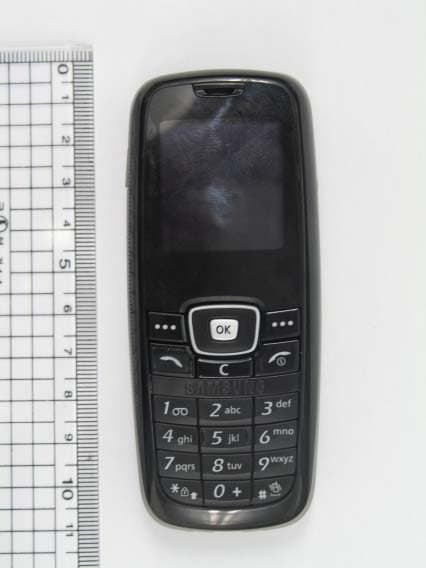
Click to zoom
Application Details
- Equipment Class
- PCE - PCS Licensed Transmitter held to ear
- Date of Grant
- Nov 03, 2005
- Application Purpose
- Original Equipment
- Date of Application
- Nov 03, 2005
- Equipment Note
- Dual-Band GSM Phone
- Frequency Range
- 1850.20000000 - 1909.80000000
- Company
- Samsung Electronics Co Ltd
- Country
- United States
Documents & Files
Document Text
Text extracted from the exhibit documents filed with the FCC. Open a document above to read the original.
Users Manual
SGH-C126QUICK GUIDE Printed in Korea Code No.: GH68-XXXXXA English 09/2005. Rev.1.0 Menu map 1. SIM AT2. Call records 2.1 Missed calls2.2 Received calls2.3 Dialled calls2.4 Delete all 2.5 Call time2.6 Call cost* 3. Network services 3.1 Call diverting3.2 Call barring3.3 Call waiting3.4 Network selection3.5 Caller ID3.6 Closed user group 4. Sound settings 4.1 Ring tone4.2 Ring volume4.3 Alert type4.4 Keypad tone4.5 Keypad volume4.6 Message tone4.7 Extra tones 5. Messages 5.1 Inbox5.2 Outbox5.3 Write new5.4 Templates5.5 Settings5.6 Delete all5.7 Memory status5.8 Voice mail5.9 Broadcast Phone layout and key functions Soft keysPerform functions indicated by the text above the key. Dial key Make and answer a call. In Idle mode, retrieve the most recent calls. Cancel/Clear key Delete characters from the display. Return the display to the previous menu level. 4-way navigation keysIn Menu mode, scroll through menu options. In Idle mode, access your favourite menus directly. Power/End keyTurn the phone on or off when pressed and held. Also end a call. Silent mode key Key guard key Menu/Confirm key In Idle mode, access Menu mode. Select the highlighted option or confirm input in a menu. Alphanumeric keys This guide explains how to set up your phone and gives a quick overview of the main functions of the phone. Installing the battery 1. Remove the battery cover and insert the SIM card. 2. Install the battery and replace the cover. Battery cover Battery Charging the battery 1. Plug the supplied travel adapter. 2. When charging is finished, unplug the adapter. Note : Do not remove the battery from the phone without unplugging the adapter first. Otherwise, the phone may be damaged. To AC wall outlet ➀ ➁ ➀ Adjusting the volume 1. In Idle mode, press the Menu soft key. 2. Select Sound settings → Ring volume . 3. Press Up or Down to adjust the volume level. 4. Press the OK soft key. While a call is in progress, press Up or Down to adjust the earpiece volume. Changing a ringtone for calls 1. In Idle mode, press the Menu soft key. 2. Select Sound settings → Ring tone . 3. Select a ringtone. Redialling recent numbers 1. In Idle mode, press . 2. Press Up or Down to scroll to the number you want. 3. Press to dial the number. Using the menus In Idle mode, press the Menu soft key or to enter the main menu. Use the 4-way navigation keys ( ) as shortcuts to access your favourite menus.1. In Idle mode, press the Menu soft key. 2. Select Phone settings → Short cut . 3. Select a key.4. Select a menu to be assigned to the key. To return to the previous menu level, press the soft key or c . To exit the menu without changing the menu settings, press this key. Labels at the bottom corners of the display show the current soft key functions. Press the left soft key ( ) or right soft key ( ) to perform the function indicated. To select and modify menu or feature:1. In Idle mode, press the Menu soft key. 2. Press the Navigation keys to reach the desired menu and then press the Select soft key or . 3. If the menu contains any submenus, locate the one you want by pressing the Navigation keys. Press the Select soft key or to enter the submenu. If the selected menu contains additi onal submenus, repeat this step. 4. Press the Navigation keys to find the setting of your choice.5. Press the Select soft key or to confirm your chosen setting. Shortcut numbersYou can quickly access the menu you want by using shortcut numbers. The shortcut number displays in front of the menu name in Menu mode.Your phone displays the following status indicators on the top of the screen: Icon Description Received signal strengthKey lock modeCall in progressOut of your service area; you cannot make or receive calls. Call diverting feature activeRoamingSilent mode or the call ringer set to vibrateMute modeNew SMS messageNew voicemailAlarm setBattery power level Switching on or off the phone 1. Press and hold for more than one second to switch on the phone. 2. To switch off the phone, press and hold for more than two seconds. Changing the display language 1. In Idle mode, press the Menu soft key. 2. Select Phone settings → Language . 3. Select a language. Making a call 1. In Idle mode, enter the area code and phone number, and press . 2. To end the call, press . Answering a call 1. When the phone rings, pr ess to answer a call. 2. To end the call, press . 6. Funbox 6.1 Sounds6.2 Images6.3 Delete all6.4 Memory status 7. Organiser 7.1 Alarm7.2 Calendar7.3 Time & Date7.4 Calculator7.5 To do list7.6 Voice memo7.7 Currency exchange 8. Phonebook 8.1 Search8.2 New entry8.3 Group search8.4 Edit group8.5 Speed dial8.6 Delete all8.7 Memory status8.8 SDN * 9. Phone settings 9.1 Display settings9.2 Greeting message9.3 Own number9.4 Language9.5 Security9.6 Extra settings9.7 Short cut9.8 Reset settings * Shows only if supported by your SIM card. Display Your phone is in Idle mode when you are not on a call or using a menu. You must be in Idle mode to dial a phone number. Silent mode Disable all sounds on the phone, when pressed and held in Idle mode. To exit, press and hold this key again. Key lock mode Lock the keypad, when pressed and held, to ignore accidental key pressing. To unlock, press the left soft key and then this key. Menu Ph.Book Te x t a n d graphic area Soft key indicators Icons SAR information Your wireless phone is a radio transmitter and receiver. It is designed and manufactured not to exceed the emission limits for exposure to radio frequency (RF) energy set by the Federal Communications Commission (FCC) of the U.S. Government. These limits are part of comprehensive guidelines and establish permitted levels of RF energy for the general population. The guidelines are based on the safety standards that were developed by independent scientific organizations through periodic and through evaluation of scientific studies.The standards include a substantial safe ty margin designed to assure the safety of all persons, regardless of age and health.The exposur…
Text truncated - open the document above for the full version.
Users Manual
SGH-C126QUICK GUIDE Printed in Korea Code No.: GH68-XXXXXA English 09/2005. Rev.1.0 Menu map 1. SIM AT2. Call records 2.1 Missed calls2.2 Received calls2.3 Dialled calls2.4 Delete all 2.5 Call time2.6 Call cost* 3. Network services 3.1 Call diverting3.2 Call barring3.3 Call waiting3.4 Network selection3.5 Caller ID3.6 Closed user group 4. Sound settings 4.1 Ring tone4.2 Ring volume4.3 Alert type4.4 Keypad tone4.5 Keypad volume4.6 Message tone4.7 Extra tones 5. Messages 5.1 Inbox5.2 Outbox5.3 Write new5.4 Templates5.5 Settings5.6 Delete all5.7 Memory status5.8 Voice mail5.9 Broadcast Phone layout and key functions Soft keysPerform functions indicated by the text above the key. Dial key Make and answer a call. In Idle mode, retrieve the most recent calls. Cancel/Clear key Delete characters from the display. Return the display to the previous menu level. 4-way navigation keysIn Menu mode, scroll through menu options. In Idle mode, access your favourite menus directly. Power/End keyTurn the phone on or off when pressed and held. Also end a call. Silent mode key Key guard key Menu/Confirm key In Idle mode, access Menu mode. Select the highlighted option or confirm input in a menu. Alphanumeric keys This guide explains how to set up your phone and gives a quick overview of the main functions of the phone. Installing the battery 1. Remove the battery cover and insert the SIM card. 2. Install the battery and replace the cover. Battery cover Battery Charging the battery 1. Plug the supplied travel adapter. 2. When charging is finished, unplug the adapter. Note : Do not remove the battery from the phone without unplugging the adapter first. Otherwise, the phone may be damaged. To AC wall outlet ➀ ➁ ➀ Adjusting the volume 1. In Idle mode, press the Menu soft key. 2. Select Sound settings → Ring volume . 3. Press Up or Down to adjust the volume level. 4. Press the OK soft key. While a call is in progress, press Up or Down to adjust the earpiece volume. Changing a ringtone for calls 1. In Idle mode, press the Menu soft key. 2. Select Sound settings → Ring tone . 3. Select a ringtone. Redialling recent numbers 1. In Idle mode, press . 2. Press Up or Down to scroll to the number you want. 3. Press to dial the number. Using the menus In Idle mode, press the Menu soft key or to enter the main menu. Use the 4-way navigation keys ( ) as shortcuts to access your favourite menus.1. In Idle mode, press the Menu soft key. 2. Select Phone settings → Short cut . 3. Select a key.4. Select a menu to be assigned to the key. To return to the previous menu level, press the soft key or c . To exit the menu without changing the menu settings, press this key. Labels at the bottom corners of the display show the current soft key functions. Press the left soft key ( ) or right soft key ( ) to perform the function indicated. To select and modify menu or feature:1. In Idle mode, press the Menu soft key. 2. Press the Navigation keys to reach the desired menu and then press the Select soft key or . 3. If the menu contains any submenus, locate the one you want by pressing the Navigation keys. Press the Select soft key or to enter the submenu. If the selected menu contains additi onal submenus, repeat this step. 4. Press the Navigation keys to find the setting of your choice.5. Press the Select soft key or to confirm your chosen setting. Shortcut numbersYou can quickly access the menu you want by using shortcut numbers. The shortcut number displays in front of the menu name in Menu mode.Your phone displays the following status indicators on the top of the screen: Icon Description Received signal strengthKey lock modeCall in progressOut of your service area; you cannot make or receive calls. Call diverting feature activeRoamingSilent mode or the call ringer set to vibrateMute modeNew SMS messageNew voicemailAlarm setBattery power level Switching on or off the phone 1. Press and hold for more than one second to switch on the phone. 2. To switch off the phone, press and hold for more than two seconds. Changing the display language 1. In Idle mode, press the Menu soft key. 2. Select Phone settings → Language . 3. Select a language. Making a call 1. In Idle mode, enter the area code and phone number, and press . 2. To end the call, press . Answering a call 1. When the phone rings, pr ess to answer a call. 2. To end the call, press . 6. Funbox 6.1 Sounds6.2 Images6.3 Delete all6.4 Memory status 7. Organiser 7.1 Alarm7.2 Calendar7.3 Time & Date7.4 Calculator7.5 To do list7.6 Voice memo7.7 Currency exchange 8. Phonebook 8.1 Search8.2 New entry8.3 Group search8.4 Edit group8.5 Speed dial8.6 Delete all8.7 Memory status8.8 SDN * 9. Phone settings 9.1 Display settings9.2 Greeting message9.3 Own number9.4 Language9.5 Security9.6 Extra settings9.7 Short cut9.8 Reset settings * Shows only if supported by your SIM card. Display Your phone is in Idle mode when you are not on a call or using a menu. You must be in Idle mode to dial a phone number. Silent mode Disable all sounds on the phone, when pressed and held in Idle mode. To exit, press and hold this key again. Key lock mode Lock the keypad, when pressed and held, to ignore accidental key pressing. To unlock, press the left soft key and then this key. Menu Ph.Book Te x t a n d graphic area Soft key indicators Icons SAR information Your wireless phone is a radio transmitter and receiver. It is designed and manufactured not to exceed the emission limits for exposure to radio frequency (RF) energy set by the Federal Communications Commission (FCC) of the U.S. Government. These limits are part of comprehensive guidelines and establish permitted levels of RF energy for the general population. The guidelines are based on the safety standards that were developed by independent scientific organizations through periodic and through evaluation of scientific studies.The standards include a substantial safe ty margin designed to assure the safety of all persons, regardless of age and health.The exposur…
Text truncated - open the document above for the full version.
RF Exposure Info
DUT: Dipole 835 MHz; Serial: 4d014 Program Name: 835MHz Dipole Validation 2005.10.12 Procedure Name: 835MHz @ 250mW Communication System: CW; Frequency: 835 MHz;Duty Cycle: 1:1 Medium parameters used: f = 835 MHz; σ = 0.88 mho/m; ε r = 40.5; ρ = 1000 kg/m 3 Phantom section: Flat Section DASY4 Configuration: - Probe: EX3DV4 - SN3537; ConvF(9.24, 9.24, 9.24); Calibrated: 2004-12-15 - Sensor-Surface: 4mm (Mechanical Surface Detection) - Electronics: DAE3 Sn468; Calibrated: 2004-12-07 - Phantom: SAM 835/900 MHz; Type: SAM; Serial: TP-1248 - Measurement SW: DASY4, V4.6 Build 19; Postprocessing SW: SEMCAD, V1.8 Build 159 835MHz @ 250mW/Zoom Scan (5x5x7)/Cube 0: Measurement grid: dx=8mm, dy=8mm, dz=5mm Reference Value = 54.0 V/m; Power Drift = 0.009 dB Peak SAR (extrapolated) = 3.58 W/kg SAR(1 g) = 2.4 mW/g Maximum value of SAR (measured) = 2.60 mW/g 835MHz @ 250mW/Area Scan (51x51x1): Measurement grid: dx=20mm, dy=20mm Maximum value of SAR (interpolated) = 2.58 mW/g 0 dB = 2.58mW/g DUT: Dipole 1900 MHz; Serial: 548 Program Name: 1900MHz Dipole Validation 2005.10.12 Procedure Name: 1900MHz @250mW Communication System: CW; Frequency: 1900 MHz;Duty Cycle: 1:1 Medium parameters used: f = 1900 MHz; σ = 1.39 mho/m; ε r = 39.1; ρ = 1000 kg/m 3 Phantom section: Flat Section DASY4 Configuration: - Probe: EX3DV4 - SN3537; ConvF(8.29, 8.29, 8.29); Calibrated: 2004-12-15 - Sensor-Surface: 4mm (Mechanical Surface Detection) - Electronics: DAE3 Sn468; Calibrated: 2004-12-07 - Phantom: SAM 1800/1900 MHz; Type: SAM; Serial: TP-1248 - Measurement SW: DASY4, V4.6 Build 19; Postprocessing SW: SEMCAD, V1.8 Build 159 1900MHz @250mW/Zoom Scan (5x5x7)/Cube 0: Measurement grid: dx=8mm, dy=8mm, dz=5mm Reference Value = 90.1 V/m; Power Drift = -0.030 dB Peak SAR (extrapolated) = 18.6 W/kg SAR(1 g) = 10.1 mW/g Maximum value of SAR (measured) = 11.3 mW/g 1900MHz @250mW/Area Scan (51x51x1): Measurement grid: dx=20mm, dy=20mm Maximum value of SAR (interpolated) = 15.2 mW/g 0 dB = 15.2mW/g
RF Exposure Info
1 of 31 SAMSUNG ELECTRONICS Co., Ltd., Regulatory Compliance Team IT R&D Center 416, Maetan-3dong, Yeongtong-gu, Suwon-si, Gyeonggi-do, Korea 443-742 TEST REPORT ON SAR Model Tested: SGH-C126 FCC ID (Requested): A3LSGHC126 Job No: FC-126 Report No: FC-126-S1 Date issued: Oct. 19, 2005 - Abstract – This document reports on SAR Tests carried out in accordance with FCC/OET Bulletin 65, Supplement C(July 2001). Prepared By Date EH JUNG- Test Engineer Checked By Date SH PARK - Senior Manager Authorized By Date JK CHOI - General Manager 2005.10.19 2005.10.20 2005.10.20 Report Number : FC-126-S1 2 of 31 Contents 1. General Information.............................................................................................3 2. Description of Device...........................................................................................3 3. Description of Test Equipment..............................................................................4 3.1 SAR Measurement Setup.........................................................................................4 3.2 DASY4 E-Field Probe.............................................................................................5 3.3 SAM Phantom.....................................................................................................6 3.4 Brain & Muscle Simulating Mixture Characterization.......................................................7 3.5 Device Holder for transmitters....................................................................................8 3.6 Validation Dipole....................................................................................................8 3.7 Equipment Calibration.............................................................................................9 4. SAR Measurement Procedure.............................................................................10 5. Description of test position..............................................................................11 5.1 SAM Phantom Shape.............................................................................................11 5.2 Cheek/Touch Position............................................................................................11 5.3 Ear/Tilt 15 Position..............................................................................................13 5.4 Body/Holster/Belt Clip Configuration..........................................................................14 6. Measurement Uncertainty...................................................................................16 7. System Verification............................................................................................18 7.1 Tissue Verification.................................................................................................18 7.2 Test System Validation...........................................................................................18 8. SAR Measurement Results.................................................................................19 8.1 Measurement Results(GSM850 Right Head SAR-Touch)............................................20 8.2 Measurement Results(GSM850 Right Head SAR-Tilt)................................................21 8.3 Measurement Results(GSM850 Left Head SAR-Touch)..............................................22 8.4 Measurement Results(GSM850 Left Head SAR-Tilt)..................................................23 8.5 Measurement Results(GSM1900 Right Head SAR-Touch)............................................24 8.6 Measurement Results(GSM1900 Right Head SAR-Tilt)................................................25 8.7 Measurement Results(GSM1900 Left Head SAR-Touch)..............................................26 8.8 Measurement Results(GSM1900 Left Head SAR-Tilt)..................................................27 8.9 Measurement Results(GSM850 Body SAR w/o Holster)............................................28 8.10 Measurement Results(GSM1900 Body SAR w/o Holster)............................................29 9. Conclusion.......................................................................................................30 10. Reference.......................................................................................................31 Report Number : FC-126-S1 3 of 31 1. GENERAL INFORMATION Test Sample : Dual-Band GSM850 / GSM1900 Phone Model Number : SGH-C126 Serial Number : Identical prototype (S/N : FC-126-G) Manufacturer : SAMSUNG ELECTRONICS Co., Ltd. Contact : SS IM, Engineer Phone : +82-31-279-7296 Fax : +82-31-279-6323 Test Standard : §2.1093; FCC/OET Bulletin 65, Supplement C(July 2001) FCC Classification : Licensed Portable Transmitter Held to Ear (PCE) Test Dates : Oct. 12, 2005 Tested for : FCC/TCB Certification 2. DESCRIPTION OF DEVICE Tx Freq. Range : 824.2 – 848.8 MHz (GSM850) 1850.20 – 1909.80 MHz (GSM1900) Rx Freq. Range : 869.2 – 893.8 MHz (GSM850) 1930.20 – 1989.80 MHz (GSM1900) Max. RF Output Power : 0.899 W ERP GSM850 (29.54 dBm) 1.439 W EIRP GSM1900 (31.58 dBm) Antenna Manufacturer : Samsung Electro-Mechanics Model No.: SGH-C126 Antenna Dimensions : 36mm28mm9mm [INTENNA] Report Number : FC-126-S1 4 of 31 3. DESCRIPTION OF TEST EQUIPMENT 3.1 SAR Measurement Setup Robotic System Measurements are performed using the DASY4 automated dosimetric assessment system. Which is made by Schmid & Partner Engineering AG (SPEAG) in Zurich, Switzerland and consists of high precision robotics system (Stäubli), robot controller, measurement server, Samsung computer, near- field probe, probe alignment sensor, and the SAM twin phantom containing the brain equivalent material. The robot is a six-axis industrial robot performing precise movements to position the probe to the location (points) of maximum electromagnetic field (EMF) (see Fig. 3.1). Figure 3.1 SAR Measurement System Setup System Hardware A cell controller system contains the power supply, robot controller, teach pendant (Joysti…
Text truncated - open the document above for the full version.
RF Exposure Info
SAMSUNG FCC ID : A3LSGHC126 835MHz GSM850 Head SAR DUT: SGH-C126; Serial: FC-126-G Program Name: SGH-C126 GSM850 Right (Job No. : FC-126) Procedure Name: Cheek/Touch, Ch.251, Ant.Intenna, Bat.Standard Procedure Notes: Meas.Tissue Temp(celsius)-21.7; Test Date-12/Oct/2005 [OET Bulletin 65- Supplement C, July 2001] Communication System: GSM850; Frequency: 848.8 MHz;Duty Cycle: 1:8.3 Medium parameters used: f = 848.8 MHz; σ = 0.88 mho/m; ε r = 40.5; ρ = 1000 kg/m 3 Phantom section: Right Section DASY4 Configuration: - Probe: EX3DV4 - SN3537; ConvF(9.24, 9.24, 9.24); Calibrated: 2004-12-15 - Sensor-Surface: 4mm (Mechanical Surface Detection) - Electronics: DAE3 Sn468; Calibrated: 2004-12-07 - Phantom: SAM 835/900 MHz; Type: SAM; Serial: TP-1248 - Measurement SW: DASY4, V4.6 Build 19; Postprocessing SW: SEMCAD, V1.8 Build 159 Cheek/Touch, Ch.251, Ant.Intenna, Bat.Standard/Area Scan (51x71x1): Measurement grid: dx=20mm, dy=20mm Maximum value of SAR (interpolated) = 0.689 mW/g Cheek/Touch, Ch.251, Ant.Intenna, Bat.Standard/Zoom Scan (5x5x7)/Cube 0: Measurement grid: dx=8mm, dy=8mm, dz=5mm Reference Value = 20.4 V/m; Power Drift = -0.004 dB Peak SAR (extrapolated) = 0.837 W/kg SAR(1 g) = 0.620 mW/g Maximum value of SAR (measured) = 0.651 mW/g 0 dB = 0.651mW/g SAMSUNG FCC ID : A3LSGHC126 835MHz GSM850 Head SAR DUT: SGH-C126; Serial: FC-126-G Program Name: SGH-C126 GSM850 Right (Job No. : FC-126) Procedure Name: Ear/Tilt, Ch.190, Ant.Intenna, Bat.Standard Procedure Notes: Meas.Tissue Temp(celsius)-21.7; Test Date-12/Oct/2005 [OET Bulletin 65- Supplement C, July 2001] Communication System: GSM850; Frequency: 836.6 MHz;Duty Cycle: 1:8.3 Medium parameters used: f = 836.6 MHz; σ = 0.88 mho/m; ε r = 40.5; ρ = 1000 kg/m 3 Phantom section: Right Section DASY4 Configuration: - Probe: EX3DV4 - SN3537; ConvF(9.24, 9.24, 9.24); Calibrated: 2004-12-15 - Sensor-Surface: 4mm (Mechanical Surface Detection) - Electronics: DAE3 Sn468; Calibrated: 2004-12-07 - Phantom: SAM 830/900 MHz; Type: SAM; Serial: TP-1248 - Measurement SW: DASY4, V4.6 Build 19; Postprocessing SW: SEMCAD, V1.8 Build 159 Ear/Tilt, Ch.190, Ant.Intenna, Bat.Standard/Area Scan (51x71x1): Measurement grid: dx=20mm, dy=20mm Maximum value of SAR (interpolated) = 0.278 mW/g Ear/Tilt, Ch.190, Ant.Intenna, Bat.Standard/Zoom Scan (5x5x7)/Cube 0: Measurement grid: dx=8mm, dy=8mm, dz=5mm Reference Value = 15.3 V/m; Power Drift = -0.009 dB Peak SAR (extrapolated) = 0.339 W/kg SAR(1 g) = 0.249 mW/g Maximum value of SAR (measured) = 0.264 mW/g 0 dB = 0.264mW/g SAMSUNG FCC ID : A3LSGHC126 835MHz GSM850 Head SAR DUT: SGH-C126; Serial: FC-126-G Program Name: SGH-C126 GSM850 Left (Job No. : FC-126) Procedure Name: Cheek/Touch, Ch.251, Ant.Intenna, Bat.Standard Procedure Notes: Meas.Tissue Temp(celsius)-21.7; Test Date-12/Oct/2005 [OET Bulletin 65- Supplement C, July 2001] Communication System: GSM850; Frequency: 848.8 MHz;Duty Cycle: 1:8.3 Medium parameters used: f = 848.8 MHz; σ = 0.88 mho/m; ε r = 40.5; ρ = 1000 kg/m 3 Phantom section: Left Section DASY4 Configuration: - Probe: EX3DV4 - SN3537; ConvF(9.24, 9.24, 9.24); Calibrated: 2004-12-15 - Sensor-Surface: 4mm (Mechanical Surface Detection) - Electronics: DAE3 Sn468; Calibrated: 2004-12-07 - Phantom: SAM 830/900 MHz; Type: SAM; Serial: TP-1248 - Measurement SW: DASY4, V4.6 Build 19; Postprocessing SW: SEMCAD, V1.8 Build 159 Cheek/Touch, Ch.251, Ant.Intenna, Bat.Standard/Area Scan (51x71x1): Measurement grid: dx=20mm, dy=20mm Maximum value of SAR (interpolated) = 0.700 mW/g Cheek/Touch, Ch.251, Ant.Intenna, Bat.Standard/Zoom Scan (5x5x7)/Cube 0: Measurement grid: dx=8mm, dy=8mm, dz=5mm Reference Value = 18.5 V/m; Power Drift = -0.019 dB Peak SAR (extrapolated) = 0.859 W/kg SAR(1 g) = 0.624 mW/g Maximum value of SAR (measured) = 0.660 mW/g 0 dB = 0.660mW/g SAMSUNG FCC ID : A3LSGHC126 835MHz GSM850 Head SAR DUT: SGH-C126; Serial: FC-126-G Program Name: SGH-C126 GSM850 Left (Job No. : FC-126) Procedure Name: Ear/Tilt, Ch.190, Ant.Intenna, Bat.Standard Procedure Notes: Meas.Tissue Temp(celsius)-21.7; Test Date-12/Oct/2005 [OET Bulletin 65- Supplement C, July 2001] Communication System: GSM850; Frequency: 836.6 MHz;Duty Cycle: 1:8.3 Medium parameters used: f = 836.6 MHz; σ = 0.88 mho/m; ε r = 40.5; ρ = 1000 kg/m 3 Phantom section: Left Section DASY4 Configuration: - Probe: EX3DV4 - SN3537; ConvF(9.24, 9.24, 9.24); Calibrated: 2004-12-15 - Sensor-Surface: 4mm (Mechanical Surface Detection) - Electronics: DAE3 Sn468; Calibrated: 2004-12-07 - Phantom: SAM 830/900 MHz; Type: SAM; Serial: TP-1248 - Measurement SW: DASY4, V4.6 Build 19; Postprocessing SW: SEMCAD, V1.8 Build 159 Ear/Tilt, Ch.190, Ant.Intenna, Bat.Standard/Area Scan (51x71x1): Measurement grid: dx=20mm, dy=20mm Maximum value of SAR (interpolated) = 0.324 mW/g Ear/Tilt, Ch.190, Ant.Intenna, Bat.Standard/Zoom Scan (5x5x7)/Cube 0: Measurement grid: dx=8mm, dy=8mm, dz=5mm Reference Value = 15.3 V/m; Power Drift = -0.027 dB Peak SAR (extrapolated) = 0.395 W/kg SAR(1 g) = 0.282 mW/g Maximum value of SAR (measured) = 0.299 mW/g 0 dB = 0.299mW/g SAMSUNG FCC ID : A3LSGHC126 1900MHz GSM1900 Head SAR DUT: SGH-C126; Serial: FC-126-G Program Name: SGH-C126 GSM1900 Right (Job No. : FC-126) Procedure Name: Cheek/Touch, Ch.810, Ant.Intenna, Bat.Standard Procedure Notes: Meas.Tissue Temp(celsius)-22.3;Test Date-12/Oct/2005[OET Bulletin 65- Supplement C, July 2001] Communication System: GSM 1900; Frequency: 1909.8 MHz;Duty Cycle: 1:8.3 Medium parameters used: f = 1909.8 MHz; σ = 1.39 mho/m; ε r = 39.1; ρ = 1000 kg/m 3 Phantom section: Right Section DASY4 Configuration: - Probe: EX3DV4 - SN3537; ConvF(8.29, 8.29, 8.29); Calibrated: 2004-12-15 - Sensor-Surface: 4mm (Mechanical Surface Detection) - Electronics: DAE3 Sn468; Calibrated: 2004-12-07 - Phantom: SAM 1800/1900 MHz; Type: SAM; Serial: TP-1248 - Measurement SW: DASY4, V4.6 Build 19; Postprocessing SW: SEMCAD, V1.8 Build 159 Cheek/Touch, Ch.810, Ant.Intenna, Bat.Standard/Area Scan (51x71x1): Measurement grid: dx=20mm,…
Text truncated - open the document above for the full version.
Test Report
SAMSUNG ELECTRONICS Co., Ltd., Regulatory Compliance Group IT R&D Center 416 Maetan3-Dong, Yeongtong-gu, Suwon city, Gyeonggi-Do, Korea 442-742 FCC CFR47 PART 22 & 24 SUBPART CERTIFICATION REPORT Model Tested: SGH-C126 FCC ID (Requested): A3LSGHC126 Report No: FC-126-R1 Job No: FC-126 Date issued: October 14, 2005 - Abstract – All measurement reported herein accordance with FCC Rules, 47CFR Part2, Part22, Part24. Prepared By Date WT JANG– Test Engineer Checked By Date SH PARK –Senior Manager Authorized By Date JK CHOI – General Manager © Copyright SAMSUNG Electronics 2005 Report Number : FC-126-R1 TABLE OF CONTENT MEASUREMENT REPORT Page 1. FCC Certification Information 3 1.1 2.1033 General Information 3 2. INTRODUCTION 4 2.1 General 4 3. MEASURING INSTRUMENT CALIBRATION 5 4. TEST EQUIPMENT LIST 6 5. DESCRIPTION OF TESTS 7 5.1 Effective Radiated Power/Equivalent Isotropic Radiated Power 7 5.2 Radiated Spurious & Harmonic Emission 8 5.3 Occupied Bandwidth 10 5.4 Spurious and Harmonic Emissions at Antenna Terminal 10 5.4.1 Occupied Bandwidth Emission Limits 10 5.4.2 Conducted Spurious Emission 11 5.5 Frequency Stability / Temperature Variation 12 6. TEST DATA 13 6.1 Effective Radiated Power(E.R.P.) 13 6.2 Equivalent Isotropic Radiated Power(E.I.R.P.) 14 6.3 GSM850 Radiated Spurious & Harmonic Measurement 15 6.4 GSM1900 Radiated Spurious & Harmonic Measurement 16 6.5 GSM850 Radiated Spurious & Harmonic Conversion Table 17 6.6 GSM1900 Radiated Spurious & Harmonic Conversion Table 18 6.7 Frequency Stability 19 6.7.1 GSM850 Frequency Stability Table 19 6.7.2 GSM850 Frequency Stability Graph 20 6.7.3 GSM1900 Frequency Stability Table 22 6.7.4 GSM1900 Frequency Stability Graph 23 7.SAMPLE CALCULATION 25 7.1 Emission Designator 8. CONCLUSION 26 9. TEST PLOTS 27 Report Number : FC-126-R1 MEASUREMENT REPORT 1. FCC Certification Information The following information is in accordance with FCC Rules, 47CFR Part2, Subpart J, Sections 2.1033 – 2.1055. 1.1 §2.1033 General Information Applicant Name: SAMSUNG ELECRONICS CO., LTD. Address: 416 Maetan3-Dong, Yeongtong-gu, Suwon City Gyeonggi-Do, Korea 443-742 Attention: FCC ID: SungJoo KIM, Engineering Manager (QA Lab) A3LSGHC126 Quantity: Quantity production is planned Emission Designators: 251KGXW(GSM850), 253KGXW(GSM1900) Tx Freq. Range: 824.2 - 848.8MHz (GSM850) 1851.25 -1908.75MHz (GSM1900) Rx Freq. Range: 869.2 - 893.8 MHz (GSM850) 1931.25 -1988.75 MHz (GSM1900 ) Max. Power Rating: 0.899W ERP GSM850 ( 29.54dBm) 1.439W EIRP GSM1900 (31.58dBm) FCC Classification(s): Licensed Portable Tx Held to Ear (PCE) Equipment (EUT) Type: Dual-Band GSM850/1900 Phone Modulation(s): GSM850/ GSM1900 Frequency Tolerance: 0.00025% (2.5ppm) FCC Rule Part(s): 24(E), 22(H), 2. Dates of Test: September 22-24 2005 Place of Test: SAMSUNG Lab, Test Report S/N: FC-126-R1 Report Number : FC-126-R1 2. INTRODUCTION 2.1 General These measurement test were conducted at SAMSUNG ELECTRONICS CO., LTD(SUWON). The site address is 416 Maetan3-Dong, Yeongtong-gu, Suwon City, Gyeonggi-Do, Korea 443-742. The site have 1 Fully-anechoic chamber and measurement facility. Measurement Procedure The radiated and spurious measurements were made Fully-anechoic chamber at a 3-meter test range (see Figure2). The equipment under testing was placed on a wooden turntable 3-meters from the receive antenna. The receive antenna height and turntable rotations were adjusted for the highest reading on the receive spectrum analyzer. The substitution antenna will replace the EUT antenna it the same position and in vertical polarization. The frequency of the signal generator shall be set to the frequencies that were measured on the EUT. The test antenna shall be raised and lowered, if necessary, to ensure that the maximum signal is still being received. The signal generator, output level, shall be adjusted until an equal or a known related level to what was measured from the EUT is obtained in the spectrum analyzer. This level was recorded. For readings above 1 GHz, …
Text truncated - open the document above for the full version.
Contact Information
Applicant
Jenni Chun(General Manager)
Technical Contact
PCTEST Engineering Laboratory, Inc.Randy Ortanez
[email protected]410-290-6652
6660-B Dobbin Road · Columbia, Maryland · United States
Test Firm
Samsung Electronics Co., Ltd.John Lee
Technical Specifications
| # | Rule Parts | Frequency Range | Power Output | Emission | Tolerance |
|---|---|---|---|---|---|
| 2 | 24E | 1.85 GHz - 1.91 GHz | 1.439 W | 253KGXW | 2.5 ppm |
Other Applications from Samsung Electronics Co Ltd
A3LSMS741B
Aug 05, 2026Portable Handset
Equipment Class
6VL - 15E 6 GHZ Very Low Power DeviceA3LSMX940
Jul 31, 2026BT,BLE Tablet DTS,UNII a,b,g,n,ac,ax,be and digitizer
Equipment Class
DTS - Digital Transmission SystemA3LSMS741U
Jul 30, 2026Portable Handset
Equipment Class
6CD - 15E 6 GHz Low Power Dual ClientA3LSMX840
Jul 27, 2026BT,BLE Tablet DTS,UNII a,b,g,n,ac,ax and Digitizer
Equipment Class
DSS - Part 15 Spread Spectrum TransmitterA3LSMX848U
Jul 27, 2026WCDMA, LTE, 5G NR Tablet BT,BLE, DTS,UNII a b g n ac ax and Digitizer
Equipment Class
JBP - Part 15 Class B Computing Device Peripheral