A3LSMR382Wrist Worn Device with WLAN and Bluetooth
Samsung Electronics Co Ltd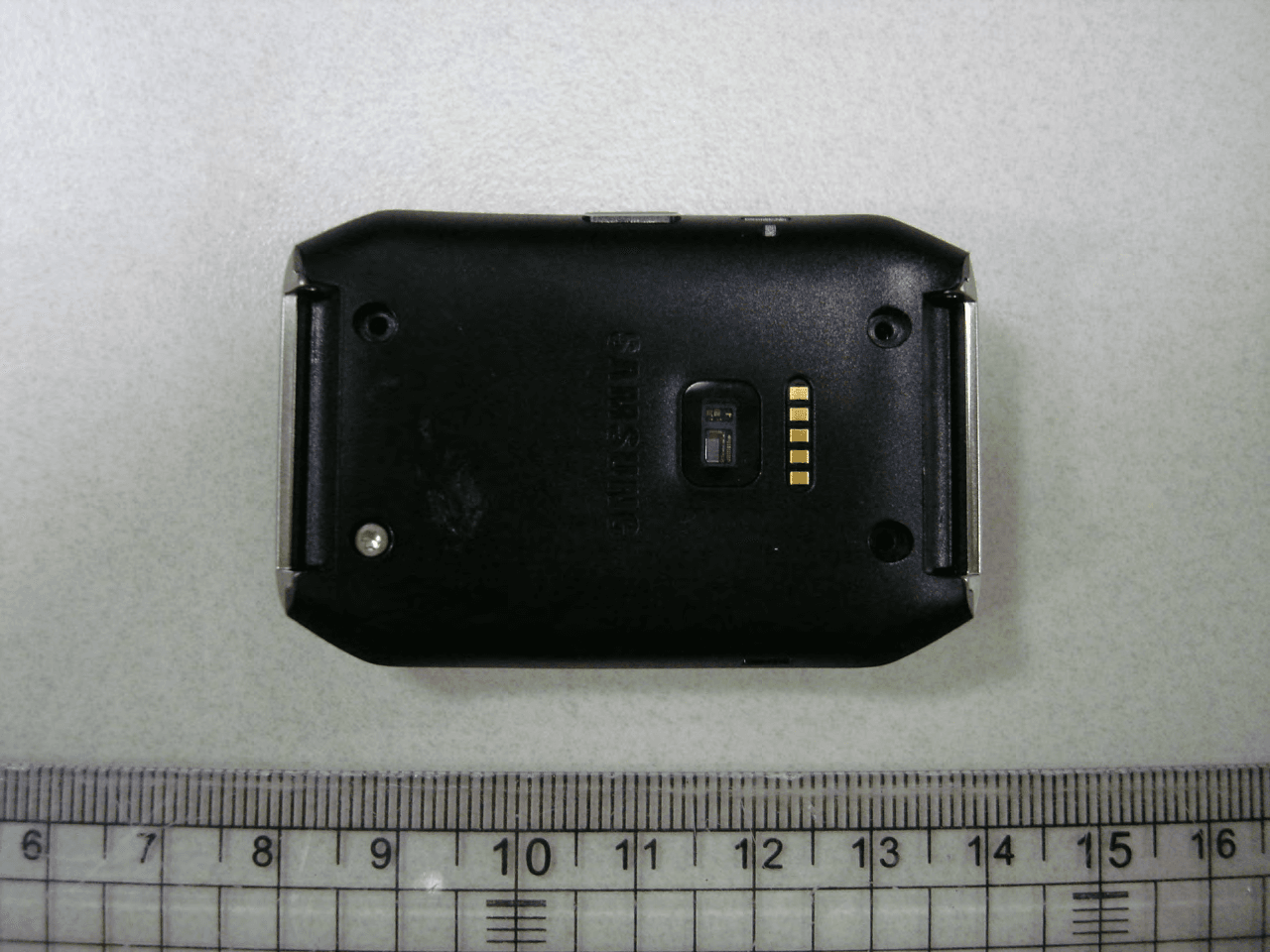
Click to zoom
Application Details
- Equipment Class
- DSS - Part 15 Spread Spectrum Transmitter
- Date of Grant
- Jun 11, 2014
- Application Purpose
- Original Equipment
- Date of Application
- Jun 11, 2014
- Equipment Note
- Wrist Worn Device with WLAN and Bluetooth
- Frequency Range
- 2402.00000000 - 2480.00000000
- Company
- Samsung Electronics Co Ltd
- Country
- United States
Documents & Files
Document Text
Text extracted from the exhibit documents filed with the FCC. Open a document above to read the original.
Users Manual
QUICK REFERENCE MANUAL DRAFT Support This guide provides you with the information you need to get started. For more information and additional support, please visit the samsung.com support page. • Get support for your device online. • Review your device’s User Manual and troubleshooting FAQs. • Review troubleshooting solutions. NOTE: Devices and software are constantly evolving—the screen images and icons you see here are for reference only. NOTE: This device should only be used with firmware versions that have been approved for use by the carrier and the device manufacturer. If unauthorized firmware is placed on the device it will not function. For a list of compatible smartphones, please visit: www.samsung.com/us/gearsupport DRAFT Device Functions You can use mobile devices more conveniently by connecting to various applications with the Samsung Gear™ Live. Set your exercise program and manage your health by connecting the Gear Live to a mobile device. Touch screen ¬Power button: Press and hold to to turn the Gear Live on/off. Press to turn the screen on/off, or to move the Home screen. DRAFT Charging terminals Microphone Power button Heart rate sensor Charging dock Charging terminals Multipurpose jack DRAFT Setting Up Your Device Charging the Device 1. Before turning on your Gear Live for the first time, charge it fully. 2. Carefully place the Gear Live on the charging dock with the charging terminals facing each other and connect to the charger. Charging terminals Charging dock DRAFT 3. Plug in the USB cable. Caution!: Connect the charger properly to the device. An improper connection can damage the device and void the warranty. DRAFT 4. When finished charging, disconnect the Gear Live from the charging dock. DRAFT Wearing the Gear Live 1. Release the pin from the strap. 2. Place the strap around your wrist, fit the strap to your wrist, and then fasten it with the pin. Pin 3. Press the button to close the clasp. DRAFT Changing the Band The strap is held in place by small spring-loaded pins (called presto pins). ¬Press in on the pin to release it from the case, and then lift the strap out as shown. Attaching the Band ¬Insert one side of the pin into the Gear Live case, and then press in on the pin. Slip the band into the case and then release the pin to secure the band in place. Presto pins Press in on the pin Lift out to remove DRAFT ©2014 Samsung Telecommunications America, LLC. Samsung, Gear, and TecTile are all trademarks of Samsung Electronics Co., Ltd. Bluetooth® is a registered trademark of Bluetooth SIG. Other company and product names mentioned herein may be trademarks of their respective owners. Screen images simulated. Appearance of device may vary. Printed in Vietnam | 04/2014 | GH68-41040A Rev_1.3 SAMSUNG TELECOMMUNICATIONS AMERICA 1301 E. Lookout Drive | Richardson, TX 75082 1.888.987.HELP www.samsung.com/mobile DRAFT Connection Pairing the Devices 1. Turn on the Gear Live and select a language. 2. Download the Android Wear app from the Play Store onto your mobile device. 3. Open the Android Wear app and tap OK when the Bluetooth ® pairing request displays. 4. Tap OK on your device to confirm the passkey. 5. On your mobile device tap the Gear Live model name. DRAFT 6. When the Bluetooth pairing request window appears on your mobile device, tap OK. 7. When the connection window appears, tap on your Gear Live . DRAFT • When the devices are connected, the Android Wear app launches on the mobile device. Then, on the Gear Live, scroll through the screen to view the on- screen information about Google Now cards. The Home screen appears on the Gear Live. NOTE: If you want to connect the Gear Live to a newly purchased mobile device or to another mobile device for the first time, reset the Gear Live. Resetting the Gear Live will remove the data from the memory. After the reset, you can connect the Gear Live to a different mobile device. DRAFT Viewing the Home screen Once you pair the Gear Live with the mobile device, the Home screen displays. Scroll left or right to view more applications. Returning to the previous page Flick your finger down from the top of the screen while using apps to return to the previous page. DRAFT Applications WatchON Remote Use the Gear Live as a remote control for a TV or set-top box. S Voice Command the device by voice to perform various features. Music Player Listen to music saved on the Gear Live. Voice Memo Record voice memos. Pedometer Set a goal and measure your daily step counts. Exercise Set a goal and an exercise plan. DRAFT Heart rate Measure and record your heart rate. Sleep Monitor your sleep patterns and record how much sleep you get. Notifications Stay up-to-date with a variety of events such as missed calls or new messages, of the mobile device. Logs View recent calls and message logs. Dialer Enter a phone number using the keypad to make a call. Contacts View the contacts list saved in the connected mobile device and make calls or send messages to contacts. DRAFT Apps Launch applications installed on the Gear Live. Settings Configure the Gear Live by setting items. Controls View the connection status and remaining battery life. Adjust the volume and display brightness. NOTE: Available applications and the arrangement of applications may vary depending on the software version. DRAFT Important • Pedometer, Sleep, Exercise, and Heart rate are intended for leisure, well-being and fitness purposes only and are not intended for medical use. • The heart rate figures may not be accurate depending on measurement conditions and surroundings. Take heart rate measurements when you are seated and relaxed. • Water-resistant and dustproof based on the IP67 Rating, which tests submersion up to 1 meter for up to 30 minutes. Not shockproof. Cases must be tightly closed. • The accuracy of the heart rate sensor may be diminished depending on skin condition, or measurement conditions and surroundings. • Do not look directly at the heart rate sensor’s lights.…
Text truncated - open the document above for the full version.
Attestation Statements
SAMSUNG ELECTRONICS CO., LTD 129, Samsung-ro,Yeongtong-gu Suwon-si,Gyeonggi-do, 443-742 Korea June 11, 2014 Fede ral Communica tions Commissio n 7435 Oakland Mills Road Colum bia, MD 21046 SUBJECT : Label Statement FCC ID : A3LSMR382 Gentlemen: We hereby provide the label statement letter for the above-mentioned device by a label statement policy of KDB 784748 D01. The label statement is as follows: The FCC ID label is located on the rear of the device with the battery installed. At this time the FCC ID is readily visible to the user. The label is permanently engraved by laser and not easily removed from the device. This statement could not be included in the label. So we inform you of it through this letter. Should you have any questions or comments concerning the above, please contact the undersigned. Sincerely Yours, Seoung Ho Park Senior Manager SAMSUNG ELECTRONICS CO.,LTD Telecommunication Network Business Mobile Communication Division Regulatory Compliance Group.
Cover Letter(s)
SAMSUNG ELECTRONICS AMERICA, INC. American QA Lab 19 Chapin Rd, Building D. Pine Brook, NJ 07058 Date: June 07, 2014 Federal Communications Commission Authorization and Evaluation Division 7435 Oakland Mills Road, Columbia, MD 21046 RE: Request of Confidentiality for FCC ID: A3LSMR382 To Whom It May Concern: Pursuant to Sections 0.457 and 0.459 of the Commission’s Rules (CFR 47), and Section 552 (b) (4) of the Freedom of Information Act, SAMSUNG ELECTRONICS CO.,LTD. hereby requests confidentiality and treatment of certain information accompanying this application. The materials contain trade secrets and proprietary information not customarily released to the public. The public disclosure of these matters might be harmful to the Applicant and provide unjustified benefits to its competitors. We are also hereby request Short-Term Confidentiality for 180 days after the grant as outlined in Public Notice DA 04-1705. This provision will give SAMSUNG ELECTRONICS CO.,LTD. temporary confidentiality of commercially sensitive information prior to product release. The requested Permanent and Short-Term Confidential exhibits are listed as follows: PERMANENT AND SHORT-TERM CONFIDENTIAL LIST Exhibit Description PERMANENT 1 Block Diagram 2 Operational Description 3 Schematics SHORT-TERM 4 External Photos 5 Internal Photos 6 Test-Setup Photos 7 Users Manual The Applicant understands that pursuant to Rule 0.457, disclosure of this application and all accompanying documentations, where applicable, will not be made public before the date of the Grant for this application. Sincerely, Peter Ra General Manager American QA Lab SAMSUNG Electronics America INC.
ID Label/Location Info
Model: SM-R382 Label and Location FCC ID: A3L SMR382 Label: Top Location: Back of device Bottom Smart Wearable : FCC ID is printed on bottom of the device Label
RF Exposure Info
FCC ID: A3LSMR382 SAR EVALUATION REPORT Reviewed by: Quality Manager Document S/N: Test Dates: DUT Type: Page 1 of 20 0Y1405231086.A3L 05/27/14 - 05/29/14 BT/WLAN Wrist Device © 2014 PCTEST Engineering Laboratory, Inc. REV 13.5 M 12/04/2013 Applicant Name: Date of Testing: Samsung Electronics, Co. Ltd. 05/27/14 - 05/29/14 129, Samsung-ro, Maetan dong, Test Site/Location: Yeongtong-gu, Suwon-si PCTEST Lab, Columbia, MD, USA Gyeonggi-do 443-742, Korea Document Serial No.: 0Y1405231086.A3L FCC ID: A3LSMR3 8 2 APPLICANT: SAMSUNG ELECTRONICS, CO. LTD. DUT Type: BT/WLAN Wrist Device Application Type: Certification FCC Rule Part(s): CFR §2.1093 Model(s): SM-R382 Test Device Serial No.: Pre-Production [S/N: R3AF501KF3V, R3AF501KG7N] This wireless portable device has been shown to be capable of compliance for localized specific absorption rate (SAR) for uncontrolled environment/general population exposure limits specified in ANSI/IEEE C95.1-1992 and has been tested in accordance with the measurement procedures specified in Section 1.7 of this report; for North American frequency bands only. I attest to the accuracy of data. All measurements reported herein were performed by me or were made under my supervision and are correct to the best of my knowledge and belief. I assume full responsibility for the completeness of these measurements and vouch for the qualifications of all persons taking them. Test results reported herein relate only to the item(s) tested. 1 gm Head (W /kg) 10 gm Extremity (W /kg) DTS2.4 GHz WLAN2412 - 2462 MHz0.100.70 DTSBluetooth LE 2402 - 2480 MHzN/AN/A DSSBluetooth2402 - 2480 MHz< 0.1< 0.1 Band & ModeTx Frequency Equipment Class SAR PCTEST ENGINEERING LABORATORY, INC. 7185 Oakland Mills Road, Columbia, MD 21046 USA Tel. +1.410.290.6652 / Fax +1.410.290.6654 http://www.pctestlab.com SAR EVALUATION REPORT FCC ID: A3LSMR382 SAR EVALUATION REPORT Reviewed by: Quality Manager Document S/N: Test Dates: DUT Type: Page 2 of 20 0Y1405231086.A3L 05/27/14 - 05/29/14 BT/WLAN Wrist Device © 2014 PCTEST Engineering Laboratory, Inc. REV 13.5 M 12/04/2013 TABLE OF CONTENTS 1 DEVICE UNDER TEST ....................................................................................................................3 2 INTRODUCTION ..............................................................................................................................5 3 DOSIMETRIC ASSESSMENT .........................................................................................................6 4 TEST CONFIGURATION POSITIONS FOR WRIST-WORN DEVICES ..........................................7 5 RF EXPOSURE LIMITS ...................................................................................................................8 6 FCC MEASUREMENT PROCEDURES ...........................................................................................9 7 RF CONDUCTED POWERS ......................................................................................................... 10 8 SYSTEM VERIFICATION .............................................................................................................. 12 9 SAR DATA SUMMARY ................................................................................................................. 13 10 SAR MEASUREMENT VARIABILITY ........................................................................................... 15 11 EQUIPMENT LIST ......................................................................................................................... 16 12 MEASUREMENT UNCERTAINTIES ............................................................................................ 17 13 CONCLUSION ............................................................................................................................... 18 14 REFERENCES .............................................................................................................................. 19 APPENDIX A: SAR TEST PLOTS APPENDIX B: SAR DIPOLE VERIFICATION PLOTS APPENDIX C: PROBE AND DIPOLE CALIBRATION CERTIFICATES APPENDIX D: SAR TISSUE SPECIFICATIONS APPENDIX E: SAR SYSTEM VALIDATION APPENDIX F: SAR TEST SETUP PHOTOGRAPHS FCC ID: A3LSMR382 SAR EVALUATION REPORT Reviewed by: Quality Manager Document S/N: Test Dates: DUT Type: Page 3 of 20 0Y1405231086.A3L 05/27/14 - 05/29/14 BT/WLAN Wrist Device © 2014 PCTEST Engineering Laboratory, Inc. REV 13.5 M 12/04/2013 1 DEVICE UNDER TEST 1.1 Device Overview 1.2 Nominal and Maximum Output Power Specifications This device operates using the following maximum and nominal output power specifications. SAR values were scaled to the maximum allowed power to determine compliance per KDB Publication 447498 D01v05. 1.3 DUT Antenna Locations Note: Exact antenna dimensions and separation distances are shown in the Technical Descriptions in the FCC Filing. Figure 1-1 DUT Antenna Locations 2.4 GHz WLANData 2412 - 2462 MHz Bluetooth LEData 2402 - 2480 MHz BluetoothData2402 - 2480 MHz Band & Mode Tx Frequency Operating Modes Maximum Nominal Maximum Nominal Maximum Nominal Maximum Nominal Maximum Nominal IEEE 802.11b (2.4 GHz) 17.5 IEEE 802.11g (2.4 GHz) Mode / Band Bluetooth LE 7.5 7.0 IEEE 802.11n (2.4 GHz) 13.5 Modulated Average (dBm) Bluetooth 13.0 17.0 14.0 13.0 12.5 14.5 To p Left Bottom 2.4 GHz BT/WIFI Tx /Rx Ant 37mm 46 mm Right Front of Device FCC ID: A3LSMR382 SAR EVALUATION REPORT Reviewed by: Quality Manager Document S/N: Test Dates: DUT Type: Page 4 of 20 0Y1405231086.A3L 05/27/14 - 05/29/14 BT/WLAN Wrist Device © 2014 PCTEST Engineering Laboratory, Inc. REV 13.5 M 12/04/2013 1.4 Simultaneous Transmission Capabilities This DUT cannot transmit in any simultaneous transmission scenarios. 1.5 SAR Test Exclusions Applied (A) WIFI/BT Per FCC KDB 447498 D01v05, the 1g SAR exclusion threshold for distances <50mm is defined by the following equation: Based on the maximum conducted power of Bluetooth LE (rounded to the nearest mW) and the antenna to user separat…
Text truncated - open the document above for the full version.
Test Report
FCC ID: A3LSMR382 FCC Pt. 15.247 BLUETOOTH TEST REPORT (CERTIFICATION) Reviewed by: Quality Manager Test Report S/N: Test Dates: EUT Type: Page 1 of 46 0Y1405231089.A3L 5/27 - 6/2/2014 Wrist Watch © 2014 PCTEST Engineering Laboratory, Inc. V 1.2 05/28/2014 Applicant Name: Date of Testing: Samsung Electronics, Co. Ltd. 5/27 - 6/2/2014 129, Samsung-ro, Maetan dong, Test Site/Location: Yeongtong-gu, Suwon-si PCTEST Lab. Columbia, MD, USA Gyeonggi-do 443-742, Korea Test Report Serial No.: 0Y1405231089.A3L FCC ID: A3LSMR382 APPLICANT: Samsung Electronics, Co. Ltd. Application Type: Certification Model(s): SM-R382 EUT Type: Wrist Watch Max. RF Output Power: 21.538 mW (13.33 dBm) Peak Conducted Frequency Range: 2402 – 2480MHz (Bluetooth for US) Type of Modulation: GFSK, /4-DQPSK, 8DPSK FCC Classification: FCC Part 15 Spread Spectrum Transmitter (DSS) FCC Rule Part(s): Part 15 Subpart C (15.247) Test Procedure(s): DA 00-705 This equipment has been shown to be capable of compliance with the applicable technical standards as indicated in the measurement report and was tested in accordance with the measurement procedures specified in DA 00-705. Test results reported herein relate only to the item(s) tested. I attest to the accuracy of data. All measurements reported herein were performed by me or were made under my supervision and are correct to the best of my knowledge and belief. I assume full responsibility for the completeness of these measurements and vouch for the qualifications of all persons taking them. PCTEST ENGINEERING LABORATORY, INC. 7185 Oakland Mills Road, Columbia, MD 21046 USA Tel. 410.290.6652 / Fax 410.290.6654 http://www.pctestlab.com MEASUREMENT REPORT FCC PART 15.247 Bluetooth FCC ID: A3LSMR382 FCC Pt. 15.247 BLUETOOTH TEST REPORT (CERTIFICATION) Reviewed by: Quality Manager Test Report S/N: Test Dates: EUT Type: Page 2 of 46 0Y1405231089.A3L 5/27 - 6/2/2014 Wrist Watch © 2014 PCTEST Engineering Laboratory, Inc. V 1.2 05/28/2014 TABLE OF CONTENTS FCC PART 15.247 MEASUREMENT REPORT .................................................................................................. 3 1.0 INTRODUCTION ...................................................................................................................................... 4 1.1 SCOPE ........................................................................................................................................................... 4 1.2 PCTEST TEST LOCATION ............................................................................................................................ 4 2.0 PRODUCT INFORMATION ..................................................................................................................... 5 2.1 EQUIPMENT DESCRIPTION......................................................................................................................... 5 2.2 DEVICE CAPABILITIES ................................................................................................................................. 5 2.3 TEST CONFIGURATION ............................................................................................................................... 5 2.4 EMI SUPPRESSION DEVICE(S)/MODIFICATIONS ...................................................................................... 5 2.5 LABELING REQUIREMENTS ........................................................................................................................ 5 3.0 DESCRIPTION OF TEST ........................................................................................................................ 6 3.1 EVALUATION PROCEDURE ......................................................................................................................... 6 3.2 AC LINE CONDUCTED EMISSIONS ............................................................................................................. 6 3.3 RADIATED EMISSIONS ................................................................................................................................ 7 4.0 ANTENNA REQUIREMENTS .................................................................................................................. 8 5.0 TEST EQUIPMENT CALIBRATION DATA .............................................................................................. 9 6.0 TEST RESULTS ...................................................................................................................................... 9 6.1 SUMMARY ................................................................................................................................................... 10 6.2 20DB BANDWIDTH MEASUREMENT ......................................................................................................... 11 6.3 OUTPUT POWER MEASUREMENT ........................................................................................................... 17 6.4 BAND EDGE COMPLIANCE ....................................................................................................................... 27 6.5 CARRIER FREQUENCY SEPARATION ...................................................................................................... 30 6.6 TIME OF OCCUPANCY ............................................................................................................................... 31 6.7 NUMBER OF HOPPING CHANNELS .......................................................................................................... 32 6.8 CONDUCTED SPURIOUS EMISSIONS ...................................................................................................... 34 6.9 RADIATED SPURIOUS EMISSION MEASUREMENTS .............................................................................. 38 6.10 RADIATED RESTRICTED BAND EDGE MEASUREMENTS .................................................................. 42 6.11 LINE CONDUCTED MEASUREMENT DATA .............................................…
Text truncated - open the document above for the full version.
Test Setup Photos
Samsung Electronics, Co. Ltd. FCC ID: A3LSMR382 Model: SM-R382 Test Set-Up Photos EUT Type: Wrist Watch Page 1 of 3 © 2014 PCTEST Engineering Laboratory, Inc. V 1.2 05/28/2014 TEST SETUP PHOTOGRAPHS Samsung Electronics, Co. Ltd. FCC ID: A3LSMR382 Model: SM-R382 Test Set-Up Photos EUT Type: Wrist Watch Page 2 of 3 © 2014 PCTEST Engineering Laboratory, Inc. V 1.2 05/28/2014 Samsung Electronics, Co. Ltd. FCC ID: A3LSMR382 Model: SM-R382 Test Set-Up Photos EUT Type: Wrist Watch Page 3 of 3 © 2014 PCTEST Engineering Laboratory, Inc. V 1.2 05/28/2014
Test Setup Photos
FCC IDA3LSMR382 SAR EVALUATION REPORT Reviewed by: Quality Manager Test Dates: DUT Type: APPENDIX F: Page 1 of 4 05/27/14 - 05/29/14 BT/WLAN Wrist Device © 2014 PCTEST Engineering Laboratory, Inc. REV 13.5 M 04/28/2014 APPENDIX F: SAR TEST SETUP PHOTOGRAPHS FCC IDA3LSMR382 SAR EVALUATION REPORT Reviewed by: Quality Manager Test Dates: DUT Type: APPENDIX F: Page 2 of 4 05/27/14 - 05/29/14 BT/WLAN Wrist Device © 2014 PCTEST Engineering Laboratory, Inc. REV 13.5 M 04/28/2014 SAR Test Setup Photo 1: Front side at 1.0 cm FCC IDA3LSMR382 SAR EVALUATION REPORT Reviewed by: Quality Manager Test Dates: DUT Type: APPENDIX F: Page 3 of 4 05/27/14 - 05/29/14 BT/WLAN Wrist Device © 2014 PCTEST Engineering Laboratory, Inc. REV 13.5 M 04/28/2014 SAR Test Setup Photo 2: Back Side at 0.0 cm FCC IDA3LSMR382 SAR EVALUATION REPORT Reviewed by: Quality Manager Test Dates: DUT Type: APPENDIX F: Page 4 of 4 05/27/14 - 05/29/14 BT/WLAN Wrist Device © 2014 PCTEST Engineering Laboratory, Inc. REV 13.5 M 04/28/2014 SAR Test Setup Photo 3: Front Side at 0.0 cm
Contact Information
Applicant
Jenni Chun(General Manager)
Technical Contact
PCTEST Engineering Laboratory, Inc.Randy Ortanez
[email protected]410-290-6652
6660-B Dobbin Road · Columbia, Maryland · United States
Test Firm
PCTEST Engineering Laboratory, Inc.Randy Ortanez
Technical Specifications
| # | Rule Parts | Frequency Range | Power Output |
|---|---|---|---|
| 1 | 15C | 2.40 GHz - 2.48 GHz | 22.00 mW |
Other Applications from Samsung Electronics Co Ltd
A3LSMS741B
Aug 05, 2026Portable Handset
Equipment Class
6VL - 15E 6 GHZ Very Low Power DeviceA3LSMX940
Jul 31, 2026BT,BLE Tablet DTS,UNII a,b,g,n,ac,ax,be and digitizer
Equipment Class
DTS - Digital Transmission SystemA3LSMS741U
Jul 30, 2026Portable Handset
Equipment Class
6CD - 15E 6 GHz Low Power Dual ClientA3LSMX840
Jul 27, 2026BT,BLE Tablet DTS,UNII a,b,g,n,ac,ax and Digitizer
Equipment Class
DSS - Part 15 Spread Spectrum TransmitterA3LSMX848U
Jul 27, 2026WCDMA, LTE, 5G NR Tablet BT,BLE, DTS,UNII a b g n ac ax and Digitizer
Equipment Class
JBP - Part 15 Class B Computing Device Peripheral