A3LWB150FDigital Camera
Samsung Electronics Co Ltd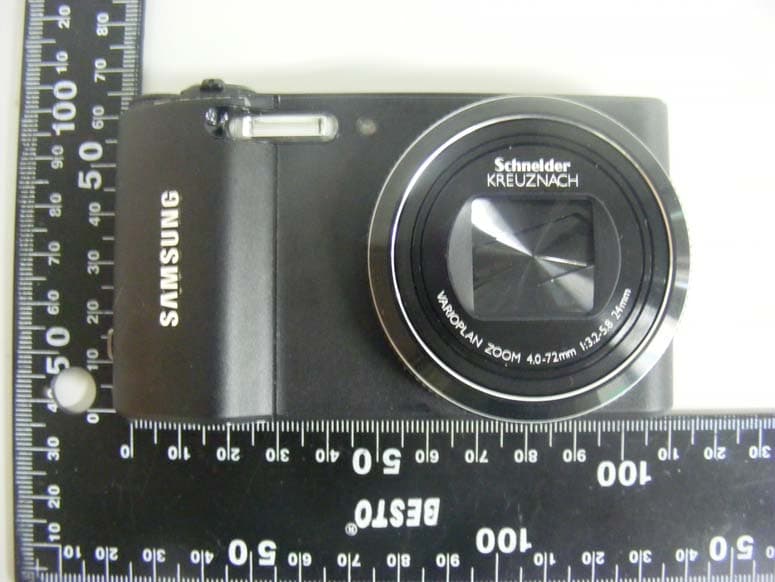
Click to zoom
Application Details
- Equipment Class
- DTS - Digital Transmission System
- Date of Grant
- Oct 23, 2011
- Application Purpose
- Original Equipment
- Date of Application
- Oct 23, 2011
- Equipment Note
- Digital Camera
- Frequency Range
- 2412.00000000 - 2462.00000000
- Company
- Samsung Electronics Co Ltd
- Country
- United States
Documents & Files
Document Text
Text extracted from the exhibit documents filed with the FCC. Open a document above to read the original.
Users Manual
This user manual includes detailed usage instructions for your camera. Please read this manual thoroughly. User Manual WB150/WB150F WB152/WB152F Click a topic Basic troubleshooting Quick reference Contents Basic functions Extended functions Shooting options Playback/Editing Wireless network Settings Appendixes Index 1 Keep your camera away from small children and pets. Keep your camera and all accessories out of the reach of small children and animals. Small parts may cause choking or serious injury if swallowed. Moving parts and accessories may present physical dangers as well. Do not expose the camera to direct sunlight or high temperatures for an extended period of time. Prolonged exposure to sunlight or extreme temperatures can cause permanent damage to your camera’s internal components. Avoid covering the camera or charger with blankets or clothes. The camera may overheat, which may distort the camera or cause a fire. If liquid or foreign objects enter your camera, immediately disconnect all power sources, such as the battery or charger, and then contact a Samsung service center. Health and safety information Always comply with the following precautions and usage tips to avoid dangerous situations and ensure peak performance of your camera. Warning—situations that could cause injury to yourself or others Do not disassemble or attempt to repair your camera. This may result in electric shock or damage to the camera. Do not use your camera near flammable or explosive gases and liquids. This may cause a fire or explosion. Do not insert flammable materials into the camera or store these materials near the camera. This may cause a fire or electric shock. Do not handle your camera with wet hands. This may result in electric shock. Prevent damage to subjects’ eyesight. Do not use the flash in close proximity (closer than 1 m/3 ft) to people or animals. If you use the flash too close to your subject’s eyes, this can cause temporary or permanent eyesight damage. 2 Caution—situations that could cause damage to your camera or other equipment Remove the batteries from your camera when storing it for an extended period of time. Installed batteries may leak or corrode over time and cause serious damage to your camera. Use only authentic, manufacturer-recommended, Lithium-ion replacement batteries. Do not damage or heat the battery. Inauthentic, damaged, or heated batteries may cause a fire or personal injury. Use only Samsung-approved batteries, chargers, cables and accessories. • Using unauthorized batteries, chargers, cables or accessories can cause batteries to explode, damage your camera, or cause injury. • Samsung is not responsible for damage or injuries caused by unapproved batteries, chargers, cables or accessories. Use the battery only for its intended purpose. Misusing the battery may cause a fire or electric shock. Do not touch the flash while it fires. The flash is very hot when fired and may burn your skin. When you use the AC charger, turn off the camera before you disconnect the power to the AC charger. Failing to do so may result in fire or electric shock. Disconnect the charger from the wall socket when not in use. Failing to do so may result in fire or electric shock. Do not use a damaged power supply cord, plug, or loose outlet when you charge batteries. This may cause a fire or electric shock. Do not allow the AC charger to come in contact with the +/- terminals on the battery. This may cause a fire or electric shock. Do not force the camera’s parts or apply pressure to the camera. This may cause your camera to malfunction. Health and safety information 3 Health and safety information Exercise caution when you connect cables or adapters and install batteries and memory cards. If you force the connectors, improperly connect cables, or improperly install batteries and memory cards, you can damage ports, connectors, and accessories. Keep cards with magnetic strips away from the camera case. Information stored on the card may be damaged or erased. Never use a damaged charger, battery, or memory card. This may result in electric shock or camera malfunction or cause a fire. Check that the camera is operating properly before use. The manufacturer takes no responsibility for any loss of files or damage that may result from camera malfunction or improper use. You must plug the small end of the USB cable into your camera. If the cable is reversed, it may damage your files. The manufacturer is not responsible for any loss of data. 4 Copyright information • Microsoft Windows and the Windows logo are registered trademarks of the Microsoft Corporation. • Mac is a registered trademark of the Apple Corporation. • Wi-Fi ® , the Wi-Fi CERTIFIED logo, and the Wi-Fi logo are registered trademarks of the Wi-Fi Alliance. • Trademarks and trade names used in this manual are the property of their respective owners. • Camera specifications or contents of this manual may be changed without prior notice due to upgrade of camera functions. • We recommend using your camera within the country where you purchase it. • You are not allowed to reuse or distribute any part of this manual without prior permission. • For Open Source License information, refer to the ‘OpenSourceInfo.pdf’ in the provided CD-ROM. Outline of the User Manual Basic functions 13 Learn about your camera’s layout, icons, and basic functions for shooting. Extended functions 34 Learn how to capture a photo and record a video by selecting a mode. Shooting options 57 Learn how to set the options in Shooting mode. Playback/Editing 84 Learn how to play back photos or videos, and edit photos or videos. Also, learn how to connect your camera to your computer, photo printer, TV, HDTV, or 3D TV. Wireless network 111 Learn to connect to wireless local area networks (WLANs) and use functions. Settings 131 Refer to options to configure your camera’s settings. Appendixes 137 Get information about error messages, specifications, and maintenance. 5 Indi…
Text truncated - open the document above for the full version.
Users Manual
Selecting a resolution and quality ............ 58 Selecting a resolution ........................ 58 Setting the photo quality ..................... 59 Using the timer .................................... 60 Shooting in the dark ........................... 61 Preventing red-eye ........................... 61 Using the flash ................................. 61 Adjusting the ISO sensitivity .................. 63 Changing the camera’s focus ............... 64 Using macro .................................... 64 Using auto focus .............................. 64 Focusing on a selected area .................. 66 Using tracking auto focus ..................... 66 Adjusting the focus area ..................... 67 Using Face Detection ........................... 68 Detecting faces ................................. 68 Capturing a self portrait shot .................. 69 Capturing a smile shot ........................ 69 Detecting eye blinking ........................ 70 Using Smart Face Recognition ............... 70 Registering faces as your favorites (My Star) ....................................... 71 Adjusting brightness and color ............... 73 Adjusting the exposure manually (EV) ...... 73 Changing the metering option ............... 74 Selecting a White Balance setting ............ 75 Using burst modes .............................. 78 Capturing photos in the High-speed burst mode .................................... 78 Capturing photos in the Precapture mode .............................. 79 Capturing bracketed photos .................. 79 Applying effects/Adjusting images ......... 81 Applying Smart Filter effects .................. 81 Adjusting your photos ........................ 83 Shooting options Learn how to set the options in Shooting mode. Shooting options 58 Selecting a resolution and quality Learn how to change the image resolution and quality settings. Setting the video resolution 1 In Shooting mode, press [m]. 2 Select V Movie Size. 3 Select an option. IconDescription 1280X720: High-quality HD files to play back on an HDTV. 640X480: HD files to play back on an HDTV. 320X240: SD files to play back on an analog TV. If a memory card is not inserted, the camera supports only . Selecting a resolution As you increase the resolution, your photo or video will include more pixels, so it can be printed on larger paper or displayed on a larger screen. When you use a high resolution, the file size will also increase. Setting the photo resolution 1 In Shooting mode, press [m]. 2 Select a Photo Size. 3 Select an option. IconDescription 4320X3240: Print on an A1 paper. 4320X2880: Print on an A2 paper in wide ratio (3:2). 3648X2736: Print on an A2 paper. 4320X2432: Print on an A2 paper in panorama ratio (16:9) or play back on an HDTV. 2832X2832: Print on an A4 paper. 2592X1944: Print on an A4 paper. 1984X1488: Print on an A5 paper. 1920X1080: Print on an A5 paper in panorama ratio (16:9) or play back on an HDTV. 1024X768: Attach to an email. SpAhMds SpAhMdsv Shooting options 59 Selecting a resolution and quality Setting the photo quality Set the photo quality setting. Higher image quality settings will result in larger file sizes. The camera compresses and saves the photos you capture in the JPEG format. 1 In Shooting mode, press [m]. 2 Select a Quality. 3 Select an option. IconDescription Super Fine: Capture photos in super high quality. Fine: Capture photos in high quality. Normal: Capture photos in normal quality. pAhMds Shooting options 60 Using the timer Learn how to set the timer to delay shooting. SpAhMdsv 3 Press [Shutter] to start the timer. • The AF-assist light/timer lamp blinks. The camera will automatically capture a photo after the specified time has elapsed. • Press [Shutter] or [t] to cancel the timer. • Depending on the Face Detection options you selected, the timer function may not be available. 1 In Shooting mode, press [t]. BackSet Timer : Off 2 Select an option. Icon Description Off: The timer is not active. 10 Sec: Capture a photo after a 10-second delay. 2 Sec: Capture a photo after a 2-second delay. Shooting options 61 Shooting in the dark Learn how to capture photos at night or in low light conditions. Using the flash Use the flash when you capture photos in the dark or when you need more light in your photos. 1 In Shooting mode, press [F]. MoveAdjust Flash : Auto Flash Strength 2 Select an option. IconDescription Off: • The flash will not fire. • The camera will display the shake warning when you are shooting in low light. Auto: In Smart Auto mode, the camera will select a proper flash setting for the scene it detects. SpAhMs Preventing red-eye If the flash fires when you capture a photo of a person in the dark, a red glow may appear in the person’s eyes. To prevent this, select Red-eye or Red-eye Fix. Refer to flash options in “Using the flash.” Before correction After correction ps Shooting options 62 Shooting in the dark • Flash options are not available if you set Burst options or select Self-Portrait or Blink Detection. • Make sure that your subjects are within the recommended distance from the flash. (p. 131) • If light from the flash is reflected or there is a substantial amount of dust in the air, tiny spots may appear in your photo. Adjusting the flash intensity Adjust the flash intensity to avoid over-exposed or under-exposed photos. 1 In Shooting mode, press [F]. 2 Scroll to an option. 3 Press [c]. IconDescription Auto: The flash will fire automatically when the subject or background is dark. Red-eye: • The flash will fire twice when the subject or background is dark to reduce the red-eye effect. • There is an interval between the 2 bursts of the flash. Do not move until the flash fires a second time. Fill in: • The flash always fires. • The camera automatically adjusts light intensity. Slow Sync: • The flash fires and the shutter stays open longer. • This option is recommended when you want to capture more ambient light to reveal more deta…
Text truncated - open the document above for the full version.
Cover Letter(s)
Date: February 14, 2010 Federal Communications Commission 7435 Oakland Mills Road Columbia MD 21046 c.c. Compliance Certification Services Certification Division 47173 Benicia Street Fremont, CA 94538, USA To whom it may concern: I, the undersigned, hereby authorize Lab Manager Charles. Kim (or Feel. Jeong) and of SGS Korea Co., Ltd and hereafter referred to as SGS Korea, to act on our behalf in all manners relating to application for equipment authorization, including signing of all documents relating to these matters. Any and all acts carried out by Lab Manager Charles. Kim (or Feel. Jeong) of SGS Korea Co., Ltd on our behalf shall have the same effect as acts of our own. I, the undersigned, hereby certify that we are not subject to a denial of federal benefits, that includes FCC benefits, pursuant to Section 5301 of the Anti-Drug Abuse Act of 1988, 21 U.S.C. 853(a). In authorizing SGS Korea as our agent, we still recognize that we are responsible to: a) comply with the relevant provisions of the certification program; b) make all necessary arrangements for the conduct of the evaluation, including provision for examining documentation and access to all areas, records (including internal audit reports) and personnel for the purposes of evaluation (e.g. testing, inspection, assessment, surveillance, reassessment) and resolution of complaints; c) make claims regarding certification only in respect of the scope for which certification has been granted; d) do not use our product certification in such a manner as to bring the Certification Division into disrepute and not make any statement regarding our product certification which the Certification Division may consider misleading or unauthorized; e) upon suspension or cancellation of certification, discontinue use of all advertising matter that contains any reference thereto and return any certification documents as required by the Certification Division; f) use certification only to indicate the products are certified as being in conformity with specified standards; g) endeavor to ensure that no certificate or report nor any part thereof is used in a misleading manner; h) ensure that any reference to our product certification in communication media such as documents, brochures or advertising, complies with the requirements of the Certification Division; i) keep a record of all complaints made known to the us relating to the product’s compliance with requirements of the relevant standard and to make these records available to the Certification Division when requested; j) take appropriate action with respect to such complaints and any deficiencies found in products or services that affect compliance with the requirements for certification; k) document the actions taken. This authorization is valid until further written notice from the applicant. Sincerely Yours, Sang Kyung (Peter) Ra / General Manager Samsung Electronics Co., Ltd.
Cover Letter(s)
Date: October 17, 2011 Federal Communications Commission Authorization and Evaluation Division 7435 Oakland Mills Road, Columbia, MD 21046 RE: Request of Confidentiality for FCC ID: A3LWB150F To Whom It May Concern: Pursuant to Sections 0.457 and 0.459 of the Commission’s Rules (CFR 47), and Section 552 (b) (4) of the Freedom of Information Act, Samsung Electronics Co., Ltd. hereby requests confidentiality and treatment of certain information accompanying this application. The materials contain trade secrets and proprietary information not customarily released to the public. The public disclosure of these matters might be harmful to the Applicant and provide unjustified benefits to its competitors. We are also hereby request Short-Term Confidentiality for 180 days after the grant as outlined in Public Notice DA 04-1705. This provision will give Samsung Electronics Co., Ltd temporary confidentiality of commercially sensitive information prior to product release. The requested Permanent and Temporary Confidential exhibits are listed as follows: CONFIDENTIAL LIST 1 Block Diagram 2 Operational Descriptions Permanent 3 Schematics 4 External Photos 5 Internal Photos 6 Test-Setup Photos Short-Term 7 User’s Manual The Applicant understands that pursuant to Rule 0.457, disclosure of this application and all accompanying documentations, where applicable, will not be made public before the date of the Grant for this application. Sincerely Yours, Sang Kyung (Peter) Ra / General Manager Samsung Electronics Co., Ltd.
Cover Letter(s)
To Whom It May Concern: We, SAMSUNG ELECTRONICS CO., LTD., located at 416, Maetan-3dong, Yeongtong-gu, Suwon-City, Gyeonggi-do, 443-742, Korea as manufacturer of the product model: WB150F and WB152F, declare that both WB150F and WB152F are exactly same in H/W and S/W. The only difference is the model name and it is named differently for marketing purpose. Best Regards Oh Dong-Chan / Manager Samsung Electronics Co., Ltd.
Cover Letter(s)
Declaration Letter of RF Exposure To Whom It May Concern: The WLAN average output power is as below: -2 412 MHz:14.48 dBm<300*[2.412]-0.5mW≒193mW≒22.86 dBm -2 437 MHz:14.61 dBm<300*[2.437]-0.5mW≒192mW≒22.83 dBm -2 462 MHz:14.17 dBm<300*[2.462]-0.5mW≒191mW≒22.81 dBm SAR is not required based on the output being below the threshold of 300*[f(GHz)]-0.5 mW according to KDB447498. Best Regards Oh Dong-Chan / Manager Samsung Electronics Co., Ltd.
Cover Letter(s)
47173 Benicia Street Fremont, CA 94538 Tel: 510-771-1000 Fax: 510-661-0888 Page 1 of 1 FCC, Office of Engineering and Technology. Re: FCC ID: A3LWB150F Applicant: Samsung Electronics Co Ltd FCC Correspondence Reference Number: 151194 Form 731 Confirmation Number: TC910699 Date: July 23, 2013 Dear Samuel, Please find below the responses to the questions raised in your correspondence dated 7/9/2013: 1. Please provide an internal photo of the device that shows the actual location of the FCCID on the device. An external photograph has been uploaded showing the label location on the bottom of the camera, in the same location specified in the drawing submitted with the original application. 2. Provide an internal drawing of the device that shows the location of all the antennas and the separation distances. A mechanical drawing showing the location of the antenna – above the camera lens and toward the top of the camera – has been uploaded. The drawing is dimensioned to indicate location relative to the back/top/sides of the camera. 3. Section 4 of the operational description did not provide the operational description of the WLAN2 as advertised. Please provide operational description of the device. I am not sure we understand the question. The original operational description (uploaded again) shows it to be an Atheros-based 802.11bgn 1x1 transceiver. Section 1 and 2 have a very general description of support for 802.11bgn, with additional information in section 2 giving the IC information and interface information (SDIO). There is a system block diagram for the camera plus an additional block diagram of the WLAN module in section 3. Section 4 has some additional information about the antenna type and external clocks. Hopefully the three documents uploaded and this letter will address your concerns. Please let me know if you have additional comments for this application. Regards, Mark Briggs Director, UL CCS Certification Program UL Verification Services, WiSE Business Segment (Wireless, Interoperability, payment Security, & EMC)
External Photos
External photos of EUT Front view of EUT Rear view of EUT Top view of EUT Bottom view of EUT Slide view of EUT
ID Label/Location Info
FCC/IC Label 1. FCC/IC Label Drawing SAMSUNG ELECTRONICS CO., LTD. Model : WB150F FCC ID : A3LWB150F IC: 649EWB150F Made in China 2. FCC/IC Label Location Bottom side of EUT
ID Label/Location Info
- Back - Bottom
Internal Photos
Internal photos of EUT view of EUT Top view of Main PCB Bottom view of Main PCB Top view of LCD PCB Bottom view of LCD PCB Top view of Lens PCB Bottom view of Lens PCB Top view of Button PCB Bottom view of Button PCB Top view of Flesh PCB Bottom view of Flesh PCB Top view of WLAN Antenna WLAN Antenna
Test Report
Report Number: F690501/RF-RTL005051-1 Page: 2 of 59 The results shown in this test report refer only to the sample(s) tested unless otherwise stated. This test report cannot be reproduced, except in full, without prior written permission of the Company. SGS Korea Co., Ltd. (Gunpo Laboratory) 18-34, Sanbon-dong, Gunpo-si, Gyeonggi-do, Korea, 435-040 Tel. +82 31 428 5700 / Fax. +82 31 427 2371 www.ee.sgs.com/korea INDEX Table of contents 1. General information --------------------------------------------------------------------------------------3 2. Transmitter radiated spurious emissions and conducted spurious emission --------------6 3. Receiver Radiated Spurious Emission --------------------------------------------------------------25 4. 6 ㏈ bandwidth ------------------------------------------------------------------------------------------- 27 5. Maximum peak output power --------------------------------------------------------------------------39 6. Power Spectral Density --------------------------------------------------------------------------------- 41 7. Transmitter AC Power Line Conducted Emission-------------------------------------------------48 8. Receiver AC Power Line Conducted Emission --------------------------------------------------- 53 9. Antenna Requirement ----------------------------------------------------------------------------------- 57 10. RF Exposure evaluation------------------------------------------------------------------------------- 58 Report Number: F690501/RF-RTL005051-1 Page: 3 of 59 The results shown in this test report refer only to the sample(s) tested unless otherwise stated. This test report cannot be reproduced, except in full, without prior written permission of the Company. SGS Korea Co., Ltd. (Gunpo Laboratory) 18-34, Sanbon-dong, Gunpo-si, Gyeonggi-do, Korea, 435-040 Tel. +82 31 428 5700 / Fax. +82 31 427 2371 www.ee.sgs.com/korea 1. General Information 1.1. Testing Laboratory SGS Korea Co., Ltd. - Wireless Div. 2FL, 18-34, Sanbon-dong, Gunpo-si, Gyeonggi-dong, Korea - 705, Dongcheon-dong Suji-gu, Yongin-si, Gyeonggi-do, Korea www.ee.sgs.com/korea Telephone : +82 +31 428 5700 FAX : +82 +31 427 2371 1.2. Details of Applicant Applicant : SAMSUNG ELECTRONICS Co., Ltd. Address : 416, Maetan3-dong, Yeongtong-gu, Suwon-si, Gyeonggi-do, Korea Contact Person : An, Jae-Il Phone No. : +82 +31 277 6803 1.3. Details of Factory Information Name : TIANJIN SAMSUNG OPTO-ELECTRONICS CO., LTD. Address : No.9 ZhangHeng Street, Micro-Electronic Industrial Park, JinGang Road, Tianjin, China 1.4. Description of EUT Kind of Product Digital Camera Model Name WB150F(Additional model name: WB152F) Serial Number N / A Power Supply DC 3.7 V (Li-ion Battery) Frequency Range 2 412 ~ 2 462 ㎒ (802.11b/g/n-HT20_SISO) Modulation Technique DSSS, OFDM Number of Channels 11 Antenna Type Integral Type Antenna Gain 1.62 ㏈i 1.5. Declaration by the manufacturer - 802.11n supports HT20 mode only. Report Number: F690501/RF-RTL005051-1 Page: 4 of 59 The results shown in this test report refer only to the sample(s) tested unless otherwise stated. This test report cannot be reproduced, except in full, without prior written permission of the Company. SGS Korea Co., Ltd. (Gunpo Laboratory) 18-34, Sanbon-dong, Gunpo-si, Gyeonggi-do, Korea, 435-040 Tel. +82 31 428 5700 / Fax. +82 31 427 2371 www.ee.sgs.com/korea 1.6. Test Equipment List Equipment Manufacturer Model S/N Cal Due. Signal Generator R & S SMR40 100272 Jul. 15, 2012 Spectrum Analyzer R & S FSP40 100007 Jul. 14, 2012 Spectrum Analyzer Agilent E4440A MY43362142 May. 18, 2012 Power Sensor R&S NRP-Z81 100669 Apr. 04, 2012 Attenuator Agilent 8494B MY42141937 Apr. 01, 2012 High Pass Filter Wainwright WHK3.0/18G-10SS 344 Jul. 07, 2012 DC power Supply Agilent U8002A MY49030063 Jan. 05, 2012 Preamplifier H.P. 8447F 2944A03909 Jul. 04, 2012 Preamplifier R & S SCU 18 10117 Mar. 23, 2012 Test Receiver R & S ESU26 100109 Feb. 21, 2012 Two-Line V-Network R & S ENV216 100190 Jan. 06, 2012 Test Receiver R & S ESHS10 863365/018 Apr. 27, 2012 Bilog Antenna SCHWARZBECK MESSELEKTRONIK VULB9163 396 Apr. 27, 2013 Horn Antenna R & S HF 907 100019 Jul. 29, 2012 Horn Antenna SCHWARZBECK BBHA 9170 BBHA9170431 Mar. 17, 2012 Antenna Master EMCO 1050 N.C.R. N.C.R. Turn Table Daeil EMC DI-1500 N.C.R. N.C.R. Anechoic Chamber SY Corporation L × W × H (6.5 m×3.5 m×3.5 m) N.C.R. N.C.R. Anechoic Chamber SY Corporation L × W × H (9.6 m × 6.4 m × 6.6 m) N.C.R. N.C.R. 1.7. Details of added models Model Information WB150F Basic model WB152F It’s the same as basic model, except for model name. Report Number: F690501/RF-RTL005051-1 Page: 5 of 59 The results shown in this test report refer only to the sample(s) tested unless otherwise stated. This test report cannot be reproduced, except in full, without prior written permission of the Company. SGS Korea Co., Ltd. (Gunpo Laboratory) 18-34, Sanbon-dong, Gunpo-si, Gyeonggi-do, Korea, 435-040 Tel. +82 31 428 5700 / Fax. +82 31 427 2371 www.ee.sgs.com/korea 1.8. Summary of Test Results The EUT has been tested according to the following specifications: APPLIED STANDARD:FCC Part15 subpart B&C, RSS-210, RSS-Gen Standard section Test Item Result 15.205(a) 15.209 15.247(d) A8.5 Transmitter Radiated Spurious Emissions Conducted Spurious Emission Complied 15.109(a) RSS-Gen 6 Receiver Radiated Spurious Emission Complied 15.247(a)(2) A8.2(a) 6 dB Bandwidth and 99% BW Complied 15.247(b)(3) A8.4(4) Maximum Peak Output Power Complied 15.247(e) A8.3(2) Power Spectral Density Complied 15.207 RSS-Gen 7.2.4 Transmitter AC Power Line Conducted Emission Complied 15.107 RSS-Gen 7.2.4 Receiver AC Power Line Conducted Emission Complied 15.247(i) 1.1307(b)(1) RSS-Gen 5.5/ RSS-102 Maximum Permissible Exposure (Exposure of Humans to RF Fields) Complied 1.9. Conclusion of worst-case The field strength of spurious emission was measured in three orthogonal EUT positions(X-axis, Y-axis and Z-axis). Worst case is X-axis. 1 Mbps is the highest output powe…
Text truncated - open the document above for the full version.
Test Setup Photos
Test setup photos of EUT A. Photo of Spurious Emission Test B. Photos of conducted power line test
Contact Information
Applicant
Jenni Chun(General Manager)
Test Firm
SGS Korea Co., Ltd.Forest Lee
Technical Specifications
| # | Rule Parts | Frequency Range | Power Output |
|---|---|---|---|
| 1 | 15C | 2.41 GHz - 2.46 GHz | 171.00 mW |
Other Applications from Samsung Electronics Co Ltd
A3LSMS741B
Aug 05, 2026Portable Handset
Equipment Class
6VL - 15E 6 GHZ Very Low Power DeviceA3LSMX940
Jul 31, 2026BT,BLE Tablet DTS,UNII a,b,g,n,ac,ax,be and digitizer
Equipment Class
DTS - Digital Transmission SystemA3LSMS741U
Jul 30, 2026Portable Handset
Equipment Class
6CD - 15E 6 GHz Low Power Dual ClientA3LSMX840
Jul 27, 2026BT,BLE Tablet DTS,UNII a,b,g,n,ac,ax and Digitizer
Equipment Class
DSS - Part 15 Spread Spectrum TransmitterA3LSMX848U
Jul 27, 2026WCDMA, LTE, 5G NR Tablet BT,BLE, DTS,UNII a b g n ac ax and Digitizer
Equipment Class
JBP - Part 15 Class B Computing Device Peripheral