A6KICABR01INTCV01
GSL Solutions, Inc.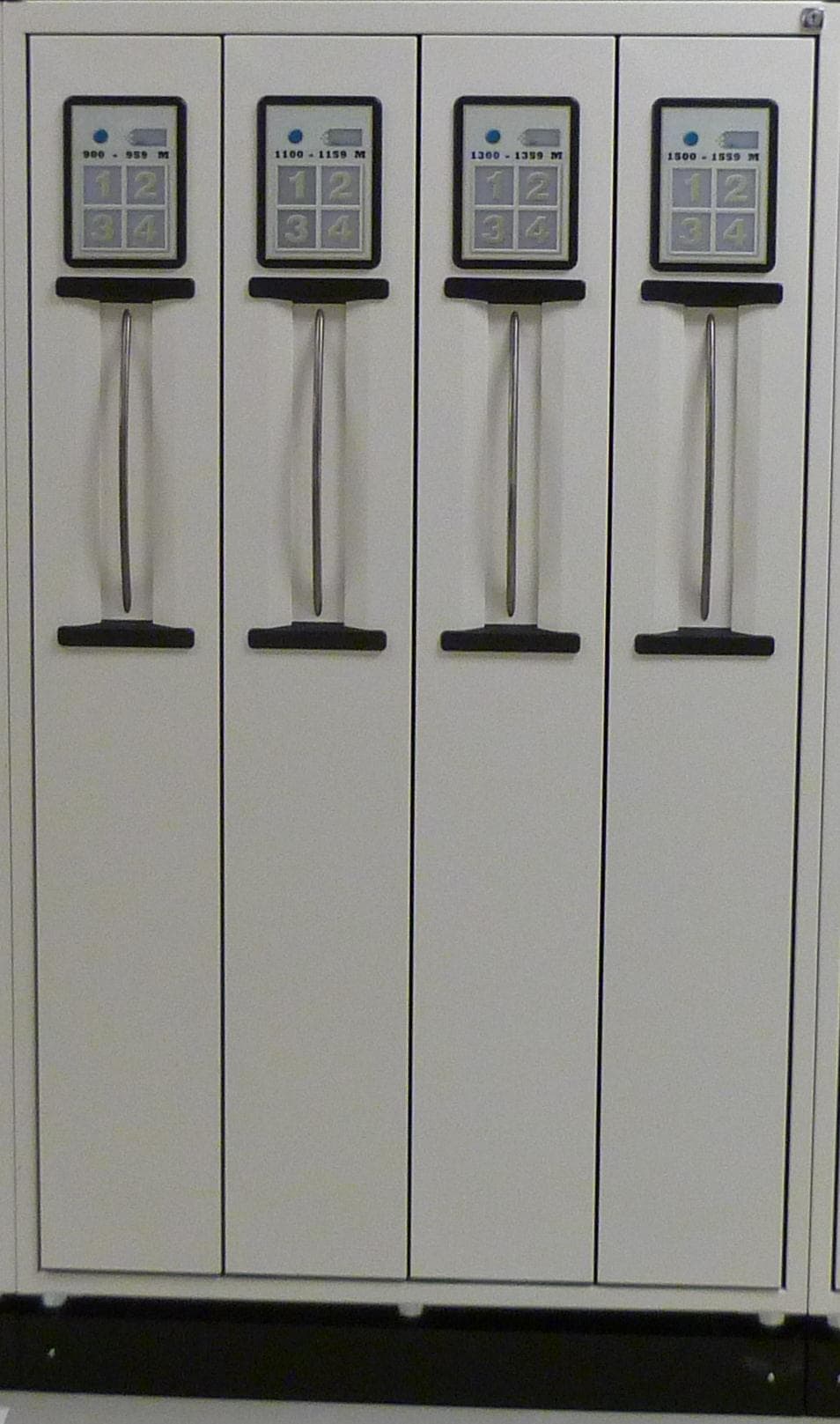
Click to zoom
Application Details
- Equipment Class
- DXX - Part 15 Low Power Communication Device Transmitter
- Date of Grant
- Feb 13, 2012
- Application Purpose
- Original Equipment
- Date of Application
- Feb 13, 2012
- Equipment Note
- INTCV01
- Frequency Range
- 13.56000000 - 13.56000000
- Company
- GSL Solutions, Inc.
- Country
- United States
Documents & Files
Document Text
Text extracted from the exhibit documents filed with the FCC. Open a document above to read the original.
Users Manual
© 2011 GSL SOLUTIONS, INC. 2414 SE 125th Ave., Vancouver, WA 98683 USA • TEL: 360.896.5354 • FAX: 360.397.0496 Document Number: GSL-ISUM-02.0-RETAIL October 2011 GSL Company Confidential – Not to be disclosed to third parties without express written consent. WILL-CALL L INTELLICAB™ SYSTEM (GWIS)S USER’S G U I D E G SL SOLUTIONS, INC. The world’s only solution for tracking prescriptions that streamlines your pharmacy operation from end to end... ... by just moving it. INTELLICAB USER MANUAL GSL-ISUM-02.0-RETAIL October 2011 © 2011 GSL Solutions, Inc. Page 2 of 103 FCC WARNING STATEMENT The IntelliCab and IntelliPad equipment has been tested and found to comply with the limits for a Class B digital device, pursuant to Part 15 of FCC Rules. These limits are designed to provide reasonable protection against harmful interference when the equipment is operated in a commercial environment. This equipment generates, uses, and can radiate radio frequency energy and, if not professionally installed, may cause harmful interference to radio communications. FCC COMPLIANCE STATEMENT This device complies with Part 15 of the FCC Rules. Operation of this device is subject to the following conditions: this device may not cause harmful interference and this device must accept any interference received, including interference that may cause undesired operation. FCC Caution To assure continued compliance, any changes or modifications not expressly approved by the party responsible for compliance could void the user's authority to operate this equipment. CANADIAN DOC STATEMENT This digital apparatus does not exceed the Class B limits for radio noise for digital apparatus set out in the Radio Interference Regulations of the Canadian Department of Communications. Le present appareil numerique n.emet pas de bruits radioelectriques depassant les limites applicables aux appareils numeriques de las classe B prescrites dans le Reglement sur le brouillage radioelectrique edicte par les ministere des Communications du Canada. INTELLICAB USER MANUAL GSL-ISUM-02.0-RETAIL October 2011 © 2011 GSL Solutions, Inc. Page 3 of 103 INTELLICAB™ SYSTEM USER’S GUIDE TABLE OF CONTENTS CHAPTER 1. INTRODUCTION .................................................................................................................................. 8 1.1. USING THE INTELLICAB™ SYSTEM.............................................................................................. 8 1.1.1. SYSTEM OPERATIONS ................................................................................................................. 9 1.1.2. TERMS ......................................................................................................................................... 10 1.1.3. EQUIPMENT DESCRIPTION ...................................................................................................... 10 1.2. GSL INTELLISYS FEATURES ....................................................................................................... 11 1.2.1. ENTRY [F1] ................................................................................................................................... 11 1.2.2. VERIFY [F3] .................................................................................................................................. 11 1.2.3. SEARCH [F2] ................................................................................................................................ 11 1.2.4. RETURN TO STOCK [F4] ............................................................................................................ 11 1.2.5. INSPECT [F6] ............................................................................................................................... 11 1.2.6. HISTORY [F7] ............................................................................................................................... 11 1.2.7. REPORTS [F10] ........................................................................................................................... 11 1.2.8. ADMIN [Alt+A] .............................................................................................................................. 11 CHAPTER 2. BASIC SYSTEM OPERATION .................................................................................................... 12 2.1. STARTING INTELLISYS ON THE WORKSTATION ................................................................. 12 2.2. LOGGING IN/OUT OF THE SYSTEM ............................................................................................. 13 2.2.1 LOGGING IN AT THE BEGINNING OF SHIFT. ............................................................................ 13 2.2.2. ACCESSING (USING) THE SYSTEM .......................................................................................... 14 2.2.3. MULTIPLE SERVER LOG-IN ....................................................................................................... 14 INTELLICAB USER MANUAL GSL-ISUM-02.0-RETAIL October 2011 © 2011 GSL Solutions, Inc. Page 4 of 103 2.3. LOG OUT OF THE SYSTEM ......................................................................................................... 16 CHAPTER 3. ENTER PRESCRIPTIONS INTO THE SYSTEM - ENTRY [F1] ................................................. 17 3.1. USING THE ENTRY [F1] SCREEN ................................................................................................ 17 3.1.1. NORMAL COUPLING ................................................................................................................... 18 3.1.2. COUPLING PRESCRIPTION(S) IN THE REFRIGERATOR ........................................................ 19 3.1.3. COUPLING PRESCRIPTION(S) TO THE OVERSIZED AREA.................................................... 21 3.1.4. CUSTOM ITEM COUPLING ......................................................................................................... 21 3.2. SPECIAL ACTI…
Text truncated - open the document above for the full version.
Users Manual
INTELLICAB USER MANUAL GSL-ISUM-02.0-RETAIL October 2011 © 2011 GSL Solutions, Inc. Page 57 of 103 CHAPTER 8. GENERATE A REPORT - REPORTS [ F10 ] 8.1. Report Types. The System makes it possible to generate a wide variety of reports. Stored information can be sorted based on Patient Name, Location, Aging Status, Partially Delivered orders, etc. 8.2. Report by Patient Name. This report provides the user with a list of all active locations sorted alphabetically by last name. The Patient Report should be printed each night at closing. In the event the IntelliSys system is down, the printed Patient Report may be used for manual search and retrieval of prescriptions until the system is back up. 8.3. Report by Location. This report provides the user with a list of all active locations sorted by the location in numeric order. 8.4. RX Aging Report. Provides the user with a list of all active locations sorted by age of prescription (date scanned into the system). 8.5. Report by Drug. This report provides a list of drugs in the IntelliSys system. 8.6. Volume Summary. Gives a count of total prescriptions processed. The report can be broken down monthly, daily, and hourly. This report is useful to generate work counts. 8.7. Volume by Operator. This report is similar to volume summary, but it further breaks down the data to individual users. 8.8. History. A simplified version of the History [F7] tab. The user is able to export the history report to a Microsoft® Excel spreadsheet or print directly to a printer. 8.9. Partially Delivered Orders. Provides the user with a list of active prescriptions which were partially delivered such as a “Temporarily Out of Stock” (TOS). 8.10. HIPAA Notices. Provides a list of HIPAA Notices delivered to patients and HIPAA Notices signed by patients. INTELLICAB USER MANUAL GSL-ISUM-02.0-RETAIL October 2011 © 2011 GSL Solutions, Inc. Page 58 of 103 8.11. Tag Misreads. Gives a report of the general health of a drawer. GSL personnel may ask a user to look at this report if the pharmacy is having issues with a drawer. 8.12. Central Fill Receive. Provides information about prescriptions received from a central fill facility. 8.13. Central Fill Return. This report shows prescriptions returned to the central fill facility. 8.14. Inventory. Provides information about current inventory in the GSL system. 8.15. Steps to Generate a Report. Use your badge to identify yourself and access the database. Press the Reports tab or [F10] button to access the Reports screen. To print a report, select your print preferences from the menu bar, such as zoom, page width, etc., and then send your report to the printer or to a file (Figure 57). You can select a specific printer or print layout, page setup, or export the report to a Microsoft® Excel spreadsheet or to an Acrobat® PDF file. INTELLICAB USER MANUAL GSL-ISUM-02.0-RETAIL October 2011 © 2011 GSL Solutions, Inc. Page 59 of 103 Figure 57. Print and Export buttons. 8.16. Volume Reports The Volume Reports are useful to generate an accurate count of specific activities throughout the pharmacy. INTELLICAB USER MANUAL GSL-ISUM-02.0-RETAIL October 2011 © 2011 GSL Solutions, Inc. Page 60 of 103 Figure 58. Volume Summary Report. Use the StartDate and EndDate boxes to set the date range of the report (Figure 58). To further breakdown each month into daily totals, click the small “+” next to the corresponding month. Daily totals can also be broken down hourly by again clicking the small “+.” The small ”+” across the top of the report will break the data down to each specific pharmacy, if multiple pharmacies are associated with the IntelliSys server. Site totals can be further broken down to specific workstations and coupling stations. To view data specific to a user(s), check their name in the Operators drop down box. The data contained along X axis is selectable in the States drop down box. For more info on the filter bar, see section 7.1 in the History [F7] section. INTELLICAB USER MANUAL GSL-ISUM-02.0-RETAIL October 2011 © 2011 GSL Solutions, Inc. Page 61 of 103 8.17. Volume by Operator The Volume by Operator report is similar to the Volume Summary report. Notice in Figure 59 the range of dates has been replaced with the users. This report is useful to observe data for all pharmacy employees. Clicking on the “+” next to each user will break down their totals by month/day/hour. Figure 59. Volume by Operator Report. INTELLICAB USER MANUAL GSL-ISUM-02.0-RETAIL October 2011 © 2011 GSL Solutions, Inc. Page 62 of 103 CHAPTER 9. THE SYSTEM ADMINISTRATOR 9.1. INITIAL SET UP AND ADMINISTRATOR FUNCTIONS Once the System is installed and all components are working correctly, the software can be prepared for use. To begin, use the default supervisor log-in information provided by the installer, and go to the Admin screen [A + Alt]. The Admin [Alt + A] screen is used whenever the Administrator needs to: 1. Identify new users or update existing ones; 2. add SmartBadges; 3. reset, place drawer online, and offline; 4. access diagnostic logs for troubleshooting; and 5. automatically upload data logs to GSL support staff. Individuals who are allowed to access the software, open SmartDrawers, or add or remove prescriptions must have a SmartBadge. Each badge contains an RFID tag and a barcode which allows the SmartBadge to be “read” by scanners. The System is capable of monitoring an infinite number of users. However, the System is configured to allow only 4 simultaneous users to access drawers, file or retrieve prescriptions, perform RTS functions, etc. 9.2. ACCESS LEVEL 9.2.1. ADMINISTRATOR - Pharmacy staff member(s) responsible for maintaining the GSL System. The Administrator(s) have access to all GSL Will-call Client settings. 9.2.2. SUPERVISOR - Pharmacy staff member with privileges to override user warnings. The supervisor does not have access to user settings or the Administrator tab [A+Alt]. 9.2.3. RPH - Usually reserved for the Pharmacist. The Pharmacist(s)…
Text truncated - open the document above for the full version.
Cover Letter(s)
Northwest EMC TCB Compliance Opinion Rev. 7/1/10 GSLS0002 Information about the Applicant Grantee (Company Name) GSL Solutions, INC. FCC Contact Person Stephen A Garrett Address 2414 SE 125th Avenue City, State, Zip Vancouver, WA 98683 Job Number GSLS0002 Model INTCV01 FCC ID A6KICABR01 Agent NA Approval Type Original Equipment Class DXX Part 15, Low Power Communication Device Transmitter Rule Part 15C (15.225) Overview The INTCV01 is a cabinet containing up to four operational drawers containing RFID readers operating at 13.56 MHz. The RFID readers are used in conjunction with RFID tagged "SmartBaskets", which contain various products, tracked by the INTCV01. Each drawer, all electrically identical, may contain up to 120 RFID antennas corresponding with the well-defined storage areas. Confidentiality requested for allowed files. Request is properly addressed and referenced. Recommendation All items have been resolved and completed to my satisfaction; therefore I recommend this application for approval. Signature Dave Tolman, TCB Committee 2/13/2012
Cover Letter(s)
GSL Solutions, Inc. 2414 SE 125 th Ave Vancouver, WA 98683 360.896.5354 (O) 360.397.0496 (F) GSL Solutions Model # INTCV01 Description and purpose of application The INTCV01 is an electronic RFID reader system utilizing the 13.56 MHz ISO15963 standard. The INTCV01 is used in conjunction with ISO15963 tagged “SmartBaskets” which will contain various products that will be physically placed and tracked within the INTCV01 into very well def ined storage areas. The INTCV01 contains up to four operational drawers, each on which is electrically the same. Each drawer contains up to 120 RFID antennas corresponding with the well-defined storage areas. The purpose of the application is to obtain FCC approval of original certification for GSL Solutions model #INTCV01 ( FCC ID: A6KICABR01 ) under FCC rule part 15.225. Stephen A Garrett Chief Technical Officer
Cover Letter(s)
GSL Solutions, Inc. 2414 SE 125 th Ave Vancouver, WA 98683 360.896.5354 (O) 360.397.0496 (F) February 1, 2012 Federal Communications Commission Authorization and Evaluation Division 7435 Oakland Mills Road Columbia, Maryland 21046 To whom it may concern, We hereby respectfully request that under the provision of 47 CFR 0.459, the documents listed below and attached with this application for certification be provided with confidential status. • Schematics.pdf • Operational Description.pdf • Frequency Block Diagrams.pdf Any exhibit and or information for which we have requested confidentiality, but which may not be accorded such treatment by the FCC, should be returned to us. The documents listed above contain extremely valuable trade secrets that are treated as extremely confidential by us. Substantial competitive harm to us could result should they be made available to the public. Sincerely, Stephen Garrett Chief Technical Officer
External Photos
GSL Solutions, Inc. 2414 SE 125 th Ave Vancouver, WA 98683 360.896.5354 (O) 360.397.0496 (F) Model INTCV01 Front of Cabinet GSL Solutions, Inc. 2414 SE 125 th Ave Vancouver, WA 98683 360.896.5354 (O) 360.397.0496 (F) Model INTCV01 side of Cabinet GSL Solutions, Inc. 2414 SE 125 th Ave Vancouver, WA 98683 360.896.5354 (O) 360.397.0496 (F) Model INTCV01 side of Cabinet GSL Solutions, Inc. 2414 SE 125 th Ave Vancouver, WA 98683 360.896.5354 (O) 360.397.0496 (F) Model INTCV01 back of Cabinet GSL Solutions, Inc. 2414 SE 125 th Ave Vancouver, WA 98683 360.896.5354 (O) 360.397.0496 (F) Model INTCV01 bottom of Cabinet (showing I/O and power ports) GSL Solutions, Inc. 2414 SE 125 th Ave Vancouver, WA 98683 360.896.5354 (O) 360.397.0496 (F) Model INTCV01 Power Supply
ID Label/Location Info
GSL Solutions, Inc. 2414 SE 125 th Ave Vancouver, WA 98683 360.896.5354 (O) 360.397.0496 (F) February 1, 2012 FCC / IC label Label located on back of Cabinet, upper left corner GSL Solutions, Inc. 2414 SE 125 th Ave Vancouver, WA 98683 360.896.5354 (O) 360.397.0496 (F) For reference, front/side of cabinet
Internal Photos
GSL Solutions, Inc. 2414 SE 125 th Ave Vancouver, WA 98683 360.896.5354 (O) 360.397.0496 (F) February 1, 2012 Re: Internal Photographs and annotations of PCBs for IntelliCab Overall drawer PCB placement; drawer size approximately 24” x 54” Main controller board Antenna board array Front Panel board GSL Solutions, Inc. 2414 SE 125 th Ave Vancouver, WA 98683 360.896.5354 (O) 360.397.0496 (F) Main Computer Board: PCB 22” x 3” Radio Sectio GSL Solutions, Inc. 2414 SE 125 th Ave Vancouver, WA 98683 360.896.5354 (O) 360.397.0496 (F) Antenna System: 10 x antennas per board 10 X loop antennas GSL Solutions, Inc. 2414 SE 125 th Ave Vancouver, WA 98683 360.896.5354 (O) 360.397.0496 (F) Front Panel Board Loop Antenna
Operational Description
GSL Solutions, Inc. 2414 SE 125 th Ave Vancouver, WA 98683 360.896.5354 (O) 360.397.0496 (F) February 1, 2012 Re: Antenna information for IntelliCab The IntelliCab operates under FCC rule 15.203, Unlicensed devices operating within 15.225, RFID systems. The IntelliCab contains internal PCB antennas which are not user accessible. Additionally the equipment is professionally installed. The PCB antennas are sandwiched between the sheet metal (shown at left) and the back of the plastic “module” (shown at right). The PCB antennas are formed as an array of 12 PCB boards, with 10 antennas on each board for a total of 120 antennas. Each possible position of a basket has an antenna located directly behind the basket. Exterior View of IntelliCab showing front and back of drawer. Antennas located behind sheet metal Antennas located behind plastic GSL Solutions, Inc. 2414 SE 125 th Ave Vancouver, WA 98683 360.896.5354 (O) 360.397.0496 (F) PCB Antenna Boards, Left, Middle, behind Sheet metal, right Radiating Element Radiating Element 10 X per PCB Component Side faces Sheet Metal Back side faces plastic
Test Report
GSL Solutions, Inc. INTCV01 Report No. GSLS0002 Report Prepared By www.nwemc.com 1-888-EMI-CERT © 2011 Northwest EMC, Inc 22975 NW Evergreen Parkway Suite 400 Hillsboro, Oregon 97124 Certificate of Test Last Date of Test: December 2, 2011 GSL Solutions, Inc. Model: INTCV01 Emissions Test Description Specification Test Method Pass/Fail Field Strength of Fundamental FCC 15.225:2011 ANSI C63.10:2009 Pass Frequency Stability FCC 15.225:2011 ANSI C63.10:2009 Pass Field Strength of Spurious Emissions FCC 15.225:2011 ANSI C63.10:2009 Pass AC Powerline Conducted Emissions FCC 15.225:2011 ANSI C63.10:2009 Pass Modifications made to the product See the Modifications section of this report Test Facility The measurement facility used to collect the data is located at: Northwest EMC, Inc. 22975 NW Evergreen Parkway, Suite 400 Hillsboro, OR 97124 Phone: (503) 844-4066 Fax: 844-3826 This site has been fully described in a report filed with and accepted by the FCC (Federal Communications Commission) and Industry Canada (Site filing #2834D-1). Approved By: Tim O'Shea, Operations Manager NVLAP Lab Code: 200630-0 This report must not be used to claim product certification, approval, or endorsement by NVLAP, NIST, or any agency of the federal government of the United States of America. Product compliance is the responsibility of the client, therefore the tests and equipment modes of operation represented in this report were agreed upon by the client, prior to testing. This Report may only be duplicated in its entirety. The results of this test pertain only to the sample(s) tested. The specific description is noted in each of the individual sections of the test report supporting this certificate of test. Northwest EMC Revision History Revision 06/29/09 Barometric Pressure The recorded barometric pressure has been normalized to sea level. Revision Number Description Date Page Number 00 None Accreditations and Authorizations FCC Accredited by NVLAP for performance of FCC radio, digital, and ISM device testing. Our Open Area Test Sites, certification chambers, and conducted measurement facilities have been fully described in reports filed with the FCC and accepted by the FCC in letters maintained in our files. Northwest EMC has been accredited by ANSI to ISO / IEC Guide 65 as a product certifier. We have been designated by the FCC as a Telecommunications Certification Body (TCB). This allows Northwest EMC to certify transmitters to FCC specifications in accordance with 47 CFR 2.960 and 2.962. NVLAP Northwest EMC, Inc. is accredited under the National Voluntary Laboratory Accreditation Program (NVLAP) for satisfactory compliance with the requirements of ISO/IEC 17025 for Testing Laboratories. NVLAP is administered by the National Institute of Standards and Technology (NIST), an agency of the U.S. Commerce Department. The NVLAP accreditation encompasses Electromagnetic Compatibility Testing in accordance with the European Union EMC Directive 2004/108/EC, and ANSI C63.4. Additionally, Northwest EMC is accredited by NVLAP to perform radio testing in accordance with the European Union R&TTE Directive 1999/5/EEC, the requirements of FCC, and the RSS radio standards for Industry Canada. Industry Canada Accredited by NVLAP for performance of Industry Canada RSS and ICES testing. Our Open Area Test Sites and certification chambers comply with RSS-Gen, Issue 2 and have been filed with Industry Canada and accepted. Northwest EMC has been accredited by ANSI to ISO / IEC Guide 65 as a product certifier. We have been designated by NIST and recognized by Industry Canada as a Certification Body (CB) per the APEC Mutual Recognition Arrangement (MRA). This allows Northwest EMC to certify transmitters to Industry Canada technical requirements. (Site Filing Numbers - Hillsboro: 2834D-1, 2834D-2, Sultan: 2834C-1, Irvine: 2834B-1, 2834B-2, Brooklyn Park: 2834E-1) CAB Designated by NIST and validated by the European Commission as a Conformity Assessment Body (CAB) to conduct tests and approve products to the EMC directive and transmitters to the R&TTE directive, as described in the U.S. - EU Mutual Recognition Agreement. Australia/New Zealand The National Association of Testing Authorities (NATA), Australia has been appointed by the ACA as an accreditation body to accredit test laboratories and competent bodies for EMC standards. Accredited test reports or assessments by competent bodies must carry the NATA logo. Test reports made by an overseas laboratory that has been accredited for the relevant standards by an overseas accreditation body that has a Mutual Recognition Agreement (MRA) with NATA are also accepted as technical grounds for product conformity. The report should be endorsed with the respective logo of the accreditation body (NVLAP). Accreditations and Authorizations VCCI Accepted as an Associate Member to the VCCI, Acceptance No. 564. Conducted and radiated measurement facilities have been registered in accordance with Regulations for Voluntary Control Measures, Article 8. (Registration Numbers. - Hillsboro: C-1071, R-1025, G-84, C-2687, T- 1658, and R-2318, Irvine: R-1943, G-85, C-2766, and T-1659, Sultan: R-871, G-83, C-3265, and T-1511, Brooklyn Park: R-3125, G-86, G-141, C-3464, and T-1634). BSMI Northwest EMC has been designated by NIST and validated by C-Taipei (BSMI) as a CAB to conduct tests as described in the APEC Mutual Recognition Agreement (US0017). GOST Northwest EMC, Inc. has been assessed and accredited by the Russian Certification bodies Certinform VNIINMASH, CERTINFO, SAMTES, and Federal CHEC, to perform EMC and Hygienic testing for Information Technology Products. As a result of their laboratory assessment, they will accept test results from Northwest EMC, Inc. for product certification KCC Northwest EMC, Inc is a CAB designated by MRA partners and recognized by Korea. (Assigned Lab Numbers: Hillsboro: US0017, Irvine: US0158, Sultan: US0157, Brooklyn Park: US0175) VIETNAM Vietnam MIC has approved North…
Text truncated - open the document above for the full version.
Test Setup Photos
NORTHWEST EMC FF photo1.jpg FF photo2.jpg Field Strength of Fundamental PSA-ESCI 2011.07.26 NORTHWEST EMC FF photo3.jpg Field Strength of Fundamental PSA-ESCI 2011.07.26 NORTHWEST EMC FSB IntelliCab 001.jpg FSB IntelliCab 002.jpg FREQUENCY STABILITY XMit 2010.11.03 NORTHWEST EMC REC Cab 01.jpg REC Cab 02.jpg Field Strength of Spurious Emissions < 30MHz XMit 2010.11.03 NORTHWEST EMC REC Cab 03.jpg Field Strength of Spurious Emissions < 30MHz XMit 2010.11.03 NORTHWEST EMC RE cab 01.jpg RE cab 02.jpg Field Strength of Spurious Emissions > 30 MHz XMit 2010.11.03 NORTHWEST EMC RE cab 03.jpg Field Strength of Spurious Emissions > 30 MHz XMit 2010.11.03 NORTHWEST EMC ACB IntelliCab 001.jpg ACB IntelliCab 002.jpg AC POWERLINE CONDUCTED EMISSIONS PSA-ESCI 2011.07.26 NORTHWEST EMC ACB IntelliCab 003.jpg AC POWERLINE CONDUCTED EMISSIONS PSA-ESCI 2011.07.26
Contact Information
Applicant
Joe Intile(Chief Operating Officer)
Test Firm
Northwest EMC, Inc.Greg Kiemel
Technical Specifications
| # | Rule Parts | Frequency Range | Power Output |
|---|---|---|---|
| 1 | 15C | 13.56 MHz - 13.56 MHz | - |
Other Applications from GSL Solutions, Inc.
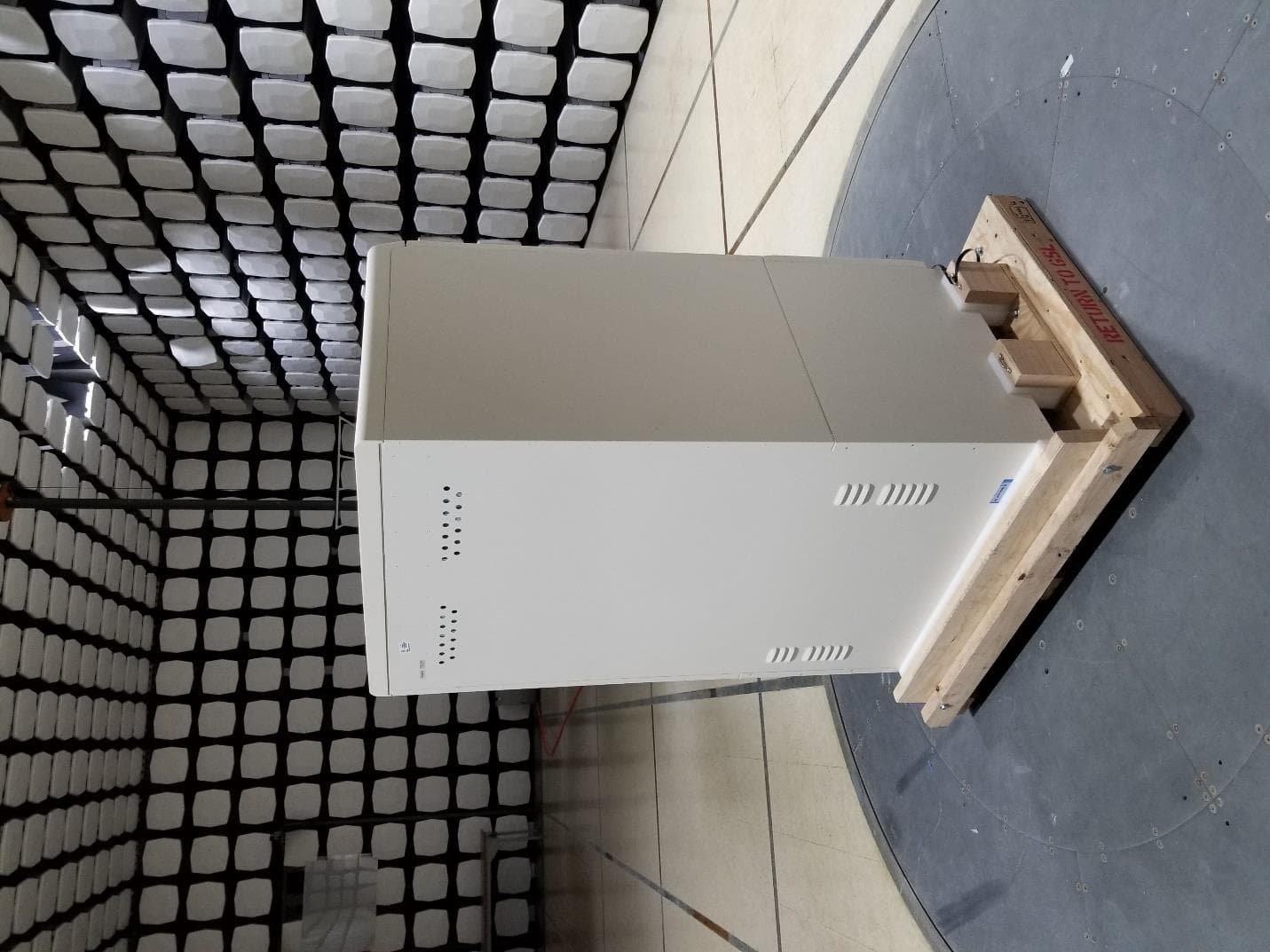
A6KIVAULTICAB
Dec 20, 2020IntelliVault/Intellicab
Equipment Class
DXX - Part 15 Low Power Communication Device Transmitter