A6KIVAULTICABIntelliVault/Intellicab
GSL Solutions, Inc.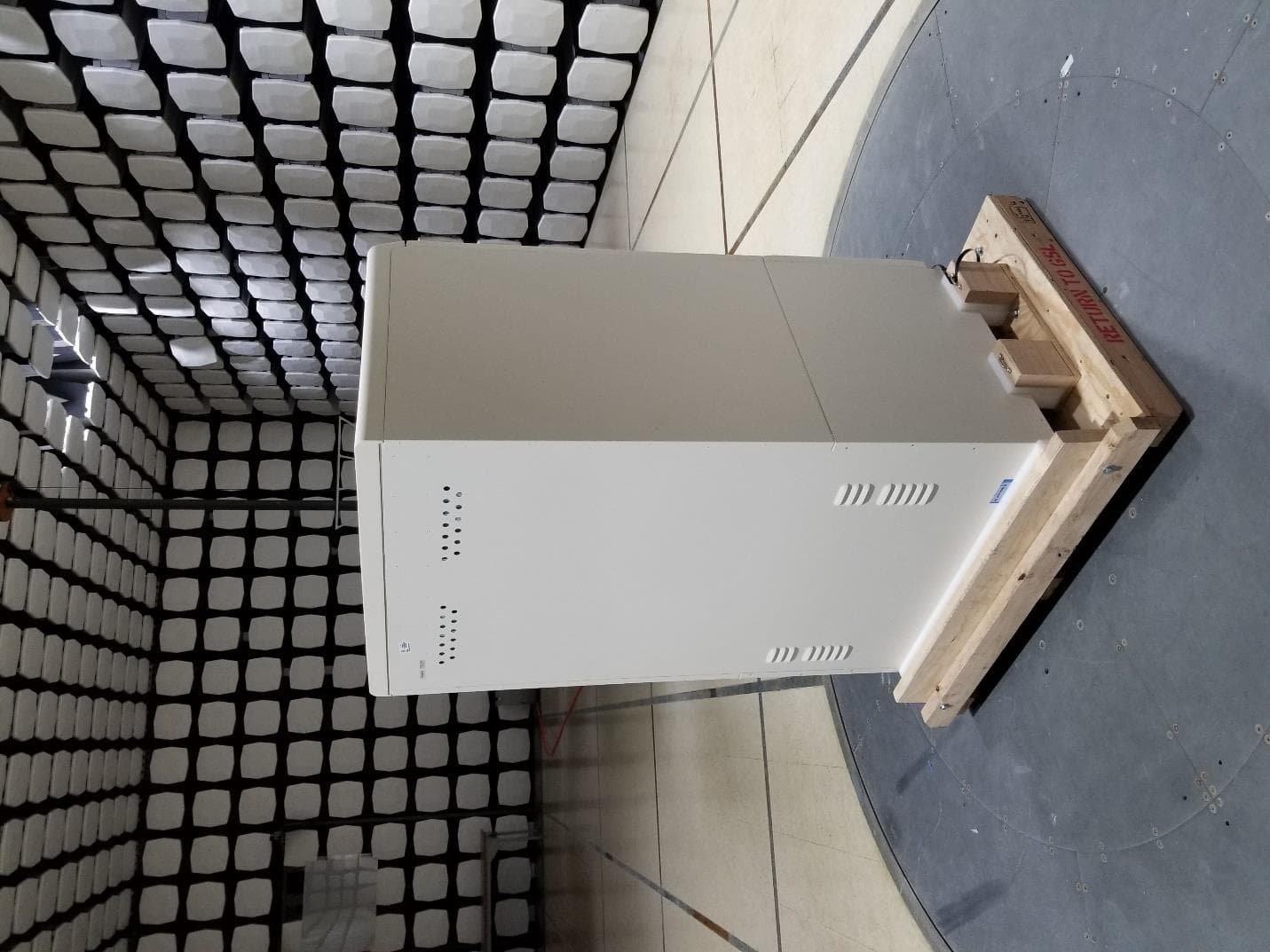
Click to zoom
Application Details
- Equipment Class
- DXX - Part 15 Low Power Communication Device Transmitter
- Date of Grant
- Dec 20, 2020
- Application Purpose
- Original Equipment
- Date of Application
- Dec 20, 2020
- Equipment Note
- IntelliVault/Intellicab
- Frequency Range
- 13.56000000 - 13.56000000
- Company
- GSL Solutions, Inc.
- Country
- United States
Documents & Files
Document Text
Text extracted from the exhibit documents filed with the FCC. Open a document above to read the original.
Users Manual
T R A I N I N G M A N U A L 24 Hour Support (866) 477-2682 ©2020 GSL Solutions, Inc. IntelliVault Training Guide v.509.5 20201116 2 Contents Login .................................................................................................................................................... 8 Stock Receive ....................................................................................................................................... 9 Prescription Fill (Tech Fill, Pharmacist Verify) ..................................................................................... 12 Prescription Fill (Pharmacist-only) ...................................................................................................... 14 Coupling Controlled Substances that have not gone through the IntelliVault Fill process ................... 14 Legend Rx Coupling (IntelliSys) ........................................................................................................... 15 Legend Rx Coupling (WillCall Client) ................................................................................................... 16 Retrieve WillCall Client ...................................................................................................................... 18 AutoSign (Signature Capture) WillCall Client ...................................................................................... 19 Drive-thru Signature Capture (optional feature) WillCall Client .......................................................... 19 Bank Teller Dispensing (optional feature) WillCall Client .................................................................... 19 Recall ................................................................................................................................................. 21 Mark as Recalled for Return to Vendor ........................................................................................... 21 Remove for Recall for Return to Vendor ......................................................................................... 21 Return to Stock – 3 Scenarios ............................................................................................................. 23 Controlled Drug Return to Stock for stock product ......................................................................... 23 Controlled Drug Return to Stock for Discontinued Rx (Once pulled for dispense) ............................ 23 Controlled Drug Return to Stock for Discontinued Rx (Discontinued during RPh Verify) .................. 23 Return items to stock that were not filled through IntelliSys .............................................................. 24 Physical Inventory .............................................................................................................................. 25 Inventory Adjustment ............................................................................... Error! Bookmark not defined. Broken or Dropped Medication ................................................................. Error! Bookmark not defined. Inventory Adjustment Reason Codes ..................................................... Error! Bookmark not defined. Consolidate Stock ..................................................................................... Error! Bookmark not defined. Reporting – Reports and History ............................................................... Error! Bookmark not defined. History .................................................................................................. Error! Bookmark not defined. Reports ................................................................................................. Error! Bookmark not defined. Admin – Task Manager, Users and Roles ................................................... Error! Bookmark not defined. Task Manager ....................................................................................... Error! Bookmark not defined. Users ..................................................................................................... Error! Bookmark not defined. Appendix C ............................................................................................... Error! Bookmark not defined. User Permissions to Manage User Roles .................................................... Error! Bookmark not defined. Settings ................................................................................................. Error! Bookmark not defined. ©2020 GSL Solutions, Inc. IntelliVault Training Guide v.509.5 20201116 3 Downtime ................................................................................................. Error! Bookmark not defined. Downtime Operations & Recovery ........................................................ Error! Bookmark not defined. Recovery Procedures ............................................................................. Error! Bookmark not defined. Task Manager ....................................................................................... Error! Bookmark not defined. Downtime Prescription Locator Report and Stock Locator Report ......... Error! Bookmark not defined. Using the Prescription Locator Report for Rxs shelved in IntelliCab ..... Error! Bookmark not defined. Using the Stock Locator Report ............................................................. Error! Bookmark not defined. Downtime RPh Fill and Dispense ........................................................... Error! Bookmark not defined. Downtime Binder .................................................................................. Error! Bookmark not defined. Downtime Stock Receive ....................................................................... Error! Bookmark not defined. Recovery from Downtime ......................................................................... Error! Bookmark not defined. Recovery Rx Fill and Dispense .....................................…
Text truncated - open the document above for the full version.
Users Manual
T R A I N I N G M A N U A L 24 Hour Support (866) 477-2682 2 ©2020 GSL SOLUTIONS, INC. IntelliVault Training Guide v.509.5 20200918 GSL Company Confidential – Not to be disclosed to third parties without express written consent. Contents Login ......................................................................................................... Error! Bookmark not defined. Stock Receive ............................................................................................ Error! Bookmark not defined. Prescription Fill (Tech Fill, Pharmacist Verify) ............................................ Error! Bookmark not defined. Prescription Fill (Pharmacist-only) ............................................................. Error! Bookmark not defined. Coupling Controlled Substances that have not gone through the IntelliVault Fill process .............. Error! Bookmark not defined. Legend Rx Coupling (IntelliSys) .................................................................. Error! Bookmark not defined. Legend Rx Coupling (WillCall Client) .......................................................... Error! Bookmark not defined. Retrieve WillCall Client ............................................................................. Error! Bookmark not defined. AutoSign (Signature Capture) WillCall Client ............................................. Error! Bookmark not defined. Drive-thru Signature Capture (optional feature) WillCall Client ................. Error! Bookmark not defined. Bank Teller Dispensing (optional feature) WillCall Client ........................... Error! Bookmark not defined. Recall ........................................................................................................ Error! Bookmark not defined. Mark as Recalled for Return to Vendor .................................................. Error! Bookmark not defined. Remove for Recall for Return to Vendor ................................................ Error! Bookmark not defined. Return to Stock – 3 Scenarios .................................................................... Error! Bookmark not defined. Controlled Drug Return to Stock for stock product ................................ Error! Bookmark not defined. Controlled Drug Return to Stock for Discontinued Rx (Once pulled for dispense) . Error! Bookmark not defined. Controlled Drug Return to Stock for Discontinued Rx (Discontinued during RPh Verify) ............. Error! Bookmark not defined. Return items to stock that were not filled through IntelliSys ..................... Error! Bookmark not defined. Physical Inventory ..................................................................................... Error! Bookmark not defined. Inventory Adjustment .......................................................................................................................... 6 Broken or Dropped Medication ............................................................................................................ 6 Inventory Adjustment Reason Codes ................................................................................................ 8 Consolidate Stock .............................................................................................................................. 10 Reporting – Reports and History ........................................................................................................ 12 History ........................................................................................................................................... 12 Reports .......................................................................................................................................... 13 Admin – Task Manager, Users and Roles ............................................................................................ 16 Task Manager ................................................................................................................................ 16 Users .............................................................................................................................................. 17 Appendix C ............................................................................................... Error! Bookmark not defined. 3 ©2020 GSL SOLUTIONS, INC. IntelliVault Training Guide v.509.5 20200918 GSL Company Confidential – Not to be disclosed to third parties without express written consent. User Permissions to Manage User Roles ............................................................................................. 18 Settings .......................................................................................................................................... 19 Downtime .......................................................................................................................................... 21 Downtime Operations & Recovery ................................................................................................. 21 Recovery Procedures .......................................................................................................................... 21 Task Manager ................................................................................................................................ 22 Downtime Prescription Locator Report and Stock Locator Report .................................................. 22 Using the Prescription Locator Report for Rxs shelved in IntelliCab ..... Error! Bookmark not defined. Using the Stock Locator Report ............................................................. Error! Bookmark not defined. Downtime RPh Fill and Dispense ........................................................... Error! Bookmark not defined. Downtime Binder ........................................................................................................................... 23 Downtime Stock Receive .......................................…
Text truncated - open the document above for the full version.
Users Manual
©2020 GSL Solutions, Inc. IntelliVault Training Guide v.509.5 20201116 1 ©2020 GSL Solutions, Inc. IntelliVault Training Guide v.509.5 20201116 2 T R A I N I N G M A N U A L 24 Hour Support (866) 477-2682 Contents Login ......................................................................................................... Error! Bookmark not defined. Stock Receive ............................................................................................ Error! Bookmark not defined. Prescription Fill (Tech Fill, Pharmacist Verify) ............................................ Error! Bookmark not defined. Prescription Fill (Pharmacist-only) ............................................................. Error! Bookmark not defined. Coupling Controlled Substances that have not gone through the IntelliVault Fill process .............. Error! Bookmark not defined. Legend Rx Coupling (IntelliSys) .................................................................. Error! Bookmark not defined. Legend Rx Coupling (WillCall Client) .......................................................... Error! Bookmark not defined. Retrieve WillCall Client ............................................................................. Error! Bookmark not defined. AutoSign (Signature Capture) WillCall Client ............................................. Error! Bookmark not defined. Drive-thru Signature Capture (optional feature) WillCall Client ................. Error! Bookmark not defined. Bank Teller Dispensing (optional feature) WillCall Client ........................... Error! Bookmark not defined. Recall ........................................................................................................ Error! Bookmark not defined. Mark as Recalled for Return to Vendor .................................................. Error! Bookmark not defined. Remove for Recall for Return to Vendor ................................................ Error! Bookmark not defined. Return to Stock – 3 Scenarios .................................................................... Error! Bookmark not defined. Controlled Drug Return to Stock for stock product ................................ Error! Bookmark not defined. Controlled Drug Return to Stock for Discontinued Rx (Once pulled for dispense) . Error! Bookmark not defined. Controlled Drug Return to Stock for Discontinued Rx (Discontinued during RPh Verify) ............. Error! Bookmark not defined. Return items to stock that were not filled through IntelliSys ..................... Error! Bookmark not defined. Physical Inventory ..................................................................................... Error! Bookmark not defined. Inventory Adjustment ............................................................................... Error! Bookmark not defined. Broken or Dropped Medication ................................................................. Error! Bookmark not defined. Inventory Adjustment Reason Codes ..................................................... Error! Bookmark not defined. Consolidate Stock ..................................................................................... Error! Bookmark not defined. Reporting – Reports and History ............................................................... Error! Bookmark not defined. ©2020 GSL Solutions, Inc. IntelliVault Training Guide v.509.5 20201116 3 History .................................................................................................. Error! Bookmark not defined. Reports ................................................................................................. Error! Bookmark not defined. Admin – Task Manager, Users and Roles ................................................... Error! Bookmark not defined. Task Manager ....................................................................................... Error! Bookmark not defined. Users ..................................................................................................... Error! Bookmark not defined. Appendix C ............................................................................................... Error! Bookmark not defined. User Permissions to Manage User Roles .................................................... Error! Bookmark not defined. Settings ................................................................................................. Error! Bookmark not defined. Downtime ................................................................................................. Error! Bookmark not defined. Downtime Operations & Recovery ........................................................ Error! Bookmark not defined. Recovery Procedures ............................................................................. Error! Bookmark not defined. Task Manager ....................................................................................... Error! Bookmark not defined. Downtime Prescription Locator Report and Stock Locator Report ......... Error! Bookmark not defined. Using the Prescription Locator Report for Rxs shelved in IntelliCab ..... Error! Bookmark not defined. Using the Stock Locator Report ............................................................. Error! Bookmark not defined. Downtime RPh Fill and Dispense ........................................................... Error! Bookmark not defined. Downtime Binder .................................................................................. Error! Bookmark not defined. Downtime Stock Receive ....................................................................... Error! Bookmark not defined. Recovery from Downtime ......................................................................... Error! Bookmark not defined. Recovery Rx Fill and Dispense ............................................................... Error! Bookmark not defined. Recovery Dispense .....................................................................…
Text truncated - open the document above for the full version.
External Photos
IntelliVault/IntelliCab External Photos IntelliVault/IntelliCab Front View IntelliVault/IntelliCab Front Left IntelliVault/IntelliCab Front Right View IntelliVault/IntelliCab Back Left IntelliVault/IntelliCab Back Right
ID Label/Location Info
This label appears on the balc of the IntelliVault/IntelliCab
Operational Description
MCB (Main Board) Antenna Dimensions Antenna Board Dimensions
Test Report
This report must not be used to claim product certification, approval, or endorsement by NVLAP, NIST, or any agency of the U.S. Government. This Report shall not be reproduced, except in full without written approval of the laboratory. EAR-Controlled Data - This document contains technical data whose export and reexport/retransfer is subject to control by the U.S. Department of Commerce under the Export Administration Act and the Export Administration Regulations. The Department of Commerce’s prior written approval may be required for the export or re- export/retransfer of such technical data to any foreign person, foreign entity or foreign organization whether in the United States or abroad. GSL Solutions, Inc. IntelliVault / IntelliCab FCC 15.225:2020 13.56MHz Radio Report: GSLS0016, Issue Date: December 9, 2020 NVLAP LAB CODE: 200630-0 CERTIFICATE OF TEST 2018-09-14 Product compliance is the responsibility of the client; therefore, the tests and equipment modes of operation represented in this report were agreed upon by the client, prior to testing. The results of this test pertain only to the sample(s) tested. The specific description is noted in each of the individual sections of the test report supporting this certificate of test. This report reflects only those tests from the referenced standards shown in the certificate of test. It does not include inspection or verification of labels, identification, marking or user information. As indicated in the Statement of Work sent with the quotation, Element’s standard process is to always use the latest published version of the test methods even when earlier versions are cited in the test specification. Issuance of a purchase order was de facto acceptance of this approach. Otherwise, the client would have advised Element in writing of the specific version of the test methods they wanted applied to the subject testing. Last Date of Test: December 3, 2020 GSL Solutions, Inc. EUT: IntelliVault / IntelliCab Radio Equipment Testing Standards Specification Method FCC 15.207:2020 ANSI C63.10:2013 FCC 15.225:2020 Results Method Clause Test Description Applied Results Comments 6.2 Powerline Conducted Emissions Yes Pass 6.4 Field Strength of Fundamental Yes Pass 6.4 Field Strength of Spurious Emissions Less Than 30 MHz Yes Pass 6.5 Field Strength of Spurious Emissions Greater Than 30 MHz Yes Pass 6.8 Frequency Stability Yes Pass Deviations From Test Standards None Approved By: Kyle Holgate, Operations Manager Report No. GSLS0016EAR-Controlled Data2/43 REVISION HISTORY 2018.07.17 Revision Number Description Date (yyyy-mm-dd) Page Number 00 None Report No. GSLS0016EAR-Controlled Data3/43 ACCREDITATIONS AND AUTHORIZATIONS 2019.03.08 United States FCC - Designated by the FCC as a Telecommunications Certification Body (TCB). Certification chambers, Open Area Test Sites, and conducted measurement facilities are listed with the FCC. A2LA - Accredited by A2LA to ISO / IEC 17065 as a product certifier. This allows Element to certify transmitters to FCC and IC specifications. NVLAP - Each laboratory is accredited by NVLAP to ISO 17025 Canada ISED - Recognized by Innovation, Science and Economic Development Canada as a Certification Body (CB) and as a CAB for the acceptance of test data. European Union European Commission – Within Element, we have a EU Notified Body validated for the EMCD and RED Directives. Australia/New Zealand ACMA - Recognized by ACMA as a CAB for the acceptance of test data. Korea MSIT / RRA - Recognized by KCC’s RRA as a CAB for the acceptance of test data. Japan VCCI - Associate Member of the VCCI. Conducted and radiated measurement facilities are registered. Taiwan BSMI – Recognized by BSMI as a CAB for the acceptance of test data. NCC - Recognized by NCC as a CAB for the acceptance of test data. Singapore IDA – Recognized by IDA as a CAB for the acceptance of test data. Israel MOC – Recognized by MOC as a CAB for the acceptance of test data. Hong Kong OFCA – Recognized by OFCA as a CAB for the acceptance of test data. Vietnam MIC – Recognized by MIC as a CAB for the acceptance of test data. SCOPE For details on the Scopes of our Accreditations, please visit: https://www.nwemc.com/emc-testing-accreditations Report No. GSLS0016EAR-Controlled Data4/43 FACILITIES 2019.03.08 California Labs OC01-17 41 Tesla Irvine, CA 92618 (949) 861-8918 Minnesota Labs MN01-10 9349 W Broadway Ave. Brooklyn Park, MN 55445 (612)-638-5136 Oregon Labs EV01-12 6775 NE Evergreen Pkwy #400 Hillsboro, OR 97124 (503) 844-4066 Texas Labs TX01-09 3801 E Plano Pkwy Plano, TX 75074 (469) 304-5255 Washington Labs NC01-05 19201 120 th Ave NE Bothell, WA 98011 (425)984-6600 NVLAP NVLAP Lab Code: 200676-0 NVLAP Lab Code: 200881-0 NVLAP Lab Code: 200630-0 NVLAP Lab Code:201049-0 NVLAP Lab Code: 200629-0 Innovation, Science and Economic Development Canada 2834B-1, 2834B-3 2834E-1, 2834E-3 2834D-1 2834G-1 2834F-1 BSMI SL2-IN-E-1154R SL2-IN-E-1152R SL2-IN-E-1017 SL2-IN-E-1158R SL2-IN-E-1153R VCCI A-0029 A-0109 A-0108 A-0201 A-0110 Recognized Phase I CAB for ISED, ACMA, BSMI, IDA, KCC/RRA, MIC, MOC, NCC, OFCA US0158 US0175 US0017 US0191 US0157 Report No. GSLS0016EAR-Controlled Data5/43 MEASUREMENT UNCERTAINTY TMU.2015.07.10 Measurement Uncertainty When a measurement is made, the result will be different from the true or theoretically correct value. The difference is the result of tolerances in the measurement system that cannot be completely eliminated. To the extent that technology allows us, it has been our aim to minimize this error. Measurement uncertainty is a statistical expression of measurement error qualified by a probability distribution. A measurement uncertainty estimation has been performed for each test per our internal quality document QM205.4.6. The estimation is used to compare the measured result with its "true" or theoretically correct value. The expanded measurement uncertainty (K=2) can be found in the table below. A lab specific value may also be found …
Text truncated - open the document above for the full version.
Test Setup Photos
POWERLINE CONDUCTED EMISSIONS WTD.2020.03.25.0 , photo PSA-ESCI 2020.06.24.2 photos PSA-ESCI 2020.06.24.2 FF and SE less than 30, Front.JPG FF and SE less than 30, Rear.JPG and SE less than 30, Rear FIELD STRENGTH OF FUNDAMENTAL photo PSA-ESCI 2020.06.24.2 photos PSA-ESCI 2020.06.24.2 FF and SE less than 30 (1).JPG FF and SE less than 30 (3).JPG and SE less than 30 (3) FIELD STRENGTH OF FUNDAMENTAL photo PSA-ESCI 2020.06.24.2 photos PSA-ESCI 2020.06.24.2 FF and SE less than 30 (4).JPG FF and SE less than 30 (5).JPG and SE less than 30 (5) FIELD STRENGTH OF FUNDAMENTAL photo PSA-ESCI 2020.06.24.2 photos PSA-ESCI 2020.06.24.2 FF and SE less than 30, Front.JPG FF and SE less than 30, Rear.JPG and SE less than 30, Rear FIELD STRENGTH OF SPURIOUS EMISSIONS LESS THAN 30 MHZ photo PSA-ESCI 2020.06.24.2 photos PSA-ESCI 2020.06.24.2 FF and SE less than 30 (1).JPG FF and SE less than 30 (3).JPG and SE less than 30 (3) FIELD STRENGTH OF SPURIOUS EMISSIONS LESS THAN 30 MHZ photo PSA-ESCI 2020.06.24.2 photos PSA-ESCI 2020.06.24.2 FF and SE less than 30 (4).JPG FF and SE less than 30 (5).JPG and SE less than 30 (5) FIELD STRENGTH OF SPURIOUS EMISSIONS LESS THAN 30 MHZ photo PSA-ESCI 2020.06.24.2 photos PSA-ESCI 2020.06.24.2 SRE Above 30MHz Re-Test (1).JPG SRE Above 30MHz Re-Test (2).JPG Above 30MHz Re-Test (2) FIELD STRENGTH OF SPURIOUS EMISSIONS GREATER THAN 30 MHZ XMit 2020.03.25.0 FS (1).JPG FS (2).JPG FREQUENCY STABILITY XMit 2020.03.25.0 FS (3).JPG FREQUENCY STABILITY
Contact Information
Applicant
Joe Intile(Chief Operating Officer)
Test Firm
Element Materials TechnologyRenee Walker
Technical Specifications
| # | Rule Parts | Frequency Range | Power Output |
|---|---|---|---|
| 1 | 15C | 13.56 MHz - 13.56 MHz | - |
Other Applications from GSL Solutions, Inc.
A6KICABR01
Feb 13, 2012INTCV01
Equipment Class
DXX - Part 15 Low Power Communication Device Transmitter