A8J-ECW230S11ax Cloud Managed AP
EnGenius Technologies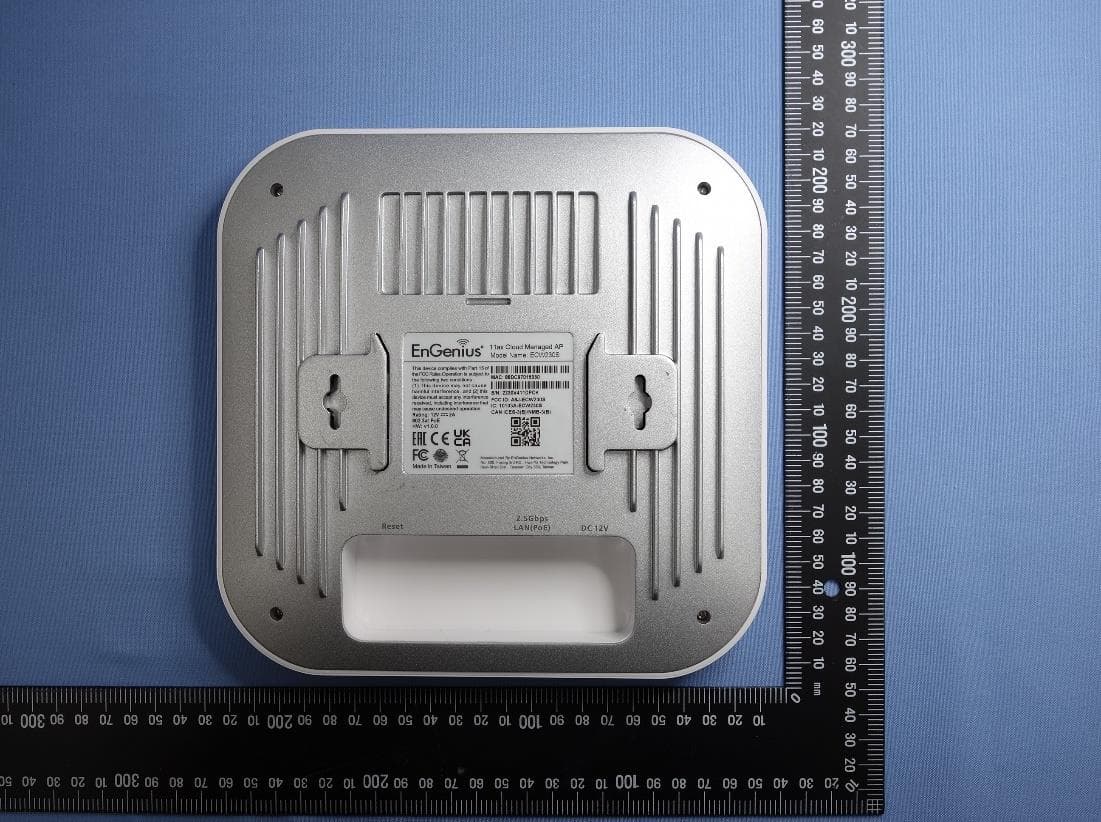
Click to zoom
Application Details
- Equipment Class
- NII - Unlicensed National Information Infrastructure TX
- Date of Grant
- Jul 31, 2022
- Application Purpose
- Original Equipment
- Date of Application
- Jul 28, 2022
- Equipment Note
- 11ax Cloud Managed AP
- Frequency Range
- 5745.00000000 - 5825.00000000
- Company
- EnGenius Technologies
- Country
- United States
Documents & Files
Document Text
Text extracted from the exhibit documents filed with the FCC. Open a document above to read the original.
Users Manual
ECW230S User Manual You can also install the "EnGenius Cloud" mobile app (available for both iOS and Android) for easier device registration and monitoring. What is EnGenius Cloud? Other Languages: 日本語 Before You Begin To start using the EnGenius Cloud service, you must prepare the following: At least one supported EnGenius Cloud wireless access point or switch. An existing network with an Internet connection including DHCP and DNS configuration. Supported Web Browsers The EnGenius Cloud is primarily accessible with a web browser. Before signing up for the EnGenius Cloud service or logging on to the web interface to manage your network, first verify that you are using a supported browser. The following table lists the web browsers that EnGenius Cloud supports: Browser Release Google Chrome 57.0.2987.110 and later Apple Safari 10.0.3 (12602.4.8) and later Mozilla Firefox 52.0 and later Microsoft Edge 80.0.361.103 and later If you use an unsupported web browser, you may experience issues displaying elements on the web interface. This article is not meant to be a comprehensive list of everything EnGenius Cloud, but rather a stepping stone to get started in the most informed way possible. Getting Started This session will assist you in setting up a new network on the EnGenius Cloud web app lication. For easier, faster setup, use the EnGenius Cloud for iOS or EnGenius Cloud for Android mobile apps. No matter which version you start with, you can always switch seamlessly between the web and mobile. Support for signing up with EnGenius Partner Portal will be available soon. Signing Up Before you start to manage EnGenius devices, you must first sign up for the service. Registering EnGenius Cloud is similar to other web-based platforms and can be done either with a social media account (e.g. Google or Facebook) or by creating an account from scratch. You will need to provide your email address, company name, physical address, and phone number. Furthermore, you must determine the country in which your account will be hosted. That is, all relative device information, user configurations, and client statistics will be kept in the corresponding region of servers (Oregon for US and Frankfurt for other countries). This enables EnGenius Cloud to protect customer data and comply with requirements like GDPR for customers within the European Union. Logging On Once your account has been created, you can login to EnGenius Cloud in the following steps: 1. Open a web browser to https: / / / cloud.engenius.ai/ . This will bring up the main login page. 2. Enter your EnGenius Cloud email address and password and click the Sign in button. 3. For EnGenius Partner who has account on EnGenius Partner Portal already, you can simply click on "E Partner" button, and EnGenius Partner Portal will pop up login page for you to use Single-Sign-On capability of Partner Portal to log on to EnGenius Cloud 4. For Google and Facebook users, you can also click on "Google" or "Facebook" button to use your account on Google and Facebook to log on to EnGenius Cloud 5. EnGenius Cloud will create a new default Organization and Network for every new account based on the email address as unique user identification. (note: If someone is invited to an Organization or Network, this account won't have default Organization and Network.) If you have multiple accounts created on EnGenius Cloud, EnGenius Cloud will merge your accounts based on the "email address" of the account. For example, if you have created a new account on EnGenius Cloud using the same email address as your google account, then you're able to login to this email account either through Google account authentication with Google account password, or through EnGenius Cloud Login with the password while you created the EnGenius Cloud account. Registering Devices to Organization Register a device to EnGenius Cloud inventory by using the serial number located on the device. Registering a device Registering devices with a serial number is easy. Just enter the serial numbers of your devices, one per line, then click the Register button. Assigning Devices to Network Before devices on EnGenius Cloud can be managed and configured, they must first be added to a network that you have created. Adding Devices to a Network 1. Navigate to Organization > Inventory. 2. Select one or multiple devices as required. 3. Click Assign to Network. Device Setup ECW AP Installation ECW AP Package Contents ECW120 Package Contents ECW220/230 Package Contents -ECW115 ECW115 Package Contents Do not use both power sources at the same time. Minimum Access Requirement Power source option - An ECW AP device can be powered by an 802.3af/at-compliant PoE device or by DC12V input Ethernet port: LAN (PoE): Uplink port accepts an 802.3af/at power source. LAN2: Data link if this port is built on a device. Connect the AP to Internet: You need to find a way to let the Cloud AP be able to access internet, so it can be managed by EnGenius Cloud. Connect the uplink LAN port to a switch port or port of router: This is the most common way to let AP be able to access Internet. (Note: please make sure the port is internet accessible by connecting a notebook to the port and browse the internet) Use your existing Cloud-managed ECW AP to mesh the new AP: Sometimes the place the AP installed is not accessible with Ethernet cable, then you can leverage EnGenius Mesh technology to mesh the new AP to your existing cloud-managed ECW AP. After internet connected, you will see Power LED blinking until the AP is able to communicate with EnGenius Cloud and the LED becomes steady lid. Usually it will take about 8 mins if there is new firmware available to upgrade. If the LED keeps blinking, then there could be some issues like no IP address, or local proxy server setting required...etc. To set static IP or Proxy, or managed VLAN, you can login to Local Access Page through Managed SSID of the AP. ECS Switch Installation ECS Switch Package …
Text truncated - open the document above for the full version.
Users Manual
ADD OBSTANCE Concrete Wall (12dB) Topology Network topology is a powerful tool to provide administrators a graphic overview of the logical network topology and the status of EnGenius devices. Use this screen to view the topology of the Org/Network. Click Manage > Topology to access this screen and double-click the organization/hierarchy view/network on the tree to change the scope. Learn which physical links in your network are most heavily-trafficked; simply hover over individual network links and devices to learn statistics about that connection’s negotiated speed, usage, and a number of directly connected clients using it in the past 5 minutes. The following describes the functions on this screen: Show label : Click to display or hide the device name & HW status on each device. HW status : Click to display or hide the POE Utilization on each switch. Redundant : Click to display or hide the redundant link . Other Devices : Click to display the third party devices as well as EWS series devices. Export : Click to download topology as PDF format . Configuring Networks There’s a lot that EnGenius Cloud can do to customize a network to meet your specific needs. We’ll walk you through the most common settings here. Configuring SSIDs Facebook Wi-Fi Facebook login provides a social sign-on experience for users logging in to access points. You can use your Facebook page as the sign-in page when they first log in to your network. Users can then check in with their Facebook credentials, update their status, and ‘like’ the Facebook page. Configuring EnGenius Wi-Fi with Facebook Login After creating a Facebook page, Facebook Login is configured on the Configure > SSID > Click one of the SSID > Captive Portal by taking the following step: 1. Select Facebook Wi-Fi under the Authentication Type section and click the Setup Facebook Wi-Fi button: 2. Wizard is displayed. Click Continue if you have created the Facebook page in advance. If you haven't created it, you could create a Facebook page. 3. You will now see a link ‘Go to FB Wi-Fi Setup page’. Clicking on this link will take you to your Facebook Wi-Fi settings page. 4. If you are not logged into Facebook, you will be prompted to log into Facebook. Once you have logged in, you will see the following settings that will let you pair your SSID with your Facebook Page: 5. Once your Facebook page has been successfully paired with your SSID, the SSID page will update the Facebook Wi-Fi section with information about the paired page, along with an option to Unpair. 802.11 Settings 802.11r 802.11r is a standards-based fast roaming technology that is leveraged when using a secure SSID (WPA2-PSK & WPA2-Enterprise). This option improves client device roaming by reducing the handoff delay in situations where client devices roam from one access point to another. 802.11r is disabled by default on EnGenius Cloud. This feature can be enabled from the Configure > SSID page under Network Scope. If this option cannot be enabled, please go to Wireless > Security Type to select WPA2 PSK or WPA2 Enterprise in advance. 802.11w 802.11w is enabled when Security Type is not Open. 802.11w enables Protected Management Frames (PMF) for management frames such as authentication, de- authentication, association, disassociation, beacon, and probe traffic. This enables APs to help prevent rogue devices from spoofing management frames from APs. Enable 802.11r will allow APs to begin utilizing Protected Management Frames for any clients that support 802.11w. Configuring Security Security Type Click Configure > SSID > Click one of SSID > Wireless to access this screen. The following describes the authentication types on this screen: Open: Allows any client to associate with this network without any data encryption or authentication. WPA2 PSK: Enter a pre-shared key of 8-64 case-sensitive characters to enable WPA2- PSK data encryption. WPA2 Enterprise: Select Custom Radius to use an external Radius server or select the EnGenius Cloud Radius to use the EnGenius Cloud for 802.1X authentication. OWE: When using hotspots in public, users are given better protection through the Wi- Fi Enhanced Open that provides unauthenticated encryption. WPA3 Personal (SAE) - WPA3 only: This type features easier password selection for users to easily remember. It also feats a higher level of security wherein data stored and data traffic in the network will not be compromised even if the password was hacked and data was already transmitted. The upgrade also enabled the Simultaneous Authentication of Equals (SAE) which replaced the Pre-shared Keys (PSK) in WPA2- Personal. WPA3/WPA2 Personal mixed: WPA2/WPA3 mixed mode allows for the coexistence of WPA2 and WPA3 clients on a common SSID. The passphrase for both WPA2 and WPA3 clients remains the same, the AP just advertises the different encryption cyphers available to be selected for use by the client. Clients choose which cypher to use for the wireless connection. WPA3 Enterprise: This type was mainly built for tighter and consistent application of security protocols across networks of governments, establishments, enterprises, and financial institutions. Offering optional 192-bit minimum security, the WPA3 will make cryptographic tools better. Hence, better protection for sensitive data. WiFi Access QR code This QR code allows you to use your mobile device to connect to the specific SSID. Client IP Addressing NAT Mode In NAT mode, the EnGenius APs run as DHCP servers to assign IP addresses to wireless clients out of a private 172.x.x.x IP address pool behind a NAT. NAT mode should be enabled when any of the following is true: W ireless clients associated to the SSID only require Internet access, not access to local wired or wireless resources. There is no DHCP server on the LAN that can assign IP addresses to the wireless clients. Th ere is a DHCP server on the LAN, but it does not have enough IP addresses to assign to wireless clients The implications of en…
Text truncated - open the document above for the full version.
Cover Letter(s)
EnGenius Technologies 1580 Scenic Avenue, Costa Mesa, CA92626 Page 1 of 1 Authority to Act as Agent Date: 2022-04-20 TUV Rheinland of North America, Inc. 1279 Quarry Lane., Suite. A Pleasanton, CA 94566 To Whom It May Concern: I appoint __________TUV Taiwan_______ to act as our agent in the preparation of this application for equipment certification. I certify that submitted documents properly describe the device or system for which equipment certification is sought. I also certify that each unit manufactured, imported or marketed, as defined in the FCC or Industry Canada’s regulations will have affixed to it a label identical to that submitted for approval with this application. For instances where our authorized agent signs the application for certification on our behalf, I acknowledge that all responsibility for complying with the terms and conditions for Certification, as specified by TUV Rheinland Group, still resides with ____EnGenius Technologies / 1580 Scenic Avenue, Costa Mesa, CA 92626____. For TCB applications, We certify that we are not subject to denial of federal benefits, that includes FCC benefits, pursuant to Section 5301 of the Anti-Drug Abuse Act of 1988, 21 U.S.C. 862. Further, no party, as defined in 47 CFR 1.2002 (b), to the application is subject to denial of federal benefits, that includes FCC benefits. Thank you, Agency Agreement Date: ___________________ Agreement is valid for 12 months from the above date. By: __________________________ Meng Chee Leo ___ (Signature) (Print name) General Manager _____ 888.725.7888#888 ___ (Title) (Telephone) On behalf of: EnGenius Technologies _ (Company Name) 2022-04-20
Cover Letter(s)
EnGenius Technologies 1580 Scenic Avenue, Costa Mesa, CA92626 MS-0044715 Page 1 of 1 Revision 0 Date: 2022-04-25 Subject: Confidentiality Request for FCC ID: A8J-ECW230S and IC: 10103A-ECW230S Pursuant to FCC 47 CRF 0.457(d) and 0.459 and IC RSP-100, Section 10, the applicant requests that a part of the subject FCC/IC application be held confidential. Type of Confidentiality Requested Exhibit Short Term Permanent Block Diagrams Short Term Permanent Internal Photos *** Short Term Permanent Operation Description/Theory of Operation Short Term Permanent Tune-Up Procedure Short Term Permanent Schematics Short Term Permanent User’s Manual*** Short Term n/a Test Setup Short Term n/a External Photos ______ EnGenius Technologies ______ has spent substantial effort in developing this product and it is one of the first of its kind in industry. Having the subject information easily available to "competition" would negate the advantage they have achieved by developing this product. Not protecting the details of the design will result in financial hardship. Permanent Confidentiality: The applicant requests the exhibits listed above as permanently confidential be permanently withheld from public review due to materials that contain trade secrets and proprietary information not customarily released to the public. (*** PAG only) Short-Term Confidentiality: The applicant requests the exhibits selected above as short term confidential be withheld from public view for a period of ___(specify number of days not to exceed 180)___ days from the date of the Grant of Equipment Authorization and prior to marketing. This is to avoid premature release of sensitive information prior to marketing or release of the product to the public. Applicant is also aware that they are responsible to notify TUV Rheinland in the event information regarding the product or the product is made available to the public. TUV Rheinland will then release the documents listed above for public disclosure pursuant to FCC Public Notice DA 04-1705. Sincerely, By: _________________________________ Meng Chee Leo / General Manager (Signature) (Print name/Title)
Cover Letter(s)
Date: July 11, 2022 Letter of Attestation for Power Conformity DECLARES, THAT THE PRODUCT ECW230S, Indoor Ceiling Mount Wireless Security Access Point The equipment ECW230S has two radio modules, one module is 2.4GHz + 5GHz with 4T4R and the other one is scanning radio; the Scanning radio has two configurations of 1T1R and RX only. For the Scanning radio in this application we just apply the RX only mode for FCC ID: A8J-ECW230S; and we also put the 1T1R test data in the report for reference only. By: Meng Chee Leo (Signature) (Print name) General Manager 888.725.7888#888 (Title) (Telephone)
External Photos
Appendix EP Photographs of EUT Page 1 of 18 CN22VVN0(P15C-BLE) 001 CN22VVN0(P15C-WiFi) 001 CN22VVN0(P15E-WiFi) 001 CN22VVN0(FCC-MPE) 001 CN22JZ5I(RSS247-BLE) 001 CN22JZ5I(RSS247-WiFi) 001 CN22JZ5I(RSS247-WiFi 5G) 001 CN22JZ5I(IC-MPE) 001 Product: 11ax Cloud Managed AP Type Identification: ECW230S Appendix EP Photographs of EUT Page 2 of 18 CN22VVN0(P15C-BLE) 001 CN22VVN0(P15C-WiFi) 001 CN22VVN0(P15E-WiFi) 001 CN22VVN0(FCC-MPE) 001 CN22JZ5I(RSS247-BLE) 001 CN22JZ5I(RSS247-WiFi) 001 CN22JZ5I(RSS247-WiFi 5G) 001 CN22JZ5I(IC-MPE) 001 Product: 11ax Cloud Managed AP Type Identification: ECW230S Appendix EP Photographs of EUT Page 3 of 18 CN22VVN0(P15C-BLE) 001 CN22VVN0(P15C-WiFi) 001 CN22VVN0(P15E-WiFi) 001 CN22VVN0(FCC-MPE) 001 CN22JZ5I(RSS247-BLE) 001 CN22JZ5I(RSS247-WiFi) 001 CN22JZ5I(RSS247-WiFi 5G) 001 CN22JZ5I(IC-MPE) 001 Product: 11ax Cloud Managed AP Type Identification: ECW230S
ID Label/Location Info
Label & label location
Internal Photos
Appendix EP Photographs of EUT Page 4 of 18 CN22VVN0(P15C-BLE) 001 CN22VVN0(P15C-WiFi) 001 CN22VVN0(P15E-WiFi) 001 CN22VVN0(FCC-MPE) 001 CN22JZ5I(RSS247-BLE) 001 CN22JZ5I(RSS247-WiFi) 001 CN22JZ5I(RSS247-WiFi 5G) 001 CN22JZ5I(IC-MPE) 001 Product: 11ax Cloud Managed AP Type Identification: ECW230S Appendix EP Photographs of EUT Page 5 of 18 CN22VVN0(P15C-BLE) 001 CN22VVN0(P15C-WiFi) 001 CN22VVN0(P15E-WiFi) 001 CN22VVN0(FCC-MPE) 001 CN22JZ5I(RSS247-BLE) 001 CN22JZ5I(RSS247-WiFi) 001 CN22JZ5I(RSS247-WiFi 5G) 001 CN22JZ5I(IC-MPE) 001 Product: 11ax Cloud Managed AP Type Identification: ECW230S Appendix EP Photographs of EUT Page 6 of 18 CN22VVN0(P15C-BLE) 001 CN22VVN0(P15C-WiFi) 001 CN22VVN0(P15E-WiFi) 001 CN22VVN0(FCC-MPE) 001 CN22JZ5I(RSS247-BLE) 001 CN22JZ5I(RSS247-WiFi) 001 CN22JZ5I(RSS247-WiFi 5G) 001 CN22JZ5I(IC-MPE) 001 Product: 11ax Cloud Managed AP Type Identification: ECW230S Appendix EP Photographs of EUT Page 7 of 18 CN22VVN0(P15C-BLE) 001 CN22VVN0(P15C-WiFi) 001 CN22VVN0(P15E-WiFi) 001 CN22VVN0(FCC-MPE) 001 CN22JZ5I(RSS247-BLE) 001 CN22JZ5I(RSS247-WiFi) 001 CN22JZ5I(RSS247-WiFi 5G) 001 CN22JZ5I(IC-MPE) 001 Product: 11ax Cloud Managed AP Type Identification: ECW230S Appendix EP Photographs of EUT Page 8 of 18 CN22VVN0(P15C-BLE) 001 CN22VVN0(P15C-WiFi) 001 CN22VVN0(P15E-WiFi) 001 CN22VVN0(FCC-MPE) 001 CN22JZ5I(RSS247-BLE) 001 CN22JZ5I(RSS247-WiFi) 001 CN22JZ5I(RSS247-WiFi 5G) 001 CN22JZ5I(IC-MPE) 001 Product: 11ax Cloud Managed AP Type Identification: ECW230S Appendix EP Photographs of EUT Page 9 of 18 CN22VVN0(P15C-BLE) 001 CN22VVN0(P15C-WiFi) 001 CN22VVN0(P15E-WiFi) 001 CN22VVN0(FCC-MPE) 001 CN22JZ5I(RSS247-BLE) 001 CN22JZ5I(RSS247-WiFi) 001 CN22JZ5I(RSS247-WiFi 5G) 001 CN22JZ5I(IC-MPE) 001 Product: 11ax Cloud Managed AP Type Identification: ECW230S Appendix EP Photographs of EUT Page 10 of 18 CN22VVN0(P15C-BLE) 001 CN22VVN0(P15C-WiFi) 001 CN22VVN0(P15E-WiFi) 001 CN22VVN0(FCC-MPE) 001 CN22JZ5I(RSS247-BLE) 001 CN22JZ5I(RSS247-WiFi) 001 CN22JZ5I(RSS247-WiFi 5G) 001 CN22JZ5I(IC-MPE) 001 Product: 11ax Cloud Managed AP Type Identification: ECW230S Appendix EP Photographs of EUT Page 11 of 18 CN22VVN0(P15C-BLE) 001 CN22VVN0(P15C-WiFi) 001 CN22VVN0(P15E-WiFi) 001 CN22VVN0(FCC-MPE) 001 CN22JZ5I(RSS247-BLE) 001 CN22JZ5I(RSS247-WiFi) 001 CN22JZ5I(RSS247-WiFi 5G) 001 CN22JZ5I(IC-MPE) 001 Product: 11ax Cloud Managed AP Type Identification: ECW230S Appendix EP Photographs of EUT Page 12 of 18 CN22VVN0(P15C-BLE) 001 CN22VVN0(P15C-WiFi) 001 CN22VVN0(P15E-WiFi) 001 CN22VVN0(FCC-MPE) 001 CN22JZ5I(RSS247-BLE) 001 CN22JZ5I(RSS247-WiFi) 001 CN22JZ5I(RSS247-WiFi 5G) 001 CN22JZ5I(IC-MPE) 001 Product: 11ax Cloud Managed AP Type Identification: ECW230S Appendix EP Photographs of EUT Page 13 of 18 CN22VVN0(P15C-BLE) 001 CN22VVN0(P15C-WiFi) 001 CN22VVN0(P15E-WiFi) 001 CN22VVN0(FCC-MPE) 001 CN22JZ5I(RSS247-BLE) 001 CN22JZ5I(RSS247-WiFi) 001 CN22JZ5I(RSS247-WiFi 5G) 001 CN22JZ5I(IC-MPE) 001 Product: 11ax Cloud Managed AP Type Identification: ECW230S Appendix EP Photographs of EUT Page 14 of 18 CN22VVN0(P15C-BLE) 001 CN22VVN0(P15C-WiFi) 001 CN22VVN0(P15E-WiFi) 001 CN22VVN0(FCC-MPE) 001 CN22JZ5I(RSS247-BLE) 001 CN22JZ5I(RSS247-WiFi) 001 CN22JZ5I(RSS247-WiFi 5G) 001 CN22JZ5I(IC-MPE) 001 Product: 11ax Cloud Managed AP Type Identification: ECW230S Appendix EP Photographs of EUT Page 15 of 18 CN22VVN0(P15C-BLE) 001 CN22VVN0(P15C-WiFi) 001 CN22VVN0(P15E-WiFi) 001 CN22VVN0(FCC-MPE) 001 CN22JZ5I(RSS247-BLE) 001 CN22JZ5I(RSS247-WiFi) 001 CN22JZ5I(RSS247-WiFi 5G) 001 CN22JZ5I(IC-MPE) 001 Product: 11ax Cloud Managed AP Type Identification: ECW230S Appendix EP Photographs of EUT Page 16 of 18 CN22VVN0(P15C-BLE) 001 CN22VVN0(P15C-WiFi) 001 CN22VVN0(P15E-WiFi) 001 CN22VVN0(FCC-MPE) 001 CN22JZ5I(RSS247-BLE) 001 CN22JZ5I(RSS247-WiFi) 001 CN22JZ5I(RSS247-WiFi 5G) 001 CN22JZ5I(IC-MPE) 001 Product: 11ax Cloud Managed AP Type Identification: ECW230S Appendix EP Photographs of EUT Page 17 of 18 CN22VVN0(P15C-BLE) 001 CN22VVN0(P15C-WiFi) 001 CN22VVN0(P15E-WiFi) 001 CN22VVN0(FCC-MPE) 001 CN22JZ5I(RSS247-BLE) 001 CN22JZ5I(RSS247-WiFi) 001 CN22JZ5I(RSS247-WiFi 5G) 001 CN22JZ5I(IC-MPE) 001 Product: 11ax Cloud Managed AP Type Identification: ECW230S Appendix EP Photographs of EUT Page 18 of 18 CN22VVN0(P15C-BLE) 001 CN22VVN0(P15C-WiFi) 001 CN22VVN0(P15E-WiFi) 001 CN22VVN0(FCC-MPE) 001 CN22JZ5I(RSS247-BLE) 001 CN22JZ5I(RSS247-WiFi) 001 CN22JZ5I(RSS247-WiFi 5G) 001 CN22JZ5I(IC-MPE) 001 Product: 11ax Cloud Managed AP Type Identification: ECW230S
RF Exposure Info
Prü fbericht - Produkte Test Report - Products Prüfbericht-Nr.: Test report no.: CN22VVN0(FCC-MPE) 001 Auftrags-Nr.: Order no.: 238519748 Seite 1 von 10 Page 1 of 10 Kunden-Referenz-Nr.: Client reference no.: N/A Auftragsdatum: Order date: 2021-09-06 Auftraggeber: Client: EnGenius Technologies 1580 Scenic Avenue, Costa Mesa, CA 92626 Prü fgegenstand: Test item: 11ax Cloud Managed AP Bezeichnung / Typ-Nr.: Identification / Type no.: ECW230S Auftrags-Inhalt: Order content: FCC Certification Prü fgrundlage: Test specification: IEEE Std C95.1 47 CFR §2.1091 47 CFR §1.1310 Wareneingangsdatum: Date of sample receipt: 2021-09-06 Prü fmuster-Nr.: Test sample no: A003123611-011, 012 A003123611-014, 016 Prü fzeitraum: Testing period: 2022-01-21 - 2022-06-02 Ort der Prü fung: Place of testing: EMC/RF Taipei Testing Site Prü flaboratorium: Testing laboratory: Taipei Testing Laboratories Prü fergebnis*: Test result*: Pass zusammengestellt von: compiled by: Ethan Shao genehmigt von: authorized by: Datum: Date: 2022-06-13 Ausstellungsdatum: Issue date: 2022-06-13 Stellung / Position: Assistant Project Engineer Stellung / Position: Ryan Chen Senior Project Manager Sonstiges / Other: Zustand des Prü fgegenstandes bei Anlieferung: Condition of the test item at delivery: Prüfmuster vollständig und unbeschädigt Test item complete and undamaged * Legende: 1 = sehr gut 2 = gut 3 = befriedigend 4 = ausreichend 5 = mangelhaft P(ass) = entspricht o.g. Prüfgrundlage(n) F(ail) = entspricht nicht o.g. Prüfgrundlage(n) N/A = nicht anwendbar N/T = nicht getestet * Legend: 1 = very good 2 = good 3 = satisfactory 4 = sufficient 5 = poor P(ass) = passed a.m. test specification(s) F(ail) = failed a.m. test specification(s) N/A = not applicable N/T = not tested Dieser Prü fbericht bezieht sich nur auf das o.g. Prü fmuster und darf ohne Genehmigung der Prü fstelle nicht auszugsweise vervielfältigt werden. Dieser Bericht berechtigt nicht zur Verwendung eines Prü fzeichens. This test report only relates to the a. m. test sample. Without permission of the test center this test report is not permitted to be duplicated in extracts. This test report does not entitle to carry any test mark. TUV Rheinland Taiwan Ltd. 11F., No. 758, Sec. 4, Bade Rd., Taipei 105, Taiwan, R.O.C. Mail: [email protected] ∙ Web: www.tuv.com Prü fbericht - Produkte Test Report - Products Prü fbericht - Nr.: Test Report No. CN22VVN0(FCC-MPE) 001 Seite 2 von 10 Page 2 of 10 Contents HISTORY OF THIS TEST REPORT .............................................................................. 3 1 GENERAL REMARKS ............................................................................................. 4 1.1 COMPLEMENTARY MATERIALS ............................................................................... 4 1.2 DECISION RULE OF CONFORMITY ........................................................................... 4 2 TEST SITES .......................................................................................................... 5 2.1 TEST FACILITIES ................................................................................................... 5 2.2 TEST FACILITY ...................................................................................................... 5 3 GENERAL PRODUCT INFORMATION ......................................................................... 6 3.1 PRODUCT FUNCTION AND INTENDED USE ............................................................... 6 3.2 RATINGS AND SYSTEM DETAILS ............................................................................. 6 4 MAXIMUM PERMISSIBLE EXPOSURE EVALUATION .................................................... 8 4.1 INTRODUCTION ..................................................................................................... 8 4.2 REFERENCE LEVELS ............................................................................................. 8 4.3 CLASSIFICATION OF THE ASSESSMENT METHODS.................................................... 9 5 TEST RESULTS ................................................................................................... 10 5.1 MAXIMUM POWER DENSITY ................................................................................. 10 APPENDIX EP - PHOTOGRAPHS OF EUT Prü fbericht - Produkte Test Report - Products Prü fbericht - Nr.: Test Report No. CN22VVN0(FCC-MPE) 001 Seite 3 von 10 Page 3 of 10 HISTORY OF THIS TEST REPORT Report No. Description Date Issued CN22VVN0(FCC-MPE) 001 Original Release 2022-06-13 Prü fbericht - Produkte Test Report - Products Prü fbericht - Nr.: Test Report No. CN22VVN0(FCC-MPE) 001 Seite 4 von 10 Page 4 of 10 1 General Remarks 1.1 Complementary Materials All attachments are integral parts of this test report. This applies especially to the following appendix: Appendix EP - Photographs of EUT 1.2 Decision Rule of Conformity The decision rule of conformity of this test report is following the requirements of the requested standard in the quotation, and agreed among testing laboratory and manufacturer (applicant) to exclude the consideration of Measurement Uncertainty, unless it is required by the specific standard. Prü fbericht - Produkte Test Report - Products Prü fbericht - Nr.: Test Report No. CN22VVN0(FCC-MPE) 001 Seite 5 von 10 Page 5 of 10 2 Test Sites 2.1 Test Facilities Taipei Testing Laboratories 11F. No.758, Sec. 4, Bade Rd., Songshan Dist. Taipei City 105 Taiwan (R.O.C.) 2.2 Test Facility Taipei Testing Laboratories No.458-18, Sec. 2, Fenliao Rd., Linkou Dist., New Taipei City 244 Taiwan (R.O.C.) Prü fbericht - Produkte Test Report - Products Prü fbericht - Nr.: Test Report No. CN22VVN0(FCC-MPE) 001 Seite 6 von 10 Page 6 of 10 3 General Product Information 3.1 Product Function and Intended Use The EUT is 11ax Cloud Managed AP. It contains BLE & WLAN compatible enabling the user to communicate data through wireless interface. This equipment has two radio modules, one module is 2.4GHz + 5GHz with 4T4R and the ot…
Text truncated - open the document above for the full version.
Test Report
Prü fbericht - Produkte Test Report - Products Prü fbericht-Nr.: Test report no.: CN22VVN0(P15E-WiFi) 001 Auftrags-Nr.: Order no.: 238519748 Seite 1 von 137 Page 1 of 137 Kunden-Referenz-Nr.: Client reference no.: N/A Auftragsdatum: Order date: 2021-09-06 Auftraggeber: Client: EnGenius Technologies 1580 Scenic Avenue, Costa Mesa, CA 92626 Prü fgegenstand: Test item: 11ax Cloud Managed AP Bezeichnung / Typ-Nr.: Identification / Type no.: ECW230S Auftrags-Inhalt: Order content: FCC Part 15E Test report (WiFi 5GHz) Prü fgrundlage: Test specification: FCC 47CFR Part 15: Subpart E Section 15.407 Wareneingangsdatum: Date of sample receipt: 2021-09-06 Prü fmuster-Nr.: Test sample no: A003123611-011, 012 A003123611-014, 016 Prü fzeitraum: Testing period: 2022-01-21 - 2022-06-16 Ort der Prü fung: Place of testing: EMC/RF Taipei Testing Site Prü flaboratorium: Testing laboratory: Taipei Testing Laboratories Prü fergebnis*: Test result*: Pass zusammengestellt von: compiled by: Ethan Shao genehmigt von: authorized by: Ryan Chen Datum: Date: 2022-06-16 Ausstellungsdatum: Issue date: 2022-06-16 Stellung / Position: Assistant Project Engineer Stellung / Position: Senior Project Manager Sonstiges / Other: Zustand des Prü fgegenstandes bei Anlieferung: Condition of the test item at delivery: Prüfmuster vollständig und unbeschädigt Test item complete and undamaged * Legende: 1 = sehr gut 2 = gut 3 = befriedigend 4 = ausreichend 5 = mangelhaft P(ass) = entspricht o.g. Prüfgrundlage(n) F(ail) = entspricht nicht o.g. Prüfgrundlage(n) N/A = nicht anwendbar N/T = nicht getestet * Legend: 1 = very good 2 = good 3 = satisfactory 4 = sufficient 5 = poor P(ass) = passed a.m. test specification(s) F(ail) = failed a.m. test specification(s) N/A = not applicable N/T = not tested Dieser Prü fbericht bezieht sich nur auf das o.g. Prü fmuster und darf ohne Genehmigung der Prü fstelle nicht auszugsweise vervielfältigt werden. Dieser Bericht berechtigt nicht zur Verwendung eines Prü fzeichens. This test report only relates to the a. m. test sample. Without permission of the test center this test report is not permitted to be duplicated in extracts. This test report does not entitle to carry any test mark. TU…
Text truncated - open the document above for the full version.
Contact Information
Applicant
Mingi Tsai(Senior Product Manager)
Technical Contact
EnGenius TechnologiesMeng Chee Leo
[email protected]888.735.7888
1580 Scenic Avenue, · Costa Mesa · United States
Test Firm
TUV Rheinland Taiwan Ltd. Taipei Testing Lab.Willy Chen
Technical Specifications
| # | Rule Parts | Frequency Range | Power Output |
|---|---|---|---|
| 4 | 15E | 5.75 GHz - 5.83 GHz | 339.30 mW |
Other Applications from EnGenius Technologies
A8J-EOC655
Feb 18, 2024Outdoor6 2x2 CPE
Equipment Class
DTS - Digital Transmission System
A8J-ENSTATION6
May 07, 2023EnGenius Station Wi-Fi 6 2x2 5GHz Outdoor CPE
Equipment Class
DTS - Digital Transmission System
A8J-ECW270
Mar 21, 2023Cloud6 4x4 Outdoor
Equipment Class
DTS - Digital Transmission System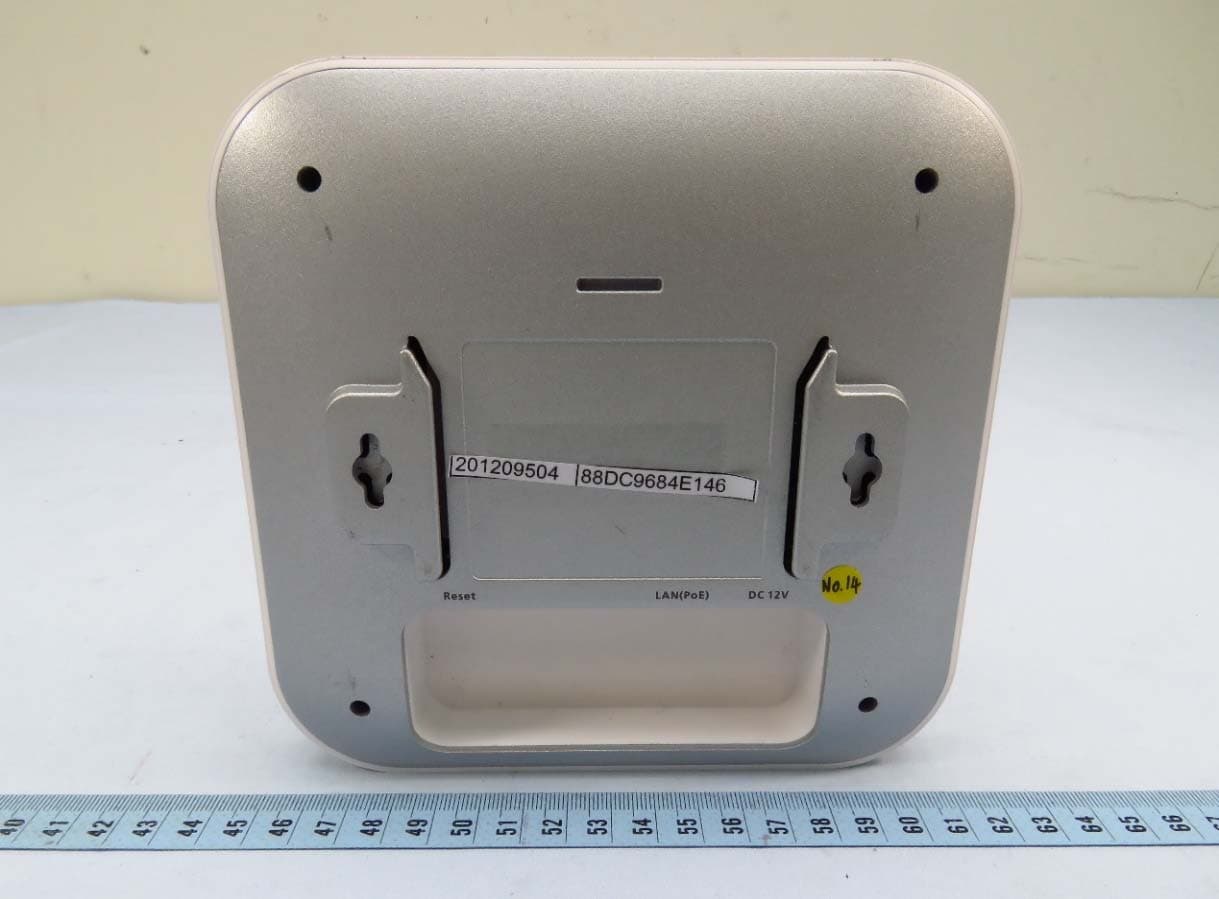
A8J-EWS357APV3A
Jan 17, 202111ax Indoor Managed AP, 11ax Cloud Managed AP
Equipment Class
DTS - Digital Transmission System
A8J-EWS377APV3
Aug 30, 202011ax Indoor Managed Access Point, 11ax Cloud Managed Access Point
Equipment Class
NII - Unlicensed National Information Infrastructure TX