A98-HDN2538Cellular/ PCS GSM and Cellular WCDMA Phone with WLAN, Bluetooth and RFID
NEC Corporation of America
Click to zoom
Application Details
- Equipment Class
- DSS - Part 15 Spread Spectrum Transmitter
- Date of Grant
- Apr 24, 2013
- Application Purpose
- Original Equipment
- Date of Application
- Apr 24, 2013
- Equipment Note
- Cellular/ PCS GSM and Cellular WCDMA Phone with WLAN, Bluetooth and RFID
- Frequency Range
- 2402.00000000 - 2480.00000000
- Company
- NEC Corporation of America
- Country
- United States
Documents & Files
Document Text
Text extracted from the exhibit documents filed with the FCC. Open a document above to read the original.
Users Manual
Calling 88 NOTE When using services where you must type in additional numbers during the call, such as for checking your bank account balance or for using ticket reservation services, "Add 2-sec pause" (,) or "Add wait" (;) can be used to enter the main telephone number and additional number together beforehand for making the call. • If you use " " ▶ "Add 2-sec pause" after the main telephone number is dialed, the additional number is dialed automatically after waiting for 2 seconds. • If " " ▶ "Add wait" is used, after the main telephone number is dialed, a wait is automatically added. Then, once a confirmation message for sending the additional number is displayed, tapping "Yes" will send the additional number. ■ Emergency call Emergency callPhone number Police emergency110 Fire brigade/Ambulance emergency 119 Maritime distress call118 Making/Receiving Calls Making a call 1 From the application list screen, "Phone" 2 "Dial" • Tap "Favorites" to display contacts saved to Phonebook. → P. 97 3 Enter the phone number • If you enter a wrong number, tap to delete the number. Touch and hold to delete all the entered numbers. ■ Set Caller ID notification manually ▶ "" ▶ "Caller ID notification" ▶ "Notify"/"Not notify" • You can set to notify/not notify your number by entering "186"/"184" before entering the number. * Effective for that call only. ■ Using Koe-no-Takuhaibin (P. 93) ▶ "Koe-Taku" 4 "" 5 When the call is finished, "" Calling Calling 89 The terminal supports "Emergency Location Report". Calls made to emergency service organizations (e.g. by dialing 110, 119 or 118) disclose information on the caller's location to the organization receiving the call. Emergency service organizations may not identify the correct location depending on the caller’s location and the receiving condition. The location information and phone number are not disclosed when, before each individual call made, "184" or another blocking prefix is dialed first. If the information is deemed necessary for the protection of life, etc., this information may be acquired by the organization being called. Locations/timing planned for adoption of this feature vary according to the status of the preparations by the relevant emergency service organizations. When calling 110, 119 or 118 from the terminal, first say you are calling from a mobile phone, give your number, and state your location clearly, because the police or fire department may call you back for confirmation. Also, do not move around when making the call. Do not turn off the power immediately after ending the call, but leave it turned on for ten minutes or so, so that you can receive a call. Depending on the area you are calling from, you may not be connected with the nearest police or fire department, etc. NOTE When you have locked the screen, you can make an emergency call without drawing screen unlock pattern and entering the Lock Number for each screen. On each screen, tap "Emergency call". The "Emergency Dialer" screen appears; you can make phone calls only to the emergency phone numbers. In Japan, the 110, 119, and 118 emergency numbers cannot be dialed when the miniUIM is not set to it, from the PIN1 code entry screen, during PIN code lock, PUK lock activated, or Encryption (P. 133) is set to this terminal. Making an international call (WORLD CALL) WORLD CALL is an international phone service that can be used from DOCOMO mobile phones. Customers who have subscribed to the FOMA service would also have automatically subscribed to "WORLD CALL" at the same time (excepting those who have declined it). For details on WORLD CALL, refer to DOCOMO "International Services website". Using international dial assist → P. 188 1 From the application list screen, "Phone" 2 "Dial" 3 Touch and hold "0" • A plus sign "+" appears. Calling 90 4 Enter the country code ▶ enter the area code (city code) ▶ enter the recipient's mobile phone number ▶ " " • If "+" is converted to an international prefix when making a call based on the settings in "Automatic conversion function" (P. 188), tap "Converted number" in the "International dial assist" screen. NOTE If the area code begins with "0", omit "0". However, "0" may be required for calling some countries or areas, such as Italy. Receiving a call 1 When a call is received, "Activate" ▶ "Accept" ■ Turn off the ring tone and the vibrator. ▶ " u "/" d " ■ Declining a call ▶ "Activate" ▶ "Reject" ■ Declining calls and transmitting by SMS ▶ "Activate" ▶ "Reject call with SMS" ▶ Tap the message • The selected message is sent to the other person as SMS. ■ Putting an incoming call on hold ▶ "" ▶ "On hold" • The call is connected and immediately placed on hold. ■ Record message ▶ " " ▶ "Record message" • Play record message → P. 94 2 When the call is finished, "" NOTE If you decline an incoming call when Voice Mail service or Call Forwarding service are set to Activate, the call is forwarded to the Voice Mail service center or the designated forwarding number.
External Photos
NEC CORPORATION OF AMERICA FCC ID: A98-HDN2538 Model: KMP7R4K1-2A External Photos EUT Type: Portable Handset Page 1 of 4 © 2013 PCTEST Engineering Laboratory Inc. EXTERNAL PHOTOGRAPHS NEC CORPORATION OF AMERICA FCC ID: A98-HDN2538 Model: KMP7R4K1-2A External Photos EUT Type: Portable Handset Page 2 of 4 © 2013 PCTEST Engineering Laboratory Inc. NEC CORPORATION OF AMERICA FCC ID: A98-HDN2538 Model: KMP7R4K1-2A External Photos EUT Type: Portable Handset Page 3 of 4 © 2013 PCTEST Engineering Laboratory Inc. NEC CORPORATION OF AMERICA FCC ID: A98-HDN2538 Model: KMP7R4K1-2A External Photos EUT Type: Portable Handset Page 4 of 4 © 2013 PCTEST Engineering Laboratory Inc.
ID Label/Location Info
FCC ID Label Placement Label placement Rear View of the phone FCC ID label is permanently affixed to the EUT by using the permanent adhesive IMEI Label Layout Vendor Name NEC CASIO MOBILE COMMUNICATIONS Confidential Model Name Year/Month of Manufacture SilN b Serial Number Barcode MAC Address Warning:Please switch off this mobile phone S er i a l N um b e r on the airplane. Please do not remove this sticker. Applicant / Manufacturer Japanese Accreditation Mark JATE Certification Number TELEC Certification Number
Test Report
FCC ID: A98-HDN2538 FCC Pt. 15.247 BLUETOOTH TEST REPORT (CERTIFICATION) Reviewed by: Quality Manager Test Report S/N: Test Dates: EUT Type: Page 1 of 45 0Y1303220531.A98 3/25 - 4/3/2013 Portable Handset © 2013 PCTEST Engineering Laboratory, Inc. V 3.2 01/20/2013 Applicant Name: Date of Testing: NEC Corporation of America 3/25 - 4/3/2013 Radio Communications Systems Division Test Site/Location: 6535 N. State Highway 161 PCTEST Lab. Columbia, MD, USA Irving, TX 75039-2402 USA Test Report Serial No.: 0Y1303220531.A98 FCC ID: A98-HDN2538 APPLICANT: NEC Corporation of America Application Type: Certification Model(s): KMP7R4K1-2A EUT Type: Portable Handset Max. RF Output Power: 1.331 mW (1.241 dBm) Conducted Frequency Range: 2402 – 2480MHz (Bluetooth for US) Type of Modulation: GFSK, /4-DQPSK, 8DPSK FCC Classification: FCC Part 15 Spread Spectrum Transmitter (DSS) FCC Rule Part(s): Part 15 Subpart C (15.247) Test Procedure(s): ANSI C63.10-2009, DA 00-705 This equipment has been shown to be capable of compliance with the applicable technical standards as indicated in the measurement report and was tested in accordance with the measurement procedures specified in ANSI C63.10-2009 and DA 00-705. Test results reported herein relate only to the item(s) tested. I attest to the accuracy of data. All measurements reported herein were performed by me or were made under my supervision and are correct to the best of my knowledge and belief. I assume full responsibility for the completeness of these measurements and vouch for the qualifications of all persons taking them. PCTEST ENGINEERING LABORATORY, INC. 7185 Oakland Mills Road, Columbia, MD 21046 USA Tel. 410.290.6652 / Fax 410.290.6654 http://www.pctestlab.com MEASUREMENT REPORT FCC PART 15.247 Bluetooth FCC ID: A98-HDN2538 FCC Pt. 15.247 BLUETOOTH TEST REPORT (CERTIFICATION) Reviewed by: Quality Manager Test Report S/N: Test Dates: EUT Type: Page 2 of 45 0Y1303220531.A98 3/25 - 4/3/2013 Portable Handset © 2013 PCTEST Engineering Laboratory, Inc. V 3.2 01/20/2013 TABLE OF CONTENTS FCC PART 15.247 MEASUREMENT REPORT...................................................................................3 1.0 INTRODUCTION ...................................................................................................................................... 4 1.1 SCOPE ........................................................................................................................................................... 4 1.2 PCTEST TEST LOCATION ............................................................................................................................ 4 2.0 PRODUCT INFORMATION ..................................................................................................................... 5 2.1 EQUIPMENT DESCRIPTION......................................................................................................................... 5 2.2 DEVICE CAPABILITIES ................................................................................................................................. 5 2.3 TEST CONFIGURATION ............................................................................................................................... 5 2.4 EMI SUPPRESSION DEVICE(S)/MODIFICATIONS ...................................................................................... 5 2.5 LABELING REQUIREMENTS ........................................................................................................................ 5 3.0 DESCRIPTION OF TEST ........................................................................................................................ 6 3.1 EVALUATION PROCEDURE ......................................................................................................................... 6 3.2 AC LINE CONDUCTED EMISSIONS ............................................................................................................. 6 3.3 RADIATED EMISSIONS ................................................................................................................................ 7 4.0 ANTENNA REQUIREMENTS .................................................................................................................. 8 5.0 TEST EQUIPMENT CALIBRATION DATA .............................................................................................. 9 6.0 TEST RESULTS .................................................................................................................................... 10 6.1 SUMMARY ................................................................................................................................................... 10 6.2 20DB BANDWIDTH MEASUREMENT ......................................................................................................... 11 6.3 OUTPUT POWER MEASUREMENT ........................................................................................................... 17 6.4 BAND EDGE COMPLIANCE ....................................................................................................................... 27 6.5 CARRIER FREQUENCY SEPARATION ...................................................................................................... 30 6.6 TIME OF OCCUPANCY ............................................................................................................................... 31 6.7 NUMBER OF HOPPING CHANNELS .......................................................................................................... 32 6.8 CONDUCTED SPURIOUS EMISSIONS ...................................................................................................... 33 6.9 RADIATED SPURIOUS EMISSION MEASUREMENTS .............................................................................. 37 6.10 RADIATED RESTRICTED BAND EDGE MEASUREMENTS .................................................................. 41 6.11 LINE CONDUCTED MEASUREMENT DATA .…
Text truncated - open the document above for the full version.
Test Setup Photos
NEC CORPORATION OF AMERICA FCC ID: A98-HDN2538 Model: KMP7R4K1-2A Test Set-Up Photos EUT Type: Portable Handset Page 1 of 3 © 2013 PCTEST Engineering Laboratory Inc. TEST SETUP PHOTOGRAPHS NEC CORPORATION OF AMERICA FCC ID: A98-HDN2538 Model: KMP7R4K1-2A Test Set-Up Photos EUT Type: Portable Handset Page 2 of 3 © 2013 PCTEST Engineering Laboratory Inc. NEC CORPORATION OF AMERICA FCC ID: A98-HDN2538 Model: KMP7R4K1-2A Test Set-Up Photos EUT Type: Portable Handset Page 3 of 3 © 2013 PCTEST Engineering Laboratory Inc.
Contact Information
Applicant
Sanjay Wadhwa(Senior Manager)
Technical Contact
PCTEST Engineering Lab., Inc.Randy Ortanez
[email protected]410-290-6652
6660-B Dobbin Road · Columbia, Maryland · United States
Test Firm
PCTEST Engineering Laboratory, Inc.Randy Ortanez
Technical Specifications
| # | Rule Parts | Frequency Range | Power Output |
|---|---|---|---|
| 1 | 15C | 2.40 GHz - 2.48 GHz | 1.00 mW |
Other Applications from NEC Corporation of America

A98-MDD1075
Oct 16, 2013Cellular WCDMA and PCS GSM Phone with RFID
Equipment Class
JBP - Part 15 Class B Computing Device Peripheral
A98-MER7671
Jun 09, 2013Cellular WCDMA and PCS GSM Phone with WLAN and RFID
Equipment Class
DTS - Digital Transmission System
A98-FQM6833
Feb 17, 2013Digital Portable Cellular Telephone
Equipment Class
JBP - Part 15 Class B Computing Device Peripheral
A98-RSZ3446
Jan 01, 2013GSM/EGPRS/WCDMA/LTE MOBILE PHONE
Equipment Class
DSS - Part 15 Spread Spectrum Transmitter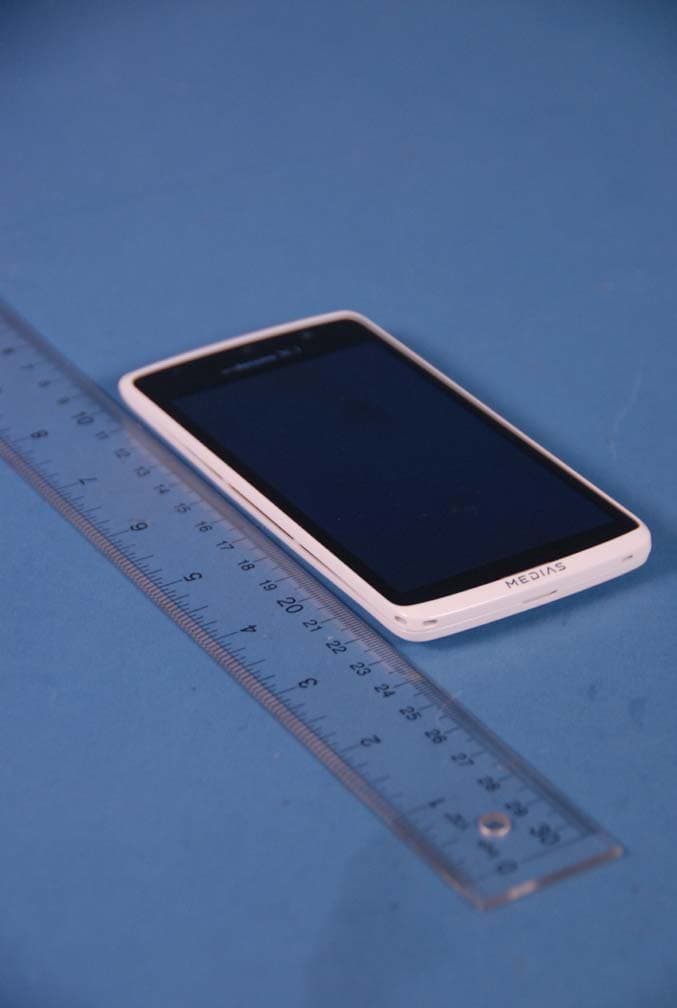
A98-EKO8545
Dec 26, 2012Cellular/ PCS GSM and Cellular WCDMA Phone with WLAN, Bluetooth and RFID
Equipment Class
JBP - Part 15 Class B Computing Device Peripheral