ACJ9TGCF-Y21Panasonic Notebook PC w/ Intel WLAN
Panasonic Corporation of North America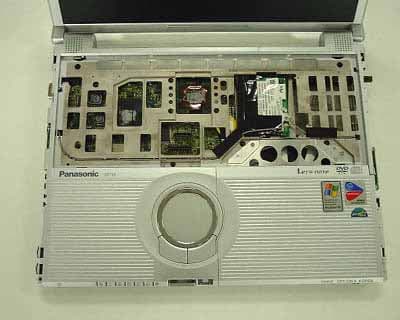
Click to zoom
Application Details
- Equipment Class
- DTS - Digital Transmission System
- Date of Grant
- May 31, 2004
- Application Purpose
- Original Equipment
- Date of Application
- May 31, 2004
- Equipment Note
- Panasonic Notebook PC w/ Intel WLAN
- Frequency Range
- 2412.00000000 - 2462.00000000
- Country
- United States
Documents & Files
Document Text
Text extracted from the exhibit documents filed with the FCC. Open a document above to read the original.
Users Manual
OPERATING INSTRUCTIONS Personal Computer Appendix LIMITED USE LICENSE AGREEMENT .......36 Hard Disk Backup Function ...........................38 Hard Disk Data Erase Utility ..........................42 Specifications ................................................43 LIMITED WARRANTY ..................................45 Troubleshooting List of Error Codes.........................................28 Dealing with Problems (Summary)...................29 Reinstalling Software ....................................34 Operation Starting Up/Shutting Down ............................16 Touch Pad .....................................................19 Reference Manual .........................................20 RAM Module .................................................21 Useful Information .........................................23 Getting Started Read Me First .................................................3 Names and Functions of Parts ......................10 First-time Operation ......................................12 Contents [Additional Manual] Reference Manual This manual can be accessed on your computer. Re- fer to page 20 on how to access the Reference Manual. Reference Manual •Read Me First•LED Indicators •Key Combinations Appendix Getting Started Operation Troubleshooting Please read these instructions carefully before using this product and save this manual for future use. XP Reference Manual •Technical Information •DMI Viewer •List of Error Codes •Dealing with Problems (Advanced) Model No. CF-Y2 Series Page Reference Manual •Touch Pad •Standby/Hibernation Functions •Security Measures •Computing on the Road •Battery Power •SD-MovieStage •DVD-ROM & CD-R/ RW Drive •Win DVD •B's Recorder/B's CLiP •PC Cards •SD Memory Card/ MultiMedia Card •SD Memory Card Security Function •External Display •USB Devices •Modem •LAN •Wireless LAN •Setup Utility •Icon Enlarger 2 Getting Started Introduction Thank you for purchasing the Panasonic computer. Read the operating instructions thoroughly for proper operation of your new computer. Illustrations and Terminology in this Manual Copyright This manual is copyrighted by Matsushita Electric Industrial Co., Ltd. with all rights reserved. No part of this manual may be reproduced in any form without the prior written permission of Matsushita Electric Industrial Co., Ltd. No patent liability is assumed with respect to the use of the information contained herein. ©2004 Matsushita Electric Industrial Co., Ltd. All Rights Reserved. Disclaimer Computer specifications and manuals are subject to change without notice. Matsushita Electric Industrial Co., Ltd. assumes no liability for damage incurred directly or indirectly from errors, omissions or discrepancies between the computer and the manuals. Trademarks Microsoft, Windows and the Windows logo are registered trademarks of Microsoft Corporation of the United States and/or other countries. Intel, Pentium and PROSet are either registered trademarks or trademarks of Intel Corporation. SD Logo is a trademark. Adobe ® and Acrobat ® are either registered trademarks or trademarks of Adobe Systems Incorporated in the United States and/or other countries. WinDVD™ is a trademark of InterVideo, Inc. Panasonic is a registered trademark of Matsushita Electric Industrial Co., Ltd. Names of products, brands, etc., appearing in this manual are trademarks or registered trademarks of their respective owner companies. NOTE:NOTE provides a useful fact or helpful information. CAUTION:CAUTION indicates a condition that may result in minor or moderate injury. Enter :This illustration means to press the [Enter] key. Fn + F5 :This illustration means to press and hold the [Fn] key, then press the [F5] key. When using with the [Fn] and [Ctrl] functions interchanged, read with [Fn] and [Ctrl] reversed ( “Key Combinations”). [start] - [Run]:This illustration means to click [start], then to click [Run]. For some applications, you may need to double-click. :Where to go for referred information. :This illustration means to refer to the Reference Manual, which is available on your computer. Refer to page 20 on how to access this manual. Some of the illustrations in this manual may differ slightly in shape from the actual items in order to make the explanation easier to understand. In this manual, “Microsoft ® Windows ® XP Professional” is indicated as “Windows” or “Windows XP”. In this manual, the following software packages are described as follows: “WinDVD™ 5 (OEM Version)” as “WinDVD” “B’s Recorder GOLD7 BASIC” as “B’s Recorder” “B’s CLiP 5” as “B’s CLiP” If the user has logged on without the administrator authority, some functions may not be executable, and some screens may not be displayed as shown in this manual. If this happens, log on with the administrator authority to enable these functions. Confirm the latest information on optional products in catalogs, etc. Circular media such as DVD-ROM and CD-ROM are described as “discs”. Customer’s Record Serial No. or Date of Purchase Model No. * 1 Code No. Dealer’s Name Dealer’s Address * 1 For the Model No., insert the 12 digit number (for example, CF-Y2DWAZZKM) located on the bottom of the computer. 3 Getting Started Read Me First Federal Communications Commission Radio Frequency Interference Statement Note: This equipment has been tested and found to comply with the limits for a Class B digital device, pursuant to Part 15 of the FCC Rules. These limits are designed to provide reasonable protection against harmful interference in a residential installation. This equipment generates, uses and can radiate radio frequency energy and, if not installed and used in accordance with the instructions, may cause harmful interference to radio communications. However, there is no guarantee that interference will not occur in a particular installation. If this equipment does cause harmful interference to radio or television reception, which can be determined by turning the equipment off and on, the …
Text truncated - open the document above for the full version.
External Photos
<CF-Y2 WLANb+g photo> 1) CF-Y2 Front View Right TX/RX Antenna Left TX/RX Antenna 2) WLAN Card position Inside view Magnified inside view WLAN Card Position
ID Label/Location Info
Spread Spectrum Transceiver (DSS), 15.247 PCTEST LAB TEST REPORT 15.247 FCC Measurement Report Reviewed by: Quality Manager Filename: 15.240413247.ACJ Test Dates: April 26, 2004 EUT Type: Notebook PC w/ WLAN FCC ID: ACJ9TGCF-Y21 Page 33 of 41 © 2004 PCTEST Engineering Laboratory, Inc. CONFIDENTIAL PROPERTY OF PCTEST EXHIBIT B – Labeling Requirements Sample Label & Location New Labeling Requirements Per 2.1074 & 15.19; Docket 95-19 The sample label shown below shall be permanently affixed at a conspicuous location on the device; instruction manual or pamphlet supplied to the user and be readily visible to the purchaser at the time of purchase. However, when the device is so small wherein placement of the label with specified statement is not practical, only the trade name, FCC ID, and the FCC logo must be displayed on the device per Section 15.19 (b)(2). Spread Spectrum Transceiver (DSS), 15.247 PCTEST LAB TEST REPORT 15.247 FCC Measurement Report Reviewed by: Quality Manager Filename: 15.240413247.ACJ Test Dates: April 26, 2004 EUT Type: Notebook PC w/ WLAN FCC ID: ACJ9TGCF-Y21 Page 34 of 41 © 2004 PCTEST Engineering Laboratory, Inc. CONFIDENTIAL PROPERTY OF PCTEST EXHIBIT B – Labeling Requirements (Cont.) Sample Label & Location FCC ID Label
Internal Photos
3) WLAN exterior photo WLAN Top View WLAN Bottom View 4) WLAN interior photo WLAN inside Top View WLAN inside Bottom View 5) Antenna position Bottom cover open view TX Antenna (send / receive) Left TX/RX Antenna Right TX/RX Antenna Magnified View Left TX/RX Antenna Magnified View 6) Antenna Specification Right Tx/Rx Antenna: Inverted F type 1.54dBi max Left Tx/Rx Antenna: Inverted F type 2.16dBi max
RF Exposure Info
PCTEST ENGINEERING LABORATORY, INC. 6660 – B Dobbin Road • Columbia, MD 21045 • USA Telephone 410.290.6652 / Fax 410.290.6654 http://www.pctestlab.com (email: [email protected]) CERTIFICATE OF COMPLIANCE (SAR EVALUATION) PCTEST SAR TEST REPORT FCC MEASUREMENT REPORT Reviewed by: Quality Manager SAR Filename: SAR.240413248.ACJ Test Dates: April 26, 2004 Notebook PC with mini-PCI WLAN b+g FCC ID: ACJ9TGCF-Y21 Page 1 of 22 © 2004 PCTEST Engineering Laboratory, Inc. APPLICANT NAME & ADDRESS: DATE & LOCATION OF TESTING: Matsushita Electric Industrial Co., Ltd. Dates of Tests: April 26, 2004 1006 Oaza Kadoma, Kadoma, Test Report S/N: SAR.240413248.ACJ Osaka, 571 JAPAN Test Site: PCTEST Lab, Columbia, MD USA Project No: ITPD-04-F014A FCC ID: ACJ9TGCF-Y21 APPLICANT: MATSUSHITA ELECTRIC INDUSTRIAL CO., LTD. EUT Type: Notebook PC with mini-PCI WLAN b+g Tx Frequency: 2412 – 2462 MHz (DSSS/OFDM) Rx Frequency: 2412 – 2462 MHz (DSSS/OFDM) Max. RF Output Power: 56 mW (17.44 dBm) Conducted Max. SAR Measurement: 0.08 W/kg Body SAR (Lap) 0.92 W/kg Body SAR (Bystander) Trade Name/Model(s): PANASONIC CF-Y2 FCC Classification: Digital Transmission System (DTS) FCC Rule Part(s): §2.1093; FCC/OET Bulletin 65 Supplement C [July 2001] Application Type: Certification Test Device Serial No.: Identical Prototype [S/N: 4DKSA00029] This wireless portable device has been shown to be capable of compliance for localized specific absorption rate (SAR) for uncontrolled environment/general population exposure limits specified in ANSI/IEEE Std. C95.1-1992 and had been tested in accordance with the measurement procedures specified in FCC/OET Bulletin 65 Supplement C (2001) and IEEE Std. P1528 D1.2 (April 2003). I attest to the accuracy of data. All measurements reported herein were performed by me or were made under my supervision and are correct to the best of my knowledge and belief. I assume full responsibility for the completeness of these measurements and vouch for the qualifications of all persons taking them. PCTEST certifies that no party to this application has been denied the FCC benefits pursuant to Section 5301 of the Anti-Drug Abuse Act of 1988, 21 U.S.C. 862. PCTEST SAR TEST REPORT FCC MEASUREMENT REPORT Reviewed by: Quality Manager SAR Filename: SAR.240413248.ACJ Test Dates: April 26, 2004 Notebook PC with mini-PCI WLAN b+g FCC ID: ACJ9TGCF-Y21 Page 2 of 22 © 2004 PCTEST Engineering Laboratory, Inc. TABLE OF CONTENTS 1. INTRODUCTION / SAR DEFINITION...........................................................................3 2. SAR MEASUREMENT SETUP..........................................................................................4 3. ALIDX-500 E-FIELD PROBE SYSTEM............................................................................5 4. PROBE CALIBRATION PROCESS.................................................................................6 5. PHANTOM & EQUIVALENT TISSUES..........................................................................7 6. TEST SYSTEM SPECIFICATIONS...................................................................................8 7. TEST CONFIGURATION POSITION.............................................................................9 8. ANSI/IEEE C95.1 - 1992 RF EXPOSURE LIMITS.........................................................10 9. MEASUREMENT UNCERTAINTIES.............................................................................11 10. SYSTEM VERIFICATION..............................................................................................12 11. SAR TEST DATA SUMMARY.......................................................................................13 12. SAR DATA SUMMARY...............................................................................................14 13. SAR TEST EQUIPMENT..............................................................................................16 14. CONCLUSION............................................................................................................17 15. REFERENCES...............................................................................................................18 EXHIBIT J - SAR TEST DATA..............................................................................................19 EXHIBIT K – SAR TEST SETUP PHOTOGRAPHS...............................................................20 EXHIBT L – DIPOLE VALIDATION....................................................................................21 EXHIBIT M – PROBE CALIBRATION.................................................................................22 PCTEST SAR TEST REPORT FCC MEASUREMENT REPORT Reviewed by: Quality Manager SAR Filename: SAR.240413248.ACJ Test Dates: April 26, 2004 Notebook PC with mini-PCI WLAN b+g FCC ID: ACJ9TGCF-Y21 Page 3 of 22 © 2004 PCTEST Engineering Laboratory, Inc. 1. INTRODUCTION / SAR DEFINITION The FCC has adopted the guidelines for evaluating the environmental effects of radiofrequency radiation in ET Docket 93-62 on Aug. 6, 1996 to protect the public and workers from the potential hazards of RF emissions due to FCC-regulated portable devices.[1] The safety limits used for the environmental evaluation measurements are based on the criteria published by the American National Standards Institute (ANSI) for localized specific absorption rate (SAR) in IEEE/ANSI C95.1-1992 Standard for Safety Levels with Respect to Human Exposure to Radio Frequency Electromagnetic Fields, 3 kHz to 300 GHz. (c) 1992 by the Institute of Electrical and Electronics Engineers, Inc., New York, New York 10017.[2] The measurement procedure described in IEEE/ANSI C95.3-1992 Recommended Practice for the Measurement of Potentially Hazardous Electromagnetic Fields - RF and Microwave[3] is used for guidance in measuring SAR due to the RF radiation exposure from the Equipment Under Test (EUT). These criteria for SAR evaluation are similar to those recommended by the National Council on Radiation Protection and Measure…
Text truncated - open the document above for the full version.
RF Exposure Info
Panasonic FCC ID: ACJ9TGCF-Y21 EUT Photographs © 2004 PCTEST Lab. Notebook PC with mini-PCI WLAN b+g Model: CF-Y2 Panasonic FCC ID: ACJ9TGCF-Y21 EUT Photographs © 2004 PCTEST Lab. Notebook PC with mini-PCI WLAN b+g Model: CF-Y2 Panasonic FCC ID: ACJ9TGCF-Y21 EUT Photographs © 2004 PCTEST Lab. Notebook PC with mini-PCI WLAN b+g Model: CF-Y2 Panasonic FCC ID: ACJ9TGCF-Y21 EUT Photographs © 2004 PCTEST Lab. Notebook PC with mini-PCI WLAN b+g Model: CF-Y2 Panasonic FCC ID: ACJ9TGCF-Y21 EUT Photographs © 2004 PCTEST Lab. Notebook PC with mini-PCI WLAN b+g Model: CF-Y2 Panasonic FCC ID: ACJ9TGCF-Y21 EUT Photographs © 2004 PCTEST Lab. Notebook PC with mini-PCI WLAN b+g Model: CF-Y2 Panasonic FCC ID: ACJ9TGCF-Y21 EUT Photographs © 2004 PCTEST Lab. Notebook PC with mini-PCI WLAN b+g Model: CF-Y2 Panasonic FCC ID: ACJ9TGCF-Y21 EUT Photographs © 2004 PCTEST Lab. Notebook PC with mini-PCI WLAN b+g Model: CF-Y2 Panasonic FCC ID: ACJ9TGCF-Y21 EUT Photographs © 2004 PCTEST Lab. Notebook PC with mini-PCI WLAN b+g Model: CF-Y2 Panasonic FCC ID: ACJ9TGCF-Y21 EUT Photographs © 2004 PCTEST Lab. Notebook PC with mini-PCI WLAN b+g Model: CF-Y2 Panasonic FCC ID: ACJ9TGCF-Y21 EUT Photographs © 2004 PCTEST Lab. Notebook PC with mini-PCI WLAN b+g Model: CF-Y2 Panasonic FCC ID: ACJ9TGCF-Y21 EUT Photographs © 2004 PCTEST Lab. Notebook PC with mini-PCI WLAN b+g Model: CF-Y2
Test Setup Photos
Panasonic FCC ID: ACJ9TGCF-Y21 EUT Photographs © 2004 PCTEST Lab. Notebook PC with mini-PCI WLAN b+g Model: CF-Y2 Panasonic FCC ID: ACJ9TGCF-Y21 EUT Photographs © 2004 PCTEST Lab. Notebook PC with mini-PCI WLAN b+g Model: CF-Y2 Panasonic FCC ID: ACJ9TGCF-Y21 EUT Photographs © 2004 PCTEST Lab. Notebook PC with mini-PCI WLAN b+g Model: CF-Y2 Panasonic FCC ID: ACJ9TGCF-Y21 EUT Photographs © 2004 PCTEST Lab. Notebook PC with mini-PCI WLAN b+g Model: CF-Y2 Panasonic FCC ID: ACJ9TGCF-Y21 EUT Photographs © 2004 PCTEST Lab. Notebook PC with mini-PCI WLAN b+g Model: CF-Y2
Contact Information
Applicant
Ben Botros(Project Manager)
Technical Contact
PCTEST Engineering Lab., Inc.Randy Ortanez
[email protected]410-290-6652
6660-B Dobbin Road · Columbia, Maryland · United States
Test Firm
PCTEST Engineering Laboratory, Inc.Randy Ortanez
Technical Specifications
| # | Rule Parts | Frequency Range | Power Output |
|---|---|---|---|
| 1 | 15C | 2.41 GHz - 2.46 GHz | 56.00 mW |
Other Applications from Panasonic Corporation of North America
ACJ-EAH-A1000
Aug 19, 2026Digital Wireless Stereo Headphones
Equipment Class
DSS - Part 15 Spread Spectrum TransmitterACJ9TGFZVNF3G1
Jun 16, 2026Contactless Smart Card Reader
Equipment Class
DXX - Part 15 Low Power Communication Device Transmitter
ACJ932AM2301
Jan 29, 2025Car AV Control Unit for CDC
Equipment Class
DTS - Digital Transmission SystemACJ96NKX-TGEA60B
Aug 13, 2024DECT Handset
Equipment Class
PUE - Part 15 Unlicensed PCS portable Tx held to earACJ96NKX-TGE630B
Aug 12, 2024DECT Base Unit
Equipment Class
PUB - Part 15 Unlicensed PCS Base Station