ADUGP700PC Link Adaptor
Bionime Corporation
Click to zoom
Application Details
- Equipment Class
- DSS - Part 15 Spread Spectrum Transmitter
- Date of Grant
- Jan 28, 2012
- Application Purpose
- Original Equipment
- Date of Application
- Jan 19, 2012
- Equipment Note
- PC Link Adaptor
- Frequency Range
- 2402.00000000 - 2480.00000000
- Company
- Bionime Corporation
- Country
- Taiwan
Documents & Files
Document Text
Text extracted from the exhibit documents filed with the FCC. Open a document above to read the original.
Users Manual
Introduction Computer System Requirements Installation Link to Computer Recharge Battery 2 3 4 5 6 Creating User Profiles Main Features Importing Data Viewing Your Data Data Analysis Advanced Data Analysis Printing Reports Changing User Settings Backup and Recovery To-Do List Customer Service GP700 Specification 7 8 9 10 13 15 16 18 20 24 25 26 28 29 30 The Indicatoin of LED Lamp Un-install Program Language Setting 3 2 Computer System Requirements Before you install the GP200 Software, please make sure the following requirements are met: 1. A Microsoft Windows computer with the following components are needed: - CPU: 550 MHz Intel Pentium 3 or above - DRAM: 512 MB or more - HD: 600 MB - OS: Windows XP (SP3 or above), Windows Vista, or Windows 7 - Internet Explorer 7.0 or above - USB 2.0 or above - LCD with resolution of 1024*768 or above, and 65536 colors or more - Printer (if you want to print any Reports) - CD-ROM drive - Mouse and keyboard 2. The GP200 Installation CD 3. The Rightest™ PC link adapter GP550 and GP550 Installation CD (PL2303). Introduction NOTE 1. BIONIME’s GM550 and GM700 Meters are compatible with the Diabetes Assistant GP200 Software. 2. The GP550 Rightest™ PC Link Adaptor is needed to connect your Meter to your computer. The GP200, BIONIME’s Diabetes Assistant Software, is intended for use by Healthcare Professionals, and patients with Diabetes. Once the GP200 is installed on your computer, a database is created that can be used to store multiple user profiles, and can manage your Blood Glucose Readings. Each person who uses the Software will have his or her own ID, and must log in at each use. The GP200 enables users to view and organize their Blood Glucose Readings, which are uploaded from your Bionime Meter. Users can backup their profiles, and print their blood glucose data directly from their computer. This Software helps you understand your Diabetes and can help you manage your Blood Glucose Readings efficiently. The GP200 is not intended to provide treatment decisions, and is not to be used as a substitute for a Healthcare Professional’s judgment. All medical diagnoses and treatment plans are to be performed by a licensed Healthcare professional. 5 4 BIONIME Diabetes Assistant Software GP200 supports BIONIME BGMS GM700. Thefollowinginstructionswillhelp you connect your device to your personal computer thrugh bluetooth PC link conducter GP700 . Connection Steps 1. Plug mini USB connector of GP700 into mini USB port of you devise, GP700 2. ”PcL” will appear on the screen, and you will see the green light is on from the indicator lamp of POWER. 3. Click on Bluetooth logo “ ” and search the devises which are with Bluetooth function. 4. Click on “GP700” and connect Bluetooth serial port of computer. You are required to key in passwords “0000” when first connection. 5. After connection is established successfully, you can transfer blood glucose readings to GP200. Rightest™ 2 3 1 4 Installation Before using the Diabetes Assistant Software, make sure that the CD is included in the product box. Please install the GP200 Installation CD following these Installation Steps: Installation Steps: 1. Turn on your computer, and insert the GP200 Installation CD into your computer. 2. Locate the file, and double click on “BIONIME GP200”. Follow the instructions in consecutive order, and complete the installation. NOTE After installing the GP200, you must install the Rightest™ PC link adapter GP550 Installation CD. If you DO NOT install the GP550 CD, your Blood Glucose Readings WILL NOT transfer to your computer. Link to Computer The linkage of the GM700 and your computer is now completed. NOTE: 2. Before you can connect GP700 and Bluetooth serial port of computer, please verify that GP700 is on and “PcL” appears on the screen. If “PcL” is not shown, please check the mini USB connection between the device and GP700. (Refer to Connection Setup on page 5) 1. Please Verify whether your computer have Bluetooth function, if there is no this function, please buy an Bluetooth dongle and set up completely. 3. GP700 will shut down automatically after 2 minutes idle, and the "PcL" will disappear from screen of your device. If you want to transfer data, please plug GP700 and connect to Bluetooth serial port of computer again. 7 6 Recharge Battery The Indicatoin of LED Lamp When the battery almost run out electricity, the indicator lamp of POWER will turn to red. Please plug in USB charge cable to charge GP700. The indicator lamp is red during charging, once the indicator lamp become to green, the GP700 is full charged. When GP700 is pluged into your device, the power supply is sufficient for transferring data. When GP700 is full charged, the color will change to Green from Red. When GP700 is pluged into your device, the power supply is insufficient, but still able to transfer data. Blue and Flashing POWER Indication What does it mean? What you see... Bluetooth Green color Red color None Blue Color None When GP700 is during charging. When GP700 is pluged into your device, the power supply can't start your devise. When GP700 is pluged into your device, and after 2 minutes idle, the power is shut down automatically. When GP700 is pluged into your device, but waiting to connect to Bluetooth serial port of computer. When GP700 is disconnected with Bluetooth serial port of computer. When GP700 connect successfully to Bluetooth serial port of computer. When GP700 connect successfully to Bluetooth serial port of computer, and under data transferring. 9 8 Un-install Program To un-install the GP200 Software, please complete the following steps. To Un-install: 1. Go to the Add/Remove Program under your Computer’s Settings. 2. Select BIONIME GP200. 3. Click on “Remove” or “un-install”, and then confirm. The program is now un-installed. Language Setting After installation, the first time you launch the GP200 Diabetes Assistant Software you will be asked to select a Language. Please choose your desired l…
Text truncated - open the document above for the full version.
External Photos
ATTACHMENT Photo Documentation Page 1 of 4 Product: Bluetooth Dongle Type Designation: GP700
ID Label/Location Info
Button
Internal Photos
ATTACHMENT Photo Documentation Page 2 of 4 Product: Bluetooth Dongle Type Designation: GP700 ATTACHMENT Photo Documentation Page 3 of 4 Product: Bluetooth Dongle Type Designation: GP700 ATTACHMENT Photo Documentation Page 4 of 4 Product: Bluetooth Dongle Type Designation: GP700
Test Report
Produkte Products Prüfbericht - Nr.: Test Report No. 10032895 001 Seite 2 von 37 Page 2 of 37 TEST SUMMARY 5.1.1 ANTENNA REQUIREMENT RESULT: Passed 5.1.2 PEAK OUTPUT POWER RESULT: Passed 5.1.3 20DB BANDWIDTH RESULT: Passed 5.1.4 CONDUCTED SPURIOUS EMISSIONS AND FREQUENCY BAND EDGE MEASURED IN 100KHZ BANDWIDTH RESULT: Passed 5.1.5 SPURIOUS EMISSION RESULT: Passed 5.1.6 FREQUENCY SEPARATION RESULT: Passed 5.1.7 NUMBER OF HOPPING FREQUENCY RESULT: Passed 5.1.8 TIME OF OCCUPANCY RESULT: Passed 6.1.1 ELECTROMAGNETIC FIELDS RESULT: Passed Produkte Products Prüfbericht - Nr.: Test Report No. 10032895 001 Seite 3 von 37 Page 3 of 37 Contents 1. GENERAL REMARKS......................................................................................................... 4 1.1 COMPLEMENTARY MATERIALS.......................................................................................... 4 2. TEST SITES...................................................................................................................... 5 2.1 TEST FACILITIES............................................................................................................... 5 2.2 LIST OF TEST AND MEASUREMENT INSTRUMENTS............................................................... 5 2.3 TRACEABILITY.................................................................................................................. 6 2.4 CALIBRATION................................................................................................................... 6 2.5 MEASUREMENT UNCERTAINTY........................................................................................... 6 3. GENERAL PRODUCT INFORMATION.................................................................................... 7 3.1 PRODUCT FUNCTION AND INTENDED USE........................................................................... 7 3.2 RATINGS AND SYSTEM DETAILS........................................................................................ 7 3.3 INDEPENDENT OPERATION MODES.................................................................................... 8 3.4 NOISE GENERATING AND NOISE SUPPRESSING PARTS....................................................... 9 3.5 SUBMITTED DOCUMENTS.................................................................................................. 9 4. TEST SET-UP AND OPERATION MODES............................................................................ 10 4.1 PRINCIPLE OF CONFIGURATION SELECTION...................................................................... 10 4.2 TEST OPERATION AND TEST SOFTWARE.......................................................................... 10 4.3 SPECIAL ACCESSORIES AND AUXILIARY EQUIPMENT........................................................ 10 4.4 COUNTERMEASURES TO ACHIEVE EMC COMPLIANCE....................................................... 11 4.5 TEST SETUP DIAGRAM.................................................................................................... 11 5. TEST RESULTS............................................................................................................... 13 5.1 TRANSMITTER REQUIREMENT & TEST SUITES.................................................................. 13 5.1.1 Antenna Requirement ................................................................................................................13 5.1.2 Peak Output Power ....................................................................................................................14 5.1.3 20dB Bandwidth .........................................................................................................................18 5.1.4 Conducted spurious emissions and Frequency Band Edge measured in 100kHz Bandwidth ..22 5.1.5 Spurious Emission .....................................................................................................................27 5.1.6 Frequency Separation ................................................................................................................28 5.1.7 Number of hopping frequency....................................................................................................30 5.1.8 Time of Occupancy ....................................................................................................................32 6. SAFETY HUMAN EXPOSURE............................................................................................. 34 6.1 RADIO FREQUENCY EXPOSURE COMPLIANCE................................................................... 34 6.1.1 Electromagnetic Fields...............................................................................................................34 7. PHOTOGRAPHS OF THE TEST SET-UP.............................................................................. 35 8. LIST OF TABLES............................................................................................................. 37 9. LIST OF PHOTOGRAPHS.................................................................................................. 37 Produkte Products Prüfbericht - Nr.: Test Report No. 10032895 001 Seite 4 von 37 Page 4 of 37 1. General Remarks 1.1 Complementary Materials All attachments are integral parts of this test report. This applies especially to the following appendix: Appendix 1: Photo (File:10032895APPENDIX1) Appendix 2: Test Result of Radiated Emissions (File:10032895APPENDIX2) Test Specifications The following standards were applied (in bold: product standards, otherwise: basic standards). Table 1: Applied Standard and Test Levels Radio FCC CFR47 Part 15: Subpart C Section 15.247 DA 00-705 of March 30, 2000 Produkte Products Prüfbericht - Nr.: Test Report No. 10032895 001 Seite 5 von 37 Page 5 of 37 2. Test Sites 2.1 Test Facilities TUV Rheinland Taiwan Ltd. 11F. No.758, Sec. 4, Bade Rd., Songshan Dist. Taipei City 105 Taiwan (R.O.C.) FCC Registration No.: 365730 2.2 List of Test and Measurement Instrum…
Text truncated - open the document above for the full version.
Test Report
Test Report No. 10032895 001 Appendix 2: Radiated Spurious Emission (File: 10032895Appendix2) Service No.: 113147402(GP700)-1110 Test Distance: 3m Test Standard: FCC Class B 3M Radiation Ant. Polarization: Horizontal Test item: Radiation Emission Test Time: 2011/11/10 PM 02:00:42 Applicant: Bionime Corporation Test Rating: Product: Bluetooth Dongle Temp.(°C °C°C °C)/Hum.(%): 24(°C °C°C °C)/54% Model No.: GP700 Test Engineer: Howard Lin Test Mode: Remark: No. Frequency (MHz) Factor (dB/m) Reading (dBuV) Level (dBuV/m) Limit (dBuV/m) Margin (dB) Det. Height (cm) Azimuth (。 。。 。) Remark 1 166.7700 -15.40 47.56 32.16 43.50 -11.34 QP 100 24 2 365.6200 -9.79 44.11 34.32 46.00 -11.68 QP 200 135 3 480.0800 -8.03 45.65 37.62 46.00 -8.38 QP 200 225 4 547.0100 -5.99 38.54 32.55 46.00 -13.45 QP 200 324 5 729.3700 -4.00 42.01 38.01 46.00 -7.99 QP 200 117 6 814.7300 -2.82 39.41 36.59 46.00 -9.41 QP 100 25 Tel:+886-2172-7000 fax:+886-2528-0018 11F., No.758, Sec.4 Bade Road. Songshan Dist, Taipei City 105 TUV Taiwan Service No.: 113147402(GP700)-1110 Test Distance: 3m Test Standard: FCC Class B 3M Radiation Ant. Polarization: Vertical Test item: Radiation Emission Test Time: 2011/11/10 PM 01:59:09 Applicant: Bionime Corporation Test Rating: Product: Bluetooth Dongle Temp.(°C °C°C °C)/Hum.(%): 24(°C °C°C °C)/54% Model No.: GP700 Test Engineer: Howard Lin Test Mode: Remark: No. Frequency (MHz) Factor (dB/m) Reading (dBuV) Level (dBuV/m) Limit (dBuV/m) Margin (dB) Det. Height (cm) Azimuth (。 。。 。) Remark 1 79.4699 -18.62 52.41 33.79 40.00 -6.21 QP 100 254 2 159.0099 -14.58 50.34 35.76 43.50 -7.74 QP 200 124 3 184.2298 -16.32 52.91 36.59 43.50 -6.91 QP 200 114 4 364.6499 -9.81 48.13 38.32 46.00 -7.68 QP 300 131 5 480.0799 -8.03 46.97 38.94 46.00 -7.06 QP 100 25 6 729.3700 -4.00 41.49 37.49 46.00 -8.51 QP 100 75 Tel:+886-2172-7000 fax:+886-2528-0018 11F., No.758, Sec.4 Bade Road. Songshan Dist, Taipei City 105 TUV Taiwan Service No.: 1110 Test Distance: 3m Test Standard: FCC above 1G PEAK Ant. Polarization: Horizontal Test item: Radiation Emission Test Time: 2011/11/9 AM 11:55:23 Applicant: Bionime Corporation Test Rating: Product: Bluetooth Dongle Temp.(°C °C°C °C)/Hum.(%): 23(°C °C°C °C)/54% Model No.: GP700 Test Engineer: Howard Lin Test Mode: Remark: TX BT 2402 TX BT 2402TX BT 2402 TX BT 2402 No. Frequency (MHz) Factor (dB/m) Reading (dBuV) Level (dBuV/m) Limit (dBuV/m) Margin (dB) Det. Height (cm) Azimuth (。 。。 。) Remark 1 1599.359 2.54 48.62 51.16 74.00 -22.84 peak 2 2389.423 6.07 36.76 42.83 74.00 -31.17 peak 3 4804.035 11.12 51.10 62.22 74.00 -11.78 peak 4 4804.035 11.12 31.70 42.82 54.00 -11.18 AVG Tel:+886-2172-7000 fax:+886-2528-0018 11F., No.758, Sec.4 Bade Road. Songshan Dist, Taipei City 105 TUV Taiwan Service No.: 1110 Test Distance: 3m Test Standard: FCC above 1G PEAK Ant. Polarization: Vertical Test item: Radiation Emission Test Time: 2011/11/9 AM 11:58:42 Applicant: Bionime Corporation Test Rating: Product: Bluetooth Dongle Temp.(°C °C°C °C)/Hum.(%): 23(°C °C°C °C)/54% Model No.: GP700 Test Engineer: Howard Lin Test Mode: Remark: TX BT 2402 TX BT 2402TX BT 2402 TX BT 2402 No. Frequency (MHz) Factor (dB/m) Reading (dBuV) Level (dBuV/m) Limit (dBuV/m) Margin (dB) Det. Height (cm) Azimuth (。 。。 。) Remark 1 1326.923 1.66 45.53 47.19 74.00 -26.81 peak 2 1599.359 2.54 45.46 48.00 74.00 -26.00 peak 3 4803.923 11.12 56.56 67.68 74.00 -6.32 peak 4 4803.923 11.12 34.71 45.83 54.00 -8.17 AVG Tel:+886-2172-7000 fax:+886-2528-0018 11F., No.758, Sec.4 Bade Road. Songshan Dist, Taipei City 105 TUV Taiwan Service No.: 1110 Test Distance: 3m Test Standard: FCC above 1G PEAK Ant. Polarization: Horizontal Test item: Radiation Emission Test Time: 2011/11/9 PM 12:08:20 Applicant: Bionime Corporation Test Rating: Product: Bluetooth Dongle Temp.(°C °C°C °C)/Hum.(%): 23(°C °C°C °C)/54% Model No.: GP700 Test Engineer: Howard Lin Test Mode: Remark: TX BT 2441 TX BT 2441TX BT 2441 TX BT 2441 No. Frequency (MHz) Factor (dB/m) Reading (dBuV) Level (dBuV/m) Limit (dBuV/m) Margin (dB) Det. Height (cm) Azimuth (。 。。 。) Remark 1 1190.705 1.53 43.57 45.10 74.00 -28.90 peak 2 1626.602 2.73 46.96 49.69 74.00 -24.31 peak 3 4868.590 11.34 45.91 57.25 74.00 -16.75 peak 4 4868.590 11.34 31.35 42.69 54.00 -11.31 AVG Tel:+886-2172-7000 fax:+886-2528-0018 11F., No.758, Sec.4 Bade Road. Songshan Dist, Taipei City 105 TUV Taiwan Service No.: 1110 Test Distance: 3m Test Standard: FCC above 1G PEAK Ant. Polarization: Vertical Test item: Radiation Emission Test Time: 2011/11/9 PM 12:04:53 Applicant: Bionime Corporation Test Rating: Product: Bluetooth Dongle Temp.(°C °C°C °C)/Hum.(%): 23(°C °C°C °C)/54% Model No.: GP700 Test Engineer: Howard Lin Test Mode: Remark: TX BT 2441 TX BT 2441TX BT 2441 TX BT 2441 No. Frequency (MHz) Factor (dB/m) Reading (dBuV) Level (dBuV/m) Limit (dBuV/m) Margin (dB) Det. Height (cm) Azimuth (。 。。 。) Remark 1 1626.602 2.73 44.07 46.80 74.00 -27.20 peak 2 2416.667 6.11 35.88 41.99 74.00 -32.01 peak 3 4881.998 11.38 48.64 60.02 74.00 -13.98 peak 4 4881.998 11.38 30.88 42.26 54.00 -11.74 AVG Tel:+886-2172-7000 fax:+886-2528-0018 11F., No.758, Sec.4 Bade Road. Songshan Dist, Taipei City 105 TUV Taiwan Service No.: 1110 Test Distance: 3m Test Standard: FCC above 1G PEAK Ant. Polarization: Horizontal Test item: Radiation Emission Test Time: 2011/11/9 PM 12:10:17 Applicant: Bionime Corporation Test Rating: Product: Bluetooth Dongle Temp.(°C °C°C °C)/Hum.(%): 23(°C °C°C °C)/54% Model No.: GP700 Test Engineer: Howard Lin Test Mode: Remark: TX BT 2480 TX BT 2480TX BT 2480 TX BT 2480 No. Frequency (MHz) Factor (dB/m) Reading (dBuV) Level (dBuV/m) Limit (dBuV/m) Margin (dB) Det. Height (cm) Azimuth (。 。。 。) Remark 1 1190.705 1.53 41.92 43.45 74.00 -30.55 peak 2 1653.846 2.92 47.71 50.63 74.00 -23.37 peak 3 4950.320 11.60 31.85 43.45 54.00 -10.55 AVG 4 4950.321 11.60 44.07 55.67 74.00 -18.33 peak Tel:+886-2172-7000 fax:+886-2528-0018 11F., No.758, Sec.4 Bade Road. Songshan Dist, Taipei City 105 TUV Taiwan Service No.: 1110…
Text truncated - open the document above for the full version.
Test Setup Photos
Produkte Products Prüfbericht - Nr.: Test Report No. 10032895 001 Seite 35 von 37 Page 35 of 37 7. Photographs of the Test Set-Up Photograph 1: Set-up for Spurious Emissions (Front View) Photograph 2: Set-up for Spurious Emissions (Back View) Produkte Products Prüfbericht - Nr.: Test Report No. 10032895 001 Seite 36 von 37 Page 36 of 37 Photograph 3: Set-up for Conducted testing Photograph 4: Set-up for Conducted testing
Contact Information
Applicant
Jen Huang(QSS Assistant Manager)
Test Firm
TUV Rheinland Taiwan Ltd.Spring Wang
Technical Specifications
| # | Rule Parts | Frequency Range | Power Output |
|---|---|---|---|
| 1 | 15C | 2.40 GHz - 2.48 GHz | 1.30 mW |
Other Applications from Bionime Corporation

ADU-MAXTEL
Sep 27, 2022Blood Glucose Monitoring System
Equipment Class
PCB - PCS Licensed Transmitter
ADU-GM700PRO2
Jul 12, 2021Blood Glucose Meter
Equipment Class
DTS - Digital Transmission System
ADU-HR310
Nov 22, 2020Receiver for CGM
Equipment Class
DTS - Digital Transmission System
ADU-HM312
Nov 09, 2020RIGHTEST Continuous Glucose Monitoring System (CGMS)
Equipment Class
DTS - Digital Transmission System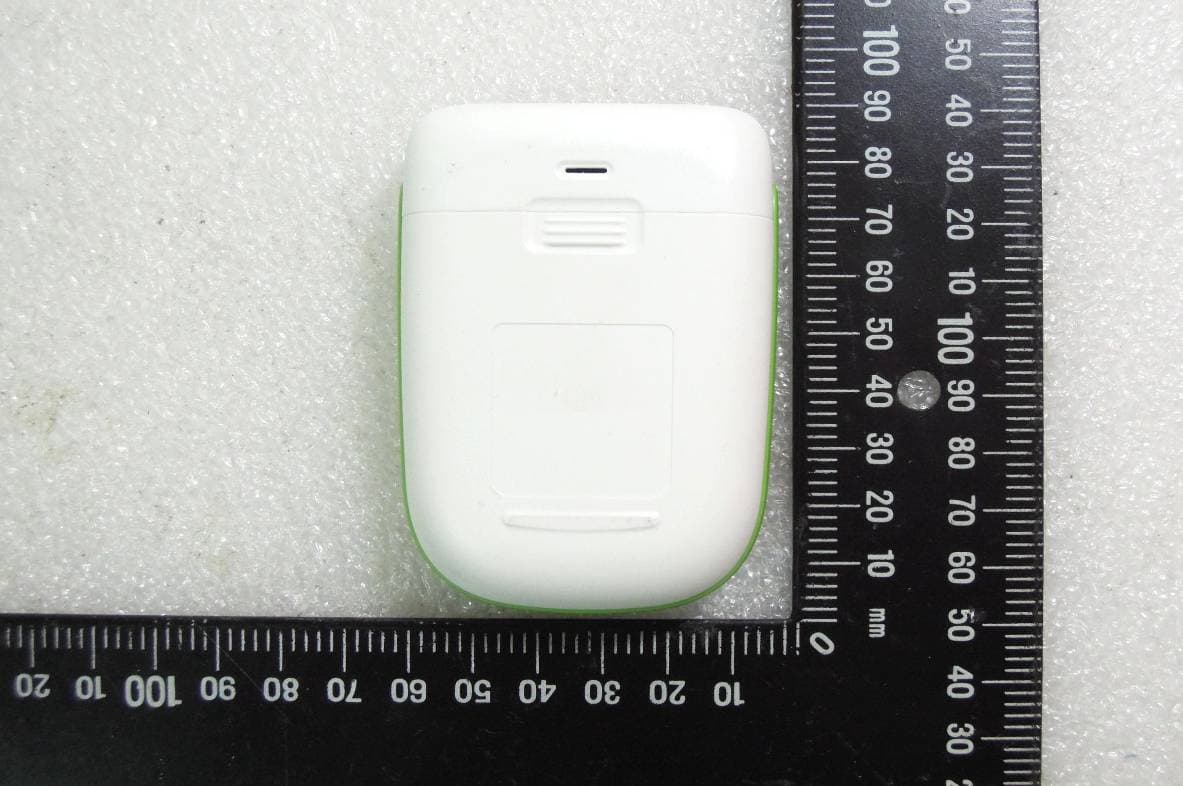
ADU-GM232C
Sep 22, 2015Blood Glucose Meter
Equipment Class
DTS - Digital Transmission System