AMWUB322scanning receiver
Uniden America Corporation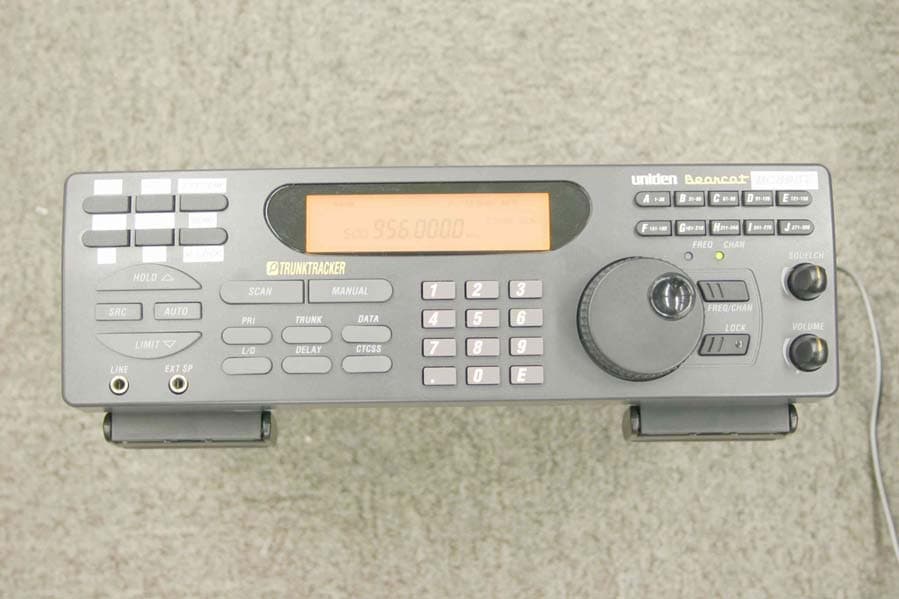
Click to zoom
Application Details
- Equipment Class
- CSR - Scanning Receiver
- Date of Grant
- May 05, 2004
- Application Purpose
- Original Equipment
- Date of Application
- May 05, 2004
- Equipment Note
- scanning receiver
- Frequency Range
- 894.01250000 - 956.00000000
- Company
- Uniden America Corporation
- Country
- United States
Documents & Files
Document Text
Text extracted from the exhibit documents filed with the FCC. Open a document above to read the original.
Users Manual
Using H BC898T Scanner Software Help Using Help Viewing Information You can select information about how to use each category of help available. When you click on Using Help , you see the following underlined links: z Viewing Information This link returns you to this introduction. zUsing the Table of Contents This link displays the table of contents. z Using the Help Map This link displays all subjects available in Help. To display a help subject, simply click its link. For example, to display the help information available for “base frequency,” click “base frequency” in the index. Using the Table of Contents You can select links to all chapter titles in Help by using the Table of Contents. To find a subject using the Table of Contents, click Table of Contents at the top of the right side of the Help window. Chapter title links appear on the left side of the Help window. Click a title on the left side of the Help window. That subject appears on the right side of the Help window. To see a list of all help topics, use the Help Map. Using the Help Map You can select links to all subjects in Help and all entries in the Index. To find a subject using the Help Map, click Help Map at the top of the right side of the Help window. The Help Map appears on the left side of the help window. Scroll up and down the Help Map until you find the information you are looking for. To display help for that information, click on it. Table of Contents Software Help Using Help Viewing Information Using the Table of Contents Using the Help Map Help Files Introduction System Requirements How The Software Works Using The Software Configuring The Software Using SETUP Using SCAN Control Basic Mode Extended Mode Using Scanning Using ID Logging Using the Database Using the Bank Editor Using the Frequency Window Using the Trunking Window Using the Trunking Record Window Using the Reference Database Opening and Working With Database Files Copying Records From the Reference Database to the Bank Editor Owners Manual The FCC Wants You to Know Scanning Legally Important Notice Precautions Introduction Feature Highlights About This Manual Understanding Scanning Understanding Banks and Channels What is Scanning? What is Searching? What is CTCSS/DCS? Conventional Scanning Simplex Operation Repeater Operation What is Trunk Tracking? Trunked Scanning Types of Trunking Systems Motorola Trunking EDACS Trunking LTR Trunking Using Weather Alert (SAME) Where to Obtain More Information Information On The Internet Using a Computer to Control Your BC898T A Quick Look at Your Scanner Included With Your Scanner Installing Your Scanner For Home Use (Desktop Installation) Adapter Safety Feature Using An Optional External Speaker/Earphone/Headphone Listening Safely Using An Optional Tape Recorder Using the Supplied Demo Software Installing The Software Installing The Scanner In a Vehicle Mounting the Scanner Connecting the Antenna Plug Connecting the DC Power Cord Installing a Temporary Power Cord: Installing a Permanent Power Cord Basic Operation Turning On the Scanner Setting the Squelch Using the Rotary Tuner Using the Frequency/Channel Mode Selector Using the Lock Key/LED Manually Selecting a Channel Scanning Programmed Channels Locking/Unlocking Banks Locking/Unlocking Channels Restoring All Locked Out Channels Priority Scanning Changing the Priority Channel Using the Dimmer Trunk Scanning Options Searching for Active Talk Groups (ID Search) Searching Only Stored Talk Groups (ID Scan) Monitoring Talk Group IDs Holding On a Single Talk Group Locking Out Talk Groups Reviewing Locked Out Talk Group IDs Restoring All Locked Out Talk Group IDs EDACS Blockout Setting the Attenuator Searching Setting a Single Search Range Setting a Chain Search Range Holding On An Active Frequency. Setting Chain Search Setting Data Skip Skipping Frequencies Storing Found Frequencies Automatically Storing Frequencies Setting Subaudible Tones for Searching Attenuating All Search Ranges Setting Delay For All Search Ranges Searching a Trunked Bank Trunk ID Hold Mode Using Weather Search and Weather Alert (SAME) Weather Alert Searching for a Weather Broadcast Programming a FIPS Code Search Hold Searching for CTCSS/DCS Tones Programming Programming Using Manual Entry Programming Using the Rotary Tuner Programming Using AutoStore Transferring a Programmed Frequency Transferring a Frequency to the First Available Channel In Another Bank Transferring a Frequency to a Specific Channel Duplicate Frequency Alert Deleting a Stored Frequency Programming a Channel With a CTCSS/DCS Tone Fleet Map Programming Selecting a Trunking Programming Mode Selecting a Preset Fleet Map Programming a Fleet Map Restoring Default Tracking Programming a Hybrid System Programming Tips Setting the Delay Mode Setting Delay in Scan or Search Mode Setting Delay in Manual Mode Recording Transmissions Data Skip Channel Skip Storing Search Frequencies Programming Conventional Channels 1. Select a Channel to Program 2. Enter the Frequency Changing the Frequency Step Setting the Modulation Mode Setting Priority Channels Programming Trunked Systems Channel Activity Indicators Programming Motorola Systems Programming EDACS Systems Programming LTR Systems ID Lockout Restoring a Single ID Restoring All IDs Searching Tips ID Hold Mode Hold Mode ID Monitor Mode Scan Lists Programming Scan Lists Manually Programming Scan Lists During Search Deleting a Stored ID Care and Maintenance General Use Location Cleaning Repairs Birdies Troubleshooting Appendix Preset Fleet Maps User Defined Fleet Maps Type I Programming Information Size Code Restrictions Quick Start to Programming Your Scanner Getting Started Conventional Scanning Worksheet Instructions Conventional Scanning Worksheet Filling Out The Conventional Scanning Worksheet Using The Conventional Scanning Worksheet to Program Your Scanner Motorola Trunking Worksheet Instructions Motorola Trunking Worksheet Filling Out The Motorola Worksheet Using The Motorola…
Text truncated - open the document above for the full version.
Attestation Statements
GENERAL INFORMATION General Information in accordance with the Federal Communications Commission Rules and Regulations, Volume II, Part 2. (1) Applicant: Uniden America Corporation 216 John Street, P.O. Box 580 Lake City, South Carolina 29560 Mr. James R. Haynes, Vice President (2) FCC Identifier: FCC ID: AMWUB322 MODEL NO.: BC898T (3) Instruction Manual: Refer to User Manual (4) Circuit Description: Refer to Operational Description (5) Circuit & Block Diagrams: Refer to Schematics Block diagrams (6) Measurement Data: Refer to Test Report Standard Test Conditions: The following conditions and procedures were followed during testing of the equipment. Room Temperature: 23 - 27 Degrees Celsius Room Humidity: 40 - 60 % Note 1: This equipment is intended to use with AC adapter. Note 2: Prior to testing, the unit is tuned-up according to the manufacturer's alignment procedure. All presented data will represent the "worst case" parameter being measured. (7) Photographs & Equipment Identification: Refer to ID Label/Location Info & External Photos (8) Peripheral or Accessory Device: Not used (9) Transition provisions in section 15.37 Rules: This equipment complies with the new Part 15 of FCC rules and is not affected by section 15.37. (10) Decoding the Emergency Broadcast System Attention Signal: Not Applicable (11) Direct Sequence Spread Spectrum Transmitter: Not Applicable (12) Compliance to Cellular Band Exclusion: Pursuant to the requirements contained in Part 15.121 of the Commission's Rules, this scanning receiver does not have the capability of tuning the frequencies assigned to the Domestic Public Cellular Radio Telecommunications Service. In this circuitry, this device is not readily alterable to restore the cellular band coverage because the inventory of frequencies contained within this band is not available in the microprocessor. Also, the microprocessor is fixed soldered and not easily removable. In addition, the critical circuitry is "hardened" with a black epoxy that covers the area of the circuitry that might be modified to circumvent the design efforts referenced above. Therefore, since the clipping of leads; or the installation of a simple component such as a diode, resistor, or a jumper wire; or the reprogramming of any semiconductor device contained within this unit cannot be accomplished using a special access code or a personal computer; This is to certify that the conditions mandated in part 15.121 have been met.
ID Label/Location Info
ID Label/Location Info Equipment Identification Label The FCC Label complies with the section 2.925(d) of the FCC Rules and will be permanently affixed to the equipment. Size of the Marking: 82 mm (W) by 20 mm (H)
Test Report
TIMCO ENGINEERING INC. 849 NW State Road 45 Newberry, Florida 32669 http://www.timcoengr.com 888.472.2424 F 352.472.2030 email: [email protected] APPLICANT: UNIDEN AMERICA CORPORATION Test Report Product Name: SCANNING RECEIVER FCC ID: AMWUB322 Applicant: UNIDEN CORPORATION 181 N. COUNTRY CLUB ROAD P.O. BOX 580 LAKE CITY, SC 29560 Date Receipt: APRIL 8, 2004 Date Tested: APRIL 29, 2004 FCC ID: AMWUB322 REPORT #: U\Uniden AMW\494AUT4\494AUT4TestReport.doc COVER SHEET TIMCO ENGINEERING INC. 849 NW State Road 45 Newberry, Florida 32669 http://www.timcoengr.com 888.472.2424 F 352.472.2030 email: [email protected] APPLICANT: UNIDEN AMERICA CORPORATION TABLE OF CONTENTS LIST APPLICANT: UNIDEN AMERICA CORPORATION FCC ID: AMWUB322 TEST REPORT CONTAINING: PAGE 1......EQUIPMENT LIST PAGE 2......TEST PROCEDURE PAGE 3-5....RADIATION INTERFERENCE TEST DATA PAGE 6......POWER LINE CONDUCTED EMISSIONS TEST DATA PAGE 7......POWER LINE CONDUCTED PLOTS PAGE 8......38 dB REJECTION RATIO EXHIBITS INCLUDING: BLOCK DIAGRAM SCHEMATIC USERS MANUAL LABEL SAMPLE LABEL LOCATION EXTERNAL PHOTOGRAPHS INTERNAL PHOTOGRAPHS OPERATIONAL DESCRIPTION TEST SET UP PHOTOGRAPHS FCC ID: AMWUB322 REPORT #: U\Uniden AMW\494AUT4\494AUT4TestReport.doc TABLE OF CONTENTS TIMCO ENGINEERING INC. 849 NW State Road 45 Newberry, Florida 32669 http://www.timcoengr.com 888.472.2424 F 352.472.2030 email: [email protected] APPLICANT: UNIDEN AMERICA CORPORATION EMC Equipment List Device Manufacturer Model Serial Number Cal/Char Date Due Date 3/10-Meter OATS TEI N/A N/A Listed 3/27/04 3/26/07 Biconnical Antenna Eaton 94455-1 1057 CAL 3/18/03 3/18/05 Biconnical Antenna Eaton 94455-1 1096 CAL 10/1/01 10/1/03 Biconnical Antenna Electro- Metrics BIA-25 1171 CAL 4/26/01 4/26/03 Blue Tower Quasi-Peak Adapter HP 85650A 2811A01279 CAL 4/15/03 4/15/05 Blue Tower RF Preselector HP 85685A 2620A00294 out for Cal Blue Tower Spectrum Analyzer HP 8568B 2928A04729 2848A18049 CAL 4/15/03 4/15/05 Signal Generator HP 8640B 2308A21464 CAL 2/15/02 2/15/04 Silver Tower Preamplifier HP 8449B 3008A01075 CAL 3/22/04 3/22/06 Silver Tower Quasi-Peak Adapter HP 85650A 3303A01844 CAL 3/22/04 3/22/06 Silver Tower RF Preselector HP 85685A 2926A00983 CAL 3/22/04 3/22/06 Silver Tower Spectrum Analyzer HP 8566B Opt 462 3552A22064 3638A08608 CAL 3/22/04 3/22/06 Tan Tower Preamplifier HP 8449B-H023008A00372 CAL 9/23/03 9/23/05 Tan Tower Quasi-Peak Adapter HP 85650A 3303A01690 CAL 9/23/03 9/23/05 Tan Tower RF Preselector HP 85685A 3221A01400 CAL 9/23/03 9/23/05 Tan Tower Spectrum Analyzer HP 8566B Opt 462 3138A07786 3144A20661 CAL 9/23/03 9/23/05 FCC ID: AMWUB322 REPORT #: U\Uniden AMW\494AUT4\494AUT4TestReport.doc Page 1 of 8 TIMCO ENGINEERING INC. 849 NW State Road 45 Newberry, Florida 32669 http://www.timcoengr.com 888.472.2424 F 352.472.2030 email: [email protected] APPLICANT: UNIDEN AMERICA CORPORATION TEST PROCEDURE GENERAL: This report shall NOT be reproduced except in full without the written approval of TIMCO ENGINEERING, INC. RADIATION INTERFERENCE: The test procedure used was ANSI STANDARD C63.4-1992 using a HEWLETT PACKARD spectrum analyzer with a pre-selector. The bandwidth of the spectrum analyzer was 100 kHz with an appropriate sweep speed. The analyzer was calibrated in dB above a microvolt at the output of the antenna. The resolution bandwidth was 100KHz and the video bandwidth was 300KHz. The ambient temperature of the UUT was 80oC with a humidity of 76%. FORMULA OF CONVERSION FACTORS: The Field Strength at 3m was established by adding the meter reading of the spectrum analyzer (which is set to read in units of dBuV) to the antenna correction factor supplied by the antenna manufacturer. The antenna correction factors are stated in terms of dB. The gain of the Preselector was accounted for in the Spectrum Analyzer Meter Reading. Example: Freq (MHz) METER READING + ACF = FS 33 20 dBuV + 10.36 dB = 30.36 dBuV/m @ 3m ANSI STANDARD C63.4-1992 10.1.7 MEASUREMENT PROCEDURES: The unit under test was placed on a table 80 cm high and with dimensions of 1m by 1.5m. The table used for radiated measurements is capable of continuous rotation. When an emission was found, the table was rotated to produce the maximum signal strength. At this point, the antenna was raised and lowered from 1m to 4m. The antenna was placed in both the horizontal and vertical planes. The situation was similar for the conducted measurement except that the table did not rotate. The EUT was setup as described in ANSIC63.4-1992 with the EUT 40 cm from the vertical ground wall. FCC ID: AMWUB322 REPORT #: U\Uniden AMW\494AUT4\494AUT4TestReport.doc Page 2 of 8 TIMCO ENGINEERING INC. 849 NW State Road 45 Newberry, Florida 32669 http://www.timcoengr.com 888.472.2424 F 352.472.2030 email: [email protected] APPLICANT: UNIDEN AMERICA CORPORATION APPLICANT: UNIDEN AMERICA CORPORATION FCC ID: AMWUB322 NAME OF TEST: RADIATION INTERFERENCE RULES PART NUMBER: 15.109 REQUIREMENTS: 30 - 80 MHz: 40.0 dBuV/M @ 3 METERS 88 - 216 MHz: 43.5 dBuV/M 216 - 960 MHz: 46.0 dBuV/M ABOVE 960 MHz: 54.0 dBuV/M TEST RESULTS: A search was made of the spectrum from 30 to 5000 MHz and the measurements indicate that the unit DOES meet the FCC requirements. TEST DATA: Tuned Frequency MHz Emission Frequency MHz Meter Reading dBuV Ant. Polarity Coax Loss dB Correction Factor dB Field Strength dBuV/m Margin dB 25.0 405.70 10.7 H 3.13 16.31 30.14 15.86 25.0 405.70 12.5 V 3.13 16.01 31.64 14.36 25.0 811.40 11.5 H 4.85 25.50 41.85 4.15 25.0 811.40 11.5 V 4.85 24.42 40.77 5.23 25.0 811.40 11.6 H 4.85 25.50 41.95 4.05 25.0 2,028.50 10.8 H 1.71 28.65 41.16 12.84 25.0 2,028.50 13.4 V 1.71 28.74 43.85 10.15 25.0 2,434.20 10.5 H 1.87 29.29 41.66 12.34 25.0 2,434.20 11.7 V 1.87 29.31 42.88 11.12 25.0 2,839.90 11.0 V 2.04 30.15 43.19 10.81 25.0 3,245.60 12.6 H 2.20 31.04 45.84 8.16 25.0 3,245.60 12.6 V 2.20 30.99 45.79 8.21 25.0 3,651.30 10.1 H 2.36 32.05 44.51 9.49 25.0 3,651.30 11.3 V 2.36 31.92 45.58 8.42 39.5 420.20 10.6 H 3.20 16.80 30.60 15.40 39.…
Text truncated - open the document above for the full version.
Contact Information
Applicant
Paul Roby
Test Firm
Timco Engineering, Inc.S Sanders
Technical Specifications
| # | Rule Parts | Frequency Range | Power Output |
|---|---|---|---|
| 1 | 15B | 894.0125 MHz - 956 MHz | - |
Other Applications from Uniden America Corporation
AMWUA2405
Apr 15, 2026RADAR DETECTOR
Equipment Class
JBP - Part 15 Class B Computing Device PeripheralAMWUA2406
Apr 15, 2026RADAR DETECTOR
Equipment Class
JBP - Part 15 Class B Computing Device PeripheralAMWUA2402
Jul 23, 2024RADAR DETECTOR
Equipment Class
CRD - Part 15 Radar Detector
AMWUA2404
Feb 17, 2024Wi-Fi Bluetooth Combo Module
Equipment Class
DTS - Digital Transmission System
AMWUA2301
Feb 15, 2023RADAR DETECTOR
Equipment Class
CRD - Part 15 Radar Detector