APYHRO00034Facsimile Equipment w/ Cordless Handsets
Sharp Corporation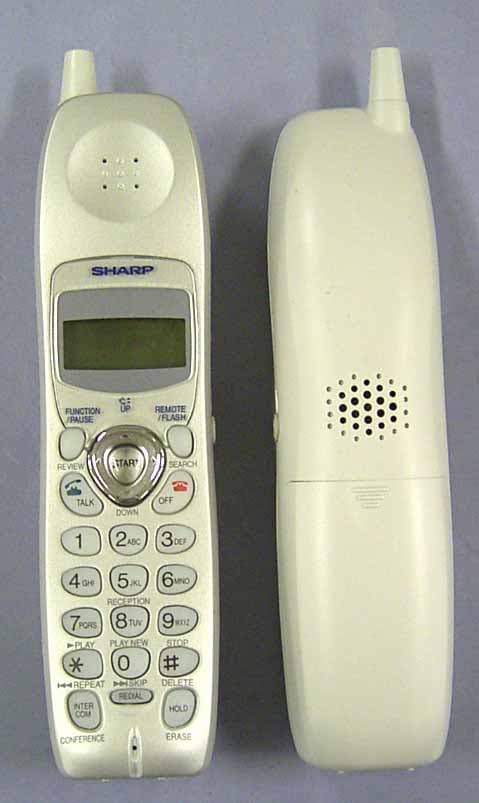
Click to zoom
Application Details
- Equipment Class
- DSS - Part 15 Spread Spectrum Transmitter
- Date of Grant
- Feb 13, 2004
- Application Purpose
- Original Equipment
- Date of Application
- Feb 13, 2004
- Equipment Note
- Facsimile Equipment w/ Cordless Handsets
- Frequency Range
- 2405.30000000 - 2474.50000000
- Company
- Sharp Corporation
- Country
- Japan
Documents & Files
Document Text
Text extracted from the exhibit documents filed with the FCC. Open a document above to read the original.
Users Manual
FACSIMILE OPERATION MANUAL Sharp Place congratulations on the purchase of your new Sharp Product! For your convenience, Genuine Sharp Supplies, Accessories, and additional Sharp Products can be purchased from the Authorized Sharp Reseller where you purchased your product or on-line at: www.SharpPlace.com visit SharpPlace to enter periodic contests and drawings! 2002 Sharp Electronics Corporation Design and specifications are subject to change without notice. To ensure Sharp quality, look for the Sharp Genuine Supplies Logo on Your business products. We provide a full line of supplies that are designed and tested to maximize the life and performance of all Sharp products. C MODEL UX-CD600 UX-CD600 FACSIMILE 1. Installation 2. Using the Cordless Handset 3. Using the Answering System 4. Sending Faxes 5. Receiving Faxes 6. Making Copies 7. Special Functions 8. Printing Lists 9. Maintenance 10. Troubleshooting TINSE4415XHTZPP WARNING - FCC Regulations state that any unauthorized changes or modifications to this equipment not expressly approved by the manufacturer could void the user’s authority to operate this equipment. Note: This equipment has been tested and found to comply with the limits for a Class B digital device, pursuant to Part 15 of the FCC Rules. These limits are designed to provide reasonable protection against harmful interference in a residential installation. This equipment generates, uses and can radiate radio frequency energy and, if not installed and used in accordance with the instructions, may cause harmful interference to radio communications. However, there is no guarantee that interference will not occur in a particular installation. If this equipment does cause harmful interference to radio or television reception, which can be determined by turning the equipment off and on, the user is encouraged to try to correct the interference by one or more of the following measures: - Reorient or relocate the receiving antenna. - Increase the separation between the equipment and the receiver. - Connect the equipment into an outlet on a circuit different from that to which the receiver is connected. - Consult the dealer or an experienced radio/TV technician for help. IMPORTANT NOTICE Fax machine FCC Radiation Exposure Statement: This equipment complies with FCC radiation exposure limits set forth for at uncontrolled equipment. This equipment should be installed and operated with minimum distance at least 20 cm between the radiator and persons body (excluding extremities: hands, wrists, feet and legs) and must not be co-located or operated with any other antenna or transmitter. Cordless handset This phone (Cordless Handset) has been tested and shown to comply with the FCC RF Exposure guidelines. For body worn operation, this phone has been tested and meets the FCC RF exposure guidelines for use with accessories that contains no metal and that positions the handset a minimum of 1.5 cm from the body. Use of other accessories may not ensure compliance with FCC RF exposure guidelines. The maximum SAR levels tested for this phone (Cordless Handset) has been shown to be 1.220 W/kg at head and 0.446 W/Kg at body. ABOUT THE TELEPHONE CONSUMER PROTECTION ACT OF 1991 "The Telephone Consumer Protection Act of 1991 makes it unlawful for any person to use a computer or other electronic device to send any message via a telephone facsimile machine unless such message clearly contains in a margin at the top or bottom of each transmitted page or on the first page of the transmission the following information: (1) The date and time of transmission. (2) Identification of either the business, business entity or individual sending the message. (3) Telephone number of either the sending machine, business, business entity or individual. In order to program this information into your facsimile machine, please refer to the appropriate instructions in the operation manual." As an ENERGY STA R ® partner, SHARP has determined that this product meets the ENERGY STA R ® guidelines for energy efficiency. all.book Page 2 Wednesday, January 21, 2004 3:38 PM TINSE4415XHTZPP 1 Introduction Fax machine and general specifications. *Based on Sharp Standard Chart at standard resolution, excluding time for protocol signals (i.e., ITU-T phase C time only). Imaging filmInitial starter roll (included with machine): 32 ft. (10 m) (approx. 30 letter-size pages) Replacement roll (not included): UX-5CR 164 ft. (50 m) (one roll yields approx. 150 letter-size pages) Paper tray capacityLetter: Approx. 50 sheets (20-lb. copier paper at room temperature; maximum stack height should not be higher than the line on the tray) Legal: 5 sheets Recommended paper weight: 20-lb. Copy Bond Recording systemThermal transfer recording Effective printing width8.3" (210 mm) max. Memory size*448 KB (approx. 24 average pages with no voice messages recorded, or 20 minutes of voice messages (including OGMs) with no faxes in memory) Modem speed14,400 bps with auto fallback to lower speeds. Transmission time*Approx. 6 seconds (only when ECM is on) Compression schemeMR, MH, MMR CompatibilityITU-T (CCITT) G3 mode In addition to the cordless handset that comes with the fax machine, you can purchase up to seven accessory cordless handsets. The cordless handsets can be used for intercom communication, and each cordless handset has its own personal box in the answering system. Welcome, and thank you for choosing a SHARP UX-CD600 fax machine and cordless handset! all.book Page 1 Wednesday, January 21, 2004 3:38 PM TINSE4415XHTZPP 2 Automatic dialingCommon book: 99 numbers Private book: 50 numbers (each cordless handset has 1 private book) Applicable telephone linePublic switched telephone network Number of connectable linesTw o Telephone functionYes (cannot be used if power fails) Reception modesAUTO ATTENDANT / TEL / TAD Automatic document feeder10 pages max. (letter/A4, 20 lb paper) Input document sizeAutomatic feeding: Width: 5.8 to 8.5" (148 to 216 mm) …
Text truncated - open the document above for the full version.
Users Manual
Storing and Using Auto-Dial Numbers 49 2. Cordless Handset ♦To change case, press . ♦To enter one of the following symbols, press or repeatedly: . / ! " # $ % & ’ ( ) + + , - : ; < = > ? @ [ ¥ ] ^ _ ' { | } ) ( 7Press . 8Return to Step 2 to store another number, or press to exit. REMOTE /FLASH START OFF OFF Dialing an auto-dial number 1Press once. 2Press to select the Common book, or to select the Private book. 3Press or until the number you wish to dial appears in the display. 4Press . •If “WHICH LINE?” appears in the display, press to select line 1 or to select line 2. •The number is automatically dialed. SEARCH TALK 1 ABC 2 COMMON DIAL ▲▼: SEARCH FUNCTION: ENTRY Example: Common book selected SELECT SEARCH ▲: COMMON ▼: PRIVATE Cordless handset display: SELECT SEARCH ▲: COMMON ▼: PRIVATE all.book Page 49 Wednesday, January 21, 2004 3:38 PM TINSE4415XHTZPP Storing and Using Auto-Dial Numbers 50 Editing an auto-dial number If you need to make changes to a previously stored auto-dial number, follow these steps: 1Press once. 2Press to select the Common book, or to select the Private book. 3Press or until the number you wish to edit appears in the display. 4Press . 5Press the number keys to enter the new number. •To clear a mistake, press . If a pause is required between any of the digits to access a special service or an outside line, press . •If you do not wish to change the number, go directly to Step 6. 6Press . 7Press the number keys to enter the new name (see Step 6 on page 48). •If you do not wish to change the name, go directly to Step 8. 8Press . SEARCH FUNCTION /PAUSE ERASE HOLD FUNCTION /PAUSE START START COMMON DIAL ▲▼: SEARCH FUNCTION: ENTRY Example: Common book selected Cordless handset display: SELECT SEARCH ▲: COMMON ▼: PRIVATE SELECT SEARCH ▲: COMMON ▼: PRIVATE all.book Page 50 Wednesday, January 21, 2004 3:38 PM TINSE4415XHTZPP Storing and Using Auto-Dial Numbers 51 2. Cordless Handset Clearing an auto-dial number If you need to clear an auto-dial number, follow these steps: 1Press once. 2Press to select the Common book, or to select the Private book. 3Press or until the number you wish to clear appears in the display. 4Press . 5Press . 6Press to exit. SEARCH ERASE HOLD START OFF OFF COMMON DIAL ▲▼: SEARCH FUNCTION: ENTRY Example: Common book selected ERASE? PRESS START KEY 9Press to exit. OFF OFF SELECT SEARCH ▲: COMMON ▼: PRIVATE Cordless handset display: SELECT SEARCH ▲: COMMON ▼: PRIVATE all.book Page 51 Wednesday, January 21, 2004 3:38 PM TINSE4415XHTZPP Redial 52 Redial You can automatically redial the last number dialed on the cordless handset. Note: The machine and cordless handsets each retain their own separate redial numbers. Note that the cordless handset redial numbers will be lost if the fax machine is unplugged or an interruption occurs in the power supply. 1Press . •Check the display to make sure the number that appears is the number you wish to dial. (If the wrong number appears, press to clear it.) 2Press . •If “WHICH LINE?” appears in the display, press to select line 1 or to select line 2. •The number is automatically dialed. REDIAL OFF OFF TALK 1 ABC 2 all.book Page 52 Wednesday, January 21, 2004 3:38 PM TINSE4415XHTZPP Using the Intercom Feature 53 2. Cordless Handset Using the Intercom Feature ♦When using the Intercom feature, you will not hear your voice through the handset receiver when you speak. ♦It may not be possible to page another cordless handset or the fax machine when other cordless handsets or the fax machine are already in use. You can use the fax machine and cordless handsets as an intercom system. 1Press on the cordless handset. 2Press on the cordless handset to select the fax machine. 3The fax machine rings. 4The other person picks up the fax machine handset to answer. 5Talk with the other person. When you are ready to end the conversation, press . INTER COM 0 OFF OFF INTERCOM 0: BASE STATION Cordless handset display: Fax machine display: Number and name of calling handset INTERCOM 1: BOB INTERCOM ▲ ▼ 2: BILL 3: SUE Cordless handset display example: The numbers and names of the other cordless handsets appear (even the numbers of cordless handsets that are not registered) Paging the fax machine from a cordless handset all.book Page 53 Wednesday, January 21, 2004 3:38 PM TINSE4415XHTZPP Using the Intercom Feature 54 Paging a cordless handset from another cordless handset 1Press on the cordless handset. 2Enter the number of the cordless handset that you wish to page. Example: 3The selected cordless handset rings. 4The other person presses any key (except ) on the cordless handset to answer. 5Talk with the other person. When you are ready to end the conversation, press . INTER COM ABC 2 OFF OFF OFF OFF INTERCOM ▲ ▼ 2: BILL 3: SUE Cordless handset display example: The numbers and names of the other cordless handsets appear (even the numbers of cordless handsets that are not registered) INTERCOM 2: BILL INTERCOM 1: BOB Display of paged handset: Number and name of calling handset all.book Page 54 Wednesday, January 21, 2004 3:38 PM TINSE4415XHTZPP Using the Intercom Feature 55 2. Cordless Handset Paging a cordless handset from the fax machine (cordless handset locator) You can use this procedure to page a cordless handset, or locate a handset in the event that you misplace it. 1Pick up the fax machine handset. •If you wish to use the speakerphone, skip this step (the speaker will activate automatically in Step 2 below). 2Press on the fax machine, and enter the number of the cordless handset that you wish to page. Example: 3The selected cordless handset rings. •This allows you to locate the cordless handset if you have misplaced it. 4The other person presses any key (except ) on the cordless handset to answer. 5Talk with the other person (if you use the speakerphone, speak toward “MIC” on the operation panel). When you are ready to end the conversation, replace the handset or press as appropriate. INTERCOM/ CONFERENCE OFF OFF SPEAKER INTERCOM …
Text truncated - open the document above for the full version.
Users Manual
Sending a Fax From Memory 99 4. Sending Faxes If the memory becomes full... If the memory becomes full while the document is being scanned, MEMORY IS FULL and SEE MANUAL will alternately appear in the display. ♦Press if you want to transmit the pages which have been stored up to that point in memory. The remaining pages will be ejected from the feeder. After transmission, the memory will be cleared and you can transmit the remaining pages. You will also need to transmit the page which was being scanned when the memory filled up. ♦Press if you want to cancel the entire transmission. START/MEMORY STOP all.book Page 99 Wednesday, January 21, 2004 3:38 PM TINSE4415XHTZPP 100 5. Receiving Faxes Receiving Faxes Automatically Automatic reception in Auto Attendant and TAD modes When the reception mode is set to Auto Attendant or TAD, the machine will automatically receive faxes. RESOLUTION/ RECEPTION MODE To select Auto Attendant or TAD mode, press until or appears in the display. RESOLUTION/ RECEPTION MODE Automatic reception in TEL mode on line 2 When the reception mode is set to TEL, the machine will automatically answer calls that come in on line 2 on four rings. If the call is a fax, the fax will be received automatically. 4 ringsFax reception ♦The number of rings on which the machine answers calls in TEL mode on line 2 can be changed. See Changing the number of rings on page 101. ♦Automatic reception of faxes is not possible on line 1. To receive a fax manually on line 1, see page 102. or all.book Page 100 Wednesday, January 21, 2004 3:38 PM TINSE4415XHTZPP Receiving Faxes Automatically 101 5. Receiving Faxes Changing the number of rings If desired, you can change the number of rings on which the machine answers calls that come in on line 2 in TEL mode. Any number from 2 to 5 can be selected. ♦If you do not want the machine to answer calls on line 2 automatically, enter 0 for the number of rings. 1Press once and once. 2Press once. 3Press once. 4Enter the desired number of rings (any number from 2 to 5). If you do not want the machine to answer automatically, enter 0. Example: 3 rings 5Press to return to the date and time display. FUNCTION STOP The display briefly shows your selection, then: TRANSACTION Display: OPTION SETTING NUMBER OF RING NUMBER OF RING ENTER (0, 2-5) 4 To select TEL mode, press until TEL appears in the display. RESOLUTION/ RECEPTION MODE RESOLUTION/ RECEPTION MODE TEL all.book Page 101 Wednesday, January 21, 2004 3:38 PM TINSE4415XHTZPP Receiving Faxes Manually 102 Receiving Faxes Manually To receive a fax manually, you must answer the call personally using the machine handset, a cordless handset, or an extension phone connected to the same line. Faxes can only be received manually in TEL mode. A fax can be received manually on line 1, or on line 2 if you answer the call before the machine answers automatically. Answering with the machine’s handset 1When the machine rings, pick up the handset. 2If you hear a fax tone, wait until the display shows RECEIVING and then replace the handset. 3If the other party first speaks with you and then wants to send a fax, press after speaking. (Press before the sender presses their Start key.) •When RECEIVING appears in the display, hang up. START/MEMORY Note: If you have set the Fax Signal Receive setting to NO, press to begin reception. START/MEMORY Beep START/MEMORY RECEIVING RECEIVING all.book Page 102 Wednesday, January 21, 2004 3:38 PM TINSE4415XHTZPP Receiving Faxes Manually 103 5. Receiving Faxes Answering on an extension phone connected to the same line 1Answer the extension phone when it rings. 2If you hear a soft fax tone, wait until your fax responds (you will hear pronounced, high-pitched tones), then hang up. 3If the fax doesn't respond, or if the other party first talks to you and then wants to send a fax, set the phone down (do not hang up), walk over to the machine, lift the machine’s handset, and press . •The above step is necessary if you have set the Fax Signal Receive setting to NO. START/MEMORY Receiving a Fax Using the Cordless Handset If you hear a fax tone after answering a call on the cordless handset, or if the other party speaks to you and then wants to send a fax, press . This signals the fax machine to begin fax reception. START START Press to begin fax reception Note: If the fax machine detects a fax signal after you answer a call on the cordless handset, it will begin reception automatically. Pronounced, high-pitched tones Beep all.book Page 103 Wednesday, January 21, 2004 3:38 PM TINSE4415XHTZPP Optional Reception Settings 104 Optional Reception Settings Fax Signal Receive The machine will automatically begin reception if you hear a soft fax tone after answering a call on the machine’s handset, the cordless handset, or an extension phone connected to the same line. If you use a computer fax modem to send documents on the same line, you must turn this function off in order to prevent your fax from mistakenly attempting to receive documents from the computer fax modem. Follow the steps below to change the setting. 1Press once and once. 2Press once and 5 times. 3Press once. 4Press to turn on the function, or to turn it off. 5Press to return to the date and time display. FUNCTION STOP The display briefly shows your selection, then: CALLER-ID (L 1) Display: OPTION SETTING FAX SIGNAL RX FAX SIGNAL RX 1=YES, 2=NO all.book Page 104 Wednesday, January 21, 2004 3:38 PM TINSE4415XHTZPP Optional Reception Settings 105 5. Receiving Faxes Reception Ratio The fax has been set at the factory to automatically reduce the size of received documents to fit the size of the printing paper. This ensures that data on the edges of the document are not cut off. If desired, you can turn this function off and have received documents printed at full size. ♦If a document is too long to fit on the printing paper, the remainder will be printed on a second page. In this case, the cut-off point may occur in the middle of a line. ♦Automa…
Text truncated - open the document above for the full version.
Users Manual
MODEL UX-K02 2.4GHz Cordless Ha ndset OPERATION MA NUAL Introduction Connecting the Cordless Handset Charger Installing and Charging the Battery Registering the Cordless Handset Enterring a Name for the Cordless Handset Maintenance Charge the battery for about 10 hours before initial use. Cargue la batería durante 10 horas aproximadamente antes del primer uso. TCADH3669XHZZPP FCC regulatory information This device complies with part 15 of the FCC rules. Operation is subject to the following two conditions: (1) this device may not cause harmful interference, and (2) this device must accept any interference received, including interference that may cause undesired operation. WARNING - FCC Regulations state that any unauthorized changes or modifications to this equipment not expressly approved by the manufacturer could void the user’s authority to operate this equipment. Note: This equipment has been tested and found to comply with the limits for a Class B digital device, pursuant to Part 15 of the FCC Rules. These limits are designed to provide reasonable protection against harmful interference in a residential installation. This equipment generates, uses and can radiate radio frequency energy and, if not installed and used in accordance with the instructions, may cause harmful interference to radio communications. However, there is no guarantee that interference will not occur in a particular installation. If this equipment does cause harmful interference to radio or television reception, which can be determined by turning the equipment off and on, the user is encouraged to try to correct the interference by one or more of the following measures: - Reorient or relocate the receiving antenna. - Increase the separation between the equipment and the receiver. - Connect the equipment into an outlet on a circuit different from that to which the receiver is connected. - Consult the dealer or an experienced radio/TV technician for help. IMPORTANT NOTICE This phone (Cordless Handset) has been tested and shown to comply with the FCC RF Exposure guidelines. For body worn operation, this phone has been tested and meets the FCC RF exposure guidelines for use with accessories that contains no metal and that positions the handset a minimum of 1.5 cm from the body. Use of other accessories may not ensure compliance with FCC RF exposure guidelines. The maximum SAR levels tested for this phone (Cordless Handset) has been shown to be 1.220 W/kg at head and 0.446 W/Kg at body. This equipment complies with Part 68 of the FCC rules and the requirements adopted by the ACTA. On the rear of this equipment is a label that contains, among other information, a product identifier in the format US:AAAEQ##TXXXX. If requested, this number must be provided to the telephone company. If this equipment causes harm to the telephone network, the telephone company will notify you in advance that temporary discontinuance of service may be required. But if advance notice isn't practical, the telephone company will notify the customer as soon as possible. Also, you will be advised of your right to file a complaint with the FCC if you believe it is necessary. The telephone company may make changes in its facilities, equipment, operations or procedures that could affect the operation of the equipment. If this happens the telephone company will provide advance notice in order for you to make necessary modifications to maintain uninterrupted service. If trouble is experienced with this equipment, or for repair or warranty information, please contact Sharp's Customer Assistance Center. The number is 1-877-794-8675. If the equipment is causing harm to the telephone network, the telephone company may request that you disconnect the equipment until the problem is resolved. This equipment contains no user-repairable parts. Refer all servicing to qualified service personnel. This equipment is hearing aid compatible. This accessory cordless handset, along with the base unit, has received TCB approval. all.book Page 1 Wednesday, January 21, 2004 4:24 PM TCADH3669XHZZPP 1 English Español Introduction Specifications As a part of our policy of continuous improvement, SHARP reserves the right to make design and specification changes for product improvement without prior notice. The performance specification figures indicated are nominal values of production units. There may be some deviations from these values in individual units. Frequency2.4 GHz (2.405 to 2.475 GHz) Dimensions Width: 1.8" (46 mm) Depth: 1.7" (42 mm) Height: 7.1" (180 mm) (not including antenna) WeightApprox. 0.3 lbs. (115 g) (without battery) Battery3.6 V Ni-MH battery; capacity: 850 mAh Power consumption Initial charging Battery life Battery life in standby mode Approx. 1.3 W (in standby mode) Approx. 10 hours for initial charge Approx. 4 hours (240 minutes) (at room temp.) Approx. 3 days with one full charge (at room temperature) Battery life (both normal and in standby mode) may vary depending on usage, range from base machine, and environmental conditions such as temperature . Thank you for purchasing a UX-K02 cordless handset. To use the UX-K02 cordless handset, you must have a SHARP UX-CD600 fax machine. Battery cover Battery pack Cordless handset charger AC adapter Accessories Operation manual all.book Page 1 Wednesday, January 21, 2004 4:24 PM TCADH3669XHZZPP 2 Important safety information Do not disassemble this product or attempt any procedures not described in this manual. Refer all servicing to qualified service personnel. Do not use this product near water, or when you are wet. For example, do not use this product near a bath tub, wash bowl, kitchen sink or laundry tub, in a wet basement, or near a swimming pool. Take care not to spill any liquids on the product. Unplug the product from the power outlet and consult a qualified service representative if any of the following situations occur: - Liquid has been spilled into the product or the product has been expose…
Text truncated - open the document above for the full version.
External Photos
FCC ID: APYHRO00034Page:12/19 UX-CD600Photographs Sharp Corporation, Communication Systems Group Photographs for Cordless Handset, Front Side / Back Side FCC ID: APYHRO00034Page:13/19 UX-CD600Photographs Sharp Corporation, Communication Systems Group Photographs for Cordless Handset, “R” Side / “L” Side FCC ID: APYHRO00034Page:18/19 UX-CD600Photographs Sharp Corporation, Communication Systems Group Photographs for Cordless Handset Charger
External Photos
FCC ID: APYHRO00034Page:2/19 UX-CD600Photographs Sharp Corporation, Communication Systems Group Photographs for Facsimile, Front Side FCC ID: APYHRO00034Page:3/19 UX-CD600Photographs Sharp Corporation, Communication Systems Group Photographs for Facsimile, Left Side FCC ID: APYHRO00034Page:4/19 UX-CD600Photographs Sharp Corporation, Communication Systems Group Photographs for Facsimile, Right Side FCC ID: APYHRO00034Page:5/19 UX-CD600Photographs Sharp Corporation, Communication Systems Group Photographs for Facsimile, Rear Side FCC ID: APYHRO00034Page:6/19 UX-CD600Photographs Sharp Corporation, Communication Systems Group Photographs for Facsimile, Bottom Side
ID Label/Location Info
NOTE: The Product Marking shown below is to be affixed or molded to the products pursuant to the FCC Rules. FACSIMILE PRODUCT MARKING NOTE: The Product Marking shown below is to be affixed or molded or printed to the products pursuant to the FCC Rules. CORDLESS HANDSET PRODUCT MARKING Cordless Handset, Model UX-CD600K This Model is packed together with Facsimile Model UX-CD600. Accessory Handset, Model UX-K02 This Model is optional Cordless Handset for the market.
Internal Photos
FCC ID: APYHRO00034Page:14/19 UX-CD600Photographs Sharp Corporation, Communication Systems Group Photographs for Cordless Handset, Without Battery Cover FCC ID: APYHRO00034Page:15/19 UX-CD600Photographs Sharp Corporation, Communication Systems Group Photographs for Cordless Handset, Internal View FCC ID: APYHRO00034Page:16/19 UX-CD600Photographs Sharp Corporation, Communication Systems Group Photographs for Cordless Handset, Internal View FCC ID: APYHRO00034Page:17/19 UX-CD600Photographs Sharp Corporation, Communication Systems Group Photographs for Cordless Handset, PWB FCC ID: APYHRO00034Page:19/19 UX-CD600Photographs Sharp Corporation, Communication Systems Group RF Module Unit
Internal Photos
FCC ID: APYHRO00034Page:7/19 UX-CD600Photographs Sharp Corporation, Communication Systems Group Photographs for Facsimile, Internal View FCC ID: APYHRO00034Page:8/19 UX-CD600Photographs Sharp Corporation, Communication Systems Group Photographs for Facsimile, Power Supply PWB FCC ID: APYHRO00034Page:9/19 UX-CD600Photographs Sharp Corporation, Communication Systems Group Photographs for Facsimile, TEL / LIU PWB FCC ID: APYHRO00034Page:10/19 UX-CD600Photographs Sharp Corporation, Communication Systems Group Photographs for Facsimile, RF and Main Control PWB FCC ID: APYHRO00034Page:11/19 UX-CD600Photographs Sharp Corporation, Communication Systems Group Photographs for Facsimile, Operation Panel PWB
Operational Description
FCC ID: APYHRO00034Page:1/1 UX-CD600Product Description 1-1. Specification for FHSS Cordless Phone: No.ItemsDescription 1 Frequency Range 2405.376 – 2474.496 MHz 2 Transmit Power 125 mW (maximum) 3 Transmit Power Control NIL 4 Duplexing Technique Time Division Duplex (TDD) 5 Multiplex Access TDMA (24 time slot) 6 Spreading Scheme Frequency Hopping 7 Speech Encoding 32K ADPCM 8 Hop Sequence Pseudo PN code 9 Channel Symbol Rate 1.152Kbps 10 Channel Spacing 1.728MHz 11 Number of Channels 47 Channels 12 Number of Active Channels 17 Channels (minimum) 13 Dwell Time 10mS (maximum) 14 Hopping Rate 100 hop/sec 15 Modulation GFSK Additional information: In accordance with requirements of FCC 15.247, on pseudo random frequency hopping sequence the following is an example of a 17 hopping sequence. {37,35,30,20,42, 5, 7,12,22, 2,10,17,32,25,15,27,40,...}; 1-2. Channel Number and Frequency Channel NumberChannel Center Frequency (MHz) Channel NumberChannel Center Frequency (MHz) 0 (*1)2401.920252445.120 1 (*1)2403.64826 (*1)2446.848 22405.376272448.576 3 (*1)2407.10428 (*1)2450.304 4 (*1)2408.83229 (*1)2452.032 52410.560302453.760 6 (*1)2412.28831 (*1)2455.488 72414.016322457.216 8 (*1)2415.74433 (*1)2458.944 9 (*1)2417.47234 (*1)2460.672 102419.200352462.400 11 (*1)2420.92836 (*1)2464.128 122422.656372465.856 13 (*1)2424.38438 (*1)2467.584 14 (*1)2426.11239 (*1)2469.312 152427.840402471.040 16 (*1)2429.56841 (*1)2472.768 172431.296422474.496 18 (*1)2433.02443 (*1)2476.224 19 (*1)2434.75244 (*1)2477.952 202436.48045 (*1)2479.680 21 (*1)2438.20846 (*1)2481.408 222439.936 23 (*1)2441.664 24 (*1)2443.392(*1) Don’t Use in product
RF Exposure Info
Applicant: Sharp Corporation T ype of Equipment : Facsimile Equipment Model No. : UX-CD600 FCC ID: APYHRO00034 RF Exposure Calculations: The following information provides the minimum separation distance for the highest gain antenna provided with the “UX-CD600“ as calculated from FCC OET Bulletin 65 Appendix A, Table (B) Limits for General Population / Uncontrolled Exposure. This calculation is based on the highest EIRP possible from the system, considerin g maximum power and antenna gain, and considering a 1.0W/cm^2 uncontrolled exposure limit. The Friis formula used was: S = (P * G) / (4* π * r 2 ) Where P =76.03 mW (Maximum peak output power) G =2.27 Numerical Antenna gain; equal 3.56dBi r =20.0 cm For: UX-CD600S = 0.03433 mW/cm 2 UL Apex Co., Ltd. Head Office EMC Lab. 4383-326 Asama-cho, Ise-shi, Mie-ken 516-0021 JAPAN Telephone: int +81 596 24 8116 Facsimile: int +81 596 24 8124 Page 1 RF Exposure Statement No. : 24EE0151-HO
Test Report
Test report No. : 24EE0151-HO Page : 1 of 71 Issued date : January 23, 2004 FCC ID : APYHRO00034 UL Apex Co., Ltd. Head Office EMC Lab. 4383-326 Asama-cho, Ise-shi, Mie-ken 516-0021 JAPAN Telephone : +81 596 24 8116 Facsimile : +81 596 24 8124 MF060b(10.04.03) EMI TEST REPORT Test Report No. : 24EE0151-HO Applicant : Sharp Corporation Type of Equipment : Facsimile Equipment / Cordless Handset Model No. : UX-CD600 (Facsimile Equipment) UX-CD60…
Text truncated - open the document above for the full version.
Contact Information
Applicant
Taihei Ohtsuka(Deputy Division Manager, ESG & Q promotion unit)
Technical Contact
UL Apex Co., Ltd.Makoto Kosaka
[email protected]81-596-24-8116
4383-326 Asama-cho · Ise-shi, Mie-ken · Japan
Test Firm
UL Apex Co., Ltd.Tetsuya Hashimoto
Technical Specifications
| # | Rule Parts | Frequency Range | Power Output |
|---|---|---|---|
| 2 | 15C | 2.41 GHz - 2.47 GHz | 87.00 mW |
Other Applications from Sharp Corporation
APYHRO00343
Aug 17, 2026Smartphone
Equipment Class
DTS - Digital Transmission SystemAPYHRO00342
Jul 29, 2026Smart phone
Equipment Class
DXX - Part 15 Low Power Communication Device TransmitterAPYHRO00341
May 28, 2026Smart phone
Equipment Class
DTS - Digital Transmission SystemAPYHRO00340
Dec 01, 2025BT remote control
Equipment Class
DTS - Digital Transmission SystemAPYHRO00339
Sep 17, 2025Smart phone
Equipment Class
NII - Unlicensed National Information Infrastructure TX