APYHRO00041PCS Cellular Phone W/ Bluetooth
Sharp Corporation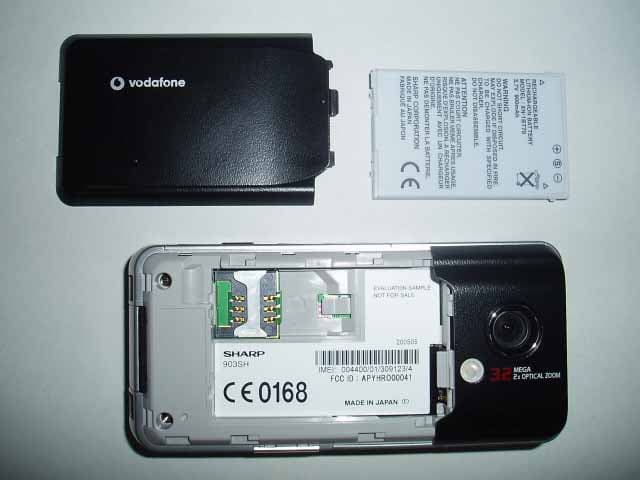
Click to zoom
Application Details
- Equipment Class
- PCE - PCS Licensed Transmitter held to ear
- Date of Grant
- Jun 13, 2005
- Application Purpose
- Original Equipment
- Date of Application
- Jun 13, 2005
- Equipment Note
- PCS Cellular Phone W/ Bluetooth
- Frequency Range
- 1850.20000000 - 1909.80000000
- Company
- Sharp Corporation
- Country
- Japan
Documents & Files
Document Text
Text extracted from the exhibit documents filed with the FCC. Open a document above to read the original.
Users Manual
Declaration of Conformity Hereby, Sharp Telecommunications of Europe Limited, declares that this 903SH is in compliance with the essential requirements and other relevant provisions of Directive 1999/5/EC. A copy of the original declaration of conformity can be found at the following Internet address: http://www.sharp-mobile.com Introduction1 Introduction Congratulations on your new 3G/UMTS 903SH phone. About This User Guide This user guide is carefully designed to help you learn about your phone’s features and operations quickly and effectively. NOTICE • We strongly recommend that you keep separate permanent written records of all important data. Data may be lost or altered in virtually any electronic memory product under certain circumstances. Therefore, we assume no responsibility for data lost or otherwise rendered unusable, whether as a result of improper use, repairs, defects, battery replacement, use after the specified battery life has expired or any other cause. • We assume no responsibility, directly or indirectly, for financial losses or claims from third parties resulting from the use of this product and any of its functions, such as stolen credit card numbers, the loss or alteration of stored data, etc. • All company and/or product names are trademarks and/or registered trademarks of their respective holders. • Screen layout may differ from that illustrated in this user guide. The information described in this user guide is subject to change without notice. • All the functions described in this user guide may not be supported by all networks. • We assume no responsibility for downloaded contents, information, etc. from the network. • Occasionally, a few black or bright pixels may appear on the screen. Please note that this will not have any impact on any of the features or on performance. Copyright According to copyright laws, the reproduction, alteration and use of material which is protected by copyright (music, pictures, etc.) is only permitted for personal or private use. If the user is not in possession of more extensive copyright or has not received the explicit permission from the copyright owner to reproduce, alter or use a copy which has been made or modified in this way, this is considered to be a violation of the copyright laws and gives the copyright owner the right to claim for damages. For this reason, avoid the illegal use of material which is protected by copyright. Windows is a registered trademark of Microsoft Corporation in the United States and/or other countries. 2Introduction Powered by JBlend™ Copyright 1997-2005 Aplix Corporation. All rights reserved. JBlend and all JBlend-based trademarks and logos are trademarks or registered trademarks of Aplix Corporation in Japan and other countries. Powered by Mascot Capsule ® /Micro3D Edition™ Mascot Capsule ® is a registered trademark of HI Corporation ©2002-2005 HI Corporation. All Rights Reserved. Licensed by Inter Digital Technology Corporation under one or more of the following United States Patents and/or their domestic or foreign counterparts and other patents pending, including U.S. Patents: 4,675,863: 4,779,262: 4,785,450: 4,811,420: 5,228,056: 5,420,896: 5,799,010: 5,166,951: 5,179,571 & 5,345,467 T9 Text Input is licensed under one or more of the following: U.S. Pat. Nos. 5,818,437, 5,953,541, 5,187,480, 5,945,928, and 6,011,554; Australian Pat. No. 727539; Canadian Pat. No. 1,331,057; United Kingdom Pat. No. 2238414B; Hong Kong Standard Pat. No. HK0940329; Republic of Singapore Pat. No. 51383; Euro. Pat. No. 0 842 463 (96927260.8) DE/DK, FI, FR, IT, NL,PT.ES,SE,GB; Republic of Korea Pat. Nos. KR201211B1 and KR226206B1; and additional patents are pending worldwide. miniSD™ is a trade mark of SD Card Association. Bluetooth is a trademark of the Bluetooth SIG, Inc. The Bluetooth word mark and logos are owned by the Bluetooth SIG, Inc. and any use of such marks by Sharp is under license. Other trademarks and trade names are those of their respective owners. CP8 PATENT Introduction3 This product is licensed under the MPEG-4 Visual Patent Portfolio License for the personal and non-commercial use of a consumer to (i) encode video in compliance with the MPEG-4 Video Standard (“MPEG-4 Video”) and/or (ii) decode MPEG-4 Video that was encoded by a consumer engaged in a personal and non-commercial activity and/or was obtained from a licensed video provider. No license is granted or implied for any other use. Additional information may be obtained from MPEG LA. See http://www.mpegla.com. This product is licensed under the MPEG-4 Systems Patent Portfolio License for encoding in compliance with the MPEG-4 Systems Standard, except that an additional license and payment of royalties are necessary for encoding in connection with (i) data stored or replicated in physical media which is paid for on a title by title basis and/or (ii) data which is paid for on a title by title basis and is transmitted to an end user for permanent storage and/or use. Such additional license may be obtained from MPEG LA, LLC. See http://www.mpegla.com for additional details. MPEG Layer-3 audio coding technology licensed from Fraunhofer IIS and Thomson. Useful Functions and Services Your phone offers you the following features: • Video calls. You can talk while viewing each other on respective screens. • 3D and colour Java™ games and applications with a graphic accelerator. You can also download various games and applications from Vodafone via the mobile Internet. • A built-in digital camera for taking pictures and video clips. • A message function for reading and creating SMS messages. • MMS (Multimedia Messaging Services) for personalising your phone in various ways. • A colour WAP browser for accessing information on the mobile Internet. • Your own ringtones and ringvideos. You can use downloaded sound or video clip files as a ringtone or ring video clip. • Playback of the downloaded sound and video clip files. • A voice recorder functio…
Text truncated - open the document above for the full version.
Users Manual
100Settings Call Settings Voicemail & Diverts This service can be used to divert incoming calls that you cannot answer. Calls can be diverted to another phone number or to your voicemail system. Note •This service may not be available on all mobile phone networks. Contact your service provider for more information. To Set the Voicemail Numbers You can divert calls to the network voicemail service centre. Depending on whether you are inside or outside your network area, you can set two voicemail numbers, a number for your home network area or for a roaming network area. Note •This service depends on the SIM card. Contact your SIM card vendor for more information. “Settings” → “Call Settings” → “Voicemail & Diverts” → “Voicemail” → “Settings” → “Voicemail Numbers” 1.Select “Home Mailbox” or “Roam Mailbox”. 2.Enter the desired phone number. To Access the Voicemail Centre 1.Press and hold G in standby. To Activate the Voicemail Service “Settings” → “Call Settings” → “Voicemail & Diverts” → “Voicemail” → “Activate” 1.Select one of the following options: “Always”:Diverts all calls without ringing. “When Busy”:Diverts incoming calls while you are talking on the phone. “No Answer”:Diverts incoming calls if you do not answer a call within a certain period of time. “Not Reachable”:Diverts incoming calls when your phone has no network service or is switched off. If you select “No Answer”, select the period of time from 6 levels (05 to 30 seconds). 2.Press . (M 12-6) (M 12-6-1) Settings101 To Activate the Diverts Service Select the appropriate option. “Settings” → “Call Settings” → “Voicemail & Diverts” → “Diverts” 1.Select “Activate” or “By Service”. If you select “By Service”, you can select further divert options. 2.Select from “Always”, “When Busy”, “No Answer” or “Not Reachable”. If you select “No Answer”, select the period of time from 6 levels (05 to 30 seconds). 3.Enter a phone number to which you wish to divert calls or search for it in the Contacts List (p. 34). 4.Press . Note •When “Voice Calls” diverts are set to “Always”, “” is displayed in standby. To Check the Diverts Status “Settings” → “Call Settings” → “Voicemail & Diverts” → “Status” 1.Select the diverts option you wish to check. To Deactivate the Diverts/Voicemail Service “Settings” → “Call Settings” → “Voicemail & Diverts” → “Deactivate” 1.Select the desired option. To Cancel the Diverts and Voicemail Service Once you have changed the diverts settings, you can cancel them all with this service. “Settings” → “Call Settings” → “Voicemail & Diverts” → “Cancel All” Call Waiting Note •This service may not be available on all mobile phone networks. Contact your service provider for more information. If you wish to be able to receive another incoming call while you have a call in progress, you must activate the Call Waiting service. “Settings” → “Call Settings” → “Call Waiting” 1.Select “On”, “Off” or “Status”. Showing Your Phone Number This lets you control whether to show your phone number when calling another party or not. “Settings” → “Call Settings” → “Show Your Number” 1.Select “On”, “Off” or “Status”. Note •Some networks do not support this service. Please check with your service provider for availability. (M 12-6-2) (M 12-6-3) 102Settings Restrict Calls This function lets you place restrictions on incoming and outgoing calls. To activate this option you will need the specified password, which is available from your service provider. “Settings” → “Call Settings” → “Restrict Calls” 1.Select “Outgoing Calls” or “Incoming Calls”. “Outgoing Calls”:Restricts outgoing calls. “Incoming Calls”:Restricts incoming calls. 2.Select one of the following options: (For “Outgoing Calls”) “Bar All Outgoing Calls”: Restricts all outgoing calls except emergency calls. “Bar International Calls”: Restricts all outgoing international calls. “Only Local & Home”:Restricts all outgoing international calls except to your home country. (For “Incoming Calls”) “Bar All Incoming Calls”: Restricts all incoming calls. “Bar if Abroad”: Restricts all incoming calls when you are outside of the coverage from your registered service provider. 3.Select one of the following options: “All Services”: Restricts all services. “Voice Calls”: Restricts all voice calls. “Video Calls”:Restricts all video calls. “Fax”: Restricts all fax calls. “Messages”: Restricts all messages. 4.Select “On”, “Off” or “Status”. 5.Enter the network password. To Cancel Settings “Settings” → “Call Settings” → “Restrict Calls” 1.Select “Outgoing Calls” or “Incoming Calls”. 2.Select “Cancel All”. 3.Enter the network password. Rejecting an Incoming Call You can register phone numbers you do not wish to answer. To Reject the Registered Number “Settings” → “Call Settings” → “Restrict Calls” → “Rejected Numbers” → “Switch On/Off” 1.Select “On” or “Off”. (M 12-6-4) Settings103 To Register the Rejected Number “Settings” → “Call Settings” → “Restrict Calls” → “Rejected Numbers” → “Set Rejecting Number” 1.Select a blank field. 2.Enter the desired number. Withheld Call “Settings” → “Call Settings” → “Restrict Calls” → “Withheld Call” 1.Select “On” or “Off”. Changing the Network Password “Settings” → “Call Settings” → “Restrict Calls” → “Change N/W Password” 1.Enter the old network password. 2.Enter a new network password. 3.Enter the new network password again. If you enter the incorrect password, you are asked to enter the password again. 4.Press . Fixed Dialling No. When the Fixed Dialling No. is enabled, you can only call pre-registered numbers. To Enable Fixed Dialling No. “Settings” → “Call Settings” → “Restrict Calls” → “Fixed Dialling No.” → “Switch On/Off” 1.Select “On” to enable this function. To Add a New Name “Settings” → “Call Settings” → “Restrict Calls” → “Fixed Dialling No.” → “Edit Dial List” 1.Highlight the blank entry, press [Options], then select “Add New Dial”. 2.Enter your PIN2 code. 3.Add a name and a phone number. For details on adding a name and a phone number, see “Add New Contact…
Text truncated - open the document above for the full version.
External Photos
903SH Photo(External) 903SH Photo(External)
ID Label/Location Info
FCC ID Location & FCC ID Spec Label
Internal Photos
903SH Photo(Internal) 903SH Photo(Internal)
RF Exposure Info
JAPAN QUALITY ASSURANCE ORGANIZATION Page 1 of 27 JQA File No. : KL80050087 Issued Date : May 25, 2005 TEST REPORT (SAR EVALUATION) APPLICANT : Sharp Corporation, Communication Systems Group ADDRESS : 2-13-1, Iida, Hachihonmatsu, Higashi-Hiroshima City, Hiroshima, 739-0192, Japan PRODUCTS : GSM-WCDMA Mobile-Phone / Bluetooth Enable MODEL NO. : 903SH SERIAL NO. : 004400/01/047446/6 FCC ID : APYHRO00041 TEST STANDARD : CFR 47 FCC Rules and Regulations Part 2 TEST RESULTS : Passed DATE OF TEST : May 16, 2005 - May 18, 2005 Yuichi Fukumoto Manager Japan Quality Assurance Organization KITA-KANSAI TESTING CENTER Testing Dept. EMC Division 1-7-7, Ishimaru, Minoh-shi, Osaka 562-0027, Japan ● The measurement values stated in Test Report was made with traceable to National Institute of Advanced Industrial Science and Technology (AIST) of Japan, National Institute of Information and Communications Technology (NICT) of Japan , and Laboratory for EMF and Microwave Electronics at the Swiss Federal Institute of Technology (ETH) in Zürich, Switzerland. ● The applicable standard, testing condition and testing method which were used for the tests are based on the request of the applicant. ● The test results presented in this report relate only to the offered test sample. ● The contents of this test report cannot be used for the purposes, such as advertisement for consumers. ● This test report shall not be reproduced except in full without the written approval of JQA. JAPAN QUALITY ASSURANCE ORGANIZATION JQA File No. : KL80050087 Issue Date : May 25, 2005 Model No. : 903SH FCC ID : APYHRO00041 Regulation : CFR 47 FCC Rules and Regulations Part 2 Page 2 of 27 TABLE OF CONTENTS Page Documentation ................................................................................................................................................. 3 1 Test Regulation.....................................................................................................................................3 2 Test Location.........................................................................................................................................3 3 Recognition of Test Laboratory............................................................................................................3 4 Description of the Equipment Under Test..........................................................................................4 5 Measurement System Diagram............................................................................................................5 6 System Components..............................................................................................................................6 7 Measurement Process...........................................................................................................................8 8 Measurement Uncertainties.................................................................................................................9 9 Equipment Under Test Modification.................................................................................................10 10 Responsible Party................................................................................................................................10 11 Deviation from Standard....................................................................................................................10 12 Test Results.........................................................................................................................................11 13 Summary..............................................................................................................................................12 14 Test Arrangement...............................................................................................................................13 15 Equipment Under Test Tune-Up Procedures....................................................................................19 Appendix A: Test Data ................................................................................................................................... 20 A.1 System Validation...............................................................................................................................20 A.2 Tissue Verification..............................................................................................................................22 A.3 SAR Measurement Data.....................................................................................................................23 Appendix B: Test Instruments....................................................................................................................... 26 Appendix C: Attachments .............................................................................................................................. 27 DEFINITIONS FOR ABBREVIATION AND SYMBOLS USED IN THIS TEST REPORT “EUT” means Equipment Under the Test. “N/A” means that Not Applicable. “N/T” means that Not Tested. - indicates that the listed condition, standard or equipment is applicable for this report. - indicates that the listed condition, standard or equipment is not applicable for this report. JAPAN QUALITY ASSURANCE ORGANIZATION JQA File No. : KL80050087 Issue Date : May 25, 2005 Model No. : 903SH FCC ID : APYHRO00041 Regulation : CFR 47 FCC Rules and Regulations Part 2 Page 3 of 27 Documentation 1 Test Regulation Applied Standard : CFR 47 FCC Rules and Regulations Part 2 Subpart J Radiofrequency Radiation Exposure Test Procedure : FCC/OET Bulletin 65 Supplement C (July, 2001) and IEEE Std. 1528-2003 Exposure Limits : ANSI/IEEE Std. C95.1-1992 2 Test Location KITA-KANSAI Testing Center 7-7, Ishimaru, 1-chome, Minoh-shi, Osaka, 562-0027, Japan KAMEOKA EMC Branch 9-1, Ozaki, Inukanno, Nishibetsuin-cho, Kameoka-shi, Kyoto, 621-0126, Japan 3 Recognition of Test Laboratory JQA KITA-KANSAI Testin…
Text truncated - open the document above for the full version.
RF Exposure Info
ATTACHMENT Exhibit 2 SAR Test Plots JAPAN QUALITY ASSURANCE ORGANIZATION Date/Time: 05/17/05 11:41:54 Test Laboratory: JAPAN QUALITY ASSURANCE ORGANIZATION File Name: Left_low_touch.da4 Cheek/Touch 0512ch (1850.20MHz) DUT: GSM-WCDMA Mobile-Phone / Bluetooth Enable; Type: 903SH; Serial: (IMEI) 004400/01/047446/6 Program: Left Head Communication System: GSM 1900; Frequency: 1850.2 MHz;Duty Cycle: 1:9.2 Medium: HSL1900 (σ = 1.455 mho/m, ε r = 39.76, ρ = 1000 kg/m 3 ) Phantom section: Left Section Measurement Standard: DASY4 (High Precision Assessment) DASY4 Configuration: z Probe: ET3DV6 - SN1679; ConvF(5.42, 5.42, 5.42); Calibrated: 2004/12/15 z Sensor-Surface: 4mm (Mechanical And Optical Surface Detection) z Electronics: DAE3 Sn508; z Phantom: SAM 1194; Type: QD 000 P40 CA; Serial: 1194 z Measurement SW: DASY4, V4.1 Build 47; Postprocessing SW: SEMCAD, V1.6 Build 115 Cheek/Touch Position/Area Scan (16x8x1): Measurement grid: dx=10mm, dy=10mm Reference Value = 4.51 V/m Power Drift = 0.002 dB Maximum value of SAR = 0.148 mW/g Cheek/Touch Position/Zoom Scan (5x5x7)/Cube 0: Measurement grid: dx=8mm, dy=8mm, dz=5mm Peak SAR (extrapolated) = 0.231 W/kg SAR(1 g) = 0.135 mW/g; SAR(10 g) = 0.0762 mW/g Reference Value = 4.51 V/m Power Drift = 0.002 dB Maximum value of SAR = 0.158 mW/g 0 dB = 0.158mW/g JAPAN QUALITY ASSURANCE ORGANIZATION Date/Time: 05/17/05 12:14:26 Test Laboratory: JAPAN QUALITY ASSURANCE ORGANIZATION File Name: Left_middle_touch.da4 Cheek/Touch 0661ch (1880.00MHz) DUT: GSM-WCDMA Mobile-Phone / Bluetooth Enable; Type: 903SH; Serial: (IMEI) 004400/01/047446/6 Program: Left Head Communication System: GSM 1900; Frequency: 1880 MHz;Duty Cycle: 1:9.2 Medium: HSL1900 (σ = 1.455 mho/m, ε r = 39.76, ρ = 1000 kg/m 3 ) Phantom section: Left Section Measurement Standard: DASY4 (High Precision Assessment) DASY4 Configuration: z Probe: ET3DV6 - SN1679; ConvF(5.42, 5.42, 5.42); Calibrated: 2004/12/15 z Sensor-Surface: 4mm (Mechanical And Optical Surface Detection) z Electronics: DAE3 Sn508; z Phantom: SAM 1194; Type: QD 000 P40 CA; Serial: 1194 z Measurement SW: DASY4, V4.1 Build 47; Postprocessing SW: SEMCAD, V1.6 Build 115 Cheek/Touch Position/Area Scan (16x8x1): Measurement grid: dx=10mm, dy=10mm Reference Value = 4.78 V/m Power Drift = -0.03 dB Maximum value of SAR = 0.153 mW/g Cheek/Touch Position/Zoom Scan (5x5x7)/Cube 0: Measurement grid: dx=8mm, dy=8mm, dz=5mm Peak SAR (extrapolated) = 0.236 W/kg SAR(1 g) = 0.136 mW/g; SAR(10 g) = 0.0753 mW/g Reference Value = 4.78 V/m Power Drift = -0.03 dB Maximum value of SAR = 0.161 mW/g 0 dB = 0.161mW/g JAPAN QUALITY ASSURANCE ORGANIZATION Date/Time: 05/17/05 12:39:10 Test Laboratory: JAPAN QUALITY ASSURANCE ORGANIZATION File Name: Left_high_touch.da4 Cheek/Touch 0810ch (1909.80MHz) DUT: GSM-WCDMA Mobile-Phone / Bluetooth Enable; Type: 903SH; Serial: (IMEI) 004400/01/047446/6 Program: Left Head Communication System: GSM 1900; Frequency: 1909.8 MHz;Duty Cycle: 1:9.2 Medium: HSL1900 (σ = 1.455 mho/m, ε r = 39.76, ρ = 1000 kg/m 3 ) Phantom section: Left Section Measurement Standard: DASY4 (High Precision Assessment) DASY4 Configuration: z Probe: ET3DV6 - SN1679; ConvF(5.42, 5.42, 5.42); Calibrated: 2004/12/15 z Sensor-Surface: 4mm (Mechanical And Optical Surface Detection) z Electronics: DAE3 Sn508; z Phantom: SAM 1194; Type: QD 000 P40 CA; Serial: 1194 z Measurement SW: DASY4, V4.1 Build 47; Postprocessing SW: SEMCAD, V1.6 Build 115 Cheek/Touch Position/Area Scan (16x8x1): Measurement grid: dx=10mm, dy=10mm Reference Value = 4.85 V/m Power Drift = -0.1 dB Maximum value of SAR = 0.173 mW/g Cheek/Touch Position/Zoom Scan (5x5x7)/Cube 0: Measurement grid: dx=8mm, dy=8mm, dz=5mm Peak SAR (extrapolated) = 0.278 W/kg SAR(1 g) = 0.159 mW/g; SAR(10 g) = 0.0859 mW/g Reference Value = 4.85 V/m Power Drift = -0.1 dB Maximum value of SAR = 0.187 mW/g 0 dB = 0.187mW/g JAPAN QUALITY ASSURANCE ORGANIZATION Date/Time: 05/17/05 14:08:40 Test Laboratory: JAPAN QUALITY ASSURANCE ORGANIZATION File Name: Left_low_tilt.da4 Ear/Tilt 0512ch (1850.20MHz) DUT: GSM-WCDMA Mobile-Phone / Bluetooth Enable; Type: 903SH; Serial: (IMEI) 004400/01/047446/6 Program: Left Head Communication System: GSM 1900; Frequency: 1850.2 MHz;Duty Cycle: 1:9.2 Medium: HSL1900 (σ = 1.455 mho/m, ε r = 39.76, ρ = 1000 kg/m 3 ) Phantom section: Left Section Measurement Standard: DASY4 (High Precision Assessment) DASY4 Configuration: z Probe: ET3DV6 - SN1679; ConvF(5.42, 5.42, 5.42); Calibrated: 2004/12/15 z Sensor-Surface: 4mm (Mechanical And Optical Surface Detection) z Electronics: DAE3 Sn508; z Phantom: SAM 1194; Type: QD 000 P40 CA; Serial: 1194 z Measurement SW: DASY4, V4.1 Build 47; Postprocessing SW: SEMCAD, V1.6 Build 115 Ear/Tilt Position/Area Scan (16x8x1): Measurement grid: dx=10mm, dy=10mm Reference Value = 7.48 V/m Power Drift = -0.1 dB Maximum value of SAR = 0.0706 mW/g Ear/Tilt Position/Zoom Scan (5x5x7)/Cube 0: Measurement grid: dx=8mm, dy=8mm, dz=5mm Peak SAR (extrapolated) = 0.101 W/kg SAR(1 g) = 0.0638 mW/g; SAR(10 g) = 0.0353 mW/g Reference Value = 7.48 V/m Power Drift = -0.1 dB Maximum value of SAR = 0.0729 mW/g 0 dB = 0.0729mW/g JAPAN QUALITY ASSURANCE ORGANIZATION Date/Time: 05/17/05 14:36:08 Test Laboratory: JAPAN QUALITY ASSURANCE ORGANIZATION File Name: Left_middle_tilt.da4 Ear/Tilt 0661ch (1880.00MHz) DUT: GSM-WCDMA Mobile-Phone / Bluetooth Enable; Type: 903SH; Serial: (IMEI) 004400/01/047446/6 Program: Left Head Communication System: GSM 1900; Frequency: 1880 MHz;Duty Cycle: 1:9.2 Medium: HSL1900 (σ = 1.455 mho/m, ε r = 39.76, ρ = 1000 kg/m 3 ) Phantom section: Left Section Measurement Standard: DASY4 (High Precision Assessment) DASY4 Configuration: z Probe: ET3DV6 - SN1679; ConvF(5.42, 5.42, 5.42); Calibrated: 2004/12/15 z Sensor-Surface: 4mm (Mechanical And Optical Surface Detection) z Electronics: DAE3 Sn508; z Phantom: SAM 1194; Type: QD 000 P40 CA; Serial: 1194 z Measurement SW: DASY4, V4.1 Build 47; Postprocessing SW: SEMCAD, V1.6 Build 115 Ear/Tilt Position/Area Scan …
Text truncated - open the document above for the full version.
RF Exposure Info
ATTACHMENT Exhibit 1 System Validation Plots JAPAN QUALITY ASSURANCE ORGANIZATION Date/Time: 05/16/05 12:17:20 Test Laboratory: JAPAN QUALITY ASSURANCE ORGANIZATION File Name: Validation_M1800_050516.da4 System Validation DUT: Dipole 1800 MHz; Type: D1800V2; Serial: 2d038 Program: Validation Communication System: CW; Frequency: 1800 MHz;Duty Cycle: 1:1 Medium: M1800 (σ = 1.506 mho/m, ε r = 53.33, ρ = 1000 kg/m 3 ) Phantom section: Flat Section Measurement Standard: DASY4 (High Precision Assessment) DASY4 Configuration: z Probe: ET3DV6 - SN1679; ConvF(4.82, 4.82, 4.82); Calibrated: 2004/12/15 z Sensor-Surface: 4mm (Mechanical And Optical Surface Detection) z Electronics: DAE3 Sn508; z Phantom: SAM 1194; Type: QD 000 P40 CA; Serial: 1194 z Measurement SW: DASY4, V4.1 Build 47; Postprocessing SW: SEMCAD, V1.6 Build 115 Antenna Input Power 250 mW/Area Scan (5x5x1): Measurement grid: dx=20mm, dy=20mm Reference Value = 93.1 V/m Power Drift = -0.07 dB Maximum value of SAR = 11.1 mW/g Antenna Input Power 250 mW/Zoom Scan (5x5x7)/Cube 0: Measurement grid: dx=8mm, dy=8mm, dz=5mm Peak SAR (extrapolated) = 16 W/kg SAR(1 g) = 9.84 mW/g; SAR(10 g) = 5.28 mW/g Reference Value = 93.1 V/m Power Drift = -0.07 dB Maximum value of SAR = 11 mW/g 0 dB = 11mW/g JAPAN QUALITY ASSURANCE ORGANIZATION Date/Time: 05/17/05 10:23:18 Test Laboratory: JAPAN QUALITY ASSURANCE ORGANIZATION File Name: Validation_HSL1800_050517.da4 System Validation DUT: Dipole 1800 MHz; Type: D1800V2; Serial: 2d038 Program: Validation Communication System: CW; Frequency: 1800 MHz;Duty Cycle: 1:1 Medium: HSL1800 (σ = 1.382 mho/m, ε r = 40.35, ρ = 1000 kg/m 3 ) Phantom section: Flat Section Measurement Standard: DASY4 (High Precision Assessment) DASY4 Configuration: z Probe: ET3DV6 - SN1679; ConvF(5.42, 5.42, 5.42); Calibrated: 2004/12/15 z Sensor-Surface: 4mm (Mechanical And Optical Surface Detection) z Electronics: DAE3 Sn508; z Phantom: SAM 1194; Type: QD 000 P40 CA; Serial: 1194 z Measurement SW: DASY4, V4.1 Build 47; Postprocessing SW: SEMCAD, V1.6 Build 115 Antenna Input Power 250 mW/Area Scan (5x5x1): Measurement grid: dx=20mm, dy=20mm Reference Value = 93.2 V/m Power Drift = -0.02 dB Maximum value of SAR = 10.8 mW/g Antenna Input Power 250 mW/Zoom Scan (5x5x7)/Cube 0: Measurement grid: dx=8mm, dy=8mm, dz=5mm Peak SAR (extrapolated) = 16.3 W/kg SAR(1 g) = 9.67 mW/g; SAR(10 g) = 5.15 mW/g Reference Value = 93.2 V/m Power Drift = -0.02 dB Maximum value of SAR = 10.8 mW/g 0 dB = 10.8mW/g JAPAN QUALITY ASSURANCE ORGANIZATION Date/Time: 05/18/05 10:19:54 Test Laboratory: JAPAN QUALITY ASSURANCE ORGANIZATION File Name: Validation_HSL1800_050518.da4 System Validation DUT: Dipole 1800 MHz; Type: D1800V2; Serial: 2d038 Program: Validation Communication System: CW; Frequency: 1800 MHz;Duty Cycle: 1:1 Medium: HSL1800 (σ = 1.357 mho/m, ε r = 40.29, ρ = 1000 kg/m 3 ) Phantom section: Flat Section Measurement Standard: DASY4 (High Precision Assessment) DASY4 Configuration: z Probe: ET3DV6 - SN1679; ConvF(5.42, 5.42, 5.42); Calibrated: 2004/12/15 z Sensor-Surface: 4mm (Mechanical And Optical Surface Detection) z Electronics: DAE3 Sn508; z Phantom: SAM 1194; Type: QD 000 P40 CA; Serial: 1194 z Measurement SW: DASY4, V4.1 Build 47; Postprocessing SW: SEMCAD, V1.6 Build 115 Antenna Input Power 250 mW/Area Scan (5x5x1): Measurement grid: dx=20mm, dy=20mm Reference Value = 93.9 V/m Power Drift = -0.02 dB Maximum value of SAR = 10.6 mW/g Antenna Input Power 250 mW/Zoom Scan (5x5x7)/Cube 0: Measurement grid: dx=8mm, dy=8mm, dz=5mm Peak SAR (extrapolated) = 16.1 W/kg SAR(1 g) = 9.62 mW/g; SAR(10 g) = 5.14 mW/g Reference Value = 93.9 V/m Power Drift = -0.02 dB Maximum value of SAR = 10.8 mW/g 0 dB = 10.8mW/g JAPAN QUALITY ASSURANCE ORGANIZATION
RF Exposure Info
JAPAN QUALITY ASSURANCE ORGANIZATION ATTACHMENT Exhibit 3 Dosimetric E-Field Probe - ET3DV6, S/N: 1679 Calibration Data
RF Exposure Info
JAPAN QUALITY ASSURANCE ORGANIZATION ATTACHMENT Exhibit 4 System Validation Dipole - D1800V2, S/N: 2d038 Calibration Data
RF Exposure Info
JAPAN QUALITY ASSURANCE ORGANIZATION ATTACHMENT Exhibit 5 Transmitted Duty Cycle Plots JAPAN QUALITY ASSURANCE ORGANIZATION Duty Cycle Plots (PCS 1900 MHz Band) Modulation Type: GSM Duty Cycle: 100 × (500/4600) = 10.87% Modulation Type: GSM+GPRS (Level 10 / 2 slot) Duty Cycle: 100 × (1133/4600) = 24.63%
Test Report
JAPAN QUALITY ASSURANCE ORGANIZATION JAPAN QUALITY ASSURANCE ORGANIZATION KITA-KANSAI TESTING CENTER 7-7, Ishimaru 1-Chome, Minoh-shi, Osaka 562-0027 Japan. Phone. +81-72-729-2243/Facsimile. +81-72-728-6848 IssueDate:May25,2005 Page 1 of 36 TEST REPORTEMCEMISSION - JQA APPLICATION No.: KL80050088 Name of Product: GSM-WCDMA Mobile-Phone/Bluetooth Enable Model/Type No.: 903SH FCC ID: APYHRO00041 Applicant: Sharp Corporation, Communication Systems Group Address: 2-13-1, Iida Hachihonmatsu, Higashihiroshima-city, : Hiroshima 739-0192, JAPAN Manufacturer: Sharp Corporation, Communication Systems Group Address: 2-13-1, Iida Hachihonmatsu, Higashihiroshima-city, : Hiroshima 739-0192, JAPAN April 13, 2005Receive date of EUT: passedFinal Judgement: are obtained in use of equipment that is traceable to National TEST RESULTS IN THIS REPORT Institute of Advanced Industrial Science and Technology (AIST) under METI Japan and National Institute of Information and Communications Technology(NICT) under MPHPT Japan. only responds to the test sample. This test report shall not be reproduced THE TEST RESULTS except in full. Authorized by: ,ManagerYuichi Fukumoto JQA KITA-KANSAI Testing Center JAPAN QUALITY ASSURANCE ORGANIZATION Page 2 of 36 DIRECTORY Page A) Documentation Directory2 Test Regulation / General Information3 - 4 Test Conditions5-18 Configuration of EUT / Operation mode of the EUT19 - 20 EUT Modification / Responsible Party / Deviation from Standard21 Test results / Measurement Uncertainty22 - 24 Summary25 26Test System-Arrangement (Drawings) 27Test-setup (Photographs) at …
Text truncated - open the document above for the full version.
Contact Information
Applicant
Taihei Ohtsuka(Division Manager, ESG & Q promotion div.)
Test Firm
Japan Qlty. Assur. Org. Kitakansai Testing CenterHiroyuki Nakamura
Technical Specifications
| # | Rule Parts | Frequency Range | Power Output | Emission | Tolerance |
|---|---|---|---|---|---|
| 1 | 24E | 1.85 GHz - 1.91 GHz | 851.00 mW | 254KGXW | 0.0050000000 ppm |
Other Applications from Sharp Corporation
APYHRO00343
Aug 17, 2026Smartphone
Equipment Class
DTS - Digital Transmission SystemAPYHRO00342
Jul 29, 2026Smart phone
Equipment Class
DXX - Part 15 Low Power Communication Device TransmitterAPYHRO00341
May 28, 2026Smart phone
Equipment Class
DTS - Digital Transmission SystemAPYHRO00340
Dec 01, 2025BT remote control
Equipment Class
DTS - Digital Transmission SystemAPYHRO00339
Sep 17, 2025Smart phone
Equipment Class
NII - Unlicensed National Information Infrastructure TX