APYHRO00048PCS Cellular Phone W/Bluetooth
Sharp Corporation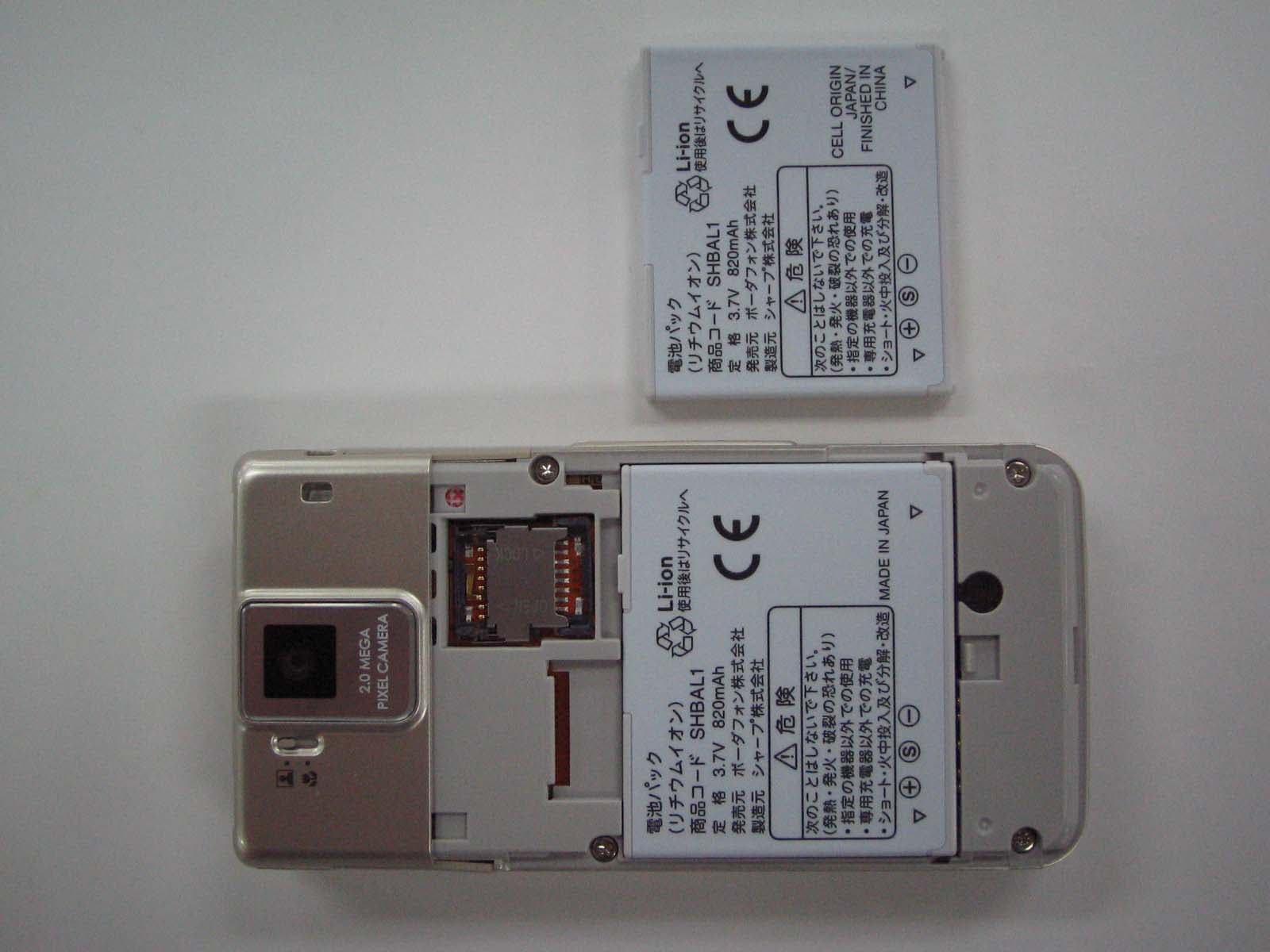
Click to zoom
Application Details
- Equipment Class
- PCE - PCS Licensed Transmitter held to ear
- Date of Grant
- Apr 27, 2006
- Application Purpose
- Original Equipment
- Date of Application
- Apr 27, 2006
- Equipment Note
- PCS Cellular Phone W/Bluetooth
- Frequency Range
- 1850.20000000 - 1909.80000000
- Company
- Sharp Corporation
- Country
- Japan
Documents & Files
Document Text
Text extracted from the exhibit documents filed with the FCC. Open a document above to read the original.
Users Manual
17-1 Abridged English Manual For more information about handset operations and functions, please go to the Vodafone K.K. Website (www.vodafone.jp) for the full manual* or dial 157 from a Vodafone handset for Customer Service. *P lease note that the full manual may not be available in English at time of purchase. In this case, call Customer Service or check Vodafone Website again at a later date. L270_insatsu.book 1 ページ 2006年4月19日 水曜日 午後4時1分 17-2 Abridged English Manual 17 Accessories ■ Lithium-ion Battery (Type 1)(SHBAJ1) ■ AC Charger (SHCAA1) ■ Utility Software (CD-ROM) ★ * * Upgrades or updates of included Utility Software may become available on the Vodafone Website (http://www.vodafone.jp) without prior notification. Please check for the newest versions of utility applications and download as required. ★ Complimentary sample not available for purchase Note X Supplied Utility Software is designed exclusively for 705SH. Tip X . For accessory-related information, please contact Vodafone Customer Centre, General Information (see P.17-45 ). . 705SH is compatible with microSD™ Memory Card; microSD™ Memory Card is not included in this package. Purchase microSD™ Memory Card to use Memory Card-related handset functions. . In this manual, microSD™ Memory Card is referred to as "Memory Card". L270_insatsu.book 2 ページ 2006年4月19日 水曜日 午後4時1分 17-3 Abridged English Manual 17 . Read safety precautions before using handset. . Observe precautions to avoid injury to self or others, or damage to property. . Vodafone is not liable for any damages resulting from use of this product. ■ Symbols Make sure you thoroughly understand these symbols before reading on. Symbols and their meanings are described below: Safety Precautions Before Using Handset 0 DANGER Great risk of death or serious injury from improper use 0 WARNING Risk of death or serious injury from improper use 0 CAUTION Risk of injury or damage to property from improper use 12345 Prohibited Actions 67 Compulsory Actions 0 Attention Required 0 DANGER Handset, Battery & Charger 6 Use specified battery, Charger and Desktop Holder. Using non-specified equipment may cause malfunctions, electric shock or fire due to battery leakage, overheating or bursting. 1 Do not short-circuit Charger terminals. Keep metal objects away from Charger terminals. Keep handset away from jewellery. Battery may leak, overheat, burst or ignite causing injury. Use a case to carry handset. Battery 1 Prevent injury from battery leakage, breakage or fire. Do not:« Heat or dispose of battery in fire « Open/modify/disassemble battery « Damage or solder battery « Use a damaged or deformed battery « Use non-specified charger « Force battery into handset « Charge battery near fire or sources of heat; or expose it to extreme heat « Use battery for other equipment 6 If battery fluid contacts eyes, do not rub them. Rinse with clean water and consult a doctor immediately. Eyes may be severely damaged. L270_insatsu.book 3 ページ 2006年4月19日 水曜日 午後4時1分 17-4 Abridged English Manual 17 0 WARNING Handset, Battery & Charger 1 Do not insert foreign objects into the handset, Charger or Desktop Holder. Do not insert metal or flammable objects into handset, Charger or Desktop Holder; may cause fire or electric shock. Keep out of children's reach. 3 Keep handset out of rain or extreme humidity. Fire or electric shock may result. 1 Keep handset away from liquid-filled containers. Keep the handset, Charger and Desktop Holder away from chemicals or liquids; fire or electric shock may result. 1 Keep battery, handset, Charger or Desktop Holder away from microwave ovens. Battery, handset, Charger or Desktop Holder may leak, burst, overheat or ignite, leading to accidents or injury. 2 Do not disassemble or modify handset or related hardware.« Do not open handset, Charger or Desktop Holder; may cause electric shock or injury. Contact Vodafone Customer Centre, Customer Assistance for repairs. « Do not modify handset, Charger or Desktop Holder; fire or electric shock may result. 7 If water or foreign matter is inside handset: Discontinue handset use to prevent fire/electric shock. Turn off handset, remove battery and unplug Charger, then contact Vodafone Customer Centre, Customer Assistance. 1 Avoid sources of fire. Prevent fire or explosion. Do not use handset in the presence of gas or fine particles (coal, dust, metal, etc.). 1 Do not subject handset to strong shocks or impacts. Strong shocks or impacts to handset, Charger or Desktop Holder may cause malfunction or injury. Should handset be damaged, remove battery then contact Vodafone Customer Centre, Customer Assistance. Discontinue handset use; fire or electric shock may occur. 7 If an abnormality occurs: If a handset emits an unusual sound, smoke or odour, discontinue use; may cause fire or electric shock. Turn off handset, remove battery and unplug Charger; contact Vodafone Customer Centre, Customer Assistance. L270_insatsu.book 4 ページ 2006年4月19日 水曜日 午後4時1分 17-5 Abridged English Manual 17 Handset 1 Take measures to prevent accidents.« For safety, never use handset while driving. Pull over beforehand. Mobile phone use while driving is prohibited by the revised Road Traffic Law (effective 1 November 2004). « Do not use headphones while driving or riding a bicycle. Accidents may result. « Moderate volume outside, especially at level/road crossings to avoid accidents. 1 Do not swing handset by handstrap. May result in injury or breakage. 6 Turn handset power off before boarding aircraft. Using wireless devices aboard aircraft may cause electronic malfunctions or endanger aircraft operation. 6 Adjusting vibration and Ringtone settings: Users with a heart condition/pacemaker/defibrillator should adjust handset settings accordingly. 6 During thunderstorms, turn power off; find cover. There is a risk of lightning strike or electric shock. Charger 1 Use only the specified voltage. Non-specified voltages may cause fire or electric shock.« AC Charger: AC 100V-240V Inp…
Text truncated - open the document above for the full version.
Users Manual
17-29 Abridged English Manual 17 Save names with phone numbers, mail addresses, etc. to Phone Book. * Not supported on USIM Card. , Save up to 750 entries in 705SH Phone Book; USIM Card Phone Book entry limit varies according to card specifications. Depending on the USIM Card in use, some items may not be supported, and character entry limits or number of Categories may be lower. Also, the number of phone numbers or mail addresses per entry may be lower. Saving to Phone Book Phone Book Entry Items Item Description Last Name: Enter up to 32 characters. (Select Name: when saving to USIM Card.) First Name:Reading: Enter up to 64 characters Add Phone Number: Enter up to three numbers on handset/two on USIM Card (32 digits each) Add Email Address: Enter up to three addresses on handset/one on USIM Card (128 single-byte alphanumerics each) Category: Sort entries into 16 Categories (11 Categories on some USIM Cards). Category names can be changed. Set Ringtone by Category (handset only). Address:* Enter postal code (20 characters), country name (32 characters), state/province (64 characters), city name (64 characters) and street name/number (64 characters) Homepage:* Save URLs. Enter up to 1024 bytes. Item Description Note:* Add personal details. Enter up to 256 characters. Birthday:* Enter birth date Picture:* Set an image to appear for incoming calls/mail Tone/Video for Voice Call:* Customise handset response to calls/mail Tone/Video for Video Call:*Tone/Video for New Message:*Light for Voice Call:*Light for Video Call:*Light for New Message:*Vibration for Incoming Call:*Vibration for New Message:*Secret:* Restrict access to Phone Book entries by saving them as Secret Mode entries Note X Back-up Important Information When battery is exhausted/removed for long periods, Phone Book entries may be lost; handset damage may also affect handset information recovery. Vodafone is not liable for damages from lost/altered data. L270_insatsu.book 29 ページ 2006年4月19日 水曜日 午後4時1分 17-30 Abridged English Manual 17 Enter a name, reading, phone number and mail address. 1 Press % , select Phone Book and press % 2 Select Add New Entry and press % 3 Select Last Name: and press % 4 Enter last name and press % 5 Select First Name: and press % 6 Enter first name and press % Characters entered for names appear under Reading: . 7 Select Add Phone Number: and press % 8 Enter a phone number and press % 9 Select an icon and press % 1 11 1 0 00 0 Select Add Email Address: and press % 1 11 1 1 11 1 Enter a mail address and press % 1 11 1 2 22 2 Select an icon and press % 1 11 1 3 33 3 Press A ß 1 Press b and select an entry 2 Press B ø 3 Select Edit and press % 4 Select an item and press % 5 Edit contents and press % After numbers/mail addresses, select an icon and press % . 6 Press A ß New Phone Book Entries Tip X Correcting Reading Select Reading: and press % . Make corrections and press % . 未 Note X Enter a name, phone number or mail address to create a Phone Book entry. Tip X Setting Storage Media Press % S Select Phone Book S Press % S Select Settings S Press % S Select Save New Entry S Press % S Select Phone , USIM Memory or Ask Each Time S Press % . For Ask Each Time , select storage media for each new entry. Editing Phone Book Entries 未 L270_insatsu.book 30 ページ 2006年4月19日 水曜日 午後4時1分 17-31 Abridged English Manual 17 1 Select a record (see P.17-24 "Calling from Received Calls") 2 Press B ø , select Save Number and press % 3 New Entry 1 Select As New Entry and press % 2 Perform Steps 3 - 13 on P.17-30 Add to Existing Entry 1 Select a Phone Book entry and press % 2 Press A ß 1 Press % , select Phone Book and press % 2 Select Settings and press % 3 Select Sort Entries and press % 4 Select By Reading , By Category or By a-ka-sa- ta-na and press % 1 Set search method to By Reading 2 In Standby, press b 3 Enter reading 4 Select a name and press % 5 Press ! Back up Phone Book via server; refresh VAB or Phone Book to reflect changes; add to/update VAB online via PC; restore lost/altered Phone Book entriesvia VAB. VAB requires a separate contract. For details, contact Vodafone Customer Centre, General Information (see P.17-45 ) or access the Vodafone K.K. Website via PC: http://www.vodafone.jp/en/VAB/ Saving from Received Calls Dialling from Phone Book Changing Search Method By Reading Shows entries that start with specified Reading By Category Opens entries in the specified Category By a-ka-sa-ta-na Shows entries with Readings that start with katakana in the specified row Tip X Opening USIM Card Phone Book EntriesPress b S Press B ø S Select Settings S Press % S Select Select Phone Book S Press % S Select USIM Memory S Press % Search by Reading Tip X Multiple NumbersUse e to select other numbers. Vodafone Address Book (VAB) L270_insatsu.book 31 ページ 2006年4月19日 水曜日 午後4時1分 17-32 Abridged English Manual 17 Select from two different shooting modes. Use Photo Camera for still images and Video Camera for video. ■ Photo Camera ■ Video Camera Camera Shake Handset movement may blur images; hold 705SH firmly or place it on a stable surface and use Self-timer. 1 Press % , select Camera and press % 2 Frame image on Display . In Video Camera mode, press A V to switch to Photo Camera. 3 Press % 4 Press % to save 5 Press " to exit Mobile Camera Before Using Camera Image Size W 1200 × H 1600 dots W 960 × H 1280 dots W 768 × H 1024 dots W 480 × H 640 dots W 240 × H 320 dots W 120 × H 160 dots Save Location Handset or Memory Card File Format JPEG (.jpg) Image Size W 176 × H 144 dots W 128 × H 96 dots W 240 × H 320 dots Save Location Handset or Memory Card Memory Card File Format MPEG-4 or H263 (.3gp) MPEG-4 (.3gp or .ASF) Note X Lens Cover Clean dust/smudges from lens cover (see P.17-14 q ) with a soft cloth before use. Mobile Camera . Mobile camera is a precision instrument, however, some pixels may appear brighter/darker. . Shooting/saving images while handset is hot may affect the image quality. . Subjecting the lens to direct sunlight will da…
Text truncated - open the document above for the full version.
Cover Letter(s)
Model Description FCC ID : APYHRO00048 Model Name : 705SH (Development Code: Merrill, Internal Name: JN-L270/J270) Type of Emission : 245KGXW Brand Name : Vodafone by Sharp Type of Equipment : WCDMA & Tri-band (900/1800/1900) GSM Dual mode Mobile Phone / Bluetooth Enable Specification Items WCDMA : TX 1922.6 to 1977.4MHz RX 2112.6 to 2167.4MHz 900MHz : Tx 880.2 to 914.8MHz Rx 925.2 to 959.8MHz 1800MHz : Tx 1710.2 to 1784.8MHz Rx 1805.2 to 1879.8MHz 1900MHz : Tx 1850.2 to 1909.8MHz Rx 1930.2 to 1989.8MHz (WCDMA & GSM900/1800MHz Band do not operate in USA) Frequency Band Bluetooth : TX 2402MHz to 2480MHz RX 2402MHz to 2480MHz Tx Power (Mobile Phone) WCDMA 23dBm±1dB 900MHz 33dBm2dB 1800MHz 30dBm±2dB 1900MHz 30dBm±2dB Tx Power (Bluetooth) Class2, Nominal 0dBm (Max +4dBm / min -6dBm) Type of Modulation (Mobile Phone) WCDMA : G1A, G1B, G1C, G1D, G1E, G1F, G1X, G7W GSM : GXW Bluetooth : GFSK Transmission Technology WCDMA : DS/CDMA, FDD GSM : FDMA/TDMA Bluetooth : FHSS Voice Codec WCDMA : AMR GSM : EFR/ FR/ HR GPRS Class B, Class 10 (Total 5slots, TX: max 2 / RX: max 4) Antenna (Mobile & Bluetooth) Integrated Antenna: Reversed Mono-pole L-Type SIM Plug-in 3V SIM card slot Display Main LCD 2.2”, 262,144color TFT(ASV), 240(W)320(H) with Backlight Sub LCD Monochrome FSTN,72(W)26(H) with Backlight Camera (Main) C-MOS 2.0M pixel Resolution (Sub) C-MOS 110,000 pixel WAP Browser ACCESS Net front Battery/Talk time Capacity 820mAh Battery Type Rechargeable Lithium-Ion Battery Standby time 300h MAIN SPECIFICATION Talk time 150min(WCDMA) / 240min(GSM) Dimensions Target size 50.2(W) x 101.1(D) x 18.2(H) mm (Close position) Target weight 110g Key Layout Soft key1, Soft key2, Navigation key, Center key, Custom key, 0-9mumeric key, Send/End key, *,# and 3 side key Bar code (JAN/QR) Scan / Decode , Encode (make a image file) Bluetooth Ver 1.2(Headset/Handsfree/Dial up/Object push) External Interface IrDA Ver 1.2 SD microSD SD Audio Ver 1.0 Stereo Headset Connector For Stereo Headset(10 pins) MCPC connector For USB Cable or PC Link cable or AC Charger SIM Card terminal 1slot SD card terminal For microSD card [1 slot] External Interface Connector Integrated charger circuit The terminals of charging are for using a cradle. LCD Remote Controller Optional Accessories STEREO Headphone Optional Accessories USB Cable Optional Accessories AC Charger Input AC 100 to 240V , Output DC 5.2V / 650mA Accessories Battery Lithium-Ion, DC 3.7V / 820mAh
RF Exposure Info
JAPAN QUALITY ASSURANCE ORGANIZATION Page 1 of 22 Technical document No. 23163-0501 JQA File No. : KL80050799 Issued Date : April 10, 2006 TEST REPORT (SAR EVALUATION) APPLICANT : Sharp Corporation, Communication Systems Group ADDRESS : 2-13-1, Iida, Hachihonmatsu, Higashi-Hiroshima City, Hiroshima, 739-0192, Japan PRODUCTS : WCDMA & Tri-band GSM Dual mode Mobile Phone / Bluetooth Enable MODEL NO. : 705SH SERIAL NO. : 004401/11/013031/3 FCC ID : APYHRO00048 TEST STANDARD : FCC/OET Bulletin 65 Supplement C (Edition 01-01) TESTING LOCATION : Japan Quality Assurance Organization KITA-KANSAI Testing Center 1-7-7, Ishimaru, Minoh-shi, Osaka 562-0027, Japan TEST RESULTS : Passed DATE OF TEST : March 28, 2006 - March 29, 2006 Yuichi Fukumoto Manager Japan Quality Assurance Organization KITA-KANSAI Testing Center Testing Dept. EMC Division 1-7-7, Ishimaru, Minoh-shi, Osaka 562-0027, Japan ● The measurement values stated in Test Report was made with traceable to National Institute of Advanced Industrial Science and Technology (AIST) of Japan, National Institute of Information and Communications Technology (NICT) of Japan , and Laboratory for EMF and Microwave Electronics at the Swiss Federal Institute of Technology (ETH) in Zürich, Switzerland. ● The applicable standard, testing condition and testing method which were used for the tests are based on the request of the applicant. ● The test results presented in this report relate only to the offered test sample. ● The contents of this test report cannot be used for the purposes, such as advertisement for consumers. ● This test report shall not be reproduced except in full without the written approval of JQA. JAPAN QUALITY ASSURANCE ORGANIZATION JQA File No. : KL80050799 Issue Date : April 10, 2006 Model No. : 705SH FCC ID : APYHRO00048 Regulation : FCC/OET Bulletin 65 Supplement C (Edition 01-01) Page 2 of 22 Technical document No. 23163-0501 TABLE OF CONTENTS Page Documentation ................................................................................................................................................. 3 1 Test Regulation.....................................................................................................................................3 2 Test Location.........................................................................................................................................3 3 Recognition of Test Laboratory............................................................................................................3 4 Description of the Equipment Under Test..........................................................................................4 5 Measurement System Diagram............................................................................................................5 6 System Components..............................................................................................................................6 7 Measurement Process...........................................................................................................................8 8 Measurement Uncertainties.................................................................................................................9 9 Equipment Under Test Modification.................................................................................................10 10 Responsible Party................................................................................................................................10 11 Deviation from Standard....................................................................................................................10 12 Test Results.........................................................................................................................................11 13 Summary..............................................................................................................................................12 14 Test Arrangement...............................................................................................................................13 15 Equipment Under Test Tune-Up Procedures....................................................................................15 Appendix A: Test Data ................................................................................................................................... 16 A.1 System Validation...............................................................................................................................16 A.2 Tissue Verification..............................................................................................................................17 A.3 SAR Measurement Data.....................................................................................................................18 Appendix B: Test Instruments....................................................................................................................... 21 Appendix C: Attachments .............................................................................................................................. 22 DEFINITIONS FOR ABBREVIATION AND SYMBOLS USED IN THIS TEST REPORT “EUT” means Equipment Under the Test. “N/A” means that Not Applicable. “N/T” means that Not Tested. - indicates that the listed condition, standard or equipment is applicable for this report. - indicates that the listed condition, standard or equipment is not applicable for this report. JAPAN QUALITY ASSURANCE ORGANIZATION JQA File No. : KL80050799 Issue Date : April 10, 2006 Model No. : 705SH FCC ID : APYHRO00048 Regulation : FCC/OET Bulletin 65 Supplement C (Edition 01-01) Page 3 of 22 Technical document No. 23163-0501 Documentation 1 Test Regulation Applied Standard : CFR 47 FCC Rules and Regulations Part 2 Radio-frequency Radiation Exposure Evaluation (§2.1091 and §2.1093) Test Procedure : FCC/OET Bulletin 65 Supplement C (Edition 01-01)…
Text truncated - open the document above for the full version.
RF Exposure Info
Attachment 1 – System Validation Plots JAPAN QUALITY ASSURANCE ORGANIZATION Date/Time: 2006/03/29 10:30:28Date/Time: 2006/03/29 10:32:49 Test Laboratory: JAPAN QUALITY ASSURANCE ORGANIZATION System Validation DUT: Dipole 1800 MHz; Type: D1800V2; Serial: 2d038 Communication System: CW; Frequency: 1800 MHz;Duty Cycle: 1:1 Medium: HSL1800 Medium parameters used: f = 1800 MHz; σ = 1.34 mho/m; ε r = 39.3; ρ = 1000 kg/m 3 Phantom section: Flat Section Measurement Standard: DASY4 (High Precision Assessment) DASY4 Configuration: z Probe: ET3DV6 - SN1679; ConvF(5.2, 5.2, 5.2); Calibrated: 2005/12/15 z Sensor-Surface: 4mm (Mechanical And Optical Surface Detection) z Electronics: DAE3 Sn508; Calibrated: 2005/12/08 z Phantom: SAM 1194; Type: QD 000 P40 CA; Serial: 1194 z Measurement SW: DASY4, V4.5 Build 19; Postprocessing SW: SEMCAD, V1.8 Build 146 Antenna Input Power 250 mW/Area Scan (5x5x1): Measurement grid: dx=20mm, dy=20mm Maximum value of SAR (measured) = 10.9 mW/g Antenna Input Power 250 mW/Zoom Scan (5x5x7)/Cube 0: Measurement grid: dx=8mm, dy=8mm, dz=5mm Reference Value = 94.6 V/m; Power Drift = -0.061 dB Peak SAR (extrapolated) = 17.1 W/kg SAR(1 g) = 9.74 mW/g; SAR(10 g) = 5.18 mW/g Maximum value of SAR (measured) = 10.8 mW/g 0 dB = 10.8mW/g JAPAN QUALITY ASSURANCE ORGANIZATION Date/Time: 2006/03/28 11:21:11Date/Time: 2006/03/28 11:23:34 Test Laboratory: JAPAN QUALITY ASSURANCE ORGANIZATION System Validation DUT: Dipole 1800 MHz; Type: D1800V2; Serial: 2d038 Communication System: CW; Frequency: 1800 MHz;Duty Cycle: 1:1 Medium: M1800 Medium parameters used: f = 1800 MHz; σ = 1.46 mho/m; ε r = 52.5; ρ = 1000 kg/m 3 Phantom section: Flat Section Measurement Standard: DASY4 (High Precision Assessment) DASY4 Configuration: z Probe: ET3DV6 - SN1679; ConvF(4.54, 4.54, 4.54); Calibrated: 2005/12/15 z Sensor-Surface: 4mm (Mechanical And Optical Surface Detection) z Electronics: DAE3 Sn508; Calibrated: 2005/12/08 z Phantom: SAM 1194; Type: QD 000 P40 CA; Serial: 1194 z Measurement SW: DASY4, V4.5 Build 19; Postprocessing SW: SEMCAD, V1.8 Build 146 Antenna Input Power 250 mW/Area Scan (5x5x1): Measurement grid: dx=20mm, dy=20mm Maximum value of SAR (measured) = 11.0 mW/g Antenna Input Power 250 mW/Zoom Scan (5x5x7)/Cube 0: Measurement grid: dx=8mm, dy=8mm, dz=5mm Reference Value = 93.1 V/m; Power Drift = -0.091 dB Peak SAR (extrapolated) = 15.8 W/kg SAR(1 g) = 9.78 mW/g; SAR(10 g) = 5.32 mW/g 0 dB = 11.0mW/g JAPAN QUALITY ASSURANCE ORGANIZATION
RF Exposure Info
Attachment 2 – SAR Test Plots JAPAN QUALITY ASSURANCE ORGANIZATION Date/Time: 2006/03/29 12:02:45Date/Time: 2006/03/29 12:08:19 Test Laboratory: JAPAN QUALITY ASSURANCE ORGANIZATION Cheek/Touch 661ch (1880.00MHz) DUT: WCDMA & Tri-band GSM Dual mode Mobile Phone / Bluetooth Enable; Type: 705SH; Serial: 004401/11/013031/3 Communication System: GSM 1900; Frequency: 1880 MHz;Duty Cycle: 1:8.3 Medium: HSL1900 Medium parameters used: f = 1880 MHz; σ = 1.45 mho/m; ε r = 38.8; ρ = 1000 kg/m 3 Phantom section: Left Section Measurement Standard: DASY4 (High Precision Assessment) DASY4 Configuration: z Probe: ET3DV6 - SN1679; ConvF(5.2, 5.2, 5.2); Calibrated: 2005/12/15 z Sensor-Surface: 4mm (Mechanical And Optical Surface Detection) z Electronics: DAE3 Sn508; Calibrated: 2005/12/08 z Phantom: SAM 1194; Type: QD 000 P40 CA; Serial: 1194 z Measurement SW: DASY4, V4.5 Build 19; Postprocessing SW: SEMCAD, V1.8 Build 146 Cheek/Touch Position/Area Scan (11x6x1): Measurement grid: dx=15mm, dy=15mm Maximum value of SAR (measured) = 0.158 mW/g Cheek/Touch Position/Zoom Scan (5x5x7)/Cube 0: Measurement grid: dx=8mm, dy=8mm, dz=5mm Reference Value = 5.32 V/m; Power Drift = -0.165 dB Peak SAR (extrapolated) = 0.229 W/kg SAR(1 g) = 0.159 mW/g; SAR(10 g) = 0.109 mW/g Maximum value of SAR (measured) = 0.167 mW/g 0 dB = 0.167mW/g JAPAN QUALITY ASSURANCE ORGANIZATION Date/Time: 2006/03/29 11:39:44Date/Time: 2006/03/29 11:45:16 Test Laboratory: JAPAN QUALITY ASSURANCE ORGANIZATION Ear/Tilt 661ch (1880.00MHz) DUT: WCDMA & Tri-band GSM Dual mode Mobile Phone / Bluetooth Enable; Type: 705SH; Serial: 004401/11/013031/3 Communication System: GSM 1900; Frequency: 1880 MHz;Duty Cycle: 1:8.3 Medium: HSL1900 Medium parameters used: f = 1880 MHz; σ = 1.45 mho/m; ε r = 38.8; ρ = 1000 kg/m 3 Phantom section: Left Section Measurement Standard: DASY4 (High Precision Assessment) DASY4 Configuration: z Probe: ET3DV6 - SN1679; ConvF(5.2, 5.2, 5.2); Calibrated: 2005/12/15 z Sensor-Surface: 4mm (Mechanical And Optical Surface Detection) z Electronics: DAE3 Sn508; Calibrated: 2005/12/08 z Phantom: SAM 1194; Type: QD 000 P40 CA; Serial: 1194 z Measurement SW: DASY4, V4.5 Build 19; Postprocessing SW: SEMCAD, V1.8 Build 146 Ear/Tilt Position/Area Scan (11x6x1): Measurement grid: dx=15mm, dy=15mm Maximum value of SAR (measured) = 0.151 mW/g Ear/Tilt Position/Zoom Scan (5x5x7)/Cube 0: Measurement grid: dx=8mm, dy=8mm, dz=5mm Reference Value = 6.63 V/m; Power Drift = -0.139 dB Peak SAR (extrapolated) = 0.247 W/kg SAR(1 g) = 0.141 mW/g; SAR(10 g) = 0.075 mW/g Maximum value of SAR (measured) = 0.157 mW/g 0 dB = 0.157mW/g JAPAN QUALITY ASSURANCE ORGANIZATION Date/Time: 2006/03/29 13:55:11Date/Time: 2006/03/29 14:01:11 Test Laboratory: JAPAN QUALITY ASSURANCE ORGANIZATION Cheek/Touch 512ch (1850.20MHz) DUT: WCDMA & Tri-band GSM Dual mode Mobile Phone / Bluetooth Enable; Type: 705SH; Serial: 004401/11/013031/3 Communication System: GSM 1900; Frequency: 1850.2 MHz;Duty Cycle: 1:8.3 Medium: HSL1900 Medium parameters used: f = 1850.2 MHz; σ = 1.45 mho/m; ε r = 38.8; ρ = 1000 kg/m 3 Phantom section: Right Section Measurement Standard: DASY4 (High Precision Assessment) DASY4 Configuration: z Probe: ET3DV6 - SN1679; ConvF(5.2, 5.2, 5.2); Calibrated: 2005/12/15 z Sensor-Surface: 4mm (Mechanical And Optical Surface Detection) z Electronics: DAE3 Sn508; Calibrated: 2005/12/08 z Phantom: SAM 1194; Type: QD 000 P40 CA; Serial: 1194 z Measurement SW: DASY4, V4.5 Build 19; Postprocessing SW: SEMCAD, V1.8 Build 146 Cheek/Touch Position/Area Scan (11x6x1): Measurement grid: dx=15mm, dy=15mm Maximum value of SAR (measured) = 0.211 mW/g Cheek/Touch Position/Zoom Scan (5x5x7)/Cube 0: Measurement grid: dx=8mm, dy=8mm, dz=5mm Reference Value = 3.08 V/m; Power Drift = 0.044 dB Peak SAR (extrapolated) = 0.323 W/kg SAR(1 g) = 0.187 mW/g; SAR(10 g) = 0.109 mW/g Maximum value of SAR (measured) = 0.198 mW/g 0 dB = 0.198mW/g JAPAN QUALITY ASSURANCE ORGANIZATION Date/Time: 2006/03/29 13:04:39Date/Time: 2006/03/29 13:10:38 Test Laboratory: JAPAN QUALITY ASSURANCE ORGANIZATION Cheek/Touch 661ch (1880.00MHz) DUT: WCDMA & Tri-band GSM Dual mode Mobile Phone / Bluetooth Enable; Type: 705SH; Serial: 004401/11/013031/3 Communication System: GSM 1900; Frequency: 1880 MHz;Duty Cycle: 1:8.3 Medium: HSL1900 Medium parameters used: f = 1880 MHz; σ = 1.45 mho/m; ε r = 38.8; ρ = 1000 kg/m 3 Phantom section: Right Section Measurement Standard: DASY4 (High Precision Assessment) DASY4 Configuration: z Probe: ET3DV6 - SN1679; ConvF(5.2, 5.2, 5.2); Calibrated: 2005/12/15 z Sensor-Surface: 4mm (Mechanical And Optical Surface Detection) z Electronics: DAE3 Sn508; Calibrated: 2005/12/08 z Phantom: SAM 1194; Type: QD 000 P40 CA; Serial: 1194 z Measurement SW: DASY4, V4.5 Build 19; Postprocessing SW: SEMCAD, V1.8 Build 146 Cheek/Touch Position/Area Scan (11x6x1): Measurement grid: dx=15mm, dy=15mm Maximum value of SAR (measured) = 0.310 mW/g Cheek/Touch Position/Zoom Scan (5x5x7)/Cube 0: Measurement grid: dx=8mm, dy=8mm, dz=5mm Reference Value = 3.43 V/m; Power Drift = -0.00 dB Peak SAR (extrapolated) = 0.485 W/kg SAR(1 g) = 0.275 mW/g; SAR(10 g) = 0.160 mW/g Maximum value of SAR (measured) = 0.285 mW/g 0 dB = 0.285mW/g JAPAN QUALITY ASSURANCE ORGANIZATION Date/Time: 2006/03/29 14:14:08Date/Time: 2006/03/29 14:20:08 Test Laboratory: JAPAN QUALITY ASSURANCE ORGANIZATION Cheek/Touch 810ch (1909.80MHz) DUT: WCDMA & Tri-band GSM Dual mode Mobile Phone / Bluetooth Enable; Type: 705SH; Serial: 004401/11/013031/3 Communication System: GSM 1900; Frequency: 1909.8 MHz;Duty Cycle: 1:8.3 Medium: HSL1900 Medium parameters used: f = 1909.8 MHz; σ = 1.45 mho/m; ε r = 38.8; ρ = 1000 kg/m 3 Phantom section: Right Section Measurement Standard: DASY4 (High Precision Assessment) DASY4 Configuration: z Probe: ET3DV6 - SN1679; ConvF(5.2, 5.2, 5.2); Calibrated: 2005/12/15 z Sensor-Surface: 4mm (Mechanical And Optical Surface Detection) z Electronics: DAE3 Sn508; Calibrated: 2005/12/08 z Phantom: SAM 1194; Type: QD 000…
Text truncated - open the document above for the full version.
RF Exposure Info
JAPAN QUALITY ASSURANCE ORGANIZATION Attachment 3 – Dosimetric E-Field Probe – ET3DV6, S/N: 1679 Calibration Data
RF Exposure Info
JAPAN QUALITY ASSURANCE ORGANIZATION Attachment 4 – System Validation Dipole – D1800V2, S/N: 2d038 Calibration Data
RF Exposure Info
JAPAN QUALITY ASSURANCE ORGANIZATION Attachment 5 – Duty Cycle Plots Modulation Type: GSM Duty Cycle: 12.0 % (Crest Factor: 8.3) Modulation Type: GSM+GPRS (Level 10 / 2 slot) Duty Cycle: 24.0 % (Crest Factor: 4.2)
RF Exposure Info
Attachment 6 – EUT Photographs JAPAN QUALITY ASSURANCE ORGANIZATION JAPAN QUALITY ASSURANCE ORGANIZATION JAPAN QUALITY ASSURANCE ORGANIZATION JAPAN QUALITY ASSURANCE ORGANIZATION
Test Report
JAPAN QUALITY ASSURANCE ORGANIZATION JAPAN QUALITY ASSURANCE ORGANIZATION KITA-KANSAI TESTING CENTER 7-7, Ishimaru 1-Chome, Minoh-shi, Osaka 562-0027 Japan. Phone. +81-72-729-2243/Facsimile. +81-72-728-6848 IssueDate:April10,2006 Page 1 of 37 TEST REPORTEMCEMISSION - JQA APPLICATION No.: KL80050800 Name of Product: WCDMA & Tri-band GSM Dual mode Mobile Phone / Bluetooth Enable Model/Type No.: 705SH FCC ID: APYHRO00048 Applicant: Sharp Corporation,…
Text truncated - open the document above for the full version.
Contact Information
Applicant
Taihei Ohtsuka(Division Manager, ESG & Q promotion div.)
Test Firm
Japan Quality Assurance Org.Katsumi Nishii
Technical Specifications
| # | Rule Parts | Frequency Range | Power Output | Emission | Tolerance |
|---|---|---|---|---|---|
| 1 | 24E | 1.85 GHz - 1.91 GHz | 1.862 W | 245KGXW | 0.0600000000 ppm |
Other Applications from Sharp Corporation
APYHRO00343
Aug 17, 2026Smartphone
Equipment Class
DTS - Digital Transmission SystemAPYHRO00342
Jul 29, 2026Smart phone
Equipment Class
DXX - Part 15 Low Power Communication Device TransmitterAPYHRO00341
May 28, 2026Smart phone
Equipment Class
DTS - Digital Transmission SystemAPYHRO00340
Dec 01, 2025BT remote control
Equipment Class
DTS - Digital Transmission SystemAPYHRO00339
Sep 17, 2025Smart phone
Equipment Class
NII - Unlicensed National Information Infrastructure TX