APYNAR0058GSM900/DCS1800/PCS1900 Tri band cellular phone
Sharp Corporation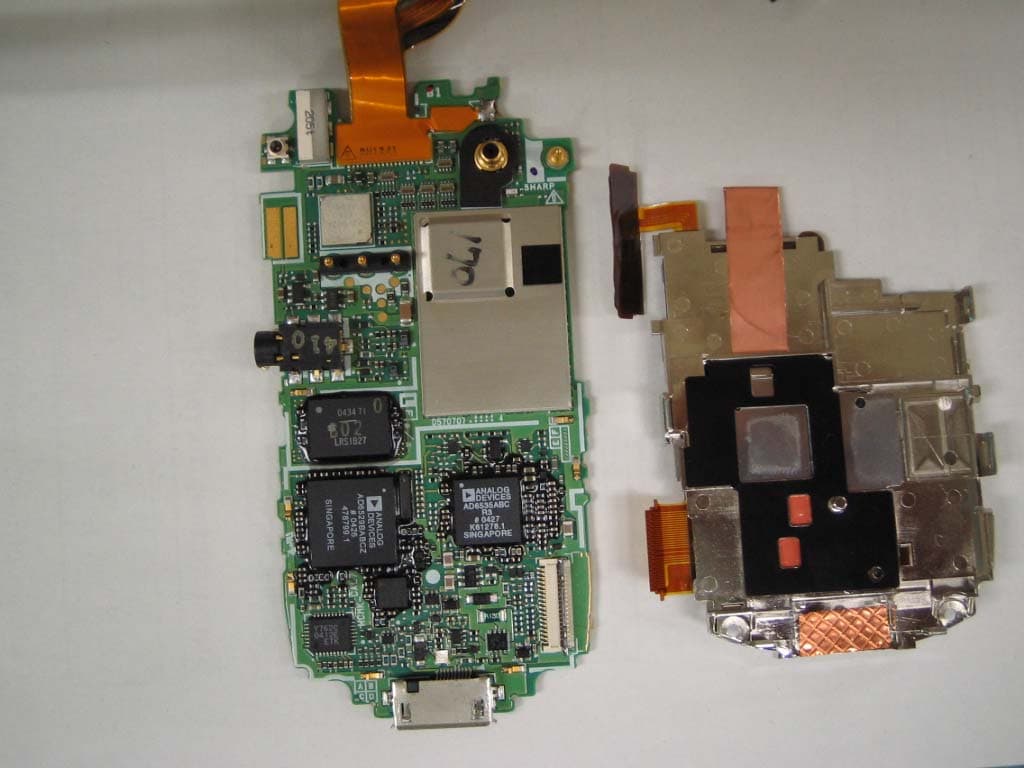
Click to zoom
Application Details
- Equipment Class
- DSS - Part 15 Spread Spectrum Transmitter
- Date of Grant
- Nov 11, 2004
- Application Purpose
- Original Equipment
- Date of Application
- Nov 11, 2004
- Equipment Note
- GSM900/DCS1800/PCS1900 Tri band cellular phone
- Frequency Range
- 2402.00000000 - 2480.00000000
- Company
- Sharp Corporation
- Country
- Japan
Documents & Files
Document Text
Text extracted from the exhibit documents filed with the FCC. Open a document above to read the original.
Users Manual
1-1 Introduction Introduction Thank you for purchasing this SHARP mobile handset. Before and while using the handset, please read this manual thoroughly and retain it for future reference. This handset is your partner. Handle it carefully at all times to ensure its long-term performance. About this Operation Manual Instruction scheme Instructions in this manual are carefully designed to help you operate the handset smoothly and easily. At the beginning of each section, the steps that have to be followed to reach the function you wish to utilise are shown (Example 1). The steps for all subsequent subsections are simplified (Example 2). Make sure to press B to enter your selection. Example 1: (Excerpt from “Viewing the Contacts List” on page 9-54) 1Press B. The main menu appears. 2Press a, b, c or d to highlight “Contacts” and press B. 3Press a or b to highlight “Contacts list” and press B. The index view of the “Contacts list” appears. In example 1, each step to reach the “Contacts list” is shown. Example 2: (Excerpt from “Selecting the Memory for saving” on page 9-55) 1At the main menu, select in the following order: “Contacts” → “Contacts list.” 2Press C [Options]. The “Options” menu appears. In example 2, the steps to reach the “Contacts list” are simplified as shown above (step1). Symbols B, a, b, c, d and C [Options] indicate the operation keys in this manual. For information on the keys and handset operations, refer to “Parts and Controls” on page 4-22. This indicates useful extra information for operating the handset. This indicates important background information or items that need to be recognised when operating the handset. This indicates operations that require extreme caution before performing on the handset. e_tm200_7fm.book Page 1 Tuesday, November 9, 2004 9:14 PM 1-2 Introduction NOTICE We strongly recommend that you keep separate permanent written records of all important data. Data may be lost or altered in virtually any electronic memory product under certain circumstances. Therefore, we assume no responsibility for data lost or otherwise rendered unusable, whether as a result of improper use, repairs, defects, battery replacement, use after the specified battery life has expired or any other cause. We assume no responsibility, directly or indirectly, for financial losses or claims from third parties resulting from the use of this product and any of its functions, such as stolen credit card numbers, the loss or alteration of stored data, etc. All company and/or product names are trademarks and/or registered trademarks of their respective holders. Screen layouts illustrated in this operation manual may differ from those on the handset. The information described in this operation manual is subject to change without notice. Some of the functions described in this operation manual may not be supported by all networks. We assume no responsibility for content, information, etc. downloaded from the network. The CGS-LCD used for the main display is a world advanced technology product, giving you fine picture quality. Occasionally, a few black or bright pixels may appear on the screen. Please note that this will not have any impact on any of the features or performance. Copyright According to copyright laws, the reproduction, alteration and use of material protected by copyright (music, pictures, etc.) is only permitted for personal or private use. If the user is not in possession of more extensive copyrights or has not received explicit permission from the copyright owner to reproduce, alter or use a copy which is made or modified in this way, this is considered to be a violation of the copyright laws and gives the copyright owner the right to claim damages. For this reason, avoid the illegal use of material protected by copyright. Windows is a registered trademark of Microsoft Corporation in the United States and/or other countries. e_tm200_7fm.book Page 2 Tuesday, November 9, 2004 9:14 PM 1-3 Introduction Powered by JBlend™, Copyright1997-2004 Aplix Corporation. All rights reserved. Java and all Java-based trademarks and logos are trademarks or registered trademarks of Sun Microsystems, Inc. in the U.S. and other countries. JBlend and all JBlend-based trademarks and logos are trademarks or registered trademarks of Aplix Corporation in Japan and other countries. In this product, JBlend™ is incorporated. JBlend™ is a Java execution environment that Aplix developed for implementing advanced performance and fast operation on small-memory systems. JBlend and JBlend logo are trademarks or registered trademarks of Aplix Corporation in Japan and other countries. Licensed by Inter Digital Technology Corporation under one or more of the following United States Patents and/or their domestic or foreign counterparts and other patents pending, including U.S. Patents: 4,675,863: 4,779,262: 4,785,450 & 4,811,420. Licensed under U.S. Patent 4,558,302 and foreign counterparts. CP8 PATENT SD logo is a trademark. T9 Text Input is licensed under one or more of the following: U.S. Pat. Nos. 5,818,437, 5,953,541, 5,187,480, 5,945,928 and 6,011,554; Australian Pat. No. 727539; Canadian Pat. No. 1,331,057; United Kingdom Pat. No. 2238414B; Hong Kong Standard Pat. No. HK0940329; Republic of Singapore Pat. No. 51383; Euro. Pat. No. 0 842 463 (96927260.8) DE/ DK, FI, FR, IT, NL,PT.ES,SE,GB; Republic of Korea Pat. Nos. KR201211B1 and KR226206B1; and additional patents are pending worldwide. Use of this product in any manner that complies with the MPEG-4 Visual Standard is prohibited, except for use directly related to (a) data or information ( i ) generated by and obtained without charge from a consumer not thereby engaged in a business enterprise, and ( ii ) for personal use only; and (b) other uses specifically and separately licensed by MPEG LA, L.L.C. Bluetooth is a trademark of the Bluetooth SIG, Inc. The Bluetooth word mark and logos are owned by the Bluetooth SIG, Inc. and any use of such marks by…
Text truncated - open the document above for the full version.
Users Manual
12-110 Enjoying Multi Media Using Music “Mobile Jukebox” in the “My Media” menu enables you to download favourite music tracks directly onto your handset. The “Music” menu is a gateway to the music providing service produced by T-Mobile that allows you to browse from a range of tracks and a Music Player is also prepared for your handset to play the downloaded music for your entertainment. The music format available on the handset is: :Music tracks in AAC format :Music tracks in MP3 format Downloading Music 1Press B. The main menu appears. 2Press a, b, c or d to highlight “My media” and press B. 3Press a or b to highlight “Music” and press B. 4Press a or b to highlight “Mobile Jukebox” and press B. The downloaded music tracks are saved in “My music.” Playing Music 1At the main menu, select in the following order: “My Media” → “Music” → “My music.” 2Press a or b to highlight a music track you wish to play and press B. The Music Player appears to start playing the music track. Music Player Basic Operations “Music Player” is the preinstalled AAC/MP3 music format player. B:Play/Pause (Toggles) a/b (V/W):Volume up/down c/d:Skip forward/back To control play back mode When playing back a music track, you can control the following play back modes. shows that this title of music cannot be played. The user did not proceed to download with payment procedure, or the valid period for this title has passed. shows that this title of music is valid to play under copyright protection. e_tm200_7fm.book Page 110 Tuesday, November 9, 2004 9:14 PM 12-111 Enjoying Multi Media 1When playing back a music track, press C [Options]. The “Options” menu appears. 2Select from the following menu items and press B. Shuffle:Sets the random shuffle play mode. Repeat1: Plays the current song repeatedly. Repeat all:Plays all songs in the list repeatedly. Normal:Plays the song in the list until the end. The mode icon you set appears on the Music Player display. Making Your Music Play List You can make your own play list. 1At the main menu, select in the following order: “My Media” → “Music” → “My music.” The list of “My music” appears. 2Press a or b to highlight a music track you wish to add to the play list and press C [Options]. The “Options” menu appears. 3Press a or b to highlight “Add to playlist” and press B. The music track adds to “My playlist.” Checking the Music Information 1At the main menu, select in the following order: “My Media” → “Music” → “My music.” The list of “My music” appears. 2Press a or b to highlight a music track whose details you wish to check and press C [Options]. The “Options” menu appears. 3Press a or b to highlight “Music details” and press B. The player pauses music playback if an incoming phone call is detected and the ringtone is heard through the headphones. When playing a music track, pressing C [Options] and selecting “Add to playlist” also adds the file to “My playlist.” When playing back music tracks, pressing C [Options] and selecting “Music details” also shows the detailed information. e_tm200_7fm.book Page 111 Tuesday, November 9, 2004 9:14 PM 12-112 Enjoying Multi Media Changing the Name of Music 1At the main menu, select in the following order: “My Media” → “Music” → “My music.” The list of “My music” appears. 2Press a or b to highlight a music track whose name you wish to change and press C [Options]. The “Options” menu appears. 3Press a or b to highlight “Rename” and press B. The text entry screen appears. For information on how to enter text, refer to “Entering Text” on page 8-51. 4When you finish renaming, press B to save. Moving or Copying Music to Memory Card 1At the main menu, select in the following order: “My Media” → “Music” → “My music.” The list of “My music” appears. 2Press a or b to highlight a music track you wish to move or copy to memory card and press C [Options]. The “Options” menu appears. 3Press a or b to highlight “Move to memory card” or “Copy to memory card” and press B. If you access music tracks saved in memory card, the menu item switch to “Move to handset” or “Copy to handset” and you can move or copy music tracks from memory cards to handset memory. e_tm200_7fm.book Page 112 Tuesday, November 9, 2004 9:14 PM 12-113 Enjoying Multi Media Deleting Music 1At the main menu, select in the following order: 2“My Media” → “Music” → “My music.” 3The list of “My music” appears. 4Press a or b to highlight a music track you wish to delete and press C [Options]. The “Options” menu appears. 5Press a or b to highlight “One music” or “All music” and press B. 6Press C [Yes]. If you wish to cancel, press A [No] in this step. Memory Status This function helps you to check the memory status of “My Media.” 1Press B. The main menu appears. 2Press a, b, c or d to highlight “My Media” and press B. 3Press a or b to highlight “Memory status” and press B. 4Press a or b to highlight “Handset” or “Memory card” and press B. The memory status is indicated by using bar chart. Once you delete a music track, it cannot be restored. e_tm200_7fm.book Page 113 Tuesday, November 9, 2004 9:14 PM 13-114 Using the Personal Organiser Using the Personal Organiser This section provides information on the organiser features that are built into the handset. Features include a calendar, alarm clock, calculator, voice memo recorder and phone help. Using the Calendar The Calendar helps you organise and manage your schedule on a daily basis. The calendar can display dates from January 2000 to December 2099. 1Press B. The main menu appears. 2Press a, b, c or d to highlight “Organiser” and press B. 3Press a or b to highlight “Calendar” and press B. The current month is displayed and the current date is highlighted. Entering Appointments You can navigate the calendar by using the navigation keys. You can enter up to three schedules per day. 1At the main menu, select in the following order: “Organiser” → “Calendar.” 2Press a, b, c or d to highlight the day you wish to create an appointment for and press B. …
Text truncated - open the document above for the full version.
Cover Letter(s)
American Telecommunications Certification Body Inc. 6731 Whittier Ave, McLean, VA 22101 November 9, 2004 RE: FCC ID: APYNAR0058_ATCB001885 Attention: Yukari Ito I have a few comments on this Application. Please note that further comments may arise in response to answers provided to the questions below. 1. Please note that the plot of the band edge compliance on page 20 (1850MHz) and the band edge plot on page 21 (1910) appear to be non-compliant as portions of the emissions shown are over the projected limit line in the plot. Please explain and please verify that the conducted plot data is at the required -13dBm limit. 2. Please note that the max SAR value in the manual (0.452w/k) does not match that recorded in the SAR report (1.42w/kg). Please explain and please provide consistent data in the appropriate documentation. Please correct documents as needed. Dennis Ward mailto:[email protected] The items indicated above must be submitted before processing can continue on the above referenced application. Failure to provide the requested information may result in application termination. Correspondence should be considered part of the permanent submission and may be viewed from the Internet after a Grant of Equipment Authorization is issued. Please do not respond to this correspondence using the email reply button. In order for your response to be processed expeditiously, you must submit your documents through the AmericanTCB.com website. Also, please note that partial responses increase processing time and should not be submitted. Any questions about the content of this correspondence should be directed to the sender.
ID Label/Location Info
Spec Label Destination Production Years Code(yyyymm) Model Name IMEI(Bar Code)
Internal Photos
Fantom Photos 1/5 Fantom Internal Photos Sub LCD side Main LCD side Fantom Photos 2/5 Key side Battery side Fantom Photos 3/5 under Main LCD under Sub LCD Fantom Photos 4/5 under SIM Frame Under SIM/SD FPC Fantom Photos 5/5 Camera (under Shield) Under RF Shield
Test Report
Test report No. : 25BE0189-HO-2 Page : 2 of 40 Issued date : November 05, 2004 FCC ID : APYNAR0058 UL Apex Co., Ltd. Head Office EMC Lab. 4383-326 Asama-cho, Ise-shi, Mie-ken 516-0021 JAPAN Telephone : +81 596 24 8116 Facsimile : +81 596 24 8124 MF060b(10.04.03) CONTENTS PAGE SECTION 1: Client information ......................................................................................................................... 3 SECTION 2: Equipment under test (E.U.T.)..................................................................................................... 3 SECTION 3: Test specification, procedures & results ..................................................................................... 5 SECTION 4: Operation of E.U.T. during testing .............................................................................................. 7 SECTION 5: Conducted Emission, Section 15.207 ........................................................................................... 8 SECTION 6: Carrier Frequency Separation, Section15.247(a)(1) ..................................................................8 SECTION 7: 20 dB Bandwidth, Section 15.247(a)(1) ....................................................................................... 8 SECTION 8: Number of Hopping Frequency, Section 15.247(a)(1)(iii).......................................................... 9 SECTION 9: Dwell time, Section 15.247(a)(1)(iii)............................................................................................. 9 SECTION 10: Maximum Peak Output Power, Section 15.247(b)(1) .............................................................. 9 SECTION 11: Spurious Emission / Band Edge Compliance 15.247(c) ......................................................... 10 APPENDIX 1: Photographs of test setup ......................................................................................................... 11 Conducted Emission ..............................................................................................................................................................11 Spurious Emission (Radiated) ............................................................................................................................................. 12 Worst Case Position (Y-axis:Horizontal / Z-axis:Vertical)................................................................................................ 13 APPENDIX 2: Test instruments ....................................................................................................................... 14 APPENDIX 3: Data of EMI test........................................................................................................................ 15 Conducted Emission ............................................................................................................................................................. 15 Carrier Frequency Separation(FHSS)................................................................................................................................ 19 20dB Bandwidth(FHSS)....................................................................................................................................................... 21 Number of Hopping Frequency(FHSS) .............................................................................................................................. 23 Dwell time(FHSS) ................................................................................................................................................................. 25 Maximum Peak Output Power(FHSS) ............................................................................................................................... 28 Radiated Spurious Emission(30-1000MHz) ....................................................................................................................... 30 Radiated Spurious Emission (1-25GHz) / Band Edge compliance ................................................................................... 33 Conducted Spurious Emission (FHSS) ............................................................................................................................... 36 99% Occupied Bandwidth(FHSS) ...................................................................................................................................... 40 Test report No. : 25BE0189-HO-2 Page : 3 of 40 Issued date : November 05, 2004 FCC ID : APYNAR0058 UL Apex Co., Ltd. Head Office EMC Lab. 4383-326 Asama-cho, Ise-shi, Mie-ken 516-0021 JAPAN Telephone : +81 596 24 8116 Facsimile : +81 596 24 8124 MF060b(10.04.03) SECTION 1: Client information Company Name : SHARP Corporation Brand Name : SHARP Address : 492 Minosho-cho Yamatokoriyama-shi Nara,639-1186,Japan Telephone Number : +81-743-55-4165 Facsimile Number : +81-743-55-7826 Contact Person : Hiroyuki Uwatoko SECTION 2: Equipment under test (E.U.T.) 2.1 Identification of E.U.T. SHARP CORPORATION, Model No: Fantom is the GSM/DCS/PCS Tri-Band Mobile Cellular Phone with Bluetooth. This EUT can be co-operated GSM (GPRS) and Bluetooth. Please refer to Report No. 25BE0189-HO-1 about GSM mode test (FCC Part 24). Type of Equipment : Tri-Band Mobile Cellular Phone FCC ID : APYNAR0058 Model No. : Fantom Serial No. : ES1-239 and ES1-310 (for Radiated Emission /Bluetooth ) FCC1 (for the other tests) Rating : AC120V(120-140V)/0.1A/ DC 3.7V(3.3 ~ 4.2V) (DC Battery) Country of Manufacture : JAPAN Receipt Date of Sample : October 13, 2004 Condition of EUT : Production prototype (Not for Sale: This sample is equivalent to mass-produced items.) 2.2 Product Description (GSM & GPRS) Equipment Type : Transceiver Frequency of operation : 1850.2-1909.8MHz Clock frequency : 13M/52M/91MHz(CPU/DSP), 26MHz(RFIC), 13MHz(Sound IC/LCDC), 5.1MHz(LCD), 32.768kHz(RTC) Type of modulation : GSMK Bandwidth & channel spacing : 60MHz & 200kHz Channel number : 299 Antenna Type : Fixed Antenna A…
Text truncated - open the document above for the full version.
Contact Information
Applicant
Taihei Ohtsuka(Division Manager, ESG & Q promotion div.)
Technical Contact
UL Apex Co. ltdHiroka Umeyama
81 596 24 8116
4383-326 Asama-cho · Ise-shi, Mie-ken · Japan
Test Firm
UL Apex Co., Ltd.Tetsuya Hashimoto
Technical Specifications
| # | Rule Parts | Frequency Range | Power Output |
|---|---|---|---|
| 1 | 15C | 2.40 GHz - 2.48 GHz | 1.10 mW |
Other Applications from Sharp Corporation
APYHRO00343
Aug 17, 2026Smartphone
Equipment Class
DTS - Digital Transmission SystemAPYHRO00342
Jul 29, 2026Smart phone
Equipment Class
DXX - Part 15 Low Power Communication Device TransmitterAPYHRO00341
May 28, 2026Smart phone
Equipment Class
DTS - Digital Transmission SystemAPYHRO00340
Dec 01, 2025BT remote control
Equipment Class
DTS - Digital Transmission SystemAPYHRO00339
Sep 17, 2025Smart phone
Equipment Class
NII - Unlicensed National Information Infrastructure TX