B94HNQ91CFXT7Slate Tablet
HP Inc.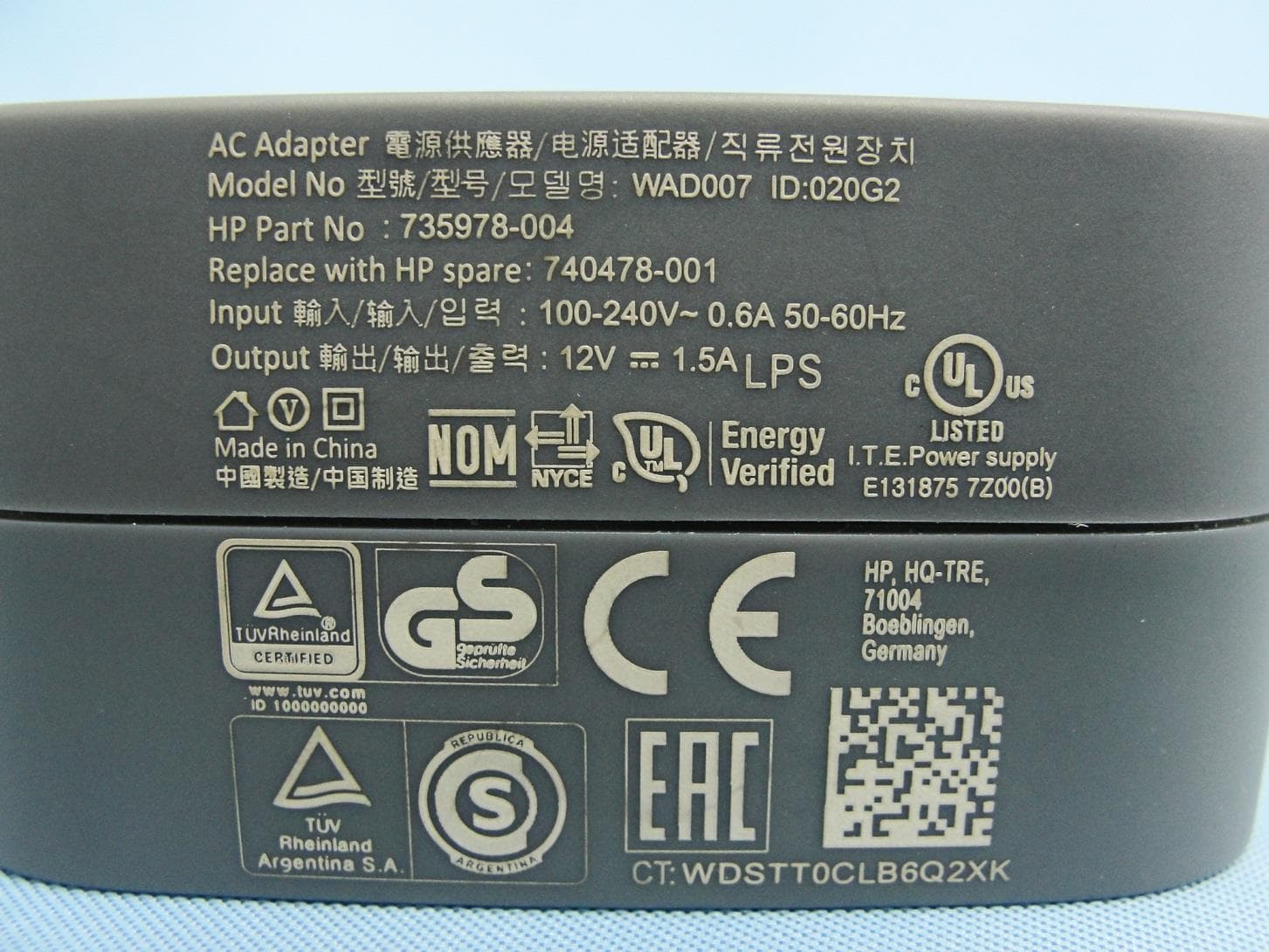
Click to zoom
Application Details
- Equipment Class
- DSS - Part 15 Spread Spectrum Transmitter
- Date of Grant
- Nov 16, 2014
- Application Purpose
- Original Equipment
- Date of Application
- Nov 13, 2014
- Equipment Note
- Slate Tablet
- Frequency Range
- 2402.00000000 - 2480.00000000
- Company
- HP Inc.
- Country
- United States
Documents & Files
Document Text
Text extracted from the exhibit documents filed with the FCC. Open a document above to read the original.
Users Manual
User Guide © Copyright 2014 Hewlett-Packard Development Company, L.P. Bluetooth is a trademark owned by its proprietor and used by Hewlett-Packard Company under license. Intel is a trademark of Intel Corporation in the U.S. and other countries. Microsoft and Windows are U.S. registered trademarks of the Microsoft group of companies. The information contained herein is subject to change without notice. The only warranties for HP products and services are set forth in the express warranty statements accompanying such products and services. Nothing herein should be construed as constituting an additional warranty. HP shall not be liable for technical or editorial errors or omissions contained herein. First Edition: October 2014 Document Part Number: 800839-001 Product notice This guide describes features that are common to most models. Some features may not be available on your tablet. Not all features are available in all editions of Windows. This tablet may require upgraded and/or separately purchased hardware, drivers and/or software to take full advantage of Windows functionality. Go to http://www.microsoft.com for details. To access the latest user guide, go to http://www.hp.com/support, and select your country. Select Drivers & Downloads, and then follow the on-screen instructions. Software terms By installing, copying, downloading, or otherwise using any software product preinstalled on this tablet, you agree to be bound by the terms of the HP End User License Agreement (EULA). If you do not accept these license terms, your sole remedy is to return the entire unused product (hardware and software) within 14 days for a full refund, subject to the refund policy of your seller. For any further information or to request a full refund of the price of the tablet, please contact your seller. Safety warning notice WARNING!To reduce the possibility of heat-related injuries or of overheating the computer, do not place the computer directly on your lap or obstruct the computer air vents. Use the computer only on a hard, flat surface. Do not allow another hard surface, such as an adjoining optional printer, or a soft surface, such as pillows or rugs or clothing, to block airflow. Also, do not allow the AC adapter to come into contact with the skin or a soft surface, such as pillows or rugs or clothing, during operation. The computer and the AC adapter comply with the user-accessible surface temperature limits defined by the International Standard for Safety of Information Technology Equipment (IEC 60950). iii iv Safety warning notice Processor configuration setting (select models only) IMPORTANT:Select tablet models are configured with an Intel® Atom® processor and a Windows® operating system. On these models, do not change the processor configuration setting in msconfig.exe from 4 or 2 processors to 1 processor. If you do so, your tablet will not restart. You will have to perform a factory reset to restore the original settings. v vi Processor configuration setting (select models only) Table of contents 1 Welcome ....................................................................................................................................................... 1 Finding information ............................................................................................................................................... 2 2 Connecting to a network ................................................................................................................................ 4 Connecting to a wireless network ......................................................................................................................... 4 Using the wireless controls ................................................................................................................. 4 Connecting to a WLAN ......................................................................................................................... 5 Using Bluetooth wireless devices (select models only) ..................................................................... 5 Using GPS (select models only) ........................................................................................................... 5 Using HP Mobile Connect (select models only) ................................................................................... 5 3 Multimedia ................................................................................................................................................... 6 Audio ...................................................................................................................................................................... 6 Adjusting the volume .......................................................................................................................... 6 Connecting headphones ...................................................................................................................... 6 Checking audio functions on the tablet .............................................................................................. 6 Webcam (select models only) ............................................................................................................................... 7 Video ...................................................................................................................................................................... 7 HDMI (select models only) .................................................................................................................. 8 Configuring audio for HDMI ................................................................................................................. 8 Discovering and connecting to Miracast-compatible wireless displays (select models only) .......... 9 4 Navigating the screen .............................................................................................................…
Text truncated - open the document above for the full version.
Users Manual
More HP resources ResourceLocation HP support • Online chat with an HP technician. • Find telephone numbers. • Locate HP service center locations. Go to http://www.hp.com/support. Product Notices, Warranty, and User Guide • Safety and regulatory information • The expressly provided HP Limited Warranty applicable to your tablet • Product documentation To access the user guides, select the HP Support Assistant app on the Start screen, select My computer, and then select User guides. Serial number, product number, model number On the back of the tablet, or from the HP Support Assistant app. NOTE: Turn off the tablet, and then disconnect the tablet from external power before removing the cover. Product description This product is a lightweight tablet and features a thin-panel display, processor, RAM, integrated battery pack, and an external AC adapter. This printed Quick Start guide identifies the hardware components of your tablet. The AC adapter has a rating of 100-240 V ac, 50/60 Hz, 0.3-1.0 A. You can access the latest user guide from the HP Support Assistant app. Specification The tablet operates on DC power, which can be supplied by an AC or a DC power source. The AC power source must be rated at 100–240 V, 50/60 Hz. NOTE: The HP 12V dc @ 1.5A - 18W adapter included with your tablet is recommended for charging the tablet. Temperature Operating: Metric, 0°C to 40°C; U.S., 32°F to 104°F Relative humidity (noncondensing) Operating: 10% to 90% Regulatory information For regulatory identification purposes, your product is assigned a Regulatory Model Number (RMN), HSTNN-Q91C. The RMN should not be confused with the marketing name (if any, etc.) or product numbers (HP P/N, etc.). If required, regulatory markings for your country or region are located on the back of the unit, un- der the removable battery (if equipped), on the packaging, or elsewhere in this document. For more safety and regulatory information, refer to the Product Notices included with your tablet, accessible via the HP Support Assistant app. Product notices Some notices may not apply to your product. One or more integrated wireless devices are installed in this device. In some environments, the use of wireless devices may be restricted. Such restrictions may apply on-board airplanes, in hospitals, near explosives, in hazardous loca- tions, and so on. If you are uncertain of the policy that applies to the use of this product, ask for authorization to use it before you turn it on. WARNING: To reduce the risk of electric shock or damage to the equipment, plug the AC adapter into an AC outlet that is easily accessible at all times. WARNING: To reduce potential safety issues, only the AC adapter provided with the product, a replacement AC adapter provided by HP, or an AC adapter purchased as an accessory from HP should be used with the product. WARNING: To reduce the possibility of heat-related injuries or of overheating the tablet, do not place the tablet directly on your lap. Do not allow a soft surface, such as pillows or rugs or clothing, to block airflow. Also, do not allow the AC adapter to contact the skin or a soft surface, such as pillows or rugs or clothing, during operation. The tablet and the AC adapter comply with the user-accessible surface temperature limits defined by the International Standard for Safety of Information Technology Equipment (IEC 60950-1). WARNING: To reduce the risk of fire or burns, do not disassemble, crush, or puncture; do not short external contacts; do not dispose of in fire or water. WARNING: To prevent possible hearing damage, do not listen at high volume levels for long periods. IMPORTANT: The battery(ies) in this product cannot be easily replaced by users themselves. Removing or replacing the battery could affect your warranty coverage. If a battery is no longer holding a charge, contact support. When a battery has reached the end of its useful life, do not dispose of the battery in general household waste. Follow the local laws and regulations in your area for battery disposal. Limited Warranty You can find the expressly provided HP Limited Warranty applicable to your product using the HP Support Assistant app. In some countries or regions, HP may provide a printed HP Limited Warranty in the box. For some countries or regions where the warranty is not provided in printed format, you may request a printed copy from http://www.hp.com/go/orderdocuments or write to: North America: Hewlett-Packard, MS POD, 11311 Chinden Blvd. Boise, ID 83714, USA Europe, Middle East, Africa: Hewlett-Packard, POD, Via G. Di Vittorio, 9 20063 Cernusco s/Naviglio (MI), Italy Asia Pacific: Hewlett-Packard, POD, P.O. Box 200 Alexandra Post Office, Singapore 911507 When you request a printed copy of your warranty, please include your product number, name, and postal address. IMPORTANT: Do NOT return your HP product to the addresses above. For U.S. support, go to http://www.hp.com/ go/contactHP. For worldwide support, go to http://welcome.hp.com/country/us/en/wwcontact_us.html. Quick Start Setting up your tablet 1 If you purchased a micro SIM card for your Internet data plan, install the SIM card in the SIM slot.* *Select models only 2 1 2 After charging the battery, press the power button for up to 3 seconds to turn on the tablet. 1 2 3 4 5 3 Follow the on-screen instructions to select a language, a wireless network, and a Microsoft® account. NOTE: If you do not have a Microsoft account, you can create one now. Turn off the tablet Press the power button . If your tablet becomes unresponsive, press and hold the power button until the tablet turns off. © Copyright 2014 Hewlett-Packard Development Company, L.P. SD Logo is a trademark of its proprietor. Microsoft and Windows are U.S. registered trademarks of the Microsoft group of companies. The information contained herein is subject to change without notice. The only warranties for HP products and services are set forth in the express warranty statements accompanying…
Text truncated - open the document above for the full version.
Users Manual
Regulatory, Safety and Environmental Notices User Guide © Copyright 2014 Hewlett-Packard Development Company, L.P. Bluetooth is a trademark owned by its proprietor and used by Hewlett-Packard Company under license. ENERGY STAR and the ENERGY STAR mark are registered trademarks owned by the U.S. Environmental Protection Agency. Java is a trademark of Sun Microsystems. Microsoft and Windows are U.S. registered trademarks of the Microsoft group of companies. The information contained herein is subject to change without notice. The only warranties for HP products and services are set forth in the express warranty statements accompanying such products and services. Nothing herein should be construed as constituting an additional warranty. HP shall not be liable for technical or editorial errors or omissions contained herein. Second Edition: October 2014 First Edition: June 2014 Document Part Number: 786097-002 About This Guide This guide provides regulatory, safety and environmental information that is compliant with U.S., Canadian, and international regulations for notebook computers, desktops, thin clients and personal workstations. WARNING!Text set off in this manner indicates that failure to follow directions could result in bodily harm or loss of life. CAUTION:Text set off in this manner indicates that failure to follow directions could result in damage to equipment or loss of information. NOTE:Text set off in this manner provides important supplemental information. iii iv About This Guide Table of contents 1 Regulatory notices for notebook computers .................................................................................................... 1 Accessing regulatory labels .................................................................................................................................. 1 Federal Communications Commission notice ....................................................................................................... 2 Modifications ....................................................................................................................................... 2 Cables .................................................................................................................................................. 2 Declaration of Conformity for products marked with the FCC logo (United States only) ................. 3 Products with wireless LAN devices or HP Mobile Broadband Modules ............................................ 3 Brazil notice ........................................................................................................................................................... 3 Canada notices ....................................................................................................................................................... 4 European Union regulatory notices ...................................................................................................................... 4 Declaration of Conformity ................................................................................................................... 4 Products with wireless functionality (EMF) ...................................................................... 5 Restrictions for product with wireless functionality ....................................................... 5 European telephone network declaration (Modem/Fax) ................................................. 5 Ergonomics notice ............................................................................................................ 5 Germany (English text) ................................................................................... 5 Germany (Deutscher text) .............................................................................. 5 Australia and New Zealand notice ......................................................................................................................... 6 Japan notice ........................................................................................................................................................... 6 Wireless LAN, Wireless WAN, and Bluetooth certification markings ................................................. 6 South Korea notices ............................................................................................................................................... 6 Mexico notice ......................................................................................................................................................... 6 Singapore wireless notice ..................................................................................................................................... 7 Thailand WWAN wireless notice ............................................................................................................................ 7 Taiwan NCC notices ................................................................................................................................................ 7 Wireless LAN 802.11a devices ............................................................................................................ 7 Wireless LAN 802.11 devices/Bluetooth devices/Short range devices ............................................. 8 Airline travel notice ................................................................................................................................................ 8 User-replaceable battery notices .......................................................................................................................... 8 Factory-sealed battery notices ............................................................................................................................. 8 Laser compliance ................................................................................................................................................... 9…
Text truncated - open the document above for the full version.
Cover Letter(s)
Hewlett-Packard Company 1501 Page Mill Road Mail Stop 510101 Palo Alto, CA 94304 www.hp.com Walter Overcash Product Regulatory Engineer 281.514.2756 Tel [email protected] October 30, 2014 FCC Laboratory 7435 Oakland Mills Rd. Columbia, MD 21046 Dear Sir: Pursuant to the provisions of Sections 0.457 and 0.459 of the Commission’s rules, we request the Commission to withhold the following attachments as confidential documents for FCC ID: B94HNQ91CFXT7 from public disclosure indefinitely: Schematic Diagram Block Diagram Part List Operational Description Tune-up Procedure The above mentioned documents contain detailed system and equipment descriptions and are considered proprietary information for operation of the equipment. The public disclosure of the above documents might be harmful to our company and would give competitors an unfair advantage in the market. In addition to the above mentioned documents, we request the Commission to grant shot- term confidentiality on the following attachments for 180 days after the grant as outlined in Public Notice DA 04-1705: External Photos Internal Photos Test Setup Photos User Manual If you have any comments or questions, please feel free to contact me. Sincerely, Walter Overcash
Cover Letter(s)
Authorizationon Behalf of Hewlett-Packard Company For the US Federal Communications Commission Office of Engineering and TechnologyandOther FCC Programs and Offices 1. I, David P. Adams, am Canada/USA Technical Regulations Manager for Hewlett- Packard Company (“Hewlett-Packard”) and Applicant/Grantee Contact of Recordfor Hewlett- Packard together with its subsidiaries and affiliates worldwide (collectively, “HP”) for HP’s dealings withthe United States Federal Communications Commission (“”FCC”). I am duly authorized by HP to make this Authorization on HP’s behalf. 2. This Authorization will designate the person named below to act on my behalf and HP’s behalf as authorized agent and representative, until further notice, with the additional power to designate one or more third partyagents for HP withregard to particular matters and applications. All acts carried out and requests made by this named representativerelating to any matter before the FCC, including requests for confidentiality,shallhave the same effect as mine. Name:Walter Overcash Title:RegulatoryEngineer Address:Hewlett-Packard Company Mailstop 050807 11445 Compaq Center Drive W Houston, TX 77070 Telephone:281-514-2756 E-mail:[email protected] 3. Questionsabout the scope and effect ofthis Authorization should be addressed as follows: David P. Adams Canada/USA Region Technical Regulations Manager 1501 Page Mill Road, MS1229 Palo Alto, CA 94304-1126 650.857.4423 Telephone 650.857.4882 Fax [email protected] 4. I declare under penalty of perjury that the foregoing is true and correct, and that this Authorization was executed atPalo Alto, California, on the date indicated below my signature. ____________________________ Signature David P. Adams Canada/USA Technical Regulations Manager Hewlett-Packard Company _March 5, 2008______________ Date
Cover Letter(s)
Hewlett-Packard Company 1501 Page Mill Road Mail Stop 510101 Palo Alto, CA 94304 www.hp.com Walter Overcash Product Regulatory Engineer 281.514.2756 Tel [email protected] October 30, 2014 FCC Laboratory 7435 Oakland Mills Rd. Columbia, MD 21046 Dear Sir: We hereby attest to the fact that we will apply the Declaration of Conformity procedure to the class B computer portion of the composite filing for FCC ID: B94HNQ91CFXT7. If you have any comments or questions, please feel free to contact me. Sincerely, Walter Overcash
Cover Letter(s)
Hewlett-Packard Company 1501 Page Mill Road Mail Stop 510101 Palo Alto, CA 94304 www.hp.com Walter Overcash Product Regulatory Engineer 281.514.2756 Tel [email protected] October 30, 2014 Federal Communications Commission Authorization and Evaluation Division 1435 Oakland Mills Road Columbia, MD 21046 Dear Sirs: Jones Tsai of Sporton International Inc. is authorized to open projects on Hewlett-Packard’s behalf for the purpose of radio assessment/certification under the following conditions: 1. This authorization is extended only to the Hewlett-Packard Regulatory Model HSTNN-Q91C for FCC IDs B94HNQ91CHWFTWN, B94HNQ91CFXT7WN, B94HNQ91CHWWRFT and B94HNQ91CFXT7. 2. This authorization is extended only for the following certifications/testing: FCC. 3. All invoices for services rendered should be sent to Sporton International Inc. and not to Hewlett-Packard. Licenses and test reports generated on Hewlett-Packard’s behalf must be emailed or copied to my attention when completed. 4. No access should be granted to any existing Hewlett-Packard file or project information. 5. The certifications and test reports should note only Hewlett-Packard’s name and Regulatory Model. No other company or product identification should be noted on the certificates or test reports except as needed by the regulator. 6. The FCC certification must be applied for using the Short-Term Confidentiality program as described in FCC DA 04-1705. We are not, as defined in 47 CFR Ch. 1.2002 (b), subject to a denial to Federal benefits, that include FCC benefits, pursuant to section 5301 of the Anti-Drug Abuse Act of 1998, 21 U.S.C. 835(a). If you have any comments or questions, please feel free to contact me. Sincerely, Walter Overcash
External Photos
Photographs of EUT Report No.: EP4O0309-01 Brand Name: hp / Model Name: HSTNN-Q91C SPORTON INTERNATIONAL INC. Page Number : 1 of 35 TEL : 886-3-327-3456 Report Issued Date : Nov. 07, 2014 FAX : 886-3-328-4978 Report Version : Rev. 01 FCC ID : B94HNQ91CFXT7 720510 1. External Photograph of EUT Photographs of EUT Report No.: EP4O0309-01 Brand Name: hp / Model Name: HSTNN-Q91C SPORTON INTERNATIONAL INC. Page Number : 2 of 35 TEL : 886-3-327-3456 Report Issued Date : Nov. 07, 2014 FAX : 886-3-328-4978 Report Version : Rev. 01 FCC ID : B94HNQ91CFXT7 720510 Photographs of EUT Report No.: EP4O0309-01 Brand Name: hp / Model Name: HSTNN-Q91C SPORTON INTERNATIONAL INC. Page Number : 3 of 35 TEL : 886-3-327-3456 Report Issued Date : Nov. 07, 2014 FAX : 886-3-328-4978 Report Version : Rev. 01 FCC ID : B94HNQ91CFXT7 720510 Photographs of EUT Report No.: EP4O0309-01 Brand Name: hp / Model Name: HSTNN-Q91C SPORTON INTERNATIONAL INC. Page Number : 4 of 35 TEL : 886-3-327-3456 Report Issued Date : Nov. 07, 2014 FAX : 886-3-328-4978 Report Version : Rev. 01 FCC ID : B94HNQ91CFXT7 Specification of Accessory AC Adapter Brand Name hp Model Name WAD007 Battery Brand Name N/A Model Name SQU-1410 WLAN Module Brand Name FOXCONN Model Name T77H462 Plugs Brand Name Longwell Model Name E342494 Remark: For accessories equipped with this EUT, please refer to the following photos. 2. Photograph of Accessory Photographs of EUT Report No.: EP4O0309-01 Brand Name: hp / Model Name: HSTNN-Q91C SPORTON INTERNATIONAL INC. Page Number : 5 of 35 TEL : 886-3-327-3456 Report Issued Date : Nov. 07, 2014 FAX : 886-3-328-4978 Report Version : Rev. 01 FCC ID : B94HNQ91CFXT7 720510 Photographs of EUT Report No.: EP4O0309-01 Brand Name: hp / Model Name: HSTNN-Q91C SPORTON INTERNATIONAL INC. Page Number : 6 of 35 TEL : 886-3-327-3456 Report Issued Date : Nov. 07, 2014 FAX : 886-3-328-4978 Report Version : Rev. 01 FCC ID : B94HNQ91CFXT7 720510 AC Adapter Photographs of EUT Report No.: EP4O0309-01 Brand Name: hp / Model Name: HSTNN-Q91C SPORTON INTERNATIONAL INC. Page Number : 7 of 35 TEL : 886-3-327-3456 Report Issued Date : Nov. 07, 2014 FAX : 886-3-328-4978 Report Version : Rev. 01 FCC ID : B94HNQ91CFXT7 720510 Photographs of EUT Report No.: EP4O0309-01 Brand Name: hp / Model Name: HSTNN-Q91C SPORTON INTERNATIONAL INC. Page Number : 8 of 35 TEL : 886-3-327-3456 Report Issued Date : Nov. 07, 2014 FAX : 886-3-328-4978 Report Version : Rev. 01 FCC ID : B94HNQ91CFXT7 720510 Battery Photographs of EUT Report No.: EP4O0309-01 Brand Name: hp / Model Name: HSTNN-Q91C SPORTON INTERNATIONAL INC. Page Number : 9 of 35 TEL : 886-3-327-3456 Report Issued Date : Nov. 07, 2014 FAX : 886-3-328-4978 Report Version : Rev. 01 FCC ID : B94HNQ91CFXT7 720510 Plugs
ID Label/Location Info
Back of the Device Label Location
Internal Photos
Photographs of EUT Report No.: EP4O0309-01 Brand Name: hp / Model Name: HSTNN-Q91C SPORTON INTERNATIONAL INC. Page Number : 10 of 35 TEL : 886-3-327-3456 Report Issued Date : Nov. 07, 2014 FAX : 886-3-328-4978 Report Version : Rev. 01 FCC ID : B94HNQ91CFXT7 720510 3. Internal Photograph of EUT Photographs of EUT Report No.: EP4O0309-01 Brand Name: hp / Model Name: HSTNN-Q91C SPORTON INTERNATIONAL INC. Page Number : 11 of 35 TEL : 886-3-327-3456 Report Issued Date : Nov. 07, 2014 FAX : 886-3-328-4978 Report Version : Rev. 01 FCC ID : B94HNQ91CFXT7 720510 Photographs of EUT Report No.: EP4O0309-01 Brand Name: hp / Model Name: HSTNN-Q91C SPORTON INTERNATIONAL INC. Page Number : 12 of 35 TEL : 886-3-327-3456 Report Issued Date : Nov. 07, 2014 FAX : 886-3-328-4978 Report Version : Rev. 01 FCC ID : B94HNQ91CFXT7 720510 Photographs of EUT Report No.: EP4O0309-01 Brand Name: hp / Model Name: HSTNN-Q91C SPORTON INTERNATIONAL INC. Page Number : 13 of 35 TEL : 886-3-327-3456 Report Issued Date : Nov. 07, 2014 FAX : 886-3-328-4978 Report Version : Rev. 01 FCC ID : B94HNQ91CFXT7 720510 Photographs of EUT Report No.: EP4O0309-01 Brand Name: hp / Model Name: HSTNN-Q91C SPORTON INTERNATIONAL INC. Page Number : 14 of 35 TEL : 886-3-327-3456 Report Issued Date : Nov. 07, 2014 FAX : 886-3-328-4978 Report Version : Rev. 01 FCC ID : B94HNQ91CFXT7 720510 Photographs of EUT Report No.: EP4O0309-01 Brand Name: hp / Model Name: HSTNN-Q91C SPORTON INTERNATIONAL INC. Page Number : 15 of 35 TEL : 886-3-327-3456 Report Issued Date : Nov. 07, 2014 FAX : 886-3-328-4978 Report Version : Rev. 01 FCC ID : B94HNQ91CFXT7 720510 Photographs of EUT Report No.: EP4O0309-01 Brand Name: hp / Model Name: HSTNN-Q91C SPORTON INTERNATIONAL INC. Page Number : 16 of 35 TEL : 886-3-327-3456 Report Issued Date : Nov. 07, 2014 FAX : 886-3-328-4978 Report Version : Rev. 01 FCC ID : B94HNQ91CFXT7 720510 Photographs of EUT Report No.: EP4O0309-01 Brand Name: hp / Model Name: HSTNN-Q91C SPORTON INTERNATIONAL INC. Page Number : 17 of 35 TEL : 886-3-327-3456 Report Issued Date : Nov. 07, 2014 FAX : 886-3-328-4978 Report Version : Rev. 01 FCC ID : B94HNQ91CFXT7 720510 Photographs of EUT Report No.: EP4O0309-01 Brand Name: hp / Model Name: HSTNN-Q91C SPORTON INTERNATIONAL INC. Page Number : 18 of 35 TEL : 886-3-327-3456 Report Issued Date : Nov. 07, 2014 FAX : 886-3-328-4978 Report Version : Rev. 01 FCC ID : B94HNQ91CFXT7 720510 Photographs of EUT Report No.: EP4O0309-01 Brand Name: hp / Model Name: HSTNN-Q91C SPORTON INTERNATIONAL INC. Page Number : 19 of 35 TEL : 886-3-327-3456 Report Issued Date : Nov. 07, 2014 FAX : 886-3-328-4978 Report Version : Rev. 01 FCC ID : B94HNQ91CFXT7 720510 Photographs of EUT Report No.: EP4O0309-01 Brand Name: hp / Model Name: HSTNN-Q91C SPORTON INTERNATIONAL INC. Page Number : 20 of 35 TEL : 886-3-327-3456 Report Issued Date : Nov. 07, 2014 FAX : 886-3-328-4978 Report Version : Rev. 01 FCC ID : B94HNQ91CFXT7 720510 Photographs of EUT Report No.: EP4O0309-01 Brand Name: hp / Model Name: HSTNN-Q91C SPORTON INTERNATIONAL INC. Page Number : 21 of 35 TEL : 886-3-327-3456 Report Issued Date : Nov. 07, 2014 FAX : 886-3-328-4978 Report Version : Rev. 01 FCC ID : B94HNQ91CFXT7 720510 Photographs of EUT Report No.: EP4O0309-01 Brand Name: hp / Model Name: HSTNN-Q91C SPORTON INTERNATIONAL INC. Page Number : 22 of 35 TEL : 886-3-327-3456 Report Issued Date : Nov. 07, 2014 FAX : 886-3-328-4978 Report Version : Rev. 01 FCC ID : B94HNQ91CFXT7 720510 Photographs of EUT Report No.: EP4O0309-01 Brand Name: hp / Model Name: HSTNN-Q91C SPORTON INTERNATIONAL INC. Page Number : 23 of 35 TEL : 886-3-327-3456 Report Issued Date : Nov. 07, 2014 FAX : 886-3-328-4978 Report Version : Rev. 01 FCC ID : B94HNQ91CFXT7 720510 Photographs of EUT Report No.: EP4O0309-01 Brand Name: hp / Model Name: HSTNN-Q91C SPORTON INTERNATIONAL INC. Page Number : 24 of 35 TEL : …
Text truncated - open the document above for the full version.
Contact Information
Applicant
Richard P Tarsio(US Canada Technical Regulations)
Test Firm
Sporton International Inc.Alex Chen
Technical Specifications
| # | Rule Parts | Frequency Range | Power Output |
|---|---|---|---|
| 1 | 15C | 2.40 GHz - 2.48 GHz | 3.80 mW |
Other Applications from HP Inc.
B94-HXWD261
Sep 07, 2026Wireless Desktop Dongle
Equipment Class
DTS - Digital Transmission SystemB94-HXMS261
Sep 07, 2026Wireless Mouse
Equipment Class
DTS - Digital Transmission SystemB94HNI70CBVN
Aug 14, 2026Model HSN-I70C
Equipment Class
CBE - Citizens Band End User DevicesB94HNQ38C3BEK
Jun 03, 2026Notebook PC
Equipment Class
TNB - Licensed Non-Broadcast Station TransmitterB94HNI65C4BLV
Apr 23, 2026Notebook Computer HSN-I65C-4
Equipment Class
PCB - PCS Licensed Transmitter