BCGA1114Bluetooth 1.2 Compliant Module
Apple Inc.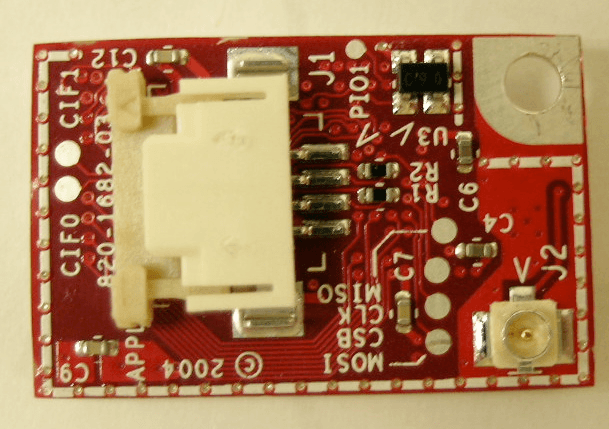
Click to zoom
Application Details
- Equipment Class
- DSS - Part 15 Spread Spectrum Transmitter
- Date of Grant
- Jan 16, 2005
- Application Purpose
- Original Equipment
- Date of Application
- Jan 16, 2005
- Equipment Note
- Bluetooth 1.2 Compliant Module
- Frequency Range
- 2402.00000000 - 2480.00000000
- Company
- Apple Inc.
- Country
- United States
Documents & Files
Document Text
Text extracted from the exhibit documents filed with the FCC. Open a document above to read the original.
Users Manual
1 1 Apple Bluetooth Welcome to the world of Bluetooth. Your computer includes Apple Bluetooth technology that eliminates the need for many cables that traditionally connect devices together. Bluetooth enabled devices, such as computers, mobile phones, and handheld devices (PDAs), can connect to each other wirelessly at distances up to 10 meters (33 feet). This document provides information on how to • pair your Macintosh with a Bluetooth enabled mobile phone and connect to the Internet • exchange files between Bluetooth enabled devices Pairing Your Computer With a Bluetooth enabled Mobile Phone Before you can connect to the Internet using your Bluetooth enabled mobile phone, you need to pair your computer with the phone. Make sure your Bluetooth enabled mobile phone is on and ready to accept a pair. This is often called “discoverable” mode. 1 Open System Preferences and click Bluetooth. 2 Click the Devices tab, and then click Setup New Device. 3 Follow the onscreen instructions. Note: To access the Internet, you must have a Bluetooth enabled mobile phone and subscribe to data services from a wireless operator. Unless you subscribe to “always on” data services (such as GPRS), you will also need an account with an Internet service provider (ISP) to access the Internet. Check with your providers for more information. 2 DraftVersion Connecting to the Internet 1 Open Internet Connect, located in the Applications folder. 2 Click Bluetooth in the Toolbar, and choose a configuration from the pop-up menu. If there are no configurations, choose Edit Configurations from the pop-up menu, and enter the information you received from your provider, such as the phone number, user name and password. 3 Choose the model of your phone from the Modem pop-up menu. 4 Click Connect. Exchanging Files Between Bluetooth enabled Devices You can use the Bluetooth File Exchange application to exchange files between one or more Bluetooth enabled devices. You can also use Bluetooth File Exchange to browse remote devices. Make sure the devices you want to exchange files with are in discoverable mode. 1 Choose Send File from the Bluetooth menu in the menu bar. If the Bluetooth menu is not in the menu bar, open System Preferences, click Bluetooth, and select the “Show Bluetooth status in the menu bar from the Settings pane.” 2 Select the files you want to send and click Send. 3 Select a device from the Device list and click Send. If the device you want to send the file to is not listed, click Search to find Bluetooth enabled devices in range. 4 If you are asked for a passkey, enter one and click Respond. If the device receiving the files is prompted for a passkey, enter the same passkey on the receiving device and click Respond. 5 If the receiving device is prompted that it is receiving a file, click Accept to receive the file. Depending on the options selected, you may be asked if you want to open the file. For more information on Bluetooth, choose Bluetooth Help from the Help menu, or go to www.apple.com/bluetooth. Communications Regulation Information FCC Declaration of Conformity This device complies with part 15 of the FCC rules. Operation is subject to the following two conditions: (1) This device may not cause harmful interference, and (2) this device must accept any interference received, including interference that may cause undesired operation. See instructions if interference to radio or television reception is suspected. Radio and Television Interference The equipment described in this manual generates, uses, and can radiate radio-frequency energy. If it is not installed and used properly—that is, in strict accordance with Apple’s instructions—it may cause interference with radio and television reception. This equipment has been tested and found to comply with the limits for a Class B digital device in accordance with the specifications in Part 15 of FCC rules. These specifications are designed to provide reasonable protection against such interference in a residential installation. However, there is no guarantee that interference will not occur in a particular installation. You can determine whether your computer system is causing interference by turning it off. If the interference stops, it was probably caused by the computer or one of the peripheral devices. If your computer system does cause interference to radio or television reception, try to correct the interference by using one or more of the following measures: • Turn the television or radio antenna until the interference stops. • Move the computer to one side or the other of the television or radio. • Move the computer farther away from the television or radio. • Plug the computer into an outlet that is on a different circuit from the television or radio. (That is, make certain the computer and the television or radio are on circuits controlled by different circuit breakers or fuses.) If necessary, consult an Apple-authorized service provider or Apple. See the service and support information that came with your Apple product. Or, consult an experienced radio/television technician for additional suggestions. Important: Changes or modifications to this product not authorized by Apple Computer, Inc., could void the FCC Certification and negate your authority to operate the product. This product was tested for FCC compliance under conditions that included the use of Apple peripheral devices and Apple shielded cables and connectors between system components. It is important that you use Apple peripheral devices and shielded cables and connectors between system components to reduce the possibility of causing interference to radios, television sets, and other electronic devices. You can obtain Apple peripheral devices and the proper shielded cables and connectors through an Apple-authorized dealer. For non-Apple peripheral devices, contact the manufacturer or dealer for assistance. Responsible party (contact for FCC matters only): Apple Computer, Inc., Prod…
Text truncated - open the document above for the full version.
Cover Letter(s)
Transmitter Module Characteristics per FCC public notice DA 00-1407 requirements Item Requirements EUT 1 Have its own RF shielding Device is equipped with Metal shielding to cover RF section. Refer to external photos 2 Have buffered modulation/data inputs (if such inputs are provided), All inputs to the modules are buffered through logic or microprocessor inputs. 3 Have it own power supply regulation Internal 1.8V power regulator. Refer to Block diagram and Technical description file 4 Meet the antenna requirements of Section 15.203 Device is equipped with unique antenna connector. Refer to external photos 5 Be tested in a stand-alone configuration, i.e., the antenna, AC or DC power and data input/output lines must be connected to the module but, the module must not be inside another case during testing Device was tested outside the host computer as a stand-alone configuration. Refer to setup photos. 6 Be labeled with its own FCC ID number, and if the FCC ID is not visible when the module is installed inside another device, then the outside of the device into which the module is installed must also display a label referring to the enclosed module. FCC ID label is included in the filing. Label is to be placed on the module. The host system also contains a label referring to the module. Refer to FCC ID label format and location file. 7 The modular transmitter must comply with any specific rule or operating requirements applicable to the transmitter and the manufacturer must provide adequate instructions along with the module to explain Transmitter module will only be installed by Apple Computer or Apple’s authorized OEM installer. This device will not be any such requirements. A copy of these instructions must be included in the application for equipment authorization. For example, there are very strict operational and timing requirements that must be met before a transmitter is authorized for operation under Section 15.231. For instance, data transmission sold as module transmitter. 8 Address compliance with the Commission's RF exposure limits in Sections 1.1310 and 2.1093. In addition, spread spectrum transmitters operating under Section 15.247 are required to address RF exposure compliance in accordance with Section 15.247(b)(4). Because the output power of this device is less than the threshold of 25 mWatts, this devices complies with the RF Exposure requirements of 15.247(i).
Cover Letter(s)
1 Helen Zhao Subject:FW: supplemental report: APPLE COMPUTER, FCC ID: BCGA1114, Assessment NO.: AN04T4423, Notice#1 FCC ID BCGA1114 Report Rev2.pd... Cover Letter Jan 24.pdf From: Claire Hoque Sent: Monday, January 17, 2005 4:44 PM To: Helen Zhao Subject: supplemental report: APPLE COMPUTER, FCC ID: BCGA1114, Assessment NO.: AN04T4423, Notice#1 Hi Helen, Pls review Apple's supplemental report addressing the 3 TCB questions below. Thanks, Claire -----Original Message----- From: Compliance Certification Services [mailto:[email protected]] Sent: Monday, January 17, 2005 11:00 AM To: Helen Zhao Subject: APPLE COMPUTER, FCC ID: BCGA1114, Assessment NO.: AN04T4423, Notice#1 Question #1: Based upon FCC DA 00-705 (Filing and Measurement Guidelines for Frequency Hopping Spread Spectrum Systems), for Carrier Frequency Separation testing, Resolution (or IF) Bandwidth (RBW) ³ 1% of the span. However the test report shows a smaller RBW (30KHz) was used when span is 10MHz. Please retest with the correct RBW setting. Question #2: Based upon FCC DA 00-705 (Filing and Measurement Guidelines for Frequency Hopping Spread Spectrum Systems), for Number of Hopping Frequencies testing, Resolution (or IF) Bandwidth (RBW) ³ 1% of the span. However the test report shows a smaller RBW (100KHz) was used when span is 20MHz. Please retest with the correct RBW setting. Question #3: Based upon FCC DA 00-1407 (PART 15 UNLICENSED MODULAR TRANSMITTER APPROVAL), there are totally 8 criterias. Please revise the modular approval application letter to include Criteria #8: 8. The modular transmitter must comply with any applicable RF exposure requirements. For example, FCC Rules in Sections 2.1091, 2.1093 and specific Sections of Part 15, including 15.319(i), 15.407(f), 15.253(f) and 15.255(g), require that Unlicensed PCS, UNII and millimeter wave devices perform routine environmental evaluation for RF Exposure to demonstrate compliance. In addition, spread spectrum transmitters operating under Section 15.247 are required to address RF Exposure compliance in accordance with Section 15.247(b)(4). Modular transmitters approved under other Sections of Part 15, when necessary, may also need to address certain RF Exposure concerns, typically by providing specific installation and operating instructions for users, installers and other interested 2 parties to ensure compliance. Best Regards, Helen Zhao The items indicated above must be submitted before processing can continue on the above referenced application. Failure to provide the requested information within 30 days of the original e-mail date may result in application dismissal and forfeiture of the filing fee. Also, please note that partial responses increase processing time and should not be submitted. Any questions about the content of this correspondence should be directed to the e-mail address listed below the name of the sender.
ID Label/Location Info
PROPOSED FCC ID LABEL AND LOCATION APPLE COMPUTER INC. This device complies with Part 15 of the FCC Rules. Operation is subject to the following two conditions: (1) this device may not cause harmful interference, and (2) this device must accept any interference received, including interference that may cause undesired operation. FCC ID: BCGA1114 FCC ID LABEL LOCATION EUT
Parts List/Tune Up Info
Apple Bluetooth ModuleFCC ID: BCGA1114 Antenna Specification Page 1 of 3 Apple Bluetooth Module Antenna Information The Apple Bluetooth Module, Model A1114 is used with three antennas as listed above. Radiation patters for each of these antennas are provided in the following pages. Antenna Model NumberMaximum Gain (dBi) 603-2672-3.1 603-1203-5.3 613-4689-4.3 Apple Bluetooth ModuleFCC ID: BCGA1114 Antenna Specification Page 2 of 3 Apple Bluetooth ModuleFCC ID: BCGA1114 Antenna Specification Page 3 of 3
Test Report
Apple Bluetooth Module Apple File No. 2040 EUT: Bluetoooth Module FCC ID: BCGA1114 Page 2 of 47 TABLE OF CONTENTS 1 Test Report Summary 3 2 EUT Description 4 3 Test Methodology 5 4 Facilities and Accreditation 5 5 Calibration and Uncertainty 6 6 Setup of Equipment Under Test 8 7 Applicable Limits and Test Results 12 7.1 20 dB Bandwidth 12 7.2 Hopping Frequency Separation 15 7.3 Number of Hopping Channels 16 7.4 Average Time of Occupancy 17 7.5 Maximum Peak Output Power 19 7.6 Average Power 20 7.7 Peak Power Spectral Density 21 7.8 Conducted Spurious Emissions 24 7.9 Radiated Emissions 29 7.10 AC Power Line 45 Apple Bluetooth Module Apple File No. 2040 EUT: Bluetoooth Module FCC ID: BCGA1114 Page 3 of 47 1 Test Report Summary Specification Test or Requirement Result Comment N/A – For reporting purposes only 20 dB Bandwidth N/A Section 7.1 CFR 15.247(a)(1) Hopping Frequency Separation Pass Section 7.2 CFR 15.247(a)(1)(iii) Numer of Hopping Channels Pass Section 7.3 CFR 15.247(b)(1)(iii) Average Time of Occupancy Pass Section 7.4 CFR 15.247(b)(1) CFR 15.247(b)(4) Peak Output Power Pass Section 7.5 N/A – For reporting purposes only Average Power N/A Section 7.6 CFR 15.247(d) CFR 15.247(f) Peak Power Spectral Density Pass Section 7.7 CFR 15.247(c) Conducted Spurious Emissions Pass Section 7.8 CFR 15.205(a) CFR 15.209(a) Radiated Emissions Pass Section 7.9 CFR 15.207(a) AC Power Line Conducted Emissions Pass Section 7.10 Apple Bluetooth Module Apple File No. 2040 EUT: Bluetoooth Module FCC ID: BCGA1114 Page 4 of 47 2 EUT Description The Apple Bluetooth Module, model number A1114, operates in the 2.4 GHz unlicensed Industrial, Scientific and Medical band and uses Frequency Hopping Spread Spectrum. This device uses a single chip radio and baseband IC. Technical Information on the Apple Bluetooth Module is provided in the table below. Apple Bluetooth Module Antenna Information Apple Bluetooth Module Information Product Tranceiver Trade Name Apple Bluetooth Module Model Number A1114 Power Supply 3.3V DC Power Supply Frequency Range 2402-2480 MHz Transmit Power 5.5 mWatt Modulation Technique FHSS Emission Designator 880KF1D Antenna Model Number Maximum Gain (dBi) 603-2672 -3.1 603-1203 -5.3 613-4689 -4.3 Apple Bluetooth Module Apple File No. 2040 EUT: Bluetoooth Module FCC ID: BCGA1114 Page 5 of 47 3 Test Methodology The tests documented in this report were performed in accordance with ANSI C63.4 and FCC CFR 47 Part 2 and Part 15. 4 Facilities and Accreditation 4.1 Facilities and Equipment The ac power line and RF conducted emissions measurements were performed at the Apple Computer, Inc. facility located at 20650 Valley Green Drive, Cupertino, California 95014. The radiated emissions measurements were performed at the Apple Computer, Inc. Evelyn 1, 10 meter semi-anechoic chamber located at 123 East Evelyn Ave., Mountain View, California 94041. Both of these facilities are constructed in conformance with the requirements of ANSI C63.4 and CISPR Publication 22. All Receiving equipment conforms to CISPR Publication 16-1, “Radio Interference Measuring Apparatus and Measurement Methods.” 4.2 Laboratory Accreditation The test facilities at Apple Computer, Inc. used to perform radiated and conducted emissions measurements are accredited by National Voluntary Laboratory Accreditation Program to perform Electromagnetic Interference tests according to FCC Part 15 and CISPR 22. Apple Computer, Inc. NVLAP Lab Code is 200071-0 and is effective through September 30, 2005. No part of this report may be used to claim or endorsement by NVLAP or any agency of the US Government. The Apple Computer, Inc Evelyn 1 10 meter Semi-anechoic chamber is currently listed with the FCC. The FCC Regisration Number is 90450 and is effective throuth Jan 5, 2007. Apple Bluetooth Module Apple File No. 2040 EUT: Bluetoooth Module FCC ID: BCGA1114 Page 6 of 47 5 Calibration and Uncertainty 5.1 Measurement Instrument Calibration The measurement instruments utilized to perform the tests documented in this report have been calibrated in accordance with the manufacturer’s recommendations and are traceable to national standards. 5.2 Measurement Uncertainty The Apple measurement uncertainty policy, available upon request under Apple File Number EMC20, ensures uncertainty has been calculated using the proper procedure. Apple will use this measurement uncertainty knowledge in determining the pass / fail criteria from the test data. The measurement uncertainty has been determined to be the following: Conducted Emissions = +/- 2.3 dB Radiated Emissions = +/- 4.1 dB Apple Bluetooth Module Apple File No. 2040 EUT: Bluetoooth Module FCC ID: BCGA1114 Page 7 of 47 5.3 Test Equipment The following test equipment was used. Description Manufacturer Model No. Identification No. Last Cal Next Cal Spectrum Analyzer R&S ESIB 40 100105 Oct 2004 Oct 2005 Spectrum Analyzer R&S ESCI 1166.5950.03 July 2004 July 2005 Spectrum Analyzer HP 4403B MY41140805 May 2003 May 2005 Receiver R & S ESCS 30 1102.4500.30 Jan 2004 Jan 2005 Antenna Sunol JB1 A122302-1 Dec 2003 Dec 2004 Antenna Sunol JB1 A122302-2 Dec 2003 Dec 2004 Amplifier Amplifier Research AR Amp 16 Nov 2003 Nov 2004 Amplifier Amplifier Research AR Amp 17 Nov 2003 Nov 2004 Amplifier HP 8449 3008A00713 March, 2004 March 2005 Horn Antenna EMCO 3117 34197 March 2004 March 2009 Horn Antenna EMCO 3160-09 011269-0041264 Sept 2001 Sept 2006 Power Meter Boonton 4532 165201 May 2004 May 2005 Power Meter Sensor Boonton 57318 3890 May 2004 May 2005 Apple Bluetooth Module Apple File No. 2040 EUT: Bluetoooth Module FCC ID: BCGA1114 Page 8 of 47 6 Setup of Equipment Under Test EUT Support Equipment EUT I/O Cables Peripheral Support Equipment Description Manufacturer Model Serial Number FCC ID Laptop Computer Apple A1054 PT342059 DoC Bluetooth USB Adapter Apple PCX0149 31 N/A USB Printer Epson Stylus C62 EJSY153329 DoC 17” Studio Display Apple M6496 Cy9171NTCV2 DoC 20 GB iPod Apple A1059 JQ436JMXP59 DoC Headphones Emerson …
Text truncated - open the document above for the full version.
Test Setup Photos
Apple Bluetooth ModuleFCC ID: BCGA1114 EUT: Bluetooth ModuleIC: 579C-A1114 Test Setup Photos Page 1 of 6 Radiated Emissions - Front Apple Bluetooth ModuleFCC ID: BCGA1114 EUT: Bluetooth ModuleIC: 579C-A1114 Test Setup Photos Page 2 of 6 Radiated Emissions – Rear Apple Bluetooth ModuleFCC ID: BCGA1114 EUT: Bluetooth ModuleIC: 579C-A1114 Test Setup Photos Page 3 of 6 Radiated Emissions – zoom in on EUT Apple Bluetooth ModuleFCC ID: BCGA1114 EUT: Bluetooth ModuleIC: 579C-A1114 Test Setup Photos Page 4 of 6 Radiated Emissions above 1 GHz Apple Bluetooth ModuleFCC ID: BCGA1114 EUT: Bluetooth ModuleIC: 579C-A1114 Test Setup Photos Page 5 of 6 Power Line conducted Emissions – Front Apple Bluetooth ModuleFCC ID: BCGA1114 EUT: Bluetooth ModuleIC: 579C-A1114 Test Setup Photos Page 6 of 6 Power Line conducted emissions – Side
Contact Information
Applicant
Abhishek Rala(Regulatory Compliance Manager)
Test Firm
Apple Computer, Inc.Robert Steinfeld
Technical Specifications
| # | Rule Parts | Frequency Range | Power Output |
|---|---|---|---|
| 1 | 15C | 2.40 GHz - 2.48 GHz | 3.40 mW |
Other Applications from Apple Inc.
BCG-E9204A
Sep 09, 2026Smartphone
Equipment Class
6VL - 15E 6 GHZ Very Low Power DeviceBCGA3277
Sep 09, 2026Magnetic Charging Cable
Equipment Class
DCD - Part 15 Low Power Transmitter Below 1705 kHzBCGA3641
Sep 09, 2026Magnetic Charger
Equipment Class
DCD - Part 15 Low Power Transmitter Below 1705 kHzBCGA3669
Sep 09, 2026Magnetic Charger
Equipment Class
DCD - Part 15 Low Power Transmitter Below 1705 kHzBCG-E9193A
Sep 09, 2026Smartphone
Equipment Class
PCE - PCS Licensed Transmitter held to ear